• Some users have recently had their accounts hijacked. It seems that the now defunct EVGA forums might have compromised your password there and seems many are using the same PW here. We would suggest you UPDATE YOUR PASSWORD and TURN ON 2FA for your account here to further secure it. None of the compromised accounts had 2FA turned on.
    Once you have enabled 2FA, your account will be updated soon to show a badge, letting other members know that you use 2FA to protect your account. This should be beneficial for everyone that uses FSFT.

8800 temps

I've found that keeping the fan "always on" lowers my temp by 10 degrees.
Last night was kind of cool so I left the window open near my PC and I saw it drop to 45 at idle and 65-70'ish on load...but that's not something I feel like doing often.
In all honesty, mine's never given me a single issue no matter what temperature it's gotten to. I feel more comfy with it being lower, but since I'm not overclocking I don't really care. One funny side note is that my heat alarm squeaks for a millisecond (I'm on an Asus P5B) every time I power my PC off. Not sure how normal that is...but it happens every time.
Anyone actually touch the card after running an intensive game? I was tweaking my airlfow a little and if you touch the PCB or the metal railing of the card - it will burn the crap out of you. I have no clue how hot it is, but I'm pretty sure it would leave a pretty serious burn if you left your skin touching it for a second or two.
 
Domingo said:
One funny side note is that my heat alarm squeaks for a millisecond (I'm on an Asus P5B) every time I power my PC off. Not sure how normal that is...but it happens every time.

I'm glad to know I'm not the only one. I have a P5B deluxe. I just assumed it was the card's "not enough power" alarm going off for that split second after the PSU shuts off.
 
Sabrewulf165 said:
I'm glad to know I'm not the only one. I have a P5B deluxe. I just assumed it was the card's "not enough power" alarm going off for that split second after the PSU shuts off.

Yeah, I have no idea if it's heat, power, or what...but it seems to be harmless enough.
The card gives me a tiny little "digital garble" when loading the boot screen, too. I think it's just one of those random little quirks.
At least the board is "heart touching" :p
 
Sabrewulf165 said:
I'm glad to know I'm not the only one. I have a P5B deluxe. I just assumed it was the card's "not enough power" alarm going off for that split second after the PSU shuts off.


wow - I noticed this also when I put this card in.. just for a milisecond when powering the PC off at the PSU switch.. I guess it's the card? because my mobo never made that sound before.. hrm.
 
Just wanted to put my own 2cents into this. I noticed the same thing since installing my 8800GTX. My current idle temps are 70C and about 85C+ under load. My system temps have gone up over 10C since installing this card. At first, I thought the card was actually sucking air INTO the case (see my other thread ). I was able to bring down the case temps by removing the spare PCI slot cover just underneath the card.

Insteading of exhausting out the rear of the card, I found that the outgoing, hot air was actually bleeding out of the four open slits before even reaching it. Hardly any air was leaving the case. Most of the heated air was actually being blasted off my X-FI, which is installed a couple of PCI slots under the card and recirculated throughout the system.
 
FYI.

Yes, I also tried setting the fan speed to a constant 100% and this did bring down the temps dramatically, but I wasn't crazy about the noise (it's VERY noticable to me) so I set it back auto.

I think this cooler would be much more efficient if it did away with the four open slits, thus making the rear vent the only avenue for the hot air to escape.
 
idles at 67c after a few hours of gaming on max settings bf2 and 2142 hits about 71c
 
For anyone interested, ntune works fine with Intel 965/975 chipsets too :).

I find the fan is very noticable at 100% (not annoying, though), but at 80% it's almost silent and keeps the card at safe temps.
 
Well, as always. Necessity is the mother of all invention. I figure while I'm waiting for the turkey and ham to finish cooking, I'd try a little mod.

I've determined that the main reason why the computer runs so warm overall is that the heat is escaping out of the "four slits" and is getting trapped in the case when it should be exhausted out. As to what they were thinking of when they designed this HSF, who knows? (See pic #1)

1. I simply removed the PCI bracket under the card.

2. I then cut a piece of plastic from an everyday plastic box to create a sort of "air ramp" to divert the air flow out the opening left by the vacant PCI slot cover. I figure this was a lot safer than covering up the slits. (See pic #2)

3. I tapered the rear edge of the plastic so the PCI bracket from the X-FI would hold it in place and not cover up the holes in which I need to connect my speakers too.

4. Once secured in place, the hot air that used to blast my soundcard is deflected out the opening. And yes, I can actually FEEL IT when I place my hand back there. (See pic #3)

Idle temps have dropped from 71-72C to 63C after an hour of surfing, typing, etc.. Load temps have dropped approximately 85-86C to about 80-81C. Note: this with the fan speed set on AUTO. No added noise.

Is this is a permanant solution? No, but it'll tie me over until something better comes along. At the minimum, I feel a little bit more at ease now.

pic #1
culprit.JPG


pic #2
ramp.jpg


pic #3
ramp_in_place.jpg
 
Very impressive temps for such an easy to apply mod. I'll probably go for the "cover slits w/ electrical tape" mod, hehe.
 
I find a $5 slot fan works a treat. The air blowing out now is red hot when the card's loaded. Idles at 52C, load 70C ish. Case temp is the same as ambient.

dscf0922lr9.jpg
 
Heh, I actually have that fan. I got it for my 9600xt when I was overclocking, I was wondering if anyone would bring it up. It is just the right size, it sucks exactly where the holes are. 5 dollars is a nice price for quite a few degrees.
 
Runing idle my 8800GTS was runing from 56 to 60 deg. C. loaded with rthdribl.exe it went to 81 to max 83 deg. with case open.

I've used it for like 2 hour testing and 3 hours playing and now it stop dooing it's magic. In 3D it works like 20$ card!!????


After a load it would idle on crazy 70+ deg. C!??? Wouldn't go down :(

It heaed up my whole system till a point where I've wasn't feeling comfortable.


But it worked.


Today after work I boot system and it would't boot at first hanging. Affter fe restrts everythign but 3D works. Just 3D stuff sucks balls :(

New driver and checking everything didn;'t help at all :(


Damn hot potatos


MD
 
FORNOWAGAIN said:
I find a $5 slot fan works a treat. The air blowing out now is red hot when the card's loaded. Idles at 52C, load 70C ish. Case temp is the same as ambient.

Yeah, actually I do have a spare slotcooler that I tried first, but the fit was too snug between the card and the X-FI. Unfortunately, this BFGTech motherboard doesn't give me a lot of room to work with.
 
FORNOWAGAIN,

Can you point me to the exact model of the slot cooler.

I jsut touched the top of my sound card and man it was hot ... think I need one of these coolers. I run at about 66 idle.

I took the back plate off ie like Brian shows; but I dont have something to rig up like he has (nice job btw Brian).
 
Jodiuh said:
Very impressive temps for such an easy to apply mod. I'll probably go for the "cover slits w/ electrical tape" mod, hehe.


Yeah no kidding, 2 fucking slots taken up is enough for me. Electrical tape for the win!
 
let me know how the electrical tape idea works out. Seems like a plan however I have to wonder if that will do any harm. I am sure those slots are there for a reason and covering them up may prove catastrophic to the card in the long run. I don't think they are there for decoration and must serve a purpose.
 
Yeah, the slot cooler does look like a better implemention if you've got the room...and I have that. ;)

 
edit: ^^ lol.. you need one of those USB beverage chillers built in there.. heh!

FORNOWAGAIN said:
I find a $5 slot fan works a treat. The air blowing out now is red hot when the card's loaded. Idles at 52C, load 70C ish. Case temp is the same as ambient.

http://img295.imageshack.us/img295/610/dscf0922lr9.jpg

very good addition! I did that also. Dropped my temps quite a bit... 5c from the blower alone. with this blower and the nvidia fan on 100% my card idles at 49c now and loads at 59c. (OC'd to 620 it loads closser to 70c) Not too shabby tho.
 
Bah, I just tried again and the slot cooler I've got is just too big. It's pressing too tightly against my soundcard. I'll have to see if I can find another one somewhere today.

On another note, I put the little plastic ramp back, enabled the event log in nTune, and played through the FEAR Expansion Pack for about 20 minutes. Load temps never got above 75C with this little plastic do hickey :)
 
The most important question is - when is Ntune actually going to be updated enough to allow you to save settings?
I idle at 55C now that I turned the fan on all time...but every time I power off/on, I have to turn it back on. After doing a little looking around - there's no fix. It's a bug in ntune :p
 
anyone got links to slot coolers? couldn't find any when i searched for them on newegg
 
Brian48 said:
Bah, I just tried again and the slot cooler I've got is just too big. It's pressing too tightly against my soundcard. I'll have to see if I can find another one somewhere today.

On another note, I put the little plastic ramp back, enabled the event log in nTune, and played through the FEAR Expansion Pack for about 20 minutes. Load temps never got above 75C with this little plastic do hickey :)

I didn't mean to knock that.. it's very innovative! I say if it works, use it. wewt.
:D

larkin said:
anyone got links to slot coolers? couldn't find any when i searched for them on newegg


I got mine off xoxide. but I think you can find them at CompOOOOsa.
 
I just grabbed one at Fry's Electronics for $10 bucks. They had a sweet deal for a 6600 too, but it was tray. :( B stepping too...

How's the noise level w/ these blowers on full? Package says 28DB/22CFM...it's an Antec.
 
mine is dead silent... I was very happy about that also.. lol. I had not used it because I thought it would make a whiny high pitched noise.. like the coolers on 7900GTs.. anyways..
 
Brian48 said:
I put the little plastic ramp back, enabled the event log in nTune, and played through the FEAR Expansion Pack for about 20 minutes. Load temps never got above 75C with this little plastic do hickey :)
Great idea! :)

I made a cardboard version of your ramp for my rig. It's the same shape as yours, but it uses 2 open slots below the card instead of 1.
With 100% fan speed, my idle temps are down to 56c from 63c :D Thanks for the tip!
 
Well, after looking at various makes/brands today, I FINALLY found a slot cooler that was slim enough to fit in between the 8800GTX and X-FI. It's the Antec Cyclone. CircuitCity has them on sale today for $4.99.

The only issue I found is that the fan intake is not completely centered beneath the slits. It's more towards the end of the cooler itself which leaves it positioned somewhat near the center of the card. Also, I've only got about 1/8 of a inch of space between the cooler and the card, so it's not a very wide path for channeling the hot air to the cooler input. To maximize the exhaust pressure, I took what was left of the plastic ramp and simply made a little "heat shield" (see pic) which directed whatever hot air that was seeping out the side of the card towards the cooler intake.

Idle temps are now at 60C versus 63C with the plastic do-hickey, and versus 70-71C without anything at all. Load temps are now at 70C versus75C versus 85C respectively. CPU/System temps are at a cool 33C/41C now.

If there's any negative at all, I'd say it's the noise level, which has increased slightly. Not as much as running the heatsink fan at 100% (the fan is currently on AUTO), but still noticable nevertheless. Since I have clear side panel, the red wire running the fan is very annoying to look at also.

I can't help but feel this could have all been avoided if they simply followed a common sense approach like AC3/5 or ATI and just vented ALL the hot air out instead of just "some" of it.

For those covering up the slits with electrical tape or what not, let us know your results. I'd rather do it that way if it's indeed safer to do so.

8800_sideview.jpg
 
Brian48[snip said:
If there's any negative at all, I'd say it's the noise level, which has increased slightly. Not as much as running the heatsink fan at 100% (the fan is currently on AUTO), but still noticable nevertheless. Since I have clear side panel, the red wire running the fan is very annoying to look at also.
[snip]

put the blower on 5v and sleave the wire :)
 
revenant said:
put the blower on 5v and sleave the wire :)

Man, this new card is really making me work. :)

Anyway, I thought about your suggestion and I think 5v might be too slow for me. I decided to split the diff and opt for 7v (12v-5v).

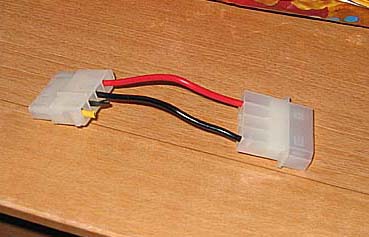
My handy-dandy 12v to 7v converter. For those doing the same, I recommend doing this instead of hacking up the molex of your new fans. ;)

12v-5v.jpg


Not sure if I feel like slicing up an old t-shirt for the cable sleeves though :D
 
I have a nice huge Lian Li server case. The airflow is awesome in these puppies. Someone posted that the Evga 680i had problems being mounted upside down but i guess my case is so huge that theres plenty of space between the components.

As far as my card goes i don't go above 68C on full load. The case had a special fan placed right over the two SLI slots that work as an exhaust for the video cards. Very well designed. The cpu even has a panel that helps redirect the heat out the back of the case. Genius.

http://www.newegg.com/product/product.asp?item=N82E16811112120
 
question for someone who knwos about gpu overclocking:

theoretical question
if my 650/2000 in unstable, how do I get it stable and why are some other people stable at that speed and higher with similar cooling?

Let me try to answer my own question and see if i'm right, other cards are stable at that oc and higher because they got lucky, whatever it means to have a lucky chip, they have it (for my benefit i'd like to know exactly what it means to be lucky technically speaking about the hardware difference). How do I make my card stable at 650/2000? Well, xtreme overclockers have shown that these cards have a lot of head room, the limiting factor is temps. So, if you want your card to be stable at a higher OC then figure out a way to keep the temps lower. This could mean mods to the gpu cooling, going water, or simply cooling down other components in the case warming things up.

Missing anything?
 
Lower temps will net you higher OC, but luck of the draw's far more influential. I still haven't installed the blower, how's the Cyclone @ 7V Brian? (that's what I got too)

That rosewill @ newegg in blue looks prettier/quieter. :D
 
Back
Top