• Some users have recently had their accounts hijacked. It seems that the now defunct EVGA forums might have compromised your password there and seems many are using the same PW here. We would suggest you UPDATE YOUR PASSWORD and TURN ON 2FA for your account here to further secure it. None of the compromised accounts had 2FA turned on.
    Once you have enabled 2FA, your account will be updated soon to show a badge, letting other members know that you use 2FA to protect your account. This should be beneficial for everyone that uses FSFT.

120Hz LCD Info Thread

Also how much clearer the text remains when scrolling up/down. :p I thought browsing internet on a 60Hz was rather unpleasant with all the text shadows that float into each other and becomes messy when scrolling up/down, with 120Hz it doesn't, well to a lot more less extent anyway.
 
Last edited:
I will wait for 120Hz to make its way into IPS. That's basically my next upgrade. Three 24" IPS at 16:10 1920x1200 resolution, 120Hz, and sRGB. I predict it will be available by June 2011. :)

hahaha We all know those specs are never gonna happen. We can dream though I guess.
 
Why not own a 120Hz monitor just for gaming and an IPS monitor for everything else ;) That's what I plan on doing, heehee. :)

The biggest flaw with this approach is that that direct comparison reduces satisfaction of both displays. :D I'm half joking and half serious. My dream display is a glossy H-IPS 16:10 display that's 120Hz. I doubt I'll ever see one though. So I've got a 24" ACD that I do my primary work on, and an Alienware 120Hz display that I game on.

Problem is that I end up doing more than game on the TN panel and since I'm bouncing back and forth.. as soon as I think "ah you know this isn't so bad" then I use the ACD and thing "woah yea it is". I actually don't mind the color accuracy so much, or even the viewing angles. My 2 biggest issues are 1) the muddy grays approaching black and 2) the $&^@# anti-glare coating making things sparkle and look grainy.

I'm not sure that I'll keep the Alienware yet. I picked it up for $330 which is decent, but I may try one of the e-ips displays. Which has the least bothersome anti-glare?
 
The biggest flaw with this approach is that that direct comparison reduces satisfaction of both displays. :D I'm half joking and half serious. My dream display is a glossy H-IPS 16:10 display that's 120Hz. I doubt I'll ever see one though. So I've got a 24" ACD that I do my primary work on, and an Alienware 120Hz display that I game on.

Problem is that I end up doing more than game on the TN panel and since I'm bouncing back and forth.. as soon as I think "ah you know this isn't so bad" then I use the ACD and thing "woah yea it is". I actually don't mind the color accuracy so much, or even the viewing angles. My 2 biggest issues are 1) the muddy grays approaching black and 2) the $&^@# anti-glare coating making things sparkle and look grainy.

I'm not sure that I'll keep the Alienware yet. I picked it up for $330 which is decent, but I may try one of the e-ips displays. Which has the least bothersome anti-glare?

Hmm, good point about the flaw with this approach. I'm still going to do it regardless and see how it goes. :p If the Asus 120 Hz display meets my expectations, then I'll just sell my IPS. :cool:
 
Why not own a 120Hz monitor just for gaming and an IPS monitor for everything else ;) That's what I plan on doing, heehee. :)

Notice I wrote THREE IPS monitors. :)

I don't want to mix and match, i.e. two 120Hz TNs and one 60Hz IPS. Like brentsg said, it would bug me too much.
 
Last edited:
I, after using a 27'' monitor (IIyama B2712HDS) for a week, would suggest waiting for the PG276 and buy 3 of those.
IMHO the 23'' are far too little.
 
I, after using a 27'' monitor (IIyama B2712HDS) for a week, would suggest waiting for the PG276 and buy 3 of those.
IMHO the 23'' are far too little.

That is what I was saying all along, wait for the 27" monitor. That is at least what I will be doing.
 
That is what I was saying all along, wait for the 27" monitor. That is at least what I will be doing.
You may be waiting a while, for the Asus PG276 at least. Meanwhile I'm really liking the Alienware AW2310. If a 3D 27" comes out, I'll get that and sell the 23". But I'm definately enjoying 3D gaming on this lowly 23"er now! :D
 
You may be waiting a while, for the Asus PG276 at least. Meanwhile I'm really liking the Alienware AW2310. If a 3D 27" comes out, I'll get that and sell the 23". But I'm definately enjoying 3D gaming on this lowly 23"er now! :D

Yeah, decisions, decisions, decisions....should I buy the Alienware now and be able to enjoy 120 Hz gaming now or wait for the most likely to be better Asus 27" and Asus 24" stand alone 120 Hz monitors. Ack, don't know what to do! :confused:
 
Yeah, decisions, decisions, decisions....should I buy the Alienware now and be able to enjoy 120 Hz gaming now or wait for the most likely to be better Asus 27" and Asus 24" stand alone 120 Hz monitors. Ack, don't know what to do! :confused:

We'll you can always wait. Personally I've been very happy witht the Alienwares, 27" & even 24" I think is too big for 1920x1080 resolution but this is very much a personal preference.
 
That is what I was saying all along, wait for the 27" monitor. That is at least what I will be doing.
Same here.
I bought the IIyama for my general use/htpc, and waiting for the PG276 for the gaming one. :D

Personally I think the TN color shift would start to get pronounced at 27".

Not so much.
I have 2 monitors: the 19 in front of me and the 27'' on the left, and I don't see the color shift very much, but maybe it's only this specific Iiyama which is so good. Can't tell, being that this is the first 27 I've owned.
 
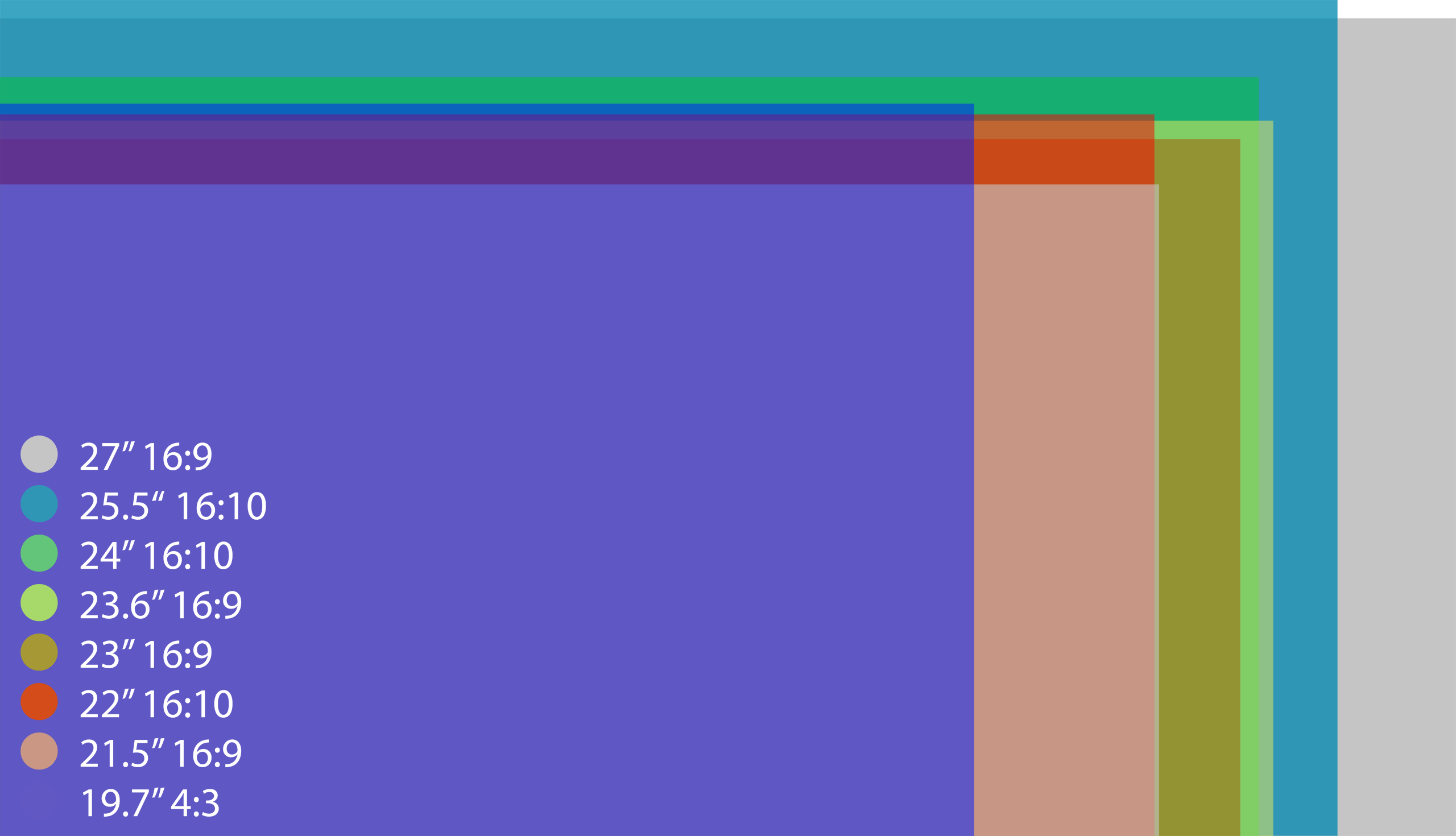
26" 16:9 vs 24" 16:10 would be near exact fit height wise, but 26" is quite uncommon and even more so for 120Hz. :p
 
Here is a better view. Notice how tall the 19.7" CRT (22") and 16:10 displays are compared to the 16:9 displays.

I used http://www.silisoftware.com/tools/screen.php to calculate it


http://jooh.no/root/pix/DisplaySize/display_ratio_size_comparison.psd


I'm not sure if I would have a 24" 16:10, or a 27 16:9. But I know that text looks very good in high DPI, so a 24" 2560x1600 would also be nice (1600/12,72=125DPI). But that requires a SLI/crossfire and DisplayPort to run at 120hz :eek:
Before Windows Vista and 7 I usually used 1280x960 as a resolution on my 19.7" viewable Lacie Electronblue22 III monitor. That is about 960/11,84=81,1DPI. The Asus 27" monitor is probably 1080/13,22=81,7DPI, so that is fine according to how it was in the past. Today I run my 19.7" viewable lacie CRT at 1800x1350 and 134DPI and text is really nice, Windows 7 scales very good to higher DPI.


http://jooh.no/web/Vista_high_dpi.png
 
Hi if i buy the LG w2363d and connect my PS3 and 360 to the monitor's HDMI ports can i get 120hz refresh rate?

If no, why not? Where is the limitation? In monitor's HDMI ports, in the consoles or in the HDMI cable?

Also besides the 120hz, when Sony release the firmware that allows the PS3 to play 3D blu ray movies would i be able to see them correctly with this monitor if of course i also buy a pair of 3D glasses?

Last question, does anyone know if the thru mode can be enabled on the HDMI ports or it's DVI only?
 
HDMI is 60hz only, it doesn't have the bandwidth for 120hz. 3D bluray doesn't work at 120hz, if I understand correctly it sends both eyes at once (effectively lowering resolution so both images fit into one frame) hence you need a special tv that knows how to split and composite the image to make it 3D - a 120hz PC monitor could not do that. These monitors are for PC's only really.
 
Even HDMI 1.4a doesn't support 120 Hz?

Also i think that the w2363d (as well all the others 120hz monitors) can support 3D gaming
on PC via the DVI with a DVI dual link cable of course.

Besides i think that 3D monitors both HDTV's and PC monitors have nothing special besides
true 120 Hz support. Basically they split the 120Hz refresh rate to 60Hz for each eye.

I mean the term 3D is just a marketing gimmick to make it sound cool and the truth is that besides the true 120 hz support all the 3D monitors doesn't have any special hardware to achieve 3D.

Or i got it all wrong?
 
Flatpanels HD have a review of the asus vg236H:
http://www.flatpanelshd.com/review.php?subaction=showfull&id=1282205217

They say it has 0 input lag too which is good :)

They are also going to do a comparison review between it and the LG - seems both have pro's and con's but both would do the job fine.

Hehe,ya, havent heard that before:rolleyes:

Not to mention they were comparing it to another lcd monitor rather than a nice crt monitor. I really dont know who to believe anymore besides myself when it comes to pc displays.

Great to see more models/brands of 120hz monitors finally coming out though, it's a big step in motivating me to fully switch from crt to lcd. But really, the only thing right now that is holding me back is input lag. Also the reason why i sold me acer 120hz monitor(w/ the orange trim) very shortly after buying and trying it out. Im sure lcd monitors will eventually reach crt's input lag someday soon.

Who knows, i might be dead wrong about these recent asus & lg 120hz displays when it comes to input lag. In fact, i hope i am wrong, because i really wouldnt mind finally dumping my crt monitor for lcd, as long as the performance is there.

I do plan on getting my hands on this asus model sometime soon to reach a final verdict on this for myself, but dammit i dont wanna dish out $500 for the combo package w/ the glasses too, i just want the monitor:p. Unfortunately, up to my knowledge, the lg model is not available in the states, so i wont be able to give that a spin.


edit: also, i just realized that this review is saying that the asus model isnt as good as the acer model(the one i previously owned) when it comes to input lag...and i noticed the subtle, yet still very noticable and annoying input lag immediately of the acer when i first played games on it when i owned it.

*sigh*
 
Last edited:
It's just the nature of an LCD that there will be input lag. It's impossible to have a true zero-lag LCD, though it can be pretty damn close.

Honestly if the 120hz was too laggy for you, you wont be happy with anything but CRT. At least not initially. But I can guarantee that if you spent a few days with it, you would get used to an LCD just like the rest of us already did. Its like learning to play with a low ping time, you get used to it and no longer notice.
 
It's just the nature of an LCD that there will be input lag. It's impossible to have a true zero-lag LCD, though it can be pretty damn close.

Honestly if the 120hz was too laggy for you, you wont be happy with anything but CRT. At least not initially. But I can guarantee that if you spent a few days with it, you would get used to an LCD just like the rest of us already did. Its like learning to play with a low ping time, you get used to it and no longer notice.

Well, i didnt give it a few days with it, I gave it a good 2 weeks w/ playing various fps's everyday on it. by the last day i just declared fuck it, i cant take, i can consistently notice it everytime i play, and especially not worth the money when i have a perfectly working &satisfying crt.

But on the other hand, im certainly a bit of a nut about this kind of stuff compared to your average pc gamer.;)
 
I recently switched from the Sony FW900 to the Samsung 2233rz, without ever connecting both at the same time. This was a concious decision to limit my disappointment. The transition was rather smooth and initially the 120hz TFT impressed me with its responsiveness and 'vibrant colors'. After a month of gaming I started to notice how my aim had been seriously affected. Focusing on fast moving objects was very difficult. Snap kills (large mouse movement then instantly fire) became impossible to get right. At 120hz you can't really see the redraw, but you can still feel it.

Last week I dragged the FW900 out of storage for a direct comparison. Not only is my aim far far better on the CRT, I can't see any reason to keep the TFT. In all areas the CRT wins. No annoying back-light bleed, dithering or viewing angle issues. I was willing to put up with these problems for better text clarity and a higher resolution on the TFT, but the Sony FW900 is much more pleasant to work and game on.

Hopefully this will be of use to any CRT gamers out there considering the switch. You may be disappointed with the results.
 
Hehe,ya, havent heard that before:rolleyes:

Not to mention they were comparing it to another lcd monitor rather than a nice crt monitor. I really dont know who to believe anymore besides myself when it comes to pc displays.

Great to see more models/brands of 120hz monitors finally coming out though, it's a big step in motivating me to fully switch from crt to lcd. But really, the only thing right now that is holding me back is input lag. Also the reason why i sold me acer 120hz monitor(w/ the orange trim) very shortly after buying and trying it out. Im sure lcd monitors will eventually reach crt's input lag someday soon.

Who knows, i might be dead wrong about these recent asus & lg 120hz displays when it comes to input lag. In fact, i hope i am wrong, because i really wouldnt mind finally dumping my crt monitor for lcd, as long as the performance is there.

I do plan on getting my hands on this asus model sometime soon to reach a final verdict on this for myself, but dammit i dont wanna dish out $500 for the combo package w/ the glasses too, i just want the monitor:p. Unfortunately, up to my knowledge, the lg model is not available in the states, so i wont be able to give that a spin.


edit: also, i just realized that this review is saying that the asus model isnt as good as the acer model(the one i previously owned) when it comes to input lag...and i noticed the subtle, yet still very noticable and annoying input lag immediately of the acer when i first played games on it when i owned it.

*sigh*

That review you linked talks about responsiveness, not input lag. The acer is know to be a good 120hz monitor with good responsiveness but bad input lag, of which most reviews put down to be about 2 60hz frames (32ms). I specifically didn't buy one because of that.

Most of the other 120hz monitors have approx half that (16ms).

The asus and the LG W2363D are the first to claim 0 frames (except on digital vs, although no ones too sure about how they do input lag testing as they don't tend to agree with anyone else).

Even an LCD with 0 input lag can't equal a CRT however. This is due to the nature of the eye - your eye effectively has an image burned onto it for 10-20ms. Hence every time the image changes on an LCD you'll still see the remnants of the last image for another 10-20ms. On CRT's this is different because the CRT uses the eye-burn - it only displays about 1/16th of the screen at a time as it draws scan lines and older ones fade. You're eyes make it look like the image is all there but a picture with a very fast camera will show it's not. However because the CRT screen has already gone black again after a couple of ms it means your eye's image burn is already wearing off. By the time the CRT redraws the scan line at that part of the screen your eye is already ready to process it. This means a CRT will always have less perceived input lag then a LCD.
 
Last edited:
I recently switched from the Sony FW900 to the Samsung 2233rz, without ever connecting both at the same time. This was a concious decision to limit my disappointment. The transition was rather smooth and initially the 120hz TFT impressed me with its responsiveness and 'vibrant colors'. After a month of gaming I started to notice how my aim had been seriously affected. Focusing on fast moving objects was very difficult. Snap kills (large mouse movement then instantly fire) became impossible to get right. At 120hz you can't really see the redraw, but you can still feel it.

Last week I dragged the FW900 out of storage for a direct comparison. Not only is my aim far far better on the CRT, I can't see any reason to keep the TFT. In all areas the CRT wins. No annoying back-light bleed, dithering or viewing angle issues. I was willing to put up with these problems for better text clarity and a higher resolution on the TFT, but the Sony FW900 is much more pleasant to work and game on.

Hopefully this will be of use to any CRT gamers out there considering the switch. You may be disappointed with the results.

Sadly the FW900 can only be bought on ebay for 1k€ ATM... :(
 
On CRT's this is different because the CRT uses the eye-burn - it only displays about 1/16th of the screen at a time as it draws scan lines and older ones fade. You're eyes make it look like the image is all there but a picture with a very fast camera will show it's not.

Yeah here's a gif of that effect-


Thats my acer 120hz on the left.
 
After reading through most of this thread and around 30 hours of reading on LCD's to replace my HP P1130 21" Flat CRT which is dying I pulled the trigger on the Alienware, I was originally SET on the Acer after many of the others weren't available here in Australia (And the Asus was a whopping $680 AUD)

I did a retailer search for the Alienware and dismissed it as not available here in Aus, not remembering that Dell is the sole supplier of AW products :rolleyes:

Anyway upon reading the huge uproar about the Acer's ACM/OD issues I decided to search for an alternate just in-case, googled the Alienware to find reviews to see what I was 'missing out on' and found a link to Dell's AU site, great! Then firefox reminded me that the site uses coupons and I found a 15% off all Monitors ending in 2 hours. Took the price down from $499 to $424.

Now that I've read sadbuttrue's confession that his CRT was so much better I'm a little scared.. My CRT has a yellow tinge to it, I have several horizontal diagonal lines that are distinctly yellow, the blacks aren't perfect and even with a calibrator it's still not as vibrant as I'd like.

However the sheer size of the CRT, the weight to move and the simple fact that I'll be without it before long (It's impossible to find a good quality CRT where I live) means I'm going to have to give the transition a shot.

Just wanted to say thanks to everyone here for facilitating the swap I'd have to make eventually, also for making sure I didn't just buy the Acer.

I hope to return to this thread in a week or so and give you guys the results, I'm a freak for detail and if it's not worth the swap for the picky people, maybe I'll save others the trouble.
 
Gotta be skeptical when reading reviews on input lag, a lot of them just plain suck. Like digitalversus, they test in clone mode, which gives less accurate results than testing with a dvi splitter cable.

A lot of those acer reviews tested with the default of overdrive ON, which can only be changed in the service menu and no review I've yet read has bothered to change. That hastens responsiveness of the pixels but also raises the input lag and causes the enhanced sharpness. Its not a coincidence that digitalversus calls the acer the most responsive monitor while also showing that it has high input lag. Turn off overdrive and guess what, the results will be swapped.

Even the 3d vision blog's review of the acer (one of the better reviews) tested with OD turned on because their focus is mostly 3d use and OD is designed to reduce ghosting in 3d. Their test, with a correct cable and OD on, showed between 0 and 16ms lag.
 
I should point out that I've been gaming on a CRT at high refresh rates (120hz and above) for many years. I can tell the difference between 100hz and 120hz quite easily. For normal games the TFT was absolutely fine. In slower FPS games like TF2/L4D2 I was quite happy with the TFT. The increased resolution, clarity and vibrancy made those games enjoyable. My complaints revolve around fast paced gaming such as Quake. Even CS:S is relatively slow paced in comparison.

I agonised for some time on whether the responsiveness of my CRT was worth giving up the benefits of a TFT. I still plan to upgrade to a 120hz TFT at some point, but will probably wait for a non-TN model.
 
I should point out that I've been gaming on a CRT at high refresh rates (120hz and above) for many years. I can tell the difference between 100hz and 120hz quite easily. For normal games the TFT was absolutely fine. In slower FPS games like TF2/L4D2 I was quite happy with the TFT. The increased resolution, clarity and vibrancy made those games enjoyable. My complaints revolve around fast paced gaming such as Quake. Even CS:S is relatively slow paced in comparison.

I agonised for some time on whether the responsiveness of my CRT was worth giving up the benefits of a TFT. I still plan to upgrade to a 120hz TFT at some point, but will probably wait for a non-TN model.

Myself also, I've been playing Quake/Unreal/Counter-Strike for close to 10 years now and I can certainly notice the difference between a CRT and 75hz LCDs. I just found a 21" CRT that runs 85hz for <$100 that I'm in pick-up distance off, so I have that as a backup I guess.

The great thing about paying for a dell is the 15 day return/refund policy. I'll give it a try for a week and if it isn't up to the standards of my current CRT running at 85hz I'll box it up and ask them for a refund, purchase a replacement CRT and play the waiting game a while longer, hoping for an IPS 120hz with great response. :rolleyes:

I really do not regret purchasing the Alienware over the Acer now, knowing that I can actually return it if it does not live up to my standards. Thanks for the additional information sadbuttrue, I'm sure I'll have a great time comparing the pros and cons of both. :D

Ultimately though, performance matters to me. Why'd we swap to LCD's again? :p
 
Just purchased a DVI-I to DVI-I/VGA splitter cable so I can test the Alienware AW2310 against my CRT directly. I don't think I have a decent quality/speed camera handy but I guess I can try to shed some light on the input delay? :confused:
 
I recently switched from the Sony FW900 to the Samsung 2233rz, without ever connecting both at the same time. This was a concious decision to limit my disappointment. The transition was rather smooth and initially the 120hz TFT impressed me with its responsiveness and 'vibrant colors'. After a month of gaming I started to notice how my aim had been seriously affected. Focusing on fast moving objects was very difficult. Snap kills (large mouse movement then instantly fire) became impossible to get right. At 120hz you can't really see the redraw, but you can still feel it.

Last week I dragged the FW900 out of storage for a direct comparison. Not only is my aim far far better on the CRT, I can't see any reason to keep the TFT. In all areas the CRT wins. No annoying back-light bleed, dithering or viewing angle issues. I was willing to put up with these problems for better text clarity and a higher resolution on the TFT, but the Sony FW900 is much more pleasant to work and game on.

Hopefully this will be of use to any CRT gamers out there considering the switch. You may be disappointed with the results.

I think you probably just needed more time to become accustomed to it. The snap kills you are talking about have less to do with what monitor you're using and more to do with muscle memory. I feel this is just a reverse placebo effect.
 
Everyone's eyes are different. From posts I've read, most people do adjust quite easily, but there are a few of us that don't. If 4 weeks of heavy gaming on only the TFT wasn't sufficient to retrain my eyes & brain, nothing will be. The different redraw technique and increased input lag simply don't agree with me.
 
I will wait for 120Hz to make its way into IPS. That's basically my next upgrade. Three 24" IPS at 16:10 1920x1200 resolution, 120Hz, and sRGB. I predict it will be available by June 2011. :)

I predict it will be made available next blursday (the 32nd of this month). Oh and good news, it will have a LED backlight despite the sRGB colorspace, with perfectly even backlighting and a re-introduced A-TW polarizer, a zero grain anti-glare coating that has the best of glossy and matte coatings, and a true, native 400,000:1 ANSI contrast ratio. I just wish it cost $200 instead of $250. :rolleyes:
 
Back
Top