- Joined
- Dec 19, 2005
- Messages
- 17,421
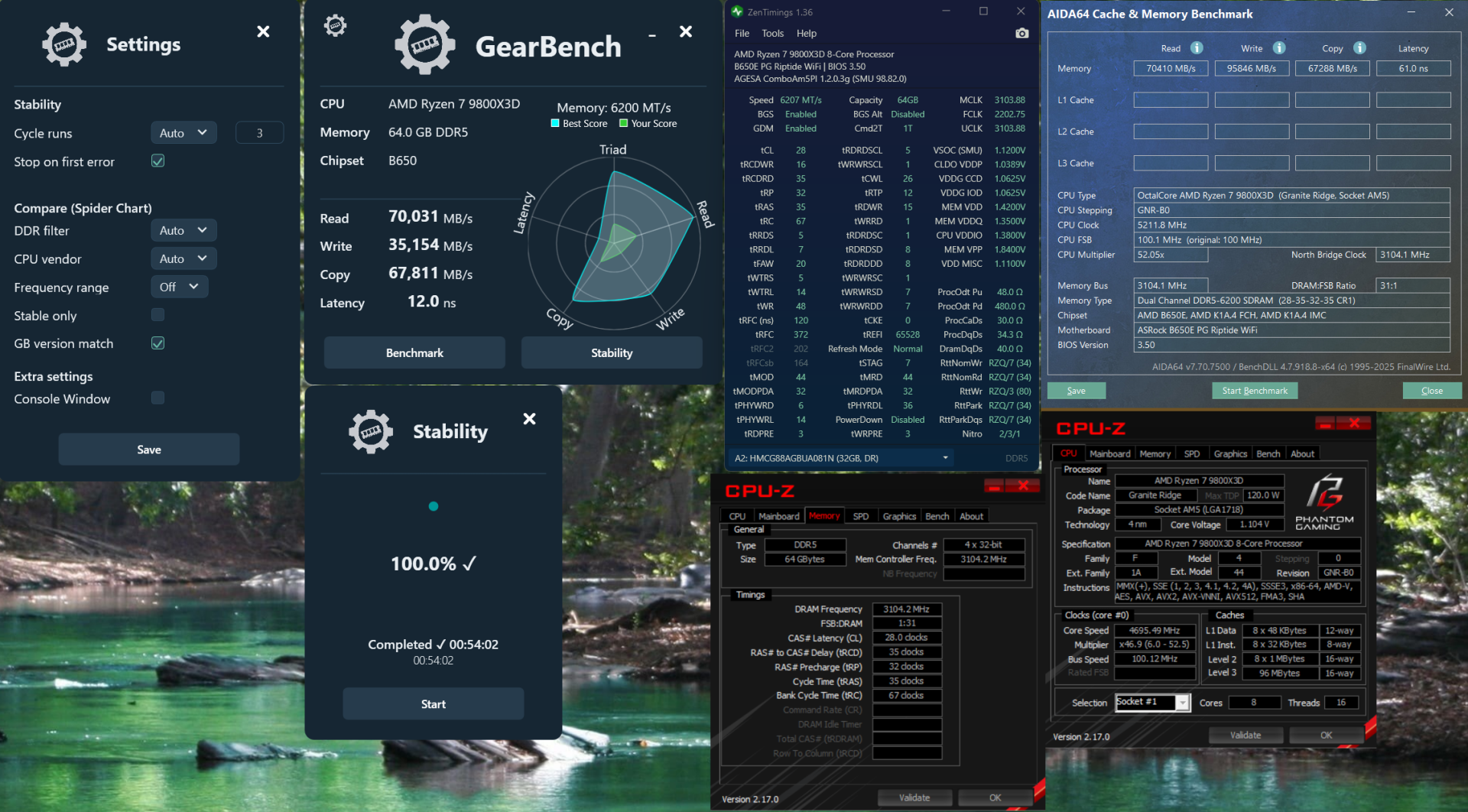
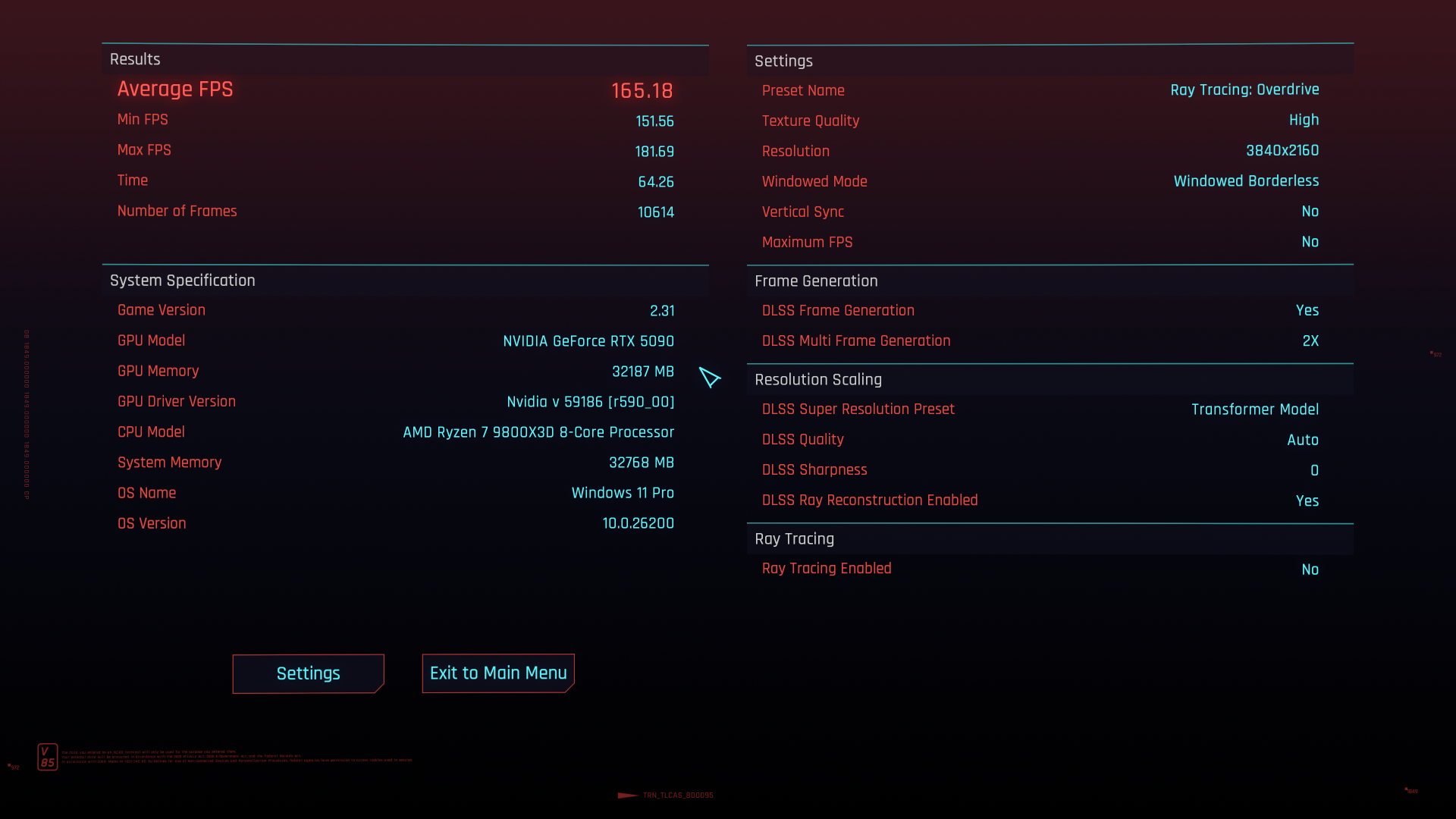
just not seeing the benefits of X3D @ 4K to be honest across Cyberpunk 2077 and also 3DMark Steel Nomad / Speedway ...


9700X:

9800X3D:
![[H]ard|Forum](/styles/hardforum/xenforo/logo_dark.png)
Follow along with the video below to see how to install our site as a web app on your home screen.
Note: This feature may not be available in some browsers.
just not seeing the benefits of X3D @ 4K to be honest across Cyberpunk 2077 and also 3DMark Steel Nomad / Speedway ...
on that note, a single reboot and i can see scores swing +\- 3.5%just not seeing the benefits of X3D @ 4K to be honest across Cyberpunk 2077 and also 3DMark Steel Nomad / Speedway ...
View attachment 789300
View attachment 789301
9700X:
View attachment 789302
9800X3D:
View attachment 789303


They're fine. I'm betting that you're hyperfixating. Relax and enjoy.on that note, a single reboot and i can see scores swing +\- 3.5%
just inconsistent
also is VCORE and SOC too high?
View attachment 789308
View attachment 789309
View attachment 789310
Speedway and Steel Nomad are GPU benches.just not seeing the benefits of X3D @ 4K to be honest across Cyberpunk 2077 and also 3DMark Steel Nomad / Speedway ...
View attachment 789300
View attachment 789301
9700X:
View attachment 789302
9800X3D:
View attachment 789303

That's because your RTX 5090 is doing the heavy lifting. The CPU does less work the higher the resolution.just not seeing the benefits of X3D @ 4K to be honest across Cyberpunk 2077 and also 3DMark Steel Nomad / Speedway ...
They're both fine, the unofficial rule of thumb is not to go over 1.3V for either. Most typically undervolt by 0.01V until it's unstable, that way you know the lowest stable voltages.also is VCORE and SOC too high?

i was a bit sloppy and negligent during CPU swapsWhy is there so much paste on the socket latch? Hah
Just depends upon the game.just not seeing the benefits of X3D @ 4K to be honest across Cyberpunk 2077 and also 3DMark Steel Nomad / Speedway ...
Massgravenow i’m dealing with MicroSlop having deactivated my Windows Digital License from using the 9700X to troubleshoot. It won’t reactivate and Microsoft Support representatives can’t get it to reactivate either so now they’re escalating it up the chain

That's strange, usually it's associated with Mobo + (eventually) Storage. I'm replacing nearly 4 processors on my current Mobo and I have no problem with that, but I'm using an online profile, not a local one.now i’m dealing with MicroSlop having deactivated my Windows Digital License from using the 9700X to troubleshoot. It won’t reactivate and Microsoft Support representatives can’t get it to reactivate either so now they’re escalating it up the chain
i have a local account that also logs into the onlineThat's strange, usually it's associated with Mobo + (eventually) Storage. I'm replacing nearly 4 processors on my current Mobo and I have no problem with that, but I'm using an online profile, not a local one.
Just wait for a response from MS, they will fix it.i have a local account that also logs into the online
should i do entirely native online account?
Hmm, 3 changes of hardware on the same moboJust wait for a response from MS, they will fix it.
With the Pro version, you have 3 changes on your Mobo, first registration + 2 more.
but i haven’t done a single mobo change3 mobo changes
If the AI is right:but i haven’t done a single mobo change
So your Windows may be waiting for confirmation from MS if it cannot resolve the issue itself.Key Hardware Components Windows Activation Monitors:
- Motherboard (main factor)
- CPU
- Hard drive or SSD
- Network adapter (MAC address)
- RAM (less critical but sometimes considered)
When Windows activates, it creates a hardware ID (HWID) based on a combination of these components to validate the license.
Yeah I was gonna say the X3D chips only really offer a boost when you are playing 1080p esports titles (trying to hit 300+ FPS) or CPU heavy games like Factorio. Turning the resolution up to 4K you won't see much of an impact usually.A. Across the 3 main resolutions 1080p/1440p/4K: each CPU maintains an extremely similar Framerate, regardless of the GPU. This is a classic CPU limitation. Its only at 4K where the 5090 separates itself a little bit------with the X3D.
That’s only partially true. X3d chips really shine at instances of cpu bottleneck, not necessarily only “lower resolution” titles.Yeah I was gonna say the X3D chips only really offer a boost when you are playing 1080p esports titles (trying to hit 300+ FPS) or CPU heavy games like Factorio. Turning the resolution up to 4K you won't see much of an impact usually.
Carefull or you are going to summon the group of people that play their games at 720p/1080p on a RTX5090 and telling you how much a CPU means and that if you play pathtraced games at maximum graphical settings at 2160p (GPU limited) you are doing it wrong and are a very bad personYeah I was gonna say the X3D chips only really offer a boost when you are playing 1080p esports titles (trying to hit 300+ FPS) or CPU heavy games like Factorio. Turning the resolution up to 4K you won't see much of an impact usually.

I always chuckle when I see someone with eg. a RTX5060 and an X3D CPU, they could have saved some money and gotten a better GPU, but the herd instinct is strong these days.That’s only partially true. X3d chips really shine at instances of cpu bottleneck, not necessarily only “lower resolution” titles.
In other words, the resolution where games get more cpu bottlenecked is more an effect than cause. An older fps/competitive title might get 300fps at 4k while Alan Wake gets 40fps - so yes the X3d should have a bigger affect on the higher fps game but it’ll be at all resolutions.
And yes, “cpu intensive” titles should get a boost with the X3d chip but not if the bottleneck is the GPU.
For the majority of gamers the X3d should be the last upgrade item. The processing power should last a long while, but for current gaming enjoyment/performance there are other upgrades which have more benefit IMO
HahaCarefull or you are going to summon the group of people that play their games at 720p/1080p on a RTX5090 and telling you how much a CPU means and that if you play pathtraced games at maximum graphical settings at 2160p (GPU limited) you are doing it wrong and are a very bad person

Haha
i did see some reviews of when the up scaling technology starts to fall apart, but heard even if almost down to 360p it’s still basically viable (is this mention even relevant or germane to the conversation?)
https://www.reddit.com/r/nvidia/comments/1qaujgi/rdr2_360p_native_vs_dlss_45_ultra_performance/
https://www.xda-developers.com/i-tried-gaming-in-360p-with-dlss-45-and-the-results-left-me-shocked/
View: https://youtu.be/uYHJeF5HmDU?si=NUJPW940ai7gZc0H&t=65
This video is insane to me, specifically at the linked timestamp. You can see how pixelated the walker outline is because DLSS isn't doing anything to it. This stuff is straight up magic.
It was a "tounge in check" to people not GPU limiting their games and not being aware how little difference between CPU's there actually are when you play 4K games with pathtracing and +90% GPU load.is it relevant? may be just ancillary details i focused on adjacently to the OP’s reference to people who run 720p/1080p (jokingly? mockingly even?)
)

Quality surge protector? I've lost components due to power outages and being directly connected to the wall.i am curious too
wondering if my motherboard slowly killed the 9800X3D, but i had no symptoms, crashes or anything
all i did was shutdown the pc, and switch off the PSU for 1 day
yep it’s an ASUS motherboardIf he is running an ASUS board then it might break randomly. Still a better story than Asrock I am told.
I am assuming you already know this. Just run it around 1.25 VSOC or something and it shouldn't break. I know recommended is 1.3 V for these but better to have some headroom for those odd spikes.yep it’s an ASUS motherboard