• Some users have recently had their accounts hijacked. It seems that the now defunct EVGA forums might have compromised your password there and seems many are using the same PW here. We would suggest you UPDATE YOUR PASSWORD and TURN ON 2FA for your account here to further secure it. None of the compromised accounts had 2FA turned on.
    Once you have enabled 2FA, your account will be updated soon to show a badge, letting other members know that you use 2FA to protect your account. This should be beneficial for everyone that uses FSFT.

LG 48CX

I’ve probably put about 10 hours into the game, on a CX with default brightness 50/50, and I don’t recall noticing overblown specular highlights. But honestly the game didn’t grab me so I stopped playing. I’ll take another look sometime this week.
I am starting to think it's just clouds... but it's hard to tell.
Hey let me know i you happen to ever try it again if you notice it. All other games look fine so it's probably ... bad clouds hdr mastering by sony :p
 
OK, so having spent the past 4 days going through the past 100-odd pages of the thread, three things have become apparent to me:

1) Everyone thinking they could get a 30xx when they came out is hilarious in hindsight.
2) Everyone going "Cyberpunk is going to be fantastic, look at how much effort they have put into the graphics" is equally hilarious.
3) The Club3D adapter CEC-1085 only has a single issue remaining, which is that VRR won't work.

I've ordered the CEC-1085 and a CEC-1372. Reading through the pages also lead me to try out BFI (TruMotion) out, and holy bejeezus is that good! It does darken the display an awful lot but what a difference it makes in smoothness. Especially doing the ufotest. I might try with it on at 120Hz seeing as I can't get VRR, see how it looks. Adjust oled brightness up a bit (I only run at 15 anyway, so I have plenty of overhead).
 
Huh, you know I hadn't considered a floor mounted stand; I have an oversized old Ikea "Jerker" desk near the wall so I am not sure that a floor mount could properly "fit" under the desk and come up behind it close to the wall. Still, maybe its worth considering the amount of changes (ie my APC and a whole bunch of other stuff below my desk etc) if there was an advantage to a full motion floor stand vs a full motion wall mount.

Aside from that, a few questions. I just recently decided to first test the CX48 as a monitor and it just barely fits semi-comfortably toward the back of my desk and is hooked up to my 3090 using the exact high speed HDMI cable suggested. Aside from some basics (ie TV set to the Picture: Game setting and enabled the FreeSync option on the TV itself , I manually set my Nvidia Control Panel resolution ; noted that the HDTV 4K option did NOT work only allowing up to 60hz, you had to go to PC list to get the 4K 120hz. ), I've not done any real configuration. I am interested in configuring it to get the best settings for a PC monitor for general use including gaming - I saw that there was a YT video on the previous page that suggested some of the best configurations. Is that still the best /most up to date configuration resource for all the various settings? I'd prefer to get it set up first for SDR mode, but now that I have a monitor that is capable of the highest tier of HDR (with nigh infinite local dimming, no less!) I'd be curious to give it a try. Note: I have just recently updated it to the latest available software which it claims is 03.21.21

In addition a few other things I've noticed and/or potential issues you may know how to solve with ease..

First, on Windows 10 do any of you have a screen saver active? I remember reading that even though this generation of OLEDs is less likely to burn in or even have temporary permanence, its still best to either turn off the display or activate a screen saver, right? Well, unfortunately W10 doesn't seem to want to do either! I found the "Screen Saver Settings" while searching for it and set it to either "blank" (which is just a black screen) or "mystify" (swirling colors), a 2 minute wait time and hit apply and... nothing! It does not seem to ever work. I can manually force these on by hitting "preview" every time I leave the PC, but that's pretty damn annoying. Likewise, I have my power management set to turn off the display after 3 minutes (Balanced mode, but set to never sleep) but that doesn't seem to happen either. Thinking back the display off thing never seems to have been working, but I just didn't mind very much using my old AH-VA monitor since there was no real concern of burn in. ; I never had a screen saver set up either. I'm guessing that there is something (I have applications like Steam, Firefox, Discord or Element running in the background as it were ) keeping it from ever sleeping or turning off? Is there a way I can check what is holding it up? Linux , at least in the quick test I ran, seems to have no problem with activating its screen saver automatically.

Second, this may be addressed in configuration/change of settings, but I noticed that it seems like the brightness is somewhat dynamic. It does seem to darken a little when idle, or sometimes depending on what's on the screen but there are also times that the brightness or contrast seems to to grow lighter globally even when on something very dark like [H] forum pages. Perhaps this results from some onboard setting (guessing the AI Brightness but it seemed even when turned off something similar remained?) and offers some sort of protective function for the OLED display?

Third, did anyone run into some issues with a slight overscan? It seems like some items are "off screen" such as in W10 being able to see the line below the taskbar icons to show an application is open (ie Steam or Firefox etc) on the bottom of the screen? For awhile it seemed the left side of the screen had ever so slightly cut off certain desktop icons, but that seems to be fixed now for some reason. Also, what application/text scaling percentage are you using? W10 amazingly suggests 300% which makes me feel like i'm looking some sort of 640x480 giant thing massively zoomed in with pitifully little room for anything, but maybe I'm just not configuring things properly. What do you prefer?

Thanks
 
Last edited:
I'm utterly in love with my CX.

If there is one thing I think is utterly stupid it's the super thin screen on the top half. This thing is EXPENSIVE and it's far FAR too easy to break it moving it. There isn't ANY point in it being that thin on the top since it has to have the thick portion on the bottom anyway. It needed enough thickness to make the screen durable enough to easily survive moving it.

It's got enough weight to it even without the base on to make the idea of transporting it to another room or to another home seriously scary.
 
I'm utterly in love with my CX.

If there is one thing I think is utterly stupid it's the super thin screen on the top half. This thing is EXPENSIVE and it's far FAR too easy to break it moving it. There isn't ANY point in it being that thin on the top since it has to have the thick portion on the bottom anyway. It needed enough thickness to make the screen durable enough to easily survive moving it.

It's got enough weight to it even without the base on to make the idea of transporting it to another room or to another home seriously scary.
Fascination with thinner=better, just like phones. Take all the technological advancements that have allowed phones to be as thin as they are today, and instead make them the same thickness as 5 years ago and use the extra room for a 3.5mm jack and a bigger battery. It's so stupid.
 
Guys, what is the best VSync setting to select in NVCP? Mine has been set to Fast for a while now, although I usually disable VSync in game options. I assume the setting in NVCP only applies if I enable VSync in-game (can someone confirm that)? Fast seems to be the best of all worlds with the fewest compromises from what I've read, but I wanted to make sure. Curiously, Adaptive VSync has disappeared from the list of options. I guess that was removed in a previous driver update?
 
Guys, what is the best VSync setting to select in NVCP? Mine has been set to Fast for a while now, although I usually disable VSync in game options. I assume the setting in NVCP only applies if I enable VSync in-game (can someone confirm that)? Fast seems to be the best of all worlds with the fewest compromises from what I've read, but I wanted to make sure. Curiously, Adaptive VSync has disappeared from the list of options. I guess that was removed in a previous driver update?
with vrr enabled, use vsync ON in nvcp.
It is not the asme vsync as without vrr. wih VRR, vsync takes care of just the tearing and ceiling part.
Disable vsync in games
 
I am starting to think it's just clouds... but it's hard to tell.
Hey let me know i you happen to ever try it again if you notice it. All other games look fine so it's probably ... bad clouds hdr mastering by sony :p
Just checked - yep specular highlights are all overblown.
 
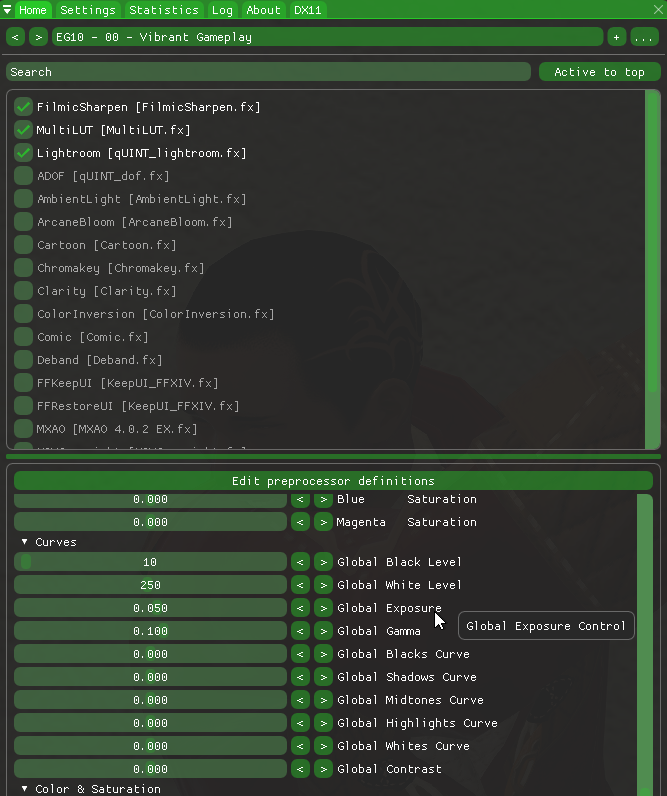
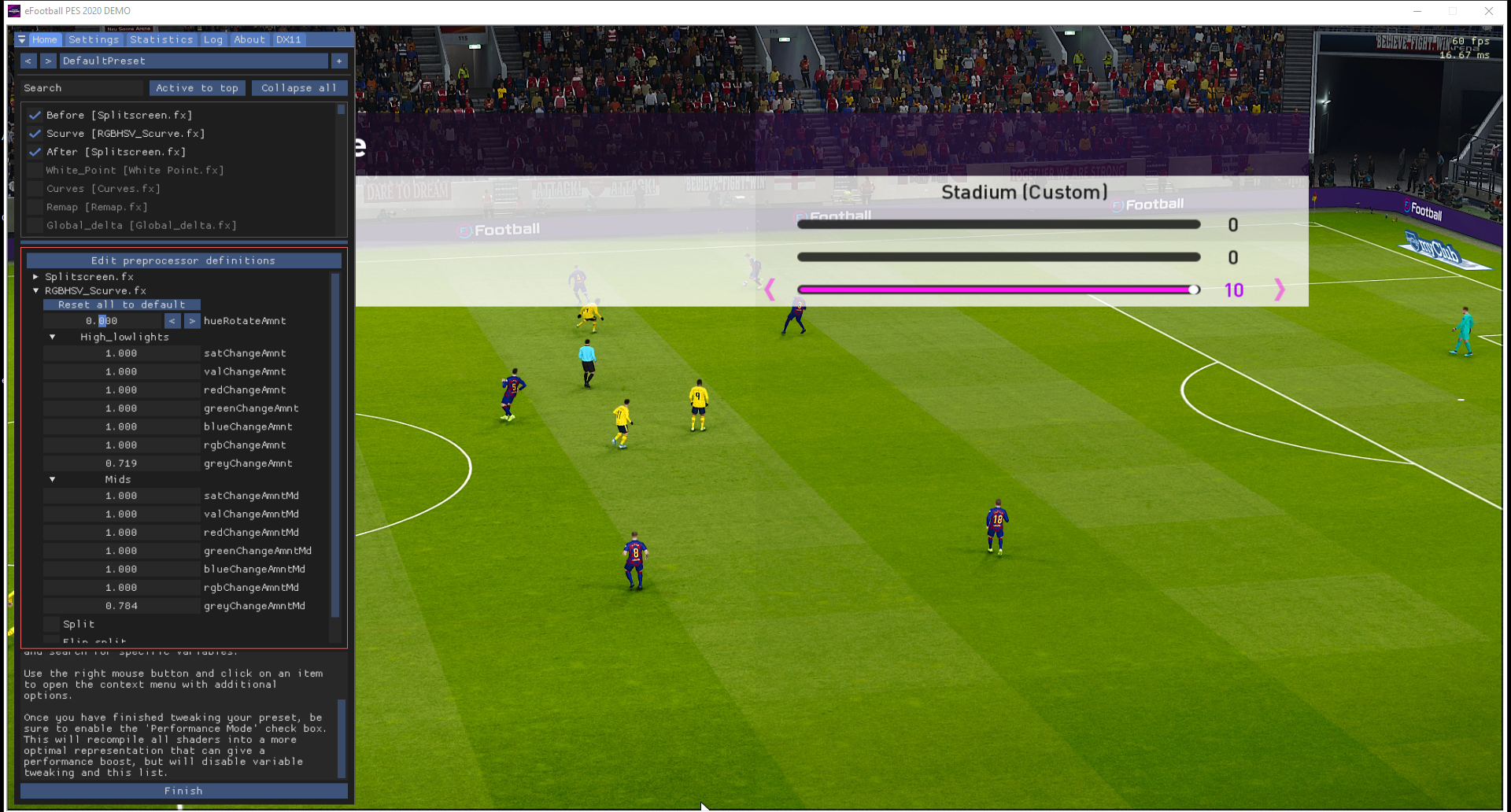
Reshade supposedly works with HDR games (on PC) but it might be buggy on a few. You might be able to experiment with the various filters you can add to reshade in order to adjust curves for those highlights.

The lightroom filter can do a lot of things that separate filters were formerly used to, if you mess with enough of it's settings.

Lightroom is a color correcting software made by adobe. It's kinda similar to photoshop but has basically more options to edit colors, lighting and shadows your way, martymcfly has made the lightroom shader in quint collection which basically has most of the features present in lightroom.
D7397TsUIAAdNRC.png


--------------------------------
Otherwise there are things like the curves filter, liftgammaGain and some others but I think you can do most stuff in lightroom now like I said.

The middle row in the LiftGammaGain setting is the midtones, top is the shadows, and bottom row is the highlights. The three columns are red, green, blue, in that order. Hope that helps!


New_S-curves_demo.png

----------------

You can save multiple named filter sets per game in Reshade so one or more filter edits can be used or switched between specifically on a per game basis. You can also save different sets for different times of day ~ room lighting conditions since saturation/gamma/contrast change a lot to your eyes and brain in relation to the lighting environment. I try to keep my pc room medium lighting in the day and down to dim/dark at night. It always looks best in the dim/dark environment but with reshade I can adjust some games to be more vibrant and brighter for daytime/brighter room conditions without having to lose game picture mode or screwing up my set LG OSD settings.

Right now I'm using FakeHDR, quint-Lightroom, and a sharpening filter on Darksiders3 (SDR game). I haven't tried reshade on any HDR games yet but I bought assassin's creed odyssey gold ed. and immortals: fenyx rising at very good sale prices recently. They are both supposed to have very good HDR implementations. I do have god of war on PS4 but I don't use that system much (and there is no reshade for consoles afaik).


* I hit "watch later" or "save" .. or watch a little of a HDR youtube vid to get it into my history, then swap to the youtube app on the LG CX to get to youtube HDR.
 
Last edited:
I have this really annoying issue with Dolby Vision files on plex / nvidia shield. It plays fine, but the Dolby Vision icon keeps popping up throughout the movie. Any idea how to fix it?
 
Just checked - yep specular highlights are all overblown.
Thank YOu! So I am not completely crazy :)

Btw, 03.11.21 update for 48" C1 just hit and they have not fixed auto sound mode changing still... Every time I reboot my pc or enable win10 hdr, audio preset changes to "game optimizer" and I prefer using "cinema mode".
It's ok on ps5 or when I enable tv after pc fully boots (until I enable hdr or reboot). Is very annoying on pc.
Anyone found a way around this ? I am contacting LG on twitter but they insist on ticket and I've tried that with no luck. I know other users have the same thing
 
I had some eARC oddities with sound cutting in and out yesterday that I'd never had before updating to 03.11.21. Anyone else noticed anything? It could have just been a coincidence.

And the quickstart+ pixel shift bug is still there 🙄
 
I had some eARC oddities with sound cutting in and out yesterday that I'd never had before updating to 03.11.21. Anyone else noticed anything? It could have just been a coincidence.

And the quickstart+ pixel shift bug is still there 🙄
no idea about eARC (do I use it with ps5 or pc if I only have internal speakers?)
What is the pixel shift bug?
 
I had some eARC oddities with sound cutting in and out yesterday that I'd never had before updating to 03.11.21. Anyone else noticed anything? It could have just been a coincidence.

No problems with eARC cutting out so far. A few times (perhaps after windows updates) I did have to go back into my win10 sound settings, device settings, and switch it back to 7.1 surround from stereo though but that is windows 10 not the TV. I have an avr with 7 satellite speakers + a subwoofer.

I'm using a sharc device and one issue is that if I've left my receiver off or receiver and LG CX off and just boot them both up, it takes up to 5 minutes for the earc to kick in. The first time that happened I thought it wasn't going to work and reconnected cables, power cable from the sharc, etc a bunch of times but now I'm realized it just takes a few minutes to kick in. Once it all initializes properly it runs great with zero delays or bugs even when switching between audio devices on windows 10 (my mixamp + headphones and back) or switching to my shield and back.

Another general sound issue I have is that when I switch my AVR to my nvidia shield which feeds from the AVR to the TV, I obviously lose all PC sound the would normally be downstream from the tv. Sound from whatever I might still be running on the PC or on my other two screens in the array but that's not really a fault of the TV. I have a streamdeck button that I can switch to headphones but I might hook up my small pair of usb speakers to swap to similarly or run a 3.5mm out from the mixamp to some small powered speakers just so I can hear general windows/apps notifications or do webcam calls etc. while watching a video on the shield.

On the TV side of that scenario - I do have to manually switch to PCM sound in the LG CX's OSD and back to "pass through" every time I want to use the LG CX's WebOS Youtube app for HDR youtube videos which is annoying. Luckily I don't view those very often especially since HDR youtube channels (like "walking japan" or whatever) usually have a static logo which I don't like leaving running for too long on a loop if I can avoid it. I use it once in awhile when I want to watch a HDR gameplay video like the one I linked above. It would be nice if LG stored a different set of sound settings on my pc named hdmi input from the LG WebOS apps/Youtube so that I could just leave the webOS/youtube on PCM without changing the PC input from "pass through" sound on eARC.
 
Last edited:
no idea about eARC (do I use it with ps5 or pc if I only have internal speakers?)
What is the pixel shift bug?
When you have Quickstart+ enabled, sometimes when you turn the TV off and back on again pixel shift will be enabled even though the setting shows disabled.

No problems with eARC cutting out so far. A few times (perhaps after windows updates) I did have to go back into my win10 sound settings, device settings, and switch it back to 7.1 surround from stereo though but that is windows 10 not the TV. I have an avr with 7 satellite speakers + a subwoofer.

I'm using a sharc device and one issue is that if I've left my receiver off or receiver and LG CX off and just boot them both up, it takes up to 5 minutes for the earc to kick in. The first time that happened I thought it wasn't going to work and reconnected cables, power cable from the sharc, etc a bunch of times but now I'm realized it just takes a few minutes to kick in.

Another general sound issue I have is that when I switch my AVR to my nvidia shield which feeds from the AVR to the TV, I obviously lose all PC sound the would normally be downstream from the tv. Sound from whatever I might still be running on the PC or on my other two screens in the array but that's not really a fault of the TV. I have a streamdeck button that I can switch to headphones but I might hook up my small pair of usb speakers to swap to similarly just so I can hear general windows/apps notifications or do webcam calls etc. while watching a video on the shield.

On the TV side of that scenario - I do have to manually switch to PCM sound in the LG CX's OSD and back to "pass through" every time I want to use the LG CX's WebOS Youtube app for HDR youtube videos which is annoying. Luckily I don't view those very often especially since HDR youtube channels (like "walking japan" or whatever) usually have a static logo which I don't like leaving running for too long on a loop if I can avoid it. I use it once in awhile when I want to watch a HDR gameplay video like the one I linked above.

I've noticed the same thing. I have a 48" at the computer and a 77" in the living room. The 77" has a Shield connected to it, the 48" has a computer and PS5 connected to it. On the 77" I also have to switch around "Auto" and "Passthru" depending on the content type. For DTS movies (and probably multichannel PCM since this is Plex decoding the DTS to PCM) I have to set it one way or the audio is stereo no matter what, but if I leave it set that way TrueHD/Atmos tracks don't play at all 🤷‍♂️. It's not the end of the world, but a bit annoying. If only "passthru" was actually just "passing through"...

On the 48", I just have both the computer and the PS5 output 5.1 PCM (I have a 5.1 setup in the office) and I don't have to fiddle with anything.
 
Last edited:
I've tested input lag booster on c1 a bit with demons souls, hdr, hgig, 60fps game mode.
I noticed that "boost" option lowers gamma and makes shadow detail tiny bit more visble. not full out washed out image but for sure goes like from 2.2 to maybe 2.1... or not even that much. it is slight but it is there.
Anyone else notices that? (dark room viewing)
 
Last edited:
Firmware 03.23.06 is out (dated 02-Jun-2021) with a tons of new privacy policies and other legalize to accept on reboot. And of course the change log reads:

[03.23.06] Software update contains minor bug fixes.

Yawn.
 
Last edited:
I could do with some advice. Maybe even if there's nothing I can do?

Basically, HDMI ports 1-3 are all faulty on my screen. Only HDMI 4 works now.

I think they were fried by a faulty Digital TV box (an old Humax) that made a couple of loud popping sounds. HDMI 1+2 died immediately, HDMI 3 continued to work for a while but was glitchy and then finally failed completely last night.

HDMI 4 is straight out of the back of the screen, unlike HDMI 1-3 which are all on the side. So I assume on a slightly different circuit - hence wasn't affected?

I'm now just outside the 1 year warranty period, having purchased in June last year.

I can survive with the last working HDMI port, but obviously if this one dies, the screen is dead. It's a beautiful screen and I was hoping I would use this for many years to come.
 
I could do with some advice. Maybe even if there's nothing I can do?

Basically, HDMI ports 1-3 are all faulty on my screen. Only HDMI 4 works now.

I think they were fried by a faulty Digital TV box (an old Humax) that made a couple of loud popping sounds. HDMI 1+2 died immediately, HDMI 3 continued to work for a while but was glitchy and then finally failed completely last night.

HDMI 4 is straight out of the back of the screen, unlike HDMI 1-3 which are all on the side. So I assume on a slightly different circuit - hence wasn't affected?

I'm now just outside the 1 year warranty period, having purchased in June last year.

I can survive with the last working HDMI port, but obviously if this one dies, the screen is dead. It's a beautiful screen and I was hoping I would use this for many years to come.
If you purchased it using a credit card, you may be eligible for additional warranty protection as one of your card benefits. I know that at least a couple of mine have that as part of their perks.
 
If you purchased it using a credit card, you may be eligible for additional warranty protection as one of your card benefits. I know that at least a couple of mine have that as part of their perks.
Thanks. I will check this out.

I've just realised I purchased on 07/06/2020 so just inside guarantee period. I'm going to claim, as tonight HDMI4 suddenly stopped working, I'm getting a "No signal" on all inputs now. It's fried.

The TV menus all work, it's just HDMI inputs don't. Tried several cables.
 
Thanks. I will check this out.

I've just realised I purchased on 07/06/2020 so just inside guarantee period. I'm going to claim, as tonight HDMI4 suddenly stopped working, I'm getting a "No signal" on all inputs now. It's fried.

The TV menus all work, it's just HDMI inputs don't. Tried several cables.
My hdmi ports stopped working at some point when I was messing with eARC. They didn’t start working again until I unplugged from the wall and plugged back in. It might be worth a shot…
 
My hdmi ports stopped working at some point when I was messing with eARC. They didn’t start working again until I unplugged from the wall and plugged back in. It might be worth a shot…
Tried that, then a few other cables.

Some good news is the store (Currys) is picking it up to repair tomorrow, aiming to return within a week. I've a feeling this will need a replacement.
 
Has anyone here disabled the ABL?
Is it risky?

Just wondering about it, because the Aorus FV43U I have makes bright HDR games like Horizon Zero Dawn look really good where as on my CX48 it look quiet dimm in comparison?
 
Has anyone here disabled the ABL?
Is it risky?

Just wondering about it, because the Aorus FV43U I have makes bright HDR games like Horizon Zero Dawn look really good where as on my CX48 it look quiet dimm in comparison?

I have not disabled ABL or ASBL. I've played all through and completed both jedi:fallen order and nioh2 which both have HDR and I haven't had any problems with dimness. They looked incredible. I didn't use reshade on either of those games when I played them incidentally but reshade is supposed to work with most HDR games.

I'm still playing through darksiders 3 at the moment which removed it's HDR support at some point due to the devs not being happy with how it turned out (washed out) I guess. I tweaked Darksider 3's SDR with Reshade in a few profiles using FakeHDR filter, Lightroom filter (editing contrast, gamma, saturation curves,middle blacks curve, etc.) and a sharpening filter... I also turned the color setting up on game picture mode on the LG CX OSD to 70 or so (though I tweaked it down slightly in the Reshade Lightroom filter). Though not like the other two HDR games I played, Darksiders3 still looks pretty brilliant in SDR with my settings. High contrast, bright colors nicely saturated... ultra dark blacks while still getting decent detail in shadows along with a nice sharpness/detail rendered look~effect.

I also just recently bought Assassin's Creed: Odyssey and Immortals: Fenyx Rising on some really good sale prices. They both have very good HDR implementations from what I've read on sites and seen on youtube HDR videos. However I haven't played them yet. I want to plug on through darksiders 3 first. I'm about to kill the 5th boss (
actually a 2 boss fight with the additional boss in the 2 on 1 being a heavy hitter even without being a "sin" boss
) out of I think 7 to 9 main boss fights along with several mini bosses/harder-than-regular enemies. I think I actually skipped one boss unintentionally so I probably have to circle back to that area using a fast travel/level loading feature called "serpent holes". I'll be on the game awhile longer yet due to the amount of time I play and that I'm playing on apocalyptic difficulty but I should be able to knock out the 5th and 6th bosses within a few days. I'll report back about the other two game's HDR when I get to them someday.

Regarding Horizon Zero Dawn, I haven't played that in HDR. I played it a long time ago in SDR on my ps4 on a VA FALD TV.
Make sure this isn't the issue between your two screens:
<from a youtube horizon zero dawn HDR video in comments:>
Since this is an old HDR game without peak brightness controls, the “correct” setting would be to set DTM to off. The reason highlights on HGIG pop is because all detail near 750nits and above is clipped & displayed at max brightness. DTM on is basically just vivid mode for HDR, but defeats the dynamic range (arguably the whole point) of HDR.

So your settings could be way different on your two different screens. I haven't played that game in HDR or on PC HDR since I don't own it on pc. The two games I've played in HDR so far looked amazing and I have two more to play in the future that are supposed to have amazing HDR too. If you find that your Aorus FV43U is using HGIG/DTM and blowing out the brightness/highlights on Horizon in a "vivid" mode, but you like that look - you could always try turning on Dynamic Tone Mapping on the LG CX. You could also mess with the HDR brightness and HDR whitepoint in the game's menus to make it more contrasted and brighter when playing on the CX. That or you could see if Reshade works with that game in HDR to give you more control instead of using DTM, which is what I would try. I don't like using Dynamic Tone Mapping's guesswork. HDR and the TV has it's own static tone mapping.
 
Last edited:
Has anyone here disabled the ABL?
Is it risky?

Just wondering about it, because the Aorus FV43U I have makes bright HDR games like Horizon Zero Dawn look really good where as on my CX48 it look quiet dimm in comparison?
You can't disable ABL afaik. You can disable ASBL though but that only affects the dimming that happens when there is static content on screen. I've disabled that and so far no issues in desktop use.

Like elvn I haven't had issues with dimness at all and I even have a Samsung CRG9 or KS8000 capable of 1000 nits with terrible local dimming to compare against and to me the OLED looked just way better in everything.
 
According to RTINGs you can sort of disable ABL by limiting the brightness settings but that is not compatible with HDR so yeah not applicable to what he's asking about.

From the Rtings C9 Review, regarding SDR settings concerning ABL:
"If ABL bothers you, setting the contrast to '80' and setting Peak Brightness to 'Off' essentially disables ABL, but the peak brightness is quite a bit lower (246-258 cd/m² in all scenes)."
 
According to RTINGs you can sort of disable ABL by limiting the brightness settings but that is not compatible with HDR so yeah not applicable to what he's asking about.

From the Rtings C9 Review, regarding SDR settings concerning ABL:
"If ABL bothers you, setting the contrast to '80' and setting Peak Brightness to 'Off' essentially disables ABL, but the peak brightness is quite a bit lower (246-258 cd/m² in all scenes)."
All that's really doing is turning "Automatic Brightness Limiter" to "Always Brightness Limiter", heh.
 
Has anyone here disabled the ABL?
Is it risky?

Just wondering about it, because the Aorus FV43U I have makes bright HDR games like Horizon Zero Dawn look really good where as on my CX48 it look quiet dimm in comparison?
I've had mine disabled since launch. Do yourself a favor and do it. No problems at all. It's the best thing you can do if you own a CX48.
 
I've had mine disabled since launch. Do yourself a favor and do it. No problems at all. It's the best thing you can do if you own a CX48.

Did you actually disable ABL or did you disable ASBL because they are not the same thing. ASBL is disabled from the service menu while ABL cannot be disabled as far as I know.
 
Well, I sent my screen back for repair, and I'm desperately missing it! 4K is great, but 120Hz and OLED is a huge upgrade. Back on a Dell 23" IPS 1440p 60hz and it feels... bad.

Once you go big OLED, you can't go back lol....
Why did you have to send your set in?
 
I've had mine disabled since launch. Do yourself a favor and do it. No problems at all. It's the best thing you can do if you own a CX48.

I didn't disable ASBL or any protections and it doesn't bother me at all. Usually the only time it turns on is if I'm paged off of a game for too long using another screen and forgot to hit cog wheel + "turn off the screen" (or hold the mic and say "turn off the screen) in order to sort of minimize the oled by turning off the emitters. I like how ASBL works and don't find it annoying at all.. I use my OLED as a gaming and multimedia stage display and leave it bright enough to view videos and slideshows even outside of game mode. I don't use the OLED for desktop/apps so with my usage scenario it doesn't bother me at all and is actually comforting to have that safety feature active. If I was doing desktop/app stuff on the OLED it might be a different story.


Well, I sent my screen back for repair, and I'm desperately missing it! 4K is great, but 120Hz and OLED is a huge upgrade. Back on a Dell 23" IPS 1440p 60hz and it feels... bad.

Once you go big OLED, you can't go back lol....

I use a 43" samsung nu6900 4k VA TV on each side that isn't even FALD and they look good to me. Their contrast levels are way higher than a non-fald IPS can do though (6107:1 according to RTINGS). Most ips are like 900:1 to 1100:1 with accompanying poor black depths unless they are FALD. The samsung 4k's would be crap for gaming since they are limited by 60hz , no vrr, 7.7 to 16.2 response time, 22ms(game mode) to 37ms input lag (outside of game mode), and they aren't even "real" HDR (320nit peak) and have no FALD for movies so still no comparison but they pair quite nicely with the OLED with their relatively high contrast ratio and deep blacks, vibrant and accurate colors (per RTINGS: "impressive out of the box color" , and "remarkable color accuracy" post calibration) and 43" 4k's PPD as desktop/app screen space.
 
With Battlefield 2042 just announced, I decided to go back and play BF4 on my CX for old-times sake.

It actually feels BETTER than I remember it. It is unbelievably fast and clear, especially at 4K120. I know the CX is not for competitive FPS players, but I am way out of practice, and I am still getting positive KDR + top 5 rankings each round. It feels like the CX is part of that competitive edge. I'm sure it doesn't hurt that I can see extremely far into the distance at 4K.

This thing can 100% stand toe-to-toe with the best gaming monitors out there.
 
Well just got rid of the Aorus FV43U and will be sticking with my CX48.

I cannot believe I wasted money on that Aorus to compare to the CX Oled, except for peak brightness the CX just totally shits all over the Aorus FV43U in image quality and response and motion.
 
Back
Top