Philips BDM4065UC - 40" 4K 60Hz monitor thread

Here is a 25ft DisplayPort Cable offered by Cables to go on Amazon:
There are also shorter lengths available. Note that this listing specifically states 4K compatibility for up to 25 feet, There is a 35ft cable, but its only rated at 2560x1600 resolution.

4K up to 25 ft isn't the same as 4K @ 60 Hz up to 25 ft. Martona's issue was that he could only get 4K @ 30 Hz on his original cable.

Also, FWIW... <http://www.displayport.org/cables/how-to-choose-a-displayport-cable-and-not-get-a-bad-one/>
  • "Despite what you may read, there is no such thing as a DisplayPort 1.1 cable and DisplayPort 1.2 cable. A standard DisplayPort cable, including the so-call DisplayPort 1.1 cables, will work for any DisplayPort configuration including the new capabilities enabled by DisplayPort 1.2, including 4K and multi-stream capabilities. All standard DisplayPort cables support RBR, HBR (High Bit Rate), and HBR2 (High Bit Rate 2), which can support 4K at 60Hz, or up to four 1080p displays using multi-stream."

    [*]"However, we should note that there is one rare exception to this rule; there are a few Reduced Bit Rate (RBR) cables on the market that will support only up to 1080p, but these are generally restricted to projector installation applications. Unless the cable is identified as RBR, it is a standard DisplayPort cable and will support all DisplayPort configurations."

Whether or not there's a formal 1.2 certification, real-world experience shows that not all DP cables are equal when it comes to pushing 4K @ 60 Hz -- so while some older cables may indeed handle DP 1.2 without being marked that way, it's not a given.
 
As an Amazon Associate, HardForum may earn from qualifying purchases.
4K up to 25 ft isn't the same as 4K @ 60 Hz up to 25 ft. Martona's issue was that he could only get 4K @ 30 Hz on his original cable.

Whether or not there's a formal 1.2 certification, real-world experience shows that not all DP cables are equal when it comes to pushing 4K @ 60 Hz -- so while some older cables may indeed handle DP 1.2 without being marked that way, it's not a given.

Yes, understood. If one needs a longer cable length, I'd at least start by trying one of these from 'Cable Matters'. I haven't seen many manufacturers specifically state 4k-60hz compatibility on their cable specs. What I was trying to convey with my 2nd point was mainly that one doesn't necessarily *need* a HBR2 rated cable to get 4k-60hz working on a monitor. You just don't know for sure with any cable until you test it. :)
 
Last edited:
The longer you get, the less bandwidth you get, usually. Probably why there aren't many longer DP1.2 cables.

I mean, you're pushing 20 Gbps over copper wire ....
 
4K up to 25 ft isn't the same as 4K @ 60 Hz up to 25 ft. Martona's issue was that he could only get 4K @ 30 Hz on his original cable.

Whether or not there's a formal 1.2 certification, real-world experience shows that not all DP cables are equal when it comes to pushing 4K @ 60 Hz -- so while some older cables may indeed handle DP 1.2 without being marked that way, it's not a given.

I can absolutely attest to this. It really comes down to length I think. Over very short distances any old DP cable should perform at HBR2 speeds, as suggested by the displayport.org quote, but over longer ranges things like connector quality, wire gauge, etc. will really come into play.I guess before HBR2 actually came around, cable vendors had no reason to test for almost 20GB/s bandwidth. Frankly even now I have to use DVI to run 2560x1600@60Hz over 25ft to my "lesser monitors" because I couldn't find a DP cable that'd actually give me a stable picture over that distance. The 30" monitors would go blank for a second every now and then; this doesn't happen with DVI.

Yes, understood. If one needs a longer cable length, I'd at least start by trying one of these from 'Cable Matters'. I haven't seen many manufacturers specifically state 4k-60hz compatibility on their cable specs. What I was trying to convey with my 2nd point was mainly that one doesn't necessarily *need* a HBR2 rated cable to get 4k-60hz working on a monitor. You just don't know for sure with any cable until you test it. :)

Yes, Cable Matters is good. I actually have their cable working in my setup right now. (I know I said it was Cables2Go, but I was mistaken. C2G are pretty cool and I tend to use them for lots of stuff (25ft DVI at WUXGA 60Hz, for example) but this time Cable Matters was the one that worked for running the Philips at 60Hz.
 
So. @weehooherod and @Croc. With the listing specifying "We don't accept backlight bleeding as a defect and that 0~2 dead pixel is possible, up to 5pixels can be found and allowed" in addition to their listing requirements that buyer paying shipping on returns. How were you two planing on dealing with things if the monitors had dead pixels or bleeding?

Also @weehooherod you already got yours I assume and nothing seriously was wrong I guess? No bleeding, dead pixels, weird colors?

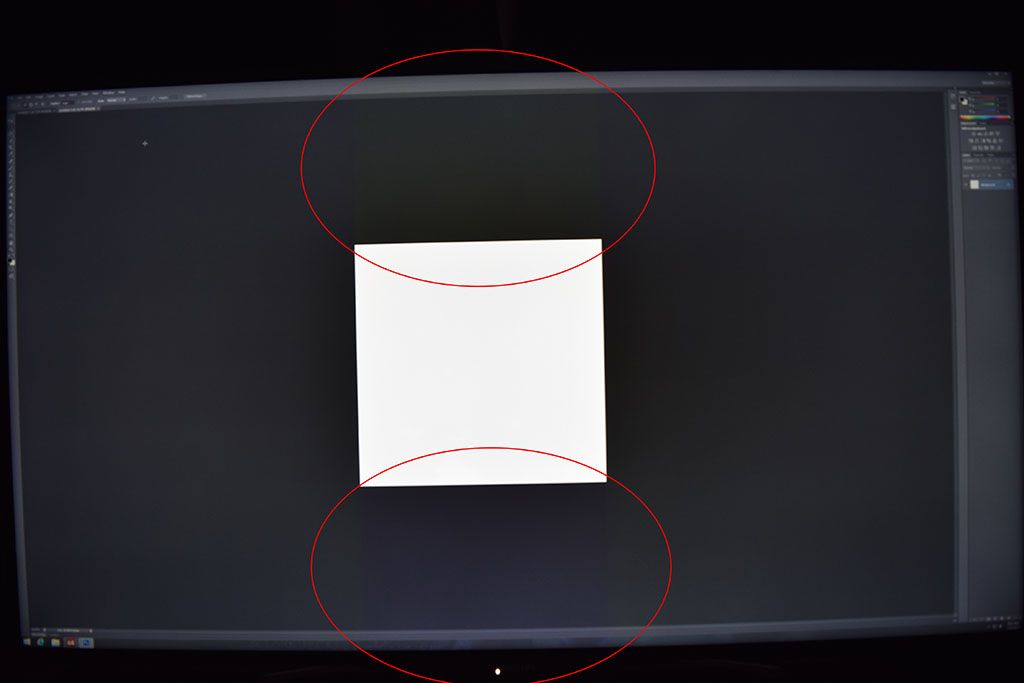
I've only had mine for a day now but I haven't seen any dead pixels or backlight problems. The only issue I have is the white line thing (http://hardforum.com/showthread.php?t=1838713&page=68). Pretty sure that's on every panel though. I'm going to mess around with the brigthness/color settings, my desktop background, and f.lux to mitigate the issue though.
 
Thinking of just buying it from eBay and getting a Square Trade. @weehooherod and Croc. Got a link of the guy you bought from? I honestly don't see it being available any time soon and unless someone has any glaring reasons why someone would not recommend buying this monitor yet. From what I have heard people have been pretty happy thus far.

Also compounding on Iserlohn's question. Could those of you who DO have your monitor, working on 4K @60hz please post your GPU's?

So I'm seeing the SquareTrade warranty mentioned again. Guys, are we sure that ST is 100% willing to cover items purchased from other countries? I ask because my patience is starting to wane for a US release, but the last thing that I'd want is to pay extra for the ST warranty and then run into hassles if I ever need to use it.
 
So I'm seeing the SquareTrade warranty mentioned again. Guys, are we sure that ST is 100% willing to cover items purchased from other countries? I ask because my patience is starting to wane for a US release, but the last thing that I'd want is to pay extra for the ST warranty and then run into hassles if I ever need to use it.

Yeah after mentioning that as well, I am worried about two things, first off ST usually tells you to contact the manufacturer if things break within the first year or two, however if you insist I believe they will deal with it, however it is (from what I can tell) a one time use warranty and if you "use" it, you no longer have their warranty. Which means if the first use is right away, you are SOL for the rest of the life of the monitor.

I have not asked yet, but I am 99% sure their warranty would include things bought from anywhere. I have never read anything that says things must be bought from the US and they only work based off what you paid. I would confirm first, but the other two things worry me more. I honestly would of bought the monitor today if my first two questions were null. Hell, If it was $200 cheaper, I would buy it regardless lol
 
Does anyone here use sRGB mode for gaming? I like the colors on sGRB mode but then there is 100% brightness lock :)


This is my setup.
The Philips display is perfect!!

Ikea Glass table.
I find the height of everything to be just nice.

As per my previous post, i bought this in Singapore with 3 years warranty
 
Last edited:
coke + kitkat over your desktop not good for your health.:(
try something with less sugar and you will live long enough for a 5k@120Hz monitor.:D
 
Nice setup, do you not find that is too close to sit to a large screen? I was sitting a similar distance from my setup but it felt like I had lizard eyes when playing fps games. My eyes were trying to span across to the edges of the screen, felt kind of discomforting to me.

So I have ordered a keyboard tray from ebay to distance myself further from my philips screen.
 
Dear geok1ng,
LOL, its only for the holiday season here in singapore. Otherwise i will skip soft drinks for the rest of the year.. ;)

Dear shadow85
i will sit much further when i play diablo. otherwise i really cant see the edge. haha. similar to BF4, i will seat back further as well - perhaps about 85cm from the screen..
i did thought about a keyboard tray, but i believe i will get used to the screen within the next few month.


I am running R9 290 on main display and it does get heaty when playing games at 4K.
6870 on both dell 23.
I must said the display is really fantastic!! - best purchase ever!
 
I sit really close to mine. My use case is somewhat different- I use the extra real estate for 15-20 tables of online poker. If I sit further away it's hard to make out bet sizes etc. I'm not trying to see the whole picture at once, it's more like scanning around a multi-monitor setup without bezels etc in the way. Curved 40" 4k would be perfect - that will probably be next year's upgrade.
 
I think he's referring to the problem discussed on this page: http://hardforum.com/showthread.php?t=1838713&page=68

Seems more likely he is referring to the 100% brightness lock rather then the comments 30 pages back. HOWEVER. The issues commented about on page 68 is VERY interesting. Can any of you other owners comment on the issues Seyumi was having?

philips_zpsf5597fda.jpg
 
Seems more likely he is referring to the 100% brightness lock rather then the comments 30 pages back.

Is it possible to replicate the exact same setting as sRGB mode, but decreasing the brightness.

I tried the TFTcentral settings, but on my screen there is still a real noticeable difference between sRGB and the user define settings from TFTcentral.
 
I plan to spend another $120-$200 on a spyder4 to calibrate this and my TV (sony 55w950b).
 
According to this thread, they may not support 4:4:4 chroma though. That's a pretty important feature for an HDTV to have when used as a monitor.

I rather bet Samsung will use the 40" curved panel with their available 4K monitor electronics to make genuine curved monitor. It would be rather stupid not to make this when the panel and electronics are readily available while competition has 40" flat monitors. 40" curved monitor will mean immediate death of flat 40". OK, maybe not immediate death since Samsung might be tempted to position curved monitor in expensive high-end professional segment.
 
Hey Everyone,

I finally got the monitor and I can't seem to get the colours right...
Since I'm running a GTX 570 for now, I have the display connected via a mini HDMI adaptor to HDMI - to the monitor.
As such, I'm running this gorgeous display at 1080p... :)
But ok, aside from the resolution I get some funky colours, especially skin tones are weird.
The typical facebook portrait (any portait for that matter) transitions from a frontal pink to almost grey to the side of the face (cheek for example)...very weird.

Does anybody have this problem?
I'm running the TFTcentral smartuniformity profile and also installed the philips utility to tweak some settings.
Could it be because of the HDMI connecting that some colour are weird?
Would the overall colours improve with a calibration device such as a spider pro?
Does anybody else get these skin tones?

Thank you!

Please post a portrait that is causing this problem. I'll view the image on my 4065uc and let you know if I notice the problem you described.
 
Well, just picked up an R9 295x2 to drive this thing, hard to pass up at $599. Might keep one of my R9 290 in there and run it in tri-fire if I need to.
 
I rather bet Samsung will use the 40" curved panel with their available 4K monitor electronics to make genuine curved monitor. It would be rather stupid not to make this when the panel and electronics are readily available while competition has 40" flat monitors. 40" curved monitor will mean immediate death of flat 40". OK, maybe not immediate death since Samsung might be tempted to position curved monitor in expensive high-end professional segment.

I don't know man, I'd tend to think anyone who does anything with graphics professionally would want their monitors to be flat. The curved fad might be OK for gaming or single-viewer TV (and pretty much nothing else) but I prefer to have a bunch of flat monitors on my desk that I can arrange any way I like.
 
Well, just picked up an R9 295x2 to drive this thing, hard to pass up at $599. Might keep one of my R9 290 in there and run it in tri-fire if I need to.

Not bad, but the 390X are probably around the corner, and supposedly a huge gain over the 290's.
 
I sit really close to mine. My use case is somewhat different- I use the extra real estate for 15-20 tables of online poker. If I sit further away it's hard to make out bet sizes etc. I'm not trying to see the whole picture at once, it's more like scanning around a multi-monitor setup without bezels etc in the way. Curved 40" 4k would be perfect - that will probably be next year's upgrade.

what's your distance btwn. you and the LCD?
 
I rather bet Samsung will use the 40" curved panel with their available 4K monitor electronics to make genuine curved monitor. It would be rather stupid not to make this when the panel and electronics are readily available while competition has 40" flat monitors. 40" curved monitor will mean immediate death of flat 40". OK, maybe not immediate death since Samsung might be tempted to position curved monitor in expensive high-end professional segment.

why? Exactly what so great about curve LCD?

How do you view a photo when it's curved?
 
Please post a portrait that is causing this problem. I'll view the image on my 4065uc and let you know if I notice the problem you described.

On this picture for example:
https://dl.dropboxusercontent.com/u/562969/Knipsel.JPG

On my 4065UC the front of the skin is a very pink-ish ...pink :) but when you follow the skin more to the side (like the cheek - darker areas) then it transitions into a very grey-ish pink.
I'm currently at work and have a 27" imac where skin tones are perfectly normal.
Before I got my 4065UC at home, I was using an old Dell 2410 from which I hated the IPS glow.
Skin tones were also perfect on that monitor though.

Only the 4065UC behaves like this, and I've been fiddling with the colour settings in-monitor and on the Philips application, but still this problem persists.

Below another totally non-scientific comparison; I took 2 pictures of the same photo, the first one on the imac screen, the second one on the Philips.

Imac:
https://dl.dropboxusercontent.com/u/562969/WP_20150304_17_21_05_Raw.jpg

4065UC:
https://dl.dropboxusercontent.com/u/562969/WP_20150304_22_23_11_Raw.jpg

Its subtle (you have to take into account that the camera has its own colour interpretation and limitation), but you can see that the 4065UC pushes the colours way more vibrantly.
And on this landscape that isn't really a problem per sé, but skin tones....o god the skin tones...

Below a picture of some news article; you'll see that the skin is really pushed colour-wise.
https://dl.dropboxusercontent.com/u/562969/WP_20150304_23_40_40_Raw.jpg

How do these images look on your screen?
Tonight I'll finally be able to hook up the 4065UC on a laptop with DP 1.2 and 4K support...I'm hoping all will be better!
 
Professional colour work is literally the only reason I could see to do this - but if you do professional colour work, you won't have this monitor anyway. Given how subjective colour is (the dress!), surely you can just adjust the settings until you find settings that you are happy with?

edit: in reply to people wanting to buy Spyder
 
Last edited:
I'm about 50cm or so from screen depending on how I'm leaning.

edit: in reply to question about how far away I'm sitting

NIOI57g.jpg
 
Last edited:
why? Exactly what so great about curve LCD?
How do you view a photo when it's curved?

40" monitor has width which makes that angle of view near the edges of the display is quite big comparing to the center, often forcing to move head. Curved monitor is more immersive. Benefit of curved depends on the application but this is not a major issue since the curvature if mild. For demanding professional photo work flat may be indeed have an advantage, this is well covered here for 34" but note that 40" is even wider than 34" so any advantage of flatness may be reduced by the need for moving head.
 
For me the best settings with the default ICC profile are:

SmartUniformity mode
Brightness: 100
Contrast: 50
Gamma: 2.6
Red: 100
Green: 96
Blue: 75
 
Professional colour work is literally the only reason I could see to do this - but if you do professional colour work, you won't have this monitor anyway. Given how subjective colour is (the dress!), surely you can just adjust the settings until you find settings that you are happy with?

edit: in reply to people wanting to buy Spyder

I just like having an accurate picture. I would also be calibrating my TV at the same time.

But I do agree that in general, you can/should be able to tweak it pretty close just with the naked eye. There are also "online" calibration sites that help too.
 
I'm about 50cm or so from screen depending on how I'm leaning.

edit: in reply to question about how far away I'm sitting

NIOI57g.jpg

Wow, that seems pretty close. Do you do any fps or rts gaming?

For me the best settings with the default ICC profile are:

SmartUniformity mode
Brightness: 100
Contrast: 50
Gamma: 2.6
Red: 100
Green: 96
Blue: 75

Don't you find the 100 brightness a bit too much?

And if you are going to use 100 brightness, do you not like to just use the sRGB mode?
 
Don't you find the 100 brightness a bit too much?

And if you are going to use 100 brightness, do you not like to just use the sRGB mode?

It's not too bright. The SmartUniformity mode + 2.6 gamma compensates the brightness. With that configuration the brightness is about 160cd/m2.

I find it better than the sRGB mode. Try it out :)
 
Hey Everyone,

I finally got the monitor and I can't seem to get the colours right...
Since I'm running a GTX 570 for now, I have the display connected via a mini HDMI adaptor to HDMI - to the monitor.
As such, I'm running this gorgeous display at 1080p... :)
But ok, aside from the resolution I get some funky colours, especially skin tones are weird.
The typical facebook portrait (any portait for that matter) transitions from a frontal pink to almost grey to the side of the face (cheek for example)...very weird.

Does anybody have this problem?
I'm running the TFTcentral smartuniformity profile and also installed the philips utility to tweak some settings.
Could it be because of the HDMI connecting that some colour are weird?
Would the overall colours improve with a calibration device such as a spider pro?
Does anybody else get these skin tones?

Thank you!

I can clearly see exactly what you mean, it's almost like the monitor can't display enough color, or it's being fed incomplete color info. Is there some sort of menu setting to change the color settings/temperatures, gamma etc etc ? I'd start there. Next up I'd try a different GPU driver, perhaps a different cable. Something isn't right there at all.

1000
 
Back
Top