• Some users have recently had their accounts hijacked. It seems that the now defunct EVGA forums might have compromised your password there and seems many are using the same PW here. We would suggest you UPDATE YOUR PASSWORD and TURN ON 2FA for your account here to further secure it. None of the compromised accounts had 2FA turned on.
    Once you have enabled 2FA, your account will be updated soon to show a badge, letting other members know that you use 2FA to protect your account. This should be beneficial for everyone that uses FSFT.

Windows Home Server FAQ

Instead of the /console switch, i use /admin. Logging in with the same username/password as if I was sitting in front of the monitor gives me the same desktop access and when i close the RDP session all it does is lock the local screen, but leaves everything still running.
 
Instead of the /console switch, i use /admin. Logging in with the same username/password as if I was sitting in front of the monitor gives me the same desktop access and when i close the RDP session all it does is lock the local screen, but leaves everything still running.

That worked! Thanks!
 
The big question is, do they actually work well?

Well, they are the only choices. As to whether they work well or not, I really don't think there's a difference from one to another. And there is some debate as to whether or not they are even needed with WHS. I honestly don't know.
 
I think there is a good case to be made that defragmenters are not even needed on desktop pc's. On WHS, with all the wacky stuff DE is doing, I wouldn't want to have an additional point of failure. Files are being constantly moved around in WHS, its not a static usage pattern that defragmenters can optimize for.
 
Have my first real hdd problems and it just happens to be on my WHS.
Luckily, it still boots, but will shut down after about 15 minutes with Event Logs about bad blocks on hdd 0.
Running some diagnostics now after I was able to back everything up over a half dozen or so backup/reboot/cross-fingers/backup/reboot/shit phases. Hoping it's just my primary.
 
Well im going to go out on a limb and say that im pretty sure its just the primary because bad blocks on a data disk would not cause a shutdown.
 
Quick question: has anyone set up an iscsi initator in WHS to do server backups to a separate data server over iscsi? I'm starting to push the limits of my backup storage, and just wanted to verify that this is possible.
 
Thinking I need to upgrade my WHS.

We just picked up two more 1.5tb HDs for $150 NIB local

When copying from my WHS to a win7 box I get around 40-45Mb/s have a GS116 switch, win7 box is a p5wdh deluxe (using onboard gigabit) whs box is c2d TEG-PCITXR/rtl 8169

Its runnin on some mobo yanked from an oem. two sata cards on pci, third slots with the gb card. another 2 port sata card is on pcie. 4 drives on the mobos sata also.

Whats the bottle neck here?
 
what are local transfer speeds on the 1.5tb drives?

could be the onboard NIC

or PCI bus
 
I dont have them in the server yet, I have 4 sitting here but no need yet and thinking I should address the speed issue first. sorry should have cleared that up!

As far as transfer speeds on the drives

12,670 KBPS
WDC WD50 00AAKS-65YGA0 WD-WCAS86216122
Controller Silicon Image SiI 3114 SoftRaid 5 Controller

44,490 KBPS
300 gb maxtor drive
Running on mobos IDE
 
Do you actually have a RAID setup or is that just the controller name?

Anyways, it sounds like you have both drive controllers and your main ethernet connection on the PCI bus so upgrading to a newer motherboard with an Intel pci-e based gigabit card and a Supermicro AOC-SASLP-MV8 (or 2+ if needed) should remove the bottlenecks and give you full drive speed over the network from the server end; the switch and cable quality play a role too as does the destination computer's network and disk system.
 
Its just the controllers name.

Yes, there are two controllers and the gigabit card on the pci bus :(

Its def not a client system issue I tested other boxes.

Whats a good cheap board to replace it with?

What about using one of my p5wdh deluxe?
 
Anyone have any issues with moving a drive from one controller card to another? WHS doesn't report it as missing?

I moved one drive from one port on my motherboard controller to a different port and WHS was happy with that.

I need to move around some stuff in my server case and just wanted to make sure it wasen't going to be an issue.
 
I move drives between controllers all the time, no issues thus far but sometimes WHS gets the naming of the drive wrong after the movie. Still works though.
 
I'll wait a day or two and let the rest of you blow up your systems before I apply it *cough*X25-M*cough*. ;)
 
I thought Power Pack 3 was supposed to add some Media Center functionality but I don't see anything new in 7MC or WHS.
 
yeah it popped up upon the server reboot and the server shows PP3 but I don't see anything extra.

Where do the new options show up?
 
EDIT: Got it working. I think WMC may have been running in the background the first time it updated so it didn't prompt for the new plugin.

Hmm maybe I will uninstall and reinstall the connector again. I don't see anything new on the connector or in 7MC and nothing about archiving recorded TV either.

http://blogs.technet.com/homeserver/archive/2009/07/17/windows-home-server-power-pack-3-beta-includes-enhancements-for-windows-7-based-computers.aspx
Windows%20Media%20Center_thumb.jpg

Assuming this is what I am supposed to see, I am not seeing any WHS options in Media Center even after a reboot..
 
Last edited:
EDIT: Got it working. I think WMC may have been running in the background the first time it updated so it didn't prompt for the new plugin.

Hmm maybe I will uninstall and reinstall the connector again. I don't see anything new on the connector or in 7MC and nothing about archiving recorded TV either.

http://blogs.technet.com/homeserver/archive/2009/07/17/windows-home-server-power-pack-3-beta-includes-enhancements-for-windows-7-based-computers.aspx
Windows%20Media%20Center_thumb.jpg

Assuming this is what I am supposed to see, I am not seeing any WHS options in Media Center even after a reboot..

Run media Center setup again
 
the laptop of the mrs has a TV tuner
she records a lot of tele to her laptop
with PP3 and the new connector she is now able to archive the recorded TV from her laptop to the server
once on the server the recorded TV is available for others to watch via media centre
the "console view" brings up server information, such as remaining space; hard drive status; back up status; shared folder status etc
not a lot of added functionality, but what is added works very well
...
as a side note, i bought a new laptop, is running win7 home premier edition.
i hadn't got round to installing my movies client on the laptop, but it could still see and play the DVDs stored on the server.
 
i hate that i have to manually uninstall the beta restart, install the new one restart and then it will work.


this is why windows for a server sucks!....... lame ass uptime
 
You sleep everynight, so why can't your server get a little 3 minute shut eye?

i suppose that's why it's only a "home server"

to be fair to WHS, it does exactly what it says on the tin
for a home server it's pretty much faultless, even the mrs finds it useful :p quite an achievement
however, sometimes i do wonder what it's doing it the hard drives, it seems to constantly access the system drive.
 
Does it really need to be 24/7? I shut my down every night. It just doesn't need to be on all that time.
 
Yea I dont see any point in leaving my WHS on overnight. I have mine timed to shut off from 12am to 6am everyday, except for saturdays (just so CHKDSK can run). Saves a bit of power too.
 
Does it really need to be 24/7? I shut my down every night. It just doesn't need to be on all that time.

My friends access mine remotely and I download those linux ISOs a lot. It is just easier to let mine run. Also hosts my websites.
 
My WHS did some updates today, not PP3, but whatever they were, my LightsOut add-in did not like it. It kept shutting down every 10 minutes, and I just recently had a hdd scare, so I was all aw crap. But there was nothing in the Event Logs, so I thought maybe it was PP3. No PP3, then I noticed an error in the event logs about connecting to OneNote beta on my main machine that occurred every 10 minutes, exactly what LightsOut was set to.
Turned off LightsOut and all is now well.
Maybe I just need to update LightsOut, but if you run into this, check out your LightsOut add-in just in case.
 
my WHS used to be linked to the main desktop in the house, the laptops would require a manual start.
given the computers are on and off so much it made sense to leave the server on 24/7
the WHS only has a wall plug power draw of ~70W so i'm not overly concerned
---
furthermore, i'm sure the on-off-on cycle of lights out contributed to the failure of a seagate 7200.12 1TB hard drive. thankfully the other 3 seem okay ..... for now
emoticon-time-bomb-3-thumb1838934.jpg
 
I was looking at the stats for the new server i put together the other day (intel ss-4200 w/ 1 tb HD), and some of the numbers seemed strange to me:

shared folders: 51 GB
PC Backups (14 Kb, not set to backup for now)
System (94 GB)
Free Space (787 GB)

Now, the sys partition, C:, is only set to 20 GB, so where does WHS calculate 94 GB from? Also, in my data drive, D:, besides some of the folders i created, there is my shares and a DE folder. Everything i add to to server gets put into its respective share (ie TV, Movies, etc). The DE folder seems to be an exact duplicate of the share folders. I do not have duplication turned on for anything on my server, so why is there two copies of everything (one in shares, and one in DE)? Does this mean I am using twice as much space on the server?

Is this where the System (94 GB) is getting calculated?

I'm a noob to this WHS filesystem and just trying to get it figured out, thanks
 
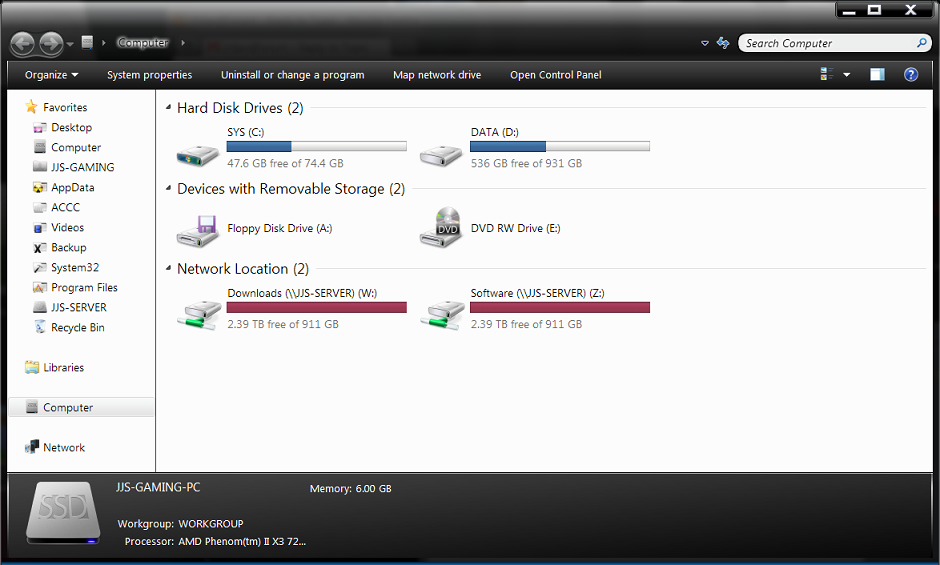
1.) My WHS's shares that are mapped on client computers always show up full, by the info shows 2.39 TB free of 911GB. Here is the situation, I have 4 HDDs on my WHS server, 2x1TB 1x750GB and 1x1.5TB. When I map a networked share on a client PC here is how the drive shows up in my computer.
MyComputer.png

Is there anyway to get an accurate progress meter in explorer either through addins or WHS services?
2.) Also, I have my server hooked up to a kill-a-watt right now and it shows 80W when idle, 82W when streaming videos, and 89 when writing. But when the demigrator gets going it uses 210-240W! What's the deal here, and is there anyway to calm that demigrator down to a normal level? I mean everytime I transfer data to a share with duplication on it spends like 30 minutes running demigrator and consequentially (that's a word?) eating up loads of electricity.
 
Back
Top