• Some users have recently had their accounts hijacked. It seems that the now defunct EVGA forums might have compromised your password there and seems many are using the same PW here. We would suggest you UPDATE YOUR PASSWORD and TURN ON 2FA for your account here to further secure it. None of the compromised accounts had 2FA turned on.
    Once you have enabled 2FA, your account will be updated soon to show a badge, letting other members know that you use 2FA to protect your account. This should be beneficial for everyone that uses FSFT.

Windows 11: incompatible drivers prevent using Memory integrity

peppergomez

2[H]4U
2FA
Joined
Sep 15, 2011
Messages
3,417
Hey all,

Just upgraded to Win 11. I see that in Device Security>Core Isolation I cannot enable Memory Integrity due to driver compatibility. When I review the incompatible drivers list it's mainly those from Logitech and Phase One (Capture One photo editing software)


https://support.microsoft.com/en-us...ntegrity-0b7ae567-74de-ee03-1030-9e6fe0d6f4b6

Instructions suggest trying to update via Windows Update or driver manufacturer. I've been doing Windows updates and that hasn't fixed it. Do I need to email Phase One and Logitech to ask about this?
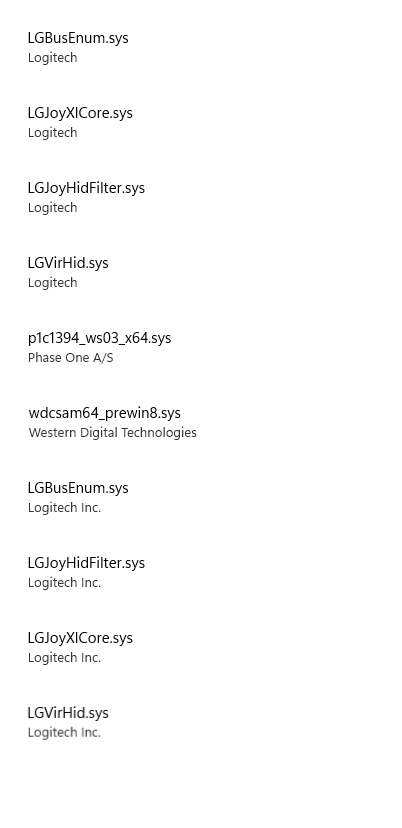
drivers.png


Thanks.
 
A quick Google for Logitech and windows 11 drivers did not lead to any solutions
 
Time to upgrade your mouse. W 11 complained about Asus AI suite here, I just disabled it and memory integrity now works wonders.
 
I have another item under that that says, "Vulnerable Driver Block List." I'm guessing Microsoft considers those drivers vulnerable. I can also have a toggle switch there grayed out (memory integrity enabled above). I'm guessing it won't let me enable memory integrity unless I also use opt into not using "vulnerable drivers."
 
I installed the Logitec Gaming Mouse software. Wonder if I remove that and just use the native MS mouse software it will fix it.
 
I installed the Logitec Gaming Mouse software. Wonder if I remove that and just use the native MS mouse software it will fix it.

Which version do you have? I have the Logitech G HUB software for my mouse and it doesn't give me that error.
 
OK I got it fixed by using the "pnputil" command in a command prompt as admin. Make sure to open the location of the file so you can get the exact path where it's stored.
The syntax is: pnputil /d xxxxxx.inf where "xxxxxx" refers to the name of the INF file. Once the INF file is deleted, all the files in that folder will be removed.

Most of these old drivers were in the folder: >Windows > System32 > DriverStore > FileRepository

I then confirmed that they were removed before I enabled code integrity. After the reboot, I installed the latest Logitech drivers using the link provided by "GotNoRice" - thanks for that link.
 
Someone has a really nice GUI tool that you can use to view/delete drivers in the Windows DriverStore if you don't want to use the PNP utility. It's called DriverStoreExplorer. It's pretty handy to clear out old drivers you previously installed. I like the 'select old drivers' option that lets you show drivers no longer being used to remove them. Handy to clear out display drivers since they can be over 1GB in size.

https://github.com/lostindark/DriverStoreExplorer
 
Back
Top