Why two sata controllers?

Sly

Supreme [H]ardness
Joined
Aug 17, 2004
Messages
5,749
My mobo is an emaxx-p35-pro and having some sata issues. First off, the 9800GTX blocks a good part of the motherboard so i don't have access to SATA1 and SATA2.

I have two sata drives. 250GB and 80GB. The 250 is my primary drive and it's plugged in right now in SATA3. I tried plugging in my 80GB in SATA4. However when i try checking the bios they don't show up. They're detected normally if only one is plugged in, but not both. Is this normal? I can't try SATA1 and SATA2 because they're under the video card.

There are a couple of white sockets, SATA5 and SATA6 slightly further away. But when i try to plug into them, they don't show up on the bios. They do show up on startup (pretty fast but i think i saw marvel in there) and they do work but i have no control on which harddrive to boot from if i use them.

This isn't much of an issue, but i'm wondering if this really is normal. I'm not a techie but it's like i have two independent southbridges.

btw, the DVD drive doesn't show up on the bios either (There's no space for it at all like the bios doesn't even support one), it does show up on the marvel list tho.
 
mostly to add more sata ports. Intel southbridges only have 4 (ICH8/ICH9) or 6 (ICH10) sata ports. Motherboard manufacturers just slap on another controller to add more ports to make themselves stand out above the others. (ooh look I can add 10 hard drives to this motherboard but only 4 to this one).
 
They're detected normally if only one is plugged in, but not both. Is this normal?

Nope. They should be seen anywhere in SATA ports 1 - 4. It looks like those ports are connected to an Intel ACH-9 controller and ports 5 & 6 are controlled by a Marvell controller as eSATA ports.
 
My mobo is an emaxx-p35-pro and having some sata issues. First off, the 9800GTX blocks a good part of the motherboard so i don't have access to SATA1 and SATA2.

My last mobo came with soem sata cables that had "L" shaped conectors. Getting some like that might fit under your vid card?
 
On some MBs, the second, usually non-Intel controller is used to provide IDE support for legacy drives. The SATA/eSATA that come with that are "free."
 
Thanks for the replies. I tried looking around the mall for those L-shaped sata cables, but all they have are straight the straight ones. I'll just keep an eye out for them =)
 
My mobo is an emaxx-p35-pro and having some sata issues. First off, the 9800GTX blocks a good part of the motherboard so i don't have access to SATA1 and SATA2.

I have two sata drives. 250GB and 80GB. The 250 is my primary drive and it's plugged in right now in SATA3. I tried plugging in my 80GB in SATA4. However when i try checking the bios they don't show up. They're detected normally if only one is plugged in, but not both. Is this normal? I can't try SATA1 and SATA2 because they're under the video card.

There are a couple of white sockets, SATA5 and SATA6 slightly further away. But when i try to plug into them, they don't show up on the bios. They do show up on startup (pretty fast but i think i saw marvel in there) and they do work but i have no control on which harddrive to boot from if i use them.

This isn't much of an issue, but i'm wondering if this really is normal. I'm not a techie but it's like i have two independent southbridges.

btw, the DVD drive doesn't show up on the bios either (There's no space for it at all like the bios doesn't even support one), it does show up on the marvel list tho.

If the two HDD's aren't both detected when plugged into SATA3 and SATA4 then you either have a bad southbridge or an improperly configured bios.
 
you either have a bad southbridge or an improperly configured bios.

Or a defective cable or a cable that's not plugged in correctly (the SATA connection is an annoying one - among other things, they'll stay in place even if not pushed all the way in).
 
Found a L sata cable. Haven't put it in yet but i'm not sure it'll fit. The video cards casing (I can't call this a heatsink!) is approximately the same size as the video card so the only space available is approximately the same height as the pcie socket :(

Here's a pic of my mobo
mob203lq0.jpg


Kinda disturbing to think that the card's so big, it covered two of the four satas. I can't use the lower PCIe because then i'll lose all the blue pins for the external USB, and that IDE ribbon cable would be right over the video cards intake fan.

If Old Hippie is right, then the problem may be somewhere else, maybe i have a PSU problem. My current one is the 500w that came with the casing. I'm gonna try to get a 600w one next week.

I have a 9800GTX, two SATA harddrives, an IDE dvd-writer and two large casefans.


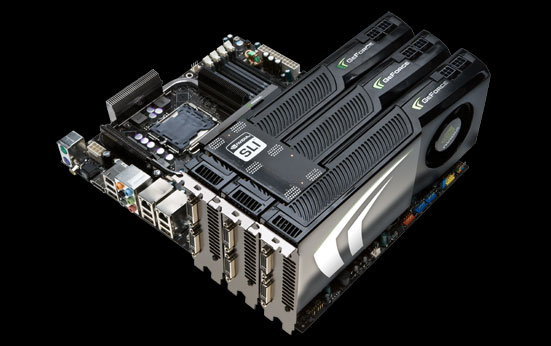
Found this posted on another forum. This isn't mine, but it does makes me wonder where the connectors are :D
gf_gtx_260_product_shot5.jpg
 
Back
Top