yeah 6040/41's suck but you dont see them floating around there all to often. i havent had one in almost 6 months i think.
I've has about 6 or so.
![[H]ard|Forum](/styles/hardforum/xenforo/logo_dark.png)
Follow along with the video below to see how to install our site as a web app on your home screen.
Note: This feature may not be available in some browsers.
yeah 6040/41's suck but you dont see them floating around there all to often. i havent had one in almost 6 months i think.
I get them on my slowest SMP system roughly 2-3 times a month. For some reason these WUs really like that system. Don't know why, perhaps it's because of the AMD processors... I have one being processed now, wanna see part of the log for the fun of it, LOL? Here it is...yeah 6040/41's suck but you dont see them floating around there all to often. i havent had one in almost 6 months i think.


Something is wrong with your system. I have an X4 @ 3.4 Ghz with a GTX 460 folding and I do 4000 PPD on a 6701.these 6701's are horrible... I am getting more PPD out of an 8800GT than an i7 920 @ 3.6ghz
8~ minute frame times 1780~ppd!!!
Yep, that makes sense and is similar to my octal-core systems clocked from 2.6-2.8GHz.Edit: if you are doing 8 minute frame times, you should be getting around 11.5K PPD.

Yeah, something is definitely wrong as you will be missing the preferred deadline by more than 24 hours. However, you are doing 7m 20s frame times so you should easily meet the preferred deadline. Looks like something is goofed with your FAHSpy. Can you install HFM.net and see what that says?heres what I am seeing
You're the same as I am and add to that the fact the data looks horribly condensed on high res displays...I get cross-eyed looking at it for more than a minute.interesting... I never liked HFM due to its lack of bargraphs, I like to glance at the monitor and see where everything is at...
I don't know what's up with FahSpy and the SMP clients. It has always been reporting weird figures, but only half the time. Sometimes it is spot on accurate... There's a bug in there for sure and it needs fixing.I installed it anyway and FAHSpy and HFM agree on the GPU PPD's but the CPU PPD's are way off... saying my 920 on that 6701 is getting 12492PPD and my QX6700 on a 6056 is getting 6188PPD
You're the same as I am and add to that the fact the data looks horribly condensed on high res displays...I get cross-eyed looking at it for more than a minute.
I don't know what's up with FahSpy and the SMP clients. It has always been reporting weird figures, but only half the time. Sometimes it is spot on accurate... There's a bug in there for sure and it needs fixing.
It does but not all the time (don't ask). With -bigadv the bonus is always displayed. It's a trade off I choose for not needing glasses to read the layout - or a microscope.bonus points yo... fahspy doesnt show bonus points. you either get the graph junk and no bonus points or no graph junk and bonus points with HFM. just how it goes.
bonus points yo... fahspy doesnt show bonus points. you either get the graph junk and no bonus points or no graph junk and bonus points with HFM. just how it goes.
It does but not all the time (don't ask). With -bigadv the bonus is always displayed. It's a trade off I choose for not needing glasses to read the layout - or a microscope.
Can't speak for others, I don't really care since I am well aware what each of my clients is supposed to produce. Only when a new series of WU is released does that cause an issue, but it's a minor annoyance until I get used to the new WU production. I have a very good idea what to expect from my systems and their clients, so it doesn't cause problems. It's a downside I accept for having a monitor that's more legible on my hi-res displays.The problem with FAHSpy is that, although it does calculate bonus points, it hasn't been updated for A3 WU's. When bigadv bonus points was added to it at the beginning of the year, it was for A2 bigadv and it hasn't been updated since. So you are both right.
Can't speak for others, I don't really care since I am well aware what each of my clients is supposed to produce. Only when a new series of WU is released does that cause an issue, but it's a minor annoyance until I get used to the new WU production. I have a very good idea what to expect from my systems and their clients, so it doesn't cause problems. It's a downside I accept for having a monitor that's more legible on my hi-res displays.
As far as progress graphs are concerned, you either like 'em or not. I find them necessary when one is running a ton of clients, in my case nearly two dozen. With less clients, yes, they are not as useful, possibly even useless. Some of the old monitors like G@HSpy and EM had progress graphs. I have a feeling the reason HFM does not is because the author wanted his monitor to be an heir to the previously successful FahMon, which also lacked graphs, but I'm not sure of this. Maybe he sees them as being redundant, I and other people do not. It's a personal preference like everything else. /shrug

haha no. I'm pretty sure my 920 capped out around 3.8 or 3.9ghz. I would be a bit surprised though if yours can't get there.Yeah with my i7 920 clocked at 3.6 I get TPF of 7:16
On that note: am I the only person with a 920 that CAN'T get it to clock stable at 4.0?? FML
lol that's what I'm telling myself, tooMaybe the 67xx are the most important units ever created. Maybe the science they are getting from them is absolutely groundbreaking, and PG wants to confirm their unbelieveable results! All hail 6701s!
haha no. I'm pretty sure my 920 capped out around 3.8 or 3.9ghz. I would be a bit surprised though if yours can't get there.
sounds like you just need better cooling.I can run at 3.8 but it gets a little too hot for my comfort, and I ran at 3.9 for a few weeks but it was crunching a 2684 and I woke up to a BSOD so I clocked it back down. 3.6 seems to be the sweet spot for this chip.
sounds like you just need better cooling.
I thought so too which is why I bought the H50. I have 2 fans on it in push/pull config blowing cold air into the case from the back forward. I'm using AS5 for the thermal compound and at 3.9ghz I push 85-90C which is no bueno. I'm thinking about lapping the CPU and heatsink to see if I can get the temps down a bit.
those temps at that voltage and overclock on that heatsink. there is something else wrong. unless you have a really high ambient temp you should be in the mid to high 70's at the most.I thought so too which is why I bought the H50. I have 2 fans on it in push/pull config blowing cold air into the case from the back forward. I'm using AS5 for the thermal compound and at 3.9ghz I push 85-90C which is no bueno. I'm thinking about lapping the CPU and heatsink to see if I can get the temps down a bit.
those temps at that voltage and overclock on that heatsink. there is something else wrong. unless you have a really high ambient temp you should be in the mid to high 70's at the most.
on another note.. I JUST GOT ANOTHER DAMN 6701 WU!!! WTF!!!!!!
Wow, that is pretty hot. How many volts are you feeding the cpu if you don't mind me asking?
Edit...ah, I see your sig now (duh). That is an awesome OC on those voltages. Odd that your temps are that high.
I'm wondering if the H50 sits above the GPU and the PSU, sucking in the hot air coming up from those.........and wondering where the hot air is exhausting.
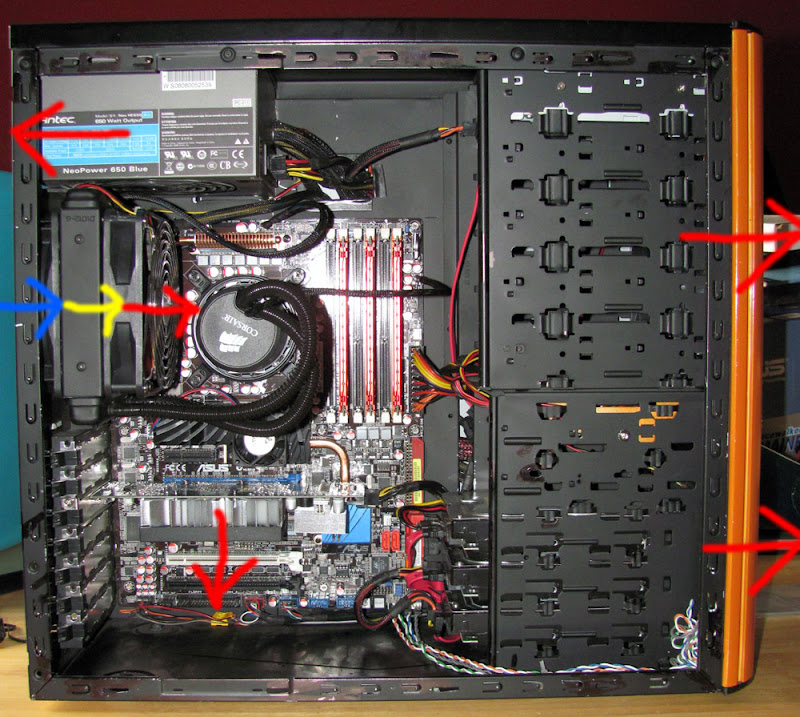

I think that is how I would set it up as wellPSU is above the H50 exhausting air out the back. Video card is on the bottom PCI-E slot and exhausts it's hot air into the case. I have two 80mm fans in the front of the case pushing the hot air out (my hard drives hate this.. they get pretty warm)
(pic)
I think that is how I would set it up as well
It's not down, just very high netload at the moment. Happens frequently with all SMP servers. It will upload in due time.Looks like a server is down... got a 6701 that won't upload to http://171.64.65.56:8080/

Ya'll want some cheese to go with ya'lls whine? Between 6701, slow GPU WUs, and BWM, ya'll are a whiney bunch lately. Sheesh.
I've mentioned this before but no one seems to care as they are too focused on maximum PPD. However, 6701 and 6702 are doing some very important science no other WUs are doing right now.