![[H]ard|Forum](/styles/hardforum/xenforo/logo_dark.png)
Navigation
Install the app
How to install the app on iOS
Follow along with the video below to see how to install our site as a web app on your home screen.
Note: This feature may not be available in some browsers.
More options
-
Some users have recently had their accounts hijacked. It seems that the now defunct EVGA forums might have compromised your password there and seems many are using the same PW here. We would suggest you UPDATE YOUR PASSWORD and TURN ON 2FA for your account here to further secure it. None of the compromised accounts had 2FA turned on.
Once you have enabled 2FA, your account will be updated soon to show a badge, letting other members know that you use 2FA to protect your account. This should be beneficial for everyone that uses FSFT.
You are using an out of date browser. It may not display this or other websites correctly.
You should upgrade or use an alternative browser.
You should upgrade or use an alternative browser.
What is your current CPU Cooling Device?
- Thread starter skyyless
- Start date


SixtyWattMan
Supreme [H]ardness
- Joined
- Aug 4, 2008
- Messages
- 4,466
S1283 with stock fan and backplate. Keeps me at 4ghz, can probably go higher but I haven't attempted it yet.
vertigomhs
[H]ard|Gawd
- Joined
- Aug 1, 2008
- Messages
- 1,231
noctua nh-c12p running q6600 @ 3.2ghz... temps reach about 60c load. not bad for my case.

still using my trusty old zalman CNPS 9500 LED that i got like 2.5 years ago.
getting around 40c idle and around 65c load. i know it can do better but im to lazy to reseat it. i switched its orientation around (a05b has reverse cooling) and i didnt bother reapplying paste.

edit: damn i need to clean out that sub sometime lol
edit2:
so you are saying your Q6600 idles at 68f? must be living in a freezer or something...
my ambient temp is like 72f
getting around 40c idle and around 65c load. i know it can do better but im to lazy to reseat it. i switched its orientation around (a05b has reverse cooling) and i didnt bother reapplying paste.
edit: damn i need to clean out that sub sometime lol
edit2:
Mine:
Intel: ASUS Silent Knight AL on a Q6600@3.5Ghz 15-20c 24/7
AMD: ASUS Silent Knight II [Copper] on a Phenom II x4 940@3.5Ghz 28-34c 24/7
so you are saying your Q6600 idles at 68f? must be living in a freezer or something...
my ambient temp is like 72f
unrealsword
Gawd
- Joined
- May 8, 2008
- Messages
- 825
True 120 black with 2x fans.

- Joined
- Apr 11, 2007
- Messages
- 33,441
Xigmatek S1283 w/ high speed Yate Loon
spenny2112
Limp Gawd
- Joined
- Dec 15, 2007
- Messages
- 382
Noctua NH-U12P in push/pull config.
MisterSparkle
[H]ard|Gawd
- Joined
- Feb 9, 2008
- Messages
- 1,077
and i didnt bother reapplying paste.
You make MisterSparkle cry :*(

filthysanchez
2[H]4U
- Joined
- Jul 19, 2006
- Messages
- 2,669
True with washer mod
still using my trusty old zalman CNPS 9500 LED that i got like 2.5 years ago.
getting around 40c idle and around 65c load. i know it can do better but im to lazy to reseat it. i switched its orientation around (a05b has reverse cooling) and i didnt bother reapplying paste.
edit: damn i need to clean out that sub sometime lol
edit2:
so you are saying your Q6600 idles at 68f? must be living in a freezer or something...
my ambient temp is like 72f
not really lol
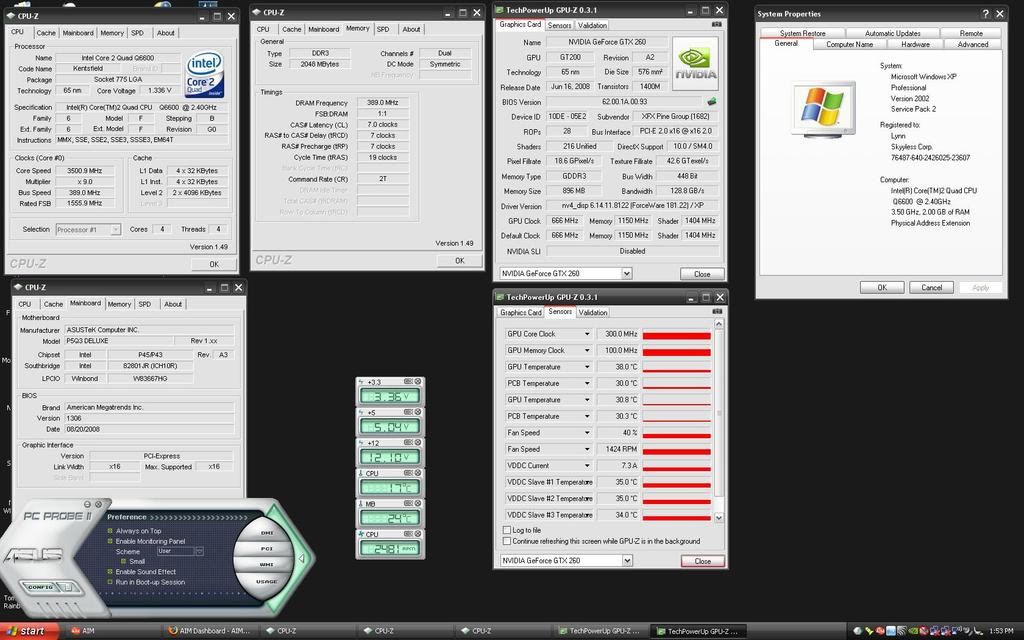
not really lol
http://i81.photobucket.com/albums/j209/boityper/lynnspec-1.jpg[IMG][/QUOTE]
pc probe is known to sometimes give erroneous readings.
try either realtemp, hwmontior or coretemp.
hey sp3 is out
Hey i know lol. this is winlite im good with this. since this is a slipstream i did myself.
Uberbob102000
2[H]4U
- Joined
- Apr 29, 2006
- Messages
- 2,243
Swiftech GTZ waterblock
Core i7 920 @ 4.2GHz
Core i7 920 @ 4.2GHz
At this moment a Thermalright XP-120 with a fat Sanyo Denki 120x38 on a 3.4gig northwood, tomorrow(crossing fingers) a XIGMATEK Dark Knight-S1283V on a Q9550(EO)-yes, I'd love the Sanyo Denki on the Xigmatek, but its only 3 pin and my new mobo is 4 pin pwm only.
A few, Right now i have a Lapped Tuniq 120, I used to switch back and forth with a TT Big Typhoon (Also lapped), but temps were the same, so i switched back.
I just got my V10 today and im still testing, so far, E5200 @ 4.3Ghz @ 1.49V, does not go over 55C, Which is awesome since on the tuniq it will spike around 75C. I also noticed my Pi blacks a bit cooler, Gotta love a V10
I just got my V10 today and im still testing, so far, E5200 @ 4.3Ghz @ 1.49V, does not go over 55C, Which is awesome since on the tuniq it will spike around 75C. I also noticed my Pi blacks a bit cooler, Gotta love a V10
A few, Right now i have a Lapped Tuniq 120, I used to switch back and forth with a TT Big Typhoon (Also lapped), but temps were the same, so i switched back.
I just got my V10 today and im still testing, so far, E5200 @ 4.3Ghz @ 1.49V, does not go over 55C, Which is awesome since on the tuniq it will spike around 75C. I also noticed my Pi blacks a bit cooler, Gotta love a V10
OoOO i must see a picture. I want one of the V10

ASUS Silent Knight AL on my Q6600 3.5Ghz
Please dont tell me thats your main case...
- Joined
- Apr 11, 2007
- Messages
- 33,441
At this moment a Thermalright XP-120 with a fat Sanyo Denki 120x38 on a 3.4gig northwood, tomorrow(crossing fingers) a XIGMATEK Dark Knight-S1283V on a Q9550(EO)-yes, I'd love the Sanyo Denki on the Xigmatek, but its only 3 pin and my new mobo is 4 pin pwm only.
3pin fan should plug into a 4pin PWM header. You just won't have PWM control.
ihmcguinness
Limp Gawd
- Joined
- Nov 15, 2007
- Messages
- 473
zalman CNPS 9500 LED
ASUS Silent Knight AL on my Q6600 3.5Ghz
just when you thought you've seen it all.....
i'm using the Xigmatek S1283 on a stock E6750. ice cold. no lapping.