![[H]ard|Forum](/styles/hardforum/xenforo/logo_dark.png)
Navigation
Install the app
How to install the app on iOS
Follow along with the video below to see how to install our site as a web app on your home screen.
Note: This feature may not be available in some browsers.
More options
You are using an out of date browser. It may not display this or other websites correctly.
You should upgrade or use an alternative browser.
You should upgrade or use an alternative browser.
The Conroe Overclock Database. (Please read 1st post for posting instructions.)
- Thread starter mentok1982
- Start date
- Status
- Not open for further replies.
mentok1982
Supreme [H]ardness
- Joined
- Sep 17, 2004
- Messages
- 4,385
zipdrive I have all the info I need except for CPU voltage. I don't trust CPU-Zs voltage readings.
Can you provide me with the voltage reading from your BIOS or another program?
Also since [H]ard|OCP recently reviewed the Monsoon 2, you should contact the author of the
article (Justin) and let them know what you think about it. I am sure he will be interested.
http://www.hardocp.com/article.html?art=MTE4MiwsLGhlbnRodXNpYXN0
His e-mail address is at the top of the article. Click his name to use Outlook.
Can you provide me with the voltage reading from your BIOS or another program?
Also since [H]ard|OCP recently reviewed the Monsoon 2, you should contact the author of the
article (Justin) and let them know what you think about it. I am sure he will be interested.
http://www.hardocp.com/article.html?art=MTE4MiwsLGhlbnRodXNpYXN0
His e-mail address is at the top of the article. Click his name to use Outlook.
Here's mine:
User Name: Clump
Stability: Orthos Large FFTs 22 Hours
CPU name: E6600
OC: 3405 MHz
Stepping: 6 B2
Week: L632
Code: A120
Vcore: 1.4625
Cooling: Air
Cooler brand/model: Zalman 9500
Motherboard: Asus P5W DH Dlx
Bios Version: 1305
RAM brand: Crucial
RAM rated speed: 6400
RAM actual speed: 946
Latency: 5-6-6-18
During the Orthos run I saw temps on core temp of 64 C max. Higher than I would like, water here we come!

User Name: Clump
Stability: Orthos Large FFTs 22 Hours
CPU name: E6600
OC: 3405 MHz
Stepping: 6 B2
Week: L632
Code: A120
Vcore: 1.4625
Cooling: Air
Cooler brand/model: Zalman 9500
Motherboard: Asus P5W DH Dlx
Bios Version: 1305
RAM brand: Crucial
RAM rated speed: 6400
RAM actual speed: 946
Latency: 5-6-6-18
During the Orthos run I saw temps on core temp of 64 C max. Higher than I would like, water here we come!
Deathspine
Weaksauce
- Joined
- Oct 15, 2006
- Messages
- 73
mentok1982 said:You forgot to say what CPU you have. I think it is an E6400 since you have a multiplier of
8, but let me know for sure please.
I update my enter but I have not figured out how to add my images and links.
I have a link for CPU-Z and a snap image of Prime95.
Could someone explain how that is done, or direct me to the instructions
Thanks
Update number two
I have all the information in my orginal enter now, is anything else need to be included in the data base?
Patrick
TheGoat Eater
[H]ard|Gawd
- Joined
- Nov 26, 2005
- Messages
- 1,428
USER- TheGoat Eater
Stability- ORTHOS small FFTs -stress CPU (5+ Hours)
Allendale E6400@ 3600MHz@1.45v
OC- 3600MHz
Stepping- 6 B2
Week- L626
Code- A293
Vcore- (REAL-1.448) (BIOS- )
Cooling- AIR
Cooler- Scythe Infinity w/ Silverstone RL-FM122-B on HIGH
(Fan causing RAM to be in single channel because ordered the wrong one - too deep -)
MOBO- P5B Deluxe/wifi-ap
BIOS- 0711
RAM- G.Skill
Model- F2-6400PHU2-2GBHZ
Rated Speed- 400MHz
Actual speed- 450MHz
Latency 4-4-4-12
Working on my RAM (single channel beacause of the fan)to get better performance (timings) then will do blend - but CPU is solid
Pic-

Stability- ORTHOS small FFTs -stress CPU (5+ Hours)
Allendale E6400@ 3600MHz@1.45v
OC- 3600MHz
Stepping- 6 B2
Week- L626
Code- A293
Vcore- (REAL-1.448) (BIOS- )
Cooling- AIR
Cooler- Scythe Infinity w/ Silverstone RL-FM122-B on HIGH
(Fan causing RAM to be in single channel because ordered the wrong one - too deep -)
MOBO- P5B Deluxe/wifi-ap
BIOS- 0711
RAM- G.Skill
Model- F2-6400PHU2-2GBHZ
Rated Speed- 400MHz
Actual speed- 450MHz
Latency 4-4-4-12
Working on my RAM (single channel beacause of the fan)to get better performance (timings) then will do blend - but CPU is solid
Pic-
TheGoat Eater
[H]ard|Gawd
- Joined
- Nov 26, 2005
- Messages
- 1,428
Got Ram issue fixed - 2 x 1024MB in Dual channel again figured the fan thing out
User Name: Badr
Stability: Orthos 10 Hours
CPU name: E6300
OC: 2975 MHz
Stepping: 6 B2
Week: L629
Code: A202
Vcore: 1.3275
Cooling: Air
Cooler brand/model: Arctic Freezer 7 Pro
Motherboard: Gigabyte GA 965P-DS3
Bios Version: F7
RAM brand: Kingston
RAM rated speed: 6000
RAM actual speed: 850
Latency: 4-4-4-12

Stability: Orthos 10 Hours
CPU name: E6300
OC: 2975 MHz
Stepping: 6 B2
Week: L629
Code: A202
Vcore: 1.3275
Cooling: Air
Cooler brand/model: Arctic Freezer 7 Pro
Motherboard: Gigabyte GA 965P-DS3
Bios Version: F7
RAM brand: Kingston
RAM rated speed: 6000
RAM actual speed: 850
Latency: 4-4-4-12
User Name: Badr
Stability: Orthos 10 Hours
CPU name: E6300
OC: 2975 MHz
Stepping: 6 B2
Week: L629
Code: A202
Vcore: 1.3275
Cooling: Air
Cooler brand/model: Arctic Freezer 7 Pro
Motherboard: Gigabyte GA 965P-DS3
Bios Version: F7
RAM brand: Kingston
RAM rated speed: 6000
RAM actual speed: 850
Latency: 4-4-4-12
http://img120.imageshack.us/my.php?image=1018screency6.jpg
Stability: Orthos 10 Hours
CPU name: E6300
OC: 2975 MHz
Stepping: 6 B2
Week: L629
Code: A202
Vcore: 1.3275
Cooling: Air
Cooler brand/model: Arctic Freezer 7 Pro
Motherboard: Gigabyte GA 965P-DS3
Bios Version: F7
RAM brand: Kingston
RAM rated speed: 6000
RAM actual speed: 850
Latency: 4-4-4-12
http://img120.imageshack.us/my.php?image=1018screency6.jpg
User Name: Badr
Stability: Orthos 10 Hours
I am sorry iam new to this imageshack
CPU name: E6300
OC: 2975 MHz
Stepping: 6 B2
Week: L629
Code: A202
Vcore: 1.3275
Cooling: Air
Cooler brand/model: Arctic Freezer 7 Pro
Motherboard: Gigabyte GA 965P-DS3
Bios Version: F7
RAM brand: Kingston
RAM rated speed: 6000
RAM actual speed: 850
Latency: 4-4-4-12
http://img176.imageshack.us/img176/9478/1018screencq8.jpg
Stability: Orthos 10 Hours
I am sorry iam new to this imageshack
CPU name: E6300
OC: 2975 MHz
Stepping: 6 B2
Week: L629
Code: A202
Vcore: 1.3275
Cooling: Air
Cooler brand/model: Arctic Freezer 7 Pro
Motherboard: Gigabyte GA 965P-DS3
Bios Version: F7
RAM brand: Kingston
RAM rated speed: 6000
RAM actual speed: 850
Latency: 4-4-4-12
http://img176.imageshack.us/img176/9478/1018screencq8.jpg
UPDATE
User Name: NerdAlert
Stability: 5hrs 37mins Orthos
CPU name E6400
OC: 3504MHz
Stepping: 6 B2
Week: L628
Code: A841
Vcore: 1.41V
Cooling: Air
Cooler brand/model: Arctic Cooler Freezer 7 Pro
Motherboard: GA-965P-DS3
Bios Version: F6
RAM brand: Corsair
RAM rated speed: 6400
RAM actual speed: 876
Latency: 5-6-6-20
Screenie:

Decided to push a little higher and managed 3.5GHz stable. That'll do pig, that'll do
User Name: NerdAlert
Stability: 5hrs 37mins Orthos
CPU name E6400
OC: 3504MHz
Stepping: 6 B2
Week: L628
Code: A841
Vcore: 1.41V
Cooling: Air
Cooler brand/model: Arctic Cooler Freezer 7 Pro
Motherboard: GA-965P-DS3
Bios Version: F6
RAM brand: Corsair
RAM rated speed: 6400
RAM actual speed: 876
Latency: 5-6-6-20
Screenie:
Decided to push a little higher and managed 3.5GHz stable. That'll do pig, that'll do
User Name: JJU357
Stability: 8 hours +
CPU name: E6300
OC: 3150 MHz
Stepping: 6B2
Week: L627
Code: A410
Vcore: 1.360 V
Cooling: Air
Cooler brand/model: Zalman 9500 LED
Motherboard: Gigabyte GA-965P-DS3
Bios Version: F7
RAM brand: Patriot
RAM rated speed: 5300
RAM actual speed: 900
Latency: 5-5-5-15
CPU-Z Validation Link

Stability: 8 hours +
CPU name: E6300
OC: 3150 MHz
Stepping: 6B2
Week: L627
Code: A410
Vcore: 1.360 V
Cooling: Air
Cooler brand/model: Zalman 9500 LED
Motherboard: Gigabyte GA-965P-DS3
Bios Version: F7
RAM brand: Patriot
RAM rated speed: 5300
RAM actual speed: 900
Latency: 5-5-5-15
CPU-Z Validation Link
Hi
I am sorry about reposting this because i just find out how to use imageshack .
User Name: Badr
Stability: Orthos 10 Hours
CPU name: E6300
OC: 2975 MHz
Stepping: 6 B2
Week: L629
Code: A202
Vcore: 1.3275
Cooling: Air
Cooler brand/model: Arctic Freezer 7 Pro
Motherboard: Gigabyte GA 965P-DS3
Bios Version: F7
RAM brand: Kingston
RAM rated speed: 6000
RAM actual speed: 850
Latency: 4-4-4-12

I am sorry about reposting this because i just find out how to use imageshack .
User Name: Badr
Stability: Orthos 10 Hours
CPU name: E6300
OC: 2975 MHz
Stepping: 6 B2
Week: L629
Code: A202
Vcore: 1.3275
Cooling: Air
Cooler brand/model: Arctic Freezer 7 Pro
Motherboard: Gigabyte GA 965P-DS3
Bios Version: F7
RAM brand: Kingston
RAM rated speed: 6000
RAM actual speed: 850
Latency: 4-4-4-12
CPU: E6300
OC: 3151
Stepping: 6 B2
Week: L629
Code: A215
Vcore: 1.33750
Cooling: Air
Cooler brand/model: Scythe Ninja Plus
Motherboard: Gigabyte GA 965P-DS3
Bios Version: F7?
RAM brand: OCZ Platnum
RAM rated speed: 6400
RAM actual speed: 900
Latency: 5-5-5-15

OC: 3151
Stepping: 6 B2
Week: L629
Code: A215
Vcore: 1.33750
Cooling: Air
Cooler brand/model: Scythe Ninja Plus
Motherboard: Gigabyte GA 965P-DS3
Bios Version: F7?
RAM brand: OCZ Platnum
RAM rated speed: 6400
RAM actual speed: 900
Latency: 5-5-5-15
ShiningHolden
Limp Gawd
- Joined
- Oct 21, 2006
- Messages
- 315
Badr said:
I think the FAN RPMs may be a little off there, buddy.
ShiningHolden said:I think the FAN RPMs may be a little off there, buddy.
I have no idea why ,here another picture with Everest

Deathspine
Weaksauce
- Joined
- Oct 15, 2006
- Messages
- 73
Deathspine Overclocking
--------------------------------------------------------------------------------
User Name: Deathspine
Stability: 11+ hours Prime95, Ortho 8+ hours
CPU: E6400
MHZ: 3208.62
Stepping: 6 B2
Week: L624
Code: A849
Watts: 65
Volts: 1.45
Cooling Method: Water
Water Block: CoolIT Freezone
Motherboard: Abit AB9-Pro
Bios: 1.4
Ram: Corsair
Ram Speed: 6400
Ram MHz: 801
Ram Latency: 4-4-4-12
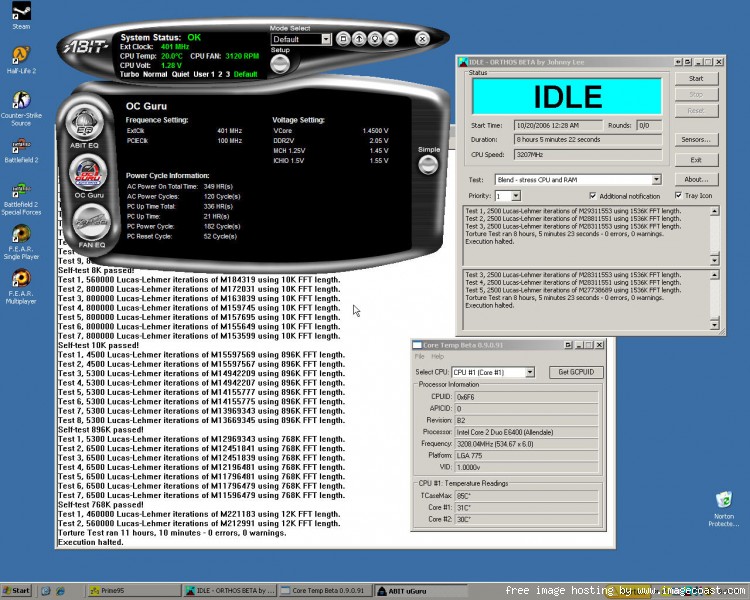
CPU-Z validation:
http://valid.x86-secret.com/show_oc.php?id=130704
--------------------------------------------------------------------------------
User Name: Deathspine
Stability: 11+ hours Prime95, Ortho 8+ hours
CPU: E6400
MHZ: 3208.62
Stepping: 6 B2
Week: L624
Code: A849
Watts: 65
Volts: 1.45
Cooling Method: Water
Water Block: CoolIT Freezone
Motherboard: Abit AB9-Pro
Bios: 1.4
Ram: Corsair
Ram Speed: 6400
Ram MHz: 801
Ram Latency: 4-4-4-12
CPU-Z validation:
http://valid.x86-secret.com/show_oc.php?id=130704
sardonic.n7
Limp Gawd
- Joined
- Oct 16, 2006
- Messages
- 273
This OCing database is awesome
Great job OP!
User Name: sardonic.n7
Stability: Orthos Blend 4+ hours
CPU Name: Intel Core 2 Duo E6400
OC: 3402 MHz (7x486)
Stepping: 6 B2
Week: L626
Code: A319
Vcore: 1.42V idle/1.4V load (set as 1.45V in bios)
Cooling: Air
Cooler: Thermaltake Big Typhoon
Motherboard: Asus P5B Deluxe WiFi-AP
Bios Version: 0711
RAM brand: Team Xtreem 2x1 GB
RAM rated speed: PC2-8000 5-5-5-15
RAM actual speed: 972
Latency: 4-4-4-10
http://valid.x86-secret.com/show_oc?id=132136

Great job OP!
User Name: sardonic.n7
Stability: Orthos Blend 4+ hours
CPU Name: Intel Core 2 Duo E6400
OC: 3402 MHz (7x486)
Stepping: 6 B2
Week: L626
Code: A319
Vcore: 1.42V idle/1.4V load (set as 1.45V in bios)
Cooling: Air
Cooler: Thermaltake Big Typhoon
Motherboard: Asus P5B Deluxe WiFi-AP
Bios Version: 0711
RAM brand: Team Xtreem 2x1 GB
RAM rated speed: PC2-8000 5-5-5-15
RAM actual speed: 972
Latency: 4-4-4-10
http://valid.x86-secret.com/show_oc?id=132136
User Name: jondl
Stability: Orthos 8hours+ prime
CPU name E6300
OC: 3247mhz
Stepping: 6 B2
Week: L628
Code: A247
Vcore: (BIOS: 1.3v)(SpeedFan: 1.26)
Cooling: AIR
Cooler brand/model: Intel HSF STOCK
Motherboard: Gigabyte GA-965P-DS3
Bios Version: F7
RAM brand: Crucial
RAM rated speed: PC2 5300
RAM actual speed: (Example: 928)
Latency: (Example: 4-4-4-12)

First day. I hit a wall at 3.4ghz unstable but most likely a heat issue. Waiting for my Ultra-120 and HR-05 and we'll see how far this baby goes!
Stability: Orthos 8hours+ prime
CPU name E6300
OC: 3247mhz
Stepping: 6 B2
Week: L628
Code: A247
Vcore: (BIOS: 1.3v)(SpeedFan: 1.26)
Cooling: AIR
Cooler brand/model: Intel HSF STOCK
Motherboard: Gigabyte GA-965P-DS3
Bios Version: F7
RAM brand: Crucial
RAM rated speed: PC2 5300
RAM actual speed: (Example: 928)
Latency: (Example: 4-4-4-12)
First day. I hit a wall at 3.4ghz unstable but most likely a heat issue. Waiting for my Ultra-120 and HR-05 and we'll see how far this baby goes!
sardonic.n7
Limp Gawd
- Joined
- Oct 16, 2006
- Messages
- 273
jondl said:First day. I hit a wall at 3.4ghz unstable but most likely a heat issue. Waiting for my Ultra-120 and HR-05 and we'll see how far this baby goes!
It's not a heat issue (if Speedfan is reading temps correctly anyway).
Not CPU heat issue anyway.
NB/SB is another story.
It'll be mostly likely you need more vcore (as right now you are way below stock) or your RAM crapping out (loosen timings or up vcore).
Based on your low temps/vcore, you should have at least 3400, likely 3500 as a target
mentok1982
Supreme [H]ardness
- Joined
- Sep 17, 2004
- Messages
- 4,385
Holy crap the weekend is over! That must mean I am back at my desk with nothing to do
once again. I should be able to update today for you folks.
once again. I should be able to update today for you folks.
sardonic.n7 said:It's not a heat issue (if Speedfan is reading temps correctly anyway).
Not CPU heat issue anyway.
NB/SB is another story.
It'll be mostly likely you need more vcore (as right now you are way below stock) or your RAM crapping out (loosen timings or up vcore).
Based on your low temps/vcore, you should have at least 3400, likely 3500 as a target
Yup, thats what i meant. NB heat issue since it gets VERY hot to the touch even with the Vornado fan running at it. Anyway, I put my trusty Vornado fan up to the motherboard last night and ran orthos at 3.4ghz + vcore 1.325 and everything ran perfectly fine. Is it normal for me to HAVE to set the vMCH to +0.3v? Around 3.1ghz i start having to need to up the vmch by +0.1v every 100-150mhz. I'll post up validation and such later on today. Have to get ready for class.
Also, my RAM is D9GMH and they've been known to do quite well above 1000mhz+.
mentok1982
Supreme [H]ardness
- Joined
- Sep 17, 2004
- Messages
- 4,385
Last time I updated it was last Monday. I can't believe it was a full week between updates. I
will do my best to not do that again. I may not update every day, but 7 days is too long.
will do my best to not do that again. I may not update every day, but 7 days is too long.
Hey Mentok....here is yet another update man!!
I loosened the timings a little, up'd the Vcore and Vdimm, and squeezed a little more out of this sucker!
User Name: ssabripo (my real name is "shervin" )
Stability: 4h+ Dual 1M SuperPI + Orthos small FFT+Orthos Blend (Max temp @ 63degree Celcius)
CPU name: E6300
OC: 3398MHz
Stepping: 6 B2
Week: L629
Code: A187
Vcore: 1.375v
Vdimm: 2.30v
Cooling: Air
Cooler brand/model: Scythe Infinity
Motherboard: Asus P5B Deluxe Wi-Fi
Bios Version: 0711
RAM brand: Crucial Ballistix BL2KIT12864AA804
RAM rated speed: 6400
Latency: 5-5-5-15 4-42 @ 1:1
CPUZ validation: http://valid.x86-secret.com/show_oc?id=132373

I've been doing double SuperPi 1M, 3dmark05, and orthos for about 4 hours, and so far it's ok....I was hoping for better superPi timings, but this will do....this chip is AMAZING!!

I loosened the timings a little, up'd the Vcore and Vdimm, and squeezed a little more out of this sucker!
User Name: ssabripo (my real name is "shervin"
)Stability: 4h+ Dual 1M SuperPI + Orthos small FFT+Orthos Blend (Max temp @ 63degree Celcius)
CPU name: E6300
OC: 3398MHz
Stepping: 6 B2
Week: L629
Code: A187
Vcore: 1.375v
Vdimm: 2.30v
Cooling: Air
Cooler brand/model: Scythe Infinity
Motherboard: Asus P5B Deluxe Wi-Fi
Bios Version: 0711
RAM brand: Crucial Ballistix BL2KIT12864AA804
RAM rated speed: 6400
Latency: 5-5-5-15 4-42 @ 1:1
CPUZ validation: http://valid.x86-secret.com/show_oc?id=132373
I've been doing double SuperPi 1M, 3dmark05, and orthos for about 4 hours, and so far it's ok....I was hoping for better superPi timings, but this will do....this chip is AMAZING!!
mentok1982, I reached my limit of 3 entries. You do whatever you want with this one. I reached the limit of my system.
User Name: Blurp
CPU name : E6400
Stepping: 6 B2
Week: L626
Code: A228
Cooling: air
Cooler brand/model: Zalman 9500
Motherboard: Gigabyte GA-965P-DS3
Bios Version: F8a
RAM brand: Mushkin
RAM rated speed: 6400
RAN actual speed: 864
Latency: 5-5-5-12 2.1v
Here are stable overclocks according to vcore:
vcore 1.3500 = 3200 MHz Coretemp = 57-59
vcore 1.38124 = 3264 MHz Coretemp = 60
vcore 1.400 = 3280 MHz Coretemp = 60
vcore 1.475 = 3400 MHz Coretemp = 67
vcore 1.55 = 3456 MHz Coretemp = 70

User Name: Blurp
CPU name : E6400
Stepping: 6 B2
Week: L626
Code: A228
Cooling: air
Cooler brand/model: Zalman 9500
Motherboard: Gigabyte GA-965P-DS3
Bios Version: F8a
RAM brand: Mushkin
RAM rated speed: 6400
RAN actual speed: 864
Latency: 5-5-5-12 2.1v
Here are stable overclocks according to vcore:
vcore 1.3500 = 3200 MHz Coretemp = 57-59
vcore 1.38124 = 3264 MHz Coretemp = 60
vcore 1.400 = 3280 MHz Coretemp = 60
vcore 1.475 = 3400 MHz Coretemp = 67
vcore 1.55 = 3456 MHz Coretemp = 70
Arcygenical
Fully [H]
- Joined
- Jun 10, 2005
- Messages
- 25,066
Alright! I just finished the minimum 4hrs orthos mark, and decided to post what I have!
User Name: Arcygenical
Stability: Orthos 4hrs 40min
CPU name E6300
OC: 3409 mhz **EDIT this setting is now stable for 16 hours, screenshots can be made available if needed, but it's only 7mhz)
Stepping: 6 B2
Week: L629
Code: A214
Vcore: 1.304v (according to speedfan, BIOS tells me it's closer to 1.34v)
Cooling: Water
Cooler brand/model: Danger Den and some custom pieces
Motherboard: Asus P5b-Deluxe
Bios Version: 0507
RAM brand: OCZ Platinum
RAM rated speed: PC2 6400
RAM actual speed: 972
Latency: 5-5-5-15 (could get to 4-4-4-12 but would crash Orthos after 16 hrs)
And now for the (MS PAINT butchered) jpg proof..

User Name: Arcygenical
Stability: Orthos 4hrs 40min
CPU name E6300
OC: 3409 mhz **EDIT this setting is now stable for 16 hours, screenshots can be made available if needed, but it's only 7mhz
)Stepping: 6 B2
Week: L629
Code: A214
Vcore: 1.304v (according to speedfan, BIOS tells me it's closer to 1.34v)
Cooling: Water
Cooler brand/model: Danger Den and some custom pieces
Motherboard: Asus P5b-Deluxe
Bios Version: 0507
RAM brand: OCZ Platinum
RAM rated speed: PC2 6400
RAM actual speed: 972
Latency: 5-5-5-15 (could get to 4-4-4-12 but would crash Orthos after 16 hrs)
And now for the (MS PAINT butchered) jpg proof..
snapshooter
n00b
- Joined
- Oct 26, 2005
- Messages
- 14
It is going to be my 24/7. Any higher FSB requires too high vcore and consequently produces too hight temp for my taste.
User Name: snapshooter
Stability: 4hours+ Orthos
CPU name: E6400
OC: 3128
Stepping: 6 B2
Week: L628
Code: A396
Vcore: 1.375 in BIOS, 1.28 under load in Asus AI Suite/CPU-Z/Speedfan
Cooling: Air
Cooler brand/model: Thermalright HR-01
Motherboard: P5B ( Vanilla)
Bios Version: 0701
RAM brand: Corsair
RAM rated speed: 5400
RAM actual speed: 782
Latency: 4-4-4-12

CPU-Z Validation
User Name: snapshooter
Stability: 4hours+ Orthos
CPU name: E6400
OC: 3128
Stepping: 6 B2
Week: L628
Code: A396
Vcore: 1.375 in BIOS, 1.28 under load in Asus AI Suite/CPU-Z/Speedfan
Cooling: Air
Cooler brand/model: Thermalright HR-01
Motherboard: P5B ( Vanilla)
Bios Version: 0701
RAM brand: Corsair
RAM rated speed: 5400
RAM actual speed: 782
Latency: 4-4-4-12

CPU-Z Validation
Hi
new update:
User Name: Badr
Stability: Orthos 10 Hours
CPU name: E6300
OC: 3150 MHz
Stepping: 6 B2
Week: L629
Code: A202
Vcore: 1.3275
Cooling: Air
Cooler brand/model: Arctic Freezer Pro 7
Motherboard: Gigabyte GA 965P-DS3
Bios Version: F7
RAM brand: Kingston HyperX KHX6000D2K2/2G
RAM rated speed: 6000
RAM actual speed: 900
Latency: 5-5-5-15

new update:
User Name: Badr
Stability: Orthos 10 Hours
CPU name: E6300
OC: 3150 MHz
Stepping: 6 B2
Week: L629
Code: A202
Vcore: 1.3275
Cooling: Air
Cooler brand/model: Arctic Freezer Pro 7
Motherboard: Gigabyte GA 965P-DS3
Bios Version: F7
RAM brand: Kingston HyperX KHX6000D2K2/2G
RAM rated speed: 6000
RAM actual speed: 900
Latency: 5-5-5-15
I've got my E6400 up to 3.4ghz using Freezone Coolit liquid cooling.
I was running ORTHOS and i got an error about an hour in.. working on getting it more stable, but its been running hot. Under full load I get about 64c. Ill post more if i can get orthos to run overnight or something.
I was running ORTHOS and i got an error about an hour in.. working on getting it more stable, but its been running hot. Under full load I get about 64c. Ill post more if i can get orthos to run overnight or something.
http://valid.x86-secret.com/show_oc?id=132873

doormat
Orthos - small FFT 21+ hrs
Core 2 Duo E6400 (2.13Ghz)
OC: 3.2Ghz
Stepping: 6 B2
Week: L627.
Code: A963
Voltage: set at 1.35V in BIOS, CPU-Z reads 1.25V
Cooling: Air
HSF: Scythe Ninja
Mobo: Asus P5B-E 1.01
BIOS: 0601
RAM:
G.Skill 2x1GB PC-6400
Actual speed: 800Mhz
Latency: 4-4-4-10
I may try higher this weekend (woo three day weekend!) so stay tuned.
doormat
Orthos - small FFT 21+ hrs
Core 2 Duo E6400 (2.13Ghz)
OC: 3.2Ghz
Stepping: 6 B2
Week: L627.
Code: A963
Voltage: set at 1.35V in BIOS, CPU-Z reads 1.25V
Cooling: Air
HSF: Scythe Ninja
Mobo: Asus P5B-E 1.01
BIOS: 0601
RAM:
G.Skill 2x1GB PC-6400
Actual speed: 800Mhz
Latency: 4-4-4-10
I may try higher this weekend (woo three day weekend!) so stay tuned.
I've got a new conroe overclocking page at
this link. I'd love you all to take a look.
There are some overclocking results posted there that can be seen as well.
My results are:
e6400 @ 3040, 1.375
aw9d-max
this link. I'd love you all to take a look.
There are some overclocking results posted there that can be seen as well.
My results are:
e6400 @ 3040, 1.375
aw9d-max
User Name: playerX
Stability: 7 hours Orthos
CPU name: E6600
OC: 3600
Stepping: 6 B2
Week: L625
Code: A740
Vcore: 1.5
Cooling: Air
Cooler brand/model: TT Big Typhoon
Motherboard: Asus P5B Deluxe Wifi
Bios Version: 0614
RAM brand: Team
RAM rated speed: 5300
RAM actual speed: 900
Latency: 4-4-4-4

Stability: 7 hours Orthos
CPU name: E6600
OC: 3600
Stepping: 6 B2
Week: L625
Code: A740
Vcore: 1.5
Cooling: Air
Cooler brand/model: TT Big Typhoon
Motherboard: Asus P5B Deluxe Wifi
Bios Version: 0614
RAM brand: Team
RAM rated speed: 5300
RAM actual speed: 900
Latency: 4-4-4-4

User Name: DavMX
Stability: 1h 41m hours Orthos
CPU name: E6600
OC: 3.24 Ghz
Stepping:???
Week: L626
Code: ???
Vcore: ???
Cooling: Air
Cooler brand/model: Zalman 9500
Motherboard: Asus P5W DH
Bios Version: 0801
RAM brand: Corsair
RAM rated speed: ???
RAM actual speed:???
Latency: ???
I have to fill out the missing ones in the morning.
mentok1982
Supreme [H]ardness
- Joined
- Sep 17, 2004
- Messages
- 4,385
dekard said:I've got a new conroe overclocking page at
this link. I'd love you all to take a look.
There are some overclocking results posted there that can be seen as well.
My results are:
e6400 @ 3040, 1.375
aw9d-max
Not enough information for me to add it to our database. Check out post number 1 for all the stuff I want.
Davmx said:User Name: DavMX
Stability: 1h 41m hours Orthos
To make it into the main database you need to be able to run Orthos on both cores for at least 4 hours.
mentok1982
Supreme [H]ardness
- Joined
- Sep 17, 2004
- Messages
- 4,385
Anyone know anyone with an E6700 or X6800? Anyone?
KEY:
Green=official result (all columns filled)
Black and bold=not official result

Highest overclocks that have not been proven to be stable:

KEY:
Green=official result (all columns filled)
Black and bold=not official result
Highest overclocks that have not been proven to be stable:
I finally updated my post with the week and code information for my E6600.
I bought an L630A E6600 from TankGuys to go for some better overclocking but I'm not ready to post any results yet. My original E6600 which I posted the 3.4ghz overclock results for is an L625A. The reason I didn't post the info originally is that I put my machine together too quickly and forgot to write it down. It was an OEM packaged chip and the packaging did not have this information on it. I had to use metal polish (for chrome wheels) to get the Coollaboratory Liquid Pro off of my original CPU after I took it out so I could read the numbers off the IHS.
My new L630A E6600 was retail boxed and so far I've gotten 3.6ghz (400 x 9) 3 hours Orthos stable out of it but with 1.525 vCore set in BIOS, and a huge 20" fan blowing inside the case. My temps are very high and I don't like it. For now I am using Zalman STG1 thermal paste. I will post final results later on..
-JWM
I bought an L630A E6600 from TankGuys to go for some better overclocking but I'm not ready to post any results yet. My original E6600 which I posted the 3.4ghz overclock results for is an L625A. The reason I didn't post the info originally is that I put my machine together too quickly and forgot to write it down. It was an OEM packaged chip and the packaging did not have this information on it. I had to use metal polish (for chrome wheels) to get the Coollaboratory Liquid Pro off of my original CPU after I took it out so I could read the numbers off the IHS.
My new L630A E6600 was retail boxed and so far I've gotten 3.6ghz (400 x 9) 3 hours Orthos stable out of it but with 1.525 vCore set in BIOS, and a huge 20" fan blowing inside the case. My temps are very high and I don't like it.
For now I am using Zalman STG1 thermal paste. I will post final results later on..-JWM
- Status
- Not open for further replies.