The Conroe Overclock Database. (Please read 1st post for posting instructions.)

Status
Not open for further replies.
User Name: NerdAlert
Stability: 4hours+ Orthos

CPU name E6400
OC: 3400MHz
Stepping: 6 B2
Week: L628
Code: A841
Vcore: 1.38V

Cooling: Air
Cooler brand/model: Arctic Cooler Freezer 7 Pro

Motherboard: GA-965P-DS3
Bios Version: F6

RAM brand: Corsair
RAM rated speed: 6400
RAM actual speed: 850
Latency: 5-6-6-20

Screenie:
3400oc.jpg


Note, I was supposed to show three different tabs on CPU-Z, but forgot in my haste to take the screenshot.

Was run at 3600MHz for an hour at 1.48V, but I didn't like the CPU temp (75C). Maybe 3500MHz in the future, but 3400MHz kicks absolute azz compared to the A64 3000+ @ 3700+ it replaced.
 
User Name: ssabripo (my real name is "shervin" :) )
Stability: 4h+ Dual 1M SuperPI + Orthos small FFT+Orthos Blend (Max temp @ 65degree Celcius)

CPU name: E6300
OC: 3220MHz
Stepping: 6 B2
Week: L629
Code: A187
Vcore: 1.365v
Vdimm: 2.25v

Cooling: Air
Cooler brand/model: Scythe Infinity

Motherboard: Asus P5B Deluxe Wi-Fi
Bios Version: 0711

RAM brand: Crucial Ballistix BL2KIT12864AA804
RAM rated speed: 6400
RAM actual speed: 892
Latency: 4-4-4-8 4-35 @ 1:1


CPUZ validation: http://valid.x86-secret.com/show_oc?id=129306
CPUZ%20validation%201.jpg


I ran two hours of Orthos small FFT, and then two hours of Blend test...I didn't know how to save both screenshots to add both times, but if someone can show me how to do that, I will re-run and submitt if necessary:
stable_current_final_OC_3.2ghz_12965_orthos.jpg

stable_current_final_OC_3.2ghz_12965.jpg
 
User Name: ChrisII
Stability: 13h40 minutes orthos stable (Small FFTs)

CPU name: E6300
OC: 3010MHz
Stepping: 6 B2
Week: L626
Code: A258
Vcore: 1.2875

Cooling: Air
Cooler brand/model: Intel Stock

Motherboard: GA-965P-S3
Bios Version: F5

RAM brand: G.Skill
RAM rated speed: 6400
RAM actual speed: 860
Latency: 4-4-4-12

Screenshot including CPU-Z:
my.php


I hang out mostly at Overclock.net, but you guys have a really complete Core 2 Duo overclock database. I just though my contribution was worthwile.
 
ChrisII said:
I hang out mostly at Overclock.net, but you guys have a really complete Core 2 Duo overclock database. I just though my contribution was worthwile.

You have made me the happiest data monger on the Internet. :D

Please hang out with us some more! (Especially if you are gonna continue to say nice things about my work.;) )
 
ssabripo said:
Ps- guys, just let me know if I missed something and needs resubmission :)

You have everything that I am looking for. Look for an update this afternoon.
 
I've got a gimpy e6400 that does 3680mhz 1.44v. At some point after removing the IHS and swapping through many motherboards, something didn't survive, and i have to set windows to see only 1 core, or i get blue screens and no boots. The cpu also only works on my ds3 and not my p5b-deluxe

lets see

cpu : E6400
OC : 3680mhz
Week : L625
Code : A429
Vcore: 1.44v
Vdimm: 1.8v

Cooling : Water
Brand : Storm Rev 1

Motherboard : Ds3
BIOS : F6

Ram : Patriot
Speed : 667 / pc-5300
Actual : 920 mhz
Latency : 4-5-5-12


pardon my cpu-=z gimpieness. like i said, the cpu is damaged, so some things don't display correctly.
gimp-1.jpg
 
Hey Mentok....here is an update man!! woohooo!!

User Name: ssabripo (my real name is "shervin" :) )
Stability: 4h+ Dual 1M SuperPI + Orthos small FFT+Orthos Blend (Max temp @ 65degree Celcius)

CPU name: E6300
OC: 3304MHz
Stepping: 6 B2
Week: L629
Code: A187
Vcore: 1.365v
Vdimm: 2.25v

Cooling: Air
Cooler brand/model: Scythe Infinity

Motherboard: Asus P5B Deluxe Wi-Fi
Bios Version: 0711

RAM brand: Crucial Ballistix BL2KIT12864AA804
RAM rated speed: 6400
RAM actual speed: 892
Latency: 4-4-4-8 4-35 @ 1:1


CPUZ validation: http://valid.x86-secret.com/show_oc?id=129576

CPUZ validation 3304ghz.jpg


I'm just starting the orthos 2nd part of test now, but so far so good...I''l post an update as it goes longer if you want....let me know.


stable_current_final_OC_3.3ghz_13006.jpg


stable_current_final_OC_3.3ghz_13006_orthos.jpg
 
I am not uploading the database tonight. So there.

KEY:
Green=official result (all columns filled)
Black and bold=not official result
conroe1yz6.png


Highest overclocks that have not been proven to be stable:
unstablemb8.png
 
Any reason my result isn' in green? I copy/pasted the info from the first post and filled in the blanks
 
ChrisII said:
Any reason my result isn' in green? I copy/pasted the info from the first post and filled in the blanks

You need to provide a cpuz verification. Take a look at a few of the other posts, You'll see what it is. The instructions are on the last tab of cpuz.

It will be best if you redo the test in full to get another post, not just a seperate verification appended.

That is a nice low power overclock. You should try a pumped up one.
 
nooh,

I'm coming for you. I'm prime stable @ 3.730. I can get 3.780 ish for over an hour... but no cigar. Its on!
 
sol.fides said:
You need to provide a cpuz verification. Take a look at a few of the other posts, You'll see what it is. The instructions are on the last tab of cpuz.

It will be best if you redo the test in full to get another post, not just a seperate verification appended.

That is a nice low power overclock. You should try a pumped up one.

CPU verification has nothing to do with the greeness. As long as all columns are filled the
result is colored green. If you want to provide me with the CPU verfication link that is cool too.
 
ChrisII said:
Any reason my result isn' in green? I copy/pasted the info from the first post and filled in the blanks

No reason. I just forgot to color it green. It will be fixed on the next update.

sol.fides said:
You need to provide a cpuz verification. Take a look at a few of the other posts, You'll see what it is. The instructions are on the last tab of cpuz.

It will be best if you redo the test in full to get another post, not just a seperate verification appended.

That is a nice low power overclock. You should try a pumped up one.

CPU verification has nothing to do with the greeness. As long as all columns are filled the
result is colored green. If you want to provide me with the CPU verfication link that is cool too.
 
User Name: fhpchris
Stability:sp2004 blend

CPU name: E6600
OC: 3707MHz
Stepping: 6 B2
Week: Example: L628
Code: A235
Vcore: 1.62v
Asus P5WDG2 WS PRO

Cooling: Water
Cooler brand/model: MP-05 SP LE

Motherboard: Asus P5WDG2 WS PRO
Bios Version: 0004

RAM brand: Crucial Ballistix
RAM rated speed: 6400
RAM actual speed: 824
Latency: 4-3-3-1

t3.JPG
 
sol.fides said:
nooh,

I'm coming for you. I'm prime stable @ 3.730. I can get 3.780 ish for over an hour... but no cigar. Its on!
Man i have already been whooped by Sheckers. I can go till till 3900+ with super pi but I am scared of running prime because of temps , also my board is not the best for showing temps , however it does show core temps .

I am doing another E6400 or a E6300 and going to go all out on that one, until it throttles , no turning back.Hopefully one this weekend or beginning of the next week also one after next week.Been lucky in that sence i have quite a few to play with and this board is brill , it helps you and tells you what to expect.

I have helped three people overclock in the last week using this board and graphs. Just tell the opposite person to put htese in the BIOS and run orthos on it for a day and its done.

Dude what are you using for cooling? Also go for it and dont be scared of it dieing on you , feel the HSF and as long as its not touch hot keep on going.
 
User Name: Chaoticon
Stability:sp2004 Small FFT/HCI memtest(Two instances)

CPU name: E6400
OC: 3200MHz
Stepping: 6 B2
Week: L626
Code: A278
Vcore: 1.356v

Cooling: Air
Cooler brand/model: Zalman 9500 Led

Motherboard: Gigabyte 965p DS3
Bios Version: F6
RAM brand: G.Skill
RAM rated speed: 6400
RAM actual speed: 400
Latency: 5-5-5-15

ChaoticonOC1.jpg


I had two instances of HCI memtest running 1gig of ram each, had them at about 9000percent stable, accidentally closed them. I plan on trying to overclock more, or at least tighening my memory timings. Thanks for all the advice guys.
 
User Name: Wterryiv
Stability:Orthos Blended

CPU name: E6300
OC: 3430MHz
Stepping: 6 B2
Week: L629
Code: A216
Vcore: 1.4v

Cooling: Air
Cooler brand/model: Gigabyte G-power Pro
Motherboard: Gigabyte 965p DS3
Bios Version: F7
RAM brand: OCZ
RAM rated speed: pc8000
RAM actual speed: 980
Latency: 5-6-6-15


3.43GHz%20Screen%20Shots%20Intel%206300.JPG
 
wterryiv said:
User Name: Wterryiv
Stability:Orthos Blended

CPU name: E6300
OC: 3430MHz
Stepping: 6 B2
Week: L629
Code: A216
Vcore: 1.4v

Cooling: Air
Cooler brand/model: Gigabyte G-power Pro
Motherboard: Gigabyte 965p DS3
Bios Version: F7
RAM brand: OCZ
RAM rated speed: pc8000
RAM actual speed: 980
Latency: 5-6-6-15

Nice :eek:

I am currently torturing a week 26 that is looking very promising

ATM its @ 2.90GHz with only 1.275Vcore set in bios (1.2V actual) ORTHOS large FFT stable :eek: :D

Once I get it to 3.60GHz I'll post an update with screen shots :)
 
User Name: Aivas47a
Stability: 4+ hours Orthos dual instances (one on each core)

CPU Name: E6400
OC: 3504
Stepping: 6 B2
Week: L626
Code: A767
Vcore: 1.48

Cooling: Air
Cooler brand/model: Scythe/Infinity

Motherboard: Asus P5B Deluxe
Bios version: 0711

RAM brand: Corsair XMS2
RAM rated speed: 8500
RAM actual speed: 876
Latency: 4-4-4-12

Link to screenshot in photobucket showing CPU-Z screens for CPU and memory and Orthos results:

http://s90.photobucket.com/albums/k...rrent=3500MhzOC.jpg&refPage=&imgAnch=imgAnch1

Thanks for maintaining this database it is very useful!
 
E6600 running @ 3.44ghz. I will take pictures when I find my digital camera. I'm having some issues though. Please go to my post here
 
User Name: DragoonTD
Stability: 4 hrs 25 min Prime 95

CPU name E6600
OC: 3.47Ghz
Stepping: 6 B2
Week: L629
Code: A339
Vcore: 1.41v

Cooling: Air
Cooler brand/model: Stock
Motherboard: Gigabyte DS3
Bios Version: F7

RAM brand: Corsair
RAM rated speed: 6400
RAM actual speed: 868mhz
Latency: 4-4-4-12

ss2.jpg

CPU-Z_Validation.jpg


The temp are obviously very high. I will fix that once I get another heatsink.
 
User Name: [H]ocusPocus
Stability: 4hours+ dual Prime95

CPU name: E6600
OC: 3510MHz
Stepping: 6 B2
Week: L628
Code: A267
Vcore: 1.5

Cooling: Air
Cooler brand/model: Artic Cooling Freezer 7 Pro

Motherboard: Gigabyte GA-965P-DS3 (rev. C2)
Bios Version: F7

RAM brand: OCZ
RAM rated speed: 5400
RAM actual speed: 780
Latency: 5-5-5-15

overclk.jpg


My temps averaged around 52 but I noticed a sustained peak of 56, so this will likely be as far as I push this setup unless I get better cooling.
 
User Name: blade52x
Stability: 10hours+ Orthos

CPU name: E6600
OC: 3150MHz
Stepping: 6 B2
Week: L626
Code: Sorry Don't remember, it's OEM so I'm not removing my HSF to check
Vcore: 1.325V

Cooling: Air
Cooler brand/model: Scythe Mine

Motherboard: Gigabyte GA-965P-DS3
Bios Version: F6

RAM brand: Patriot
RAM rated speed: 5300
RAM actual speed: 875Mhz
Latency: 4-4-4-10

RULE #2: I will require either a screenshot of CPU-Z, CPU-ID or a CPU-Z validation link.
http://img95.imageshack.us/img95/869/cpuzke4.jpg

RULE #3: Overclock entries must be submitted with a screenshot of at least a 4 hour Prime95, Orthos or SP2004 run (both cores) to be included in the main database.
http://img92.imageshack.us/img92/1787/stable31cv9.jpg

RULE #4: For the main (stable) database, each user will get up to 3 entries for each setup. An example of a setup would be an E6600 on an Asus P5W DH motherboard.
-No other setups, this is my only one

RULE #5: I will maintain a list for overclocks that are not proven to be stable. There will be 5 entries for each CPU and each user will be allowed 1 entry for each setup.
To be "not stable" you should be able to run Windows and maybe a benchmark such as 3DMark05 or 3DMark06.
- Didn't test any "not stable" overclocks, was searching for stable only
 
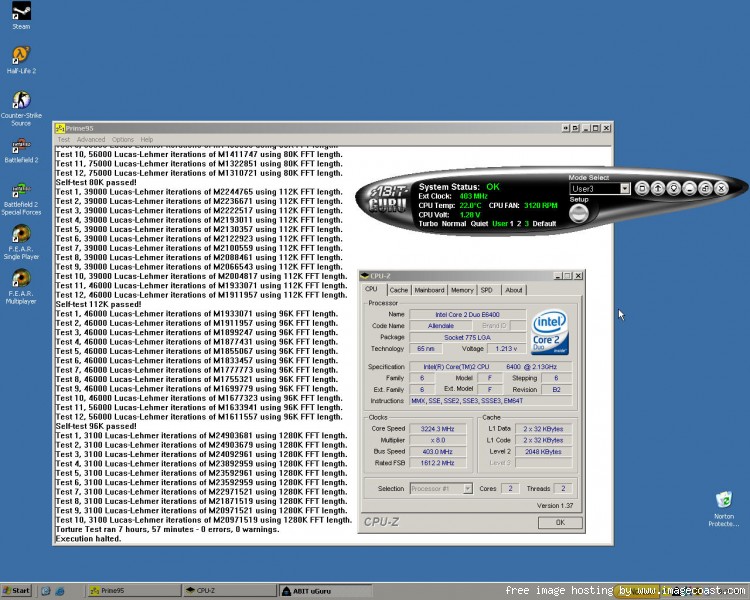
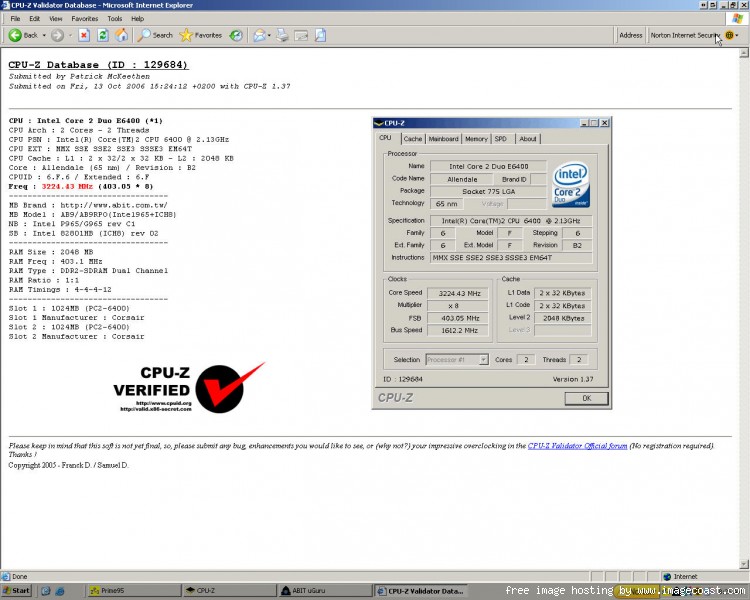
User Name: Deathspine
Stability: 7+ hours Prime95
CPU: E6400
MHZ: 3224.43
Stepping: 6 B2
Week: L624
Code: A849
Watts: 65
Volts: 1.45
Cooling Method: Water
Water Block: CoolIT Freezone
Motherboard: Abit Ab9-Pro
Bios: 1.4
Ram: Corsair
Ram Speed: 6400
Ram MHz: 803
Ram Latency: 4-4-4-12

CPU-Z validation link:http://valid.x86-secret.com/show_oc.php?id=129684

snap1.jpg


snapcpzu.jpg
 
Deathspine said:
User Name: Deathspine
MHZ: 3224.43
Stepping: 6 B2
Week: L624
Code: A849
Watts: 65
Volts: 1.45
Cooling Method: Water
Water Block: CoolIt Freezone
Motherboard: Abit Ab9-Pro
Bios: 1.4
Ram: Corsair
Ram Speed: 6400
Ram MHz: 803
Ram Latency: 4-4-4-12

You forgot to say what CPU you have. I think it is an E6400 since you have a multiplier of
8, but let me know for sure please.
 
User Name: Aelryl
Stability: 4+ hrs of Orthos


CPU: E6600
OC: 3203.5MHz
Stepping: 6 B2
Week: L628
Code: A265
Vcore: 1.375 in BIOS (1.35 in CPU-Z)

Cooling: Air
Cooler brand/model: Thermalright SI-128

Motherboard: Asus P5W DH Dlx
Bios Version: 1407
RAM brand: G.Skill
RAM rated speed: 6400
RAM actual speed: 800
Latency: 4-4-4-12

I went straight for a 24/7 OC that I was comfortable with. So I went straight for 3200MHz and setting the multiplier at 8 so the mem could run at 800. I'm happy with my OC but I might try and go higher =) Temps maxed out at 56C with Orthos running and idled around 38-39C. This was recorded using Core Temp Beta.
 
Trying something new. Replaced my North/Southbridge coolers with active coolers.
Something different for the database. I'm now using a Monsoon 2 Tec cooler. I tried Zalman 9500, Arctic feezer pro, and Koollance Exos watercooler, but so far Ive achieved my greatest overclock/heat combo with this ThermalElectric Cooler.

3258kw7.jpg
 
Finally got the memory from Fry's. Currently running @ 3.6ghz with the OCZ . Will find out how high these can go.
 
Here's mine:

User Name: SenDog
Stability: 19 Hours of Orthos, 2 hours looping 3DMark06, Memtest86+

CPU: E6600
OC: 3500mhz
Stepping: 6 B2
FPO/Batch - L628A711
Version - D63625-002
Pack Date - 29/08/2006
Vcore: 1.51 in BIOS (1.46 actual)

Cooling: Air
Cooler brand/model: Thermalright Ultra 120 w/Panaflo 120mm low speed

Motherboard: Asus P5B Deluxe
Bios Version: 0711
RAM brand: OCZ
RAM rated speed: 6400
RAM actual speed: 778mhz
Latency: 4-4-4-12-4-35

 
I dont get it. I notice that on Orthos and CoreTemp or anything else beside CPU-Z read the FSB wrong??
 
nooh said:
Man i have already been whooped by Sheckers. I can go till till 3900+ with super pi...

Dude what are you using for cooling? Also go for it and dont be scared of it dieing on you , feel the HSF and as long as its not touch hot keep on going.

I'm going to try for your prime 95 stability, I'm sitting on 3.717 7+ and 3.740 for 2+. A quick Superpi test yeilded 3.88*Ghz.

I'm running a Scythe Infinity. Got in my 2 2500RPM 104CFM panaflo fans to mount in push\pull. dropped my temps 5-8c but the noise is unbearable (eagely awaits the fan controller.) Those few extra celcius bought me no extra stability as I had hoped. It may be the remount. I had a hell of a time getting it back in the case & secured with the two 38mm wide fans on either end. I'll remount outside the case when I rewire for the fan controllers.

I'm not light at heart. I have tested for the thermal stability barrier. Haven't reached it.

E6600 week28
P5W DH
XMS2-8500C5D
Infinity w/ 2x10⁴cfm
HR-05
Swiftec BGA ramsinks on mofsets
Antec NEO-550
CM-830 w/ 4x 140mm & 3x 120mm fans

Noticed how the only component that is touch hot is the ICS?
 
go for more , you are nearly there , I also lapped my cpu and my shf and i think thats what helped me get to what i got .
 
Status
Not open for further replies.
Back
Top