• Some users have recently had their accounts hijacked. It seems that the now defunct EVGA forums might have compromised your password there and seems many are using the same PW here. We would suggest you UPDATE YOUR PASSWORD and TURN ON 2FA for your account here to further secure it. None of the compromised accounts had 2FA turned on.
    Once you have enabled 2FA, your account will be updated soon to show a badge, letting other members know that you use 2FA to protect your account. This should be beneficial for everyone that uses FSFT.

SR-2 Optimization Thread

MCH Strap:
What exactly does this setting do? The description is very vague and changing the value does not appear to adjust anything at all. I've got it at 1600 right now, but I also have all my memory timings set manually...I don't understand how the setting can affect my timings if I've set them all manually?

I've noticed changing the MCH Strap will change any ram settings that are on Auto, specifically the 5th timing on (to the last one). Usually your ram only specs out the first 4 timings. (ie 9-9-9-24)

Changing MCH Strap (in my case) I noticed the other timings were adjusted higher or lower. Timings were lower on 1333 than they were on 1600.
Likewise I had problems booting and could not run memtest86 with MCH Strap on 1333, obviously because it set the extra timings lower than what my ram used. I changed MCH Strap to 1600, I've had no problems since. I've also had no problems with disappearing ram since turning MCH Strap off Auto and putting B2B CAS Delay back to Auto (0) (which turns it off according to CPU Tweaker).

1066 vs 1333 divider + uncore multi:
I'm still trying to understand how this all works together. I have not been able to use the 1333 setting without stability issues, but I'm also not really sure what it does. I have 1600MHz RAM, but that speed isn't listed anywhere, so I have no idea what any of these values mean. If I want to OC my RAM, what do I actually adjust? Uncore multi?

Two different things there....
MCH Strap is one thing, Uncore multiplier is another.

Your uncore multiplier should technically be no higher than 2x your ram divider. IE if your ram divider is 2:8, your uncore should be 16. (since 8x2=16)
If you're running 2:10 your uncore might be 20x but you generally need a lot of QPI/Vtt voltage (depending on what the bios calls it) to run a 20x uncore. Most OC guides tell you to lower uncore to 16x because it will take uncore out of the equation on stability (and also allow you to use a lower Vtt voltage). Some people try to run higher uncore frequencies (17x is generally usually stable; 18x is hit or miss)...AFAIK uncore doesn't really affect F@h at all and running a higher uncore than 16x does take more Vtt so essentially it's not worth it.

Your ram dividers are fairly self explanatory....however in most bioses (including that of the SR-2), the dividers do not give a x:y divider ratio, they give a speed. If speed is given, you can safely assume that the speed is always based on the stock 133mhz frequency (in general most bioses all base any speed setting on 133mhz). IE in the SR-2, the ram settings are as follows:
DDR-800 (divide 800/133 and you get 6, so that is 2:6 ram divider)
DDR-1066 (1066/133=8, so 2:8)
DDR-1333 (1333/133=10, so 2:10)
I don't recall off the top of my head if the SR-2 has a DDR-1600 but obviously that would be 2:12.

The MCH Strap setting does not use the 133mhz base speed for what it says (as far as I can tell). IE setting MCH Strap to 1600 uses a generic 1600mhz speed settings for CAS latencies and such.

To answer your question - if you want to OC your ram, you would change the ram speed setting to increase the divider. The end result will be your base clock (bclk) multiplied by the 2nd number of your divider (ie 6, 8, or 10). IE in my case I'm running 200bclk, with my 1333 ram oc'd to 1600 I was using the 2:8 divider and therefore my ram speed setting was DDR-1066 which is the 2:8 divider. Now I'm running DDR3 2000, same bclk, so I changed the setting to DDR-1333 (2:10, 200x10=2000 for the ram).

Obviously depending on your ram it might work, it might require more vdimm voltage, or it might not work at all if you oc too high. You can usually get a few hundred mhz free on ram with no voltage bump, but depending on what your bclk is, changing the divider might push the ram too far. You say you're running 200bclk; if your ram is 1600 your divider should be 2:8. However you probably won't be able to change it to 2:10 and get your 1600 ram to run at 2000. If you're running 1333 @ 2:6 divider and you change it to 2:8 like I did to run @ 1600, that will probably work no problems. Going from 1333->1600 is fairly easy and a safe bet; going from 1600->2000 is a 400mhz oc for the ram and may not be possible without more vdimm or looser timings (ie higher # timings like 10 or 11 instead of 8 or 9).

Hope this helps clear up your questions. ;)
 
Last edited:
Wow, zero2dash, thank you thank you thank you! That was the type of breakdown I was looking for. :)

It makes a lot more sense to me now, and I can see why my system wouldn't like the 2:10 divider since my RAM is not a super-OC kind of kit (G.Skill F3-12800CL9T-6GBNQ). Even at 10-10-10, HardwareCanucks was only able to get 1889MHz in their testing but perhaps I can just tighten my timings a little bit and experiment with that.

I've just been using the XMP profile settings, which is why I was confused about what the MCH Strap was actually doing. I'm guessing that if nothing is left on AUTO then it doesn't really matter what MCH setting I use?

Thanks again for the explanation: the system makes sense to me now and tweaking things won't seem so frustrating and tedious (especially now that I understand why the board wouldn't boot at certain settings). :)
 
I've just been using the XMP profile settings, which is why I was confused about what the MCH Strap was actually doing. I'm guessing that if nothing is left on AUTO then it doesn't really matter what MCH setting I use?

I'm pretty sure this is correct. MCH only matters if your RAM timings are set to Auto, and then it determines what "auto" actually means. In my case, my RAM is 9-9-9-24, but when I set the timings to Auto I found that with higher BCLK settings sometimes it would change to 11-11-11-29. If I set MCH to 1600, it "locks in" those loose timings so I don't have to worry about tighter timings showing up sometimes when I reboot and causing stability issues. I think adjusting MCH is useful during initial overclocking, and then you can lock down specific RAM timings once you get a stable overclock.
 
MCH still does something even with all timings manually set. *

eg at 1333 ddr strap, MCH 800 and 1867 won't boot, and 1067 is unstable, 1333 is stable, with marginally better folding times. 1600 is stable but a smidge slower.

WHAT it is doing I cannot tell you, but it still does something.:confused:

*only setting on Auto = back to back cas delay - but Auto means disabled.
 
Okay, sorry to just jump in and ruin the conversation, but I was wondering if anyone else had been tweaking their L5640 CPU's SR-2 setups to get a higher BLCK? I replaced some stuff this morning and had to do a BIOS reset, and now it looks like I'm currently hitting a successful 211 BLCK with the A50 BIOS.

Currently crunching on a 2685 that I downloaded just before taking the system down for several hours, so we'll have to see if there is any real benefit to running 3.8 Ghz on the SR-2 instead of the older 3.6 I was at earlier. Hoping this turns out nicely... ;)
 
Okay, sorry to just jump in and ruin the conversation, but I was wondering if anyone else had been tweaking their L5640 CPU's SR-2 setups to get a higher BLCK? I replaced some stuff this morning and had to do a BIOS reset, and now it looks like I'm currently hitting a successful 211 BLCK with the A50 BIOS.

Currently crunching on a 2685 that I downloaded just before taking the system down for several hours, so we'll have to see if there is any real benefit to running 3.8 Ghz on the SR-2 instead of the older 3.6 I was at earlier. Hoping this turns out nicely... ;)

I think i got as high as 210 stable with the A50 bios. The problem was i was very high on Vcore, Vtt, and IOH and the machine was actually slower. The absolute fastest folding speed I have managed is 203 x 18, and it is faster on the A41 bios or whatever the board ships with.
 
Does QPI Frequency affect folding performance? I have the choice between
5.288gt(auto) with ram at 1970mhz 10-10-10-28-1t mch-1600
or
4.800gt with ram at 1970mhz 9-10-9-28-1t mch-1600.

I'm running the latter, getting 124.8kppd at 3.5ghz on 6900. I'm only getting 3kppd more than running with 5.288gt qpi with ram at 1600mhz ram, 2t, mch auto!
There's something greatly affecting performance.. either qpi or mch.

Other discovery: more than 1.25vcore and 1.3vtt needed to push ram beyond 1600mhz, not enough vcore the system is unstable and with less than 1.375 vtt, ram disappears. More vcore helps getting tighter timings too.
 
QPI is usually bus speed time multiplier. So a 4.8GT/S QPI is 36x bus speed, whereas the 5.28GT/s is 39x.

But, when running overclocked, you want to use the lowest setting. For example, if you are at 200mhz BCLK, the QPI will be 7.2GT/s, so keep it where it is for stability.

You really shouldn't see any difference on folding unless somehow (unlikely) folding is QPI bottlenecked.

If you are seeing a difference, it might be that stability might be compromised by the higher QPI multiplier settings.

Does QPI Frequency affect folding performance? I have the choice between
5.288gt(auto) with ram at 1970mhz 10-10-10-28-1t mch-1600
or
4.800gt with ram at 1970mhz 9-10-9-28-1t mch-1600.

I'm running the latter, getting 124.8kppd at 3.5ghz on 6900. I'm only getting 3kppd more than running with 5.288gt qpi with ram at 1600mhz ram, 2t, mch auto!
There's something greatly affecting performance.. either qpi or mch.

Other discovery: more than 1.25vcore and 1.3vtt needed to push ram beyond 1600mhz, not enough vcore the system is unstable and with less than 1.375 vtt, ram disappears. More vcore helps getting tighter timings too.
 
SNIP

Your uncore multiplier should technically be no higher than 2x your ram divider. IE if your ram divider is 2:8, your uncore should be 16. (since 8x2=16)
If you're running 2:10 your uncore might be 20x but you generally need a lot of QPI/Vtt voltage (depending on what the bios calls it) to run a 20x uncore. Most OC guides tell you to lower uncore to 16x because it will take uncore out of the equation on stability (and also allow you to use a lower Vtt voltage). Some people try to run higher uncore frequencies (17x is generally usually stable; 18x is hit or miss)...AFAIK uncore doesn't really affect F@h at all and running a higher uncore than 16x does take more Vtt so essentially it's not worth it.

Actually uncore does affect folding times slightly. I spent an unenjoyable afternoon proving it the hard way. http://hardforum.com/showpost.php?p=1036320130&postcount=419

original.jpg


Basically 18x or 19x times is the sweet spot for x5660's and up at 2:10 - bear in mind all my rigs have higher multipliers = not pushing the board that hard (baseclocks of 191,187, 187), the highest vtt on any of them is 1.375v for the x5650, the x5660 and x5680 use 1.35v vtt.

No that you mention it, I should test my x5650 at lower uncore - as it is the only one running 2:8. I wonder if I would lose any performance dropping to 16x. Hmmm..
 
I've actually found the cause to my missing memory problem. It's motherboard flex causing it. I reseated the #0 HSF last night, and after booting back up, I was missing 1gb. I took all the ram out and testing booting 1 stick at a time.

I found that I couldn't boot with ram in the nearest red socket to #0. So I pulled the entire board and started checking all the sticks of ram in that slot. I accidentally popped one of the cooler's push pins when I was testing, so I was like "meh" and kept testing, well it booted.

So I secured the HSF and it wouldn't boot. I popped that pin, and it will boot. So after examining the underside of the board, I think the little back plate the board ships with is warped. I'm going to remove it after work and check it out.

It's likely that my whole problem with missing ram is a combination of the HSF that uses the push pins to secure and the warped back plate. Maybe this will solve the problem of my graphics card not working in odd numbered slots.
 
First of all, I would like to thank you guys for this useful topic. I have been using lot of info on this page to further fine tune my sr-2 box to maximize ppd while keeping power consumption under control.

I'm at a point where I can't improve further. Anyone can beat the following ppd record? If so, can you share you configuration?

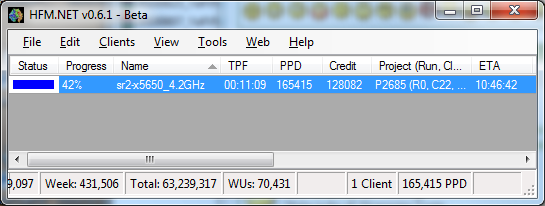
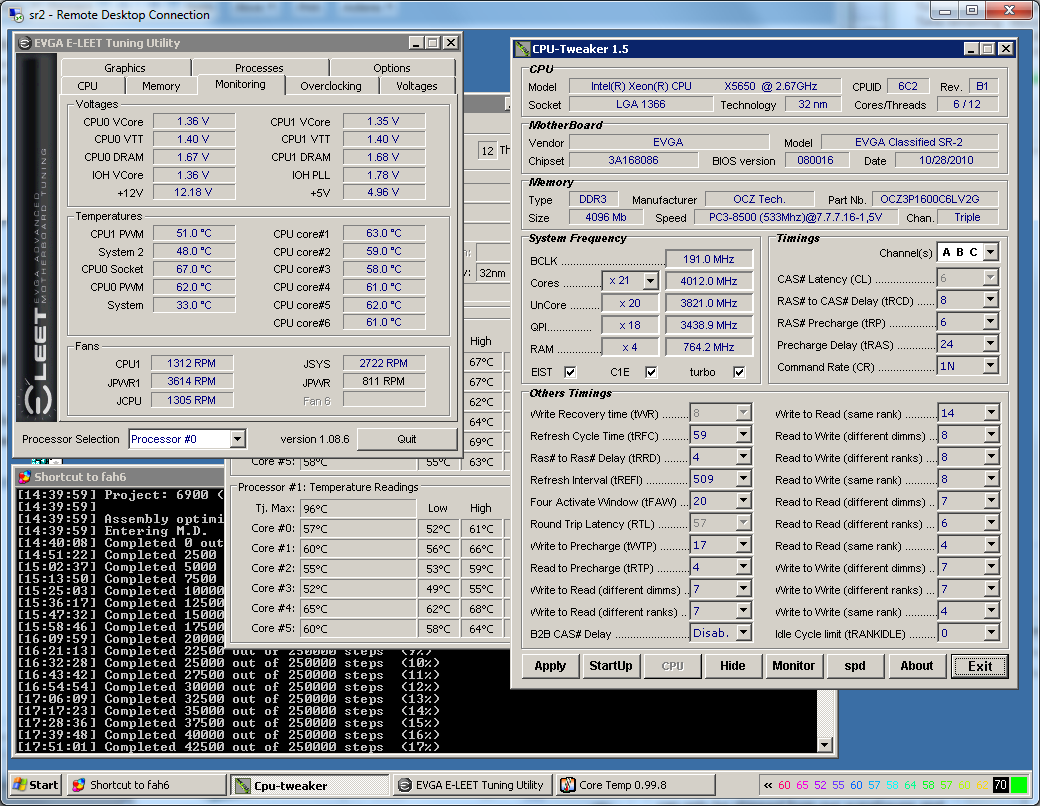
191x22@1.36Vcore@2:8@6-8-6-24-1T@Uncore=20x with very tight memory sub-timing (MCH=1067MHz).

I was able to run stable at 6-8-6-21-1T but it doesn't seem to prove the TPF for any project so I use 24 to remove any long term risk.

Power consumption while folding 24 threads: 620watt
Project: 2685: 11:09tpf = 165k ppd
Project: 6900/2686: 11:15tpf = 163k ppd
Project: 2692: 11:35tpf = 156k ppd
Project: 2684: 15:55tpf = 97k ppd
Average bigadv: (165k + 163k + 163k + 156k + 97k)/5 = 149k ppd.
sr22685tpf.png


Temperature and memory sub-timing info:
sr2folding18.png
 
Firstly, congrats! You have a whumping fast system there. Basically you are right there with the fastest in the [H]. I will send you a benchmark several of us have been using so we can compare accurately - unfortunately the WU vary a fair bit in speed, so we need to compare apples to apples. Your 2692 scores looks low for example. But the rest are great.

But otherwise it looks like the tight timings are doing a very good job - and especially surprising seeing them do so well at 2:8.

But to see 4gb modules run so fast is great. How long have you been running this configuration - and have you ever suffered from the dreaded less RAM showing on boot? All my rigs have to run 10% looser simply to reliably boot with all ram.

Anyway, thanks for posting, it looks like you have done several things differently to me (a good thing!) and there could be a lot we can learn from what you have done.:)

First of all, I would like to thank you guys for this useful topic. I have been using lot of info on this page to further fine tune my sr-2 box to maximize ppd while keeping power consumption under control.

I'm at a point where I can't improve further. Anyone can beat the following ppd record? If so, can you share you configuration?

191x22@1.36Vcore@2:8@6-8-6-24-1T@Uncore=20x with very tight memory sub-timing (MCH=1067MHz).

I was able to run stable at 6-8-6-21-1T but it doesn't seem to prove the TPF for any project so I use 24 to remove any long term risk.

Power consumption while folding 24 threads: 620watt
Project: 2685: 11:09tpf = 165k ppd
Project: 6900/2686: 11:15tpf = 163k ppd
Project: 2692: 11:35tpf = 156k ppd
Project: 2684: 15:55tpf = 97k ppd
Average bigadv: (165k + 163k + 163k + 156k + 97k)/5 = 149k ppd.
sr22685tpf.png


Temperature and memory sub-timing info:
sr2folding18.png
 
I have been running this sr-2 for about 2 weeks. This is the 3rd set of memory that I use. On the first one (1300MHz@Cas7 due to my noob experience with OC), I suffer losing memory at boot also (12GB but detected 10 or even 8GB). I was forced to run 2:6 to get over that problem.

The next set of memory is 1600MHz@cas8, no memory detection issues at 2:8. The last set is 1600MHz@cas6. BTW, CPU-Tweaker got it wrong, my stick is 2GB each, not 4GB. I have 6x2GB@cas6. No memory detection issues neither at 2:8.

The last set of memory running with the above screenshot configuration has been running for 3 days now. It chew all kind of bigadv already including the 2684.

So the "wrong memory detected" issue was long gone for me. However, I do see a similar issue at boot time. This issue exist for a long time now and I'm not sure it has complete goes away yet. The Marvin hard drive controller will hang sometimes while detecting hard drive. The work around is to reboot or power down the board and restart again. This issue happen a lot with bclk = 195 or higher. It rarely happen when I set it below 190. It some times happen at 190/191 but I think increasing IOH voltage helped (not enough data to verify, just my feeling). I do use PQI Signal offset -85 and -16.
 
Interesting - PM with benchmark sent..

I had hell with some OCZ, and once my second kit of Kingston showed 100% reliability when loosened, I had to decide with later machines if I tried again for better, or stuck with known "ok" memory. Sounds like you have found reliable AND fast stuff, so well done.
 
So I finally got around to installing Eleet, which is kinda nice BTW, and decided to try a little on-the-fly tweaking on my slower SR-2 to see if I could figure out why it is the slower SR-2. It actually was slower at 3.600 than it was at 3.564 running OCZ memory before the memory crapped out. It is now identical to my other SR-2 hardware-wise and memory settings-wise, which is running at 3.654. My guess was that it needed more Vcore at the higher clock speed, even though it used significantly less Vcore at 3.564. I rebooted it at 202 * 18 and starting pushing up both Vcores while running a 2686. Frame times were 13.13 before I started all of this. Eleet was saying 1.400 Vcore on both CPUs to start. I am now at 1.43125 on each according to Eleet, and my last two frames were 12:57 and 12:59. So, that is a 15 second/frame decrease, which equates to around 5K ppd. Eleet still shows Vcore at 1.34-1.36, which I don't know if i believe. Temps are really rather lower at around 60 +/-, which kinda suggests that the Vcore reading are close to being correct. I'm going to keep going a bit, maybe pushing bclk up to 203 or 204 and see if frame times keep improving.
 
Yeah don't do what I did and forget to close Eleet while benching -it knocks a fair bit of PPD off ;)

I tried your suggestion on one box and bumped vcore 2 notches and got nada, (but that was on SR2#1 which was already volted relatively higher than bigadv needs to cope with 6701s - remember them?) I will try it on others when I can.

I have had success using eleet to change voltages on the fly, but changing baseclock has been funky enough that I do not trust it anymore = waste of time testing. It is great for changing voltage while graphing temps in Argus monitor to see the effect in realtime.
 
@10e - I was fiddling with the CPU PLL 1.8v voltage like you suggested, and I could not detect any temp change on SR2#3 - am I adjusting the right thing? (I did both CPUs just in case)

Not calling you a despicable lying filthy techno-harlot (...yet! :p) - I just can't reproduce it.

original.jpg


But the news of the week is that I have finally torn myself away from endless Swedish bigadv long enough to give SR2#3 a proper go.

I got 4.4Ghz working, but better yet, I found I could get my baseclock and mem to 205 x 21 (no turbo) = 4.305Ghz / 2050ddr. :eek: :D So same 4.3Ghz overclock, just 2x less multi on CPU and much boosted ram speed. This gave better results than 4.4GHz (25x176) for less volts.

So all my data and assumptions from a few months back about my RAM topping out at about ddr 1900 were wrong - unlocking uncore to 18x has given me a lot more headroom. Even better - my loose timings to allow consistent booting with 12GB did not need further loosening going from DDR 1870 to DDR 2050! (apart from MCH strap 1333 to 1600)

Anyway, same clock speed, but now at 10mins58 on 2686 bench = 2.4% better times, and the equiv of going from 4.3 to 4.4 GHz. I ran my captured 6701 unit until I was 80% sure it is stable for folding, and finished a 6900. Then I scored a scorcher of a 2685 - averaging 10:55 = 170,750 PPD - a new record for me. :D

original.jpg


Now I have the chance to repeat this on SR2#2 with the x5660 - it can just do 21x with turbo off. But I am having no luck getting stable above 200 baseclock - crash crash crash. Working... I have QPI to -93, IOH up to 1.425, vtt and vcore up a notch, mem loosened, uncore dropped another 1, but no dice. 200 x 21 seems stable so far, but anything over is no go.

Any tips for greater than 200 baseclock? - this is unknown territory for me.:confused:
 
[H]ecklerKoc[H];1036503265 said:
@MIBW: Are you currently using the KHX1600C7D3K3/6GX modules in SR2#3?

Yes, in all. 12 dimms in SR2#1, 6 in the others. Once I had something working, I was not inclined to experiment further. ;)
 
Any tips for greater than 200 baseclock? - this is unknown territory for me.:confused:

Scrap the Westmeres and get a $400 set of Gainestown quad-cores...I had my pair at 210 bclk for months... :)

Seriously though, I have no idea and from what i have seen, neither does anyone else. One of mine is at 203 and the other at 202 (needing to go to 201 or get a bunch more voltage and hope the nic doesn't stop working again...don't ask.) I was getting into Windows at 210 bclk on one of mine, but it took pushing 1.5 Vcore, Vtt, and IOH, and was not even close to being stable. At 205, you already have me beat...
 
Scrap the Westmeres and get a $400 set of Gainestown quad-cores...I had my pair at 210 bclk for months... :)

Seriously though, I have no idea and from what i have seen, neither does anyone else. One of mine is at 203 and the other at 202 (needing to go to 201 or get a bunch more voltage and hope the nic doesn't stop working again...don't ask.) I was getting into Windows at 210 bclk on one of mine, but it took pushing 1.5 Vcore, Vtt, and IOH, and was not even close to being stable. At 205, you already have me beat...

It seems to me that this board is at the limit just over 200. I've had mine stable at 209 for over a week, but voltages are pretty high and I didn't notice much gain. I'm also scared to get over 1.45v on the VTT, I really don't want to harm my precious motherboard.

I'm at 17:07 tpf on a 6900, it was basically the same when running at 200.

My temps are decent, and I think the 5530's can go higher. However the system starts to pull mega wattage when it's cranked up like this. It's pulling over 550 watt right now.


Has anyone tried OC'ing the SR-2 with only one CPU? I wonder if one could get the bclk higher.
 
I've run into an issue on mine, last week after finishing up a 6900 it pulled a 2685 and puked it almost immediately. I thought it was perhaps a bad WU so I restarted the client and it pulled another 2685 and the same thing (Core communication error). I didn't have time to play with the machine with holiday the weekend so folding was shut down. I finally tinkered with it last night, upped vcore to 1.24xx and fired up -bigadv after running Linx for 2 hours using all RAM without a hiccup. It still had the crashed 2685 but tried to start work on it, and crashed it instantly again.
I don't know if it trashed the WU and that's why it failed instantly, but I decided it best to keep it offline until I could play with it some more and see if any of you had a p2685 captured that I could mess with.
 
Yes, in all. 12 dimms in SR2#1, 6 in the others. Once I had something working, I was not inclined to experiment further. ;)

Wait a sec. You are running DDR3 1600 @ 2050!?!?

I have some DDR3 2000 and I can hardly get it to run above 2000 on my ASUS Rampage Gene II
 
Scrap the Westmeres and get a $400 set of Gainestown quad-cores...I had my pair at 210 bclk for months... :)

Seriously though, I have no idea and from what i have seen, neither does anyone else. One of mine is at 203 and the other at 202 (needing to go to 201 or get a bunch more voltage and hope the nic doesn't stop working again...don't ask.) I was getting into Windows at 210 bclk on one of mine, but it took pushing 1.5 Vcore, Vtt, and IOH, and was not even close to being stable. At 205, you already have me beat...

Well, I certainly seemed to have lucked out. Wish I knew why. But I think I might just stick with hexcores ;)

But wasn't someone running at ~220 baseclock or am I remembering wrong? I haven't been paying attention to the L5640 threads as much as I never thought I would need over 200.:eek:

[H]ecklerKoc[H];1036503615 said:
Then Barvo for the RAM running at 2050. Were you able to keep CAS 7 too?

Not even close! - this is as loose as a goose 9 10 9 24, but still 1T. Which beats the hell out of 7 8 7 20 at ~1600ddr.

Wait a sec. You are running DDR3 1600 @ 2050!?!?

I have some DDR3 2000 and I can hardly get it to run above 2000 on my ASUS Rampage Gene II

Once proven stable I will do my usual writeup, but ram timings were and are:
9 10 9 24 10 76 6 5 6 24 1T 0 72 73 74

I was super surprised as you that they were still fine at 2050. I very nearly did not try beyond 196x22, but this is [H], someone would have asked questions about my [H]ardness.:eek:

I knew they were loose to defeat the lost-mem-at-boot issue, but still... it is not often that you have a hail-mary-just-try-this-for-giggles watch-it-explode.... huh, it works?!! Of course I then tried 215 x 20, which did not get very far.:p

But fully manual memory settings, MCH to 1600, and uncore to 18x or lower are how I got there. MCH 1333 or DRAM ratio give instant memtest errors, and uncore 19x and up give STOP 124 on 6701s, and I am not prepared to up vtt.

The more I read it seems that I just got lucky with SR2#3 - it is the newest mobo, and perhaps there is a memory controller superiority in the x5680 compared to the x5660. Both have turbo off in this scenario, but the x5680 is at 21x (25x normally) and the x5660 is at max 21x already.

Which is good, as is feels more than a little wasteful to have a x5680 running at a x5660 multi. Luckily I paid same price. Thx ebolamonkey3. :D
 
Not even close! - this is as loose as a goose 9 10 9 24, but still 1T. Which beats the hell out of 7 8 7 20 at ~1600ddr.
By how much? For some reason, I get about the same performance between ram at 2000mhz 10-11-10-28-1T and ram at 1600mhz 9-10-9-27-1T. ~4kppd difference
 
Okay, sorry to just jump in and ruin the conversation, but I was wondering if anyone else had been tweaking their L5640 CPU's SR-2 setups to get a higher BLCK? I replaced some stuff this morning and had to do a BIOS reset, and now it looks like I'm currently hitting a successful 211 BLCK with the A50 BIOS.

Currently crunching on a 2685 that I downloaded just before taking the system down for several hours, so we'll have to see if there is any real benefit to running 3.8 Ghz on the SR-2 instead of the older 3.6 I was at earlier. Hoping this turns out nicely... ;)
ax how did 211 work out for you?

I just joined the dual L5640 club and I did a nearly "full auto" set and forget 200bclk 3.6ghz overclock right out of the box. Temps are in the mid/upper 50s underneath my air coolers.

I would love to push up to 3.8 or so if I don't have to sacrifice huge amounts of voltage like Musky apparently does.
 
By how much? For some reason, I get about the same performance between ram at 2000mhz 10-11-10-28-1T and ram at 1600mhz 9-10-9-27-1T. ~4kppd difference

About 6 or 7 kppd. Nothing like the difference as when we all had NUMA enabled, but still, given that this is achieved without upping any volts or power draw, I don't regard it as overclocking, but optimising what you have. I should have qualified my "beats the hell out of" statement by saying that "within the realm of teeny tiny differences due to RAM speed" ;)

But my scorcher SR2#3 at DDR 2050 borked a 6900 at 86% :( so it is back to tweaking that one. ~120,000 points up in smoke. Oh well. Which in a way is more comforting to know the universe won't let me have DDR 2050 for so little effort :p

But I think I found the problem - it was not my bad overclock... it was a Satanic influence: :eek:

original.jpg
 
all this throwing around "hex"es is finally coming back around. I told you guys this was a bad idea.....
 
ok, rewind the clock a bit......

My OC got reset (it was a low OC on this rig) and I have a bit of time to play with it now.....

E5530's, what settings should i look at? (been a while since I tried with these guys
 
E5530....I remember those ;)

I say, put Vtt at 1.4v, vdimm at 1.65v, QPI ratio at 4.8ghz, DRAM ratio at whatever appropriate speed, and bclk up to 190 or 200
 
E5530....I remember those ;)

I say, put Vtt at 1.4v, vdimm at 1.65v, QPI ratio at 4.8ghz, DRAM ratio at whatever appropriate speed, and bclk up to 190 or 200

smacking into a wall at 175 with doing just that.....
 
Just to add some more data to this thread...

I tried swapping the stock shrouded Thermalright fans on the TRUEs with the famous San Ace fans. Subjectively, the fans are very impressive. Objectively, they only dropped my peak temps 1-3 degrees per core and are noticeably louder (though not unbearable). I'm going back to stock.

The good news is my X5650s are finally stable (fingers crossed) at 3.916GHz or 178x22. My voltages are Vcore 1.35, VTT 1.35, IOH 1.35. RAM is 11-11-11-29 1T, MCH 1600, 1.5V. The only concerns are temps (may be able to drop Vcore a bit) and RAM -- haven't tried disabling NUMA again yet, and there's certainly some tweaking room there. At any rate, I really need to dump my old desktop before it dies, so I'm going to stop tweaking and copy over all my software this weekend.
 
Well, I'm back folding again this time for [H]. As well, thanks to some fortune, I will finally be upgrading to a proper ram set up, but for now am still on dual channel.

Currently I am due to drop my first [H] BigAdv unit in aprox 3 hours from now. I have a passkey that I have folded on for a while, so bonus so be applied with my very first drop.
 
Nice chilly!

SE, I'm surprised you can't hit 4ghz

What RAM are you using? I have a theory about numa.
Posted via [H] Mobile Device
 
SE, I'm surprised you can't hit 4ghz

What RAM are you using? I have a theory about numa.

I'm currently using G.SKILL Ripjaws 6x4GB, but I had the same issues with Corsair Dominator 6x2GB. I think one of my X5650s has a weak memory controller or something that's limiting the overclock. There may be something wrong with the current RAM preventing me from disabling NUMA, but I'll look into it later.

BTW, today I noticed a weird pulsing sound coming from the other SR-2 in the Lian Li case. I think it's the motherboard fan cycling up and down. I probably need to add some more exhaust fans to the case.
 
I have Corsair XMS3 and I can't disable NUMA either.

I think everybody that did disable NUMA has other brands of RAM.

I noticed in my x58 mobo that my E5640 didn't want to boot with the Corsair RAM. I think I might try a different brand.
 
The Corsair is now in my other SR-2 with the L5640s, and I was able to disable NUMA with no issues.
 
Back
Top