• Some users have recently had their accounts hijacked. It seems that the now defunct EVGA forums might have compromised your password there and seems many are using the same PW here. We would suggest you UPDATE YOUR PASSWORD and TURN ON 2FA for your account here to further secure it. None of the compromised accounts had 2FA turned on.
    Once you have enabled 2FA, your account will be updated soon to show a badge, letting other members know that you use 2FA to protect your account. This should be beneficial for everyone that uses FSFT.

Slow real world NVME SSD performance

jebo_4jc

[H]ard|DCer of the Month - April 2011
2FA
Joined
Apr 8, 2005
Messages
14,572
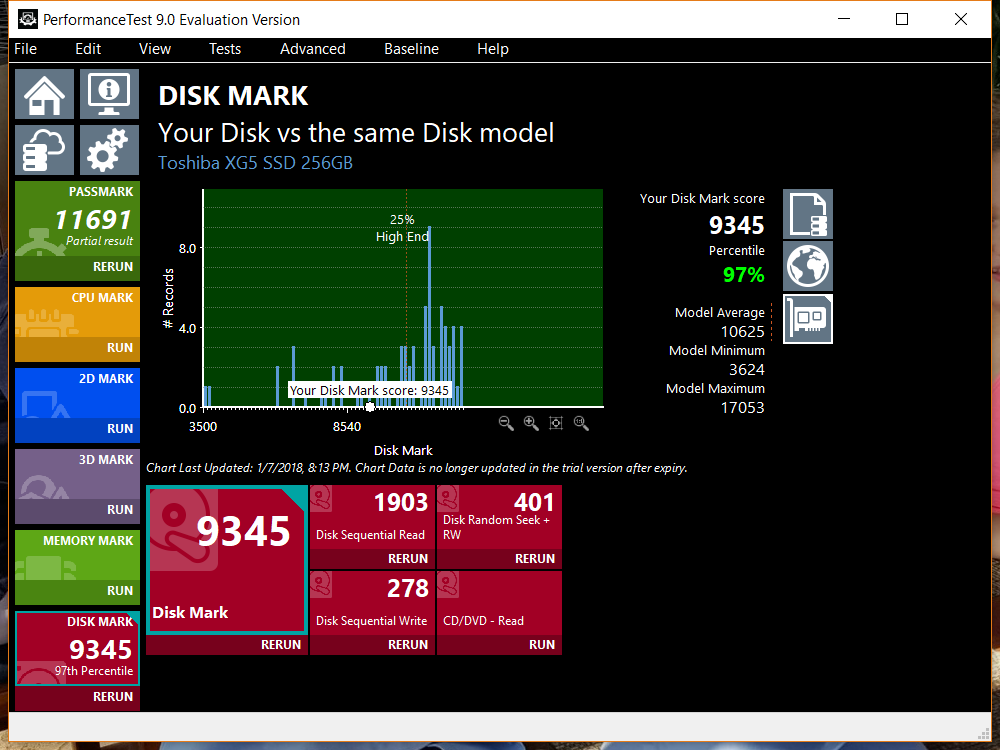
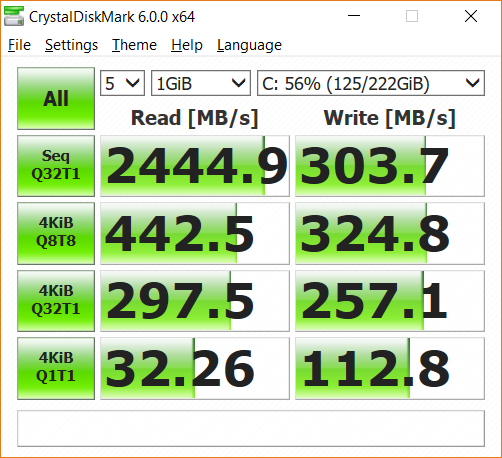
I have a Dell Inspiron 15 7000 Gaming with an i5 and a Toshiba XG5 256GB NVME SSD. The PC is basically new, and out of the box, performance is sluggish. It seems to hang at odd times (5 seconds to open Chrome, for example), but it's erratic (at other times, Chrome loads instantly). To me, this sounds like some sort of SSD issue, but I guess it could be an oddity in a driver or something.

So, I ran a couple performance tests. The results are attached. Can anybody help me interpret?

Thank you!
 

Attachments

  • Untitled.png
    Untitled.png
    104.9 KB · Views: 0
  • Untitled2.png
    Untitled2.png
    75.8 KB · Views: 0
I have a Dell Inspiron 15 7000 Gaming with an i5 and a Toshiba XG5 256GB NVME SSD. The PC is basically new, and out of the box, performance is sluggish. It seems to hang at odd times (5 seconds to open Chrome, for example), but it's erratic (at other times, Chrome loads instantly). To me, this sounds like some sort of SSD issue, but I guess it could be an oddity in a driver or something.

So, I ran a couple performance tests. The results are attached. Can anybody help me interpret?

Thank you!
I have a 7557.

What performance mode are you utilizing for Windows?
 
I'm using the "Dell" setting. About the only thing I could see affecting these results is the PCIe state power management, right?

Edit: not to mention, if this is the Dell recommended setting, how could they recommend a setting that would result in drastically worse user experience? Ugh.
 
I'm using the "Dell" setting. About the only thing I could see affecting these results is the PCIe state power management, right?

Edit: not to mention, if this is the Dell recommended setting, how could they recommend a setting that would result in drastically worse user experience? Ugh.

Yeah, turn off the pcie management.

I don't really know what Dell was thinking with a few things they did. The drives they put in them with the exception of the Samsung are garbage.

I don't recall any bios settings that would cause this. Have you updated your firmware and bios?
 
Update the laptop's firmware, if you haven't already.

It should already be enabled, but verify the TRIM setting.

Download the latest Intel DSA and update everything that it finds an update for.
 
Sometimes they do that so they can test the battery power and brag about how long it lasts.
 
Back
Top