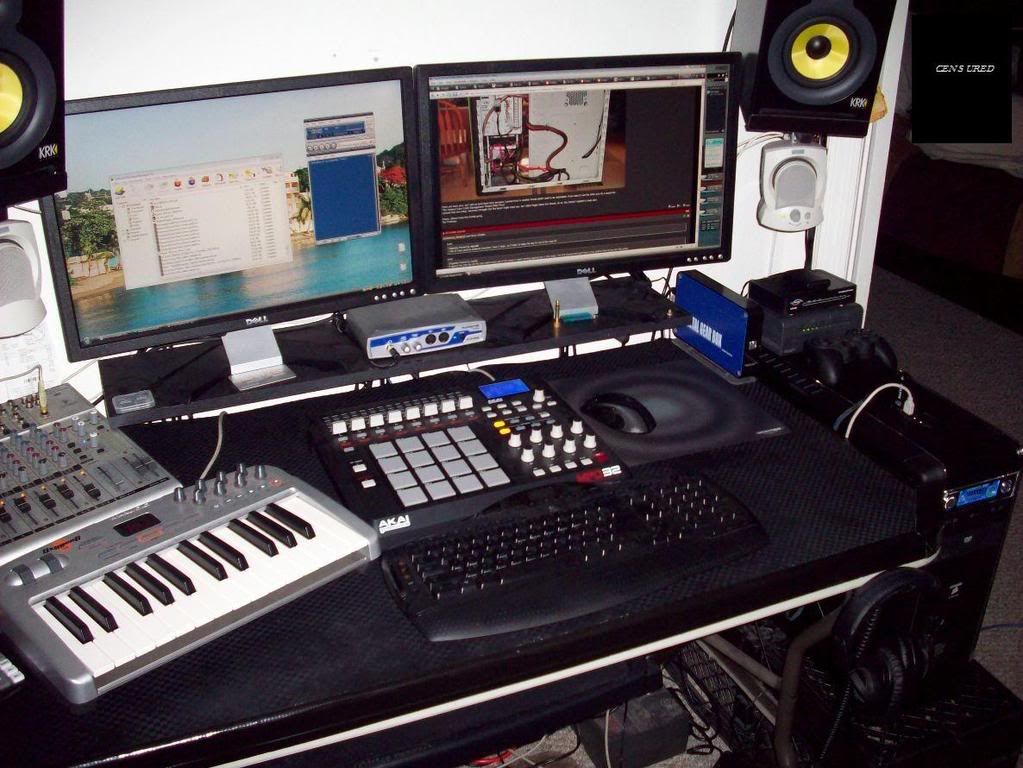
Show Your LCD(s) setups!!!

+1,
I'm also curious.
I used to use synthesia, but that was a little while ago. Your software looks much better!

It's Konami Keyboardmania for the PC
http://www.youtube.com/watch?v=uEBbURR1ViA

It's more arcade game based than synthesia but does the same job really. There are other modes which will wait for you to hit notes, etc. Can import any midi files you want.

There's a knockoff version called Doremi Mania.
 
http://i270.photobucket.com/albums/jj95/projectmayhem3/IMG_2229.jpg
[/QUOTE]

I like what you did with the Polks.

Oh and... is that lamp on your desk a halogen or LED?
I've been looking for a nice black LED lamp about that size for my desk.
 
Thanks. I looked all over for some nice durable stands for them, and eventually ended up finding some on craigslist. 4 of them for $50, which I thought was pretty good. They're real heavy duty and were exactly what I wanted. I could of bought only two from the guy, but I figured I may need more in the future, so why not while I can get them. Also, the lamp is halogen. Little 20w bulb I believe. I don't use it all that much though, to be honest.
 
Thanks. I looked all over for some nice durable stands for them, and eventually ended up finding some on craigslist. 4 of them for $50, which I thought was pretty good. They're real heavy duty and were exactly what I wanted. I could of bought only two from the guy, but I figured I may need more in the future, so why not while I can get them. Also, the lamp is halogen. Little 20w bulb I believe. I don't use it all that much though, to be honest.

Thanks for the info... and $50 for improved audio staging and a nice look, yep, sounds like they're worth it to me too.
 
3254224561_d48713f482.jpg


just my dual acer 22s. Also have other displays floating around the apartment, working on organizing them all and putting everything into a home office (spare bedroom) will post pics of all that when i get it done.
 
I just got a Samsung 2253BW before christmas and the backlight bleed is unbelievably bad, especially on the top. However, backlight bleed has never really bothered my that much so i dont mind. but for anyone who cares about bleeding this monitor would be a nightmare.
 
How are you running these monitors also what brand are those 17 inchers ? I'm kinda looking at a same set up like yours

He said they are Hanns-G ... even in your quote.

Nonetheless, you would need either two videocards, at least one of them with dual outputs, or a motherboard with onboard video and a card with dual outputs that will work with your onboard. Of course, there are other options you could also look into such as USB or video cards with 4 outputs.
 
Do I spy a Dreamcast arcade stick?

Yes indeed! Love this feller!
arcadestick.p.jpg


applekeyboardrj9.jpg


Just got the Apple Aluminum keyboard. Hacked drivers, some remapping software, and parts of Bootcamp and voila! It's hilariously fun having an eject button on your keyboard that works in XP!
 
Yes indeed! Love this feller!


Just got the Apple Aluminum keyboard. Hacked drivers, some remapping software, and parts of Bootcamp and voila! It's hilariously fun having an eject button on your keyboard that works in XP!

... i want one hacked gah
 
did not realize how dusty that stand was lol:D

dscn0458dx8.jpg

dscn0459in5.jpg

http://img18.imageshack.us/img18/3579/dscn0460zu7.jpg[/IMG
[IMG]http://img18.imageshack.us/img18/9001/dscn0461cz1.jpg
dscn0462tn9.jpg

dscn0463xi2.jpg

dscn0464il8.jpg
 
Just got the Apple Aluminum keyboard. Hacked drivers, some remapping software, and parts of Bootcamp and voila! It's hilariously fun having an eject button on your keyboard that works in XP!

details on how to get the eject button to work. did you get any other buttons to work?
 
details on how to get the eject button to work. did you get any other buttons to work?

http://www.happytocode.com/file.axd?file=AppleKeyboardInstaller.exe

http://www.happytocode.com/file.axd?file=BootCamp.msi

Use the first to install the keyboard and drivers, you need Bootcamp to make use of the volume controls and eject. It even has the onscreen gui volume and eject graphics when you use them. However, that will disable the default F14 and F16 keys because I believe bootcamp takes control of them. They will still work if you hit Fn and then F14 and F16.

You can also remap the keys with any key remapper program. I had to manually remap F13-F15 to their windows counterparts of Print Screen, Scroll Lock, and Break. I have F16-F19 manually mapped to another set of media control buttons (besides the default Apple ones through bootcamp of F7-F9). I also mapped the right alt and windows button (Command/Option) to another set of volume up/down (default bootcamp is F11/F12).

Fn button is functional but of course trying to change brightness does nothing but it can act as an F-Lock I believe if you want to assign extra F-Lock functions to F1- F19. That's another thing...a keyboard with up to F19 is friggin' cool over all those losers stuck with F12!!! :p

The Fn key is on by default (when when I hit F7, it's automatically on last track instead of being F7) so you can have it off by default by editing the registry key:
HKEY_LOCAL_MACHINE\SYSTEM\ControlSet001\Services\KeyMagic\OSXFnBehavior
HKEY_LOCAL_MACHINE\SYSTEM\CurrentControlSet\Services\KeyMagic\OSXFnBehavior
to 00 or 01

By doing that you can manually remap the buttons yourself without using bootcamp but then you can't get the eject key to work. I also swapped the left options and command keys so that the windows start key is the Apple option key and the Apple command key is Windows alt. The numlock key is actually labeled as "clear". I'm not sure where insert is yet, as that is fn at the moment, I haven't had a need to use ins for awhile. It seems that by default or by bootcamp, the windows key doesn't recognize in games so that is even better as then I can assign it as a very useful large key under WASD for game functions - it of course works fine in Windows which I need since I removed my start button entirely from my taskbar with Lclock.
 
i have a wireless apple keyboard ...i dont need to remap...just would like the volume and eject to work. so just install those setups?
 
i have a wireless apple keyboard ...i dont need to remap...just would like the volume and eject to work. so just install those setups?

not sure about bluetooth but it should work if you install both those programs. Be warned that bootcamp expects your system to be a Mac and not an XP machine so it can slow down starting windows or make it seem like it's frozen for awhile but wait for awhile and everything loads properly.
 
Still a work in progress...

Setup consists of 3 30" HP LP3065's, and an HP 26" LCD on top for my home surveillance system.

p331545228-5.jpg


Man that has to be the coolest set up in the ugliest room I have ever seen.

Not one for home decor huh?

Where did you get band-aid colored paint? :)

I am just messing with you but really guys some of these rooms could use a little help even if you are not one for that kinda thing


First picture of my new (well not really new anymore) system... :D Playing with Photomerge in Photoshop CS4.
 
Man that has to be the coolest set up in the ugliest room I have ever seen.

Not one for home decor huh?

Where did you get band-aid colored paint? :)

I am just messing with you but really guys some of these rooms could use a little help even if you are not one for that kinda thing

Here's that room now. Guess you didn't come across the updated room pics..

3 30" HP LP3065's and a 26" LCD up top for my home survellance system / TV.
p506607972-5.jpg


Here's the rest of the gallery.

http://modboyzz.zenfolio.com/p688387029/h1e323964#hc1bf058

Enjoy! :D
 
Man that has to be the coolest set up in the ugliest room I have ever seen.

Not one for home decor huh?

Where did you get band-aid colored paint? :)

I am just messing with you but really guys some of these rooms could use a little help even if you are not one for that kinda thing


Its just a neutral colored wall. Pretty common today actually same as my room....wall is fine maybe just hang some cool pictures or something
 
Back
Top