• Some users have recently had their accounts hijacked. It seems that the now defunct EVGA forums might have compromised your password there and seems many are using the same PW here. We would suggest you UPDATE YOUR PASSWORD and TURN ON 2FA for your account here to further secure it. None of the compromised accounts had 2FA turned on.
    Once you have enabled 2FA, your account will be updated soon to show a badge, letting other members know that you use 2FA to protect your account. This should be beneficial for everyone that uses FSFT.

SB Overclocking results?

Just like every other processor: don't bother.

My E6600 went from 2.4 to 3ghz on stock cooling and only maxed at 56C at 100% load so just incase my new Hyper 212 isn't compatible with the Ivy Bridge it would be nice to know I can still OC a little bit.
 
Can you post your settings, please? What is your batch?

I didn't take a look at the numbers on the CPU before seating the cooler, so I'm not sure what batch for sure, all I have at this point is the stepping.

It's 206a7.

I've left a lot of the CPU/mainboard options on automatic. I'll list what I've made changes to.

BCLK-100, Turbo Multi=48
Turbo Ratio- All cores
Load Line Calibration-Ultra High (75%)
VRM Spread Spectrum- On
VCCSA Voltage- 0.9
VCCIO Voltage- 1.0
CPU PLL Voltage- 1.66875 (yes, that is undervolting)
DRAM voltage: 1.5 (Again, undervolting. This time to keep it in spec, the DIMMs I use are rated for 1.9v)
DRAM timings: 9-9-9-20 @ 1333

Hope it helps. :)
 
HT off
Single stage cooling

screenshot005jdp.jpg
 
I didn't take a look at the numbers on the CPU before seating the cooler, so I'm not sure what batch for sure, all I have at this point is the stepping.

It's 206a7.

I've left a lot of the CPU/mainboard options on automatic. I'll list what I've made changes to.

BCLK-100, Turbo Multi=48
Turbo Ratio- All cores
Load Line Calibration-Ultra High (75%)
VRM Spread Spectrum- On
VCCSA Voltage- 0.9
VCCIO Voltage- 1.0
CPU PLL Voltage- 1.66875 (yes, that is undervolting)
DRAM voltage: 1.5 (Again, undervolting. This time to keep it in spec, the DIMMs I use are rated for 1.9v)
DRAM timings: 9-9-9-20 @ 1333

Hope it helps. :)

You can find the batch number on the box.:) Thank you for your settings. My 2500k needs 1.384 in order to hit 4.7GHz but I am using offset.
 
You can find the batch number on the box.:) Thank you for your settings. My 2500k needs 1.384 in order to hit 4.7GHz but I am using offset.
I found that I'd get .1v of vDroop when I overclocked. LLC seemed about the only way to really rectify that short of setting the CPU at 1.4v constantly. Which I didn't want to do.


Oh, and the batch is L040B436
 
I finally got the F6A BIOS (which has PLL overvolting), for my GA-P67A-UD3P to be stable and I am now at 5GHz in windows .... time to do some stress testing.

win5ghz.jpg
 
I finally got the F6A BIOS (which has PLL overvolting), for my GA-P67A-UD3P to be stable and I am now at 5GHz in windows .... time to do some stress testing.

win5ghz.jpg

Grab the beta of cpu-z which reads voltages correctly.
 
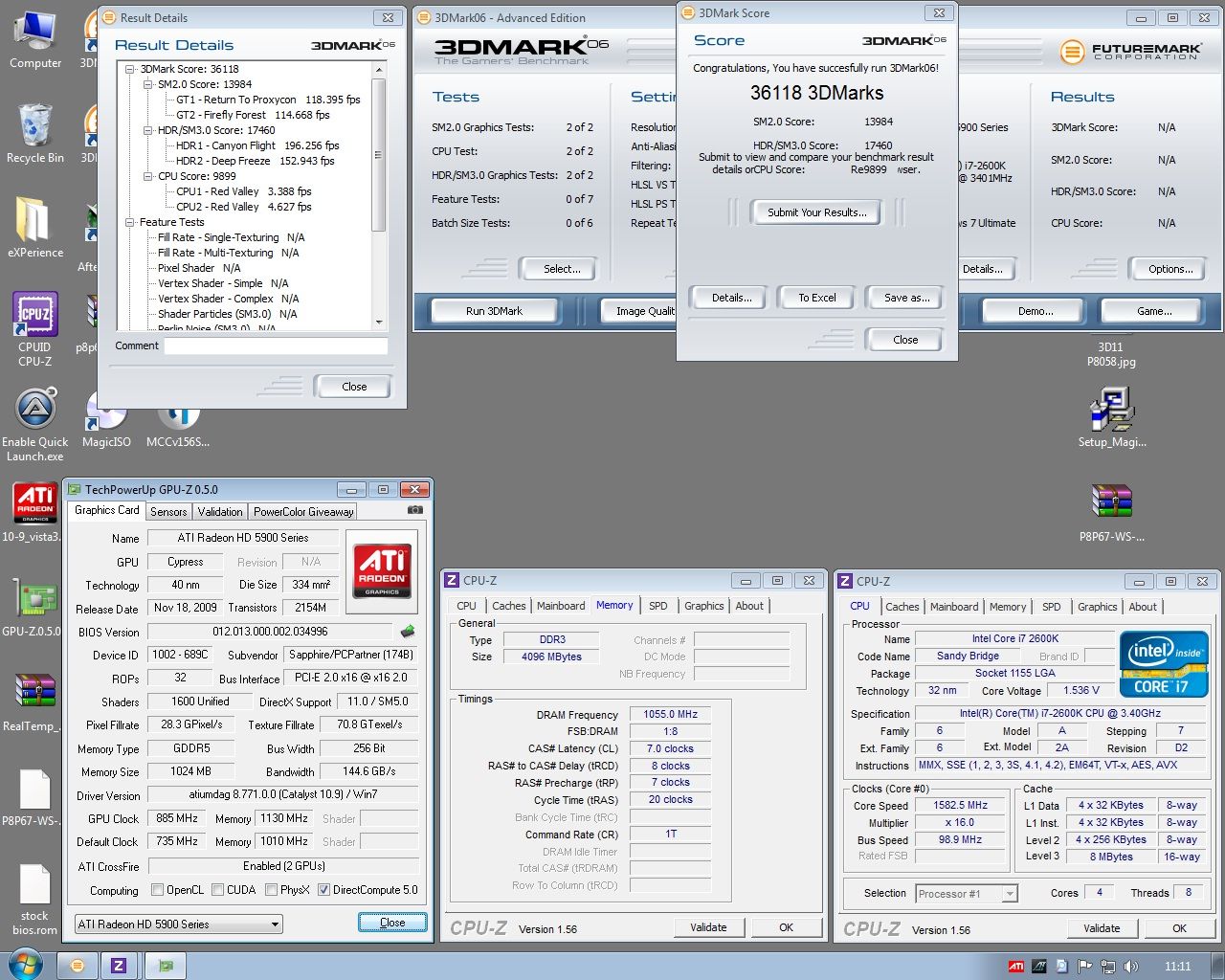
3dmark.png


My goal was to hit 32000 in 3dmark, I didnt think my cpu could of gone up to 5.2ghz.

Time to start getting the voltages lower.

(Fyi that videocard is a 6950 with the 6970 flash + OC)
 
i7-2600k/p8p67 LE

how's prime95 in-place fft, 8 threads cpu-z 1.56.3 reports 1.264-1.272v, 4327mhz and load temps do not exceed 60c (coretemp 99.8)

good conservative, stable, overclock?
 
Grab the beta of cpu-z which reads voltages correctly.

5GHz.jpg


Just did. Temps are from playing arkham asylum for a good 45 minutes. It appears stable to me ... maybe its time to try for higher. :D The dual bios on this board is a pain. Everytime a high overclock fails it flashes the bios back to an earlier version without pll over volting. This causes me to have to flash the bios back to the F6A constantly.
 
Just did. Temps are from playing arkham asylum for a good 45 minutes. It appears stable to me ... maybe its time to try for higher. :D The dual bios on this board is a pain. Everytime a high overclock fails it flashes the bios back to an earlier version without pll over volting. This causes me to have to flash the bios back to the F6A constantly.

You can flash a newer BIOS into the backup BIOS. I believe it is done by holding Alt-F12 during POST. It'll put whatever version is in the main BIOS in to the backup.
 
I disagree. If you can't pass 24 hours of Prime95, with Intel Burn Test and Furmark both running at the same time, then you aren't stable. Can't let any spare cycles get away, or let your video card and PSU get a free ride. And it helps if it is a full moon, during high tide, so the gravitational effects are maximized.

See, anyone can make up arbitrary "stable requirements". Trying to define stablity by using some test, or combination of tests is just a waste of time. Unless you want to spend Intel-level dollars on qualification testing, you'll never know if your system is really stable at any given speed. Which is why chips have "rated" speeds. Overclocking, by definition, is unstable.

Um, IBT and Furmark still wouldn't run together well at the same time because IBT would pull all the cpu cycles from Furmark. BTW Furmark is a retarded way to test your gpus overclock since it does not artifact check at all and just power hogs.
 
Um, IBT and Furmark still wouldn't run together well at the same time because IBT would pull all the cpu cycles from Furmark. BTW Furmark is a retarded way to test your gpus overclock since it does not artifact check at all and just power hogs.

SARCASM. read the rest of his post.
 
Um, IBT and Furmark still wouldn't run together well at the same time because IBT would pull all the cpu cycles from Furmark. BTW Furmark is a retarded way to test your gpus overclock since it does not artifact check at all and just power hogs.

Deadskull, meet Sarcasm. Sarcasm, Deadskull.
 
I found that I'd get .1v of vDroop when I overclocked. LLC seemed about the only way to really rectify that short of setting the CPU at 1.4v constantly. Which I didn't want to do.


Oh, and the batch is L040B436

Thank you. I tried your settings and there is no way I can hit 4.8GHz witch such a low voltage. My batch is L040b354 and it seems to be a quite a good one. Any ideas?:)
 
You can flash a newer BIOS into the backup BIOS. I believe it is done by holding Alt-F12 during POST. It'll put whatever version is in the main BIOS in to the backup.

Done. Thank you so much.
 
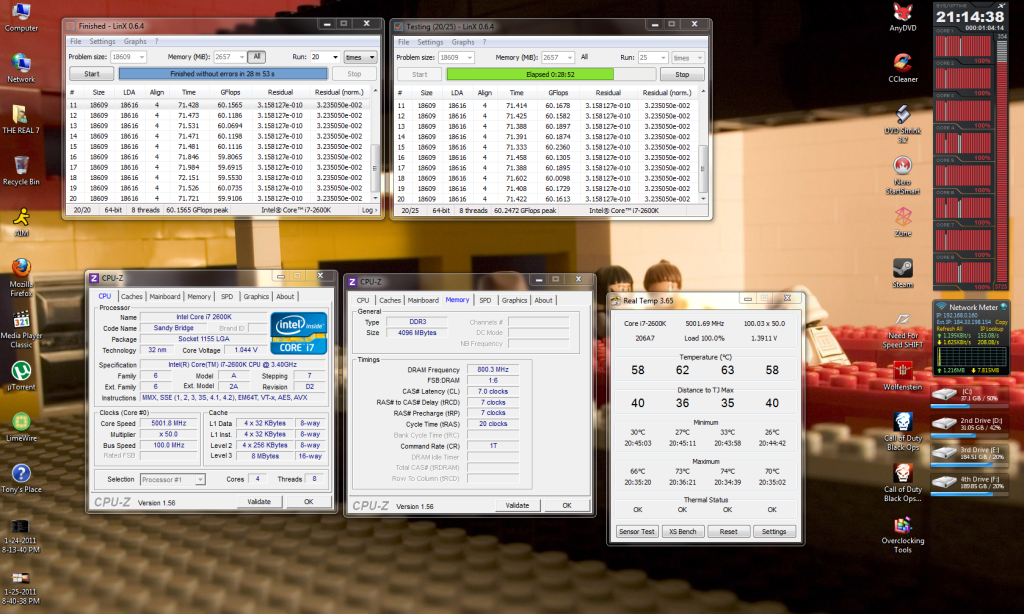
P8P67 vanilla with a 2500k @ 4.7 on 1.376V (avg on cpu-z). Using a 212+ with temps in the 66-70C range. I'm mostly stable at 4.8 but the voltage can jump over 1.4V with temps up to 75C. Think I'm going to stay @ 4.7 for now
 
nice overclock! how much actual voltage? (assuming you're aware that cpu-z 1.56 shows incorrect voltage on Gigabyte boards)

you mean the 1.044 lol yes that wrong , cpuz 1:56 has bug for my board ..
But look at real temp is correct at 1.392 :)
 
I finally got the F6A BIOS (which has PLL overvolting), for my GA-P67A-UD3P to be stable and I am now at 5GHz in windows .... time to do some stress testing.

win5ghz.jpg

You've got some really nice low voltage there, friend. Mine takes 1.50v to stabilize at 5Ghz. Other than yours, I only see one other user with that low voltage for that speed. Trade with me?
 
i7-2600k @ 4.5GHz
Auto volt with +0.005 Offset ~ min volt .970 ~ max volt 1.336
Zalman 9700 CPU cooler Temps for normal 24/7 usage min 26C ~ max 62C
 
you mean the 1.044 lol yes that wrong , cpuz 1:56 has bug for my board ..
But look at real temp is correct at 1.392 :)

not bad at all! cpu-z 1.56.2 (i believe 1.56.3 is beta released also?) supposedly shows correct voltage for your board, if you care at all.
 
You've got some really nice low voltage there, friend. Mine takes 1.50v to stabilize at 5Ghz. Other than yours, I only see one other user with that low voltage for that speed. Trade with me?

It is actually at 1.5v, that was just the old version of CPU-Z. I think I will drop it back to 4.8GHz as I can do that at 1.45v. Temps at 1.5v get up slightly above 80 at 1.5v, and 1.45v they never break 72-73 (pic below). 10 Deg and 0.05v for 200MHz isn't really worth it IMO.

48stable.jpg
 
Last edited:
Anyone with very low voltage 5Ghz chips around here? Is 5Ghz doable with 1.35V?

I don't think I've seen any with that low a voltage. Most of them seem to take 1.4 and above to hit 5 Ghz - and lots seem to take something close to 1.5.
 
prime. Super Pi 32m what are we in 2005?? :rolleyes:

If you think it is outdated or without merit why not show us what you can do? If it was not stable it would not have finished the benchmark and I suspect you have little to no knowledge of it's workings. I point to the subject and name of this thread "SB Overclocking Results". ;)
 
Last edited:
I'm not going to prime a chip at 1.5v air unless you're willing to fork over the cash for a spare chip.

So, you going to take me up on my offer?

Sure, go ahead...I'll cover you. More likely you are not going to do what I did on air cooling alone anyway. ;)
 
Asus P8P67 PRO + 2500K + Thermalright MUX-120

With BIOS version 1003, my max was 46x100 @ 1.4v (i actually never bothered to test it with lower vcore).
Regardless of what Vcore I set to, system would freeze at Widows boot with 47x multiplier.

I just updated my BIOS to latest 1204 and what a suprise?
Just to see if any improvement to overclocking has been made, I just set to vcore to auto and up the multiplier to see how far it could go ?
Not only did it actually booted into Windows @ 47x multi but I successfully booted into Windows @ 51x100 with auto vcore burning at 1.63v @ load.

I did run a Prime95 for about 30 seconds or so to see how high of a temperature it gets and i reached near 90C.
SuperPI 1M did in about 7s.
 
Back
Top