Very first post. This has been asked a lot. Plus, there's a lot of others, I just can't think of any.DR_K13 said:If you want software to make network diagrams you can use , http://www.networknotepad.com/ ( free) http://www.smartdraw.com/ ( free for a while ) or visio
http://office.microsoft.com/en-us/FX010857981033.aspx
![[H]ard|Forum](/styles/hardforum/xenforo/logo_dark.png)
Navigation
Install the app
How to install the app on iOS
Follow along with the video below to see how to install our site as a web app on your home screen.
Note: This feature may not be available in some browsers.
More options
You are using an out of date browser. It may not display this or other websites correctly.
You should upgrade or use an alternative browser.
You should upgrade or use an alternative browser.
Post Your Networkdiagram
- Thread starter DR_K13
- Start date
- Status
- Not open for further replies.


Thought I would update this a little.
Recently changed the server to a celeron 2.4 and put 3x250gb disks in a Asus case. Works reasonably well considering it was such a cheap build, not as if it does much anyway really.
My main workstation is pretty much unchanged with the exception of a larger IDE drive for mass storage.
The VP6 is about as Silent and smal as I can get it and sits in the downstairs study with a 17inch sony lcd and looks pretty nice on the desk.
The router was a recent purchase of eBay costing £11 delivered because the seller thought it was broken, just needed a firmware update and it has been perfect for weeks.
Cant really remember the specs on the thinkpads but they are about average.
The NeoWare e100 is also a purchase from ebay costing £24 delivered (again the seller mislablled) and is working fine under the embedded CE that was preinstalled. Anyone got any cool ideas of what I can do with this box? (might start a new topic on that actually).

Nacho said:It works
Do you get 2-3x the speed with all those connections plugged into a single computer?
versello said:Do you get 2-3x the speed with all those connections plugged into a single computer?
Its more that I'm bored, I've never actually hit bandwidth limitations on anything, just have the capacity for more I suppose.

blu3_scr33n
n00b
- Joined
- May 24, 2006
- Messages
- 35

Simple, but all I need. Next year Ill be at college and the setup will remain the same. I'll probably get a new router, and the college gives you your own laptop which is included in the tuition.
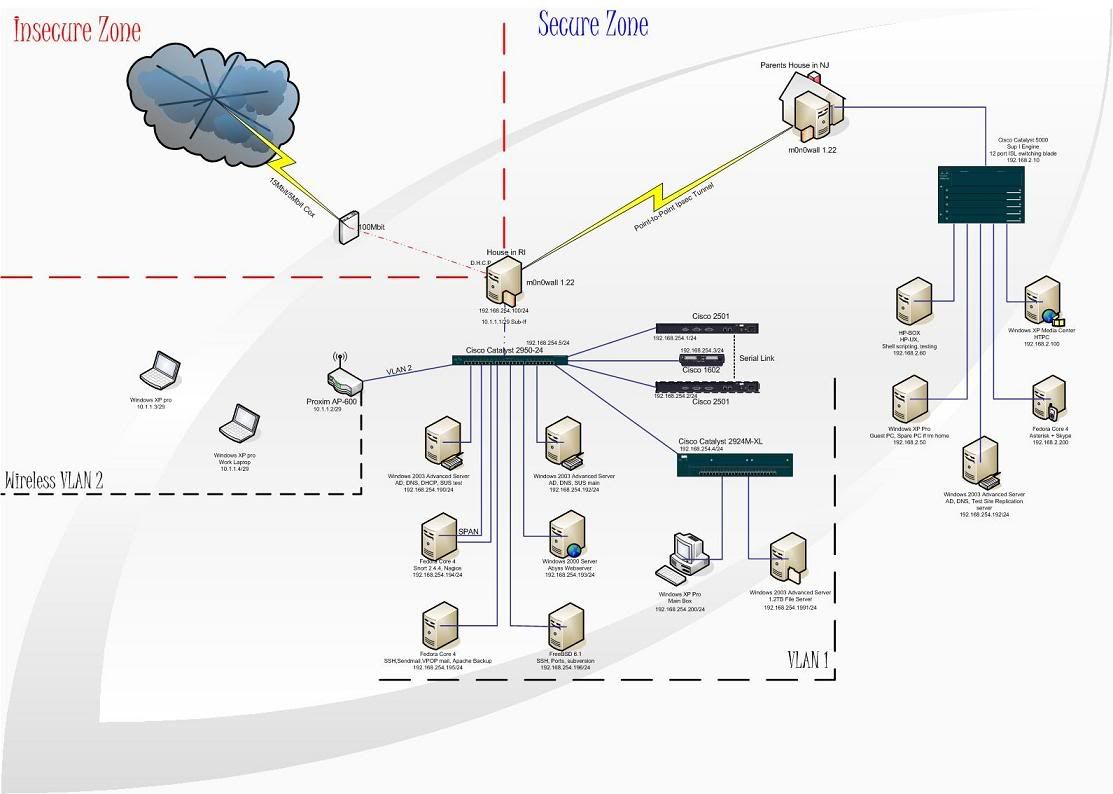

Not my network at home, but one I just recently designed. I removed/changed some stuff to keep it confidential. If anyone is wondering, I use Visio 2003 and have about 300mb in visio stencils.
*Note* BIG FILE
http://www.needmoreboost.com/xs/bcsv.jpg
*Note* BIG FILE
http://www.needmoreboost.com/xs/bcsv.jpg
WesM63 said:Not my network at home, but one I just recently designed. I removed/changed some stuff to keep it confidential. If anyone is wondering, I use Visio 2003 and have about 300mb in visio stencils.
*Note* BIG FILE
http://www.needmoreboost.com/xs/bcsv.jpg
not putting any redundancy into a network that seems quite large?
Ibanez3434
Bad Trader
- Joined
- Jun 15, 2004
- Messages
- 669
W00t, just added a couple of systems, and hopefully more to come!

I wish I could post network diagrams of my work, but it's just too much sensitive information. our SAP infrastructure blows every single diagram here outta the water. when I saw a picture of it, I was overwhelmed by how massive it was... and that was only a single environment for our engineering dept!
put it this way, we have 4 seperate datacenters at my physical location (there are several secret/classified I do not know where or how many) and between 5-10 datacenters offsite in the U.S. and in corporate.
put it this way, we have 4 seperate datacenters at my physical location (there are several secret/classified I do not know where or how many) and between 5-10 datacenters offsite in the U.S. and in corporate.
Stang Man said:I wish I could post network diagrams of my work, but it's just too much sensitive information. our SAP infrastructure blows every single diagram here outta the water. when I saw a picture of it, I was overwhelmed by how massive it was... and that was only a single environment for our engineering dept!
put it this way, we have 4 seperate datacenters at my physical location (there are several secret/classified I do not know where or how many) and between 5-10 datacenters offsite in the U.S. and in corporate.
Stang,
That would be cool. The only reason I posted the one I did is because it was a proposed network and they are not going with it.
Stang Man said:I wish I could post network diagrams of my work, but it's just too much sensitive information. our SAP infrastructure blows every single diagram here outta the water. when I saw a picture of it, I was overwhelmed by how massive it was... and that was only a single environment for our engineering dept!
put it this way, we have 4 seperate datacenters at my physical location (there are several secret/classified I do not know where or how many) and between 5-10 datacenters offsite in the U.S. and in corporate.
I believe this is a thread for YOUR network diagram. Why don't you post up a diagram of YOUR network that "blows ours out of the water".
.
.
.
.
.
.
.
.
.
.
.
.
.
.
.
hahahah, im just bustin your balls man.

Ours is here: http://www.hardforum.com/showthread.php?t=1073581
I can't post the real one because it is propietary information
I can't post the real one because it is propietary information
Blitzrommel
2[H]4U
- Joined
- Sep 26, 2001
- Messages
- 2,659
xphil3 said:well, I finally put together a diagram. Let me know what you guys think.
*snip*
sorry about the quality, I have a full res image. If someone req's ill throw that up later.
Dang, our networks are almost identical

Dangman
Ninja Editor SuperMod
- Joined
- Dec 15, 2005
- Messages
- 46,056
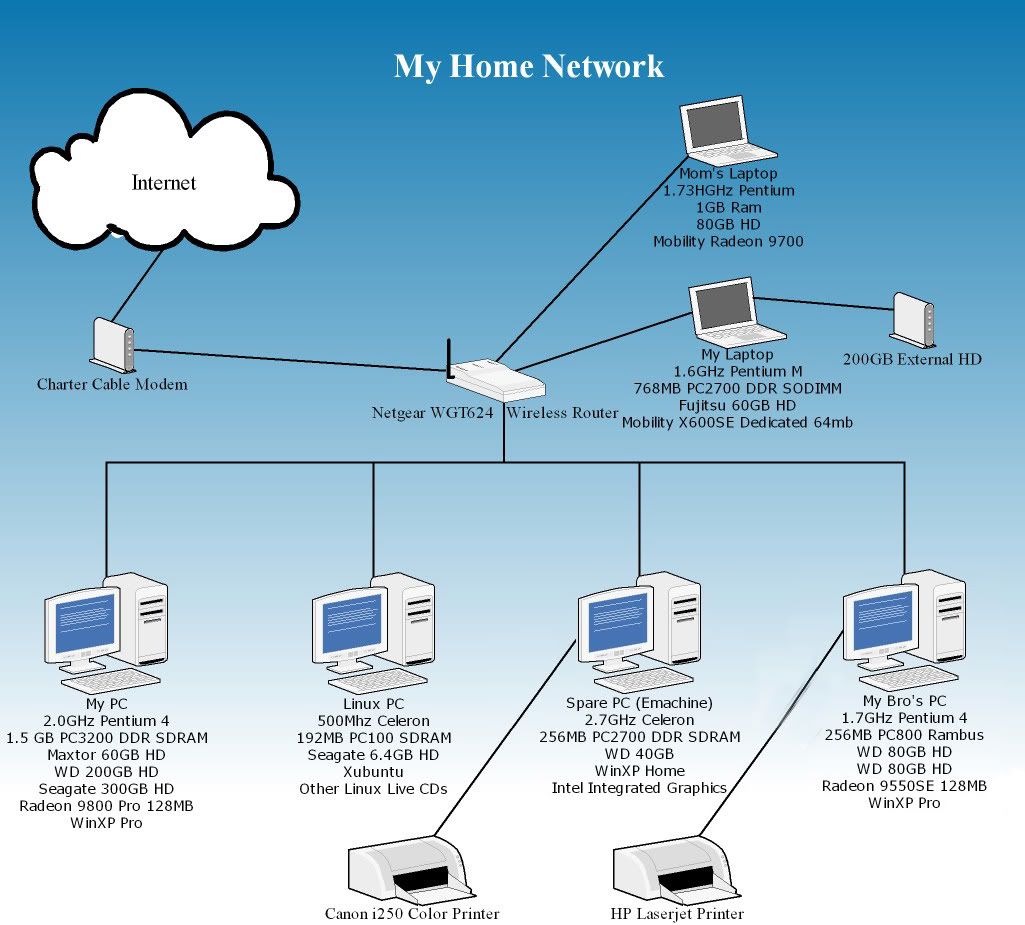
Here's my network:

PanzerKrieg13
Gawd
- Joined
- Jun 20, 2005
- Messages
- 982
pat1006 said:
LOL. Notice the IP for the wireless, along with the SSID and the WEP-WPA password.
Blitzrommel
2[H]4U
- Joined
- Sep 26, 2001
- Messages
- 2,659
Hehe, he forgot his address though. dohPanzerKrieg13 said:LOL. Notice the IP for the wireless, along with the SSID and the WEP-WPA password.
the_architect713
n00b
- Joined
- Apr 1, 2005
- Messages
- 14
Here is my little home network. I have one more server and two more laptops but they are for testing software and other things and are not on the network at all. The program I used to put together this diagram was SmartDraw

D
Deleted member 79192
Guest
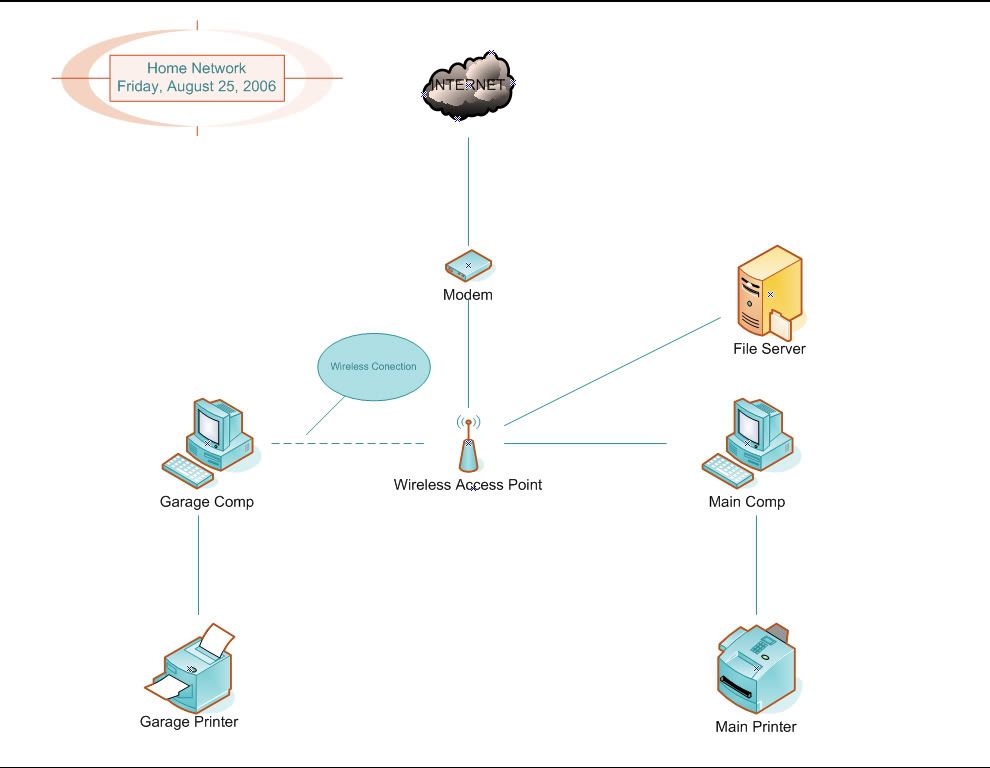
All links between computers, routers, and switches are 100mbit cat5. Between comps and printers are USB. Green line = Wireless-G link.

EDIT: Updated pic to include PS2.
EDIT: Updated pic to include PS2.
Johnboy12358
Weaksauce
- Joined
- May 12, 2006
- Messages
- 78

Nn'theraq'pss
Limp Gawd
- Joined
- Mar 20, 2002
- Messages
- 160

I'm seriously considering consolidating the file server and the infrastructure server into one dual-core opty box and loading it with RAM to run VMWare in because that E4000 is a freakin space heater. Probrably towards the beginning of next year when I have some more funds available.
D
Deleted member 79192
Guest
Wow... nice setup there... How did you get the WRT54Gs to run in a wireless mesh network?
Nn'theraq'pss
Limp Gawd
- Joined
- Mar 20, 2002
- Messages
- 160
Thanks.Wow... nice setup there... How did you get the WRT54Gs to run in a wireless mesh network?
To answer your question, the latest DD-WRT firmware and the instructions from
http://www.dd-wrt.com/wiki/index.php/WDS_Linked_router_network
and
http://www.bitsum.com/openwiking/owbase/ow.asp?WRT54G5_CFE
Nn'theraq'pss
Limp Gawd
- Joined
- Mar 20, 2002
- Messages
- 160
A little bit of both I guess. I use it for the home network and for learning about networking in general. Plus I'm a geek so running multiple computers at home is a preresequitejbog91 said:What's all that for? Just messin around or does it have another use?
That and it's just plain cool.
D
Deleted member 79192
Guest
Yeah that's a neat setup... Could do a hell of a lot of tinkering with it. My dad owns our home network so I don't have permission to play around with things unfortunetely...
Hey thanks for the tips on doing that mesh networking thing with the WRT54Gs... You seem to know a lot about this kind of stuff so I have a question... Do you think they'd create a version of that firmware for the newer Wireless N routers? I might be interested in setting up a mesh but the distance would be a bit too far for G...
My dad owns our home network so I don't have permission to play around with things unfortunetely...Hey thanks for the tips on doing that mesh networking thing with the WRT54Gs... You seem to know a lot about this kind of stuff so I have a question... Do you think they'd create a version of that firmware for the newer Wireless N routers? I might be interested in setting up a mesh but the distance would be a bit too far for G...
Nn'theraq'pss
Limp Gawd
- Joined
- Mar 20, 2002
- Messages
- 160
I'm not sure. Active development on the new v24 firmware is going strong so you might want to do a feature request over in their forums for it.Matt Welke said:Do you think they'd create a version of that firmware for the newer Wireless N routers? I might be interested in setting up a mesh but the distance would be a bit too far for G...
Ibanez3434
Bad Trader
- Joined
- Jun 15, 2004
- Messages
- 669
Giggity Giggity Gooatomiser said:im sure we would all love this in our home...
atomiser said:im sure we would all love this in our home...
Networked Washers and Dryers? A SlingBox, HTPC, and a cable box? Isn't that a little outta hand?
- Status
- Not open for further replies.