• Some users have recently had their accounts hijacked. It seems that the now defunct EVGA forums might have compromised your password there and seems many are using the same PW here. We would suggest you UPDATE YOUR PASSWORD and TURN ON 2FA for your account here to further secure it. None of the compromised accounts had 2FA turned on.
    Once you have enabled 2FA, your account will be updated soon to show a badge, letting other members know that you use 2FA to protect your account. This should be beneficial for everyone that uses FSFT.

Post Your Mac Setup!

You have a new macbook right?? I am just holding onto my 12 inch powerbook til I really have to get a new one. Probably will wait until the next version of OSX comes out.
Yeah I have the new 2.4GHz model. It's my first Mac and I absolutely love it. It's a perfect LAN machine also. Plays almost every game out there sans Crysis at high settings with 40+ FPS.
 
^^ I didn't know you can play PC Games on a mac? How much memory do you have in the 2.4GHz model?
 
I've had this awesome MacBook Pro since early October just before the new version MBP was released.

My baby's specs: C2D 2.5GHz, 4GB G.Skill PC2-5300, 250GB 5400RPM, 8600M GT 512MB, Gorgeous 15" Matte LED LCD. :D

 
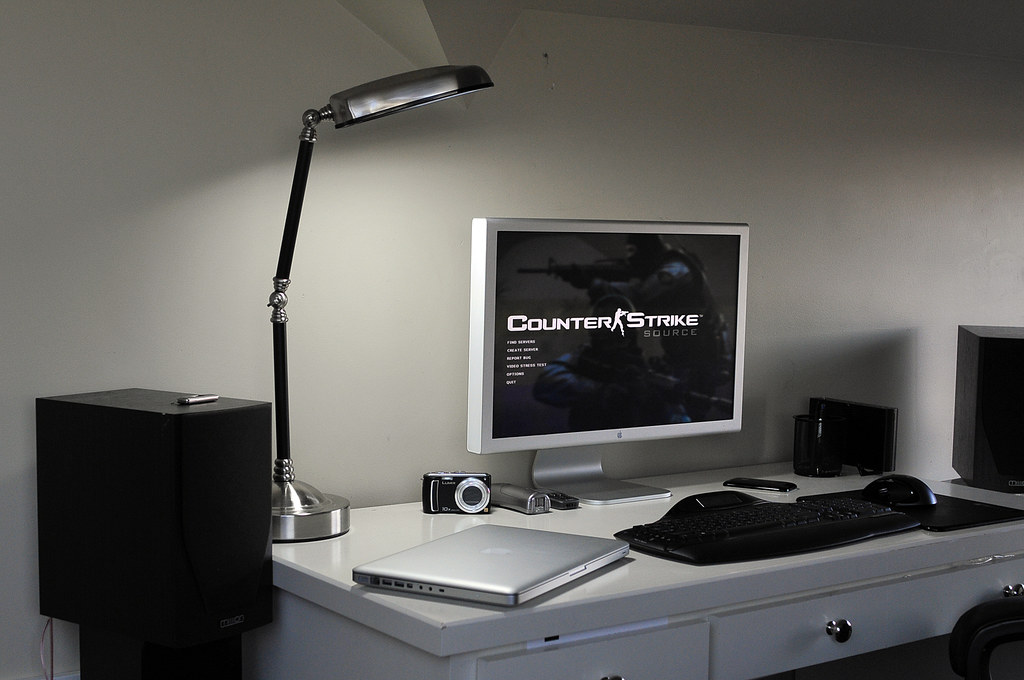
Here's mIne. I know I need a good desk and a new floor.
3.jpg

2.jpg

1.jpg

:D
 
3117023088_2f3b84b22f_o.jpg


Aluminum Macbook, iPhone 3G, 23" Apple Cinema Display, Hack Pro (4ghz, 8GB RAM, about 1TB HD, 8800GT 512mb), Mission M71i monitors connected to a Yamaha HTR6030 5.1 receiver.

Taken with the Canon 5D. Tried a different angle than usual.

Older pic:
2965024897_6cb3e3cda7_b.jpg
 
Hackintosh
Intel E8500@4.25ghz, 8GB DDR2 OCZ SLI RAM, XFX 8800GT Alpha Dog, Gigabyte ep35-ds3l, 5 hard drives.
Apple Cinema Display HD - 23", Logitech MX Revolution
Aluminum Macbook 2.0ghz, 4gb DDR3 RAM, 160gb hard drive.
Thinkpad X61 Tablet 1.6ghz, 4gb DDR2 RAM, 160gb hard drive.
Since genmay people put cars in their signatures, I drive a black BMW 540i Sport package.

You have like everything I want hehe.
 
3117023088_2f3b84b22f_o.jpg


Aluminum Macbook, iPhone 3G, 23" Apple Cinema Display, Hack Pro (4ghz, 8GB RAM, about 1TB HD, 8800GT 512mb), Mission M71i monitors connected to a Yamaha HTR6030 5.1 receiver.

Taken with the Canon 5D. Tried a different angle than usual.

Older pic:
2965024897_6cb3e3cda7_b.jpg

Is it me or are those 2 rendered 3d models? Either way, nice setup :p
 
posted this in the other subforum, didn't see there was a Mac Rig thread

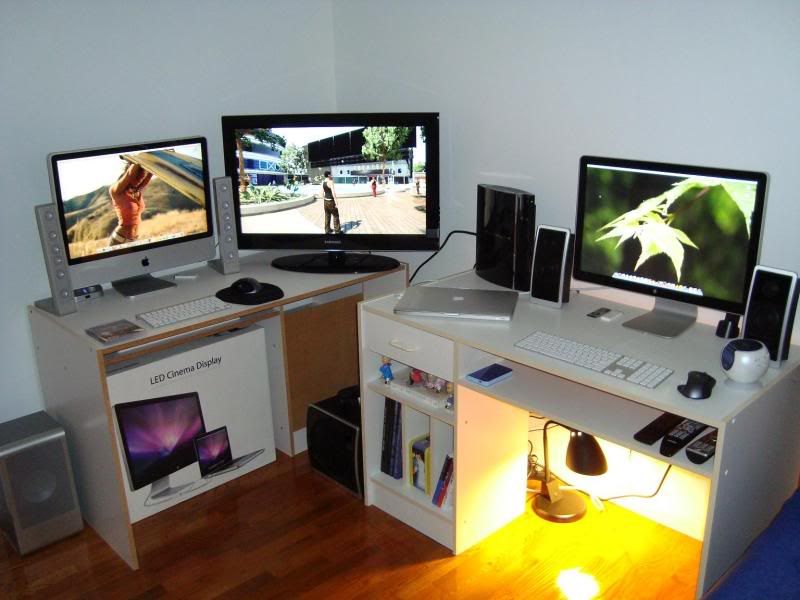
DSC00125.jpg


From Left to Right:

24" iMac, 2.8Ghz Extreme, 2GB RAM running Tiger
Apple Wireless keyboard + Logitech MX Revolution
Altec Lansing FX6021 2.1 speakers

Samsung 32" 1080p LCD HDTV, 550 series
Sony PS3 80GB
Sennheiser HD-555 earphones

Macbook Pro 15.4", 2.53Ghz, 4GB DDR3 RAM running Leopard & XP
Apple 24" LED display
Apple wired keyboard + Logitech MX Revolution
Logitech Z Cinema 2.1 speakers
Apple 16GB iPod Nano w/ Shure SE110 earbuds
WD 320GB My Passport (external pocket drive)
 
posted this in the other subforum, didn't see there was a Mac Rig thread

DSC00125.jpg


From Left to Right:

24" iMac, 2.8Ghz Extreme, 2GB RAM running Tiger
Apple Wireless keyboard + Logitech MX Revolution
Altec Lansing FX6021 2.1 speakers

Samsung 32" 1080p LCD HDTV, 550 series
Sony PS3 80GB
Sennheiser HD-555 earphones

Macbook Pro 15.4", 2.53Ghz, 4GB DDR3 RAM running Leopard & XP
Apple 24" LED display
Apple wired keyboard + Logitech MX Revolution
Logitech Z Cinema 2.1 speakers
Apple 16GB iPod Nano w/ Shure SE110 earbuds
WD 320GB My Passport (external pocket drive)

Nice Setup! :)

i just had one question though, im getting the new unibody macbook pro soon, and was most likely going to get the 24" LED Display, but when i tried it out in the Apple store, i saw that it wouldn't work unless the macbook pro was opened, not closed, which was a downer to me as i just wanted to put the macbook pro on the side when it was connected to the monitor, but in your picture i do see your macbook pro attached while closed and working, so basically my question, can you use the LED Display with the macbook pro when it is closed?

Also, do you think the LED Display is an all around good monitor for the unibodies?
 
hey speedy523

ghostchild is indeed correct, the new LED display will work even if the MB or MBP you're using is closed. what i do is i turn on my MBP with the lid open obviously, and the system boots up with both screens on. you can go through System Preferences though and designate which of the two displays you want to serve as primary with the dock etc. once you close the lid of the MB or MBP, the system will temporarily go to sleep but if you shake your mouse or push a few buttons on your external keyboard, the display will wake up only on that external display, hope that helps.

as for how good a monitor the new LED display is, I love it. i have gone through quite a few higher end displays in the past few years and I can genuinely say this LED display is my fav, my Apple affinity aside. it is so bright and vibrant, images and video are so clear and viewing angle is great. i have even done a little gaming on it and everything is super smooth. as always, there has been a lot of flame baiting and trolling across various forums about the cost of this monitor, $899. Is it expensive? It definitely is, anyone that says $900 + tax for a computer monitor is cheap is either very wealthy or not all there upstairs lol. I will end by saying this... this LED display was made specifically for the new unibody MB's and MBP's, and for what it is, it is amazing. the three prong extension is so convenient, i love that i can leave my Apple charger in my bag and just dock my MBP once i get home. Is it expensive? Yes it is. Is it worth $900? Maybe not to everyone but I am a happy owner, so don't let all the negativity sway you. it is a gorgeous panel and the best supplement to the new unibody Macs you will find. I have yet to see a 24" LED panel with this much capability at this low a price point.

good luck on your future purchases, you will not be disappointed, both the new MBP and the LED display are gorgeous pieces of technological architecture, you'll be very very pleased with both. =)
 
3117023088_2f3b84b22f_o.jpg


Aluminum Macbook, iPhone 3G, 23" Apple Cinema Display, Hack Pro (4ghz, 8GB RAM, about 1TB HD, 8800GT 512mb), Mission M71i monitors connected to a Yamaha HTR6030 5.1 receiver.

Taken with the Canon 5D. Tried a different angle than usual.

Older pic:
2965024897_6cb3e3cda7_b.jpg

Thats an AWESOME setup!
 
No 3D models here, not sure what you're referring to. Just a tripod, very expensive camera and an eye for post processing.

He's referring to the fact that the overall quality of the image(s) gives them a 3D-rendered feel. I thought exactly the same thing when I caught both of them, but the older shot has the same effect in a much more pronounced way. Not sure why a real photo of a real setup has that particular effect, but in your case, it does, twice over. :D

Was going to make a post stating the same thing but the other poster beat me to it. They do look like HDR renders, in my opinion. Nice to see someone else caught it too...
 
This is from when I just moved into my new apartment
86a59907-bd1f-46bd-9895-552d478e0182.jpg


I'm using VGA with the monitor because I was young and impressionable when I bought it and DVI will never work how I want it. These are older pics. The laptop screen is now the secondary desktop and faces me.
e82887a0-2e8b-4cc3-9ad3-579ee5990f74.jpg


And my recently repaired ibook!!!! I can seeee now that the backlight works.
4c74b803-f5cf-44b4-aef5-f2a422e30cca.jpg

42fa7930-7978-4f9a-b0ca-a50bee68c102.jpg

a1fa5968-971c-465e-bf6c-75c5c6e117b2.jpg

The wires were packed so tight in the hinge that they eventually got cut right though. It was too much work to repair all of them so the computer only sleeps when you tell it to, not when you close it. Additionally, I forgot to put a metal reflector type shield thingy back behind the lcd so there is a cool looking light pattern coming out of it. Ill take a dark pic and post it here later.
 
He's referring to the fact that the overall quality of the image(s) gives them a 3D-rendered feel. I thought exactly the same thing when I caught both of them, but the older shot has the same effect in a much more pronounced way. Not sure why a real photo of a real setup has that particular effect, but in your case, it does, twice over. :D

Was going to make a post stating the same thing but the other poster beat me to it. They do look like HDR renders, in my opinion. Nice to see someone else caught it too...

Thanks, I guess :confused:

HDR doesn't mean render in any way I've ever heard it used, it refers to what was traditionally produced only by medium format cameras (extremely high dynamic range, hence the "hrd") but nowadays its the slang for multiple exposure stacking / tone mapping from 35mm/crop cameras.

These are single exposure photos, part of the quality is the light - its a "Sun Light Lamp" that produces extremely pure whites.

Here's the EXIF off the newer picture;

Camera: Canon EOS 5D
Exposure: 0.3 sec (3/10)
Aperture: f/11
Focal Length: 50 mm
ISO Speed: 100
Exposure Bias: 0 EV
Flash: Flash did not fire
 
We're not doubting you, so don't take it that way if you are. :D We're just commenting on the fact that the images, probably because of multiple variables including the lighting in the room at the time of the exposure, gives the "rendered" quality. Just something that I - because of working with CGI for over 20 years - tend to notice more often than not.

HDR is just the concept of the high dynamic range on the lighting, for the most part. It's a "more real than real" quality, sorta defies an accurate way of describing it.

It's a beautiful setup, and great photos, they just have that particular quality to 'em, that's all.
 
Hm, very interesting stuff. Its funny you should say it about both pictures because they were taken with different cameras and lenses (5D and 50/1.8, D300 and 35-70/2.8).

No photoshop except sharpening and curves. The screen images aren't superimposed, the saturation hasn't been played with. I guess I'm magical... maybe Pixar could use me? :D
 
Hm, very interesting stuff. Its funny you should say it about both pictures because they were taken with different cameras and lenses (5D and 50/1.8, D300 and 35-70/2.8).

No photoshop except sharpening and curves. The screen images aren't superimposed, the saturation hasn't been played with. I guess I'm magical... maybe Pixar could use me? :D

just goes to show the IQ of a good DSLR.
 
3153393361_fd5a643d32.jpg

Going to have to upgrade that macbook pro soon... its limiting me now.... especially with batch processing... And its only a year old....
 
Let me know if you are looking for one.. I might be selling mine for an OCZ Whitebook.
 
Going to have to upgrade that macbook pro soon... its limiting me now.... especially with batch processing... And its only a year old....
Makes me glad I only need my MBP for writing and video simulation design.
 
What's with the ego stroking? lol. The pictures are good, but they don't look rendered. Too many imperfections, unless you want to add imperfections to a render to make it look real... ;)

Oh wait.. I forgot this is the Apple category :eek:


J/K I'm looking forward to seeing what they do with the Mac Mini. I don't really want an Imac, The current Mini kinda sucks and the pro is too expensive (although sexy)
 
What's with the ego stroking? lol. The pictures are good, but they don't look rendered. Too many imperfections, unless you want to add imperfections to a render to make it look real... ;)

Oh wait.. I forgot this is the Apple category :eek:


J/K I'm looking forward to seeing what they do with the Mac Mini. I don't really want an Imac, The current Mini kinda sucks and the pro is too expensive (although sexy)

Man, I wish that 17" quad core MBP rumor is true on top of what they may do w/ the mac mini. I'm ready to pull the trigger but want to see what comes out of macworld. another week of waiting.
 
If they do upgrade the Mini, I will most likely buy one for a file/torrent sever. Nice Swam M10s, I've been looking for some, how do they sound? I think they might be too big for my desk though... :(
 
If they do upgrade the Mini, I will most likely buy one for a file/torrent sever. Nice Swam M10s, I've been looking for some, how do they sound? I think they might be too big for my desk though... :(

Swans are the best $100 speakers out there...
 
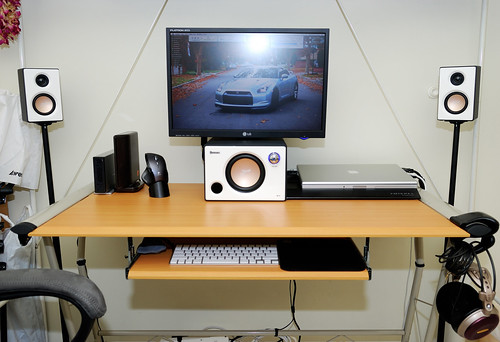
got a new 640GB Western Digital external drive to take advantage of Leopard's Time Capsule app. also got a new 5.1 system for movies and rearranged peripherals to give entire Mac rig a cleaner look... i still need to get a new desk and speaker stands for the rear speakers but, for now, pretty happy

DSC00219.jpg


DSC00243.jpg
 
Apartment: New Samsung 24bw. Editing with new pics, brb:

Apartment: New Samsung 24bw. Editing with new pics, brb:


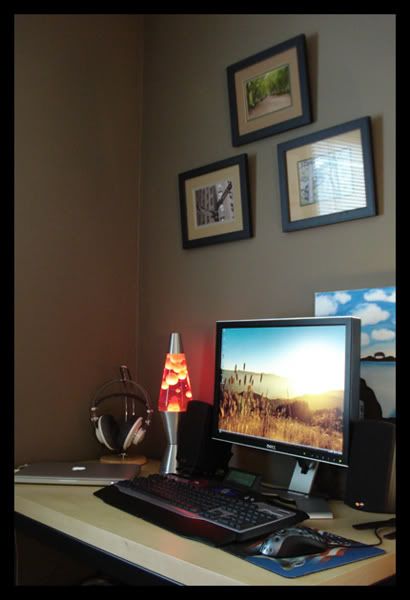
What kind of headphones and stand do you have rocking there UncleDave?

look like AGK K701's like he mentioned in another thread, and iunno about him, but for my ATH-A900's I use a banana stand I got at bed bath and beyond on recommendation by head-fi.
 
What kind of headphones and stand do you have rocking there UncleDave?
They're AKG K701s. I got the stand from Amazon.com for $10.

The headphones aren't burned in but they still sound amazing. I'm excited to get my amp because these things are very demanding and my MacBook doesn't provide enough current.

where did you get those picture frames?
Michael's! It's amazing how hard it is to find plain black picture frames. I matted them myself as and I also took the photographs.

look like AGK K701's like he mentioned in another thread, and iunno about him, but for my ATH-A900's I use a banana stand I got at bed bath and beyond on recommendation by head-fi.
Exactly. You can buy purpose built stands but they're expensive. I'm gunna be purchasing some A700's for gaming soon I think.
 
As an Amazon Associate, HardForum may earn from qualifying purchases.
what amp did you say you were getting again? I run my A900's off my Pioneer Receiver, but they're a lot lower impedance than those K701's, I've always loved the look of those, if/when you get the A700's, lemme know how they compare.

Oh, I've got a PA2V2 amp for portable use, but it really doesn't change much except for volume and some staging, but it's not like, amazingly better than just the headphones to my iPhone directly, I'd be much more likely to use a desktop headphone amp.
 
Back
Top