
Nasty_Savage
Extremely [H]
- Joined
- Mar 19, 2001
- Messages
- 37,798
If it saves my multi monitor positions when i update the driver i’m sold…
![[H]ard|Forum](/styles/hardforum/xenforo/logo_dark.png)
Follow along with the video below to see how to install our site as a web app on your home screen.
Note: This feature may not be available in some browsers.

Currently, if you install Nvidia drivers fresh you get the standard Nvidia Control Panel (and GFE if you select to install it).I've installed it, the Control Panel page seems the same. The Geforce Experience is now the GeForce App.
Is the control panel portion a separate install?
I've installed it, the Control Panel page seems the same. The Geforce Experience is now the GeForce App.
Is the control panel portion a separate install?

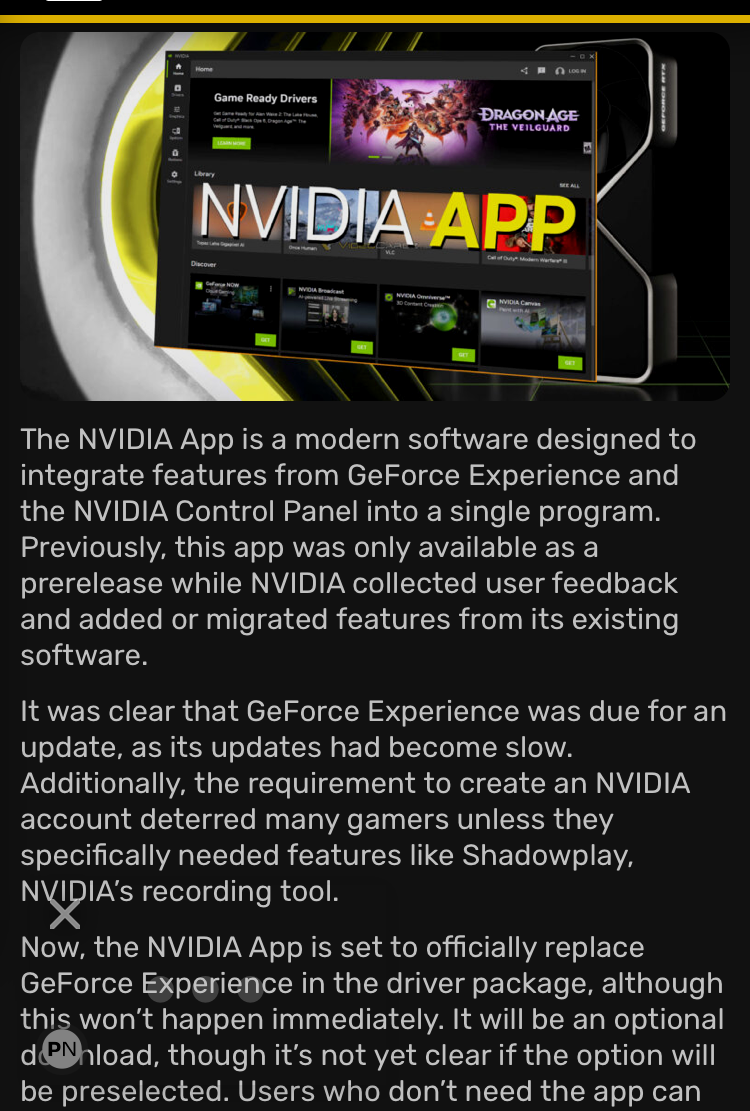

So this is replacing GeForce Experience only? So those of us who don't use GFE and still wish to use nVidia Control Panel can continue to do so?NVIDIA App exits beta, set to replace GeForce Experience in drivers soon
View attachment 691210
https://videocardz.com/newz/nvidia-app-exits-beta-set-to-replace-geforce-experience-in-drivers-soon

Hopefully sooner rather than later. That ancient thing isn't doing anyone any favors and at this point, anything I'd need to do in it can be done faster in the new app. So lightweight, so snappy. I just cringe thinking about hitting Apply in the old control panel and the whole window just refreshing like its from 1998.So this is replacing GeForce Experience only? So those of us who don't use GFE and still wish to use nVidia Control Panel can continue to do so?
EDIT: It helps if I actually read the article:
- "Users who don't need the app can skip it, as they’ll still be notified about new drivers through other channels."
- "NVIDIA isn’t sunsetting the Control Panel, as the official blog post doesn’t mention any changes to it. It seems the company will take time to fully integrate Control Panel features, so users can run both programs simultaneously for now."


We've been using it for months, so far that is not the case.Why do I have a bad feeling this is just going to be a skin change with advertisements and microtransactions?


It loads faster and runs far more smoothly than the control panel app, and unsurprisingly km ahead of the geforce experience app.Ugh, another form of bloatwares. I'm glad all I do is install my drivers and that's that.


You can't. It's one of the complaints on the GeForce forums right now.Anyone know how to adjust RTX HDR globally? In the global settings I'm only seeing on or off, and with it set to on I can't adjust any settings from the app, still have to do it on a per game basis using Alt + F3. Would be nice to just set it in the app and forget about it.


lol so true. my little sister saw me looking at some screenshots of it and said "wtf, is that from windows 95?!?"...Fact: Once NVIDIA fully commits to a new control panel, we will officially be living in “the future.”

lol so true. my little sister saw me looking at sone screenshot of it and said "wtf, is that from windows 95?!?"...
 I feel like I'm one of the few who love it.
All it really needs is to present more legibily at higher resolutions. It doesn’t scale or enlarge to fill a window. I have to squint in 4K. Fortunately, I know it from memory and I swear it has looked like this since maybe windows 98.
I have 2 retro PCs... one running windows 98se, the other windows XP. Can confirm, it looks the same back then too.... LOLAll it really needs is to present more legibily at higher resolutions. It doesn’t scale or enlarge to fill a window. I have to squint in 4K. Fortunately, I know it from memory and I swear it has looked like this since maybe windows 98.
I would only be in favor of changing it if you did not give up ANY functionality.

It replaces GFE, and is still missing some functionality that the NVCP has. Eventually NV will replace the NVCP with the new App. Eventually.Ok so the latest drivers have the app built in and is supposed to replace the control panel but now every time I start my pc I get a message saying the nvidia control panel is not installed.
Then why didn't the control panel get installed automatically like it always has on ever other driver install?It replaces GFE, and is still missing some functionality that the NVCP has. Eventually NV will replace the NVCP with the new App. Eventually.
It installed for me FWIW...Then why didn't the control panel get installed automatically like it always has on ever other driver install?
Because it hasn't done that since Nvidia branched off the NVCP install to windows via the windows store (on the back end)? Pretty sure that was a couple of years ago when Nvidia added the DCH version of their drivers (vs the Standard driver which did have the NVCP installed along side the driver, which is no longer offered IIRC).Then why didn't the control panel get installed automatically like it always has on ever other driver install?
I have always installed every single nvidia driver and not one single time did I have to manually go get the control panel.Because it hasn't done that since Nvidia branched off the NVCP install to windows via the windows store (on the back end)? Pretty sure that was a couple of years ago when Nvidia added the DCH version of their drivers (vs the Standard driver which did have the NVCP installed along side the driver, which is no longer offered IIRC).
Probably because you did it one time (Nvidia control panel icon click, then installation happened seamlessly via the Windows Store) and then always installed new drivers over the old, and didn't clean install them after using DDU.I have always installed every single nvidia driver and not one single time did I have to manually go get the control panel.
I guess you did not read the last several posts...Made me realize I can uninstall NVCP finally. Thats fantastic, actually. There is nothing still in that ancient software I need anymore.
Make sure the folders it scans for games carried over from GFE and then do a manual scan.The POS app cant even figure out what games I am playing recently. Not a single game I played today or even this week shows up. Even when I sort it by recent games played it throws up shit I have not played for months or years. On the last driver the stupid app would just put a new entry for the same game over and over every time I played something. This thing was not ready to come out of beta if it cant even get simple things like that right.
The game list in mine is as expected, everything I have installed seemingly sorted by what I've played recently. Naturally, if you're not a regular DDU user I can see things getting mucked up.The POS app cant even figure out what games I am playing recently. Not a single game I played today or even this week shows up. Even when I sort it by recent games played it throws up shit I have not played for months or years. On the last driver the stupid app would just put a new entry for the same game over and over every time I played something. This thing was not ready to come out of beta if it cant even get simple things like that right.