![[H]ard|Forum](/styles/hardforum/xenforo/logo_dark.png)
Navigation
Install the app
How to install the app on iOS
Follow along with the video below to see how to install our site as a web app on your home screen.
Note: This feature may not be available in some browsers.
More options
You are using an out of date browser. It may not display this or other websites correctly.
You should upgrade or use an alternative browser.
You should upgrade or use an alternative browser.
Network pics thread
- Thread starter BobSutan
- Start date


Vito_Corleone
[H]ard|Gawd
- Joined
- Dec 17, 2006
- Messages
- 1,730
2801
Vito_Corleone
[H]ard|Gawd
- Joined
- Dec 17, 2006
- Messages
- 1,730
Actually, I think it's a 2901.
I'm running two XENServer boxes off a 1511+ running iSCSI. Works well. Did ESXi on it before aswell.
Please excuse cabling. More of a temp setup till I get a real rack in here.
http://141networks.com/upload/rack.jpg
Is that a Ubiquiti Nanostation up in the corner? How you like it?
NickOlsen8390
Weaksauce
- Joined
- Sep 24, 2009
- Messages
- 126
Is that a Ubiquiti Nanostation up in the corner? How you like it?
Works well. I work for a WISP and we use some of them so I get them easy.
However. They don't do Dual 20/40 channel size. So normal Wireless N laptops will connect. But things that support N only in 20 mhz (Iphone..most cell phones) won't connect to it unless its in 20mhz (150Mb/s) mode.
If you wanted a ubnt product that did dual 20/40 I think only the UniFi's do that right now. Which I'm looking into getting a few of.
Works well. I work for a WISP and we use some of them so I get them easy.
However. They don't do Dual 20/40 channel size. So normal Wireless N laptops will connect. But things that support N only in 20 mhz (Iphone..most cell phones) won't connect to it unless its in 20mhz (150Mb/s) mode.
If you wanted a ubnt product that did dual 20/40 I think only the UniFi's do that right now. Which I'm looking into getting a few of.
I just ordered a -3-pack of UniFi's to test in our office area. Not sure how well they'd work on a manufacturing floor with 65-foot metal ceiling. May try one out there though...
Various images from cleaning out my phone - some old, some newer

Inside of the ONT's we use in our FTTH Exchanges - I think I've posted picture of the fronts a while back. Basic 2x pots + 4x 100meg ethernet.

Remote cabinet finally upgraded from our old ATM based AFC system to the new Ethernet based Occam/Calix B6. Old AFC system was sooo overloaded we had to limit DSL speeds to 768k/256k. Sadly an OC-3 sounded like plenty of bandwidth when the system was engineered. New system should be able to do 10-20 meg to everyone in the area.

Not as "network" related, but worthy of a post since it still effects it. Long story short this is an ISDN repeater we use in area's that don't have enough physical pairs to get phone service to people on a specific route. There's 2 pins @ the bottom you can't see that the snake is shorting out w/ ~190v DC on there
Inside of the ONT's we use in our FTTH Exchanges - I think I've posted picture of the fronts a while back. Basic 2x pots + 4x 100meg ethernet.
Remote cabinet finally upgraded from our old ATM based AFC system to the new Ethernet based Occam/Calix B6. Old AFC system was sooo overloaded we had to limit DSL speeds to 768k/256k. Sadly an OC-3 sounded like plenty of bandwidth when the system was engineered. New system should be able to do 10-20 meg to everyone in the area.
Not as "network" related, but worthy of a post since it still effects it. Long story short this is an ISDN repeater we use in area's that don't have enough physical pairs to get phone service to people on a specific route. There's 2 pins @ the bottom you can't see that the snake is shorting out w/ ~190v DC on there
NickOlsen8390
Weaksauce
- Joined
- Sep 24, 2009
- Messages
- 126
I just ordered a -3-pack of UniFi's to test in our office area. Not sure how well they'd work on a manufacturing floor with 65-foot metal ceiling. May try one out there though...
I bet you they work great. A colleague of mine covered his office in them. Using 3 of them he covered a huge office, Great signal everywhere. Says the mangement software rocks too.
I just installed a 3 pack UniFi System for a client of mine almost 2 weeks ago. I also have to chime in that the APs themselves are awesome and the software is great. To answer your question, the control software runs on any computer that you can stay logged into, and simply runs a tiny web server for the management page. Throught that web page you do all of your managing, provisioning, updating, etc. The setup is really easy to start, and then every next unit you plug in, gets automatically upgraded to the firmware the rest of the APs are on and automatically provisioned. Literally, 2 minutes after plugging it in, everything is done and you are good to go. No need to go into every individual unit and reconfigure settings. Do it once, and done.
They have the pro version slated to come out sometime soon which will feature gigabit ports. Not sure if that is something that would make or break the deal. But the current version supports N and is fast as it is.
They have the pro version slated to come out sometime soon which will feature gigabit ports. Not sure if that is something that would make or break the deal. But the current version supports N and is fast as it is.
jeffmoss26
2[H]4U
- Joined
- Aug 1, 2002
- Messages
- 2,267
Macco, I got a good jolt removing an old pairgain NID from a customer's office once. Oops!
finally a picture from home...
....
top to bottom...
1232 (workgroup bridge for connectivity to my home network)
3 pdu's
3x 3640 (tons of interfaces)
1x 2621xm
1x 2651xm
1x pix515e
2x 3550-24
2x 3640g-48ps
1x 4530 sup2+ts 4548-gb-rj45v 4448-gb-rj45
1x ls1010
1x 6506 sup2-msfc2 6408-gbic 6148a-gb-45af
not everything is plugged in yet...ran out of patch cables, need to come up with some more ...still need more atm interfaces so i can get everything in the atm cloud (unless i scrap that idea for now), to figure out what im going to do to get the octal's to reach everything for console and a flexwan or two for the 6500, its going to be my frame switch...once everything is plugged in ill make a visio and share it...
not pictured is my home network...2811 with a 16 port ESW, 2fxo card, an ap-1232 for wireless for home and a lap-1152 that connects to office extend at work (which is awesome)
What kinda Polks are those? I just picked up some DB6501s for my car. Nice lab btw

Greatone123
[H]ard|Gawd
- Joined
- May 10, 2006
- Messages
- 1,293
Why do they like racks?

vsboxerboy
2[H]4U
- Joined
- Oct 17, 2005
- Messages
- 3,661
Duhh, their eyes add to the green / amber lights...
jmroberts70
2[H]4U
- Joined
- Oct 15, 2002
- Messages
- 2,953
A shot I took many years ago but I just love cats when they get in my stuff...
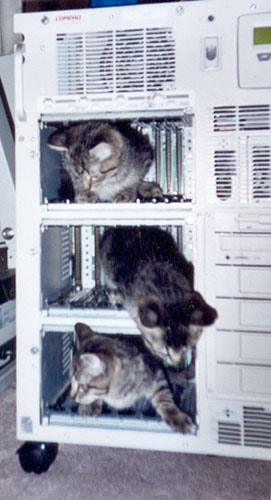
I want that rack
Ebay
Looks like an APP maybe 22U
APC 25u
Red Squirrel
[H]F Junkie
- Joined
- Nov 29, 2009
- Messages
- 9,223
lol @ the cats, that's so awesome.
I'd be scared they hit a power button or something lol
I'd be scared they hit a power button or something lol
just got this off eBay for $160 perfect 18U server rack deep enough for full depth servers as well
thannks for teasing me
There fixed it sorry, won't quote pictures
Last edited:
no, its a shame quoting a picture doesn't remove the tags.
I think I can fix the above post though.[/quote]
I fixed, sorry shouldn't have quoted your pics.
just got this off eBay for $160 perfect 18U server rack deep enough for full depth servers as well
More to come when I get my gear into it.
What model is that? how much was shipping?


aaronearles
[H]ard|Gawd
- Joined
- Aug 31, 2006
- Messages
- 2,016
dremel!!