Need some help on building a mid range system

Joined
Sep 16, 2006
Messages
795
Hi I just have a few questions on my system

So far all I have is my heatsink and case and with that being said I still need a little help considering what I should get

Cooling- Scythe Zipang
Case- Rocketfish
CPU- Q6600
GPU- Need help on this one. I want a 21 inch or 22 inch monitor, but read that the 8800GT trails behind the 8800GTX by just a little in high resolutions. Which one should I get?
RAM- Need help on this one
MOBO- Also need help on this one. I might want to go SLI, but I nice good overclocker under $100 would be awesome, but I'll go for $150
PSU- Meh I'm thinking going for the Strider 750w. I can research on the PSU on my own so that won't be a problem

So far just need help on the GPU/RAM. I don't need a super fast awesome amazing RAM, but just something that works and gets me modest overclocks at an affordable price. GPU I;m not sure whether to buy a 8800GTX and use it for a while or get an 8800GT and SLI down the road...

also any upcoming gear I should look into? Thanks.
 
An 8800GT or 8800GTS 512Mb will do fine for a 21" LCD or 22" with 1600 x 1200 res or 1680 x 1050 WS. DDR2 800 RAM is good. SLI board is not recommended for 1600 x 1200 or 1680 x 1050 res gaming. If you had a 24" lcd and intend to game at 1920 x 1200, then it would be more ideal. An Intel P35 mobo will be good. PSU - Corsair HX520 modular or VX550 non modular.
 
Ok thanks alot for the info. What DDR2 RAM is preferred? Also yes I'm looking into a P35 board, and all P35 boards support DDR3 right?

also hard drive in another problem for me. I don't need a 10,000 raptor drive, but I would like my computer to be fast when it boots up and just quick in general. A 16mb cache drive is ok right? My plan was to have maybe a 320gb for OS and stuff, and maybe a 400gb for everything else. That would do right?

Appreciate the help, thank you.

HOLY WTF just saw enginurds post, that DDR2 is good for OC right? I'm about to buy it. When did DDR2 get so cheap? :0
 
Sometime after I paid $210 for that exact same G.Skill 2GB kit. :p :mad: :( Sorry, thats a $20MIR on the A-Data kit, lol.

Anyhow, yes, since you're getting a Q6600, DDR2-800 is all you need...

/*------------- <cut n paste> -------------*/
Formulas for Intel platform @ 1:1 settings: (base FSB speed is SDR, or single data rate)
c × [Base FSB speed] = CPU Clock speed (c = CPU Multiplier)
2 × [Base FSB speed] = RAM speed (DDR: double data rate)
4 × [Base FSB speed] = Effective FSB speed (QDR: quad data rate)

On Intel platforms, running the RAM higher than a 1:1 ratio with the CPU is, for the most part, useless, so don't bother trying to do so. If the BIOS does it for you, just let it. All you need is a 1:1 config, though. Here's some possible clock speeds (as always with OC'ing, your results will vary):

Q6600: 9 × 266 = 2.4Ghz, DDR2-533 << STOCK speeds
Q6600: 9 × 333 = 3.0Ghz, DDR2-667 << Nice OC
Q6600: 9 × 378 = 3.4Ghz, DDR2-756 << Good OC, near max for B3 stepping w/ good air cooling
Q6600: 9 × 400 = 3.6Ghz, DDR2-800 << Great OC, near max for G0 stepping w/ good air cooling

You won't notice a difference between CL4 and CL5, unless you're running benchmarks (and even then, the difference is negligible), so don't pay a huge price premium for lower latency.
/*------------- </cut n paste> -------------*/

As for a HDD, check out the new WD6400AAKS drives, on sale for $120 at newegg (coupon code: EMCAEABBC)
http://www.hardforum.com/showthread.php?p=1032282618#post1032282618
 
Sometime after I paid $210 for that exact same G.Skill 2GB kit. :p :mad: :( Sorry, thats a $20MIR on the A-Data kit, lol.

Anyhow, yes, since you're getting a Q6600, DDR2-800 is all you need...

/*------------- <cut n paste> -------------*/
Formulas for Intel platform @ 1:1 settings: (base FSB speed is SDR, or single data rate)
c × [Base FSB speed] = CPU Clock speed (c = CPU Multiplier)
2 × [Base FSB speed] = RAM speed (DDR: double data rate)
4 × [Base FSB speed] = Effective FSB speed (QDR: quad data rate)

On Intel platforms, running the RAM higher than a 1:1 ratio with the CPU is, for the most part, useless, so don't bother trying to do so. If the BIOS does it for you, just let it. All you need is a 1:1 config, though. Here's some possible clock speeds (as always with OC'ing, your results will vary):

Q6600: 9 × 266 = 2.4Ghz, DDR2-533 << STOCK speeds
Q6600: 9 × 333 = 3.0Ghz, DDR2-667 << Nice OC
Q6600: 9 × 378 = 3.4Ghz, DDR2-756 << Good OC, near max for B3 stepping w/ good air cooling
Q6600: 9 × 400 = 3.6Ghz, DDR2-800 << Great OC, near max for G0 stepping w/ good air cooling

You won't notice a difference between CL4 and CL5, unless you're running benchmarks (and even then, the difference is negligible), so don't pay a huge price premium for lower latency.
/*------------- </cut n paste> -------------*/

As for a HDD, check out the new WD6400AAKS drives, on sale for $120 at newegg (coupon code: EMCAEABBC)
http://www.hardforum.com/showthread.php?p=1032282618#post1032282618

Wow thank you so much for the help. I'm considering buying a x3210 teamed with a
Asus P5K-E and that RAM you linked me to. Would all that be good?

I'm looking into that hdd and am considering in using it for storage like for media files, but would a regular 7200 RPM drive be quick in start up? I'm tired of waiting like 3 mins for everything to boot up :(
 
Wow thank you so much for the help. I'm considering buying a x3210 teamed with a
Asus P5K-E and that RAM you linked me to. Would all that be good?

I'm looking into that hdd and am considering in using it for storage like for media files, but would a regular 7200 RPM drive be quick in start up? I'm tired of waiting like 3 mins for everything to boot up :(

If any 7200 drive would be quick to boot windows, its that 640GB drive. Will you be running Vista? If so, consider using ReadyBoost with a flash drive.

You're now getting an X3210 instead of a Q6600? What made you change your mind? The Q6600 has a higher multiplier (9x vs 8x), making it easier to OC. What are your OC'ing goals? If you only want 3.2Ghz, then yes, that DDR2-800 RAM is fine for the X3210. If you'd like to go higher, you'll need some higher speed RAM unless you go with the Q6600. FYI, the Q6600 is only $200 at Microcenter B&M.
 
If any 7200 drive would be quick to boot windows, its that 640GB drive. Will you be running Vista? If so, consider using ReadyBoost with a flash drive.

You're now getting an X3210 instead of a Q6600? What made you change your mind? The Q6600 has a higher multiplier (9x vs 8x), making it easier to OC. What are your OC'ing goals? If you only want 3.2Ghz, then yes, that DDR2-800 RAM is fine for the X3210. If you'd like to go higher, you'll need some higher speed RAM unless you go with the Q6600. FYI, the Q6600 is only $200 at Microcenter B&M.

It's $200 in store and I live in NYC. I didn't change my mind yet, it's just that I can get it for $150 used (X3210), so IMO I think that is a good deal if you all think otherwise then I won't go for it. I'm not a huge OCer like some of the guys here, 2.4 to 3.2 isn't so bad for me. Q6600 will let me go much more on air? I thought X3210 was the same as the Q6600.
 
It's $200 in store and I live in NYC. I didn't change my mind yet, it's just that I can get it for $150 used (X3210), so IMO I think that is a good deal if you all think otherwise then I won't go for it. I'm not a huge OCer like some of the guys here, 2.4 to 3.2 isn't so bad for me. Q6600 will let me go much more on air? I thought X3210 was the same as the Q6600.

They aren't the same CPUs. The X3220 is the same as the Q6600 and both have a CPU multiplier of 9. The X3210 has a CPU multiplier of 8. Thus the higher multiplier of the Q6600/X3220 will for a higher OC without being limited by your RAM.

I would not recommend getting that Xeon CPU anyway. Not all motherboards support the Xeon CPUs and the ones that do, can't OC those particular Xeon CPUs that well.
 
NYC? Isn't there a Microcenter around you? I'd definitely go for the Q6600 @ $200 over an X3210 @ $150.
 
They aren't the same CPUs. The X3220 is the same as the Q6600 and both have a CPU multiplier of 9. The X3210 has a CPU multiplier of 8. Thus the higher multiplier of the Q6600/X3220 will for a higher OC without being limited by your RAM.

I would not recommend getting that Xeon CPU anyway. Not all motherboards support the Xeon CPUs and the ones that do, can't OC those particular Xeon CPUs that well.

Besides the difference in Ocing, is there a difference in performance?

NYC? Isn't there a Microcenter around you? I'd definitely go for the Q6600 @ $200 over an X3210 @ $150.

HardwareGuru is right, there is one in NYC. Problem is I don't own a car and I'm busy during the week and weekends. Only possible time I could possibly go is Friday. Anyone who has been there, do you guys know if the LIRR is close? I'd go if there is a train nearby (I have to check). Is the Q6600 worth it that much over the X3210?

Also about my hard drive.. if I only get a 320gb hard drive with a 16mb my computer would be quick to boot right? I'm thinking about getting a 320gb hard drive with 16mb for now and get a much larger drive later. What do you guys think?

Also one more question on the GPU. I'm planning to get a 21 inch or 22 inch monitor. From what I've read so far the 8800GT can handle those resolutions. Should I get the 8800GTX (which I can get for $250) for a 21 inch or 22 inch screen? Because I know the 8800GTX is better for high resolutions but I would like the 8800GTX for detail and also for future games (that are more complex).

Thanks.
 
Besides the difference in Ocing, is there a difference in performance?

A small difference in performance actually. The Q6600 is only 266mhz faster than the X3210. If your mobo supports the X3210 with no problem, then yes the X3210 is the better value as long as you don't plan to OC at all. Problem is, no mobo manufacturer actually lists Xeon CPUs as compatible with their consumer desktop motherboards. Try to confirm for a fact that the X3210 will indeed work with whatever mobo you choose.

Unless you're doing highly intensive disk transfer and etc, the 16MB cache should be good enough. So yes, go with a 320GB drive and if you need more storage, get a larger drive. Also, note that the size of the cache does not necessarily mean that you'll have a faster boot time. There's also other factors like platters, design, seek times, etc.

If you don't plan on upgrading for a long long time and don't care for how much power the card uses, then yeah, get the GTX. However, make sure that it actually has a warranty left. No warranty or transferable warranty, don't bother with it. $250 is a lot of money and it'll be a bitch if that $250 card dies and you have no warranty at all.

Oh and some PSU recommendations:
Corsair 650TX 650W PSU - $120
Corsair 620HX 620W PSU - $139
PC Power & Cooling Silencer 750 Quad 750W PSU - $150
Corsair 750TX 750W PSU - $158
 
A small difference in performance actually. The Q6600 is only 266mhz faster than the X3210. If your mobo supports the X3210 with no problem, then yes the X3210 is the better value as long as you don't plan to OC at all. Problem is, no mobo manufacturer actually lists Xeon CPUs as compatible with their consumer desktop motherboards. Try to confirm for a fact that the X3210 will indeed work with whatever mobo you choose.

Unless you're doing highly intensive disk transfer and etc, the 16MB cache should be good enough. So yes, go with a 320GB drive and if you need more storage, get a larger drive. Also, note that the size of the cache does not necessarily mean that you'll have a faster boot time. There's also other factors like platters, design, seek times, etc.

If you don't plan on upgrading for a long long time and don't care for how much power the card uses, then yeah, get the GTX. However, make sure that it actually has a warranty left. No warranty or transferable warranty, don't bother with it. $250 is a lot of money and it'll be a bitch if that $250 card dies and you have no warranty at all.

Oh and some PSU recommendations:
Corsair 650TX 650W PSU - $120
Corsair 620HX 620W PSU - $139
PC Power & Cooling Silencer 750 Quad 750W PSU - $150
Corsair 750TX 750W PSU - $158

I do plan on Ocing, but not to the point some of the hard core enthusiasts do it. If I can get 3.2 on air I'm happy (or even 3.0). I'll try to confirm if the X3210 will work or not. If not I see alot of G0 Q6600s on sale here, so I'll check out a few of those.

As for the hard drive this is the one I'm talking about, I would like to know if it is quick
http://www.newegg.com/Product/Product.aspx?Item=N82E16822148317

I don't plan on upgrading for a while (at least a year and a half) so I want something I can use for a while. yes the card does have the lifetime warranty on it.

I'm checking out the PSUs. Thank you for that, I'll probably go with that Corsair.
 
Don't know if that hard drive is quick or not however I know that this drive is:
Seagate Barracuda 7200.10 320GB 7200RPM SATA 3.0Gb/s Hard Drive - $80

However, there is a new revision of this hard drive that's almost as fast as a Raptor and the Seagate drive I recommended:
Western Digital WD3200AAKS 320GB 7200RPM SATA 3.0Gb/s Hard Drive - $74

The problem is that it's pretty much random which revision of that AAKS drive you get from newegg.com

As for the lifetime warranty on that card, make sure that warranty is either transferable OR the seller has a receipt for that card. You might need that receipt for warranty purposes.
 
Don't know if that hard drive is quick or not however I know that this drive is:
Seagate Barracuda 7200.10 320GB 7200RPM SATA 3.0Gb/s Hard Drive - $80

However, there is a new revision of this hard drive that's almost as fast as a Raptor and the Seagate drive I recommended:
Western Digital WD3200AAKS 320GB 7200RPM SATA 3.0Gb/s Hard Drive - $74

The problem is that it's pretty much random which revision of that AAKS drive you get from newegg.com

As for the lifetime warranty on that card, make sure that warranty is either transferable OR the seller has a receipt for that card. You might need that receipt for warranty purposes.

Ok great thank you for the recommendation :) $250 is good right for a 8800GTX? I'm seeing most go for like $300 or lowest $285

Yeah he told me if I need help he will send the card back. He has the eVGA lifetime warranty. But what I want to know is say there is an incredibly complex game that comes out in 2 years and I want to play it on the 21" inch screen. The 8800GTX would be able to handle it better than a 8800GT, correct? regardless of the resolution
 
Correct. And yes $250 is good for a 8800GTX. Just be sure that the seller is legit and won't leave you hanging.
 
Correct. And yes $250 is good for a 8800GTX. Just be sure that the seller is legit and won't leave you hanging.

yeah checked him out, he is a good guy with healthy heat. Regardless he PMed back and told me he will send it back if anything happens.

Danny Bui, you've been a big help, thank you. I have another question you don't mind. I'm seriously contemplating buying 4gb of this RAM. My question, will a see a huge difference from 2gb to 4gb? I know that 4gb is mostly for 64bit Vista, but what about games and other applications? I mean seriously I really just want 4 gigs because it's at a killer price.
 
Anyone who has been there, do you guys know if the LIRR is close? I'd go if there is a train nearby (I have to check).

Where do you live around Long Island/NY? I live on Long Island and can explain where the place is, and how to get there if you still don't know. It's actually very close to an LIRR station.. VERY close. Pretty much right next to each other.
 
Where do you live around Long Island/NY? I live on Long Island and can explain where the place is, and how to get there if you still don't know. It's actually very close to an LIRR station.. VERY close. Pretty much right next to each other.

You kidding me, they are close to each other? Damn that is awesome

I don't live in Long Island I live in Brooklyn. My father works for the MTA so he can explain to me how I can get to the LIRR, but I'm not sure which station to get off to and where to walk to. I could use your help :)
 
Danny Bui, you've been a big help, thank you. I have another question you don't mind. I'm seriously contemplating buying 4gb of this RAM. My question, will a see a huge difference from 2gb to 4gb? I know that 4gb is mostly for 64bit Vista, but what about games and other applications? I mean seriously I really just want 4 gigs because it's at a killer price.

Actually this set of RAM is a better deal since it's 2x2 rather 4x1, which puts less stress on your northbridge:
A-Data ADQVE1B16K 2 x 2GB DDR2 800 RAM - $70

But you really won't notice the difference between 2GB and 4Gb of RAM unless you use a 64bit OS, do a ton of media editing and rendering, multi-tasking, run multiple virtual machines, etc. Right now 2GB of RAM is the sweet spot for current games. But damn it is a killer price. If you can spare the cash, go for it.

Unlike Enginurd, who paid $210, I paid $180 for the exact same G.Skill set last year. Just bought that same set of G.Skill RAM for $35. Oh how the times has changed. I don't even think DDR RAM ever got this low.
 
You kidding me, they are close to each other? Damn that is awesome

I don't live in Long Island I live in Brooklyn. My father works for the MTA so he can explain to me how I can get to the LIRR, but I'm not sure which station to get off to and where to walk to. I could use your help :)

If you get on in Brooklyn you need to get on an eastward train that will stop in Westbury, that's where Microcenter is. You will have to switch trains in Jamaica most likely, if you get on at Flatbush Avenue or other Brooklyn stop, to switch to a train going into Westbury. Pretty sure Westbury is part of the Port Jefferson branch.

I really love trains ;)

It might be a little further, but it's just one straight block down, I remember that much. Very close.
 
Actually this set of RAM is a better deal since it's 2x2 rather 4x1, which puts less stress on your northbridge:
A-Data ADQVE1B16K 2 x 2GB DDR2 800 RAM - $70

But you really won't notice the difference between 2GB and 4Gb of RAM unless you use a 64bit OS, do a ton of media editing and rendering, multi-tasking, run multiple virtual machines, etc. Right now 2GB of RAM is the sweet spot for current games. But damn it is a killer price. If you can spare the cash, go for it.

Unlike Enginurd, who paid $210, I paid $180 for the exact same G.Skill set last year. Just bought that same set of G.Skill RAM for $35. Oh how the times has changed. I don't even think DDR RAM ever got this low.

I know G.Skill is a reputable company and they make some of the best quality RAM out there, but I don't know about A-Data. They might be cheap, but is there RAM good for overlocking and actually something that works. Yeah I almost had a heart attack when I saw that price, $35 WTF?!?!? :p

If you get on in Brooklyn you need to get on an eastward train that will stop in Westbury, that's where Microcenter is. You will have to switch trains in Jamaica most likely, if you get on at Flatbush Avenue or other Brooklyn stop, to switch to a train going into Westbury. Pretty sure Westbury is part of the Port Jefferson branch.

I really love trains ;)

It might be a little further, but it's just one straight block down, I remember that much. Very close.

Ok so is there only one train stopping in Westbury? That would just make it so much easier for me
 
I know G.Skill is a reputable company and they make some of the best quality RAM out there, but I don't know about A-Data. They might be cheap, but is there RAM good for overlocking and actually something that works. Yeah I almost had a heart attack when I saw that price, $35 WTF?!?!? :p


Ok so is there only one train stopping in Westbury? That would just make it so much easier for me

Yup. Each train stop is in a different town. Carle Place is right before Westbury.
 
Yup. Each train stop is in a different town. Carle Place is right before Westbury.

ok that is great, but does Microcenter charge tax? I mean what's the point if I could a qaud here for the same price (including taxes)

I've seen a few quads here that went for $215 shipped
 
ok that is great, but does Microcenter charge tax? I mean what's the point if I could a qaud here for the same price (including taxes)

I've seen a few quads here that went for $215 shipped

Ah, yeah.. they must charge tax. Then factor in the fact that the LIRR is expensive as hell.. and it's probably worth getting for $215 shipped.. As long as it's G0 stepping, I think? I think Microcenter has it for sure? That's just what I hear when I was buying my processor :)
 
I know G.Skill is a reputable company and they make some of the best quality RAM out there, but I don't know about A-Data. They might be cheap, but is there RAM good for overlocking and actually something that works. Yeah I almost had a heart attack when I saw that price, $35 WTF?!?!? :p

About A-DATA:

A-Data is one of the world's largest memory manufacturers. They've been making DRAM for a while, but its only recently that they started marketing it themselves under their own brand. Their customer service isn't up to par with the major players (corsair, kingston, crucial, ocz, etc), but they are a good budget-oriented alternative. Since they're a global manufacturer, they make everything to spec... and DDR2-800 JEDEC spec is 5-5-5-15 @ 1.8v. All ram you buy should have those numbers for SPD, and you can just lower them in the BIOS. Of course, some sticks won't go as low as you want, lol.

We've been recommending them due to their prices and because they perform just as well as the better-known name brands.

Speaking of performance, today's Intel processors don't benefit from any RAM overclocking, so virtually any RAM would do. It's actually better to get RAM a bit faster than the level you wish to overclock the processor's FSB at so you could maintain a 1:1 FSB/CPU ratio and not have to worry about tweaking the RAM. (If you recall enginurd's cut-and-paste chart for the Q6600 speeds, he also recommended the RAM for you to use in order to "achieve" those speeds.)
 
Checkout the MSI OC'd 88GT newegg has, 660core/1900mem. $210 before $30 MIR. <---has 112 SP's compared to 96GT's 64SP's, Xtra horsepower needed/wanted in some cases.
http://www.newegg.com/product/product.aspx?item=N82E16814127329.
The dualslot OC'd MSI 9600GT, 700core/1900mem is around $165 before $20 MIR :D.
http://www.newegg.com/Product/Product.aspx?Item=N82E16814127333.

As for memory, the g.skilll kit for $35 is a good buy, only other kit I'd recommend(for a good price) is some WINTEC AMPX for about $45 that does 4-4-4-12 @ 1.9V (also if you/we gotta/wanna have the black rather than red g.skill. lol)
http://www.newegg.com/product/product.aspx?item=N82E16820161063
 
Wow I totally forgot about the 9600GT. How would that do against a 8800GT?

Also I'm considering that Wintec RAM. How much better is it better than the G.Skill?
 
The 9600GT would work well with a 20 inch or smaller LCD. The 8800GT, with its additional stream processors, would perform better.

I've had bad experiences with Wintec RAM before, but I've had no problems with G.Skill. But since this is only one person's experience on the matter, take that for what it's worth. Having said that, there is no noticeable difference performance-wise between CL4 and CL5 RAM, so there's no need to spend extra on lower latency RAM. (And please don't buy RAM based on the color of the heatsinks... that's not... [H]ard....)
 
Ugh, so much reading... lol.

Wow I totally forgot about the 9600GT. How would that do against a 8800GT?

Also I'm considering that Wintec RAM. How much better is it better than the G.Skill?

The 9600GT isn't quite as good as the 8800GT, due to having less stream processors. Check out some reviews at gpureview.com. You can compare the cards and there are review links at the bottom.

Personally, I've had better success with G.Skill and A-Data over Wintec and Transcend. I agree with tiraides, go with the G.Skill over the AMP-X. I also agree with Danny on the 2x2GB vs 4x1GB choice. If you want 4GB, now is a great time to buy it, but if you do so, go with 2x2GB.

As for the hard drive this is the one I'm talking about, I would like to know if it is quick
http://www.newegg.com/Product/Product.aspx?Item=N82E16822148317

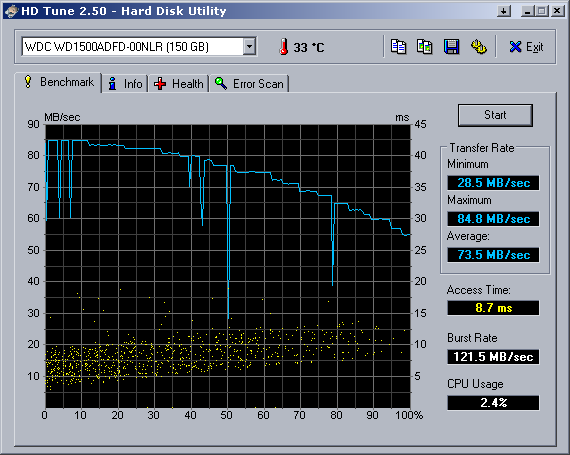
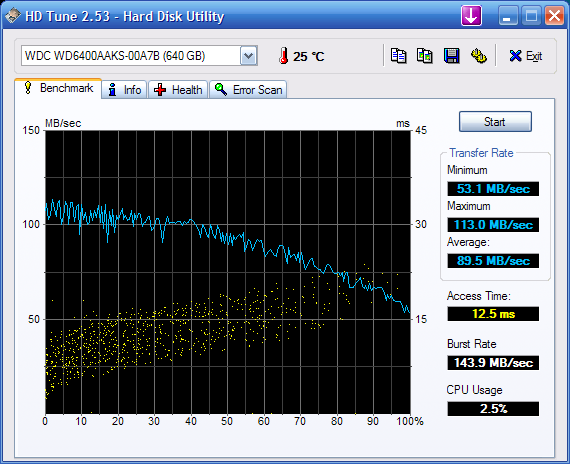
The old 320GB drives are slower than the new 640GB drive. The 640GB 2-platter drive is around 30% - 50% faster than the old 320GB drives. If you get lucky and get a new revision 320GB drive, then it'll be pretty damn fast (as fast as the 640GB); but as Danny mentioned, its luck of the draw whether you get an old or new revision from newegg. If you want to make sure you get a fast drive, go for the 640GB drive as your boot drive. If you need more space a year or later down the line, pickup another drive. Here are some benchmarks from the thread I linked to earlier.

wd3200aaks (old one, 2 platters)
HDTune_Benchmark_WDC_WD3200AAKS-22VYA0.png

By request, here's the HDTune results [new 320GB/platter]:
hdtunewd3200aakssc3.png

Here's a few more HDTune scores...
WD1500ADFD [Raptor]
HDTune_Benchmark_WDC%20WD1500ADFD-00NLR.png

WD6400AAKS [New 320GB/platter]
HDTune_Benchmark_WDC%20WD6400AAKS-00A7B.png
 
About A-DATA:


We've been recommending them due to their prices and because they perform just as well as the better-known name brands.

Speaking of performance, today's Intel processors don't benefit from any RAM overclocking, so virtually any RAM would do. It's actually better to get RAM a bit fastethan the level you wish to overclock the processor's FSB at so you could maintain a 1:1 FSB/CPU ratio and not have to worry about tweaking the RAM. (If you recall enginurd's cut-and-paste chart for the Q6600 speeds, he also recommended the RAM for you to use in order to "achieve" those speeds.)
OK that's great I'll get the 2x2gb then

Ugh, so much reading... lol.
The 9600GT isn't quite as good as the 8800GT, due to having less stream processors. Check out some reviews at gpureview.com. You can compare the cards and there are review links at the bottom.

haha sorry about that! I haven't been following with what's been happening been happening in the computer world since like May of 2007 :D Yeah I read a review of the 9600GT @ techpowerup and yeah It's good for the price but I need something more. I think I'm just going to go for the 8800GTX

Personally, I've had better success with G.Skill and A-Data over Wintec and Transcend. I agree with tiraides, go with the G.Skill over the AMP-X. I also agree with Danny on the 2x2GB vs 4x1GB choice. If you want 4GB, now is a great time to buy it, but if you do so, go with 2x2GB.

Yeah I guess I'll go for the 2x2gb. Does anyone know if A-Data is good with their rebates?


The old 320GB drives are slower than the new 640GB drive. The 640GB 2-platter drive is around 30% - 50% faster than the old 320GB drives. If you get lucky and get a new revision 320GB drive, then it'll be pretty damn fast (as fast as the 640GB); but as Danny mentioned, its luck of the draw whether you get an old or new revision from newegg. If you want to make sure you get a fast drive, go for the 640GB drive as your boot drive. If you need more space a year or later down the line, pickup another drive. Here are some benchmarks from the thread I linked to earlier.

Oh no I think the 640gb will be used for a looooong time. The only thing is the price. I can definitely buy the 640gb later, but at this point I was looking to spend less than $100 on a hard drive. I still have the buy the Q6600 ($210-$215), a 8800GTX ($250), a PSU (Probably over a $100), the RAM ($70), and lastly the mobo ($90), oh yeah and the monitor uggggghh :( Actually I don't know what the rush is, I just really want everything now for some reason lol. I just don't want to lose out on good prices.
 
ok so ummm mobo wise

Is the Asus P5K-E a good one to use for now and then I can I upgrade it later? One guy is selling it for $90 and I want to pick it up. Can I pop in future processors or should I look for something with a P35 chipset?

EDIT: NVM it has the P35 but apparently it doesn't support DDR3. I really don't care about DDR3 right now, but I want to be able to upgrade without the RAM hindering me
 
The P35 chipset will support the Q6600 and all of the 45nm Penryn processors. It won't support the Nehalem processors coming at the end of this year... then again, none of the Socket 775 boards will support Nehalem.

The performance "benefits" of DDR3 are not worth the price increase over DDR2. Considering that you could now get 4GB of DDR2 RAM for under $80, I wouldn't even look at DDR3 right now. By the time DDR3 becomes beneficial, you'll probably be looking at building a new system anyways.
 
The P35 chipset will support the Q6600 and all of the 45nm Penryn processors. It won't support the Nehalem processors coming at the end of this year... then again, none of the Socket 775 boards will support Nehalem.

The performance "benefits" of DDR3 are not worth the price increase over DDR2. Considering that you could now get 4GB of DDR2 RAM for under $80, I wouldn't even look at DDR3 right now. By the time DDR3 becomes beneficial, you'll probably be looking at building a new system anyways.

Oh yeah I don't need Nehalem for a very long time. I've been living with single core, 512mb RAM and no graphics for 18 years (and I'm 18 hahaha) so I can wait it out easy. No GPU to a GT or GTX is a gigantic leap for me, let alone having more than 512mb and more than one core on a CPU; it's so overwhelming! :D Yeah I really don't care about DDR3 right now. If 4gb of RAM costs $70 I'm taking it.

So IYO the P5K-E isn't so bad right?
 
So IYO the P5K-E isn't so bad right?

If you're getting it for $90, it's not a bad choice. If you're getting it used, make sure that mobo actually works and doesn't have any glitches, annoyances, pecularities, etc.
 
So IYO the P5K-E isn't so bad right?

It's not so bad -- actually, that's a pretty good price -- but follow Danny's advice on the sale.

To make things simpler for you: If you're planning on doing a lot of gaming, and you plan on buying a 20-24 inch monitor, then consider the 512MB (G92) 8800GTS. And right now, 4GB of DDR2 RAM DOES cost $70.
 
Oh no I think the 640gb will be used for a looooong time. The only thing is the price. I can definitely buy the 640gb later, but at this point I was looking to spend less than $100 on a hard drive. I still have the buy the Q6600 ($210-$215), a 8800GTX ($250), a PSU (Probably over a $100), the RAM ($70), and lastly the mobo ($90), oh yeah and the monitor uggggghh :( Actually I don't know what the rush is, I just really want everything now for some reason lol. I just don't want to lose out on good prices.

Yah, if you're pressed for a budget, you could take the chance with one of the 320GB WD drives instead. If you get an old one, its still not bad. If you want a longer warranty and don't mind the extra noise, the Seagate 'cuda.10 is good, but overpriced, IMO. The 640GB is $0.19/GB, btw, so it has better value than the 320GB (ranges from $0.23 to $0.25/GB).
 
rather than making a new thread, I have a quick question regarding building a new comp.

I have always assembled the computer motherboard first in case, then installation of cpu and HS. however I have not built a computer in a number of years, is this still the norm? or do most poeple prefer to install the cpu and HS on the motherboard, then install it into the case?

I'm not sure how safe I would feel applying the pressure on the pushpins for a lg775 outside of the case.
 
Back
Top