• Some users have recently had their accounts hijacked. It seems that the now defunct EVGA forums might have compromised your password there and seems many are using the same PW here. We would suggest you UPDATE YOUR PASSWORD and TURN ON 2FA for your account here to further secure it. None of the compromised accounts had 2FA turned on.
    Once you have enabled 2FA, your account will be updated soon to show a badge, letting other members know that you use 2FA to protect your account. This should be beneficial for everyone that uses FSFT.

Need some advice

budboomer

n00b
Joined
Jun 19, 2004
Messages
43
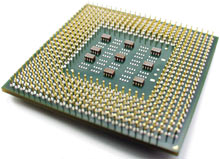
I pulled my heat sync off to vacuum it and bent about 25 pins trying to put it back in. I tried to straighten them with no luck. 2 questions:

1. How do I fix this? Order a new heat sync and destroy the new one trying to put it in or order a new motherboard?

2. What are the chances that I fried my motherboard trying to power up my machine with all those bent pins?

Thanks for any response.
 
what kind of cooler was that. dont think any harm came to the mobo if you managed to secure it back in, if not then the cpu might had a heart attack without the cooler directly contacting it.
if you want order a new cooler, but the current one could work also, since i dont know how it looks like
 
We are confused, heatsinks have fins, not pins. It appears you have pulled the cpu chip out of the socket when you removed the heatsink. If this is the case, you probally did not damage the motherboard trying to power it on, but you will be needing a new cpu.

Sometimes the thermal grease/pad used between the cpu chip and the heatsink hardens and acts like a glue, making the bond between the cpu and heatsink fairly strong. Strong enough that when you yank on the heatsink you pull the cpu out of its socket.
 
Exactly what pins are you talking about? The pins on the processor, pins on the heatsink, or pins on the motherboard?

If it's the pins on the proc, get a mechanical pencil. Pull the lead out and use the tip of the pencil to straighten out the pins. After you get them as straight as possible, put it into the socket and lock it in place. Then unlock it and pull it out. Then put it back in. Do this a number of times. After that you should be good to go.

If you bent the pins on the mobo, use the mechanical pencil to get them straight as possible. Check, double check, triple check that they are as straight as possible. After that, throw your cpu back on and the cooler. Cross your fingers and turn on your comp.

If it's your heatsink that has bent pins, just bend them back to where they were or leave them. Doesn't really matter all that much.


BillParrish>> Some heatsinks do have pins. My Swiftech heatsink has pins, course the pins are a hell of a lot larger than those on the proc or mobo.

mcx775-v.gif
 
We are confused, heatsinks have fins, not pins. It appears you have pulled the cpu chip out of the socket when you removed the heatsink. If this is the case, you probally did not damage the motherboard trying to power it on, but you will be needing a new cpu.

Sometimes the thermal grease/pad used between the cpu chip and the heatsink hardens and acts like a glue, making the bond between the cpu and heatsink fairly strong. Strong enough that when you yank on the heatsink you pull the cpu out of its socket.

That sounds exactly like what happened to me. This heat sink had fins AND about 400 little pins. Also the owner's manual talked about grease which I did not see.

I guess I will be ordering a new cpu today.

Thanks for your help.
 
Exactly what pins are you talking about? The pins on the processor, pins on the heatsink, or pins on the motherboard?

If it's the pins on the proc, get a mechanical pencil. Pull the lead out and use the tip of the pencil to straighten out the pins. After you get them as straight as possible, put it into the socket and lock it in place. Then unlock it and pull it out. Then put it back in. Do this a number of times. After that you should be good to go.

If you bent the pins on the mobo, use the mechanical pencil to get them straight as possible. Check, double check, triple check that they are as straight as possible. After that, throw your cpu back on and the cooler. Cross your fingers and turn on your comp.

If it's your heatsink that has bent pins, just bend them back to where they were or leave them. Doesn't really matter all that much.

BillParrish>> Some heatsinks do have pins. My Swiftech heatsink has pins, course the pins are a hell of a lot larger than those on the proc or mobo.

mcx775-v.gif

I'll see if I can post a pic of what I'm talking about. I'll be back in a few minutes.
 
If you are talking about something like this...

p4pins220.jpg


Then you definitely pulled the proc out with the heatsink. If you bent those pins, then follow my suggestion for bent proc pins.
 
If you are talking about something like this...

p4pins220.jpg


Then you definitely pulled the proc out with the heatsink. If you bent those pins, then follow my suggestion for bent proc pins.

I'll try to post a pic anyway. It almost seems like you took the pic for me.

temp001.jpg


I tried to fix them but I think they are beyond repair.

I guess my next is to order a new CPU??
 
As long as the pin doesn't fall off, it's not beyond repair. It just may require you to put more work into it. Now if you don't want to bother bending the pins back to shape, you can always order a new proc.

Also, I can't see the pic. Looks like my work blocks photobucket. I can take a look see when I'm off work. From there, I could tell you what socket proc you need to purchase, if you want to go down that route, unless you already know.
 
Your CPU is FUBAR'ed my friend.
Things you need to do......
1) what model is your CPU
2) what model/brand is your MB
3) did the MB socket end up looking like your CPU there......if the MB socket is all bent to hell your gonna need a new MB,too.
 
As long as the pin doesn't fall off, it's not beyond repair. It just may require you to put more work into it. Now if you don't want to bother bending the pins back to shape, you can always order a new proc.

Also, I can't see the pic. Looks like my work blocks photobucket. I can take a look see when I'm off work. From there, I could tell you what socket proc you need to purchase, if you want to go down that route, unless you already know.

I would appreciate it. I need all the help I can get. Also, I will post my machine's stats if that will help.
 
Your CPU is FUBAR'ed my friend.
Things you need to do......
1) what model is your CPU
2) what model/brand is your MB
3) did the MB socket end up looking like your CPU there......if the MB socket is all bent to hell your gonna need a new MB,too.

OUCH!
FUBAR is right!

1) from the photo (heatsink base and bottom of the chip), looks like a 30-cap Pentium 4 (socket 478 - not LGA775)
2) if its an Abit IC7-G or IC7-MAX3 or Asus P4C800-E (or Deluxe) and I'll take it off the OP's hands. (assuming it's not damaged)
3) removing the HS with the chip probably didn't hurt it (socket), forcing it back in may have...although I believe the pins are the weak point, as long as all of the pins are still visible on the chip (none missing), the socket should still be okay.
 
Your CPU is FUBAR'ed my friend.
Things you need to do......
1) what model is your CPU
2) what model/brand is your MB
3) did the MB socket end up looking like your CPU there......if the MB socket is all bent to hell your gonna need a new MB,too.

I'm going to look up that info right now. Also going to check out the socket with a magnifying glass. I'll let you know.

Just so everyone knows, BillParrish hit the nail right on the head as far as the cause. I just popped the chip off the heat sync and that grease crap was hard as a rock and acted just like glue.

I hope this helps someone from doing what I did.
 
Apparently other ppl see something I can't. Course doesn't help that I'm blocked from seeing the pic. Me...I'd probably try to repair it with an eye glass screwdriver set and a mechanical pencil.

Since I can't see it, I don't know the extent of the damage. I do know that I'd try to fix it if all the pins are still on there.
 
Apparently other ppl see something I can't. Course doesn't help that I'm blocked from seeing the pic. Me...I'd probably try to repair it with an eye glass screwdriver set and a mechanical pencil.

Since I can't see it, I don't know the extent of the damage. I do know that I'd try to fix it if all the pins are still on there.

Yeah, from the pic, its toast.
 
My Machine:

Dell XPS
Pentium 4 - 3.4 GHz
250 gig Serial ATA hard drive
1024 mb DDR SDRAM

The only info I can find about the MB- Dell #E210882

The chip socket on the MB looks OK.

Thanks for all your help.
 
My Machine:

Dell XPS
Pentium 4 - 3.4 GHz
250 gig Serial ATA hard drive
1024 mb DDR SDRAM

The only info I can find about the MB- Dell #E210882

The chip socket on the MB looks OK.

Thanks for all your help.

It looks like there might be at least one pin left in the socket up in the top right corner of your pic. I guess make sure that that one is out.
 
Got home and now see the pic. Check your mobo. It looks like two pins are missing from the proc. There's some super ghetto ways to possibly get it to work.

Bend all the pins, that you can, back into their original shape. Or as close as possible.

Then the pins that you cannot fix, you pull off the proc. Make sure that the area the pin is gone, doesn't have any extra metal protruding from it.

You take an ethernet cable, pull the wires out of it, cut it to the length of a pin, and throw it into the pin hole of the socket where the missing pin is.

Plug your proc into the socket and fire it up. If you do attempt this, I make no guarantees that it'll work fine, nor take responsibility if more items end up breaking. Nor will I take responsibilty if the computer turns evil and rapes your mom and dad.
 
rats, afraid of that, yep, its toast. But well worth trying to replace the processor with the hope the board is good, make sure all broken pins are out of the socket, and giving it another go. If you google your Dell model number and or check the manual, you should find a list of cpus your machine can use.

check back if you need help when the new cpu shows up.
 
I think I will replace the processor. The socket on the MB looks OK.

Thank you to everyone who helped out today especially BillParrish and krotch. You guys checked back after work.

THANKS!!
 
ya, Newegg has a couple Socket 478 procs in stock. I personally suggest ebay.
 
Back
Top