• Some users have recently had their accounts hijacked. It seems that the now defunct EVGA forums might have compromised your password there and seems many are using the same PW here. We would suggest you UPDATE YOUR PASSWORD and TURN ON 2FA for your account here to further secure it. None of the compromised accounts had 2FA turned on.
    Once you have enabled 2FA, your account will be updated soon to show a badge, letting other members know that you use 2FA to protect your account. This should be beneficial for everyone that uses FSFT.

My modem and router dated?

Westwood

[H]F Junkie
Joined
Nov 17, 2012
Messages
10,918
EDIT: Linked the wrong router in the OP. Its fixed now

This is completely not my wheel house.

Been getting a bunch of lag in my games. In Call of Duty, the packet loss icon never goes away. I've dubbed around with a bunch of stuff, but still there.

Modem:
ARRIS CM820A Cable Modem DOCSIS 3.0 (Latest Version - 1 Step Activation)

Router:
NETGEAR N600 Dual Band Wi-Fi Router (WNDR3400)

Got the PC plugged directly into the router. Wife is on Wifi. She does online streaming with about five or six others at a time. Would her being on the Wifi slow down my Ethernet?
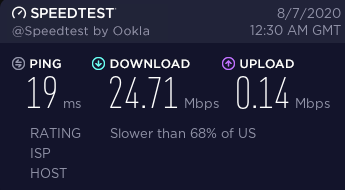
421343214.png


Getting frustrating. =/
 
Last edited:
As an Amazon Associate, HardForum may earn from qualifying purchases.
It's not your equipment. What cable service are you using and what speed are you paying for?

And yes, her being on Wifi is using your bandwidth - doesn't matter if it is getting sucked in via ethernet or wifi, both pipes are sucking that bandwith up from what is being fed out from your cable modem. Most decent net cable packages should easily be able to handle that load, but if you have bare bones internet (25 Mbps or less) than yes, you'll probably want more bandwidth to handle you gaming and her streaming with five or six others at a time. That many streams will easily eat into your gaming bandwidth needs if you are near bottom tier service.
 
Last edited:
It's not your equipment. What cable service are you using and what speed are you paying for?
Spectrum

And man, I don't even know what speed. I haven't touched the account in several years. I'm digging through it now.

So it probably is her on the wifi then. I thought perhaps since I was on the cable I'd be fine. damn
 
You should be able to log into your Spectrum account and find out what service level you are paying for. They may even have some kind of upgrade deal for more bandwith. I'd say you'd be much better off with at least 60 Mbps or better service.

Odds are you are paying way more for really crappy speed then you could get if you decided to "upgrade" or go with one of their newer package offerings. Often these new service packages are much cheaper than the legacy service they were selling you before, but they aren't going to tell you that if you are still paying more for the old stuff.
 
They offer 100, 400, and 940. I think I'm on the 100.

The price is $49 a month for 12 months, they it gets bumped up. I'm paying $70. My bill just says "Internet". That's it.
 
They offer 100, 400, and 940. I think I'm on the 100.

The price is $49 a month for 12 months, they it gets bumped up. I'm paying $70. My bill just says "Internet". That's it.

Is that bill just for internet? Or is it Internet and TV combined? That "100, 400, and 940" speed option may just be what they offer now - it doesn't mean that it is what you currently have.

Go to their site without logging in. Select their internet service option link and then enter a neighbor's street address/zip so that you can see what they would offer a new customer. See what they offer. Next call them up and tell them you would like to upgrade your internet package/speed. They should offer whatever package price tier they offered for someone "new". If they don't, just tell them that you are looking to switch providers - they'll then usually cough up the better deal. If you are paying $79 a month just for 25 Mpbs internet, you are getting ripped off badly. You should be getting at least 150-200 Mpbs for that price.
 
Just Internet. I, uh, I don't have any neighbors. I'm way in the boonies in the woods.

From here:
https://www.spectrum.com/browse/content/ratecard


SPECTRUM STANDARD SERVICE OFFERINGS (MONTH-TO-MONTH PLAN) *
Spectrum Internet 50/5 with WiFi$74.99
Spectrum Internet 50/5$69.99

Spectrum Internet 100/10

$69.99
Spectrum Internet 100/10 with WiFi$74.99

Spectrum Internet Ultra 400/20

$94.99

Spectrum Internet Assist 30/4 **

$17.99
Spectrum Internet Assist 30/4 with WiFi **$22.99

Spectrum Internet Gig

$129.99


So its either 50/5 or 100/10.

Wife got off the call, and COD is still pinged out. Iunno. Maybe its just an issue tonight or something. But its never been great.
 
Ugh! One of the non-benfits of living out in the boonies. :D (I'm paying $60 a month for 600 Mbps tier net service in the 'burbs via Comcast.)
Try unplugging the power to your cable modem and then also powering down your router. Let them sit for 30 seconds, then plug your cable modem back in. Wait a while until is fully back on-line. (May take a solid 5+ minutes, especially if it needs to refresh it's firmware code/settings from Spectrum). Once the cable modem is back up and all the lights are happy indicating it is fully back online, then power you router back up as well. Then check out your speeds - this may help improve your connection/bandwidth some.

You should also probably look into your Router's firmware and see if there is an upgrade for that as well - if it hasn't been touched in years, it probably is outdated and there may be firmware improvements that will help. Your upload speed is also awfully low - that is probably what is causing your CoD gaming issues.

If you are actually paying for 50 or 100 Mbps service, you should be clocking at much higher than the 24.71Mbps you showed us...

Also try bypassing the router and plugging your PC directly into the cable modem's Ethernet connection - see what speed you get then... it should be awfully close if not slightly above either 50 or 100Mbps.

In the end, if it is 50Mbs service you have, then you may want to consider doubling to 100Mbs. Especially if it is only an extra $5 a month for you - might save a lot of headaches. The jump in upload speed will also help with online gaming.
 
Last edited:
Just Internet. I, uh, I don't have any neighbors. I'm way in the boonies in the woods.

From here:
https://www.spectrum.com/browse/content/ratecard


SPECTRUM STANDARD SERVICE OFFERINGS (MONTH-TO-MONTH PLAN) *
Spectrum Internet 50/5 with WiFi$74.99
Spectrum Internet 50/5$69.99

Spectrum Internet 100/10

$69.99
Spectrum Internet 100/10 with WiFi$74.99

Spectrum Internet Ultra 400/20

$94.99

Spectrum Internet Assist 30/4 **

$17.99
Spectrum Internet Assist 30/4 with WiFi **$22.99

Spectrum Internet Gig

$129.99


So its either 50/5 or 100/10.

Wife got off the call, and COD is still pinged out. Iunno. Maybe its just an issue tonight or something. But its never been great.
If the price difference isn’t an obstacle get the 100/10, if for nothing other than more upload speed for posting cat videos. The download pipe is what they always advertise, but if your upload is saturated, the server won’t know to send you anything on the download side.
 
Interesting.

So I ran a speed test again this morning, and same results.

Plugged the PC directly in the modem and,

63456534634.png


Bad router then? I did the whole unplug thing a few times last night and it didn't help.
 
Possible. For 50Mbps, those numbers look solid now. Before you replace the router, try upgrading it’s firmware first. Also, make sure the Ethernet cable from the router to the cable modem is solid. If no joy for either of those, then yes, might be the router.
 
Possible. For 50Mbps, those numbers look solid now. Before you replace the router, try upgrading it’s firmware first. Also, make sure the Ethernet cable from the router to the cable modem is solid. If no joy for either of those, then yes, might be the router.
Yea, I checked all the firmware this morning and it reads no updates.

Thanks for the help. I can weld and rebuild motors with my eyes closed, but some of this computer stuff is above my skill level. XD
 
Called. Paying for a 100mb connection. Amir(?) says a new 3.1 1gigabit modem should solve my issues. Iunno. I ordered a new router already. We'll see how that goes.
 
Amir(?) says a new 3.1 1gigabit modem should solve my issues. Iunno. I ordered a new router already. We'll see how that goes.

A DOCSIS 3.0 modem is good for 1Gb down, 200Mb up. A DOCSIS 3.1 modem is good for 10Gb down, 1-2Gb up. A DOCSIS 3.0 modem should not be holding you back at all. DOCSIS 3.1 uses more channels which can help even out some issues on their side, but it's not needed to reach your speeds. It sounds like it's easier for them to blame your modem rather than acknowledge that the problem might be on their end. A lot of ISPs are having issues right now due to all the increased traffic. People who used to mostly check their email and browse the web are now doing live video-conferences and streaming movies all day long and it's revealing bottlenecks in many ISP networks that are held together by duct tape and superglue.
 
A DOCSIS 3.0 modem is good for 1Gb down, 200Mb up. A DOCSIS 3.1 modem is good for 10Gb down, 1-2Gb up. A DOCSIS 3.0 modem should not be holding you back at all. DOCSIS 3.1 uses more channels which can help even out some issues on their side, but it's not needed to reach your speeds. It sounds like it's easier for them to blame your modem rather than acknowledge that the problem might be on their end. A lot of ISPs are having issues right now due to all the increased traffic. People who used to mostly check their email and browse the web are now doing live video-conferences and streaming movies all day long and it's revealing bottlenecks in many ISP networks that are held together by duct tape and superglue.
Yeah, I doubt it is your modem too. Sounds like you're still getting the 50/10 config file versus the 100/10 you're paying for. As Charlie Puth has sang, 'how long has this been going on'? You've been getting ripped off unfortunately unless your modem is causing the speed limit.

I would get another router local from like walmart or whatever as it will handle 100Mbps no problem. Then I would call back spectrum about why you're only gettint 50/10. And be sure to only talk to their US counterparts. The overseas centers are overflow and probably just do 'get them off the phone' type of resolutions.
 
A DOCSIS 3.0 modem is good for 1Gb down, 200Mb up. A DOCSIS 3.1 modem is good for 10Gb down, 1-2Gb up. A DOCSIS 3.0 modem should not be holding you back at all. DOCSIS 3.1 uses more channels which can help even out some issues on their side, but it's not needed to reach your speeds. It sounds like it's easier for them to blame your modem rather than acknowledge that the problem might be on their end. A lot of ISPs are having issues right now due to all the increased traffic. People who used to mostly check their email and browse the web are now doing live video-conferences and streaming movies all day long and it's revealing bottlenecks in many ISP networks that are held together by duct tape and superglue.
That's pretty much what I expected. I mean, even if I were rocking 40/10 I'd be fine. I don't need 5000/1000 speeds.

Wife just sent me a video of 12/.1. I'm having her unplug everything and reset it all.

The fact everything seemed fine once I skipped the router leads me to believe that's where the issue is.
 
Yeah, I doubt it is your modem too. Sounds like you're still getting the 50/10 config file versus the 100/10 you're paying for. As Charlie Puth has sang, 'how long has this been going on'? You've been getting ripped off unfortunately unless your modem is causing the speed limit.

I would get another router local from like walmart or whatever as it will handle 100Mbps no problem. Then I would call back spectrum about why you're only gettint 50/10. And be sure to only talk to their US counterparts. The overseas centers are overflow and probably just do 'get them off the phone' type of resolutions.
Any place that would even sell a router is no less than 1.5h from me. I've ordered a new one and will be here tomorrow.

As for how long this has been going on, we've never really had a decent connection. Lately I've been playing more COD and the packet loss icon never leaves the screen. Wife started a new job WFH so its been noticeable.

To give you an idea of my location:

kgkgkgk.png


So I'm not really expecting too much. But yea, last night we really started to feel it. She was on a six way video chat thing and I was trying to play COD. Not a chance that was happening.

Now, I've also installed a Powerline AV2 adapter yesterday when this things became more evident. There's no reason those two things are related, are they?
 
Any place that would even sell a router is no less than 1.5h from me. I've ordered a new one and will be here tomorrow.

As for how long this has been going on, we've never really had a decent connection. Lately I've been playing more COD and the packet loss icon never leaves the screen. Wife started a new job WFH so its been noticeable.

To give you an idea of my location:

View attachment 268144

So I'm not really expecting too much. But yea, last night we really started to feel it. She was on a six way video chat thing and I was trying to play COD. Not a chance that was happening.

Now, I've also installed a Powerline AV2 adapter yesterday when this things became more evident. There's no reason those two things are related, are they?
Ah, the emerald isle. :) Well, I guess a domestic one anyways, lol. No shortage of fresh air and no covid zombies though. I wish I was in a place like this right now. :(

Cool. You should see a difference with the new router. That's bad that it's never been stable. :( What's the highest speed they offer?

One thing I did back in the day when I needed more bandwidth and a single modem wasn't cutting it was to get more than one service--ie, more modems. So I had 3x modems, each running 8/384k connected to a multi-wan router to give me a whopping 24/1.1 connection back in the mid-2000s. Not suggesting that such a complicated setup woudl be best for you, but if the wife is wfh, getting a dedicated connection for her and her work would separate the issues if you can't get more total bandwidth.

The powerlines shouldn't have caused any issues, but they will make issues more evident since if you were previously on wifi wired>wireless.
 
Ah, the emerald isle. :) Well, I guess a domestic one anyways, lol. No shortage of fresh air and no covid zombies though. I wish I was in a place like this right now. :(

Cool. You should see a difference with the new router. That's bad that it's never been stable. :( What's the highest speed they offer?

One thing I did back in the day when I needed more bandwidth and a single modem wasn't cutting it was to get more than one service--ie, more modems. So I had 3x modems, each running 8/384k connected to a multi-wan router to give me a whopping 24/1.1 connection back in the mid-2000s. Not suggesting that such a complicated setup woudl be best for you, but if the wife is wfh, getting a dedicated connection for her and her work would separate the issues if you can't get more total bandwidth.

The powerlines shouldn't have caused any issues, but they will make issues more evident since if you were previously on wifi wired>wireless.
There's 100, 400, and 900something. Apparently I'm paying for 100. I've never really followed up on speeds. I mostly play ARPGs where its not that dependent on speeds like FPS games are. But I guess that would attribute to my .4 kd in COD. The packet loss icon stays on the screen 100% of the time.

We'll see what the router does.

Location is great, but you have to be prepared for it. Common amenities like mail and cell service are a no-go here. Which is why I'm not too hung up on crazy fast speeds. But something playable would be nice.
 
There's 100, 400, and 900something. Apparently I'm paying for 100. I've never really followed up on speeds. I mostly play ARPGs where its not that dependent on speeds like FPS games are. But I guess that would attribute to my .4 kd in COD. The packet loss icon stays on the screen 100% of the time.

We'll see what the router does.

Location is great, but you have to be prepared for it. Common amenities like mail and cell service are a no-go here. Which is why I'm not too hung up on crazy fast speeds. But something playable would be nice.
Those are great speed offerings. I think the highest they do here is 300 or something like that. And that's with WOW offering 1Gbps at the same address.

If you are truly getting packet loss, they can see that too with their tools over the phone. Run packetlosstest.com and see what you get. If you're getting loss, call them and tell them you've got packet loss and for them to run a modem ping from their end. They can ping the modem on their internal network and if there's packet loss, they will send someone out to fix it. :) If it's not at the modem, then it can still be further up in their network.

No mail and no cell service--sounds like paradise. :D At least for a vacation. :D
 
Those are great speed offerings. I think the highest they do here is 300 or something like that. And that's with WOW offering 1Gbps at the same address.

If you are truly getting packet loss, they can see that too with their tools over the phone. Run packetlosstest.com and see what you get. If you're getting loss, call them and tell them you've got packet loss and for them to run a modem ping from their end. They can ping the modem on their internal network and if there's packet loss, they will send someone out to fix it. :) If it's not at the modem, then it can still be further up in their network.

No mail and no cell service--sounds like paradise. :D At least for a vacation. :D
Thanks for the packet loss dealio. I'll try that when I get home.

Wife reset all the hardware and sent me a pic of 12 down and .09 up. Removed the powerline and same numbers. so that cancels that out.
 
had some other CAT5 cable kicking around, swapped it out. Nothing.

Checked the firmware and it said it was up to date. But I found a much newer version. Manually did it. Still 22/.2.

Looks like no gaming until the router comes in. Even then, that may not be the issue. damnit
 
Maybe I missed something... how are you using both the modem and modem/router combo device!?
 
Maybe I missed something... how are you using both the modem and modem/router combo device!?

Damn, I never even looked at his router link... you are right! *smacks forehead*

Westwood, you've got two cable modems there... You only need one of them. You don't use those two cable modem devices tied together like that!

Normally, one would have a cable modem feeding another plain router with WiFi/Ethernet. (I.E. NOT a router that happens to be also be a cable modem as well.)

What you have are two cable modems, just different types, the second with more interfacing capability.

If I am understanding what I think your set up is like, you have the first cable modem being fed by the coax signal (internet cable) and it is then feeding its one Ethernet port into the other cable modem's (N600) Ethernet port. You then have your PC feeding into the N600's second Ethernet port... If so, this is not right.

You are using the second device (N600) wrong... It doesn't need to be fed from your first cable modem, because it IS a cable modem. Work with Spectrum to get that N600 cable modem configured correctly. It needs to be registered/configured with them. If you hook up its coax, Spectrum won't recognize it as it is not a registered device with your account... only the first (plain jane) ARRIS cable modem is configured with Spectrum.

If you scrap that ARRIS cable modem, and then hook your coax signal to the second cable modem (NETGEAR N600) and then work with Spectrum to register the N600 to your account, that should solve your poor performance issues on Ethernet.

What it should look like is this:

Spectrum Coax cable ---> (Coax input ) of Netgear N600 ----> Netgear N600 Ethernet Port 1 ---> Your PC.

You'll have one spare Ethernet port left over. That ARRIS modem you won't need. It's basically a lessor version of the N600 without a second Ethernet port and WiFi built in.

The only show stopper here would be if you N600 cable modem is bad...
 
If I am understanding what I think your set up is like, you have the first cable modem being fed by the coax signal (internet cable) and it is then feeding its one Ethernet port into the other cable modem's (N600) Ethernet port. You then have your PC feeding into the N600's second Ethernet port... If so, this is not right.
This is exactly how I have it setup.
 
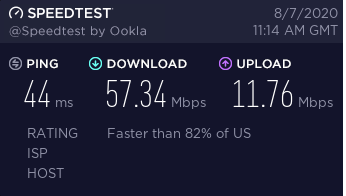
Well. What the HELL IS THIS NOW?

54235235423.png


I've been messing with this thing all night. At first, the 192.whatever thing said firmware was up to date. Netgear listed a far newer firmware. Installed it manually. no difference. I've been unplugging, resetting, swapping cables, all night long. At one point I had nothing. no wi-fi or ethernet.

Internet finally kicked back on, and for the hell of it I ran the speed test and got the above. everything is plugged in and wi-fi is going too.
 
Hold on. Wait.

Is this what your Internet is like all the time?! Everything is instant.
 
Well, that does look a lot better. I still doubt that you are paying for and getting 100Mbps service though. Your speed looks a lot more like 50Mbps service. It's not unusual to get slightly faster speed tests than what you are signed up for - but it can at times dip down a good bit lower when there's heavy traffic on the trunk your service is on due to other customers saturating it... Then again, being so far out in the boonies, getting what you have now may be a win. I'd still talk to Spectrum and get them to check/test your connection over the phone (they've got tests they can run within their network). Would be nice to at least confirm its actually 100Mbps service and that you are getting what you are paying for.
 
Well, that does look a lot better. I still doubt that you are paying for and getting 100Mbps service though. Your speed looks a lot more like 50Mbps service. It's not unusual to get slightly faster speed tests than what you are signed up for - but it can at times dip down a good bit lower when there's heavy traffic on the trunk your service is on due to other customers saturating it... Then again, being so far out in the boonies, getting what you have now may be a win. I'd still talk to Spectrum and get them to check/test your connection over the phone (they've got tests they can run within their network). Would be nice to at least confirm its actually 100Mbps service and that you are getting what you are paying for.
I'll do exactly this. I'll also hookup the new router. Maybe mine is just on its way out.

Just played a round of COD and it was awesome.
 
Well. What the HELL IS THIS NOW?

View attachment 268250
You know, one thing I forgot is how bad all the speedtest sites are. Try dslreports.com/speedtest. It's the only one that I've found can actually be accurate across different isps. Also check out fast.com. I use these two to check for issues on my own connections and the ones I manage (a total of 4--wow, comcast, and 2x spectrum).
 
You know, one thing I forgot is how bad all the speedtest sites are. Try dslreports.com/speedtest. It's the only one that I've found can actually be accurate across different isps. Also check out fast.com. I use these two to check for issues on my own connections and the ones I manage (a total of 4--wow, comcast, and 2x spectrum).
Duly noted. Running 60/12 this morning according to that site.

Iunno. That was totally weird. But yea, I never knew my Internet could be this fast. New router comes in today and I'll get that all setup. Shoot for 100/10+ like I'm paying for. I'll keep yeas posted on how that pans out.

Thanks all. Feel like a total idiot here. But this was a big help.
 
Back
Top