MBO not working

Strange bird

[H]ard|Gawd
Joined
Feb 19, 2021
Messages
1,625
I bought a new motherboard, installed it and it won't work. The MBO LED lights work but that's it.
At first the power button didn't do anything for me. Now when I press it the first time, the fan spins a little and then immediately dies. The MBO LED lights work constantly.
Do you know what the problem could be?
I bought the motherboard on aliexpress. It's an asrock b550m steel legend. What else should I try now or is the motherboard defective?
 
I bought a new motherboard, installed it and it won't work. The MBO LED lights work but that's it.
At first the power button didn't do anything for me. Now when I press it the first time, the fan spins a little and then immediately dies. The MBO LED lights work constantly.
Do you know what the problem could be?
I bought the motherboard on aliexpress. It's an asrock b550m steel legend. What else should I try now or is the motherboard defective?
Test it on the open bench setup without anything apart from CPU & cooler and one stick of RAM. Reset BIOS. Use proven good power supply, and basic passive GPU if you have one. Do not connect any case, USB headers, hard drives and so on. Only bare basics.
If still doesn't work, return it to the seller for a full refund. Do CC chargeback if Aliexpress seller is uncooperative.
 
Last edited:
Test is on the open bench setup withour anything apart from CPU and one stick of RAM.
If still doesn't work, return it to the seller for full refund. Do CC chargeback if seller if uncooperative.
Do you mean without a gpu and without anything? I have this new memory 2x16gb, that's all I have, I sold the old ones
 
Do you mean without a gpu and without anything? I have this new memory 2x16gb, that's all I have, I sold the old ones
I edited my first post to include more details.
Add GPU of course if CPU doesn't have one built-in, you probably have Ryzen CPU so you will have to get one. Its worth keeping an old passive GPU without any power connectors needed, just to test problematic hardware like in this case.
 
yes the GPU too and Cooler for CPU keyboard and mouse as if that needs to be said too.
how else would you know it's booting. much of trouble shooting is process of elimination.
what you are eliminating here is the case one stick of memory and any other peripherals that may have been plugged in when you experienced the issue.
make sure the one stick of memory is in the right slot for one stick config... consult your manual.

What CPU are you using?
 
yes the GPU too and Cooler for CPU keyboard and mouse as if that needs to be said too.
how else would you know it's booting. much of trouble shooting is process of elimination.
what you are eliminating here is the case one stick of memory and any other peripherals that may have been plugged in when you experienced the issue.
make sure the one stick of memory is in the right slot for one stick config... consult your manual.

What CPU are you using?
5600x
 
It doesn't look like your board supports bios flash back.
If this is your problem (TBD) you will need a 3000 series processor to flash the bios.
 
agreed TBD
BTW A2 is the correct slot for a single stick of memory

it should be noted if it doesn't work the 1st time try the other stick in the same slot

What is your memory model number?
 
agreed TBD
BTW A2 is the correct slot for a single stick of memory

it should be noted if it doesn't work the 1st time try the other stick in the same slot

What is your memory model number?
patriot PVB432G360C8K
The memory is newer and maybe it is the culprit, if only I had another one of 3200MHz or less.
I've tried almost everything except without the GPU and M2 drive, nothing works, the motherboard still just lights up (the LED lights up from the MBO) and that's it
 
You have Post Status Checker on that board. are any lights lit. If so which one?
StatusLED-B560M Steel Legend_mobile.jpg


I doubt the memory is the problem

You may want to remove the M.2 and hook up a known working drive.
 
Last edited:
Sorry got to go. Hope you get it sorted.
remember process of elimination.
If you don't have a spare CPU or GPU or PSU to eliminate them as the issue it may be a good time to make friends at your local PC repair shop.
They will have what you need.
GL
 
You have Post Status Checker on that board. are any lights lit. If so which one?
View attachment 709557

I doubt the memory is the problem

You may want to remove the M.2 and hook up a known working drive.
Well, on that m2 it was before (on the old mbo) there is Windows 11 and everything else, I don't see any LED from the post status checker, where is it located?
I don't know what it is.

You mixed up the motherboards, this one is a b550m S.L., this one doesn't have a post status checker
 
Last edited:
rtfm. find the light, figure out what its telling you. pulling it apart and bench testing it is probably the best suggestion so far. check your ram slots too(rtfm)
 
rtfm. find the light, figure out what its telling you. pulling it apart and bench testing it is probably the best suggestion so far. check your ram slots too(rtfm)
I left only the CPU and cooler, and one stick of RAM in A2, plugged in the PSU and nothing again, turned the fans a little and that's it.
I found the post status checker lights, none of them are on,all are turned off
Well, it's impossible that it's some old BIOS version that doesn't have 5600x on it, it supports 5600X since version P1.20, the third in a row from 2020.
 
does the box say that its 5000 cpu ready, is there an extra sticker on the box saying so? in its og state it is not, they didnt add support until bios v1.2. so it is possible the chip wont work until its updated.
 
does the box say that its 5000 cpu ready, is there an extra sticker on the box saying so? in its og state it is not, they didnt add support until bios v1.2. so it is possible the chip wont work until its updated.
I bought it on aliexpress, it doesn't have the original box, it didn't even come with a battery.
The motherboard looks brand new, you can see some kind of small damage in the top right corner where the screw comes in, everything else looks like new, there was even plastic under the m2 cover
If it's just the BIOS then that's fine, I'll take it to the service center to have them update it to the latest, but I'm saying, all the post status checker LEDs are off
 
I bought it on aliexpress, it doesn't have the original box, it didn't even come with a battery.
The motherboard looks brand new, you can see some kind of small damage in the top right corner where the screw comes in, everything else looks like new, there was even plastic under the m2 cover
looks new, no box and is damaged, uh huh...
then i would assume it doesnt. youll need a 1/2/3000 chip to confirm or take it to a shop. post pics of this damage....
 
looks new, no box and is damaged, uh huh...
then i would assume it doesnt. youll need a 1/2/3000 chip to confirm or take it to a shop. post pics of this damage....
here, but that's nothing to me, there's nothing there
 

Attachments

  • IMG_20250209_183305188.jpg
    IMG_20250209_183305188.jpg
    279.9 KB · Views: 0
  • IMG_20250209_183330187.jpg
    IMG_20250209_183330187.jpg
    437.8 KB · Views: 0
  • IMG_20250209_183355599.jpg
    IMG_20250209_183355599.jpg
    386.8 KB · Views: 0
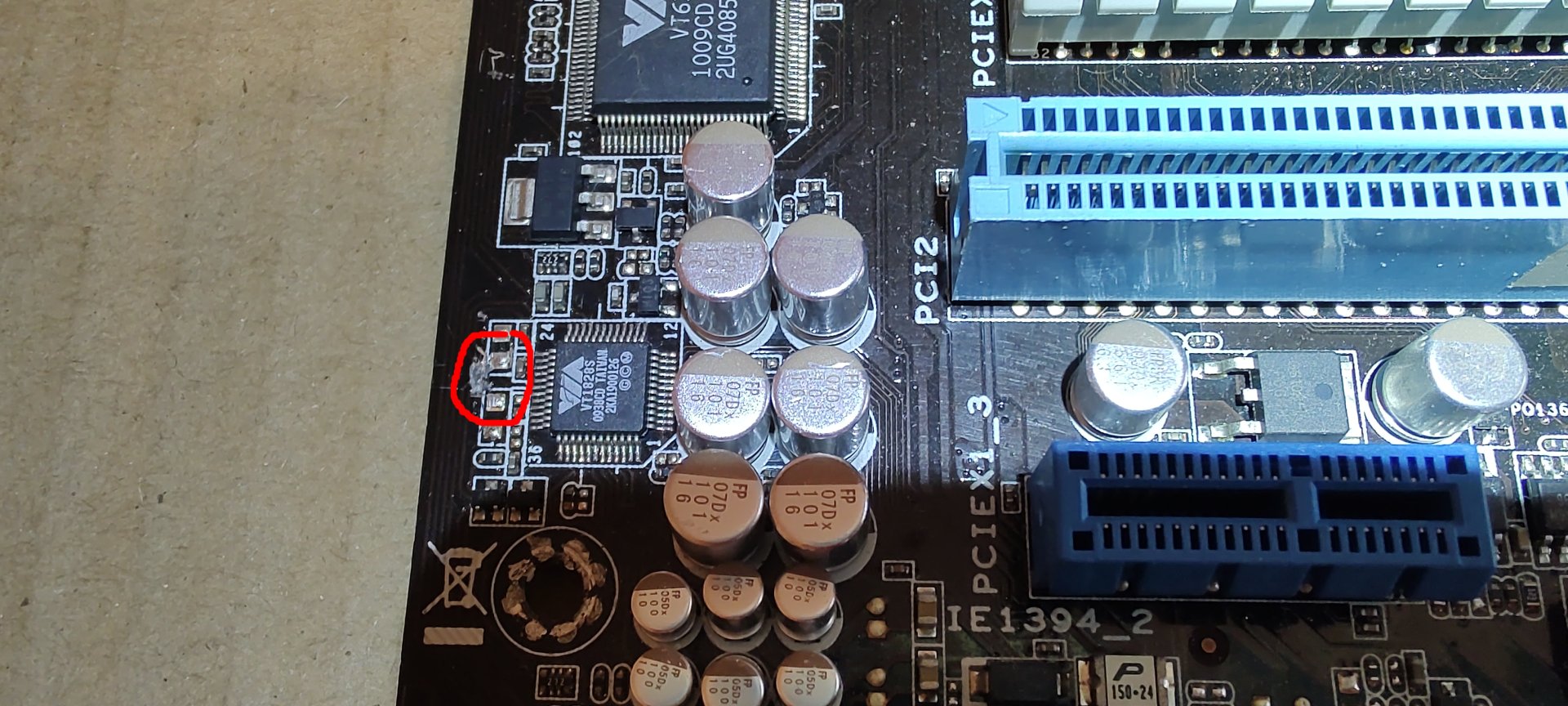
it was dropped. looks like its just the corner, may be broken internal traces though, and its in the ram section.
dont ignore the bios thing, it may be all it is but you wont know until you confirm what bios is on it.
 
it was dropped. looks like its just the corner, may be broken internal traces though, and its in the ram section.
dont ignore the bios thing, it may be all it is but you wont know until you confirm what bios is on it.
I was aware that I wasn't buying a completely new motherboard, but I don't need the original box, battery, etc. anyway. This damage is in an unimportant place in my opinion, there's nothing important there unless I'm mistaken.
If it's an old bios (first version) then it's logical that it doesn't work. Or the seller put in a faulty motherboard that no bios can help with.

All I have to do is take it to a service center so they can determine if the motherboard is dead or just the BIOS, I don't have the processors or memory to play with that.
 
Next time never install a motherboard into a PC without confirming if it's working at all. It will save you a lot of time.
Let us know if you are taking it some place to try with old CPU to check BIOS issue.
Other than that, your best option is to return it to Aliexpress seller for a full refund, and demand chargeback if they are not cooperative.
 
thats what i said...
Here are better pictures, now when I look at it it looks pretty damaged, it's starting to break, and now is that area where something is or there is nothing there, I have no idea
Or should I simply complain and return it?
 

Attachments

  • IMG_20250209_190246297.jpg
    IMG_20250209_190246297.jpg
    357.8 KB · Views: 0
  • IMG_20250209_190347400.jpg
    IMG_20250209_190347400.jpg
    91.9 KB · Views: 0
  • IMG_20250209_190355334.jpg
    IMG_20250209_190355334.jpg
    88.8 KB · Views: 0
  • IMG_20250209_190402988.jpg
    IMG_20250209_190402988.jpg
    158.5 KB · Views: 0
  • IMG_20250209_190407524.jpg
    IMG_20250209_190407524.jpg
    138.5 KB · Views: 0
  • IMG_20250209_190422692.jpg
    IMG_20250209_190422692.jpg
    252 KB · Views: 0
Here are better pictures, now when I look at it it looks pretty damaged, it's starting to break, and now is that area where something is or there is nothing there, I have no idea
Or should I simply complain and return it?
oof.
if it was sold as "damaged, as - is" youre sol, if its not mentioned demand a full refund, including return shipping.
 
oof.
if it was sold as "damaged, as - is" youre sol, if its not mentioned demand a full refund, including return shipping.
No damage, MBO should have been correct
And in my opinion it couldn't have been damaged in transit, because it came in a regular box that is the same size as the original box, it opens the same way, inside it was in an antistatic bag and in a bubble bag, in my opinion it wasn't damaged in transit.Unless they checked it at customs or opened it and someone dropped it.But I don't believe they opened
 
Last edited:
Yeah, no point checking any further, just return it as soon as possible. Take all evidence, you may need it to do a chargeback, Aliexpress seller may refuse to pay back, and Ali support is often resolving support requests in their favour.
 
Thank you all, the current situation is that we are waiting for the seller to provide a return address, it takes two days.
When they provide the address, I will return it. A full refund will be sent automatically if the seller doesnot provide a return adrdress before 2 day.
 
This is a motherboard that I bought a long time ago on an ad and it didn't want to work the first time, it didn't give me any signs. ASUS P7P55D-E EVO.
What can you tell me about that MBO? I've looked into it more closely now and I noticed that one of the CPU pins seems to be bent. I also discovered some kind of damage to the board itself.
Is it possible that it didn't give any signs because of that pin?
I have the latest bios on the chip, at least I ordered it from a seller on eBay a long time ago. I told him to burn the latest bios for that board on the chip for me.
I plan to test the board again to see if it might work. It would be good if I could return it to work. I bought it used a long time ago, as far as I know the seller didn't say it was defective.
I even took it to a local service center and store before and they said it didn't work. They couldn't do anything.
Could that MBO be repaired?
 

Attachments

  • bent pin 2.jpg
    bent pin 2.jpg
    299.7 KB · Views: 0
  • bent pin.jpg
    bent pin.jpg
    548.1 KB · Views: 0
  • bios chip.jpg
    bios chip.jpg
    423.9 KB · Views: 0
  • damage..jpg
    damage..jpg
    355.6 KB · Views: 0
  • damage.jpg
    damage.jpg
    388.2 KB · Views: 0
  • IMG_20250213_151525360.jpg
    IMG_20250213_151525360.jpg
    371.4 KB · Views: 0
  • IMG_20250213_151533907.jpg
    IMG_20250213_151533907.jpg
    435.4 KB · Views: 0
  • IMG_20250213_151538755.jpg
    IMG_20250213_151538755.jpg
    378.3 KB · Views: 0
  • IMG_20250213_151543034.jpg
    IMG_20250213_151543034.jpg
    410.6 KB · Views: 0
  • IMG_20250213_151616850.jpg
    IMG_20250213_151616850.jpg
    381.7 KB · Views: 0
  • IMG_20250213_151621996.jpg
    IMG_20250213_151621996.jpg
    292.5 KB · Views: 0
  • IMG_20250213_151635286.jpg
    IMG_20250213_151635286.jpg
    354.8 KB · Views: 0
  • IMG_20250213_151644743.jpg
    IMG_20250213_151644743.jpg
    403.4 KB · Views: 0
  • IMG_20250213_151648143.jpg
    IMG_20250213_151648143.jpg
    370 KB · Views: 0
  • IMG_20250213_151652480.jpg
    IMG_20250213_151652480.jpg
    395.3 KB · Views: 0
  • IMG_20250213_151707136.jpg
    IMG_20250213_151707136.jpg
    415.9 KB · Views: 0
  • IMG_20250213_151724703.jpg
    IMG_20250213_151724703.jpg
    312.3 KB · Views: 0
  • IMG_20250213_151731361.jpg
    IMG_20250213_151731361.jpg
    407.4 KB · Views: 0
  • IMG_20250213_152313870.jpg
    IMG_20250213_152313870.jpg
    545.2 KB · Views: 0
  • IMG_20250213_152320303.jpg
    IMG_20250213_152320303.jpg
    468.9 KB · Views: 0
  • IMG_20250213_152343251.jpg
    IMG_20250213_152343251.jpg
    444.1 KB · Views: 0
  • IMG_20250213_152352411.jpg
    IMG_20250213_152352411.jpg
    299.2 KB · Views: 0
  • IMG_20250213_152452020.jpg
    IMG_20250213_152452020.jpg
    618.2 KB · Views: 0
  • IMG_20250213_153739950.jpg
    IMG_20250213_153739950.jpg
    98.2 KB · Views: 0
Update:
hi friend, the returned address is wrong, please adjust the address again, otherwise the parcel will return to you.

Now the seller, the chatbot, is telling me that the address is wrong and that I need to change the address. I went to the post office and the woman said that she can't change anything, that the package has to be returned and resent. They sent me the wrong address and now apparently the package is being returned back to me.
I sent the MBO to the address that aliexpress gave me when I requested a return and the motherboard was damaged and not working. Now the seller/chatbot is telling me a different address and that the shipment was returned somewhere in Hong Kong.

This is now the real address:
Return info:
Consignee: xxxxxxx
ADD: 701, Block A, Haojing Industrial Building, Jianfa Street, Tuen Mun District, New Territories, Hong Kong Special Administrative Region, China, 999077
TEL: xxxxxxx

The address they gave me is supposedly wrong and now it needs to be sent to this other one. Are they some kind of scam or what? I already paid 21 euros for return shipping and now it turns out I have to send it again to a different address but only after the package is returned to me.
 
Open a chargeback claim with your bank as soon as possible. Bank may give you money back without needing to send it to Hong Kong again.
 
Open a chargeback claim with your bank as soon as possible. Bank may give you money back without needing to send it to Hong Kong again.
According to the tracking number, the shipment was shipped to domestic traffic, HKHKGG, HONG KONG CENTRAL MAIL CENTRE, for 07.03.2025. it says delivery attempt

How do I do this chargeback claim? Do I have to go to the bank or can I resolve it online? Internet or mobile banking?
I can't go to the bank anymore, it's Saturday and they're not open.
 
On the back of your debit/credit card, you will find emergency number for fraud cases, you can start from there. In normal circumstances, you should contact your bank who issued your payment card and report claim there, you can usually do that through online and phone channels. Check online reporting/contact facility, and phone lines, if not, you can definitely do that on Monday.
 
On the back of your debit/credit card, you will find emergency number for fraud cases, you can start from there. In normal circumstances, you should contact your bank who issued your payment card and report claim there, you can usually do that through online and phone channels. Check online reporting/contact facility, and phone lines, if not, you can definitely do that on Monday.
I just looked online, as far as I can see there is no option to do that, the chat also doesn't work, they work from monday to friday.
I'll go ask on monday.
What does it mean, is it a sure fraud or what?
The transaction was made on 20.01., purchase aliexpres London GB, I paid 113.11 euros for MBO.

As far as I can see, the seller is still on AliExpress, has two 5 ratings and one 1, and I think it falls under ASRS Motherboard Store
 
Last edited:
When filing a chargeback, avoid labeling it as "fraud" unless the seller's actions genuinely fit that category (e.g., deliberate deception or scam). Instead, describe it accurately:

State that you received a damaged item.
Explain that the seller refused to cooperate or accept a return.
Provide evidence: item photos, dispute details, and communication records.
Emphasize that you attempted to resolve the issue directly with the seller and through AliExpress without success.
 
When filing a chargeback, avoid labeling it as "fraud" unless the seller's actions genuinely fit that category (e.g., deliberate deception or scam). Instead, describe it accurately:

State that you received a damaged item.
Explain that the seller refused to cooperate or accept a return.
Provide evidence: item photos, dispute details, and communication records.
Emphasize that you attempted to resolve the issue directly with the seller and through AliExpress without success.
How do I contact AliExpress again? Now this ASRS motherboard store has contacted me again and says it's not their mistake, that AliExpress sent the address, and that they don't change the address.
 
How do I contact AliExpress again? Now this ASRS motherboard store has contacted me again and says it's not their mistake, that AliExpress sent the address, and that they don't change the address.
Seller set the address, not Ali, they are probably lying. Aliexpress Customer Support is notoriously hard to contact (useless bots on every step), if I were you, I'd concentrate on filling chargeback claim as soon as possible.
 
That new address he sent is probably wrong too and I could send it indefinitely, that's obviously their trick, I would spend another 21 euros for nothing and I would never get my money back
 
Back
Top