M3A2 Beta Project: Discontinued

Status
Not open for further replies.
On that note, would you like to see a 140/120mm fan mount on the side panel? Of course both you linked, including the 140mm Prolimatech have a 120mm hole pattern (105 x 105).
A 140mm opening would be awesome, but I don't think it would be greatly restricting to mount that fan on a 120mm opening. I'm gonna order one soon to test it out, the noise/airflow numbers on that site look fantastic!

Edit: Found a German review of the Prolimatech fan. It did come in at 18dB, and it had the best cooling performance of all the fans it was tested against, including full size 140mm fans. Do want.
 
Last edited:
The design is getting squared away, but I'm always open to suggestions and comments. I'm currently working on the drive bracket and will show internals once that's sorted out.
render41.jpg

render43.jpg

render44.jpg

render46.jpg

render47.jpg
 
How much space is there between the board and the side of the case? It's nice to have a little room so that you can route cables behind the MB. SATA cables and maybe the 4-pin power connector should be able to fit with a gap of only a few millimeters as long as you lay things out before the you put the MB in.

A 140mm opening would be awesome, but I don't think it would be greatly restricting to mount that fan on a 120mm opening. I'm gonna order one soon to test it out, the noise/airflow numbers on that site look fantastic!

Edit: Found a German review of the Prolimatech fan. It did come in at 18dB, and it had the best cooling performance of all the fans it was tested against, including full size 140mm fans. Do want.

I've never seen that fan before, it looks interesting.

I had another though about CPU fans as well. You could reverse the CPU fan and use it as an exhaust fan. Does anyone have experience using a top-mounted CPU fan in reverse? I guess this is something that would just have to be tested to see if it actually works. But it could really help to keep air moving in and out of the case, instead of just blowing it around with only the PSU to act as an exhaust.
 
I bought a prototype - are these things by chance going to be all black? Not the biggest deal, but it would be nice for a HTPC setup for it to be all black to match other components.
 
How much space is there between the board and the side of the case? It's nice to have a little room so that you can route cables behind the MB. SATA cables and maybe the 4-pin power connector should be able to fit with a gap of only a few millimeters as long as you lay things out before the you put the MB in.
There is about 7.5mm between the side panel and the motherboard except where a part of the machined side sticks out some. And there is just under 8mm space under the motherboard. You should be able to run cables before installing the motherboard/bottom panel and some after.

I bought a prototype - are these things by chance going to be all black? Not the biggest deal, but it would be nice for a HTPC setup for it to be all black to match other components.
Thank you, updawg! I greatly appreciate it! They will indeed be all black, but you can also request natural brushed aluminum. Other colors will made available later in production. I'm looking into bringing powder coating and anodizing house for more flexibility.
 
How much space is there between the board and the side of the case? It's nice to have a little room so that you can route cables behind the MB. SATA cables and maybe the 4-pin power connector should be able to fit with a gap of only a few millimeters as long as you lay things out before the you put the MB in.


I've never seen that fan before, it looks interesting.

I had another though about CPU fans as well. You could reverse the CPU fan and use it as an exhaust fan. Does anyone have experience using a top-mounted CPU fan in reverse? I guess this is something that would just have to be tested to see if it actually works. But it could really help to keep air moving in and out of the case, instead of just blowing it around with only the PSU to act as an exhaust.

This would probably also have the added benefit of drawing air in from the GPU area, helping to make sure that air doesn't stagnate there.

On the other hand, one benefit of using the top/side fan as an intake could be dust control. I imagine a good 120/140mm fan would create positive pressure, so a dust filter over this fan would go a long way to keeping out the dust bunnies.
 
This would probably also have the added benefit of drawing air in from the GPU area, helping to make sure that air doesn't stagnate there.

On the other hand, one benefit of using the top/side fan as an intake could be dust control. I imagine a good 120/140mm fan would create positive pressure, so a dust filter over this fan would go a long way to keeping out the dust bunnies.
That's good thinking turning the top panel panel to intake. Fresh air directly onto the CPU and secondarily on to the under side of the GPU.

I'm still looking into the possibility of filters on the long passive intakes of the side panels as well as one for the GPU intake. Mounting the side panels filters is pretty simple, but finding a clean way of mounting a filter to the GPU intake (bottom panel) requires a little more thought.
 
Okay, so I'm on track to finalizing a good drive bracket design. It allows you to easily remove the bracket, install the drives and install the loaded bracket. In the images below it is configured with 2 x 2.5" SSD, 1 x slim ODD and 1 x 3.5" HDD. The 3.5" drive can be replaced by 2 x 2.5" drives. The only way to fit a second 3.5" HDD looks to be underneath the ODD, which only work with shorter graphics cards (less than 8" or so).

The bracket should shield the 3.5" drive from much of the heat, while the SSDs towards the front have two layers of aluminum and an optical drive insulating them from GPU heat, in addition to be away from the hottest part of the graphics card.
render48.jpg

render49.jpg
 
The 3.5" drive won't work how you have it pictured. The optical drive will require a slim line adapter and that will stick out too far and conflict with the drive.
 
Are there any right angle adapters, or maybe cable adapters that would be more flexible than a rigid, single-piece type of thing for the slim drive?

There might also be a problem if the connections for the HDD and the ODD line up. In that case even right angle connectors might not fit.

Edit: It's hard to see how wide this is, but it might work. http://www.amazon.com/StarTech-com-SLSATAF20RA-20-Inch-Right-Slimline/dp/B003D181HM
 
As an Amazon Associate, HardForum may earn from qualifying purchases.
The 3.5" drive won't work how you have it pictured. The optical drive will require a slim line adapter and that will stick out too far and conflict with the drive.

I will have to check the spacing between the two when I get home. But I know I can shift the DVD drive forward 4 mm and the hard drive back maybe 4 or 5 mm.
 
Now that I think about it I could flip the hard drive upside down. This would stagger the connectors between the hard drive and the optical drive.
 
wondering why you didn't extend the side vent slots? specifically, looking at this picture http://i142.photobucket.com/albums/r116/cmadki4/forums/render48.jpg it seems like 1/3 of the psu intake is covered. maybe its an optical illusion.
No particular reason. I extended the slots, adding two more to increase the amount space for PSU exhaust. You can see the PSU bracket highlighted in green in the back ground.
extendedslots.jpg


And here is the spacing as-is between the ODD and HDD. Just over 1.25"(33.22mm). That is with a tray-load optical flush with the outside face of the case. I may be able to get another 5-8mm by shifting the HDD back, but will need to create a clearance cutout on the drive bracket.
drivespacing01.png
 
Last edited:
And here is the spacing as-is between the ODD and HDD. Just over 1.25"(33.22mm). That is with a tray-load optical flush with the outside face of the case. I may be able to get another 5-8mm by shifting the HDD back, but will need to create a clearance cutout on the drive bracket.

That seems like plenty of space with some right angle connectors (or maybe left angle) as long as the two drives don't line up, it might be enough even if they do.
 
That seems like plenty of space with some right angle connectors (or maybe left angle) as long as the two drives don't line up, it might be enough even if they do.
I just added a Seagate SATA model 3.5" HDD and it fits the 147mm max length form factor, which pushes that gap down to 26mm, so just over an inch. But if you flip the HDD upside down the connector is above the entire ODD as well as off to the side of the ODD connector.

Getting 3.5" HDD and power supplies to fit small form factor cases are always the tricky parts...
ExtrudedITXAssemblywithComponents01.jpg


Alternative: Another idea is to leave the HDD circuit board side down and switch the SSDs and the ODD. The ODD would be on top and the SSDs on bottom. This would stagger the SATA connectors on the HDD and the ODD. I might have to turn the SSDs 90* towards the PSU to make them easier to connect.
 
Last edited:
how close are you to being able to fit the 3.5" HDD above the ODD? seems to me that putting the 2 connectors right on top of each other would be easiest. then the SSDs can go above the gpu with the connectors toward the mobo. looks like a tight fit though.

2 other questions: is the drive caddy going to be resiliently mounted? if you can find a way to put a rubber washer between the bracket and the case at each screw that would be a huge plus for htpc (silent) usage. since the hdd and odd are both mounted to it i think it would be a nice feature. also are you planning on making any sort of duct around the psu exhaust to make sure it exits the case? it might be fine how it is, but would definitely be better with a duct.
 
It's amazing just how much you're fitting in this thing. Makes the X51 look shoddy lol
 
how close are you to being able to fit the 3.5" HDD above the ODD? seems to me that putting the 2 connectors right on top of each other would be easiest. then the SSDs can go above the gpu with the connectors toward the mobo. looks like a tight fit though.
There is about 36mm between the back of the GPU and the top cover. The stack up of the ODD and HDD will be over 38mm. It would be nice, just not doable here sadly.

2 other questions: is the drive caddy going to be resiliently mounted? if you can find a way to put a rubber washer between the bracket and the case at each screw that would be a huge plus for htpc (silent) usage. since the hdd and odd are both mounted to it i think it would be a nice feature.
Isolating the drive caddy is a good idea! I'll see what I can do as far as rubber grommets or at least rubber pads. The case body is also actually very rigid, which will help resist resonate vibrations. The side panels are 250% thicker than your average aluminum case.

also are you planning on making any sort of duct around the psu exhaust to make sure it exits the case? it might be fine how it is, but would definitely be better with a duct.
The power supply exhaust is currently ducted out the side of the case (see the green highlighted part, front panel removed for better view). Good to go there :)
psuduct.png

It's amazing just how much you're fitting in this thing. Makes the X51 look shoddy lol
It takes some serious effort to do so without making significant compromises. A real engineering/design challenge for sure!
 
Any thoughts on front USB ports, and/or headphone/mic jacks?

edit: I see they are listed as option on Indiegogo, but don't see any renders yet.
 
Any thoughts on front USB ports, and/or headphone/mic jacks?

edit: I see they are listed as option on Indiegogo, but don't see any renders yet.

Yeah, you may wanna throw up a render with those in, I posted a link to this thread over on the XBMC forums and AVSforum and got that question as well. Wouldn't hurt to have a render showing an option for an IR receiver too, thats an often desired option on those boards.

Also, here are some anti-vibration grommets on FrozenCPU. IDK if the added rubber would complicate fitting the drives in though.
 
maybe another option might be to use a riser or something and have the psu top sit flush with the top of the chassis. not sure how much space that would allow, but would that be enough space to fit 1-2 ssd drives underneath? downside to this would be you would have to make more vent slots on the panel(possibly not as aesthetically pleasing?), and would not work with your original idea of making the psu suck air from the cpu area
 
I'd worry about putting anything sensitive to heat towards the back of the video card. Not sure about SSDs, but platter drives are probably a big no-no in that regard.
 
Yeah, you may wanna throw up a render with those in, I posted a link to this thread over on the XBMC forums and AVSforum and got that question as well. Wouldn't hurt to have a render showing an option for an IR receiver too, thats an often desired option on those boards.
I'll try to do some renders with the IR receiver featured. I'll have to come up with some manor of lens. Where on the front panel should this be located?

maybe another option might be to use a riser or something and have the psu top sit flush with the top of the chassis. not sure how much space that would allow, but would that be enough space to fit 1-2 ssd drives underneath? downside to this would be you would have to make more vent slots on the panel(possibly not as aesthetically pleasing?), and would not work with your original idea of making the psu suck air from the cpu area
You could probably fit one. Two SSDs side by side are 140mm wide, and a SFX PSU is only 125mm wide. I'll try it out tomorrow and post some shots of what it might look like. But ultimately the SSDs are fairly easy to located. It's the 3.5" HDD that's proving to be a bear.

I'd worry about putting anything sensitive to heat towards the back of the video card. Not sure about SSDs, but platter drives are probably a big no-no in that regard.
This is not a unique configuration. The X51 places the HDD immediately under the GPU and the Tiki has the drives on the backside of the GPU. The SSDs in my layout are better insulated from the GPU heat than either of those two. But I will need to take that heat on the 3.5" HDD into consideration.

The back of a video card would not be hot so I don't see that as a problem.
While cards vary, the backs of a lot cards get pretty warm; especially apparent if the card doesn't have a back plate.
 
How much space is there below the video card, and would a slimline ODD fit there? This probably varies a lot between cards, but slimline drives are only around 13mm thick. If it does fit then you could switch the HDD and SDD places which would alleviate some of the heat issues and give you more room for cabling.
 
How much space is there below the video card, and would a slimline ODD fit there? This probably varies a lot between cards, but slimline drives are only around 13mm thick. If it does fit then you could switch the HDD and SDD places which would alleviate some of the heat issues and give you more room for cabling.
Only think about putting anything between the GPU and the bottom panel is for longer reference style or dual fan cards. The ODD will likely block the intake fan. But there is room for an ODD down there.
 
I'll try to do some renders with the IR receiver featured. I'll have to come up with some manor of lens. Where on the front panel should this be located?

Functionally, anywhere on the front is fine. Aesthetically, I'd want something like this...

O
[ ][][]

That being top down, left to right the power button, IR shield, 2x USB.

Inteset has a $2.00 option when you order one of their IR receivers to include a 1"x5/8"x0.060" clear plexiglass piece to use as a shield. That's pretty close to the height of a USB port.

Edit: Formatting quircks... but the 2 USB ports are supposed to be centered below the power button in my crude little diagram :D
Edit 2: And after looking at the renderings again I'm not sure there's room for it there due to the PSU. Maybe you could give us a picture of the front panel, outlining the areas that you could fit the ports?
 
Last edited:
The back of a video card would not be hot so I don't see that as a problem.

The back of a video card can get quite hot:

LqbIGoZ.png


wQDELGE.png

(GTX680 and HD7970, from behardware)

That's over 80C, or 176F. Not something you want to touch and you definitely want some airflow moving through there. The heatsink side of the card is comparatively cool, which makes sense if you think about it. IMO it would be better to put drives on that side, which is what the X51 does (and the M1 :p). The Tiki has the drives towards the front end of the card, with the backside of the GPU chip itself - usually the hottest part - left exposed.
 
I guess it would also be visible through the intake vents if the case is upright, which isn't exactly ideal.

As for the IR window, maybe at the bottom of the center (between the PSU and ODD), or maybe opposite the power button. Or it could be at the bottom of the front panel, below the drive slot. The USB and front audio connectors could all be put in a row there.
 
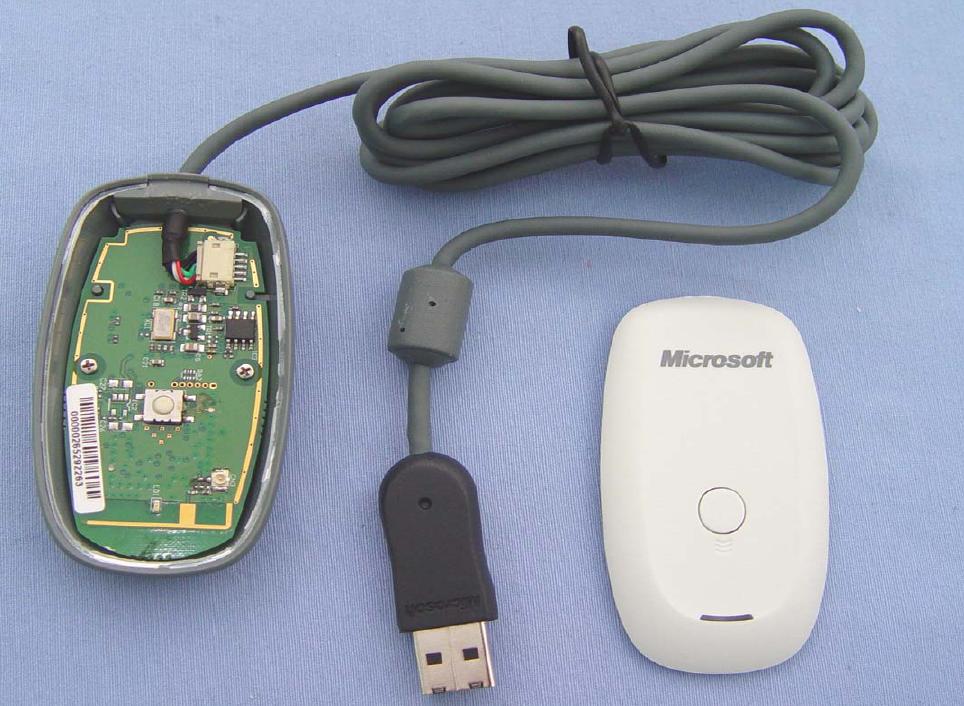
Would anyone else be interested in an internal 360 controller receiver? Looking at this...
openingoi6.jpg

...it shouldn't be too hard to rewire it to an internal USB header. You would need to come up with a bracket to mount it, and have another button on the front for syncing purposes.
 
That's an RF receiver right? What kind of window would you need for that?

I've had one of these for years and I don't think I've ever pushed that button, it might not be an issue to just leave it only accessible from the inside.
 
You shouldn't need any window at all. In fact, if you don't intend on using the controller with another device besides the PC, you probably wouldn't ever need the button after the initial sync either. You only need the button if you want to be able to sync it to different receivers, like a real 360 or another PC receiver.
 
Are the feet removable? How about lying down flat? will there be feet as well?
 
Are the feet removable? How about lying down flat? will there be feet as well?
Yes, when vertical you can use the supplied aluminum feet with rubber pads for added support to prevent tipping over and allow a gap for passive air intake. There are also removable rubber feet for laying the case down flat. These will also be of sufficient height to allow GPU intake through the bottom panel.
 
I've made an alternative drive configuration to get the 3.5" HDD away from the hottest part of the card.

  • Moved 3.5" HDD towards the front
  • Moved the SSD towards the rear, spaced 26mm above the back of the GPU
  • Moved the ODD to above the PSU
render52.jpg

render53.jpg


I'm also contemplating a second 120mm fan location on top located over the back of the GPU. If you forgo the 3.5" HDD and move the SSD towards the front in it's place, you can place a 120mm directing behind the GPU, either blowing cooler air on to it (intake) or drawing hot air off of it (exhaust). Personally, I'm not a huge fan of the added vent, but if helps keep things happy and cool, then so be it. Suggestions?
render51.jpg

render54.jpg


I'm still looking into the location of the IR receiver option.
 
Last edited:
How the PC-Q12 should have been designed :D :p

Looking nice!
Thank you! That means a lot from a very skilled SFF designer/fabricator.

On that note, I'd love to get your input on the drive locations relative to the hot spots of the GPU. Care to weigh in?

Any thoughts on front USB ports, and/or headphone/mic jacks?

edit: I see they are listed as option on Indiegogo, but don't see any renders yet.
I've added USB3.0 ports to the renders now, because I'm think most people will want at least that. HTPC users may prefer not to have anything. And some gamers may prefer HD Audio ports as well. Location will be similar to the current USB3.0.

The front panel is the most customizable part at the time of ordering. As an example:

Front Panel Options

Front ports:

  • None.
  • USB3.0 (2 ports)
  • USB3.0 (2 ports) + HD Audio (mic/headphones)
Optical drive:

  • None.
  • Tray-load.
  • Slot-load.
Power button:

  • None (16mm vandal resistant power button on back panel)
  • 16mm vandal resistant (front panel mounted)
  • 16mm LED ring vandal resistant (front panel mounted)
Other options:

  • IR receiver
  • Custom logo/text
  • Special finish
That's just an example of what the ordering of the case may look like. I need to keep the options reasonable magnitude and relatively compatible with each other so they don't conflict/interfere with each other.


Since the front panel is what you see and interact with the most on the most any PC, it's nice to be able to configure the way you want it.
 
Yet another alternative is a 2.5" SSD + 3.5" HDD + Slim ODD configuration shown below. This leaves the hot spot on the back of the GPU fully exposed for 120mm fan placement. The 3.5" is mounted towards the front and the SSD is tucked underneath it on the front panel.

Again, any almost any configuration you can replace one (1) 3.5" HDD with two (2) 2.5" HDDs/SSDs.

What kind of configurations are you guys most likely to go with? I'm sure to hear how you'd setup your cases.
hiddenssdscreenshot.png
 
Status
Not open for further replies.
Back
Top