• Some users have recently had their accounts hijacked. It seems that the now defunct EVGA forums might have compromised your password there and seems many are using the same PW here. We would suggest you UPDATE YOUR PASSWORD and TURN ON 2FA for your account here to further secure it. None of the compromised accounts had 2FA turned on.
    Once you have enabled 2FA, your account will be updated soon to show a badge, letting other members know that you use 2FA to protect your account. This should be beneficial for everyone that uses FSFT.

LG 48CX

Yes if you watch HDTVTEST's HDR temperature map footage of one of the newer star wars movies you can see that most of the scene is in SDR and what is in HDR range is often not higher than 700 in most places. He always says that in blind tests people always like OLED HDR better since FALD has to play zones off against each other.


https://hardforum.com/threads/lg-48cx.1991077/post-1044646108

View attachment 371538


Not surprising. Vincent on HDTVTest often states that in order to do mixed/constrasted area scenes, FALD displays have to more or less make a dim or glow "halo" area in relation to each other or they would overwhelm one of the other area, Therefore outside of the brightest overall scenes (without darker areas, shadows, etc mixed in) they can't hit their quoted peak numbers. They also lose detail when they offset their zones against each other, where contrasted areas meet.


Temperature map of a HDR 10,000 capable game here shows that only the sun and the brightest reflection of it on the gun barrel would be that bright. I don't think it would be worth the FALD zone issues to see that highlight at more than 750-800nit. I'm all for 10,000 nit HDR where it would mostly be things like the sun and the sun's reflections off a a gun barrel because it would add realism if at the per pixel level someday. It would almost never be a full field of white if ever. In fact every tv has % window for what % of the screen is capable of different peak nits to begin with.
View attachment 371539

Per pixel emissive is way better overall. Ultimate black depth side by side with colors at the pixel level is way better than trading off to LCD and FALD issues that lose out in black depth, side by side contrast and details lost in competing zone vs zone. LCD is also slow response time and usually has uniformity issues (very badly if not FALD). Some of the newer LCD FALD TV's also use a viewing angle filter that reduces their contrast ratio and black depth by a lot.


There is a lot of variance in the settings people use on their screens and in different games. By default, game mode on the LG CX is pretty low saturation. I've been using Reshade with FakeHDR filter, LightroomFilter, and a sharpness filter that helps the render look. I also turned the game mode's color setting up in the TV's OSD to start with before adjusting everything in Reshade. The result is hugely different than the default game mode's appearance for SDR games. Darksiders3 is the only game I've been playing in SDR (with Reshade filters and increased OSD color) and I love how it looks now. The other two games I played and finished since I got the LG CX, jedi:fallen order and Nioh2, are HDR so have their own color metadata that is way more bright and saturated than the default dull game mode. The next two games I have to play are AC:Odyssey and Immortals:Fenyx rising which both have great HDR.

Yup I still have my Acer X27 1000 nit FALD display and I haven't had any desire to use it. Been sitting in the closet since December last year.
 
For everyone new to the thread, this is a good place to post the link to the "Better Cleartype Tuner" again. Setting the cleartype to "greyscale" is the best overall compromise option for the sub pixel arrangement of the CX / C1. Turning cleartype off is not really an option it looks far worse. Leaving it stock has minor visible color halos around text.

https://github.com/bp2008/BetterClearTypeTuner/releases

If you are sitting at a more reasonable distance for a 48" screen (30+ inches) it will largely solve any complaints about text. If you keep it right in your face, nothing will completely solve it at this time as Microsoft doesn't support non-standard subpixel arrangements with cleartype.

I was totally satisfied after switching to greyscale.
I’d experiment. Grayscale can have a bit weird effects on text in some apps. I find that with the 125% scaling I prefer RGB with contrast adjusted to something like 1600. I wish Windows had a grayscaling font smoothing option that looked like OSX without font smoothing. OSX looks perfectly fine to my eyes whereas Windows is a bit of a compromise.
 
Out of curiousity, why do you ask? Are you wondering if it is not marketed as a TV?
for someone looking to import one in another country. It became a curiosity

Also started wondering if they do label/market it as a TV. I suspected the CX might have a reference to it and that the C1 might have done away with it. Maybe someone at LG is enlightened.

Just search for LG C1 unboxing on youtube. I don't think it does.
Those unboxings were annoying while trying to find this. None or few of them thought to show off the box as far as I could tell.
 
The crazy part about this screen is that it may "only" hit 750-nits in HDR, but it feels much brighter than that. That's because each pixel is self-lit, which means you can have insane bright spots in the screen surrounded by total darkness. This is most apparent on a game like Doom Eternal; HDR is painful to look at on this screen because it is able to produce violently bright splashes of color instantly, then die back down; it doesn't give our eyes time to adjust, which makes the image unbelievably punch. I have a Samsung Q90R which can hit 1500+ nits peak brightness with HDR, and believe me when I say that it doesn't punch nearly as hard as the CX does on Doom Eternal.

People get obsessed about how many nits their HDR screen can put out... it's a useless measure. LG's OLED tech is the ONLY HDR experience anyone should be gaming with. The stupidly fast pixel response + per-pixel brightness control puts OLED on another level compared to it's LCD counterparts. It's just that good.
Try explaining this to wizz33.
 
  • Keep display brightness as low as possible for longevity. (obviously, crank it up for HDR)
  • Set Screen Shift On
  • Set Logo Luminance Adjustment to Low.
  • Set Game Mode On (for fastest response)
  • On the Home Dashboard, set the HDMI port you have your PC plugged into as "PC" (it does change some settings).
  • Set you desktop background to flat black
  • Set a Screen Saver to 5 minutes.
  • Set Automatic Screen off (in Windows) to 1 hour or less.
  • Put a bucket under your mouth to catch the drool.
Automatic screen off in windows makes no sense since it will put tv in the gallery mode.
Better off with just blank windows screen saver
 
I wouldn't trust any of those screensavers because they can crash, app crash/notifications can take the top layer. Rare but possible - OS can crash and get stuck on bios screen on reboot, gpu can crash leaving gpu artifacts/noise on screen, etc.

I use the "turn off the screen" feature via 2 clicks on the remote or by mic on the remote saying it. To the system the screen is still on and functioning and not in stand-by. Sound still running if you don't mute it. I do have a screensaver on a timer though but it just turns on my side screens because any time it would kick on my oled is "minimized" in the "turn of the screen" mode. Any time I'm not actively using the OLED and any time I walk away I "minimize it" to emitters off with 'turn off the screen'. Hit the wheel on the remote and it turns back on in a fraction of a second.

https://www.reddit.com/r/OLED/comments/j0mia1/quick_tip_for_a_fast_way_to_turn_off_the_screen/
 
Last edited:
Automatic screen off in windows makes no sense since it will put tv in the gallery mode.
Better off with just blank windows screen saver
You can disable the gallery mode which just gives you a bouncing fireworks with no signal text. I wish you could disable that but I expect it's still less wear than the bright white gallery thing.
 
It would be great if I could find a way to do the minimize the screen trick and switch picture modes, inputs, etc using a windows app hotkey to a stream deck key but I don't think that it can be done or easily enough. If the LG app was on windows and had hotkeys for input type, picture mode, and screen emitters off mode that would be very handy.

It would be neat if LG ever expanded the Universal Control feature (which controls other devices from the TV) to a windows app connecting via wifi, then included the TV itself in the devices that could be controlled.

There might be some emitter I could buy for windows that could clone the LG Magic remote's signals though. I'll have to look into that.
Instead of infrared (IR), the LG Magic Remote uses radio frequencies (RF) or Bluetooth to communicate directly to the TV
Pretty sure it uses bluetooth mainly if not entirely.

Maybe windows 11's compatibility with phone apps could come into play with the LG remote app too.

Using the remote isn't that bad, I just prefer using my streamdeck keys for everying (via hotkeys mapped to it or via streamdeck apps). I leave the LG magic remote in between my split keyboard halves so it's always accessible.
 
Last edited:
You can disable the gallery mode which just gives you a bouncing fireworks with no signal text. I wish you could disable that but I expect it's still less wear than the bright white gallery thing.
really ?! I need to do that. how? I only found you can press mute button few times and disable no signal textbox
 
At least on the C9/CX it's "No signal image" off in General settings.
On an E9 with that setting turned off, the fireworks never show up and this is all that appears (apologies for vertical video syndrome, the TV is actually owned by a family friend):
 
On an E9 with that setting turned off, the fireworks never show up and this is all that appears (apologies for vertical video syndrome, the TV is actually owned by a family friend):
I think they have changed it a bit on CX, I think my C9 looks the same with the no signal text moving around the screen. I wish you could disable that too so it would be a blank screen but unfortunately that's not an option it seems.
 
Howdy folks, I'm a 55 inch C7 owner that used it as my primary computer monitor for 2 years, it's in my living room now. Good news, no burn in!

Eventually I went back to ultra high refresh rate monitors because I play a lot of Battle Royale games and high input lag with 60hz is a deal breaker. I still miss the OLED picture quality every day.

I'm considering a 48C1 or the 42 inch that LG has in production.

I have a couple questions about BFI on the C1 that I'm hoping others can clarify:

42 inch @ 1440P with No Scaling in NVCP would be 31.5 inches with black bars on all sides. That would be a much more manageable size for Warzone I think and would allow me to sit much closer. I'm putting the 48C1 or 42C2 on a monitor arm for easy repositioning.

If I'm running 1440p or 4k with BFI 120 HZ on High or Medium in Game Mode to get the 5ms input lag then I can't run PC mode input right? This is annoying because I would like Chroma 4:4:4 and BFI on High or Medium. I thought maybe a firmware update might resolve this?

My understanding of the "Prevent Input Delay" feature is that setting it to "Boost" only benefits 60z signals, is that correct?

Rtings says: "There's a new setting for 2021 models found in the Game Optimizer menu, called Prevent Input Delay. There are two options: 'Standard' and 'Boost'. We ran several input lag tests and found that the 'Boost' setting consistently lowers the input lag by about 3ms when the TV is running 60Hz compared to the LG CX OLED. It works by sending a 120Hz signal to refresh the screen more frequently, so it does not affect 120Hz input lag. The published results are what we measured using the 'Boost' setting. On 'Standard', we measured 13.1ms for 1080p @ 60Hz, 13.4ms for 1440p @ 60Hz, and 13.0ms for 4k @ 60Hz."
Rtings says: "In 'Game Optimizer' mode, the settings are the same, but note that you can't enable BFI if you have Prevent Input Delay set to 'Boost'. Unfortunately, you can't enable BFI in 'PC' mode."

I literally never use gsync and I only play Battleroyale games on low-ish settings to avoid any frame rate drops. I haven't used HDR for gaming in years because single player mostly bores me. The last HDR game I played was Shadow of War and it was both beautiful and fun. I have a 3080.

I'm coming from an Asus 280hz Tuf VG279QM, it's got shit picture quality but 280hz is nice, it has 3ms input lag which would be very comparable to the 5MS on the LG C1. 120hz OLED with BFI on Medium or High should give comparable motion clarity, if not better, than what I have now I think.

My use case for this display will be 80% battle royale games and other competitive FPS on mouse and key. I also do an hour of Kovaaks aim training every day. I wish this wasn't necessary but being 40 years old sucks.

Some of you guys are using a keyboard tray that would be barely large enough to support my mouse and I'd have no space for a keyboard at all. No clue how people game at high sensitivity like that!

This guys video makes me think 4k @120hz with BFI on High is going to be amazing! 4:22 has the comparison to CX.

 
Last edited:
Howdy folks, I'm a 55 inch C7 owner that used it as my primary computer monitor for 2 years, it's in my living room now. Good news, no burn in!

Eventually I went back to ultra high refresh rate monitors because I play a lot of Battle Royale games and high input lag with 60hz is a deal breaker. I still miss the OLED picture quality every day.

I'm considering a 48C1 or the 42 inch that LG has in production.

I have a couple questions about BFI on the C1 that I'm hoping others can clarify:

42 inch @ 1440P with No Scaling in NVCP would be 31.5 inches with black bars on all sides. That would be a much more manageable size for Warzone I think and would allow me to sit much closer. I'm putting the 48C1 or 42C2 on a monitor arm for easy repositioning.

If I'm running 1440p or 4k with BFI 120 HZ on High or Medium in Game Mode to get the 5ms input lag then I can't run PC mode input right? This is annoying because I would like Chroma 4:4:4 and BFI on High or Medium. I thought maybe a firmware update might resolve this?

My understanding of the "Prevent Input Delay" feature is that setting it to "Boost" only benefits 60z signals, is that correct?

Rtings says: "There's a new setting for 2021 models found in the Game Optimizer menu, called Prevent Input Delay. There are two options: 'Standard' and 'Boost'. We ran several input lag tests and found that the 'Boost' setting consistently lowers the input lag by about 3ms when the TV is running 60Hz compared to the LG CX OLED. It works by sending a 120Hz signal to refresh the screen more frequently, so it does not affect 120Hz input lag. The published results are what we measured using the 'Boost' setting. On 'Standard', we measured 13.1ms for 1080p @ 60Hz, 13.4ms for 1440p @ 60Hz, and 13.0ms for 4k @ 60Hz."
Rtings says: "In 'Game Optimizer' mode, the settings are the same, but note that you can't enable BFI if you have Prevent Input Delay set to 'Boost'. Unfortunately, you can't enable BFI in 'PC' mode."

I literally never use gsync and I only play Battleroyale games on low-ish settings to avoid any frame rate drops. I haven't used HDR for gaming in years because single player mostly bores me. The last HDR game I played was Shadow of War and it was both beautiful and fun. I have a 3080.

I'm coming from an Asus 280hz Tuf VG279QM, it's got shit picture quality but 280hz is nice, it has 3ms input lag which would be very comparable to the 5MS on the LG C1. 120hz OLED with BFI on Medium or High should give comparable motion clarity, if not better, than what I have now I think.

My use case for this display will be 80% battle royale games and other competitive FPS on mouse and key. I also do an hour of Kovaaks aim training every day. I wish this wasn't necessary but being 40 years old sucks.
On the CX BFI and PC mode work together just fine. I still think it's the wrong display for your use cases and a fast LCD is more straightforward to use.
 
Howdy folks, I'm a 55 inch C7 owner that used it as my primary computer monitor for 2 years, it's in my living room now. Good news, no burn in!

Eventually I went back to ultra high refresh rate monitors because I play a lot of Battle Royale games and high input lag with 60hz is a deal breaker. I still miss the OLED picture quality every day.

I'm considering a 48C1 or the 42 inch that LG has in production.

I have a couple questions about BFI on the C1 that I'm hoping others can clarify:

42 inch @ 1440P with No Scaling in NVCP would be 31.5 inches with black bars on all sides. That would be a much more manageable size for Warzone I think and would allow me to sit much closer. I'm putting the 48C1 or 42C2 on a monitor arm for easy repositioning.

If I'm running 1440p or 4k with BFI 120 HZ on High or Medium in Game Mode to get the 5ms input lag then I can't run PC mode input right? This is annoying because I would like Chroma 4:4:4 and BFI on High or Medium. I thought maybe a firmware update might resolve this?

My understanding of the "Prevent Input Delay" feature is that setting it to "Boost" only benefits 60z signals, is that correct?

Rtings says: "There's a new setting for 2021 models found in the Game Optimizer menu, called Prevent Input Delay. There are two options: 'Standard' and 'Boost'. We ran several input lag tests and found that the 'Boost' setting consistently lowers the input lag by about 3ms when the TV is running 60Hz compared to the LG CX OLED. It works by sending a 120Hz signal to refresh the screen more frequently, so it does not affect 120Hz input lag. The published results are what we measured using the 'Boost' setting. On 'Standard', we measured 13.1ms for 1080p @ 60Hz, 13.4ms for 1440p @ 60Hz, and 13.0ms for 4k @ 60Hz."
Rtings says: "In 'Game Optimizer' mode, the settings are the same, but note that you can't enable BFI if you have Prevent Input Delay set to 'Boost'. Unfortunately, you can't enable BFI in 'PC' mode."

I literally never use gsync and I only play Battleroyale games on low-ish settings to avoid any frame rate drops. I haven't used HDR for gaming in years because single player mostly bores me. The last HDR game I played was Shadow of War and it was both beautiful and fun. I have a 3080.

I'm coming from an Asus 280hz Tuf VG279QM, it's got shit picture quality but 280hz is nice, it has 3ms input lag which would be very comparable to the 5MS on the LG C1. 120hz OLED with BFI on Medium or High should give comparable motion clarity, if not better, than what I have now I think.

My use case for this display will be 80% battle royale games and other competitive FPS on mouse and key. I also do an hour of Kovaaks aim training every day. I wish this wasn't necessary but being 40 years old sucks.

Some of you guys are using a keyboard tray that would be barely large enough to support my mouse and I'd have no space for a keyboard at all. No clue how people game at high sensitivity like that!

This guys video makes me think 4k @120hz with BFI on High is going to be amazing! 4:22 has the comparison to CX.


I'm just the opposite, I played online shooters starting in dial up days but I haven't played arena shooters in years because they are very boring to me like a demolition derby in a few mall arenas over and over instead of having more content in the game. Rock'em Sock'em robots if you will. That and the fact that cheating is rampant in online games:
...hundreds of thousands of cheaters that have been caught -- probably million+s of players cheating, even with less obvious intermittent assist cheats (temp wall hack spotting, reticule/target assist aimbot when near hitbox "gravity well"~"bullet gravity", etc)... over 420k banned on Apex, Overwatch and destiny cheating up 50% since january, call of duty warzone banned over 30,000 cheaters in only one wave of bans, CoD WZ is at least 475,000 bans. 2018 over 13million pubg accounts banned, end of 2019 pubg confirmed it was banning around 100,000 accounts per week. and there are several high ranked personalities caught and that's just who have been caught on streams cheating, (I believe a few other personalities even caught cheating during competition at esport LAN matches). The Chinese government raided a whole cheat engine subscription model servvice for a-la-cart abilities/cheats recently and arrested people running it (one 76million dollar cheat engine organization out of what's possibly a near 300 million dollar cheat service market across all of china) . There are plenty of other cheats and cheat services online if you look. All of that and also that netcode in a game chooses one side of a coin or another in resolving near timings which comes down to even slightly better ping time being a big advantage. Also that tick rates on most games suck. tick rate timing is actually based on the tick + interp time. Even the best online servers are doing interp server action states at around 15ms ~ 65Hz no matter what your local fps+Hz is. And most of them are wayyy worse, for example:

Valorant: 128tick
Specific paid matchmaking services like ESEA: 128tick
CSGO ("normal" servers): 64tick
Overwatch: 63
Fortnite: 60 (I think, used to be 20 or 30)
COD Modern Warfare mp lobbies: 22tick
COD Modern Warfare custom lobbies: 12tick

128tick at interp_2 = .015 seconds
64 tick at interp_2 = .031 seconds
22 tick at interp_2 = .090 seconds
12 tick at interp_2 = .166 seconds

/end rant

=============================================================

HDR on this screen is glorious on a well done game. Even using fakeHDR filter + Lightroom filter in reshade on a SDR game looks great compared to anything not HDR. That monitor you referenced is 1,186:1 contrast ratio with the accompanying grey black depth and has no local dimming so is edge flashlights from the sides. I'd never go back to something like that personally.

So this is a gorgeous goddess of a display.. supernatural beauty (infinitie black depth, inf to 1 contrast, high color volume, HDR ~800).. grace in movement (120hz, VRR, miniscule response time) and per pixel fidelity at 4k.. and you want a fast rooster-rat you've shaved the hair and plucked the feathers off of (low graphics settings) to put in a rat race cock fight arena from the sound of it. :inpain: ... So I have to agree with kasakka that you might want to look at something else. Though there are some high Hz miniLED LCD FALD displays coming out now at 144hz or more that might be better all-rounders for people playing games that get over 300fps average (in order to get appreciable benefits out of 240hz+) .. which isn't likely at 4k unless you are playing something with very weak demands/graphics settings (or stripping all of the graphics for some scoring/ladder advantage). It's hard enough to get 100fps+ average on many top games with high+ to near ultra settings on a 120hz 4k screen and that's not even with raytracing on. The graphics are getting better and better with HDR, 4k, DLSS, VRR, even raytracing if you have the wiggle room, etc.. I can't imagine (exaggerating) running a black and white 720p TV to get scoring advantages in some demolition derby but that's me. :D👍

Worth noting that best use scenario for BFI is matching or exceeding the peak Hz with your frame rate (over 120fps minimum frame rate on LG CX). If you are getting 120 or 144 fps minimum on a game with a very fast response time 120hz/144hz screen, you will already be getting a 50% to 60% sample and hold blur reduction even without BFI. OLED response times are extremely fast too so there won't be any ghosting or anything muddying the clarity increase results like when using LCDs so it will probably be marginally clearer results than those same fps+Hz on a lcd.

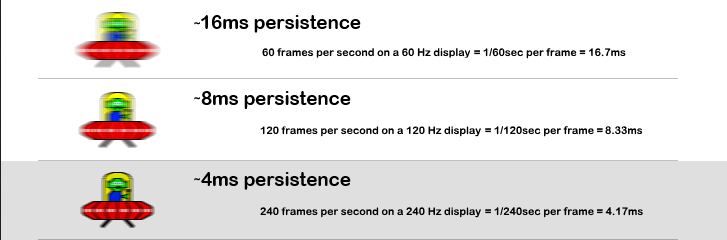
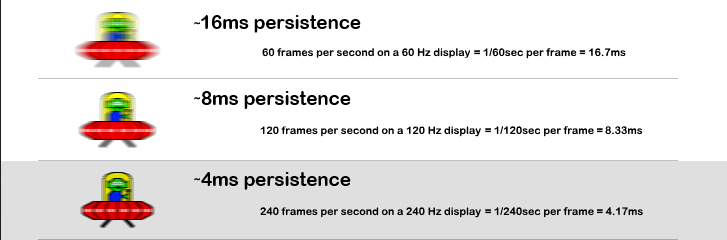
You can substitute the 1000 px/sec by matching the fps values to the same Hz in this graphics (e.g. 480fps at 480Hz). 1000 is just proving a point about where it would need to be to be "zero" blur at 1000px/sec 1000fps.
okw997S.png

~ 8pixels of blur with a sharp OLED response time cut off at 120fps+Hz is still not bad. BFI without crosstalk at 120fps solid/minimum is probably like (EDIT) 240fps at 240Hz (blur reduction wise ~ 4pixels) but it has other tradeoffs:
--The frame rate minimum requirement (and accompnaying loss of graphics and FX quality)
--dimmer / less luminous colored screen
--no HDR
--no VRR
--can be eye fatiguing/headache inducing over time even if you can't "see it" (sort of like PWM in that, even if BFI has uniform insertion).
--If I'm not mistaken it also introduces a little more input lag. I remember something like 13ms with BFI off vs 21ms with it on at 120fps/Hz but that might have been the C9. The C1 might even have different #'s than the CX too.


My understanding of the "Prevent Input Delay" feature is that setting it to "Boost" only benefits 60z signals, is that correct?
Vincent of HDTVtest did a video that referenced it.
If you are playing a 60fps game or running a gpu that only does 60hz on the tv it might still be useful. Vincent said it looks like it's doubling the frames for a slight input lag reduction on 60fps content(12.5ms vs 9.6ms) and is not useful at 120fps. In fact I think he said it makes the input lag worse at 120fps so you should still use standard mode for that.
 
Last edited:
https://www.resetera.com/threads/re...ame-insertion-on-and-off.332765/post-52471061

Unfortunately the CX has very limited options for BFI.
With its 120Hz BFI support, it should be able to offer 60Hz BFI with three levels of persistence.
Instead, the Auto/Low/Medium settings run at 120Hz, and only the High setting runs at 60Hz.

The display should be capable of the following combinations with a 60Hz source, where 1 is the source frame, and 0 is a black frame.

  • 1111 - 60Hz, no BFI. 16.67ms persistence, full brightness, no flicker. Lots of motion blur.
  • 1110 - 60Hz 1/4 BFI. 12.5ms persistence, 3/4 brightness, high flicker. Slightly reduced motion blur, smooth motion.
  • 1100 - 60Hz 1/2 BFI. 8.33ms persistence, 1/2 brightness, high flicker. Moderately reduced motion blur, smoother motion.
  • 1000 - 60Hz 3/4 BFI. 4.17ms persistence, 1/4 brightness, high flicker. Highly reduced motion blur, very smooth motion.
  • 1010 - 120Hz 1/2 BFI. 8.33ms persistence, 1/2 brightness, moderate flicker. Moderately reduced motion blur, double-images/judder in motion.
The highlighted options are the only ones available on the CX.
Without having one of these displays myself, I couldn't tell you what it's doing to differentiate Low/Medium BFI; only that it's running both at 120Hz like the last example.
The C9's BFI option is equivalent to 1/2 BFI rather than 3/4 - so it's brighter at 60Hz, but has less-clear/smooth motion than the CX.

Unfortunately BFI modes on most modern displays really highlight just how good CRTs were.
CRTs were able to pull off <1ms persistence while still remaining at roughly 100 nits brightness, which is the spec for SDR.
No other display using BFI that has options for sub-1ms persistence is anywhere close to reaching 100 nits brightness.


pswii60 said:
BFI doesn't support VRR which is a bit pants. And motion blur at 120hz is already massively reduced over 60hz even without BFI, so I'd rather take the brighter imager and lower latency at that point.
At 120Hz the brightness only drops by 1/2 rather than 3/4 to achieve the same 4.17ms persistence, so it's far more usable.
VRR is fundamentally incompatible with most BFI implementations, and there are a whole lot of technical challenges that would have to be overcome to make it work. I know ASUS have their ELMB-Sync monitors, but there's a reason that does not work well.

Correct me if I'm wrong but I think accoding to that and other comments..
50% BFI (resulting in moderate flicker/crosstalk and 50% brightness reduction) at 120fps+120Hz on the CX is 4.17ms persistence (half of the 120fpsHz BFI off persistence) which would more like 240fps at 240Hz in the previous graphic.

That is:

(compare to a baseline of 60fps at 60Hz baseline = 16.7ms ~ 17pixels of motion blur)

8 pixels of motion blur at 120fpsHz with BFI off
vs.
4 pixels of motion blur at 120fpsHz with BFI on medium (and with the accompanying BFI tradeoffs)


Generally, BFI tech dims the screen the same % it reduces the blur. So at 50% reduction, you get a 50% less luminous screen.


When objects move at speed or when moving the FoV/gameworld around at speed you'd get this kind of blur.
Outside of these maximum blur amounts, it varies most with the speed you are moving the viewport at any given time or if it's moving at all. Also how fast other objects are moving on screen. So it's more like zero(static) "up to" those peaks in each slot.

from https://blurbusters.com/ (edited by me showing the 240fpsHz darker to suggest BFI dimming)
k1aCWd3.png

1ms / "zero" blur of CRT or 1000fps at 1000Hz

ZCxnQl7.png


--------------------------

All of those 120Hz blur reductions listed are reliant on 120fps minimums, not averages. Often omitted from comments that only cite 120hz as cutting sample and hold blur (like the comment in the above quote by pswii60).

I shoot for at least 100fps average when possible.. relying on VRR to ride the roller coaster of variable frame rates and Hz. Which is typically something like:

(70) 85 fpsHz <<<< 100 fpsHz >>>> 115fpsHz (117 capped)

which results in something like:

~ 13.3px <<<<< 10 px >>> ~ 8.5 px of motion blur


Of course 120fps minimum would be less at ~ 8px of blur all of the time but VRR allows that tradeoff to gain much higher graphics settings smoothly, and while still gaining a lot of motion definition in addition to some motion clarity/blur reduction. Combined with quality DLSS in a game supporting it well, the graphics setting ceilings and/or frame rates can be higher too.
 
Last edited:
Howdy folks, I'm a 55 inch C7 owner that used it as my primary computer monitor for 2 years, it's in my living room now. Good news, no burn in!

Eventually I went back to ultra high refresh rate monitors because I play a lot of Battle Royale games and high input lag with 60hz is a deal breaker. I still miss the OLED picture quality every day.

I'm considering a 48C1 or the 42 inch that LG has in production.

I have a couple questions about BFI on the C1 that I'm hoping others can clarify:

42 inch @ 1440P with No Scaling in NVCP would be 31.5 inches with black bars on all sides. That would be a much more manageable size for Warzone I think and would allow me to sit much closer. I'm putting the 48C1 or 42C2 on a monitor arm for easy repositioning.

If I'm running 1440p or 4k with BFI 120 HZ on High or Medium in Game Mode to get the 5ms input lag then I can't run PC mode input right? This is annoying because I would like Chroma 4:4:4 and BFI on High or Medium. I thought maybe a firmware update might resolve this?

My understanding of the "Prevent Input Delay" feature is that setting it to "Boost" only benefits 60z signals, is that correct?

Rtings says: "There's a new setting for 2021 models found in the Game Optimizer menu, called Prevent Input Delay. There are two options: 'Standard' and 'Boost'. We ran several input lag tests and found that the 'Boost' setting consistently lowers the input lag by about 3ms when the TV is running 60Hz compared to the LG CX OLED. It works by sending a 120Hz signal to refresh the screen more frequently, so it does not affect 120Hz input lag. The published results are what we measured using the 'Boost' setting. On 'Standard', we measured 13.1ms for 1080p @ 60Hz, 13.4ms for 1440p @ 60Hz, and 13.0ms for 4k @ 60Hz."
Rtings says: "In 'Game Optimizer' mode, the settings are the same, but note that you can't enable BFI if you have Prevent Input Delay set to 'Boost'. Unfortunately, you can't enable BFI in 'PC' mode."

I literally never use gsync and I only play Battleroyale games on low-ish settings to avoid any frame rate drops. I haven't used HDR for gaming in years because single player mostly bores me. The last HDR game I played was Shadow of War and it was both beautiful and fun. I have a 3080.

I'm coming from an Asus 280hz Tuf VG279QM, it's got shit picture quality but 280hz is nice, it has 3ms input lag which would be very comparable to the 5MS on the LG C1. 120hz OLED with BFI on Medium or High should give comparable motion clarity, if not better, than what I have now I think.

My use case for this display will be 80% battle royale games and other competitive FPS on mouse and key. I also do an hour of Kovaaks aim training every day. I wish this wasn't necessary but being 40 years old sucks.

Some of you guys are using a keyboard tray that would be barely large enough to support my mouse and I'd have no space for a keyboard at all. No clue how people game at high sensitivity like that!

This guys video makes me think 4k @120hz with BFI on High is going to be amazing! 4:22 has the comparison to CX.


I would recommend trying the Aorus FI32U which has BFI + VRR between 100-144hz. It's a 32 inch 4k 144Hz IPS panel and those who own the monitor says the BFI + VRR works pretty well, although I guess you can also wait for professional reviews before deciding.
 
I'm just the opposite, I played online shooters starting in dial up days but I haven't played arena shooters in years because they are very boring to me like a demolition derby in a few mall arenas over and over instead of having more content in the game. Rock'em Sock'em robots if you will. That and the fact that cheating is rampant in online games:
...hundreds of thousands of cheaters that have been caught -- probably million+s of players cheating, even with less obvious intermittent assist cheats (temp wall hack spotting, reticule/target assist aimbot when near hitbox "gravity well"~"bullet gravity", etc)... over 420k banned on Apex, Overwatch and destiny cheating up 50% since january, call of duty warzone banned over 30,000 cheaters in only one wave of bans, CoD WZ is at least 475,000 bans. 2018 over 13million pubg accounts banned, end of 2019 pubg confirmed it was banning around 100,000 accounts per week. and there are several high ranked personalities caught and that's just who have been caught on streams cheating, (I believe a few other personalities even caught cheating during competition at esport LAN matches). The Chinese government raided a whole cheat engine subscription model servvice for a-la-cart abilities/cheats recently and arrested people running it (one 76million dollar cheat engine organization out of what's possibly a near 300 million dollar cheat service market across all of china) . There are plenty of other cheats and cheat services online if you look. All of that and also that netcode in a game chooses one side of a coin or another in resolving near timings which comes down to even slightly better ping time being a big advantage. Also that tick rates on most games suck. tick rate timing is actually based on the tick + interp time. Even the best online servers are doing interp server action states at around 15ms ~ 65Hz no matter what your local fps+Hz is. And most of them are wayyy worse, for example:

Valorant: 128tick
Specific paid matchmaking services like ESEA: 128tick
CSGO ("normal" servers): 64tick
Overwatch: 63
Fortnite: 60 (I think, used to be 20 or 30)
COD Modern Warfare mp lobbies: 22tick
COD Modern Warfare custom lobbies: 12tick

128tick at interp_2 = .015 seconds
64 tick at interp_2 = .031 seconds
22 tick at interp_2 = .090 seconds
12 tick at interp_2 = .166 seconds

/end rant

=============================================================

HDR on this screen is glorious on a well done game. Even using fakeHDR filter + Lightroom filter in reshade on a SDR game looks great compared to anything not HDR. That monitor you referenced is 1,186:1 contrast ratio with the accompanying grey black depth and has no local dimming so is edge flashlights from the sides. I'd never go back to something like that personally.

So this is a gorgeous goddess of a display.. supernatural beauty (infinitie black depth, inf to 1 contrast, high color volume, HDR ~800).. grace in movement (120hz, VRR, miniscule response time) and per pixel fidelity at 4k.. and you want a fast rooster-rat you've shaved the hair and plucked the feathers off of (low graphics settings) to put in a rat race cock fight arena from the sound of it. :inpain: ... So I have to agree with kasakka that you might want to look at something else. Though there are some high Hz miniLED LCD FALD displays coming out now at 144hz or more that might be better all-rounders for people playing games that get over 300fps average (in order to get appreciable benefits out of 240hz+) .. which isn't likely at 4k unless you are playing something with very weak demands/graphics settings (or stripping all of the graphics for some scoring/ladder advantage). It's hard enough to get 100fps+ average on many top games with high+ to near ultra settings on a 120hz 4k screen and that's not even with raytracing on. The graphics are getting better and better with HDR, 4k, DLSS, VRR, even raytracing if you have the wiggle room, etc.. I can't imagine (exaggerating) running a black and white 720p TV to get scoring advantages in some demolition derby but that's me. :D👍
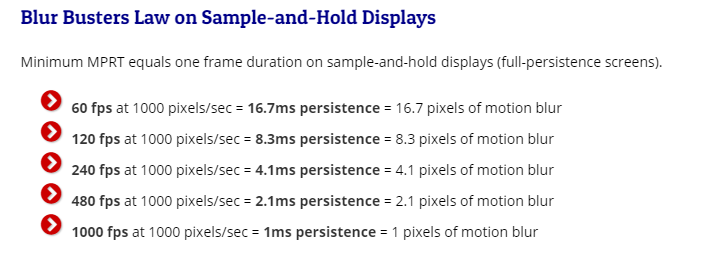
Worth noting that best use scenario for BFI is matching or exceeding the peak Hz with your frame rate (over 120fps minimum frame rate on LG CX). If you are getting 120 or 144 fps minimum on a game with a very fast response time 120hz/144hz screen, you will already be getting a 50% to 60% sample and hold blur reduction even without BFI. OLED response times are extremely fast too so there won't be any ghosting or anything muddying the clarity increase results like when using LCDs so it will probably be marginally clearer results than those same fps+Hz on a lcd.

You can substitute the 1000 px/sec by matching the fps values to the same Hz in this graphics (e.g. 480fps at 480Hz). 1000 is just proving a point about where it would need to be to be "zero" blur at 1000px/sec 1000fps.
View attachment 374941

~ 8pixels of blur with a sharp OLED response time cut off at 120fps+Hz is still not bad. BFI without crosstalk at 120fps solid/minimum is probably like (EDIT) 240fps at 240Hz (blur reduction wise ~ 4pixels) but it has other tradeoffs:
--The frame rate minimum requirement (and accompnaying loss of graphics and FX quality)
--dimmer / less luminous colored screen
--no HDR
--no VRR
--can be eye fatiguing/headache inducing over time even if you can't "see it" (sort of like PWM in that, even if BFI has uniform insertion).
--If I'm not mistaken it also introduces a little more input lag. I remember something like 13ms with BFI off vs 21ms with it on at 120fps/Hz but that might have been the C9. The C1 might even have different #'s than the CX too.


Vincent of HDTVtest did a video that referenced it.
If you are playing a 60fps game or running a gpu that only does 60hz on the tv it might still be useful. Vincent said it looks like it's doubling the frames for a slight input lag reduction on 60fps content(12.5ms vs 9.6ms) and is not useful at 120fps. In fact I think he said it makes the input lag worse at 120fps so you should still use standard mode for that.

I wish I didn't love competition so much because the cheaters in Warzone are driving me insane! I wish I liked story driven content but it bores me to tears. I've tried dozens of story focused games that have stellar reviews, I make it about three hours in, get bored and quit. Even games like the Witcher and RDR... it just isn't competitive enough.

I agree that Arena shooters are boring, I quit FPS for years and then Battle royales happened. It pulled me back in like nothing I've ever tried other than WoW. Playing with a quality 4 man squad in Warzone is the most fun game I've played in 10 years, it's also the most frustrating.

The only other games I genuinely enjoy are strategy games. I'm a lifelong XCOM addict and I also enjoy Diablo type games. As long as the game is light on story and deep on replayability I'm interested. Recently I started playing Rocket League which is entirely server hosted so there is no cheaters and that game is bloody awesome!

I'm not planning on playing FPS games at 4k. I'm not planning on using Gsync, VRR, or HDR. Raytracing is literally a joke IMHO.

It's actually pretty easy to run Fortnite, Warzone, and Apex Legends at higher than 120 fps at all times and that's where BFI is a huge plus. Graphics fidelity means nothing in those titles. I want OLED because the motion resolution is so good and the colors are so clear that spotting people will be easier.

My Warzone addiction has convinced me to do the following: Work out regularly to improve my reaction time, drink less booze, smoke less pot, aim train daily, upgrade my PC repeatedly, learn a fuck-load about Ram overclocking and go to bed earlier. All to be marginally better at a game that I will never truly master because I'm 40 years old. The hilarious thing is that now I'm in the best shape of my life and my yoga practice is really evolving.

I'm not looking for casual games... I WANT to be obsessive. Golf was too hard, video games are less agonizing.
 
I would recommend trying the Aorus FI32U which has BFI + VRR between 100-144hz. It's a 32 inch 4k 144Hz IPS panel and those who own the monitor says the BFI + VRR works pretty well, although I guess you can also wait for professional reviews before deciding.

I don't understand why people want VRR. I've had gsync for years, there is literally zero point to it if you run games for max fps.
 
I don't understand why people want VRR. I've had gsync for years, there is literally zero point to it if you run games for max fps.
I have had GSYNC for the last 4 years, and now I can’t use a display without it, both for shooters and other games. Seeing tearing on screen or feeling the frame lag of vsync just drives me nuts.
 
I don't understand why people want VRR. I've had gsync for years, there is literally zero point to it if you run games for max fps.

The point of the VRR was because you wanted BFI to work at refresh rates other than a fixed 144 or 120. In the case of the Aorus BFI will work at any refresh rate between 100-144hz, that was the entire point of the VRR. Unless you absolutely need BFI to work at under 100Hz then yeah the Aorus won't suit you.
 
I dunno how someone can be so dead set on BFI and it's motion clarity advantage but then have 0 visual perception of the advantage of VRR.

If I had a choice between BFI + tearing or Vsync stutter/input lag vs no BFI + VRR, I'd take no BFI + VRR all day as would anyone with working eyeballs.

Going back to Vsync or worse yet no Vsync is super jarring even at 144hz, it looks like constant stutter.

https://www.testufo.com/vrr
 
He's running games at low settings which I compared to plucking a rooster for a cockfight instead of flying with angels.. or like playing on a 720p black and white screen that makes him think he can aim better for some reason. He doesn't care if it's ugly or primitive looking as long as he gets higher frame rates, prob doesn't care about any kind of lighting of foliage or weather or texture details, worlds, architectures as it sounds like he's just going for the most stripped down he can go relative to minimum fps being over the peak Hz of his screen.

The things is, no matter what he does - not only are there rampant cheaters in the games he mentioned, even stealthy low-key cheating methods just to get the edge to make it to the peak tiers on ladders (and/or to help carry team-mates), but the server's tick rates are way lower than 120hz of game world updates let alone 240 or 360.

------------
Fortnite

I think fortnite's tickrate is 30 Hz which means double that for interpt2 in normal gameplay (unless you want to suffer huge ms penalty ~ 250ms on any latency spike) .. so that means 66.6ms between each server update to your machine. Even if it was 33.3ms it would be pretty bad compared to the local 120fpsHz ~ 8.3ms of world states (or 240fpsHz 4.2ms).

Fortnite players cheat the most in any online multiplayer game, with over 26,822,000 searches for hacks

https://us.blastingnews.com/gaming/...fter-fncs-cheating-controversy-003096277.html

https://fortnitetracker.com/article/1236/fortnite-cheating-crisis-reaches-new-highs

-----------------------
Call of Duty Warzone

Looks like Call of Duty Warzone's tick rate is even lower at around 20Hz. 1000Hz / 20 ... That's 50ms x interp2 ~> 100ms between each update on your machine even when you are running 120fpsHz: 8.3ms or 240fpsHz 4.2ms

https://www.forbes.com/sites/paulta...rzone-has-now-banned-half-a-million-cheaters/


------------------------------

Apex legends, surprisingly is also 20Hz tick rate! (For reference again, Valorant is 128tick). That makes it the same scenario as COD:WZ above in regards to how many action state dots your machine is connecting to on the dotted line so to speak as far as the server is concerned.

March 2021
Hundreds of high ranked Apex Legends players just got banned for cheating

april 2021
Apex Legends Devs Looking Into Compensation For Losing To Cheaters

Feb 2021
https://charlieintel.com/apex-legends-cheaters-hit-by-huge-ban-wave-with-more-to-come/85678/


-----------------------------------------------


People typically want VRR because they want games to look better using frame rate averages instead of locking on frame rate minimums. But it also helps compensate for judder/shudder frame rate "potholes" that can happen randomly in a frame rate graph for whatever reason (occasional game engine glitches or rendering pipeline whack, assets loading, whatever).

As I said in my previous post, I think BFI actually increases input lag somewhat and it has some flicker and darkens the screen the higher you set BFI. So low BFI pretty much issue free but the gain is so small that it's useless, and high BFI is to aggressive and dark and results in flicker/artifacts. Medium can still be eye fatiguing, darkens the screen color luminosity 50%, adds input lag, disallows VRR, incompatible with HDR color volume --- all for 4px of blur at fastest speed motion vs 8px of blur during fastest motion or movement of the FoV (comparing 120fpsHz minimum BFI = on at 4px -VS- 120fpsHz minimum BFI = off at 8px).
 
Last edited:
Yeah the only usable setting on LG OLED's is the low but if I had to quantify it, it's like a 20% improvement to my eye. Everything else sacrifices too much brightness and for me personally makes flicker visible.
 
Flicker was only visible at 60Hz. At 120Hz I didn't notice any flickering even with BFI set to High. And Vsync shouldn't stutter as long as you are able to maintain the frame rate, PS5 doesn't support VRR yet and just runs at a 60Hz Vsync but the games are still butter smooth.
 
Love my CX48 for gaming but do you guys thinkg the upcoming Samsung G9 Neo will beat it!

2000 nits brightness, miniLED 2048 zones, fast pixel response (samsung actually make fast VA panels, unlike rest of the garbage VA in the market).

Only limiting factor is that its vertically tiny!! Why do they not make 32" 16:9 4K panels, or 42" 4K with this kind of panel technology..
 
Love my CX48 for gaming but do you guys thinkg the upcoming Samsung G9 Neo will beat it!

2000 nits brightness, miniLED 2048 zones, fast pixel response (samsung actually make fast VA panels, unlike rest of the garbage VA in the market).

Only limiting factor is that its vertically tiny!! Why do they not make 32" 16:9 4K panels, or 42" 4K with this kind of panel technology..
Absolutely not. It's still LCD tech so going to have worse response times, VA panel viewing angle issues etc.

But I think it might turn out to be a very good compromise if it performs as well as the G9/G7 models. I really like the 5120x1440 form factor, though I would love if they made it slightly taller or alternatively higher res.

7680x2160 is just very heavy to run so I don't expect to see that anytime soon, as cool as that would be.
 
Absolutely not. It's still LCD tech so going to have worse response times, VA panel viewing angle issues etc.

But I think it might turn out to be a very good compromise if it performs as well as the G9/G7 models. I really like the 5120x1440 form factor, though I would love if they made it slightly taller or alternatively higher res.

7680x2160 is just very heavy to run so I don't expect to see that anytime soon, as cool as that would be.
And it's still going to be around the $3K price range or more once it hits the US like the PG32UQX.
 
Love my CX48 for gaming but do you guys thinkg the upcoming Samsung G9 Neo will beat it!

2000 nits brightness, miniLED 2048 zones, fast pixel response (samsung actually make fast VA panels, unlike rest of the garbage VA in the market).

Only limiting factor is that its vertically tiny!! Why do they not make 32" 16:9 4K panels, or 42" 4K with this kind of panel technology..
It's still limited by backlighting. I have yet to find a backlighting tech that can even get close to OLED's per pixel brightness control.
 
Flicker was only visible at 60Hz. At 120Hz I didn't notice any flickering even with BFI set to High. And Vsync shouldn't stutter as long as you are able to maintain the frame rate, PS5 doesn't support VRR yet and just runs at a 60Hz Vsync but the games are still butter smooth.

BFI can be eye fatiguing even if you don't "see" the flicker. Kind of like PWM (even if BFI is uniform where PWM is more agressive because it's pulse time varies).

BFI is I think 75% reduction.... 120fps solid/minimum at 120hz would already cut sample and hold blur down to 8.3px (and would be somewhat tighter looking on an oled at that rate vs a lcd's poorer response times). So BFI's 75% reduction could go down to 2.x pixels of blur during FoV movement at speed for example where it would really show. 2.x pixels of blur is very tight but at 75% loss in color luminance/screen brightness. Also no VRR, no HDR obviously, and at much lower graphics settings to maintain 120fps minimum.

If that works for you with those trade-offs go for it but I'll take, when I can get it:

(100fps average):

13px <<10px >> 8px blur
at
85 <<100fps>>117ps

.................

or (120fps average):

~ 10px <<< 8px >>> 8px

105 <<<117fps>> (117capped)


and at much, much higher graphics settings and utilizing VRR. Personally I use fakeHDR filter and Lightroom filter in reshade on SDR games and while still inferior to an actual well-done HDR game .. wow they really pop and look great compared to anything SDR.

And Vsync shouldn't stutter as long as you are able to maintain the frame rate
v-sync yes with input lag. Are you saying using v-sync when running a minimum frame rate that is over the max refresh rate of the screen? Because I believe what he was talking about is running very high frame rates without any syncs in an attempt to get an edge over the competition.


==========================================================

https://blurbusters.com/faq/benefits-of-frame-rate-above-refresh-rate/

....................QUOTE.....................

The disadvantage, however, is tearing during VSYNC OFF. This disadvantage doesn’t matter to many competitive/eSports players where winning the frag is more important.


At 432 frames per second, each frame fragment shown (frame slice) has only 1/432 second of input lag from GPU rendering. This means you can react more quickly to on-screen action at frames higher than refresh rate.


Advantage 3: Reduced Tearing & Stutters​


Tearing is much fainter at framerates far higher than the refresh rate. This is useful if you run older games (CS:GO, Quake, etc) that run at extremely high frame rates of hundreds or thousands of frames per second:


VSYNC OFF during 150fps creates more visible tear lines than 500fps. This is because the horizontal offsets at the tearline boundaries are much smaller at ever higher frame rates.


At ultra-high frame rates, there are many more tear lines, but they are all at smaller offsets:
.................

Also, microstuttering become reduced at higher frame rates, since there’s less harmonic frequency effects between frame rate and refresh rate. 61fps at 60Hz will have 1 stutter per second, as will 145fps at 144Hz. Running at frame rates much higher than refresh rate, massively reduces microstutters caused by harmonics between fps and Hz. This is important during unsynchronized frame rates (VSYNC OFF, Fast Sync, low-lag triple-buffered modes, etc.)


Obviously, if you have a variable refresh rate (VRR) monitor (GSYNC or FreeSync), it reduces stutters at any frame rate within your VRR range. This is very good if your game cannot run at high frame rates.


However, if you use “VSYNC OFF” with ultra-high frame rates, visibility of stutters and tearing gradually reduces on average, the higher your frame rate goes above refresh rate.

...............End QUOTE..................................


=====================================================

https://blurbusters.com/howto-low-lag-vsync-on/

....................QUOTE..............................

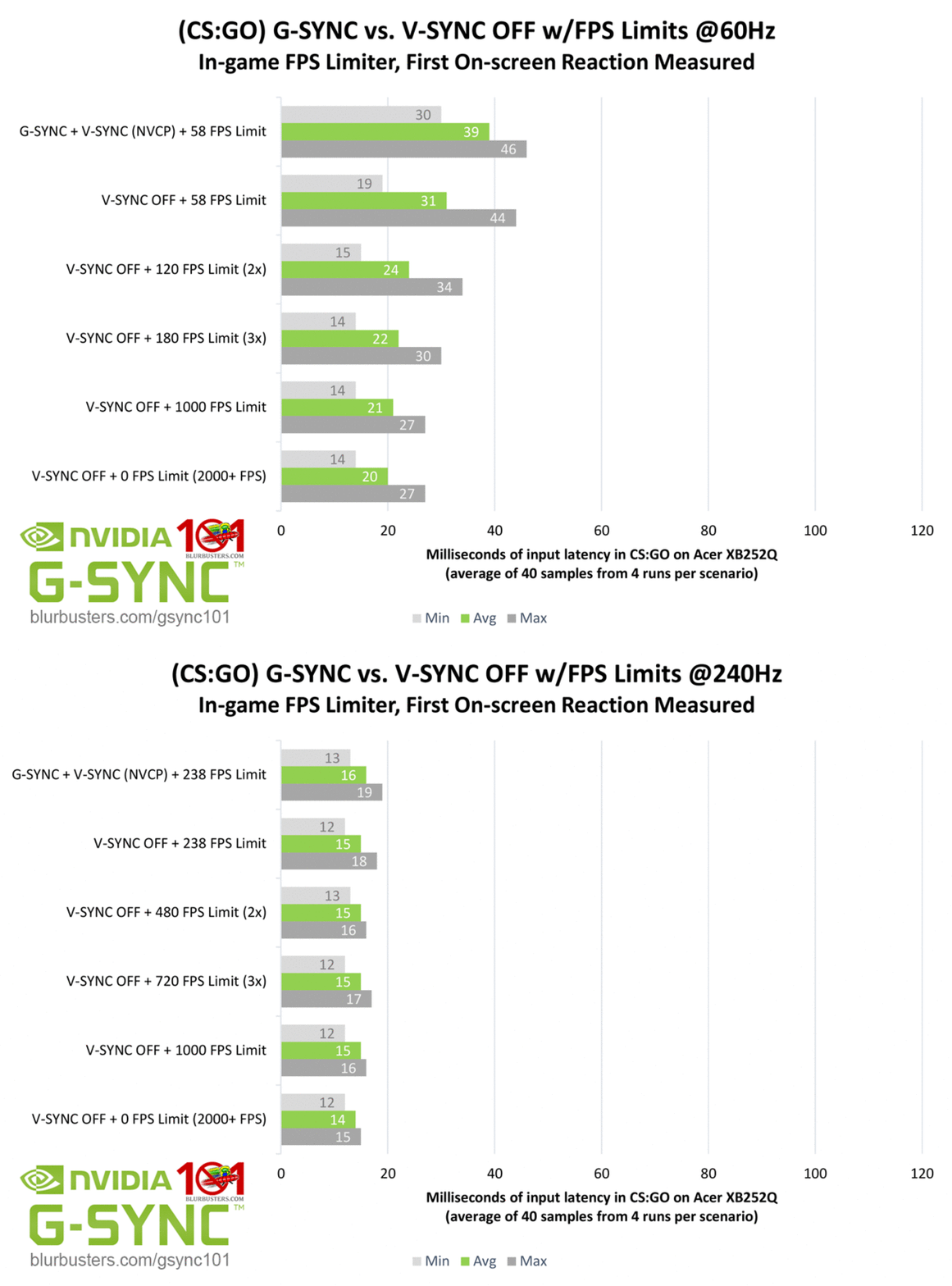
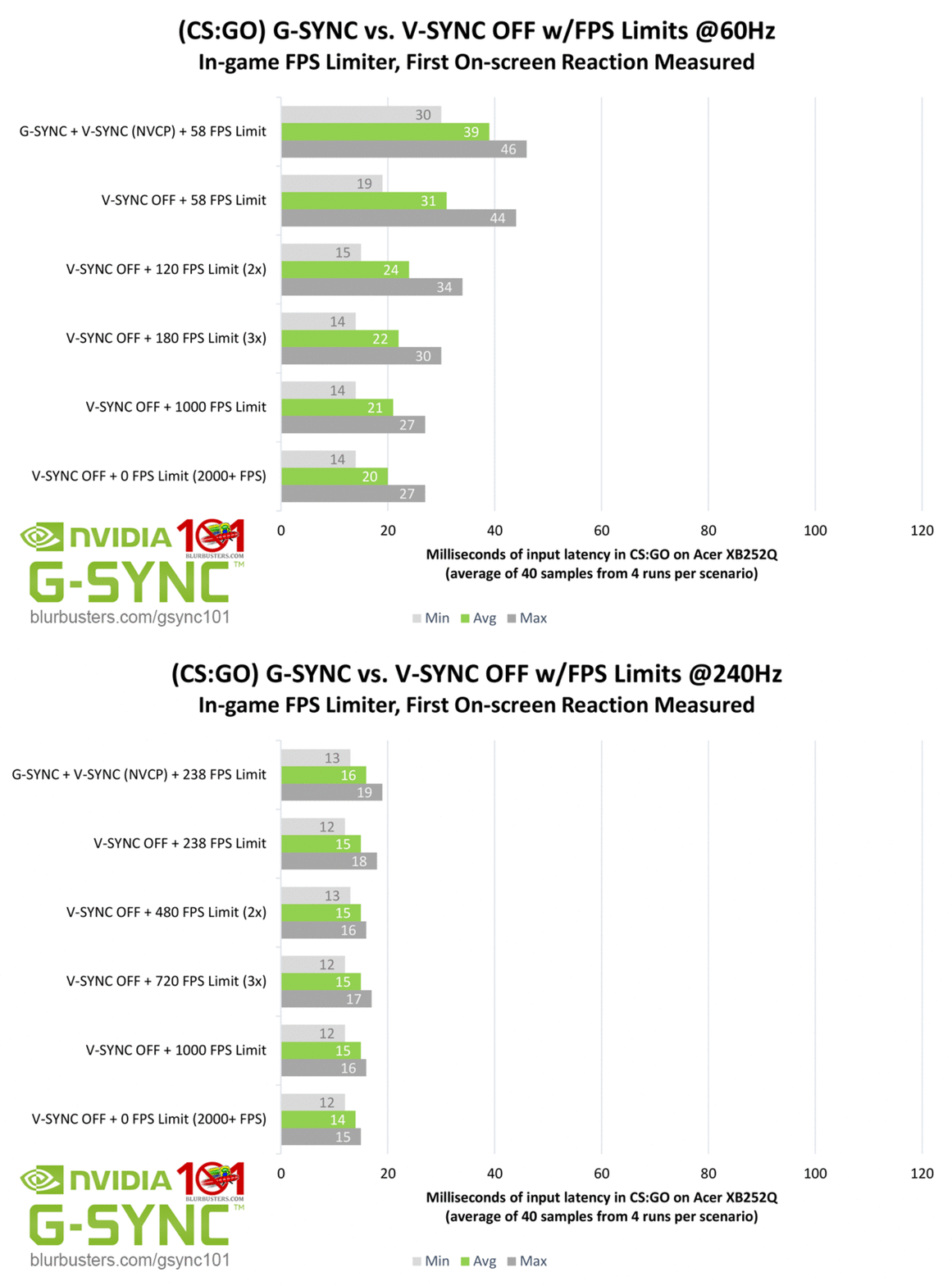
There are people who play CS:GO with VSYNC OFF, and switches to using G-SYNC or FreeSync for other games for better, smooth motion without stutters or tearing.


If you have a very high refresh rate (240Hz), the input lag of G-SYNC becomes similarly low as VSYNC OFF (unlike at 60Hz where the difference is much bigger). 240Hz VRR is capable of eSports-quality gaming. By adding sheer Hertz, VRR becomes suitable for professional gaming.

60hz-vs-240hz.gif


......................end QUOTE............................

====================================================

https://blurbusters.com/network-lag/

.........................QUOTE...................................

Let’s say that the gameserver sends just 10 updates per second, like many Call of Duty games do when a client is hosting the match. At this update rate, we have 100ms between the data packets, which is the same time that we have between 2 bullets when a gun has firing rate of 600 rounds per minute. So at an update rate of 10Hz, we have one data packet per fired bullet, as long as there is no packet loss and as long as the gun has a firing rate of no more than 600RPM.


But many shooters, including Call of Duty, have guns which shoot 750 rounds per minute, or even more. And so we then have 2 or more bullets per update. This means that when 2 bullets hit a player, then the damage of these 2 hits will be sent in a single update, and so the receiving player will get the experience that he got hit by a “super bullet” that dealt more damage than a single hit from this gun is able to deal.

............... end QUOTE.........................

--------------------------------------------------------------------------------


https://dignitas.gg/articles/blogs/...-not-the-reason-why-you-just-missed-that-shot

.....................QUOTE........................

During this time, a set number of further packages arrived on the client’s side containing more updated ticks from the server. Through these ticks, the client is able to interpolate what has happened between these two points in time and display this assumption to the player (don’t get mad yet). Interpolation time is determined by the simple equation


cl_interp = cl_interp_ratio / cl_updaterate


So in our 128 tick server example from above, on otherwise default settings this would mean: You receive a new packet every 7.8 Milliseconds (cl_updaterate 128) but the server waits until you received a third packet (cl_interp_ratio 2) before displaying the information, making the interpolation time is 15.6 Milliseconds for this example. On the other hand, a client running cl_interp_ratio 1 is presented with a renewed state of the game every 7.8 Milliseconds – assuming all other hardware and software variable are optimal.


Of course, from everything we’ve learned in our long online gaming history we assume that a lower number in front of the ms sign is always preferable. But, you already guessed it, things aren’t so easy this time around as bad connections and lag compensation come into the picture.


Again, the people with unreliable connections are better off to accept higher interp times, as the game client requires a new package of information from the server precisely at the interpolation time to update your game. If the second package is lost, the client waits 250ms on another package before flashing that red warning message in the top right corner of the screen.


For someone who tends to experience any package loss pretty much ever, it is safer to set cl_interp_ratio to 2, especially since you regain the “lost” time in the lag compensation.

.....................END QUOTE...................................


Command Execution Time = Current Server Time – (Packet Latency + Client View Interpolation)

Put into English this means that once you pull the trigger and this information package gets sent to the server, it then goes back from the current server time (the time the pulling the trigger package was received) by your ping plus your interpolation time. Only then it is determined if the client hit the shot or not.

So once your packet is received it rolls back in time as much as your ping time + your interpolation time.

For example lets say:

40ms ping + on a 20 tick (50ms) server which is 100ms interp2 ---> 140ms time span..
Then rollback applied when the server receives your packet, and with the net code making a lot of decisions.

90ms ping + 20 tick server(1000/20 = 50ms) which would be 100ms interp2 ---> 190ms time span

20tick/Hz server is sill trying to deliver you action states/frames every 100ms (interp2).
The extra tick worth of interp2 gives some buffer space vs latency. If you ever ran without it and had any latency that resulted in a lost packet you'd get wacked with a 250ms wait time until the server reoriented you.

Command Execution Time = Current Server Time – (Packet Latency + Client View Interpolation)

However the netcode makes a lot of choices for you which makes the results kind of muddy in that and rolled back time frame. In some games there can be no simultaneous kills ever... in some whoever's ping is even slightly better gets the shot/kill. These timing decisions in the "rollback in time" apply to a ton of things like ducking your head in and out of a window, jumping off a ledge, reloading time finishing, throwing that grenade, finishing bandaging and getting the health back in time, whatever.

--------------------------------------------------------------

Peeker's advantage:
Imagine you want to reach the boxes on top mid on Mirage while an AWP is perched in window. You jump out of the cover of the wall, fly and land safe behind the boxes. In the moment you land, the AWP shot goes off and you somehow die and end up right on the edge of the boxes, a good half meter away from where you stood on your screen. In the German scene, you would have just been “interped”, even though “being lag compensated” might be the more accurate term (I acknowledge that is way more clunky and less easy to complain about).


As the peeking CT moves into the gap of the double doors, his lag compensated hitbox and model are still behind the door, giving the Terrorist no real chance to respond. However, it is imperative in this scenario for the peeking player to actually hit (and in most cases kill) his opponent in the time it takes the server to compute all executed commands and the appropriate lag compensation. Of course, the showcased example is taken with a ping of 150ms, which is unrealistically high for most people, artificially lengthening that time.


Should any of you reading this have the good fortune to play on LAN one day, you should keep in mind that peeker's advantage is solely dependent on lag compensation, a big part of which is made up by a players ping. With the typical LAN connection ping of 3-7ms, peeker's advantage is practically non-existent anymore. Together with many other factors, this is one of the reasons why CS:GO has to be played differently in certain aspects on LAN than on the internet.

.................

https://www.reddit.com/r/Overwatch/comments/3u5kfg/everything_you_need_to_know_about_tick_rate/

Note: In an example where two players shoot eachother, and both shots are hits, the game may behave differently. In some games. e.g. CSGO, if the first shot arriving at the server kills the target, any subsequent shots by that player that arrive to the server later will be ignored. In this case, there cannot be any "mutual kills", where both players shoot within 1 tick and both die. In Overwatch, mutual kills are possible. There is a tradeoff here.

  • If you use the CSGO model, people with better latency have a significant advantage, and it may seem like "Oh I shot that guy before I died, but he didn't die!" in some cases. You may even hear your gun go "bang" before you die, and still not do any damage.
  • If you use the current Overwatch model, tiny differences in reaction time matter less. I.e. if the server tick rate is 64 for example, if Player A shoots 15ms faster than player B, but they both do so within the same 15.6ms tick, they will both die.
  • If lag compensation is overtuned, it will result in "I shot behind the target and still hit him"
  • If it is undertuned, it results in "I need to lead the target to hit them".

-----------------------------------------

Also keep in mind that the fastest touch reaction times are 150ms so the fastest players are reacting in a 150ms to 180ms range --- but only after actually receiving a new -interpolated/adjusted- action state slice from the server. (Most gamers are probably 180ms - 240ms). So you would be receiving a new (netcode adjusted results wise) action slice 100ms later on a 20hz server, then you'd react to it ~ 180ms later.

At 100fps solid that means you would be receiving new (netcode adjusted results wise) action slices every 10 frames, and then reacting to it after another 18 frames. :watching:
 
Last edited:
I dunno how someone can be so dead set on BFI and it's motion clarity advantage but then have 0 visual perception of the advantage of VRR.

BFI is better than VRR, but you have to do the necessary work up front to make sure your game stays locked at the refresh rate at all times.

This isn't difficult. All you need to do is look at a well-produced console game, like Mario 3D World or Ratchet and Clank on PS5, to see how smooth things look when developers target an absolutely consistent frame rate with no variation in frame time.

The problem is that people are playing at BFI with unlocked frame rates, sometimes going above refresh, sometimes below, which totally defeats the purpose. With BFI, you need perfect 1:1 frame rate to refresh rate synchronization.

This is possible with a simple frame rate cap, but there are was to have low-lag vsync as well.

One being Scanline-sync from RTSS: https://forums.blurbusters.com/viewtopic.php?t=4916. From the game's perspective, vsync is off, but RTSS is controlling where the tearing line is. You can either put it at the top or bottom of the screen, or completely off-screen in the blanking interval.

Another is just simply setting a frame rate cap a few microsecond shorter than your refresh rate with vsync on, which greatly reduces the input lag: https://blurbusters.com/howto-low-lag-vsync-on/

And beyond those, on modern DX12 and Vulkan engines, some developers like Id-tech have really good vsync implementations. Like Vsync in Doom Eternal, not the triple buffered vsync but just the "vsync on" option, gives a basically imperceptible lag increase.
 
BFI is better than VRR,

"Better" is subjective. When I play SDR games I use fakeHDR filter and lightroom filter (which is not quite as good as but is kind of like using tone mapping on HDR end result wise, at least it looks like SDR+ compared to regular SDR) and with graphics as high as I can get without going below 100fps average if I can help it. ... (using VRR to ride the roller coaster +/- my frame rate average).

Flaying and knocking the lights out of a great looking game for a potential scoring advantage, and across all of the internet gaming limitations that are there to begin with, isn't better to me at all.

All of the frame rate scoring/hit tests I've seen (on LTT for example) were done on a local LAN or vs bots. Online gaming is muddy due to net code going back in time and shuffling things as it sees fit, plus poor tick rates.

.....

Unless you meant BFI is better than VRR when both have frame rates greatly exceeding the refresh rate of the screen? In that case, perhaps in that scenario purely in an attempt at scoring advantage with zero care for aesthetics.. though in the blurbuster's link above it indicates that at those frame rates VRR is competitive:


https://blurbusters.com/howto-low-lag-vsync-on/

....................QUOTE..............................

There are people who play CS:GO with VSYNC OFF, and switches to using G-SYNC or FreeSync for other games for better, smooth motion without stutters or tearing.


If you have a very high refresh rate (240Hz), the input lag of G-SYNC becomes similarly low as VSYNC OFF (unlike at 60Hz where the difference is much bigger). 240Hz VRR is capable of eSports-quality gaming. By adding sheer Hertz, VRR becomes suitable for professional gaming.

60hz-vs-240hz.gif


......................end QUOTE............................

All for this.. affecting the whole game world moving the viewport at speed of course, (though when slower movement or stationary, or at the fastest flick movement it wouldn't really be perceptible either):

When objects move at speed or when moving the FoV/gameworld around at speed you'd get this kind of blur.
Outside of these maximum blur amounts, it varies most with the speed you are moving the viewport at any given time or if it's moving at all. Also how fast other objects are moving on screen. So it's more like zero(static) "up to" those peaks in each slot.

from https://blurbusters.com/ (edited by me showing the 240fpsHz darker to suggest BFI dimming)
476623_k1aCWd3.png

1ms / "zero" blur of CRT or 1000fps at 1000Hz

476624_ZCxnQl7.png

--------------------------

All of those 120Hz blur reductions listed are reliant on 120fps minimums, not averages.

That kind of blur reduction is appreciable don't get me wrong, but at huge tradeoffs in graphics quality on most games with modern graphics, minus VRR, HDR, minus 50% to 75% color luminance and with potential eye-fatigue too of course.

Also I thought BFI increased the input lag to 21ms instead of 13ms? Can anyone confirm if that is true and if not , is it the same ~ 13.x ms? Maybe once you reset it to PC mode it goes back down to 13 but I remember that number for some reason.
 
Last edited:
"Better" is subjective. When I play SDR games I use fakeHDR filter and lightroom filter (which is not quite as good as but is kind of like using tone mapping on HDR end result wise, at least it looks like SDR+ compared to regular SDR) and with graphics as high as I can get without going below 100fps average if I can help it. ... (using VRR to ride the roller coaster +/- my frame rate average).

Flaying and knocking the lights out of a great looking game for a potential scoring advantage, and across all of the internet gaming limitations that are there to begin with, isn't better to me at all.

All of the frame rate scoring/hit tests I've seen (on LTT for example) were done on a local LAN or vs bots. Online gaming is muddy due to net code going back in time and shuffling things as it sees fit, plus poor tick rates.

.....

Unless you meant BFI is better than VRR when both have frame rates greatly exceeding the refresh rate of the screen? In that case, perhaps in that scenario purely in an attempt at scoring advantage with zero care for aesthetics.. though in the blurbuster's link above it indicates that at those frame rates VRR is competitive:


https://blurbusters.com/howto-low-lag-vsync-on/

....................QUOTE..............................

There are people who play CS:GO with VSYNC OFF, and switches to using G-SYNC or FreeSync for other games for better, smooth motion without stutters or tearing.


If you have a very high refresh rate (240Hz), the input lag of G-SYNC becomes similarly low as VSYNC OFF (unlike at 60Hz where the difference is much bigger). 240Hz VRR is capable of eSports-quality gaming. By adding sheer Hertz, VRR becomes suitable for professional gaming.

View attachment 375594


......................end QUOTE............................

All for this.. affecting the whole game world moving the viewport at speed of course, (though when slower movement or stationary, or at the fastest flick movement it wouldn't really be perceptible either):


That kind of blur reduction is appreciable don't get me wrong, but at huge tradeoffs in graphics quality on most games with modern graphics, minus VRR, HDR, minus 50% to 75% color luminance and with potential eye-fatigue too of course.

Also I thought BFI increased the input lag to 21ms instead of 13ms? Can anyone confirm if that is true and if not , is it the same ~ 13.x ms? Maybe once you reset it to PC mode it goes back down to 13 but I remember that number for some reason.

BFI is a niche use case for me nowadays, only used in super old games that lack HDR and I am able to get hundreds of fps anyways making VRR a moot point. Rather just lock it to 120Hz and turn BFI on. 99% of the time I am using VRR.
 
That's the thing, BFI would be much more attractive if they were to support arbitry refresh rates between 60 and 120 with it. But currently, no manufacturer is doing that.

Like, I'm currently using Trinitron and Diamondtron CRT's. By they nature of the display, they strobe at any refresh rate you use. 90hz and 80hz look incredible on these monitors. Even 60hz for games like Street Fighter 5 and Mega Man 11 that are locked at 60fps.

So that's the next step for BFI: arbitrary refresh rates. Because sometimes you want to run at a high resolution with max settings, and locked 100hz isn't attainable. Being able to lock your frame rate at 80, and run BFI 80hz, would be incredibly useful.
 
That's the thing, BFI would be much more attractive if they were to support arbitry refresh rates between 60 and 120 with it. But currently, no manufacturer is doing that.

Like, I'm currently using Trinitron and Diamondtron CRT's. By they nature of the display, they strobe at any refresh rate you use. 90hz and 80hz look incredible on these monitors. Even 60hz for games like Street Fighter 5 and Mega Man 11 that are locked at 60fps.

So that's the next step for BFI: arbitrary refresh rates. Because sometimes you want to run at a high resolution with max settings, and locked 100hz isn't attainable. Being able to lock your frame rate at 80, and run BFI 80hz, would be incredibly useful.
There have been monitors that combined BFI and VRR, but those implementations were not very good if I recall correctly.
 
  • Like
Reactions: elvn
like this
Back
Top