![[H]ard|Forum](/styles/hardforum/xenforo/logo_dark.png)
Navigation
Install the app
How to install the app on iOS
Follow along with the video below to see how to install our site as a web app on your home screen.
Note: This feature may not be available in some browsers.
More options
You are using an out of date browser. It may not display this or other websites correctly.
You should upgrade or use an alternative browser.
You should upgrade or use an alternative browser.
iRam 2???
- Thread starter mjz_5
- Start date
Lazn_Work said:
the anandtech one doesn't tell the whole story. They should have did a fraps test like hardOCP to see if it reduces the drops in FPS because of seek time. Like, when entering a new area or opening a door in an FPS
mjz_5 said:the anandtech one doesn't tell the whole story. They should have did a fraps test like hardOCP to see if it reduces the drops in FPS because of seek time. Like, when entering a new area or opening a door in an FPS
Any well written game will cache upcoming data into RAM already anyways, so your hard drive should never be a limit on frames per second in a first person shooter. Unless of course the programmer is a 13 yr old who just figure out basic.
If that were the case, a person with a Raptor would get a higher FPS than a person with a normal drive.. I have both a Raptor and a normal 7200.9.. the Raptor will let levels load faster, but not affect the FPS in game.
-Nate
Lazn_Work said:Any well written game will cache upcoming data into RAM already anyways, so your hard drive should never be a limit on frames per second in a first person shooter. Unless of course the programmer is a 13 yr old who just figure out basic.
If that were the case, a person with a Raptor would get a higher FPS than a person with a normal drive.. I have both a Raptor and a normal 7200.9.. the Raptor will let levels load faster, but not affect the FPS in game.
-Nate
thats what i was wondering.. why does fear expansion lag for a second every time i open a door? It is very annoying..
PC:
Intel 920 @ 3.74 Ghz
OS Drive: 40 Segate - Game Drive: WD Raptor
ATI 1800XT Video Card
Creative x-fi music
game running at 1280x720 with 2xAA.
I know this is an old topic but I figured I'd post with my thoughts on buying something like this vs raptors or other disks. If you're looking for insane speeds, but need more than 4 or 8gb of space, look to SAS for a solution. I'm running a pair of Maxtor Atlas 15k RPM 36GB SAS drives in RAID0 and let me tell you, they're freaking fast, probably close in sustained transfer speeds to the iRAM. Obviously the seek times won't be the same, but they're still pretty good, and better than Raptor150's. The whole setup isn't too bad in price either. Around $280 (for both) for the drives from Dell, $200ish for the LSI LSISAS3041E-R controller. Here's a couple benchmarks I did:
First... a pair of Raptor 150's on NVRaid:

And the SAS Array on the LSI Controller:
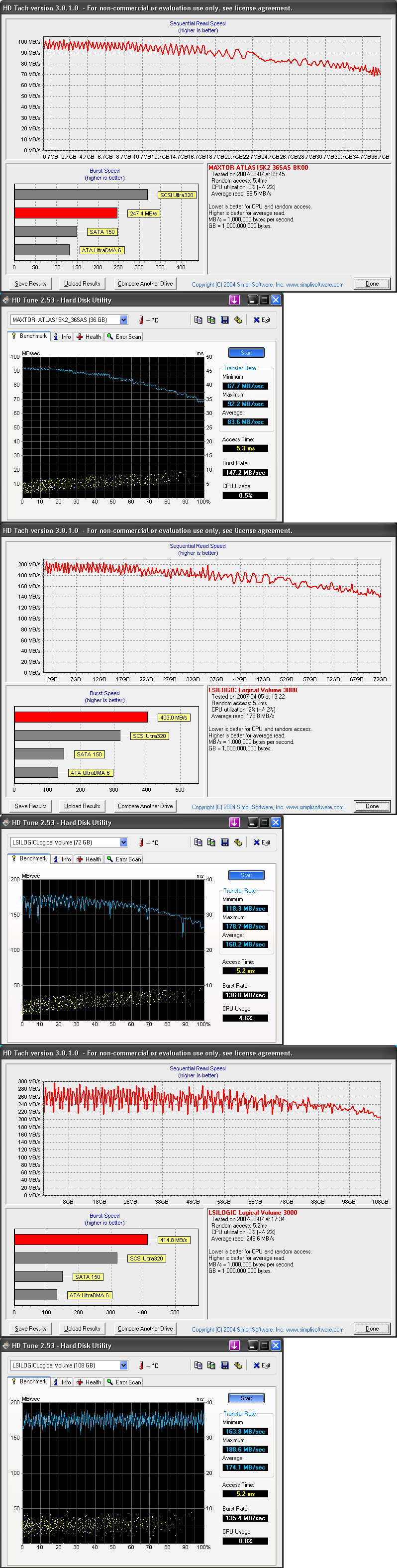
First... a pair of Raptor 150's on NVRaid:
And the SAS Array on the LSI Controller:
I know this thread is old, but I just want to relate my experience with my two I-Rams over the past year.
I got them in March '06 pretty much immediately after they showed up for sale. I was fortunate that DDR prices were at historic lows back then, around $45 per 1 Gig module. I bought two, both outfitted with 4 gig. I ran them in a Raid 0 config.
I simply used them for the windows swap file and to hold my world of warcraft game files. WoW was about 4.5GB in size (now with the expansion its 6GB), so I needed 2 of them... I decided to use Raid-0 but JBOD probably would have worked the same.
One thing that I noticed a few months after I got them, was that despite the battery, I couldn't depend on my data still being there if I ever powered down the PC, even for a just a few seconds. It was as if the battery wasn't really doing its job. Eventually the drives would corrupt even if I simply rebooted. Sometimes I would just have to delete the game files and copy them back from the backup copy on my regular hard drive. Other times I had to delete the raid entry and re-create it. Fortunately my system was stable so this wasn't a big deal, I'd copy my files to hard drive before every reboot, I never had "surprise" reboots.
Well that worked well enough for the past year but I just decided to go into another upgrade cycle, moving from my 4400+ to a E4300 that I plan on OCing the crap out of. One complication is that with the two I-Rams, I need 4 PCI slots. And there's only 1 legit overclocker board for Core2Duo with 4 PCI slots, the Asus Commando. Most boards have 2 PCI slots, a few have 3.
Anyways, so I'm taking apart my PC, pulling the cards out, and I notice my I-Rams aren't sitting straight in their slots... something has pushed them around inside the case, they are actually bent. It turns out the batteries are actually HISSING at me, they have expanded to 3 times their usual side, super hot, the I-Ram on top bent upwards from the battery pushing down on the card below, which is my other I-Ram which was bent downwards, fortunately in the last card slot. I pulled them out and flipped the batteries out with a screwdriver, letting them drop onto my linolium kitchen floor, while I wondered if I had anything to put out a class C fire. Eventually they stopped hissing as they cooled off. The I-Ram cards themselves are now permanently bent, although if they had a good battery I guess they'd still work.
I wonder how long it would have gone if I hadn't decided to upgrade again, before the batteries exploded or caught fire. And, although the Commando is a good MB, I'm kind of annoyed that I made the decision to go with it based on wanting to use 2 I-Rams that are now dead (they won't work sans-batteries). Oh and I now have 8 gig of DDR doing nothing, new computers all use DDR2... maybe since DDR is so expensive now I can ebay it and get my money back lol.
Anyways... Gigabyte's I-Ram was an interesting device... just not implimented quite right, and with the misfortune of RAM prices doubling instead of halving over the past year. Time to put this one out to pasture with the SpaceOrb and SB16-SCSI2.
I got them in March '06 pretty much immediately after they showed up for sale. I was fortunate that DDR prices were at historic lows back then, around $45 per 1 Gig module. I bought two, both outfitted with 4 gig. I ran them in a Raid 0 config.
I simply used them for the windows swap file and to hold my world of warcraft game files. WoW was about 4.5GB in size (now with the expansion its 6GB), so I needed 2 of them... I decided to use Raid-0 but JBOD probably would have worked the same.
One thing that I noticed a few months after I got them, was that despite the battery, I couldn't depend on my data still being there if I ever powered down the PC, even for a just a few seconds. It was as if the battery wasn't really doing its job. Eventually the drives would corrupt even if I simply rebooted. Sometimes I would just have to delete the game files and copy them back from the backup copy on my regular hard drive. Other times I had to delete the raid entry and re-create it. Fortunately my system was stable so this wasn't a big deal, I'd copy my files to hard drive before every reboot, I never had "surprise" reboots.
Well that worked well enough for the past year but I just decided to go into another upgrade cycle, moving from my 4400+ to a E4300 that I plan on OCing the crap out of. One complication is that with the two I-Rams, I need 4 PCI slots. And there's only 1 legit overclocker board for Core2Duo with 4 PCI slots, the Asus Commando. Most boards have 2 PCI slots, a few have 3.
Anyways, so I'm taking apart my PC, pulling the cards out, and I notice my I-Rams aren't sitting straight in their slots... something has pushed them around inside the case, they are actually bent. It turns out the batteries are actually HISSING at me, they have expanded to 3 times their usual side, super hot, the I-Ram on top bent upwards from the battery pushing down on the card below, which is my other I-Ram which was bent downwards, fortunately in the last card slot. I pulled them out and flipped the batteries out with a screwdriver, letting them drop onto my linolium kitchen floor, while I wondered if I had anything to put out a class C fire. Eventually they stopped hissing as they cooled off. The I-Ram cards themselves are now permanently bent, although if they had a good battery I guess they'd still work.
I wonder how long it would have gone if I hadn't decided to upgrade again, before the batteries exploded or caught fire. And, although the Commando is a good MB, I'm kind of annoyed that I made the decision to go with it based on wanting to use 2 I-Rams that are now dead (they won't work sans-batteries). Oh and I now have 8 gig of DDR doing nothing, new computers all use DDR2... maybe since DDR is so expensive now I can ebay it and get my money back lol.
Anyways... Gigabyte's I-Ram was an interesting device... just not implimented quite right, and with the misfortune of RAM prices doubling instead of halving over the past year. Time to put this one out to pasture with the SpaceOrb and SB16-SCSI2.
sdavids5670
n00b
- Joined
- Nov 22, 2006
- Messages
- 3
You're right. It was a cool concept but it was just horribly implemented. Luckily, I was able to use my 4 GB of memory on an older motherboard (I have that luxury because I don't use the PCs to game). I feel for you, though, being stuck with 8 GB of RAM.
What they needed to do straight from the start was to impliment a bay device instead of a slot device, they should have also allowed greater capacity of one unit by adding in more slots. Another thing they should have done was increased the battery potential, perhaps even have an option where a baymount battery could be used as secondary long term backup.
For a VMware server, you should have more than 4GB of system RAM. Of course this means a 64bit cpu and OS to properly take advantage of the RAM.
Wrong, you don't need more than 4GB of ram. And unless you have the new 6.0 workstation beta, the damn program won't even use more than 4GB total, regardless of whether or not you have a 64 bit OS.
spectrumbx
[H]ard|Gawd
- Joined
- Apr 2, 2003
- Messages
- 1,647
Wrong, you don't need more than 4GB of ram. And unless you have the new 6.0 workstation beta, the damn program won't even use more than 4GB total, regardless of whether or not you have a 64 bit OS.
Wrong... the 3.6GB limitation is per VM.
So, you can have as many 3.6GB VMs has your system can handle.
The memory requirement is not per VMware but per your use (VMs requirements).
Anyway, I too gave up on i-RAM.
I sold the 4GB ram I had reserved for it.
Solid state memory should be more common by early 2008 at less than $40/gig.
http://www.newegg.com/Product/Product.asp?Item=N82E16820147015&ATT=20-147-015&CMP=OTC-Froogle
doesn't this do the same thing as iram, but more reliably, bigger, at about the same cost?
doesn't this do the same thing as iram, but more reliably, bigger, at about the same cost?
Wrong... the 3.6GB limitation is per VM.
So, you can have as many 3.6GB VMs has your system can handle.
The memory requirement is not per VMware but per your use (VMs requirements).
Anyway, I too gave up on i-RAM.
I sold the 4GB ram I had reserved for it.
Solid state memory should be more common by early 2008 at less than $40/gig.
That's incorrect. It is 3.6GB per VM max, and also a limit of 4GB total across ALL VMs. The new Workstation 6.0 addresses this problem, sets the limit at 8GB per VM and the limit across all is the amount of memory currently on the host system. This is for the Workstation and free server product, which is what I assume most people here would use. (If you have ESX than more power to you).
No, it is much slower. In terms of raw speed, the iRAM, HyperOS, Cenatek (which is what I use) SSDs are far faster. The only thing large flash SSD drives have over DRAM-based solutions is size and somewhat better cost in terms of GB/dollar.http://www.newegg.com/Product/Product.asp?Item=N82E16820147015&ATT=20-147-015&CMP=OTC-Froogle
doesn't this do the same thing as iram, but more reliably, bigger, at about the same cost?