• Some users have recently had their accounts hijacked. It seems that the now defunct EVGA forums might have compromised your password there and seems many are using the same PW here. We would suggest you UPDATE YOUR PASSWORD and TURN ON 2FA for your account here to further secure it. None of the compromised accounts had 2FA turned on.
    Once you have enabled 2FA, your account will be updated soon to show a badge, letting other members know that you use 2FA to protect your account. This should be beneficial for everyone that uses FSFT.

Ick nicehash down

I realized this last night when I checked whattomine and it said skunk was killing it, yet NH2 didn't have the skunk miner available to me. Legacy all the way!

The most profitable stuff isn't even on whattomine's radar. That site is an incomplete picture.
 
The most profitable stuff isn't even on whattomine's radar. That site is an incomplete picture.
the best are the new coin releases which when NH has one algo skyrocket it leads me to look into which new coin is poppin. I got a massive ETN stockpile because of this.
 
The most profitable stuff isn't even on whattomine's radar. That site is an incomplete picture.

I get that, but if switching between NH and MPH at my leisure without doing any real daily research, I can easily decide where I want to aim my cards. I don't personally want a lot of alt coins in my portfolio. Except gridcoin. I want gridcoin.
 
I have had half a mind in the past to pull the Legacy miner repo down and implement some 1-click settings for cards grouped by algorithm.

Now, lest i appear like a prick (looking at you mkrohn odditory), everyone should be using the Legacy miner even if you're using NVidia cards.
 
Heh. Its like some of you guys have to be hit over the head before you get it.

Seriously though Nist5 has been glorious for about 10 days now. Thankfully so many people are lazy and just want 1-click ease without bothering to look under the hood of anything. Most of the kiddie miners will stick with NH 2.x which omits some of the most profitable algo's, but its only a matter of time until a spoonfeed thread goes up on reddit/nicehash and they come flooding in to legacy.

There are actually a few ways of tuning ccminer-alexis further, I'm getting 92MH/s out of my 1080Ti's.

No need to be a dick about it. I haven't been using NH miner for a while, so let's tone down the condescension a bit, shall we? Currently running excavator to mine Lyra2REv2. It's been the best performing on that algo by a good margin.
 
Oh, please. It was said with Iove and semi respect!
 
Last edited:
This is [H]ardforum. We're a family of misfits as it is. Let's not polarize each other :love::rage:
 
Some folks (you know who you are) need to understand that their personal profitability is not going to take an appreciable hit if they expose what they know about mining.

I've seen that type of thought from day 0 in the mining community at large(not just here) and it really gets me.

It's irrational, self-serving, rude, and just plain assinine.

We help each other out here, period.
 
  • Like
Reactions: Parja
like this
You're thinking about it backwards and kinda stupid. By mining to the external wallet you are increasing your risk and letting them sit on your money longer. By mining to internal and yanking it daily to coinbase you at least lower your exposure.
No I just have a different perspective. IRS will have their hooks into coinbase starting in 2018 from what I’ve read. I don’t want to move my coin through coinbase, so I’ll be mining directly to my external wallet.
 
I managed to get 6 of my rigs moved to NH today which was quite a pain since I had to install fresh debloated win10 images on each rig. I was pleasantly surprised that none of them had issues with as many as 9 GPU's being left connected during the entire process, including one 4x 1080Ti watercooled rig that I installed onto the existing SSD from my win10 USB installer. So Microsoft really stepped up to the plate with the Fall Creators Edition compared with what I remember the last time I tried running Windows on my mining rigs.

So what do you guys use as a watchdog if a card hangs or dies to reboot the entire rig? Under nvOC, the watchdog will monitor GPU utilization and restart the miner if needed, and if that doesn't do the trick, reboot the entire rig. I'd sleep better at night if I had something similar on Windows, just in case.
 
I managed to get 6 of my rigs moved to NH today which was quite a pain since I had to install fresh debloated win10 images on each rig. I was pleasantly surprised that none of them had issues with as many as 9 GPU's being left connected during the entire process, including one 4x 1080Ti watercooled rig that I installed onto the existing SSD from my win10 USB installer. So Microsoft really stepped up to the plate with the Fall Creators Edition compared with what I remember the last time I tried running Windows on my mining rigs.

So what do you guys use as a watchdog if a card hangs or dies to reboot the entire rig? Under nvOC, the watchdog will monitor GPU utilization and restart the miner if needed, and if that doesn't do the trick, reboot the entire rig. I'd sleep better at night if I had something similar on Windows, just in case.
Just use task scheduler to implement a daily windows reboot. It seems to solve any issue for me at the expense of just a couple minutes of mining.

Set nicehash to start automatically on reboot.
 
Just use task scheduler to implement a daily windows reboot. It seems to solve any issue for me at the expense of just a couple minutes of mining.

Set nicehash to start automatically on reboot.

you don't have login passwords on your miners?
 
Great, a reboot every 24 hours is what I'll do them. I did have to revert one of my rigs back to Linux/nvOC. I wasn't surprised as it had a mix of 9 different 1070's. Everything from a FE to a Zotac 1070 AMP! and 4 different flavors of EVGAs in between. lol.
 
No I just have a different perspective. IRS will have their hooks into coinbase starting in 2018 from what I’ve read. I don’t want to move my coin through coinbase, so I’ll be mining directly to my external wallet.
If you're under $20k you're fine but yep over that which I'll be you do have to worry about that. I've been working on keeping my coins diversified though so I can probably keep myself under $20k (cashed out). I only use NH for a small chunk of my mining and only for what I plan on cashing out for expenses and buying additional equipment.
 
Great, a reboot every 24 hours is what I'll do them. I did have to revert one of my rigs back to Linux/nvOC. I wasn't surprised as it had a mix of 9 different 1070's. Everything from a FE to a Zotac 1070 AMP! and 4 different flavors of EVGAs in between. lol.

Which CPU are you running in your rigs?
 
Which CPU are you running in your rigs?

The 2 large 9x1080Ti rigs are running G4600 CPU's.

My 4x1080Ti rig is running a E5-2630L CPU (X99 mobo),

The 9x1070 rig is running a G3930 and a single 4GB DIMM. That's the one having issues under windows. I suppose that maybe I should drop something a little more juicy in there along with another DIMM? That said, the 9x1080Ti rigs are also running with a single 4GB DIMM...
 
The 2 large 9x1080Ti rigs are running G4600 CPU's.

My 4x1080Ti rig is running a E5-2630L CPU (X99 mobo),

The 9x1070 rig is running a G3930 and a single 4GB DIMM. That's the one having issues under windows. I suppose that maybe I should drop something a little more juicy in there along with another DIMM? That said, the 9x1080Ti rigs are also running with a single 4GB DIMM...
If using 4gb of ram increase your virtual memory a lot.


Ideally 1:1 for all ram in your system together.

I.E.
9 GPUs with 8gb each = 72gb
+ 4gb ram

Your swap file for windows should be 76 x 1024 = 77824 MB. (Set both min and max to the same 77824 size). See if that fixes your problem.
 
The most profitable stuff isn't even on whattomine's radar. That site is an incomplete picture.
Mind passing on the extra tuning tips for ccminer? Keeping the 70% Power limit, the most I seem to be able to get is ~89.5 MH/s.
 
If using 4gb of ram increase your virtual memory a lot.

Ideally 1:1 for all ram in your system together.

I.E.
9 GPUs with 8gb each = 72gb
+ 4gb ram

Your swap file for windows should be 76 x 1024 = 77824 MB. (Set both min and max to the same 77824 size). See if that fixes your problem.

Thanks for the tip. Thing is that I got 60GB SSD's in all the rigs since I was sizing them for Linux originally. So the largest virtual memory I was able to allocate was 38gb and still leave a few gb free for windows. I'll pick up some 120GB SSD's and I suppose it wouldn't hurt to run 8 or even 16gb of ram in each rig?

The 1080Ti rig's got 11gb of ram per GPU, so that's 99gb right there. Maybe I should look at 240gb SSD's instead? At least SSD's seem to be available at relatively decent prices unlike gpu's right now.

EDIT: BB has the SanDisk 240GB SSD on sale right now for $69.99 so I'll stop by and grab some tomorrow.
 
Last edited:
Thanks for the tip. Thing is that I got 60GB SSD's in all the rigs since I was sizing them for Linux originally. So the largest virtual memory I was able to allocate was 38gb and still leave a few gb free for windows. I'll pick up some 120GB SSD's and I suppose it wouldn't hurt to run 8 or even 16gb of ram in each rig?

The 1080Ti rig's got 11gb of ram per GPU, so that's 99gb right there. Maybe I should look at 240gb SSD's instead. At least SSD's seem to be available at relatively decent prices unlike gpu's right now.

are these mining specific machines? If so, why not put hard drives in them?
 
are these mining specific machines? If so, why not put hard drives in them?

They are mining specific, so that is certainly an option. I do have some old 2.5" laptop spinners laying around here somewhere, but I bet they are going to be real slow. With 240GB SSDs available locally (BB) for $69, that might be the better option. With each of those large rigs doing $80+ a day, the SSD would ROI in about 20 hours, lol.
 
They are mining specific, so that is certainly an option. I do have some old 2.5" laptop spinners laying around here somewhere, but I bet they are going to be real slow. With 240GB SSDs available locally (BB) for $69, that might be the better option. With each of those large rigs doing $80+ a day, the SSD would ROI in about 20 hours, lol.

Up to you. I dont really notice a slowdown with my spinners. Once they start working, the storage device doesn't really matter. A 2.5" hdd would be my choice personally since it uses little power and is dirt cheap.
 
Up to you. I dont really notice a slowdown with my spinners. Once they start working, the storage device doesn't really matter. A 2.5" hdd would be my choice personally since it uses little power and is dirt cheap.
it'd be interesting to see some actual benchmark numbers on that. I've often wondered.

My cousin and I used to get memory errors regularly with our 8GB ram system and multiple cards. Until I read the tip about manually setting the virtual memory size 1:1 with all your system ram (and GPU ram). No more errors for either of us since (been months). That was absolutely the solution there. He had deterermined 4GB of RAM wasn't enough for his rigs until he tried the virtual memory swap and then it worked, so he's back to 4GB of RAM per system. some of his systems with 11 cards. I just kept 8gb in mine because I started with 8gb and --- just because.

But I would think - based on that experience that there definitely is paging going on. If paging is going on - you'd want the fastest drive you could muster. That's an SSD. (or NVME SSD). But I don't think I've ever seen benchmarks on it - and for the benchmarks to really matter you'd want to see benchmarks on a system that maxed out the spinners I/O. So a system with 12 1080TI cards on 5400 RPM, 72000 RPM, and then SSD and then NVME would be a really interesting test.
 
Last edited:
it'd be interesting to see some actual benchmark numbers on that. I've often wondered.

My cousin and I used to get memory errors regularly with our 8GB system and multiple cards. Until I read the tip about manually setting the virtual memory size 1:1 with all your system ram (and GPU ram). No more errors for either of us since (been months). That was absolutely the solution there. He had deterermined 4GB of RAM wasn't enough for his rigs until he tried the virtual memory swap and then it worked, so he's back to 4GB of RAM per system. some of his systems with 11 cards. I just kept 8 in mine because I started with 8 and --- just because.

But I would think - based on that experience that there definitely is paging going on. If paging is going on - you'd want the fastest drive you could muster. That's SSD. (or NVME SSD). But I don't think I've ever seen benchmarks on it - and for the benchmarks to really matter you'd want to see benchmarks on a system that maxed out the spinners I/O. So a system with 12 1080TI cards on 5400 RPM, 72000 RPM, and then SSD and then NVME would be a really interesting test.

Not sure how it would be on an 8 or 11 card rig, but with my 3 card rig, according to task manager, my hard drive utilization hangs out under 10%, with write speeds under 1MB/s. Not sure if things get loaded up when switching miners or loading new stuff though.
 
Would Ready Boost take care of that using a thumb drives?
 
My cousin and I used to get memory errors regularly with our 8GB system and multiple cards. Until I read the tip about manually setting the virtual memory size 1:1 with all your system ram (and GPU ram).

So do you want to be precise? i.e. on a rig with 9x 1080Ti's and 4gb ram, you would want to set virtual memory size to:

9 x 11,264MB GPU RAM= 101,376 MB
1 x 4,094MB System RAM = 4,096 MB

So under virtual memory in windows, set both the initial and max size to 105,472 MB as opposed to just 103,000 MB? (9x11 + 4)
 
So do you want to be precise? i.e. on a rig with 9x 1080Ti's and 4gb ram, you would want to set virtual memory size to:

9 x 11,264MB GPU RAM= 101,376 MB
1 x 4,094MB System RAM = 4,096 MB

So under virtual memory in windows, set both the initial and max size to 105,472 MB as opposed to just 103,000 MB? (9x11 + 4)

ideally yes (same size or larger)

Is it absolutely necessary? no, but it's ideal, and will eliminate memory errors.

Yes to manual set, yes to both initial and max to the same value.
 
Heh. Its like some of you guys have to be hit over the head before you get it.

Seriously though Nist5 has been glorious for about 10 days now. Thankfully so many people are lazy and just want 1-click ease without bothering to look under the hood of anything. Most of the kiddie miners will stick with NH 2.x which omits some of the most profitable algo's, but its only a matter of time until a spoonfeed thread goes up on reddit/nicehash and they come flooding in to legacy.

There are actually a few ways of tuning ccminer-alexis further, I'm getting 92MH/s out of my 1080Ti's.

I've been tinkering around with mining to see if I want to build a rig, I added a 107ti to my Quadro p4000 computer and have had some luck with ccminer, ethminer and a few others -

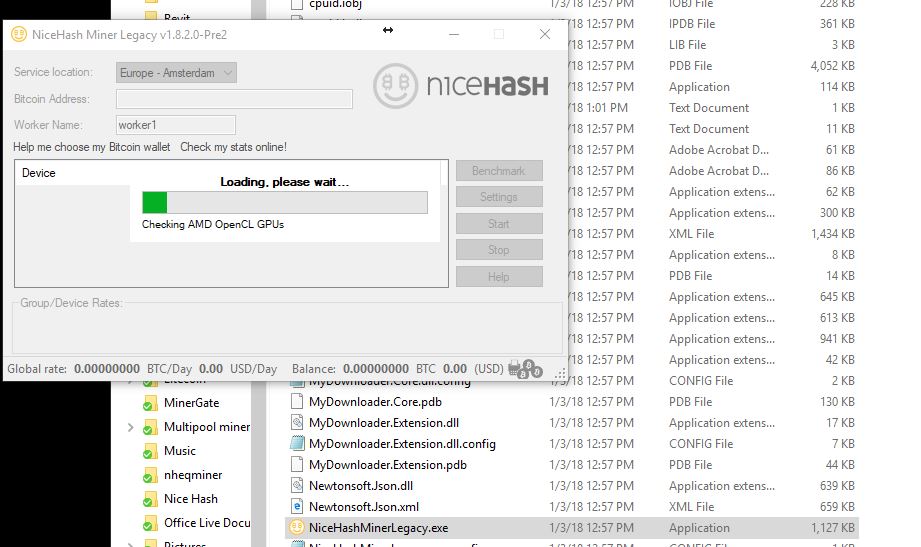
I have Nicehash 2.0.1.5 running, but you guys have me wanting to try out the legacy version of NH, but it gives me an OpenCL.dll was not found error when I tries to run AMDOpenCLDeviceDetection.exe, when I put a copy of OpenCL.dll in the NHML folder NiceHashMinerLegacy.exe hangs when it gets the point where it's "Checking AMD OpenCL GPUs"

I've tried the 1.8.2 and the 1.8.1.5 with the same results

Any ideas?
 
I've been tinkering around with mining to see if I want to build a rig, I added a 107ti to my Quadro p4000 computer and have had some luck with ccminer, ethminer and a few others -

I have Nicehash 2.0.1.5 running, but you guys have me wanting to try out the legacy version of NH, but it gives me an OpenCL.dll was not found error when I tries to run AMDOpenCLDeviceDetection.exe, when I put a copy of OpenCL.dll in the NHML folder NiceHashMinerLegacy.exe hangs when it gets the point where it's "Checking AMD OpenCL GPUs"

I've tried the 1.8.2 and the 1.8.1.5 with the same results

Any ideas?

Go under Settings and check "Disable Detection of AMD".
 
sgrinavi Turn off AMD detection in the settings. Sounds like you have no AMD cards in your system yes?

Edit: By a hair there, Parja :D
 
  • Like
Reactions: Parja
like this
Do you guys run with NVIDIA P0 State enabled or not? I don't see a significant difference in speed, but with it enabled, I get that annoying popup unless I launch NHML as administrator.

@ Archaea thanks. I'll be "precise". I meant might as well.
 
Go under Settings and check "Disable Detection of AMD".

sgrinavi Turn off AMD detection in the settings. Sounds like you have no AMD cards in your system yes?

Edit: By a hair there, Parja :D

Thanks for the fast responses

Correct, no AMD cards.

I can't get to the point where the settings menu become available

Capture.JPG
 
Correct, no AMD cards.

I can't get to the point where the settings menu become available

What happens after you get the error? Does it crash out?

From github...
"Alternatively, you can manually modify \configs\General.json for general settings..."
"DeviceDetection\DisableDetectionAMD true or false Set it to true if you would like to skip the detection of AMD GPUs."

Try editing the json file manually and hopefully it'll skip that part.
 
You'll probably have to edit the config file directly.

What happens after you get the error? Does it crash out?

From github...
"Alternatively, you can manually modify \configs\General.json for general settings..."
"DeviceDetection\DisableDetectionAMD true or false Set it to true if you would like to skip the detection of AMD GPUs."

Try editing the json file manually and hopefully it'll skip that part.

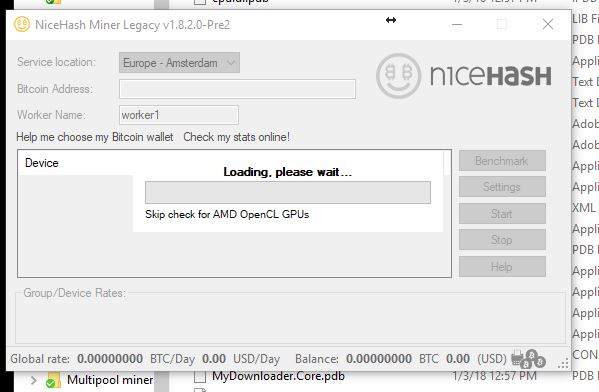
Thanks again - I found that poking around- now it hangs at the same place, but it's telling me that it's skipping the check...

Capture.JPG
 
Back
Top