Car mods I'd argue are potentially worse. At least with PC hardware, there is a period where it still retains most of its value. A used Supercharger, turbo charger, headers, etc. all plummet and when on the vehicle are worth almost nothing.Computer gear has the worst depreciation of anything else you can buy.
![[H]ard|Forum](/styles/hardforum/xenforo/logo_dark.png)
Navigation
Install the app
How to install the app on iOS
Follow along with the video below to see how to install our site as a web app on your home screen.
Note: This feature may not be available in some browsers.
More options
-
Some users have recently had their accounts hijacked. It seems that the now defunct EVGA forums might have compromised your password there and seems many are using the same PW here. We would suggest you UPDATE YOUR PASSWORD and TURN ON 2FA for your account here to further secure it. None of the compromised accounts had 2FA turned on.
Once you have enabled 2FA, your account will be updated soon to show a badge, letting other members know that you use 2FA to protect your account. This should be beneficial for everyone that uses FSFT.
You are using an out of date browser. It may not display this or other websites correctly.
You should upgrade or use an alternative browser.
You should upgrade or use an alternative browser.
How much RAM you got?
- Thread starter Violator
- Start date

- Joined
- Sep 29, 2001
- Messages
- 21,703
Ya, I bought a Newtek Video Toaster 4000 card and was doing Lightwave 3D with it.The A3000 is a rather uncommon pick as far as Amigas go, being one of the pricey workstation models. Maxing it out with RAM, especially that weird SIPP kind and the sort that can do 68030 burst mode transfers, can't have been easy back then, and it sure isn't easy now.
Were you doing Video Toaster/LightWave 3D stuff with it at the time that warranted having that much RAM? Maybe a bit of Mac emulation on the side? (I'm guessing 2 MB Chip RAM/16 MB Fast RAM to get the 18 MB total.)
I bet you liked explaining to those PC people that Amigas aren't limited to 640 KB of conventional memory, either. 68k address space was so much more elegant than x86 back then.
That card cost the same as my Amiga and monitor. I added the ram and a 345MB SCSI hard drive since the 120MB stock drive would barely fit the Toaster software.
and ya, 2MB chip and 16MB fast.
this is my desk in 94 or 95
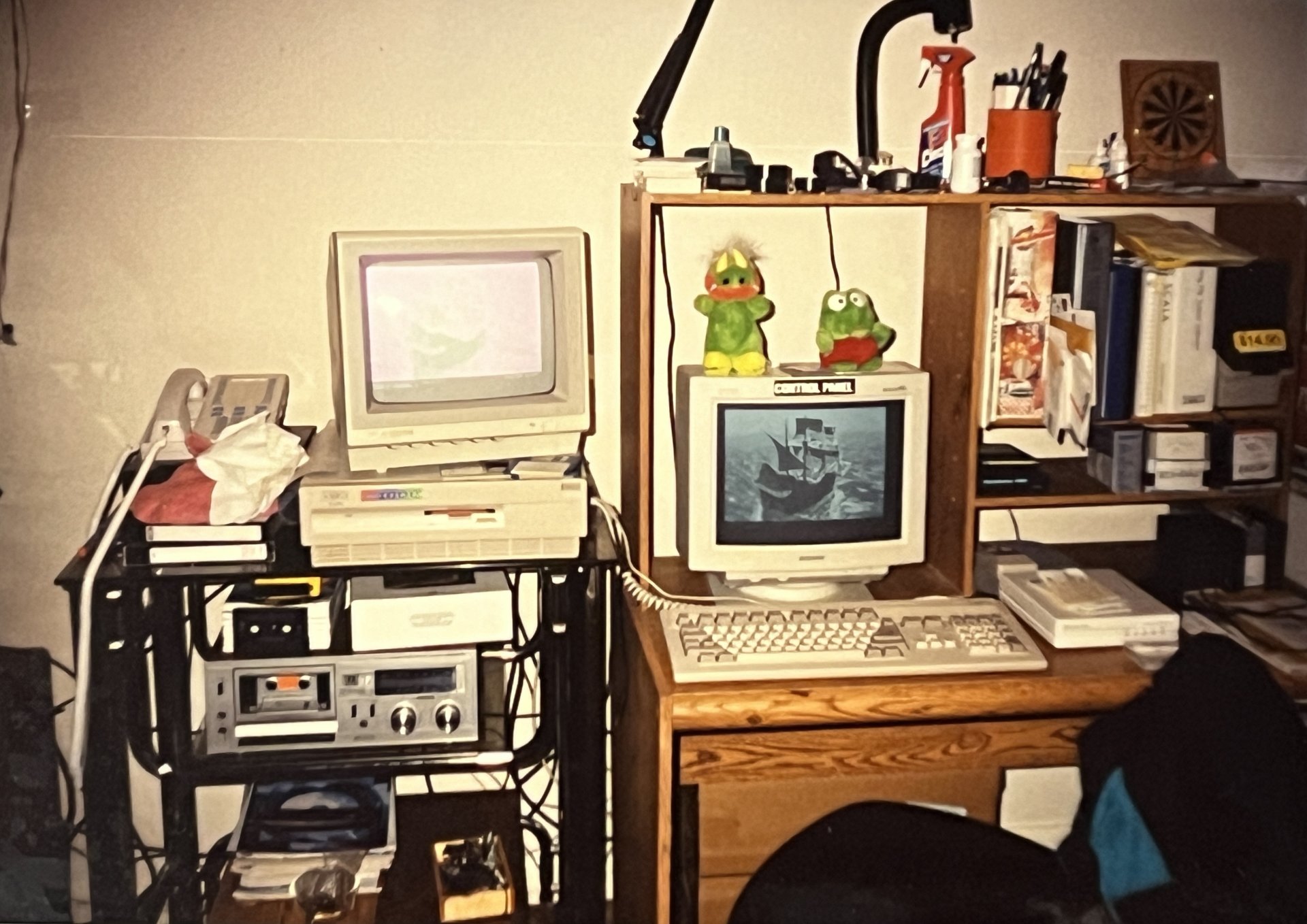
I had the toaster hooked up to my TV as well,


- Joined
- Apr 10, 2005
- Messages
- 17,145
I paid 160 for 4x 1mb simms in 94.18mb of ram in 1993 was like 2k. Crazy expensive. And 2k back then was a shit ton of money.

Mad Maxx
[H]F Junkie
- Joined
- Apr 12, 2016
- Messages
- 8,683
Word processing and a few games like Creepy Castle. LOL! That's all I really needed to get through college.What? Like 4MB memory? What tasks were you able to do with it?
Last edited:
- Joined
- Sep 29, 2001
- Messages
- 21,703
I think the ram for my Amiga was about the same cost, $40 or so per 1MB.I paid 160 for 4x 1mb simms in 94.
- Joined
- Sep 29, 2001
- Messages
- 21,703
I had almost $7,500 into that Amiga. I think that's like $15K in todays money. Just crazy when I think back about it.18mb of ram in 1993 was like 2k. Crazy expensive. And 2k back then was a shit ton of money.
But having that setup got me a job at a local TV station doing graphics work on their Amiga 2000/Toaster system since there weren't many people available in my area that knew Amigas, Llightwave and the Toaster.

- Joined
- Feb 8, 2005
- Messages
- 13,274
Time marches on, and so does my RAM. Workstation moved from 64GB to 128GB. I really need a use case for more than that.
Deadjasper
2[H]4U
- Joined
- Oct 28, 2001
- Messages
- 2,847
Time marches on, and so does my RAM. Workstation moved from 64GB to 128GB. I really need a use case for more than that.
Bragging rights is always a good use case.
- Joined
- Mar 20, 2017
- Messages
- 401
I'm on 64GB but for some reason an instance of a process in windows 11 like a browser with many tabs open is only limited to using up 32GB at any given time. I even encountered a memory leak with video playback in chrome and the tab crashed with an out of memory error at 32GB.
I wonder if it's a problem with my system or it's really like that with Windows.
I wonder if it's a problem with my system or it's really like that with Windows.
Last edited:

- Joined
- Aug 3, 2004
- Messages
- 23,936
I feel that, I am at 96GB in my current rig, considered going to 128GB, but then I look at my usage and I seldom actually go over 70GB unless I turn on several of my local VMs at the same time.Bragging rights is always a good use case.

- Joined
- Sep 17, 2019
- Messages
- 1,804
I am finding that simply running local AI now with large context windows is spilling way over my 5090 and using almost 80GB of my 96GB available. Obviously VMs have always used a lot, but boy does Ai eat that RAM. For gaming its more than overkill, but I am debating picking up another 96GB kit, and if i can still keep 6200MT/s CAS 28, I'd consider keeping it to be able to run Gemma 3 27B at FULL context window.
- Joined
- Aug 18, 2006
- Messages
- 11,470
16GB on my desktop and laptop. 36GB on my work machine (M3 pro MacBook Pro). I'm typing this on my shitty MacBook Pro 2014, hence the proper capitalizations (autocorrect). This machine has 8GB of ram and 128GB SSD and is running Ventura. 16GB still seems plenty for my use case. I only work on the work machine and the rest of it is me bullshitting around on the other machines.
I’ve been debating going 32gb on my 8th gen system ( i5 8500 ) vs getting a faster processor as the prices of the 8th/9th gen chips are still too much for my stubbornness to buy. I’ve always had 16gb and known it to be standard for many years. 32gb of Netac ram is $70. I just don’t know if it’s really going to do anything. Especially with the 2010-2018 era games it’s loaded with. Has a 4060 so it runs anything except the most recent games at least 1080P but most at 1440p
I think having the extra space for the system to cache more in RAM is beneficial, I've got 64GB but the system will regularly use 30-34GB just with a few programs running in the background and some gaming. I'm not concerned about running out of RAM, and for $70 I'd say it's a no-brainerI’ve been debating going 32gb on my 8th gen system ( i5 8500 ) vs getting a faster processor as the prices of the 8th/9th gen chips are still too much for my stubbornness to buy. I’ve always had 16gb and known it to be standard for many years. 32gb of Netac ram is $70. I just don’t know if it’s really going to do anything. Especially with the 2010-2018 era games it’s loaded with. Has a 4060 so it runs anything except the most recent games at least 1080P but most at 1440p
 .
.
- Joined
- Jul 16, 2001
- Messages
- 4,364
Recently upgraded to 96gb. No real need for it but it's nice not having a limitation.

- Joined
- Mar 9, 2018
- Messages
- 6,257
Currently have 32GGB in my Elitedesk, wanted to get another 32, but the prices nearly doubled..........

- Joined
- Aug 17, 2005
- Messages
- 7,367
I have another 16GB of same brand ram (Same model is impossible) just bagged up in my laptop bag do to the fact i ran into hell getting the pc stable with both sets installed, if it even posts without memory error beeps. I guess these days you have to purchase all the ram at one time, and just retire the old EXPENSIVE ram or see it for 10 cents on the dollar (compared to original cost). This newer set i also had to drop it to 2T to get it stable. (no big deal it still works fine)
I have another 16GB of same brand ram (Same model is impossible) just bagged up in my laptop bag do to the fact i ran into hell getting the pc stable with both sets installed, if it even posts without memory error beeps. I guess these days you have to purchase all the ram at one time, and just retire the old EXPENSIVE ram or see it for 10 cents on the dollar (compared to original cost). This newer set i also had to drop it to 2T to get it stable. (no big deal it still works fine)
I always mix RAM freely, buying whatever is cheap for auction on ebay. No problems when the RAM passes testing.
You did run memtest86+, right?
- Joined
- Aug 17, 2005
- Messages
- 7,367
yes there both solid stable also with bf2042 and 6 which is as extreme as it gets in my experience....i think its just another asus bios quirk....i could try it again since there has been half a dozen bios updates since i last tried it.I always mix RAM freely, buying whatever is cheap for auction on ebay. No problems when the RAM passes testing.
You did run memtest86+, right?

thedream829
Limp Gawd
- Joined
- Jul 22, 2021
- Messages
- 320

- Joined
- Mar 24, 2009
- Messages
- 6,082
'Stable' RAM I've got 64Gb. in mixed 4x8gb, 8x4Gb configs
I purchased 64Gb more in 4x16Gb sticks, they all individually tested as stable in memtest86, but when I mix them in with my other ram I end up with bluescreens. not sure why. all my ram when tested passes one pass of memtest86.
but when mixing...doesn't necessarily pass memtest86 (black screens midway through test, or bluescreen in windows 10)
I purchased 64Gb more in 4x16Gb sticks, they all individually tested as stable in memtest86, but when I mix them in with my other ram I end up with bluescreens. not sure why. all my ram when tested passes one pass of memtest86.
but when mixing...doesn't necessarily pass memtest86 (black screens midway through test, or bluescreen in windows 10)
thedream829
Limp Gawd
- Joined
- Jul 22, 2021
- Messages
- 320
'Stable' RAM I've got 64Gb. in mixed 4x8gb, 8x4Gb configs
I purchased 64Gb more in 4x16Gb sticks, they all individually tested as stable in memtest86, but when I mix them in with my other ram I end up with bluescreens. not sure why. all my ram when tested passes one pass of memtest86.
but when mixing...doesn't necessarily pass memtest86 (black screens midway through test, or bluescreen in windows 10)
I think that's why they tell you to purchase the kits.
- Joined
- Mar 24, 2009
- Messages
- 6,082
If by 'kits' you mean not mixing different capacities of ram sticks, it'd be a nice goal. Since this is a ddr3 system I'm sure not going to be springing for 'new' ram. It doesn't mean much, but I am at least running them in matched sets of two. Running across two processors. So 4x16gb, 4x8gb, so on, so forth, split evenly between processors.I think that's why they tell you to purchase the kits.
Servers be finicky.
- Joined
- Mar 19, 2003
- Messages
- 11,070
In hindsight grabbing 64 gigs for 210 or so bucks was a smart thing to do.
Deadjasper
2[H]4U
- Joined
- Oct 28, 2001
- Messages
- 2,847
I bumped 2 of my systems to 64GB before the price increases not knowing they were coming. Dumb luck is always good luck.

- Joined
- Nov 11, 2009
- Messages
- 8,681
Me too.

- Joined
- Jul 24, 2021
- Messages
- 3,685
Grabbed a Gskill kit 48GB 6000 c26 EXPO
- Joined
- Oct 30, 2000
- Messages
- 5,331
128GB, in two sticks.
Newly built system, so i decided I needed more than previous systems. VM's, games, 3d modeling etc..
Newly built system, so i decided I needed more than previous systems. VM's, games, 3d modeling etc..
Mad Maxx
[H]F Junkie
- Joined
- Apr 12, 2016
- Messages
- 8,683
For Christmas, I bought my little brother a 32GB DDR4 kit for his PC.


Deadjasper
2[H]4U
- Joined
- Oct 28, 2001
- Messages
- 2,847
That's an excellent gift.

- Joined
- Jun 25, 2003
- Messages
- 28,292
Laptop: 32GB DDR 5 5200 SODIMM - Purchased July 8, 2023 for $108.24. Same set is going for $229.00. Works quite well for what I need it to do but once my main rig is fully configured and running I may sell it off.
Desktop: 32GB DDR 5 6000 - Purchased September 6, 2024 for $135.29. Same set is going for $420.00 nowadays.
Workstation: 64GB DDR 4 ECC - Purchased the system from work and got a great deal on it. Going to pull the M.2s out of it and sell the system locally since I no longer need it.
Desktop: 32GB DDR 5 6000 - Purchased September 6, 2024 for $135.29. Same set is going for $420.00 nowadays.
Workstation: 64GB DDR 4 ECC - Purchased the system from work and got a great deal on it. Going to pull the M.2s out of it and sell the system locally since I no longer need it.
Main rig: 64GB Klevv 6400 CL32 DDR5
Laptop: 32GB DDR5 whatever came with the Gigabyte Aero X16
Second rig: 64GB Corsair Dominator 3600 CL16 DDR4
Third rig: 48GB Corsair mixed 2666 CL?? DDR4
Fourth rig: 24GB Patriot 1600 CL9 DDR3
TrueNAS/Plex rig: 64GB Corsair Vengeance RGB 3200 CL16 DDR4
Wife's rig: 48GB mixed G-Skill and V-Color 3600 CL18 DDR4
All bought while cheap. Praying there's no failures. Wanted to upgrade the wife's PC to 64G now that she's running game servers.. but nah. Maybe later.
Laptop: 32GB DDR5 whatever came with the Gigabyte Aero X16
Second rig: 64GB Corsair Dominator 3600 CL16 DDR4
Third rig: 48GB Corsair mixed 2666 CL?? DDR4
Fourth rig: 24GB Patriot 1600 CL9 DDR3
TrueNAS/Plex rig: 64GB Corsair Vengeance RGB 3200 CL16 DDR4
Wife's rig: 48GB mixed G-Skill and V-Color 3600 CL18 DDR4
All bought while cheap. Praying there's no failures. Wanted to upgrade the wife's PC to 64G now that she's running game servers.. but nah. Maybe later.
twin_savage
n00b
- Joined
- Mar 13, 2014
- Messages
- 28
My main compute rig has 128GB of CPU L4 backed by 384GB of DDR5, only 384GB is addressable though.
96GB of Corsair Vengeance 5600 in my main PC atm.
48GB of Corsair Vengeance 9200 CuDimm for my upcoming build.
Think i have a few sticks of 32GB DDR5 laying around that i need to see if they work. (Put them in the system but had trouble with configuring them)
48GB of Corsair Vengeance 9200 CuDimm for my upcoming build.
Think i have a few sticks of 32GB DDR5 laying around that i need to see if they work. (Put them in the system but had trouble with configuring them)