• Some users have recently had their accounts hijacked. It seems that the now defunct EVGA forums might have compromised your password there and seems many are using the same PW here. We would suggest you UPDATE YOUR PASSWORD and TURN ON 2FA for your account here to further secure it. None of the compromised accounts had 2FA turned on.
    Once you have enabled 2FA, your account will be updated soon to show a badge, letting other members know that you use 2FA to protect your account. This should be beneficial for everyone that uses FSFT.

How loud does crossfire get?

zod96

Suspected BAD TRADER
Joined
Feb 23, 2008
Messages
2,709
I am thinking of going 6950 2GB crossfire. I have a arctic cooling twin 2 on my current 6950 and its dead quiet and cool. If I go crossfire I have to remove that cooler and put the stock back on. I have never heard the stock cooler on the 6950 so I really don't know how loud it is under load or idle. How loud do these cards get under load? I am using this 6950 model btw...

http://www.amazon.com/XFX-6950-Mini...Z7YY/ref=sr_1_1?ie=UTF8&qid=1318432143&sr=8-1
 
As an Amazon Associate, HardForum may earn from qualifying purchases.
You don't have to put it back. Also, that cooler is the worst of the lot. I don't think the fan gets horrendously loud, but the cards will just get incredibly hot. For that reason, you may as well keep the Arctic attached, unless it physically won't fit (I doubt that).
 
It will not fit with it on. The arctic cooler takes up about 3 slots and covers the 2nd PCI express 16x slot
 
I used to run 5870 CF, had to game at 80% fan, I could still hear it 12 feet away while outside having a cigarette through a door. My best friend run's 6970 CF and I had to make a plexiglass box around the two card's separating their heat from the rest of the case and put 3X120mm fan's in the box. That was the only way he could game for hours without the top card overheating and locking up his PC.
 
my 5770s scream and wail. the top card still gets to 90c. :(


Luckily xfire is just an experiment for me. I can yank a card out with no penalty whenever.:D
 
Sounds like some people have piss poor ventilation in their cases.

This is why you want possitive pressure in a high end PC and you remove the Pci slot covers above and below your video cards so excess pressure pushes yet more heat away from your cards and out the back of your case. It's also a good idea to not use an I/O shield on your motherboard to give yet another way for heat to get out of your case.

With high end rig's always make sure your fans are bringing in more air than they are putting out and do not make the mistake most do and forgot about your PSU's fan which is where some people go wrong but not including that one.

This has always been my experience with the best results for the higher end machine I've built.
 
I used to run 5870 CF, had to game at 80% fan, I could still hear it 12 feet away while outside having a cigarette through a door. My best friend run's 6970 CF and I had to make a plexiglass box around the two card's separating their heat from the rest of the case and put 3X120mm fan's in the box. That was the only way he could game for hours without the top card overheating and locking up his PC.

Meanwhile with my 6970s in crossfire and my side fans switched off, the top card gets to something like 85C, and the fans are a relatively quiet 45-50% speed tops. If you're going to use crossfire, don't do it in a tiny box with no ventilation.
 
I have two reference 6950's in xfire and I usually run the top card at 65% and the bottom around 50% to cut down on noise but I usually hit 80 on the top card at 100% usage. If I forget to turn them up and game, expect a lock up fairly quickly. With headphones on or the music blaring I can tune it out, but it's pretty loud.
 
800D is a tiny box??? and I added 12 gentle typhoons 1850RPM... they are just poor coolers no if's and's or buts. My 460SLI gets next to no ventilation max temps i have seen were 58C-66C.
 
Why would I spend hundreds and use X8/X8 not full X16/X16 ? Believe me I didn't buy the UD7 for around $400 the week it came out because I don't even know how to install two video cards.
 
Because it basically makes no difference. Look at all the people with high-end P55, P67 and Z68 boards - almost none of them support x16/x16. Check some benches, the difference between 16/16 and 8/8 is normally less than 4%. If you're going to complain about the noise, suffer the 4% and put the cards in a better arrangement?
 
Who is complaining? up until early 2010 I ran delta 3300 RPM case fan's instead of the 1850 gentle typhoons. All I care about is my components being cooled properly, and I found SLI is far easier to cool then AMD because of better coolers on the graphics cards. And I will arrange my cards however I please thank you very much, I worked hard to be able to spend the money I did on my PC and I want every ounce of power it can make, not 96%.
 
What size? A 3300rpm 80mm case fan would still be quieter than a pair of radeon coolers at max speed. If it was 120mm then fair enough, that is loud :p
 
I am thinking of going 6950 2GB crossfire. I have a arctic cooling twin 2 on my current 6950 and its dead quiet and cool. If I go crossfire I have to remove that cooler and put the stock back on. I have never heard the stock cooler on the 6950 so I really don't know how loud it is under load or idle. How loud do these cards get under load? I am using this 6950 model btw...

http://www.amazon.com/XFX-6950-Mini...Z7YY/ref=sr_1_1?ie=UTF8&qid=1318432143&sr=8-1


I see this issue rear its head from time to time so I thought I’d post.

It would seem people buy motherboards based on whatever criteria they had in mind at the time, but do not take into account future possibilities such as installing a second video card, or changing heatsinks, etc.

If I recall correctly, there isn’t a whole lot of space between the PCIex16 slots on your motherboard, correct?

If not a correct assumption, disregard the rest of the post :)

In that case, you may actually want to consider an interim upgrade before getting a second card. You may want to upgrade your motherboard before you do anything else, because if you value silence, (or as near to it as possible) running two cards in a cramped arrangement will be noisy and hot.

Getting a replacement board may be the best “interim” choice since it would at least let you identify a board with sufficient space between the PCIex16 slots to utilize crossfire with aftermarket coolers, which would cut down on noise as well as keep temps low.

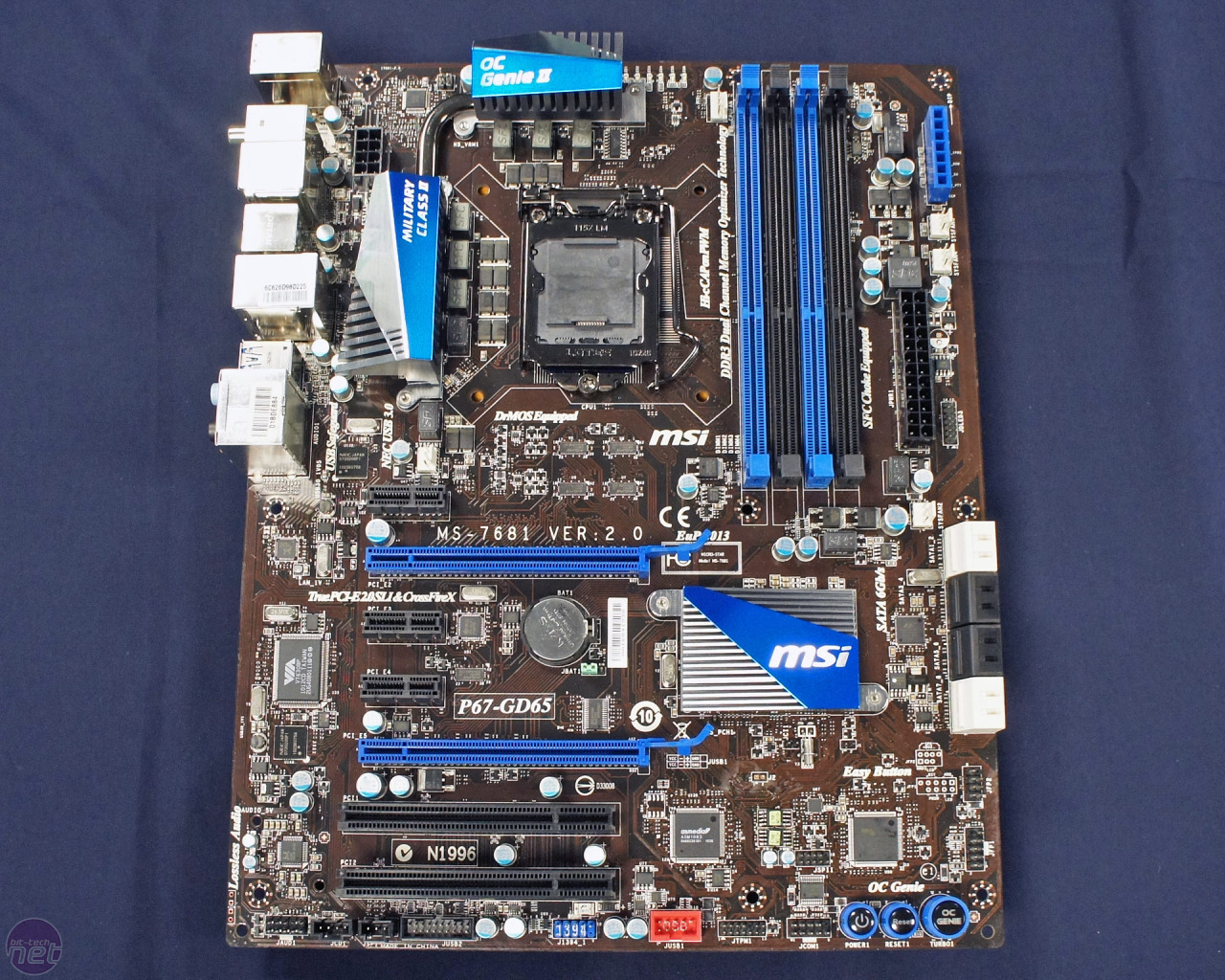
I believe in the P67 chipset boards, the MSI P67A-GD65 Rev3 board has one of the better layouts for using 2 cards with aftermarket coolers. (though not the best layout)
msi-p67a-gd65-1.jpg


With this layout, you do not need to buy longer Crossfire Connectors, and you gain the maximum amount of space between the cards so that your obstructed card is not really all that “obstructed” to begin with…The only downside is that if you use those “quik-connect” jumper blocks that you connect your front panel wires to, then plug the block into the motherboard, going Crossfire will require you to remove them. I’m running Crossfire on my board and I had to ditch them because the card will not seat into the slot if you use them because they make the connection too tall.

Big picture warning:
img0786a.jpg


My old Asus P5Q Pro Turbo board has the same slot layout, and I run a pair of Radeon HD4870s in Crossfire using a pair of Scythe Musashi coolers on them, and I have no temp or sound issues at all. In fact, one of the 4870s has no fans on it at all because the case fans are so close that they keep it cool. I believe the new Scythe coolers will work on a 6000 series card if the card is in a board with the same layout.
img0533v.jpg
 
As an Amazon Associate, HardForum may earn from qualifying purchases.
ehm..the pic is a bit on the small side when you replace your three 24s with three 30s in Xfire ;)

that said, I did post a warning since i know some people do not like large pics

image is fine on a 27" U2711 :p
 
So a little research on his motherboard. His slots are not spaced so close together as originally though. In fact I'd bet that the 2 cards would fit even if he leaves his aftermarket cooler on. Granted the top card would be sandwiched with the cooler but I believe the cooler isn't block shaped like amd's stock coolers so it should be fine. Nvidia's solutions do better when sandwiched because nvidia had the foresight to consider a sandwiched scenario and angled the corner of their cooler to allow better airflow when in a sandwiched scenario.

Here is the motherboard listed in his sig. Permitting his sig is up to date it appears there is enough spacing in between the 2 x16 slots (light grey) used for crossfire/sli. There appears to be nothing but a bunch of caps and board components in between so plenty of room for the cards to breath. With the stock coolers on there should be ample spacing and with his aftermarket cooler I wouldn't anticipate a problem even though it'll be right up against the bottom card. OP I'd give it a try before you remove the aftermarket cooler. Anyway, if it doesn't fit you should be fine with the stock coolers as the worse case scenario of the cards being sandwiched together where you'd have insane noise problems isn't happening here. Here is his mobo pic

130-SB-E675-KR_LG_5.jpg
 
image is fine on a 27" U2711 :p

Nah it's fine, it doesn't quite fit on the screen but it's no issue, it just amuses me how much the message panel gets stretched to fit the image.

Even though they removed a slot in the centre, that's still only single slot spacing - which is usually quite a big problem for aftermarket coolers. Especially ones that occupy three slots.
 
OP... did you glue anything to your RAM or VRM's with that cooler? You will risk damaging the card if you attempt to remove them. Just a thought.
 
You don't have to put it back. Also, that cooler is the worst of the lot. I don't think the fan gets horrendously loud, but the cards will just get incredibly hot. For that reason, you may as well keep the Arctic attached, unless it physically won't fit (I doubt that).

I don't think they are that bad, I have a pair of 6850's with that cooler on it from XFX, and they rarely ever get over 70C with an aggressive fan profile, which makes the fans super duper loud. Nothing that gaming with a headset won't remedy though.
 
That's with good slot spacing though, they'll be useless with tight spacing. Also, those fans are very loud with an aggressive fan profile, the profiles are aggressive enough as it is!
 
That's with good slot spacing though, they'll be useless with tight spacing. Also, those fans are very loud with an aggressive fan profile, the profiles are aggressive enough as it is!

2 slots between the two...

P9110095.JPG
 
Yes, that's what I mean by proper slot spacing :p
Nice tidy system by the way but, 910W for two 6850s?
 
Yes, that's what I mean by proper slot spacing :p
Nice tidy system by the way but, 910W for two 6850s?
TY, that case makes it so easy to hide the cables.

It was a NewEgg shell shocker for $99. Figured with the 2600K running at 4.8Ghz and the high probability of upgrading GPU's before this rig's lifetime was up, I better do something better than the 650W Corsair I had initially planned on using.

I already owned one 6850 that I had bought right at release for my old PC and I wanted to recycle that card to attempt to keep this build's price under $1500, so I just added a second one to the mix. I will eventually hand those down to my two sons and upgrade GPU's the next cycle.
 
I don't have the problems with noise on my HD6950 CF setup with AMD's stock coolers- but I setup my case with 4x140mm and 2x120mm intakes. The only exhaust is the H60 on my CPU, and the two 6950's. Fractal Design Define R3, btw. With the two-slot spacing between the cards (one open slot) provided by my board the cards get plenty of air, and while they still get up to 90c, their coolers don't have to spin up too much to keep them there.
 
The dual fan XFX models are pretty quiet. I went from a single reference 6950 2GB, to CFX with the dual fan 2GB model, and I am quite pleased with the reduction in noise. With both cards at 90% fan, they are still quieter than the single ref model at anything above 60% or so, and I said in another thread, the noise they DO make is far less annoying. Temps are about the same.

I don't have any experience with the single fan model you have so, can't say for sure. As others have said though, it seems to be the worst of the lot for non-ref coolers.

img0310wv.jpg


Also, +1 on proper slot spacing.
 
I have 2 6870's with the reference cooler design in X-fire, and they aren't too bad, even though those aren't the quietest coolers. The fan speeds typically stay under 35%, even during heavy gaming.

My MB does have pretty decent slot spacing though, so I'm guessing that helps quite a bit.
 
See with my Evga P67 board the 6950's would be right on top of each other no space in between..
 
Dual 6870s are audible but only if playing a game on mute.
Biggest issue I see with CF and SLi is heat.
I say that strictly speaking about the two current product lines in competition.
 
See with my Evga P67 board the 6950's would be right on top of each other no space in between..

Zod in your own thread I told you that your motherboard has a good spacing in between, trust me there are worse sittuations. You have a slot in between both cards. There are situations where you can't fit a credit card between the two cards and that's not the case on your motherboard assuming you still have the evga p67 sli

130-SB-E675-KR_LG_5.jpg
 
My two 5850's were never any louder than a single 5850, my two 6870's are never any louder than a single 6870. I don't see why they would be any louder unless your case airflow is terrible.
 
A good case and good slot spacing and they don't really get much louder - I wouldn't say the noise levels are identical though, there's normally a 10-20% increase in fan speed.
 
Zod in your own thread I told you that your motherboard has a good spacing in between, trust me there are worse sittuations. You have a slot in between both cards. There are situations where you can't fit a credit card between the two cards and that's not the case on your motherboard assuming you still have the evga p67 sli

130-SB-E675-KR_LG_5.jpg

IIRC on that MOBO the two gray PCI-E slots are the ones that run 16x for a single card and 8x when populated for sli/xfire. The black PCI-E slot is a 4x slot. So if he pops both gray slots with dual slot cards the bottom one will indeed be smack up against the bottom of the upper card. And.. the gpu he linked has the fan in the middle of the card and not at the back end like the reference boards. So the bottom gpu will be pretty starved for air.

That's how it was on my EVGA P55 SLI. It was a classic example of that "credit card" spacing you mention. I used a spare PCI-E power connector wedged between the back end of the two cards to get the bottom one some breathing room. The bottom card (at the time I had a pair of 5870's with aftermarket center fan coolers) ran at least 8~10c hotter under load leading the fan to run at a higher duty cycle under load. Add overclocking and the extra heat that follows and your fans will spin accordingly faster.

So yes.. xfire on that setup will run louder under load. Intolerably louder? That's a subjective thang.. but you will hear that bottom card wind up under load. His other option is to use the bottom black 4x PCI-E slot (you'll need a longer xfire bridge) to buy some breathing room. The performance hit from 8x to 4x is about 1~4% IIRC.

My2c.
 
Back
Top