• Some users have recently had their accounts hijacked. It seems that the now defunct EVGA forums might have compromised your password there and seems many are using the same PW here. We would suggest you UPDATE YOUR PASSWORD and TURN ON 2FA for your account here to further secure it. None of the compromised accounts had 2FA turned on.
    Once you have enabled 2FA, your account will be updated soon to show a badge, letting other members know that you use 2FA to protect your account. This should be beneficial for everyone that uses FSFT.

[H] users 7950 Overclock Results

Any chance you can give me the BIOS version number from gpuz? Thanks!
Anyway the reason why I'm asking is that I think my bios is causing my vrm's to bust through the roof with high temperatures. I don't think its the gpu's cooling because the 950mhz cards have beefy vrm cooling.


BIOS version found in this screen shot.

http://img.hwbot.org/u24304/image_id_871441.jpeg

The VRM temps got hot on mine as well. I am running mine water cooled with fujipoly xtreme thermal pad on the vrm and memory.
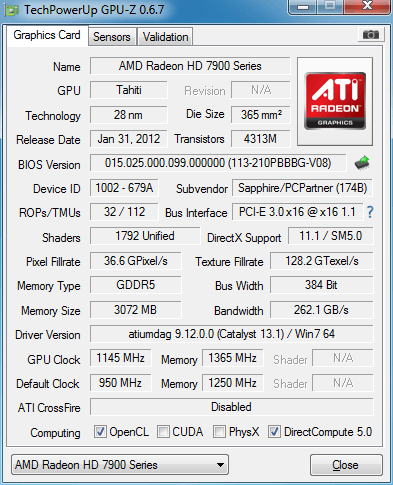
 
BIOS version found in this screen shot.

http://img.hwbot.org/u24304/image_id_871441.jpeg

The VRM temps got hot on mine as well. I am running mine water cooled with fujipoly xtreme thermal pad on the vrm and memory.

Thanks Sonda5 you're the first person to really confirm my VRM temperatures on the Sapphire 7950. Its kinda weird though don't you think that the VRM's get hot? a 950mhz Sapphire 7950 has good vrm cooling does it not?
 
I'd think with earlier cards 1050/1400 was average, but it seems the cards that have been coming out for the past 6 months or so tend to clock 1150+ on the core much more frequently. Memory is the most random of all... so its hard to say an average, really. I mean, some people cant hit 1400. Others can hit 2000.. much more variation than the core, even if considered as a percent OC.
 
Mine is running in that range .. 1145/1365 on Sapphire 7950 OC Vapor-X. Tried a bit higher and it crapped on the first load of Heaven. BUT, its running solid and I'm loving the card thus far.

4ak.png
 
I had a Sapphire Dual-X that I had running stable at 1200/1600 @ 1.25V, it decided to take a crap on me after a week however (wasn't so stable after all). RMA'd it, my replacement just came in today. Will update tomorrow with whatever stable clocks I'm able to achieve. In the meantime, anybody recommend some good stability testing tools? I'm currently using Heaven 4.0 and OCCT.
 
Getting a bit sleepy, but ive ran into something.

My top card is a dual fan, bottom card is a single fan.

Single fan card is 10 degrees cooler than my dual wtf?


3i2qbV7.jpg
 
Thanks Sonda5 you're the first person to really confirm my VRM temperatures on the Sapphire 7950. Its kinda weird though don't you think that the VRM's get hot? a 950mhz Sapphire 7950 has good vrm cooling does it not?


I think the VRMs get hot on alot of HD7900 cards. I read that some VRMS (Bussman) are rated to operate max around 120C.


I hate to run the VRM that hot and that is why I water cooled mine and the temps go down alot.


The Sapphire 950mhz Ediiton does have good VRM cooling but is also has strong VRM design and when you over clock the temps go up fast. It's fierce card to tame and good air cooling or water cooling helps alot. Water cooling mine has worked out great.
 
I'm currently testing my OC on a Sapphire Dual-X and am quite confused. Leaving voltage at stock (1.25V) I'm able to get 1150/1600 with no artifacts, at least none that I can see, in Heaven 4.0. OCCT and EVGA OC Scanner X report artifacts however until I lower the core to 1125. Quite confusing results, which should I trust?
 
Last edited:
Getting a bit sleepy, but ive ran into something.

My top card is a dual fan, bottom card is a single fan.

Single fan card is 10 degrees cooler than my dual wtf?


3i2qbV7.jpg


Fan speed? One is 29% and the other 39%

Try upping that at 1150 and see if the artifacts are reported.
 
I must have a golden sample card. Sapphire DualX that I just got today is running 1200/1575 at 1.125 and not hitting above 45C in Kombuster yet. Sweet!
 
I don't know about Kombuster, but it was Heaven 3.0 that was helping me catch my artifacts. I could do 1200/1600 on 3D Mark but couldn't go beyond 1175/1600 on Heaven 3.0.

As for your temp, I don't know what level of load Kombuster puts on the card, but if you can do 2-3 runs on Heaven 3.0 on those clocks of yours 1200/1575 and stay within 65 you're doing very good.
 
It's not stable in Heaven. It will run for the first two levels then freeze at 1200/1575 and 1.3V. Max temp was 55C. Going to step back a few notches and see where the sweet spot is. I don't want to run 1.3 volts even if the temps are ok right?
 
Well, most people are more concerned about the core temps and vrm temps, if that is in the 70s it is usually good.

As for volts its more of a personal thing, some people especially on watercooling and other aftermarket cooling typically run at high volts since the card stays relatively cool while people on air have to keep an eye out more for the temps than the volts.

Also, how are you monitoring your max temps, are you using Afterburner for the entire run since it tracks temps right through your run vs using Trixx that just shows you temps at that point in time.
Looking at 55 as your max temp, I get a feeling that you're reading this off of Trixx and not Afterburner, because 55 is like the temp you get with water cooling under heavy load and OC rather than on air. After 2 runs of Heaven you'll typically hit at least 65C if you're OC-ing.
 
Looking like I may have to settle at 1125/1600 on my card. Beyond that games run fine up to 1150 or so (Heavy artifacts at 1175, crashing at 1200) as far as I can tell, however OC scanners such as EVGA OC scanner X and OCCT all detect artifacts above 1125. Heat isn't an issue, core stays around 65-66C, VRM doesn't go past 80C. Honestly not sure what to do from here. I'm reluctant to go any further without knowing what to base my OC stability on, seeing as I already fried a previous 7950 by pushing too far (The card I'm running currently is the replacement that was sent).
 
1125/1450 is my current stable oc. I don't want to exceed 1.250V so that core is as fast as it gets there. Heaven never gets it over 51C and that is on max settings. Bf3 on high/medium no AA gets it to 55C. Cool and quiet. VRM only hit 46C so far? Using GPU-Z and thats what it says. Wild. Good card.
 
Last edited:
I think the VRMs get hot on alot of HD7900 cards. I read that some VRMS (Bussman) are rated to operate max around 120C.


I hate to run the VRM that hot and that is why I water cooled mine and the temps go down alot.


The Sapphire 950mhz Ediiton does have good VRM cooling but is also has strong VRM design and when you over clock the temps go up fast. It's fierce card to tame and good air cooling or water cooling helps alot. Water cooling mine has worked out great.

Thanks again for the info, at least now I know I'm not the only one suffering of VRM temps for the 950mhz cards. I've been thinking about changing the cooler. You think the Accelero Xtreme 7970 cooler on top of the stock VRM heatsinks will lower the VRM temps more?
 
Thanks again for the info, at least now I know I'm not the only one suffering of VRM temps for the 950mhz cards. I've been thinking about changing the cooler. You think the Accelero Xtreme 7970 cooler on top of the stock VRM heatsinks will lower the VRM temps more?


Not sure. I have no experience with that block.

The stock heat sinks are ok and if you get high air flow directly on them it will help out with temps.


Water cooling them makes a big difference for me.


Also using Fujipoly Extreme thermal pad with stock heat sink should help out.
 
Hey guys, I'm having a lot of trouble with my new Sapphire 7950 Dual-X boost (950/1250 default) and I was hoping you could help.

The first issue is that setting the BIOS switch on the card itself to 1 or 2 doesn't seem to change anything. GPU-z shows the same exact BIOS version of 015.023.000.001.000000 (113-1E207200P2-S4C). Is that normal?

Secondly, I've been able to increase the core speed fine (runs at 1200 with 1.20V). The problem is that if I increase the memory from the default 1250 to anything higher (even 1260) my 3Dmark score tanks, and if I move windows around on my desktop I get weird graphic artifacts, even if the core is set to default. It seems like something may be wrong if it can't even go 1mhz higher than the stock on memory without having issues on the desktop. It doesn't seem to help if I change the power limit to 20% in MSI afterburner, or whether I change the voltage in Trixx. Any idea what may be causing this? I am completely stumped. Is there a setting to increase the voltage to the memory? Should I even need to increase it to get it to be stable at anything higher than stock?

I look forward to your replies.
 
WOW, I feel really stupid. Apparently you can scroll down on Trixx and it shows the Board Power Li, I increased that to 20% and now my memory is able to go higher. The weird thing is I tried boosting the memory using Afterburner, which I was adjusting the power limit to 20% in there, but the issue remained. I guess afterburner wasn't working correctly or something. Weird.

Still wondering about the bios versions being the same though. And people keep saying that default voltage on the Sapphire Dual-X is 1.25, but if I load up Trixx it shows 1.112 as default?

Will post my results tomorrow when I get some more time to work on it.

EDIT: Looks like I needed the newest beta of Afterburner for its voltage settings to properly apply.
 
Last edited:
A little voltage loss is normal, especially under load.


I'd stick with TRIXX.
 
WOW, I feel really stupid. Apparently you can scroll down on Trixx and it shows the Board Power Li, I increased that to 20% and now my memory is able to go higher. The weird thing is I tried boosting the memory using Afterburner, which I was adjusting the power limit to 20% in there, but the issue remained. I guess afterburner wasn't working correctly or something. Weird.

Still wondering about the bios versions being the same though. And people keep saying that default voltage on the Sapphire Dual-X is 1.25, but if I load up Trixx it shows 1.112 as default?

Will post my results tomorrow when I get some more time to work on it.

EDIT: Looks like I needed the newest beta of Afterburner for its voltage settings to properly apply.

Yes the default "boost" voltage on these cards is 1.25V, try installing the latest version of Trixx from the Sapphire website, it should show 1.25V as the default voltage.
Older versions of Trixx showed 1.125V (like it is for you) however, the newer versions show 1.25V and irrespective of what they "show" the default boost voltage on these cards is 1.25V.
To verify, log using GPU-Z when running a game (or benchmark) and in the log look for the voltages (VDCC) and you'll clearly see voltages in the 1.2V range even when Trixx shows 1.125V set as default.

It took me a while to figure this out and as for the bios on the card, it looks like its the same for both the switch positions.
 
Yes the default "boost" voltage on these cards is 1.25V, try installing the latest version of Trixx from the Sapphire website, it should show 1.25V as the default voltage.
Older versions of Trixx showed 1.125V (like it is for you) however, the newer versions show 1.25V and irrespective of what they "show" the default boost voltage on these cards is 1.25V.
To verify, log using GPU-Z when running a game (or benchmark) and in the log look for the voltages (VDCC) and you'll clearly see voltages in the 1.2V range even when Trixx shows 1.125V set as default.

It took me a while to figure this out and as for the bios on the card, it looks like its the same for both the switch positions.

Very helpful post, thanks a lot, I am definitely not using the latest Trixx. I'll give it a go when I get home today.
 
Hmm strange, it seems that 4.6.0 is the latest Trixx version, and when I open it it says 1112 on VDDC. If I run heaven and look at GPU-z it looks like it hovers around 1.068 or 1.072. It doesn't seem like 1.25v is the default on this card.
 
I've got it running at 1100/1610 @ 1.175v with no artifacts in Heaven. What's the upper limit for safe VRM temps? Mine were hitting 68C or so. The max I can get the ram before it starts artifacting is around 1720, but the temperature is pretty high.

3DMARK11 score = P9558 with 1100/1610 and my i5-2500k @ 4.5GHz (Graphic score is 10061).
 
Is this your card ?
There are many Sapphire Dual-X-es and my comment above was specific to this card.

As for VRM temps, most people agree that anything upto 75-80C is believed to be safe/good.

What version of drivers are you using?
That score is in line with 7950 cards, however see if you can get more on the core.

Edit - One other thing, don't read VDCC off of GPU-Z directly, since it shows the current value, log it like I said and then you can check for the ranges in the log. These voltages on the boost cards go up as required, so you may not see it hitting 1.25V instantly, however it could in the course of your run.
 
Is this your card ?
There are many Sapphire Dual-X-es and my comment above was specific to this card.

As for VRM temps, most people agree that anything upto 75-80C is believed to be safe/good.

What version of drivers are you using?
That score is in line with 7950 cards, however see if you can get more on the core.

Edit - One other thing, don't read VDCC off of GPU-Z directly, since it shows the current value, log it like I said and then you can check for the ranges in the log. These voltages on the boost cards go up as required, so you may not see it hitting 1.25V instantly, however it could in the course of your run.

The card I got was http://www.amazon.com/Sapphire-Rade...&ie=UTF8&qid=1361739476&sr=1-46&keywords=7950

I'm currently on the 13.2 beta 7 drivers.
 
As an Amazon Associate, HardForum may earn from qualifying purchases.
How much better 7950 boost version is than GTX670? There are some reviews but from August 2012.
 
How much better 7950 boost version is than GTX670? There are some reviews but from August 2012.

With the new drivers and a decent oc they are at least as good. In BF3, I can run the same fps as I did with my 670 but now I can add high shadows up from medium with the 7950. So a slight bump up maybe? New drivers are good.
 
I got my Sapphire Dual-X Boost to 1120 core / 1515 memory, at 1.25 V. Seems stable; however 1525 memory will result in corruption and I have to reset my computer. In Unigine Valley I get 1440 points on Extreme HD benchmark, and the card will heat up and stabilize after a while at temperatures around 72-73 C, fan at 100%. Are those safe to maintain for my 1-2 hour play sessions? And would it be OK to maybe see if I can push the core a little higher?

To be honest, I'm a bit disappointed, a lot of you guys seem to be able to reach more with less heat.
 
If you were to read some more of this thread you would realize that most people recommend
A. Monitor VRM temps along with core
B. Temps in the low-mid 70s for core and up to 80 for VRM seem okay.

As long as your temps are in control (limits above) and you don't have crazy voltages you could try to push the clocks further.

How is your case ventilation?
 
Just an update, it looks like 1135/1700 @ 1.200v is around my limit artifact free. I can't get the core any higher with any additional voltage, I'm pretty sure my power supply is the limiting factor here..

I've got a Corsair VX550W PSU but even at 1.200v the voltage is drooping to 1.121v, pretty terrible. I'm running 3 traditional hard drives and 1 SSD along with a DVD drive and a 2500k @ 4.5GHz, so I guess it's just too much for it.

My 3DMark11 score @ 1135/1700 is P9727 and a graphics score of 10308 http://www.3dmark.com/3dm11/6216541
 
If you were to read some more of this thread you would realize that most people recommend
A. Monitor VRM temps along with core
B. Temps in the low-mid 70s for core and up to 80 for VRM seem okay.

As long as your temps are in control (limits above) and you don't have crazy voltages you could try to push the clocks further.

How is your case ventilation?

Temps are fine for both, 73 is the upper limit for core and VRM is below that. Case cooling is OK, I have a Segotep case with fan to push the hot air out. I did another Heaven Valley run at 1120 core / 1515 mem and again I had the screen lock up with a corruption pattern. I didn't get it the first time I ran the bench at the same clocks. I recorded the sensor values with HWInfo64 and I notice that the core and memory frequency, as well as the voltage, fluctuate a lot during my run, they don't stay all the time at the max. 1.25V, 1120 MHz / 1515 MHz.

I am doing my overclocking with the latest version Trixx taken from Sapphire's website with "Force constant voltage" checked.

Here are the values, the last is just before the crash:

Code:
GPU Thermal Diode [°C]	GPU VDDC [V]	GPU Fan [RPM]	GPU Clock [MHz]	GPU Memory Clock [MHz]
42.0	950	1817	300.0	150.0
45.0	1250	1807	1120.0	1514.0
45.0	1250	1972	1120.0	1514.0
44.0	950	1873	300.0	150.0
51.0	1250	2075	1120.0	1514.0
53.0	1250	2445	1120.0	1514.0
54.0	1250	2749	850.0	1250.0
55.0	1125	2793	1120.0	1514.0
55.0	1250	2926	1120.0	1514.0
56.0	1250	2966	837.0	1250.0
57.0	1250	3153	911.3	1514.0
57.0	1250	3227	837.0	1250.0
58.0	1250	3174	891.0	1514.0
59.0	1125	3212	1120.0	1514.0
59.0	1125	3198	850.0	1250.0
60.0	1125	3194	850.0	1250.0
60.0	1250	3197	1120.0	1514.0
60.0	1125	3207	850.0	1250.0
59.0	1125	3208	1120.0	1514.0
60.0	1250	3208	1120.0	1514.0
60.0	1125	3203	850.0	1250.0
61.0	1250	3195	837.0	1250.0
61.0	1250	3190	837.0	1250.0
61.0	1125	3182	1120.0	1514.0
61.0	950	3193	501.0	1250.0
61.0	950	3190	501.0	1250.0
61.0	1125	3190	850.0	1250.0
62.0	1125	3184	796.5	1250.0
62.0	1125	3181	850.0	1250.0
62.0	1125	3177	850.0	1250.0
62.0	1125	3181	850.0	1250.0
62.0	1125	3175	1120.0	1514.0
62.0	1250	3172	891.0	1514.0
 
XFX double D 900.

I cannot get up to 1100 core, and 1350 memory no matter the voltage. Temps are good now that I have my case venting/flowing better. Disappointing but I don't necessarily need to OC at the moment, sucks I'm not going to have the head room for future games like I thought.
 
Tried raising 1125 core/ 1515 mem @ 1.275 V, still freezes with purple screen in Heaven Valley after a while. Got some 1100'ish points. Temps below 70.

Retried with 1130 core / 1475 mem @ 1.25 V, this time it didn't freeze. Did 2 benchmark runs. Temps OK, hover around 66 C. First time some 1280'ish points, next time 1380 points. Yay! :D .

Could memory clock have been the culprit for the freezes? I will work some more on core clocks later, if the memory isn't willing. I will have to play some more to see if the card behaves at 1130 / 1475, then try higher core clocks.

EDIT: 2 runs at 1150 / 1490 , 1.25 V . Stable so far with temps below 65 C. But the score is only 1170 this time. The strange thing is that I cannot replicate the 1380 points even at the clocks above, I seem to be stuck at 1170 points or so. Overclocking doesn't really improve framerates in the benchmark.
 
Last edited:
Back
Top