![[H]ard|Forum](/styles/hardforum/xenforo/logo_dark.png)
Navigation
Install the app
How to install the app on iOS
Follow along with the video below to see how to install our site as a web app on your home screen.
Note: This feature may not be available in some browsers.
More options
You are using an out of date browser. It may not display this or other websites correctly.
You should upgrade or use an alternative browser.
You should upgrade or use an alternative browser.
Eyefinity Configuration Suggestions
- Thread starter FrgMstr
- Start date

- Joined
- Apr 19, 2000
- Messages
- 607
i saw utube 3 24" displays running a game with a nvidia 8800gtx. does anyone know how this is accomplished
Either SoftTH or Matrox Triple Head
That is good to here...I better wait until someone who has 3 different monitors running on one 5800/5700 series card posts....don't want to get stuck with a card. Or maybe gave ATI a call Monday.
Not only does it work in normal multimonitor mode, you can use them all for a game with SoftTH if you can jigger the configuration the right way.
question about proposed setup
recently bought a U2410. considering getting 2 P2310H for the right and left monitors
I realize the monitors are slightly different sizes and slightly different resolution. the p2310h are 23 inch native 1920 by 1080 res. the u2410 is 1920 by 1200
my plan for eyefinity is to set the middle monitor U2410 to a resolution of 1920 by 1080 so that all 3 are the same resolution. I am hoping the u2410 has a mode where you can have 1:1 scaling which if I understand correctly means that there will be slight black bars at the top and bottom. this should mean that the picture on the center monitor with the black bars should line up quite well with the P2310h.
My main question is- does the U2410 have 1:1 scaling mode? Will there be black bars when the resolution is erduced to 1920 by 1080? or will the picture be stretched to fit the full screen but still in 1920 by 1080 mode?
second question- can eyefinity be disabled so that when i'm not gaming, I can use all 3 monitors that there native resolution ie 1920 by 1080, 1920 by 1200 and 1920 by 1080?
Any help is greatly appreciated!
recently bought a U2410. considering getting 2 P2310H for the right and left monitors
I realize the monitors are slightly different sizes and slightly different resolution. the p2310h are 23 inch native 1920 by 1080 res. the u2410 is 1920 by 1200
my plan for eyefinity is to set the middle monitor U2410 to a resolution of 1920 by 1080 so that all 3 are the same resolution. I am hoping the u2410 has a mode where you can have 1:1 scaling which if I understand correctly means that there will be slight black bars at the top and bottom. this should mean that the picture on the center monitor with the black bars should line up quite well with the P2310h.
My main question is- does the U2410 have 1:1 scaling mode? Will there be black bars when the resolution is erduced to 1920 by 1080? or will the picture be stretched to fit the full screen but still in 1920 by 1080 mode?
second question- can eyefinity be disabled so that when i'm not gaming, I can use all 3 monitors that there native resolution ie 1920 by 1080, 1920 by 1200 and 1920 by 1080?
Any help is greatly appreciated!
B^gD^ddy~CF~
Limp Gawd
- Joined
- Nov 5, 2006
- Messages
- 172
personally I'm going with a BenQ2400WD which I owned first, a Samsung SyncMaster 2443BW, then a Lenovo ThinkVision L2440X because it has a displayport connection. Where did all the 1920 X 1200 2ms 24" TN panels go? This is as close as I could get in an eyefinity configuration. The 2400WD's are nowhere to be found, and finding a monitor with close specs to it took forever. Paid $219 for the 2443BW, and $429 for the L2440X. I'll post some pics here if my 5870 ever ships.
LOL
3 - 30" in Portrait would be a geeks wet dream, with the 2 sides angled towards you, that would be gaming heaven, and not even in the same ball park as one single 52" TVA monitor that large at 52" with the low res of 1920x1080 would blow, the pixels would be gigantic with fuzzy quality compared to 3 - 30" of 4800x2560res
I've been gaming for a few months on my 52" Sony XBR9 and I have to say, I love it. I'm sure it'd be nicer to be super-high rez, but honestly, things aren't that jaggy. I'm just hunting down a 5800-series card to replace my 9800 GX2 and get some more pixel-pushing power, and an SSD to keep the disc access out of my frame-rate's way.

Last edited:

l88bastard
2[H]4U
- Joined
- Oct 25, 2009
- Messages
- 3,929
No matter how big your screen is it will not beat a triple screen setup. Its not all about resolution, its about how much more you can see. Here are two pictures taken from Over Flanders Fields, one is 2560x1600 and the other its 4800x1200.
2560x1600
http://img.photobucket.com/albums/v725/l88bastard/Shot10-04-09-15-34-49.jpg
4800x1200
http://img.photobucket.com/albums/v725/l88bastard/Shot12-05-09-01-36-04.jpg
http://img.photobucket.com/albums/v725/l88bastard/Shot12-05-09-13-28-07.jpg
As you can see, the immersion factor of a single jumbo screen is not even close to the triple threat!
Any Questions?
2560x1600
http://img.photobucket.com/albums/v725/l88bastard/Shot10-04-09-15-34-49.jpg
4800x1200
http://img.photobucket.com/albums/v725/l88bastard/Shot12-05-09-01-36-04.jpg
http://img.photobucket.com/albums/v725/l88bastard/Shot12-05-09-13-28-07.jpg
As you can see, the immersion factor of a single jumbo screen is not even close to the triple threat!
Any Questions?
I'm torn between these two choices right now. They both have similar shapes and thin bezels etc. I'd love to buy the three Dells but I'm buying an HD 5970 and I think it's potential would be wasted on monitors that small.
Acer B273HU bmidhz Black 27" $1290 total
http://www.newegg.com/Product/Product.aspx?Item=N82E16824009165
Pros: Resolution. Large size. Reasonable price. Hdmi port. Usb ports.
Cons: No Display Port. No portrait mode. You still need to purchase a Display Port adapter.
DellTM Professional P2310H 23" $630 total
http://accessories.us.dell.com/sna/...etail.aspx?c=us&l=en&s=bsd&cs=04&sku=320-8325
Pros: Display port. Price. Portrait mode.
Cons: No hdmi port. Resolution limited to 1080p
My ideal buy would be those Dell monitors with at least 1920 x 1200 resolution. Their 24 inch monitors that have portrait mode and the Display Port cost too much to me for the size.
Acer B273HU bmidhz Black 27" $1290 total
http://www.newegg.com/Product/Product.aspx?Item=N82E16824009165
Pros: Resolution. Large size. Reasonable price. Hdmi port. Usb ports.
Cons: No Display Port. No portrait mode. You still need to purchase a Display Port adapter.
DellTM Professional P2310H 23" $630 total
http://accessories.us.dell.com/sna/...etail.aspx?c=us&l=en&s=bsd&cs=04&sku=320-8325
Pros: Display port. Price. Portrait mode.
Cons: No hdmi port. Resolution limited to 1080p
My ideal buy would be those Dell monitors with at least 1920 x 1200 resolution. Their 24 inch monitors that have portrait mode and the Display Port cost too much to me for the size.
Last edited:
I'm torn between these two choices right now. They both have similar shapes and thin bezels etc. I'd love to buy the three Dells but I'm buying an HD 5970 and I think it's potential would be wasted on monitors that small.
Acer B273HU bmidhz Black 27" $1290 total
http://www.newegg.com/Product/Product.aspx?Item=N82E16824009165
Pros: Resolution. Large size. Reasonable price. Hdmi port. Usb ports.
Cons: No Display Port. No portrait mode. You still need to purchase a Display Port adapter.
DellTM Professional P2310H 23" $630 total
http://accessories.us.dell.com/sna/...etail.aspx?c=us&l=en&s=bsd&cs=04&sku=320-8325
Pros: Display port. Price. Portrait mode.
Cons: No hdmi port. Resolution limited to 1080p
My ideal buy would be those Dell monitors with at least 1920 x 1200 resolution. Their 24 inch monitors that have portrait mode and the Display Port cost too much to me for the size.
Those Dells look sharp. Did you do much research on these things to arrive at the final decision with the Dells? I'm also looking into 3x value monitors that can do portrait mode.
- Joined
- Apr 19, 2000
- Messages
- 607
Those Dells look sharp. Did you do much research on these things to arrive at the final decision with the Dells? I'm also looking into 3x value monitors that can do portrait mode.
The Professional Series Dells are nice, I have three of the P2310H in Portrait in my Eyefinity setup.

The Professional Series Dells are nice, I have three of the P2310H in Portrait in my Eyefinity setup.
Excellent! By the way, why do the two side monitors look like they are slightly lower? (Are they further back in plane)?
I don't think I would do that for gaming, but for regular use, browsing, and work Portrait is just awesome.
Those Dells look sharp. Did you do much research on these things to arrive at the final decision with the Dells? I'm also looking into 3x value monitors that can do portrait mode.
Yup. Basically I took a few things into consideration.
The display port obviously because I really prefer to use technology natively as opposed to converters and adapters etc.
The price for three of the same monitors. The Dell Professional P2310H 23" usually fall between $200 - $250 which is a great deal for monitors that can also do portrait mode (which is a rare thing on it's own). Pictures of those monitors using eyefinity seals the deal for me
Thanks for the post.One last thing I considered when researching was the thickness and also the shape of the bezel. The Dell Professional P2310H 23" monitors are perfectly rectangular and also have pretty thin bezels compared to everything else I've come across. They look neater and better when aligned. Overall I can see no better deal unless you can afford three Dell UltraSharpTM U2410. Those would be perfect if only I could afford it. I really wanted the resolution of 1920 x 1200 on each monitor due to the fact that I'm buying a HD 5970 for gaming. If anyone knows how to get those Dell UltraSharpTM U2410 at a price maybe around $400 (by some miracle) please don't hesitate in letting me know
If you could care less about portait mode your options in general are greater. Hence the Acer 27" which are also rectangular and neat like the Dells and also there are some Samsung monitors with the same shape.
Last edited:
- Joined
- Apr 19, 2000
- Messages
- 607
Excellent! By the way, why do the two side monitors look like they are slightly lower? (Are they further back in plane)?
I don't think I would do that for gaming, but for regular use, browsing, and work Portrait is just awesome.
Yeah, the two side monitors are pushed back slightly. I basically wanted to try to reduce the viewable bezel size by pushing the monitors back and moving them in slightly. I didn't like the effect as it made the middle monitor jump out at you.
The Professional Series Dells are nice, I have three of the P2310H in Portrait in my Eyefinity setup.
Kudos on the awesome setup. Just got my 5870 last weekend and am now anxious to get an eyefinity setup. I'm running out of patience to see what Samsung is supposedly releasing with tiny bezels. I'm afraid I'll wait and the Samsung monitors will be too expensive anyway. What do you guys think of using the 21.5" (P2210H) dell over the 23" (P2310H)? The resolution is the same (1920x1080), just about inch smaller horizontally and .5 inches smaller vertically. The price difference right now is $150 less for the 21.5" from about $850 shipped to $700 shipped.

Last edited:
What do you guys think of using the 21.5" (P2210H) dell over the 23" (P2310H)? The resolution is the same (1920x1080), just about inch smaller horizontally and .5 inches smaller vertically. The price difference right now is $150 less for the 21.5" from about $850 shipped to $700 shipped.
I say go for it. You can spend the extra savings on something beneficial to your build like a better gaming mouse and pad, some extra memory or maybe it could be the difference between a core i5 and a core i7 processor or an HD 5850 and an HD 5870 depending on your specs
I bit. 3x P2210H for $700, though I was tempted by the new NEC EA231WMi IPS panel. The $300 total increase in price was a bit much to swallow though, especially with the possibility of Samsung releasing the thin bezel monitors in the near future. With this setup I think I can eventually justify upgrading to the thin bezel Samsungs (if they are ever released). Would have been harder to justify it with the NECs.
/drool

/drool

Zorachus
[H]F Junkie
- Joined
- Dec 17, 2006
- Messages
- 12,524
I bit. 3x P2210H for $700, though I was tempted by the new NEC EA231WMi IPS panel. The $300 total increase in price was a bit much to swallow though, especially with the possibility of Samsung releasing the thin bezel monitors in the near future. With this setup I think I can eventually justify upgrading to the thin bezel Samsungs (if they are ever released). Would have been harder to justify it with the NECs.
/drool
Forgot how that did look on my setup
The 3 Dell 2408WFP's in Portrait. I did switch back to Landscape to see more of the game world. But not sure which is better, both modes are great.Forgot how that did look on my setup
How hard is it to switch between modes? I was hoping to use landscape for NFS Shift and Dirt, and then portrait for MMOs and FPSs.
AlvinMaker
Limp Gawd
- Joined
- Dec 8, 2009
- Messages
- 288
OK, I am in the EXACT same boat....been on the fence on the 3xDell P2210H/P2310H OR the 3 X NEC EA231wmi. Someone suggested these wouldn't look good because they are TN panels (in portrait mode, which is what they will be in about 70% of the time.)
Any opinions on this? I am having trouble going from 600 shipped for the P2210hs to right over 1000 for the NECs. (blew most of the remaining budget on the 5970)
Any advice would be great. My new I7 920 build is nearing completion and I want to order my monitors by the weekend! Thanks!!
Any opinions on this? I am having trouble going from 600 shipped for the P2210hs to right over 1000 for the NECs. (blew most of the remaining budget on the 5970
)Any advice would be great. My new I7 920 build is nearing completion and I want to order my monitors by the weekend! Thanks!!
What size desks do you guys have for landscape?
I don't have the monitors yet, but the P2210H is 20.15" wide x 3 = 60.45". The bases won't take quite that much room however, and angling the monitors will reduce the space required. I'm going to be setting them on my Ikea Galant left corner desk with the center monitor at facing the apex of the corner.
OK, I am in the EXACT same boat....been on the fence on the 3xDell P2210H/P2310H OR the 3 X NEC EA231wmi. Someone suggested these wouldn't look good because they are TN panels (in portrait mode, which is what they will be in about 70% of the time.)
Any opinions on this? I am having trouble going from 600 shipped for the P2210hs to right over 1000 for the NECs. (blew most of the remaining budget on the 5970
Any advice would be great. My new I7 920 build is nearing completion and I want to order my monitors by the weekend! Thanks!!
See Blix's post above. Those are dell P2310H's (TN panels) in portrait mode. I can't really testify to any angle problems, but it looks good from the angle the picture is taken, and I'm assuming that it's working since I haven't heard many complaints about it, could just be my lack of information though.
I'm currently using an Acer TN panel and if the dells are similar, I doubt I'll have any problems as long as they are positioned correctly.
AlvinMaker
Limp Gawd
- Joined
- Dec 8, 2009
- Messages
- 288
Thanks. I have been going back and forth on this it's giving me a headache.
Either way I am aure I'll be happy- I just have to talk myself into - or OUT of - the extra 300.00 or so for the 2310hs (for the BARGAIN set up of 3 2210hs @600.00/3 saving me 475 or so).
I'll post an update once I decide, get everything in, and fire it up for the first time. So close!
Either way I am aure I'll be happy- I just have to talk myself into - or OUT of - the extra 300.00 or so for the 2310hs (for the BARGAIN set up of 3 2210hs @600.00/3 saving me 475 or so).
I'll post an update once I decide, get everything in, and fire it up for the first time. So close!
AlvinMaker
Limp Gawd
- Joined
- Dec 8, 2009
- Messages
- 288
Well, for anyone intrested, I pulled the trigger today on 2 of what will be 3 Dell p2310hs. Dell had them on sale, 40.00 off, bringing them to 227.00 ea., shipped. Couldn't pass up the 3 of them for 680.00. I'll get some pics up, as well as a quick review once I get everything running. (assuming my 5970 shows up on Friday).
Thanks for all the advice!
Thanks for all the advice!
Well, for anyone intrested, I pulled the trigger today on 2 of what will be 3 Dell p2310hs. Dell had them on sale, 40.00 off, bringing them to 227.00 ea., shipped. Couldn't pass up the 3 of them for 680.00. I'll get some pics up, as well as a quick review once I get everything running. (assuming my 5970 shows up on Friday).
Thanks for all the advice!
I just ordered 3 x P2310H's too. I was in Dell chat for like 2 hours getting sales to honor a deal I saw online for $188 per monitor. I got them all for $610 after tax, free shipping
I just ordered 3 x P2310H's too. I was in Dell chat for like 2 hours getting sales to honor a deal I saw online for $188 per monitor. I got them all for $610 after tax, free shipping
You will not be disappointed, I bought 3 of those monitors back in late October and they are excellent. I really think they are the perfect monitors for eyefinity.
That setup should work very well. You just have to use Catalyst control Centre to make sure that it knows what orientation the portrait screens are in. Otherwise the side monitors will be rotated 90 degrees, which, on second thought would be kind of funny.
I cannot figure out how to setup 3x1 with 19" portrait - 24" Landscape - 19" portrait with Catalyst control Centre....
I cannot get the the 2 side 19" set for portrait....anyone know how to do this?
Edit: Nevermind I found out all 3 must be PPP or LLL for eyefinity.
Last edited:
Not with Eyefinity
This setup must be using Ultramon.
AlvinMaker
Limp Gawd
- Joined
- Dec 8, 2009
- Messages
- 288
I just ordered 3 x P2310H's too. I was in Dell chat for like 2 hours getting sales to honor a deal I saw online for $188 per monitor. I got them all for $610 after tax, free shipping
wow...and I thought I got a good deal!
Now I just have to hope the website is mistaken...I ordered 2 on Thursday, and they are slated before De. 17th. The third was ordered on Friday, and it says January 4th?! That's gonna be some TORTURE if it's true!
Finally got my new P2210Hs today! Initially had them in landscape, but I like portrait much better. Much higher level of immersion. Took a while to get the display angles just right, you can definitely tell they are TN panels. I have the panels facing over my left shoulder as when they face me directly, the right (normally the top) edge of the panel fades noticeably. I was using an Acer 24" 1920x1200 monitor and these new dells are 1920x1080. I didn't think a 120 pix drop would make that much difference, but in landscape mode, games seem overly stretched to the point that the only games I would consider playing in landscape are racing games or flight sims. I'm not a fan of 16:9 monitors. The bezels are a little annoying at first, but once you get into a game, you hardly notice them at all. I only wish they were slightly farther apart (again, wish there was a cheap 16:10 option).
The immersion factor of having 3x as many pixels as a standard monitor is huge and well worth the sacrifice of having breaks in the picture (bezels) imo. Overall, I'm very happy with my purchase and will be buying similar setups in the future.
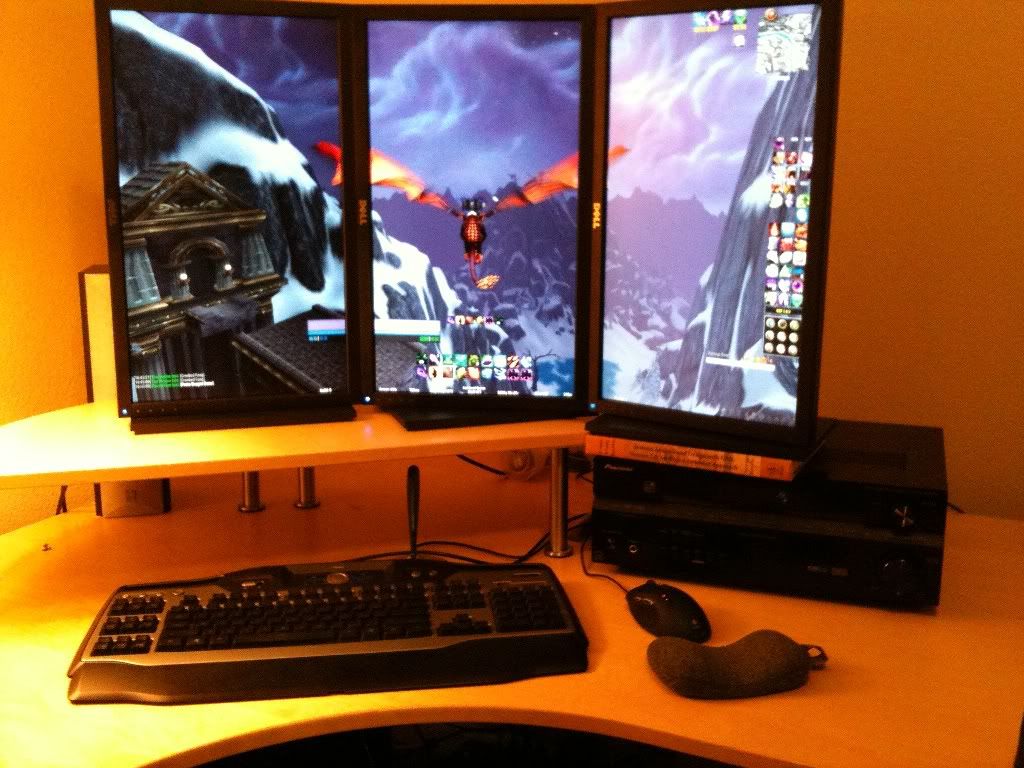
Forgive the clutter, haven't figured out a good stand yet, so my receiver is filling in for the time being.
The immersion factor of having 3x as many pixels as a standard monitor is huge and well worth the sacrifice of having breaks in the picture (bezels) imo. Overall, I'm very happy with my purchase and will be buying similar setups in the future.
Forgive the clutter, haven't figured out a good stand yet, so my receiver is filling in for the time being.
Eyefinity is great, I have it on my 3 - 24" monitors, all in Portrait mode of 3600x1920res But Eyefinity is very simple in a way. It must be straight forward setup, all displays must be the same size and same resolution, and all must be in the same orientation, either all Landscape, or all Portrait, not mix and match of anything, it just does NOT work with Eyefinity.
But the most common mix I see wanted and asked for the most, is of that picture, 20" Portrait + 30" Landscape + 20" Portrait. Is a shame AMD didn't figure that out in engineering this product, oh well.
Is there any word on when/if AMD will ever improve Eyefinity to address that?
It'd open up a lot of alternate configs (both at the high end and for those on a tight budget)... I think it'd really help Eyefinity catch on. Right now I'm unwilling to downgrade my main display from a 24" to anything smaller, and 24" IPS displays that would look the best in portrait mode are far too expensive for me... So it's either live w/TN panels in portrait mode, do landscape mode, or wait it out... So far it's the latter.
Zorachus
[H]F Junkie
- Joined
- Dec 17, 2006
- Messages
- 12,524
Finally got my new P2210Hs today! Initially had them in landscape, but I like portrait much better. Much higher level of immersion. Took a while to get the display angles just right, you can definitely tell they are TN panels. I have the panels facing over my left shoulder as when they face me directly, the right (normally the top) edge of the panel fades noticeably. I was using an Acer 24" 1920x1200 monitor and these new dells are 1920x1080. I didn't think a 120 pix drop would make that much difference, but in landscape mode, games seem overly stretched to the point that the only games I would consider playing in landscape are racing games or flight sims. I'm not a fan of 16:9 monitors. The bezels are a little annoying at first, but once you get into a game, you hardly notice them at all. I only wish they were slightly farther apart (again, wish there was a cheap 16:10 option).
The immersion factor of having 3x as many pixels as a standard monitor is huge and well worth the sacrifice of having breaks in the picture (bezels) imo. Overall, I'm very happy with my purchase and will be buying similar setups in the future.
Forgive the clutter, haven't figured out a good stand yet, so my receiver is filling in for the time being.
Looks nice
...I was telling everyone that Portrait mode is 100X better for immersion factor, that Landscape looks too thin and stretched out on smaller sized monitors. But since I got the Dell 2709WFP's the 27" size does Landscape much better than the small 24".What add/ons you running in WoW...I had a hard time when in Landscape to get the mod "moveanything" to work in Portrait mode.
What add/ons you running in WoW...I had a hard time when in Landscape to get the mod "moveanything" to work in Portrait mode.
I use bartender4 for my action bars, which allows you to move your action bars anywhere on the screen. I also use pitbull for the unit frames which also allows you to move them anywhere you want. I use grid for my raid frame. I took most of my ideas from CaithUI on wowinterface.com. I usually just copy the WTF folder into mine and copy the addon profiles, and then change them to taste. I'll include a link to the CaithUI at the bottom.
Caith UI


Zorachus
[H]F Junkie
- Joined
- Dec 17, 2006
- Messages
- 12,524
I use bartender4 for my action bars, which allows you to move your action bars anywhere on the screen. I also use pitbull for the unit frames which also allows you to move them anywhere you want. I use grid for my raid frame. I took most of my ideas from CaithUI on wowinterface.com. I usually just copy the WTF folder into mine and copy the addon profiles, and then change them to taste. I'll include a link to the CaithUI at the bottom.
Caith UI
Cool thanks for the answer
Main thing I need to adjust is the action spell bars at the bottom of the screen. As you know in Portrait mode those span across all three display and look horrible.Cool thanks for the answer
Yeah, I use bartender4 to shrink the buttons and stack the bars on the middle screen, with grid, chat windows, and map on the left and right screen.
Can anyone please point me to a good/affordable triple monitor arm for 23" and up monitors?
Do you think this will work? There's also a silver model for those who have silver/white monitors.

http://sewelldirect.com/AES-GOGO-tr...se&cvsfa=1306&cvsfe=2&cvsfhu=53572d3231383638
Do you think this will work? There's also a silver model for those who have silver/white monitors.
http://sewelldirect.com/AES-GOGO-tr...se&cvsfa=1306&cvsfe=2&cvsfhu=53572d3231383638
Last edited:
kartman_canada
n00b
- Joined
- Dec 19, 2009
- Messages
- 9
OK... I'm new but I've been reading enough to realize that I might have an issue...
I have one newer monitor (Dell U2410 - 1920x1200) that has a DP input and 2 older Samsung LCDs that are 1600x1200 panels. I recently got my Radeon 5870 card after much waiting.
Before ordering I found ATI/AMD marketing crap that said the Eyefinity system would handle different resolution panels within a group. I want 1600+1920+1600 horizontally x 1200 vertically for an effective desktop of 5120x1200. Of course, all I can get the latest driver to do is 4800x1200 which puts the middle 1920x1200 LCD into 1600x1200 mode, matching the other 2 displays. Grrr...
Much reading yesterday has left me with the impression that many are in my boat. My question is what to do from here... return the card and wait for ATI/AMD to get their act together, live with it, etc.
My real question is: Is this a HARDWARE limitation with this card/GPU which will never be "corrected" or is this SOFTWARE and had AMD given any comment about whether they can and will fix this limitation? If so, when?
Sorry to reopen this, I'm just looking for the definitive answer or a point in the right direction
I have one newer monitor (Dell U2410 - 1920x1200) that has a DP input and 2 older Samsung LCDs that are 1600x1200 panels. I recently got my Radeon 5870 card after much waiting.
Before ordering I found ATI/AMD marketing crap that said the Eyefinity system would handle different resolution panels within a group. I want 1600+1920+1600 horizontally x 1200 vertically for an effective desktop of 5120x1200. Of course, all I can get the latest driver to do is 4800x1200 which puts the middle 1920x1200 LCD into 1600x1200 mode, matching the other 2 displays. Grrr...
Much reading yesterday has left me with the impression that many are in my boat. My question is what to do from here... return the card and wait for ATI/AMD to get their act together, live with it, etc.
My real question is: Is this a HARDWARE limitation with this card/GPU which will never be "corrected" or is this SOFTWARE and had AMD given any comment about whether they can and will fix this limitation? If so, when?
Sorry to reopen this, I'm just looking for the definitive answer or a point in the right direction
Before ordering I found ATI/AMD marketing crap that said the Eyefinity system would handle different resolution panels within a group.
My real question is: Is this a HARDWARE limitation with this card/GPU which will never be "corrected" or is this SOFTWARE and had AMD given any comment about whether they can and will fix this limitation? If so, when?
These two AMD reps may be helpful, but it's likely a software problem IMO. What you want is similar to the common PLP setup (1200x1600 + 2560x1600 + 1200x1600), but without the additional problem of rotation. This does not seem to be a priority - they're still struggling to get even a majority of identical-monitor setups working perfectly. The viewpoint they have taken is that Eyefinity was something they realized could exist late in the Evergreen platform development cycle due to the way that they set up Displayport's clock - a bonus that they have helpfully included in early beta form for customers, with little expectation that it would be popular. They note that there exist innumerable potential hardware combinations, far too many for them to test, and they are focused on getting some very basic useful features right as soon as possible with a fixed development staff and market research suggesting that multi-monitor accounts for a tiny share of sales.
There is certainly AMD marketting crap that was more ambitious than what was launched, but I don't recall any of it stating explicitly that different-resolution monitors would be allowed.
I'd pick up another screen, there's no knowing how long it will take.
Last edited:
AlvinMaker
Limp Gawd
- Joined
- Dec 8, 2009
- Messages
- 288
Finally got my new P2210Hs today! Initially had them in landscape, but I like portrait much better. Much higher level of immersion. Took a while to get the display angles just right, you can definitely tell they are TN panels. I have the panels facing over my left shoulder as when they face me directly, the right (normally the top) edge of the panel fades noticeably. I was using an Acer 24" 1920x1200 monitor and these new dells are 1920x1080. I didn't think a 120 pix drop would make that much difference, but in landscape mode, games seem overly stretched to the point that the only games I would consider playing in landscape are racing games or flight sims. I'm not a fan of 16:9 monitors. The bezels are a little annoying at first, but once you get into a game, you hardly notice them at all. I only wish they were slightly farther apart (again, wish there was a cheap 16:10 option).
The immersion factor of having 3x as many pixels as a standard monitor is huge and well worth the sacrifice of having breaks in the picture (bezels) imo. Overall, I'm very happy with my purchase and will be buying similar setups in the future.
Forgive the clutter, haven't figured out a good stand yet, so my receiver is filling in for the time being.
Well, as fluke of Dell backordering the P2310Hs I had on order, and me not wanting to wait, I switched gears and have 2 of my 3 2209WAs showing up on Tuesday. I think I'll ultimately enjoy the added viewing angles of the IPSs vs. TNs. The third will be in shortly after New Years, so I'll get some pics/first impressions up once I fire it all up.
Zorachus
[H]F Junkie
- Joined
- Dec 17, 2006
- Messages
- 12,524
Well after seeing Caducus Portrait setup, I had to go back yet again to Portrait
