![[H]ard|Forum](/styles/hardforum/xenforo/logo_dark.png)
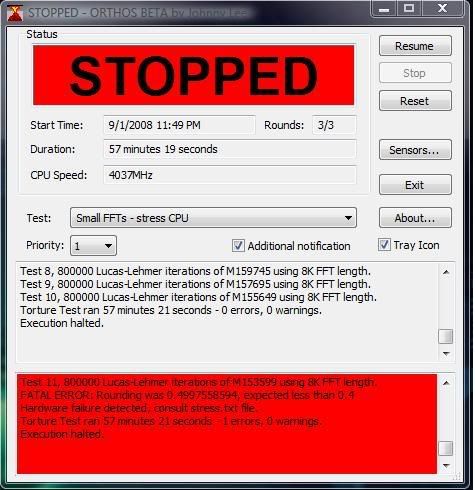
I've hit my 4 Ghz mark, and I'm in windows. However, I'm having stability issues. Every now and then a game or program may crash on me. I also ran Orthos last night for 57 minutes, and got 1 error and it stopped. Most of my settings on the P5Q Deluxe are on auto, but I'll post everything for anyone that may be able to offer some helpful advice. Originally I had no intentions of overclocking my memory, but if i can get this system stable I would like to have it running per GSkill DDR2-1000 spec.
System Setup:
E8500
8GB Gskill DDR2-1000
Asus P5Q Deluxe
ATI 4870x2
WD Velociraptor
WD 6400 AAKS x2
SB X-Fi Titanium Fatality Pro
Custom Built Water Cooling
I'm running a 9.5x multi, 425fsb, and 2.0 on dram voltage. Everything else is set to AUTO. Cpu spread spectrum, pcie spread spectrum, speed step, dram static read control, and c1e support are all disabled / off.
ASUS P5Q DELUXE Template:
Orthos Error:
System Setup:
E8500
8GB Gskill DDR2-1000
Asus P5Q Deluxe
ATI 4870x2
WD Velociraptor
WD 6400 AAKS x2
SB X-Fi Titanium Fatality Pro
Custom Built Water Cooling
I'm running a 9.5x multi, 425fsb, and 2.0 on dram voltage. Everything else is set to AUTO. Cpu spread spectrum, pcie spread spectrum, speed step, dram static read control, and c1e support are all disabled / off.
ASUS P5Q DELUXE Template:
Code:
AI Overclock tuner: MANUAL
CPU Ratio Setting: 9.5
FSB Frequency: 425
PCI-E Frequency: 100
FSB Strap to North Bridge: AUTO
DRAM Frequency:AUTO
DRAM CLK Skew on Channel A1: AUTO
DRAM CLK Skew on Channel A2: AUTO
DRAM CLK Skew on Channel B1: AUTO
DRAM CLK Skew on Channel B2: AUTO
DRAM Timing Control: AUTO

1st Information: 5-5-5-15-3-52-6-3
2nd Information: 8-3-5-4-6-4-6
3rd Information: 14-5-1-6-6

CPU Voltage: AUTO (Reads 1.272 in the latest CPU-Z)
CPU GTL Voltage Reference (0/2): AUTO
CPU GTL Voltage Reference (1/3): AUTO
CPU PLL Voltage: AUTO
FSB Termination Voltage: AUTO
DRAM Voltage: 2.0
NB Voltage: AUTO
NB GTL Reference: AUTO
SBridge Voltage: AUTO
PCIE SATA Voltage: AUTO

Load Line Calibration: Enabled
CPU Spread Spectrum: Disabled
PCIE Spread Spectrum: Disabled
CPU Clock Skew : AUTO
NB Clock Skew : AUTO
CPU Margin Enhancement: OPTIMIZED
Orthos Error:

 The dividers aren't inherently bad, you're just likely to not derive much of a benefit from running the memory faster if it comes at the cost of tRD (Anandtech has some good info on this, on the ROG Rampage review), so it's a balance game. Real-world benefits are probably minute either way, on the memory side... As far as getting the proc OC stable (which should be the priority if you already verified the memory to be stable on Memtest), I'm sure someone else can better help ya with that.