• Some users have recently had their accounts hijacked. It seems that the now defunct EVGA forums might have compromised your password there and seems many are using the same PW here. We would suggest you UPDATE YOUR PASSWORD and TURN ON 2FA for your account here to further secure it. None of the compromised accounts had 2FA turned on.
    Once you have enabled 2FA, your account will be updated soon to show a badge, letting other members know that you use 2FA to protect your account. This should be beneficial for everyone that uses FSFT.

Dell U2410

..., the only thing that comes into question now is how dell will deal with the warranty if you manually flash your monitor..

I imagine it could potentially cause an issue. However, it seems some A00's might have had the firmware installed anyway. i.e. they weren't relabelled as A01. So you can follow this line of logic...;)
 
How good is your technical expertise? If you can't figure out the instructions, you may not want to proceed with the flash? I'm not trying to be a jerk, just don't want you to mess up (brick) your monitor is you're not sure what you are doing.

You have to rename one file as well, it's an obvious rename.

I can give instructions, but I'm a bit reticent to do so if it means someone messus up their monitor?

I have no issue flashing stuff and i understand bin, pdf and exe. what i dont get is how to copy the three files to other then html docs.
 
So this is it? Flash and dithering problems, all gone?

Nice. Now I just have to wait for monday, to exchange this tint-issue monitor, and hopefully get a decent one.
 
Yes, the new firmware fixes the dithering.

@ decapitator - you need to click on each file to bring up the download page (that is why they are htm links). Then click on 'download'. You should get a prompt with the proper filename. Hope this helps.
 
Great, the firmware update is finally in our hands and now the goddamn U2711 is on its way... I should have just bought a 2410 on impulse when it came out
 
I confirm the flash works! No more dithering, it also seems the touch sensitive buttons are more responsive.
 
Has anyone posted about this on Dell's forum to see what the Dell reps. say about it?
 
It's already up on there forums. Chris M is saying that the leaked update has not been tested in the States and it could void your warranty so the risk is yours.

Anyone else see a correlation with the leak of this fix and the upcomming new monitors that have been announced at CES? I mean honestly it does not take 6 months to release a fix for firmware. And if it does then Dell should really think about using a different manufacture for these monitors.
 
Well, I've tried the DELL U2410_M1F191_5719.bin firmware and can also report success with an A00 U2410.

The A01 is firmware version is M1F191, and the 5719 in the name refers to the checksum. Rev A00 was firmware version M1F190 with a 0DFF checksum. There appears to be a date of September 10th or October 9th 2009 on the firmware (can't tell because the date could be either way around, but I suspect it's October).

It would be really nice if someone, who received an A01 from the factory, could load the Dell ISP Tool and check the firmware version by installing the software, hooking up the USB cable, and pressing the "Get FW Ver" button. Since Revision A00 U2410's report as Firmware Version "90", I'm wondering if factory flashed Rev A01's report as version "91", or do they report Revision number "M1f19", as they do when you manually flash using the U2410_M1F191_5719.bin file?

Here's a before and after shot of what you see in the Dell ISP Tool when flashing from A00 to A01.
U2410_FlashTool_A00Before_A01After.jpg


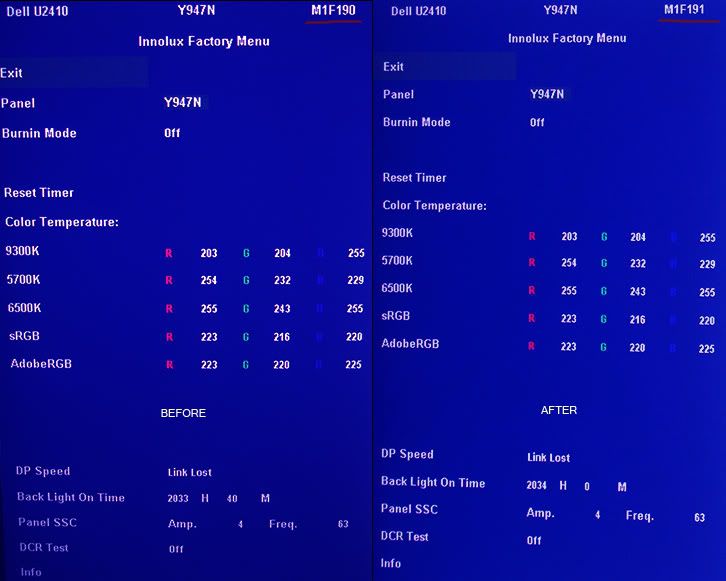
For those curious when you flash it also preserves your settings, so nothing is lost. Here's a before and after shot of what the Factory Menu looks like between A00 and A01. As you can see the only thing that changed is the version number in the top right..

U2410_ManualFlash_A00_A01_FactoryMe.jpg


I flashed from Windows 7 (64 bit), All you do is unplug everything from the U2410 except the power cable and USB port, hook up the USB port cable to another system with another screen, and launch the tool. Takes just over a minute and then you power/off on and are done. Very simple procedure. It's really great to finally be able to use sRGB mode as it was intended - without grainy looking images! I'm still looking for any other differences but haven't noticed any as of yet..
 
would be really nice if someone, who received an A01 from the factory, could load the Dell ISP Tool and check the firmware version by installing the software, hooking up the USB cable, and pressing the "Get FW Ver" button. Since Revision A00 U2410's report as Firmware Version "90", I'm wondering if factory flashed Rev A01's report as version "91", or do they report Revision number "M1f19", as they do when you manually flash using the U2410_M1F191_5719.bin file?


I ran the program and my A01 has the FW M1f19.
 
I ran the program and my A01 has the FW M1f19.
Thanks for checking!

That's good to know since it means there should be no way for Dell to tell (other than the lack of an A01 sticker placed over the A00) that the end user has performed their own upgrade.. Just in case they tried not to honour the warranty just because you flashed your own screen..
 
Yes, the new firmware fixes the dithering.

@ decapitator - you need to click on each file to bring up the download page (that is why they are htm links). Then click on 'download'. You should get a prompt with the proper filename. Hope this helps.

Thanks Betaboy, it was late and i overlooked the download tab.
Thanks again.:)
 
Last edited:
I've just bought U2410 rev. A00 and I have FW Ver: M1f19 :)
So Dell is aplying new firmware to displays which have made before new firmware
 
Well, I've tried the DELL U2410_M1F191_5719.bin firmware and can also report success with an A00 U2410.

The A01 is firmware version is M1F191, and the 5719 in the name refers to the checksum. Rev A00 was firmware version M1F190 with a 0DFF checksum. There appears to be a date of September 10th or October 9th 2009 on the firmware (can't tell because the date could be either way around, but I suspect it's October).

It would be really nice if someone, who received an A01 from the factory, could load the Dell ISP Tool and check the firmware version by installing the software, hooking up the USB cable, and pressing the "Get FW Ver" button. Since Revision A00 U2410's report as Firmware Version "90", I'm wondering if factory flashed Rev A01's report as version "91", or do they report Revision number "M1f19", as they do when you manually flash using the U2410_M1F191_5719.bin file?

Here's a before and after shot of what you see in the Dell ISP Tool when flashing from A00 to A01.
U2410_FlashTool_A00Before_A01After.jpg


For those curious when you flash it also preserves your settings, so nothing is lost. Here's a before and after shot of what the Factory Menu looks like between A00 and A01. As you can see the only thing that changed is the version number in the top right..

U2410_ManualFlash_A00_A01_FactoryMe.jpg


I flashed from Windows 7 (64 bit), All you do is unplug everything from the U2410 except the power cable and USB port, hook up the USB port cable to another system with another screen, and launch the tool. Takes just over a minute and then you power/off on and are done. Very simple procedure. It's really great to finally be able to use sRGB mode as it was intended - without grainy looking images! I'm still looking for any other differences but haven't noticed any as of yet..

So i unplugged everything from my u2410 except the usb and the powercord, then plugged the usb into my laptop then turned the u2410 back on.

now do i run the.exe from my laptop?
 
Last edited:
So i unplugged everything from my u2410 except the usb and the powercord, then plugged the usb into my laptop then turned the u2410 back on.
now do i run the.exe from my laptop?
Yes. Make sure the U2410 USB device is done being installed by Windows. Then browse to bin file and press start. When it's done, after just over 1 minute, it will tell you to power the monitor off then on. When you're sure it's done reset the monitor power.. Congrats.. you are now on version A01 :)
 
Thanks for checking!

That's good to know since it means there should be no way for Dell to tell (other than the lack of an A01 sticker placed over the A00) that the end user has performed their own upgrade.. Just in case they tried not to honour the warranty just because you flashed your own screen..

Lol, I saw where you were going with the earlier questioning, was thinking the same thing...:D
 
I had two U2410's delivered just before Xmas, about two weeks later one has black spots, got Dell to send me a NEW monitor and they assured me it would be A00 (so both monitors match) well I got a A01 and of course after a factory reset they don't match in the factory menu all the colors are different. So I did do the firmware update on the A00 to A01 which worked fine as as far as I can dell they are all good now.........but......... The revision name "M1F19" on the factory A01 monitor text is YELLOW in color the monitor A00 that I updated myself to A01 the text is in White. So obviously there is some sort of difference...... Just what to know what you guys find.

Below is the ISP tool pic on a factory shipped A01 and both my factory menu pics so you can see the color on the revision text sorry about the pics they're from my blackberry

Pics can be found here
http://sites.google.com/a/antonelli.tv/u2410/home
 
I flashed my A00 monitor using Win 7 x64 with no problems.

Now I have a monitor with no tinting, and dithering. Who do I thank for this?
 
Updated to A01, and things look a lot better. Even the spyder3 calibration looks slightly better. I think the dithering may have been confusing the colorimeter a bit during the dark grey measurements.

Still, using a Spyder3Elite still has some issues with this monitor. sRGB-tagged images are yellow-shifted when using any profile created with the colorimeter software. One must manually select an sRGB ICC profile in windows color management after having the Spyder3 Profile Chooser update the video card LUT with its calibrated profile. Strange, I know. I wish I knew why this was the case to get sRGB images to display properly. (yes, I know I really should be using AdobeRGB... I just primarly do webwork so sRGB is the way I roll).

Also, I noticed that the U2410 has a noticeable luminance gradient from left to right, on order of about 10 candle power. The left side of both of my U2410's measures around 93, the right side around 103 (I have calibrated to a target of 100). Color temperature also varies depending on where one measures on the screen. It seems to have a variance of approximately 150 Kelvin.

Also of interest, 6500K on the U2410 looks more like 5000K does on standard-gamut monitors. I remember reading an Eizo white paper on why this is the case.
 
I just updated my A00 and it updated fine to the new version but now the buttons do not work and they do not light up :(

Any ideas?
 
Unplug the power cord, then replug power cord, and hit the power button. After you flash the monitor, it tells you to cycle it, so that is what I did.
 
Unplug the power cord, then replug power cord, and hit the power button. After you flash the monitor, it tells you to cycle it, so that is what I did.

Yeah I did those exact steps as well and no luck. I even tried to flash it again and still nothing. I guess its time to call customer support?
 
The revision name "M1F19" on the factory A01 monitor text is YELLOW in color the monitor A00 that I updated myself to A01 the text is in White. So obviously there is some sort of difference...... Just what to know what you guys find.
Hmm. So your factory flashed A01 shows as a Yellow M1F191 in the Innolux Factory Menu? Can anyone else with a factory flashed A01 confirm that?

I'm not sure why there'd be that difference.. I assume you're using the normal DVI-D 1 port and all the same settings on both? The Factory Flashed Rev A00 "M1F190" text was also white on my screen, as is the manual flashed "M1F191".
 
Yeah I did those exact steps as well and no luck. I even tried to flash it again and still nothing. I guess its time to call customer support?

Are you sure you unplugged the power cord from the monitor? Not the wall socket, but directly from the back of the monitor. Leave it for a good 5 minutes. Then plug it back in and see if it powers up, it should.
 
Also of interest, 6500K on the U2410 looks more like 5000K does on standard-gamut monitors. I remember reading an Eizo white paper on why this is the case.
One big problem is that a colorimeter isn't "spectral independent". There are possibilities of compensation (especially if you know the combination of probe and display) but to be on the absolutely safe side you have to use a spectrophotometer. We have run into some problems with a few WCG- and RGB-LED displays that could only be solved by using an accordant probe. But I haven't seen the DELL yet so I can only presume.

edit: I've found the whitepaper - Eizo speaks of a problem that exists in addition to what I mentioned (so even with a spectrophotometer). The solution seems to be quite coherent if you want to use both "types" in a multi screen setup.

Best regards

Denis
 
Last edited:
Are you sure you unplugged the power cord from the monitor? Not the wall socket, but directly from the back of the monitor. Leave it for a good 5 minutes. Then plug it back in and see if it powers up, it should.

Thanks Betaboy, I just unplugged it from the wall and went to sleep. Plugged it back this morning and viola :D
 
Hmm. So your factory flashed A01 shows as a Yellow M1F191 in the Innolux Factory Menu? Can anyone else with a factory flashed A01 confirm that?

I'm not sure why there'd be that difference.. I assume you're using the normal DVI-D 1 port and all the same settings on both? The Factory Flashed Rev A00 "M1F190" text was also white on my screen, as is the manual flashed "M1F191".

I have factory flashed firmware and the M1F191 text is yellow, although there is rev A00 on the label.
 
Hmm. So your factory flashed A01 shows as a Yellow M1F191 in the Innolux Factory Menu? Can anyone else with a factory flashed A01 confirm that?

I'm not sure why there'd be that difference.. I assume you're using the normal DVI-D 1 port and all the same settings on both? The Factory Flashed Rev A00 "M1F190" text was also white on my screen, as is the manual flashed "M1F191".

I would not put to much thought into it, the flash could have come from multi source software developers, the leak one from china right?
 
Being this flash is still young I'd still be interested if we ever find out if there is any significance to the factory yellow and the flashed white text. As far as I can tell they are both working spot on with the same color, hues, luminance, etc when set to the same settings.

It's more of a curiosity at this point.
 
No U2410 anymore. Adio green pink tint, fuzzy picture and terrible Dell ...

Anyone has an recommendation for 1920x1200 24'' with white color from left to right?

I was looking today at HP LP1740 5 years old LCD and that was eye releving white and color saturation and it is a 6-bit panel +2 FRC...

Cheers,

Marin
 
Back
Top