• Some users have recently had their accounts hijacked. It seems that the now defunct EVGA forums might have compromised your password there and seems many are using the same PW here. We would suggest you UPDATE YOUR PASSWORD and TURN ON 2FA for your account here to further secure it. None of the compromised accounts had 2FA turned on.
    Once you have enabled 2FA, your account will be updated soon to show a badge, letting other members know that you use 2FA to protect your account. This should be beneficial for everyone that uses FSFT.

Custom Dell Case (Completed!)

dellcopy.jpg


stroke is the outside line surrounding the dell logo.
 
Case Cover Part 3

DVD DRIVE BEZEL

Well I worked like crazy tonight and have another update. Hopefully this one is more successful than the last ;). The DVD drive I am using is UGLY but hopefully I can pull it off to where you dont see ANY of it.

First thing I created was the front panel

front.jpg


I may make some more cuts and definitely need to drill holes before I polish it but this gets me started.

Here is the OEM drive

bezel1.jpg


I sanded down the original bezel to get a nice flat surface to glue to

bezel2.jpg


Made the bezel

bezel3.jpg


and then attatched it...

drivecover1.jpg


drivecover2.jpg


And when all is said and done, this is how it will be finally installed...

bez1.jpg


bez2.jpg


bez3.jpg


bez4.jpg


bez5.jpg


I'm not sure what I'm going to do about the button yet... any suggestions. I'd love to leave it to where you just press a spot on the front and have no button but that would be very hard to get consistent.

I may drill a small hole for the activity light or I might just forget it and keep it simple.

Geo
 
Geo Fry said:
I'm not sure what I'm going to do about the button yet... any suggestions. I'd love to leave it to where you just press a spot on the front and have no button but that would be very hard to get consistent.
Geo
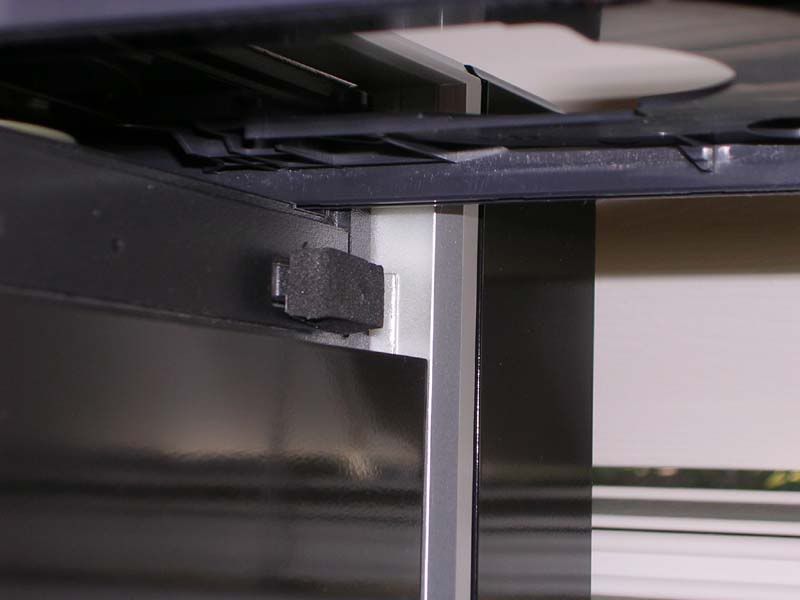
I use double sided foam tape on the button and it seems to work pretty well.

From my current rig:
stealthedcdbuttontape.jpg


You may have to adjust the thickness a bit, but especially considering the width of that aluminum panel there should be plenty of flex. You want the foam to be pressing against the surface as much as possible without it staying pushed down.

Great job on the mod so far btw! Do you plan on painting any of that aluminum as well?
 
Hey, you were talking about putting the dell logo on case, and not many people were fond of the idea. I remembered that you were trying to salvage the "fuse cabinet" sticker off the front of your metal box. If the case is too bland for you, maybe make a recreation of that?

probably lame.. But maybe people will like it?
 
I may be the only person active in this thread that liked the dell logo idea.

I like it even better with a blue-lit plexi (counterstroke or not) background. I think it'd look cool, and it keeps with the theme somewhat in that it's a modded dell (even if none of the parts are REALLY dell parts).

The Delete idea'd be cool (but you'd have to spell it Deleet, i suppose).

At any rate, I'm definitely for some sort of lit logo on the top. LEDs + plexi = fun.
 
Heeeyy, I liek the Dell logo, too! lol

To be honest I don't think it fits by technical standards, since this is a far cry from what it once was, BUT, I do think it will look good on it anyway. :)
 
cudaman73 said:
I may be the only person active in this thread that liked the dell logo idea.

Nope, I think it's cool as well. Backlit with blue plexi would be really cool.
 
digital_exhaust said:
Nope, I think it's cool as well. Backlit with blue plexi would be really cool.

Blue plexi backlit Dell logo would completly awesome. Were you planning to mount it on the front of the case, or the top? Amazing mod btw!
 
So I guess that it was just the people who didn't like it speaking up :p

I am completely and totally for it.

This worklog has *almost* inspired me to do a case mod meself.

'cept i'd be working with an HP case as a base, and HP cases are crap.
 
whrswoldo said:
Great job on the mod so far btw! Do you plan on painting any of that aluminum as well?
Thanks man and thanks for the suggestion... I'm sure I'll figure something out. As far as painting the aluminum... the sheets get polished and some of the 'L' and 'C' channels get painted black.

Thanks cudaman for encouraging others to speak up for it. I was starting to think it was a dumb idea afterall lol. I kind of like it... especialy if the E was backlit. I'm going to finish the case wthout it first. The only problem with backlighting it is the fact that I will have to cut through my top panel and if I end up not liking it then I need to make a new top panel :rolleyes: so we'll see.

Like JinxyBoi said it doesn't fit by any technical standards since it is almost nothing from what I started with, but it does go with the theme and might fit for a neat gimmick. If only I was cool enough to have my own logo :p

BMWlover said:
Blue plexi backlit Dell logo would completly awesome. Were you planning to mount it on the front of the case, or the top? Amazing mod btw!

The logo would go where the 4 screws are on the top... although I could do one on the front but probably not.

Thanks for the comments guys. An update wont be in order for a little while.... I'm working a lot in these next few days and wont get much, if any, work done
 
cudaman73 said:
I may be the only person active in this thread that liked the dell logo idea.

I like it even better with a blue-lit plexi (counterstroke or not) background. I think it'd look cool, and it keeps with the theme somewhat in that it's a modded dell (even if none of the parts are REALLY dell parts).

The Delete idea'd be cool (but you'd have to spell it Deleet, i suppose).

At any rate, I'm definitely for some sort of lit logo on the top. LEDs + plexi = fun.

Totaly agree.
Ok, so it's not a Dell any more but it was so the name still make sense to me.
Like the cut-out Dell name plate lots, nice work.
 
Just wanted to update a little bit on whats going on...

I got a great deal on a 3.0 Ghz P4 from someone here at the [H] and will probably be dropping in to this PC so that will help out alot. It is the Northwood core so heat wont be that much of an increase... so I have a queston for you guys.

Since this mod will have almost nothing from my old Dell in it, I think I should rename my title. Any suggestions?

Oh and I started folding @ home like 4 days ago :D . Here are my tags

 
Geo Fry said:
Just wanted to update a little bit on whats going on...

I got a great deal on a 3.0 Ghz P4 from someone here at the [H] and will probably be dropping in to this PC so that will help out alot. It is the Northwood core so heat wont be that much of an increase... so I have a queston for you guys.

Since this mod will have almost nothing from my old Dell in it, I think I should rename my title. Any suggestions?

Oh and I started folding @ home like 4 days ago :D . Here are my tags

call it the shoebox.
 
verrryyy nice dude.

could'a probibly pushed for a little less space by lowering your bracket that holds the drive and hdd a little, maybe only a cm but...

anywho dont get me wrong, this box pwns.
 
Pentium 4

Alright so it is official. The only peice of hardware from the original Dell is the hard drive lol. This is what I got in the mail the a few days ago.

P4package.jpg


P4outofbox.jpg


P4wrap.jpg


P4pin.jpg


P4.jpg


Lets compare from my old proc.

Celeron ------------------> Pentium 4
2.4Ghz -------------------> 3.0 Ghz
128MB L2 Cache ----> 512MB L2 Cache
no HT ---------------------> with HT

dual threads ftw!!

This is the Northwood core so heat wont be as bad as a Presott... although I must say that after installing it heat is much more prominent. Not just from the CPU heatsink... but also from the PSU. I really dont want to add another fan but we'll see once I get the case closed up how bad heat is internally. It may only need a few more vents.

OK so lets do some comparing benchmarks for this old system. I did these like 2 hours ago, right after intsalling the new P4. I'll be able to eek out a few more points if and when I overclock (all scores are at stock speeds)

-------------------------Celeron---------------------Pentium 4
PCMark04---------- 2573 ------------------------ 3769
3DMark05---------- 1301 ------------------------- 1542

So nothing fantastic but a definite improvement :). 3D scores are low but ah well. One thing I realized is that since my case is so small, if the GPU were to be upgraded, my choices will be very limited by space alone. I could maybe fit a 7600GS in there. But then heat would be an even bigger issue.

Anyways, next update will be pretty much the completed case... so stay tuned!

Geo
 
Just wanted to say that i love this mod.
In fact i love all mods that consist of building a case from scrath and not just adding water cooling system and some paint.
Maybe my next case mod will be like this one ;)
 
Nice mod Geo Fry, been watching your worklog from the back row, where I watch all the worklogs ;) .

I really like the cleanliness of your dvd drive, and I think you should try and keep it as such with no buttons for the drive. Now, no one has ever accused me of over-engineering stuff *ahem* but a really cool thing you could do to open the drive is make it touch sensitive. A bit like the touch lamps you can buy that work on capacitive sensing. In your case you just touch the drive bezel and it opens! I wouldn't use the same method for closing it though, as when you put a disc in you'll probably end up touching it and it'll close before you can get the disc in...

As for the name, your Dell logo worked out sweet and would be a shame not to use it. However, names like DELL-33T (a spin-off from the delete already suggested) and Dell-No-More are my offerings!
 
I like Mysterae's suggestion for the Dell-33t, to be honest.

and I somewhat agree for the touch-sensitive optical drive, though i imagine it'd be somewhat difficult to pull off (I've never even seen how the mechanism works, much less tried to put it into something, but it'd be awesome if you did :)
 
Hi,

Saw this mod for the first time today, and I must say - I'm impressed!

I think I may have a solution to your Dell logo problem. A few months ago, I saw a mod wherein a guy had basically created a light panel using plexiglass and LEDs. If you file an LED down slightly using a rough grit, I diffuses the light. If you put said LED into a hole drilled into plexiglass then it spreads the light throughout the whole sheet creating the light panel effect. I think doing this with the Dell logo could be a nice effect, using a piece of blue plexiglass as the backing for the logo (like someone sketched above).

EDIT:
filthysanchez said:
/EDIT

leddifussion.jpg


Here is a link to the incredible project, Orac3, at the point where he describes this technique:

http://www.bit-tech.net/modding/2003/09/16/orac3_part1/6.html

http://www.bit-tech.net/modding/2006/10/02/Creative_X-Fi_Gaming_Mod/8.html
...and another mod using this idea
 
Well I got lots to say ;)

First off, thanks for all the interest guys! It means a lot and it keeps me going. And thanks for liking it Mysterae... feels good coming from a guy with a much more refined mod ;) :D. Oh and about the touch sensitive drive door... I have no clue how to go about doing that lol. And even if I did, after sanding down the original button and trying it out, it works fine as is. Thx tho

Alright so I have a couple topics I want to discuss and I have a few questions:

TOPIC 1 - HEAT

So the new P4 idles at 42-43C which I think is too hot for the Northwood core. Maybe I need to reapply AS5 and reseat the heatsink? I mean it is still exceptable but once the case cover goes on this will most likely change. Does anyone know the average temp a Northwood P4 should get?

Also I've noticed that my PSU dumps alot of heat into my case. The PSU housing has these secondary vents shown here

panelconvent.jpg


Some air exits out these instead of the back where the plug is. Normally this wouldn't be a problem in a bigger case but this is a very small case and I'm using the PSU as my primary exhaust fan. Once the top is put on all that hot air will remain in the case and just be recirculated. Do you think it would be okay to seal off those vents to force the air out the back or does the PSU need those for proper cooling of the unit?

TOPIC 2 - LOGO

Well I have decided to use the Dell logo. My brother likes the idea of it... especially if the 'E' is backlit. I've never backlit anything so hopefully I can impress. Thanks so much for the suggestion rogersj3. The focused light of LEDs was going to be a problem. I wasn't even thinking about sanding down the lens.

I will try many different approaches to getting this logo lit up. I will take pics of them so you guys can help me decide what looks the best :D. As far as color, my initial pick was blue but then I thought orange would look great.

Out of these what would you suggest?

- plexi behind entire logo / just behind 'E' ?
- LED color orange / blue / white ?
- colored / clear plexi ?
- frosted / transparent ?

These are my thoughts:
Clear frosted plexi behind entire logo with orange LEDs
 
man what a great job on your dell mod geo, i want to mod a fan in the front just like you did, and suggestions?
 
Geo,

For the effect to look really good, you need to use the same color plexi as the LED. personally I prefer the blue, but if you got creative ( use an X of plexie melded to produce and orange and blue panel and use both LED colors) it could be good either way.

Glad to be of assistance with my first post (ever).
 
I agree with filing down the LED to get that diffuse (as opposed to focused) light, for a back lighting panel.

If you have the extra plexi, i'd suggest mocking up a backlight panel that surrounds the whole dell logo, 'cause i think that'd look better. I could be wrong, but I think it'd look better.

And i think you could go either way with frosted or clear. it depends on the LED you use, and if you file it or not, i guess. filed LED + frosted plexi = very diffuse light, i'd imagine.

but excellent work so far. keep on truckin' :)

EDIT:
And in response the PSU thing, I'd suggest blocking the vents with something removable (like duct tape) first, to see if it helps or hinders the PSU/ambient/CPU temps at all. If it helps, you could block them with something more permanent (bondo? :p)
/EDIT
 
Geo Fry said:
So the new P4 idles at 42-43C which I think is too hot for the Northwood core. Maybe I need to reapply AS5 and reseat the heatsink? I mean it is still exceptable but once the case cover goes on this will most likely change. Does anyone know the average temp a Northwood P4 should get?
Those temps are more than fine for a Northwood, especially on stock air. Unless you start having instability or throttling issues, don't worry about it.
 
Zero82z said:
Those temps are more than fine for a Northwood, especially on stock air. Unless you start having instability or throttling issues, don't worry about it.

Alright good. I'm not as much worried about the temps as I am the sound of the fan on the heat sink.... I did some testing and with the cover on, the fan spins at aroung 3000rpm, compared to 2300rpm when the cover is off (temps remain the same) and this is at idle. The sound of that whirring fan gets a little annoying but maybe if I make some kind of duct from the rear grill, maybe the direct fresh air will keep it around 2500rpm. I'll have to try that tomorrow...
 
I like the craftmanship of the logo, I would use it.

When I think Dell, i think blue, so I would not use orange. Then again, this is not just any Dell.
I would try cutting a plexi sheet with the same outline of the logo, then frost the edges and the back side, and use several leds with the lens sanded down to lit everything up. Since I have not tried this before, I would get some scrap plexi and experiment to see how things work best.

I take it that the Dell logo will go on the top face to hide the (ugly) screws holding the CD rack. Otherwise you could put it on the front (or make somethign new) to hide an air intake hole.
You could then put an exhaust fan in the back (where the old Dell used to have the intake) or mount an intake fan in the front to suck in air via the new (disguised) front hole.

And I too, would tape up the PSU vents to see how it behaves.
 
Sorry for the lack of any type of update... progress has been A LOT slower than I anticipated. I've been thinking about everyone's suggestions and working on a solution for them all. Lately I've just been priming sanding and painting. Here are a few pics of what I've got done...

parts2.jpg


parts.jpg


Obviously the grey parts are just primed and will be black soon enough... I've realized that my painting skills suck so it's been a lot of sanding and doing over till I get it the way I want it. I'm pleased with the logo finally.

As you can also see I have cut a peice of plexi the full size of the logo. This will make it being back lit look tons better. The tray with the 4 LEDs in it is what will be behind the 'E'. The bottom is painted white so it will reflect the most amount of light. I'm also going to drill a few holes in the plexi and insert some LEDs in there to keep light through.

I may do a combo of lights... i.e. white backlit E with blue LEDs in the plexi's drilled holes. Not sure yet. Any ways thanks for looking and being patient :)

Geo
 
Here this will explain a little more on the backlighting...

I made a tray

tray.jpg


Painted it white and added LEDs

trayclose.jpg


Cut a hole in my top panel

topwhole.jpg


Place the tray under it

topwtray.jpg


And then the "E" gets lit from behind :D

topwlogo.jpg


Light will hopefully also come from the sides too

topwlogo2.jpg


See now those 4 screws have a purpose :p

Just so you know... the plexi is clear, not green. It's just the protective film
 
yay for backlighting the logo!

looks much better than i thought you were gonna go for.
i remember thinking this was a simple mod to give your brother a decent looking machine, not this beauty.
 
filthysanchez said:
i remember thinking this was a simple mod to give your brother a decent looking machine, not this beauty.

LOL yea I remember thinking that too... When I started I figured I have it done in oh... a few weeks. But no I keep getting too many ideas into my head. I need to stop though. I keep telling him it will be done this weekend... ok I mean this weekend.... ok this weekend :p. He's getting tired of me getting his hopes up. I just need to freakin finish. I will definitely have it finished by Halloween though :)
 
Just finish the logo and give it to your bro.

Then, if he has 'heat issues', he can turn it in for further modding.

Or, you can change the inside components and give him your old case with this hardware and you keep this box with your current hardware ;) :D

edit: oh yeah, i forgot to mention that the "D" looks funny without a hole in the middle, but making the hole is probbably more work than it is worth.
 
Ozone77 said:
Or, you can change the inside components and give him your old case with this hardware and you keep this box with your current hardware ;) :D

Yeah I've thought about keeping the case for myself but the hardware inside is all that will fit in it. The MSI mobo that's in there is 9.6" by 7.5"... very small and it fits EXACTLY in the case. I wouldn't be able to get any size bigger than whats in there. Also the GPU is quite snug aswell. I could MAYBE fit a 7600GS or a X1600pro but it all depends on the molex power connector that needs to be connected (clearance to the front of the case is quite tight).

Plus it would just be mean to keep the case for myself :p
 
Back
Top