• Some users have recently had their accounts hijacked. It seems that the now defunct EVGA forums might have compromised your password there and seems many are using the same PW here. We would suggest you UPDATE YOUR PASSWORD and TURN ON 2FA for your account here to further secure it. None of the compromised accounts had 2FA turned on.
    Once you have enabled 2FA, your account will be updated soon to show a badge, letting other members know that you use 2FA to protect your account. This should be beneficial for everyone that uses FSFT.

Corsair: 650D

i've been rocking an Antec 900 for a long time.... debating on if i should upgrade to this case. my cable management sucks right now and my psu is not modular. actually worth the upgrade? better off getting a modular psu instead?

I made the same exact move and I'm glad I did. I've got some before and after pics here:

http://hardforum.com/showpost.php?p=1037519452&postcount=9899

As you can see, I pretty much gave up on cable management in the Antec.
 
thats great, thanks for the input. debating between the 650d and the 500r carbide now.... any input there?

do you have a microcenter near you? They should have the 650d in stock and may even have the 500r for you to compare.
 
thats great, thanks for the input. debating between the 650d and the 500r carbide now.... any input there?

I liked the look of the 650D better. Plus, I use built-in dock on the top relatively frequently, so that was definitely an attraction for me.

I was a little nervous about the temps, but once they released the mesh side panel, I didn't worry about it because I had an option if it was too warm for my liking. That was my only reservation with this case.
 
I ended up buying the 650D and an Antec Tricool 120MM fan. I realized afterward that this fan has no 3 pin connector, it's an OEM model that only has it's own 3 speed switch and a molex power connector. I was wondering what most people do, do they use the case's fan controller for all their case fans, or do they plug any of them into the motherboard? I'm trying to decide how valuable that 3 pin connector is, if I should return this fan and get a more expensive one with the right connector. I've never dealt with case fans before, just used the stock fans that came with my last Lian Li case.

This Obsidian case seems to be great quality, no paint chips and it did have the -1 revision on the UPC code. I'm going to put it together tomorrow, looking forward to it. The way the front panel hatch door slowly opens after you push it is real slick.
I replaced all the stock fans and got a seperate fan controller. I would say still find a 3 pin fan, most controllers only support 3 pin.
 
I replaced all the stock fans and got a seperate fan controller. I would say still find a 3 pin fan, most controllers only support 3 pin.
I live in Canada so it costs at least $10+ to ship most fans that I'm seeing online, and my local Canada Computers doesn't seem to have good options for me aside from the no-connector fan I already bought. I think I'm going to stick with that plus the two 200mm stock fans and see how it goes. I'll adjust the back one manually and the other two via the top switch. I did some research and it doesn't seem like being able to hook your fans to the mobo is that big of a deal.
 
Hi, I'm hoping to get some advice with my new 650D purchase. I just spend the day moving my PC into the new case and working on the cable routing, hours later I discovered this flaw in the manufacturing and was wondering if it's worth worrying about. The bolt on the top-right corner is supposed to go through both layers of metal but it only went through the first layer and then pushed that layer outward instead of proceeding through the second layer. It doesn't seem to affect the front face going on or looking wrong, I don't know if it would create some structural weakness or other issues. Thanks.

flaw1.jpg


flaw2.jpg


flaw3.jpg
 
Last edited:
That's a bad rivet job. I wouldn't be too concerned with it. A simple fix is to drill it out and replace it with another rivet or a screw/nut. It wouldn't be worth the expense to ship it out considering that you are in Canada.

Important disclaimer: Before drilling remove all components from the case.
 
yeah, it doesn't look like it's affecting anything but that little corner of metal. i wouldn't worry about it if it's not affecting the front piece any.
 
My concern is just that they put that thing there to help hold it together and give it strength (I assume) and whatever job it's supposed to be doing, it's not doing. I can take it back to the retail store with some effort but I spent so much time on this one that it'd be really frustrating to dismantle it and start over, and hope there's nothing wrong with the replacement. This one is fine aside from that one thing.
 
Last edited:
All I have to say is that this case is simply stunning. The pictures really don't justify it's craftsmanship and ingenuity.

I am so happy I went with this over any other case.
 
My concern is just that they put that thing there to help hold it together and give it strength (I assume) and whatever job it's supposed to be doing, it's not doing. I can take it back to the retail store with some effort but I spent so much time on this one that it'd be really frustrating to dismantle it and start over, and hope there's nothing wrong with the replacement. This one is fine aside from that one thing.
When I had mine apart this weekend I noticed it didn't have a rivet there at all. Not there, not the one above it, or either on the other side too. Just four empty holes.
 
When I had mine apart this weekend I noticed it didn't have a rivet there at all. Not there, not the one above it, or either on the other side too. Just four empty holes.
That is crazy. How long have you had it, and does it seem fine? Sturdy and stuff?
 
I got it end of Feb. I have taken it apart many times, I have drilled several holes and cut out the font fan mesh and it is still very sturdy.
 
Thanks man, eases my mind. I had 99% decided not to return mine and now I'm up to 100%. I really like this case aside from that messed up rivet/bent piece. Very nice. My only complaints are there could be some more space behind the motherboard for cables, and more tie down points. With more tie down points I might not even need the extra space.
 
Last edited:
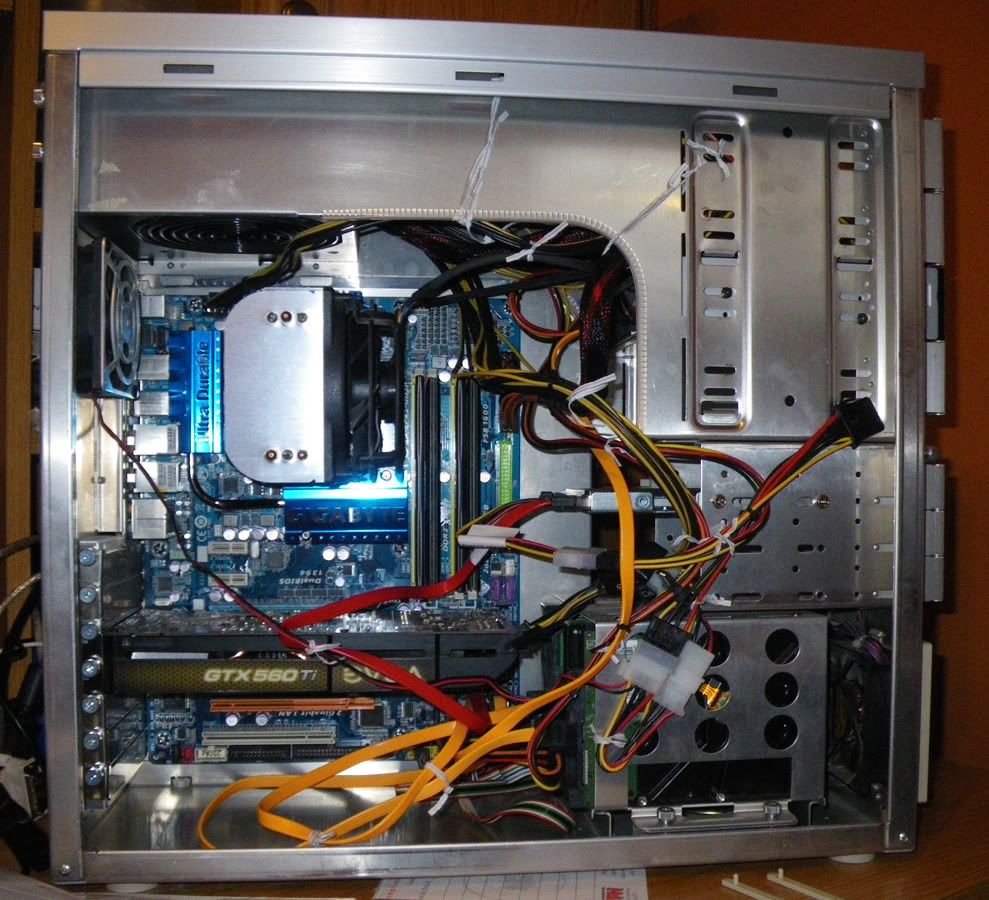
I've finished routing my cables as good as they're gonna get, ready to post some before/after photos. I plan to upgrade my mobo/cpu/ram/heatsink next month so I should have some black SATA cables to replace these orange ones at that point, and will try to do the cables a little better. The components are identical between the before/after, only the case has changed.

Before (Lian Li case I bought in 2002)
IMGP5366a.jpg


After (Obsidian 650D)
IMGP5392a.jpg
IMGP5389a.jpg
 
Some things that will change are the next mobo will have the sata ports on the right edge so they won't be sticking out like that, and will be black cables. Not a whole lot more I can think of doing without buying a modular psu which I don't plan to. Got any other suggestions?
 
well, short of doing what i would do ( make all cables just the right length and 550 cord sleeving with no heat shrink ) you could use the grommet by the psu instead of routing through that square hole, cut out any unnecessary wires (my psu is semi modular and came with 8 and 4 pin power connectors so i cut out the 4 pin one) and you probably already know, but you can put that HDD cage on the base next to the psu and remove the plastic stand that it is currently on completely. that wouldn't really help with cables, but i think it makes the case look a little less odd and frees up the front fan completely. i took all my hdd cage out all together and mounted my 3.25 drive in the 5.25 bay and drilled holes on the side near that square cut out and mounted my SSD there. there is so much you could do really, but you probably just don't care much about those sort of things.
 
I did route the CPU power cable through that grommet by the PSU but it seemed more practical to route the rest through the large square hole. I'll re-evaluate that when I replace everything next month. I thought about moving that lower hdd cage back toward the psu like you suggest, but I wasn't sure if it would look good having it be visible through the window. I guess it would help hide those psu cables that are going out the square hole though. Is it easy to remove the plastic stand under the bottom hdd cage? I do care about the looks but I don't think I would go to the extend of cutting out wires or buying sleeving and stuff like that. I like the blue LEDs on that antec 120mm fan at the back and was considering finding something similar for the top and front fans. Thanks for the ideas!
 
there are four screws under the case to remove that plastic piece.

i guess i didn't really like the look of having it either spot, which is why i got rid of them all together.

if you use 550 cord for sleeving ( which i think looks tons better) it's dirt cheap, about 7 cents a foot most places. but it's kind of a pain to do it, i'm kind of dreading finishing up my wires.
 
I just picked this case up and would like to ask a question to the owners of this case and RedBeard...

Where's the internal USB3 connector for the motherboard??? This is almost a deal breaker since I have a bunch of USB stuff in the back and don't really want to give up two ports in the back for the front two USB3 ports. Not only that but why on earth would I want two wires coming from inside the case to the back of the case to clutter things up? Is there a USB 3.0 mobo connecter to the connector for the front two ports available (there's gotta be)?

That said I like almost everything else about the case. The front fan does make a bit of noise but I think that's due mostly because of how close the fan blades are to the holes in the fan cutout up front. should be a easy fix via a dremel and 200mm fan grill.

This case should also be able to support a pretty substantial water cooling setup which is the main reason I bought it :D
 
You can buy a Bitfenix brand internal connector for around $10, the case doesn't come with one. I've read about the front fan making noise but mine doesn't seem to. It sounds the same as the top fan.
 
You can buy a Bitfenix brand internal connector for around $10, the case doesn't come with one. I've read about the front fan making noise but mine doesn't seem to. It sounds the same as the top fan.
Thanks, exactly what I was looking for...
http://www.bitfenix.com/global/en/products/accessories/internal-usb3-adapter/

And you're right, my fans also sound very much the same. The front fan make a bit more whine, but I know this is mostly from the proximity to the front holes on the case which I believe can be fixed with a 200mm wire grill :)
 
I've read about some people cutting the front metal mesh right out. and just leaving an open hole there. Others have put extra rubber washers between the fan and the grill to create space. I don't feel the need, I assumed they fixed that problem cause the complaints I'd been reading were from last summer and I bought my case a few weeks ago. I'm used to a much noisier case so maybe I just don't know what to expect, I personally don't hear what I'd call a whine though.

My only complaints with this case are the lack of internal USB 3.0 and one of the rivets on the front was installed wrong and bent some of the metal (pics on previous page). I decided that was minor enough not to return the case, just cosmetic and invisible when I put the front panel on. I'm really happy with it otherwise.
 
Also note this interesting gem I found...
http://www.frozencpu.com/products/1...ator_Silverstone_Cooler_Master_Yate_Loon.html

Looks like it will fit perfectly up front if you remove the plastic HDD holder and hdd cage to the postion closest to the PSU. Should have more then enough room for a pump as well.

This should be enough to support a overclocked i7 and Single GPU. if more cooling is needed there's always the top of the case with it's room for 140mm rads! :eek: :cool:
 
done. i opted for the silverstone slot load bay instead of the stealth bay i made because i was an idiot and tried to take the front panel off without taking the dirve out first and the front came off the drive. i couldn't get it back on flush and i wanted to use that bluray drive for turning my previous computer into an HTPC anyway.

2z7najb.jpg


108e7w9.jpg


27xl180.jpg
 
done. i opted for the silverstone slot load bay instead of the stealth bay i made because i was an idiot and tried to take the front panel off without taking the dirve out first and the front came off the drive. i couldn't get it back on flush and i wanted to use that bluray drive for turning my previous computer into an HTPC anyway.

2z7najb.jpg


108e7w9.jpg


27xl180.jpg

GREAT job on your PC. One of the best builds I've seen in this thread!
 
done. i opted for the silverstone slot load bay instead of the stealth bay i made because i was an idiot and tried to take the front panel off without taking the dirve out first and the front came off the drive. i couldn't get it back on flush and i wanted to use that bluray drive for turning my previous computer into an HTPC anyway.

http://i44.tinypic.com/2z7najb.jpg

http://i41.tinypic.com/108e7w9.jpg

http://i41.tinypic.com/27xl180.jpg
Woah, that's a very nice build man!
What fan is that in the front of the case??

I hate to say it but I've been considering taking this case back and going for something smaller and just stick to air cooling (the 650d is a epic watercooling case). but those pics are making that decision much MUCH harder :cool:
 
thanks
it's a bitfenix spectre pro 200mm

i don't know what case you could find that's better, i love this thing.
 
thanks
it's a bitfenix spectre pro 200mm

i don't know what case you could find that's better, i love this thing.
That's the thing, I really can't find anything "better". smaller is where I'd go with if I took it back. But finding a case close to this would be a very hard job. If only I could find a matx version of this case (Readbeard do you hear me:D). The features and thoughtfulness that went into the design are very hard to fault.
 
I'm planning to buy an ivy bridge 3570k CPU and thinking about using a Corsair H80 cooler with it in my 650D. I don't know if I'm going to overclock it or not. Could anyone tell me how the H80 fan's noise level compares to the stock 650D fans? I have my case fans on medium and am fine with the noise level of those.

Also, with the H80 would you put the fan in the top-back position in the case vs the back-back or top-front positions? I assume that's where it would go since I know the H100 goes along the top.

Another thing, not case-related, would it be best to plug the H80 fan controller wire into the H80 or the motherboard?

Thanks.
 
Here's the corsair recommended install locations for bothe the h100 and h80:
http://www.youtube.com/watch?v=BWWFjsJONYc
Thanks. That's interesting that they show the H80 going in the back but the H100 in the top. I think it makes more sense for me to put H80 in the top cause the back fan is right near my ear and if this thing gets loud it's going to bother me more if it's in the back. If I put it in the top I would install my extra 120mm fan in the other top spot. I'm also hesitant to make it an intake as suggested in the video. There are no dust filters on those vents, I'd want it as an exhaust like I have my case already set up. Anyone have any thoughts?
 
Last edited:
having it as intake might make cpu temps better only, but it will be pushing hot air off the radiator into your case and having as intake will mess up the airflow. i had mine as intake for a long while and put it back to exhaust after a month or so. i noticed temps drop on everything even except the cpu when i changed to exhaust. cpu temps haven't raised however, just stayed the same.
 
Back
Top