• Some users have recently had their accounts hijacked. It seems that the now defunct EVGA forums might have compromised your password there and seems many are using the same PW here. We would suggest you UPDATE YOUR PASSWORD and TURN ON 2FA for your account here to further secure it. None of the compromised accounts had 2FA turned on.
    Once you have enabled 2FA, your account will be updated soon to show a badge, letting other members know that you use 2FA to protect your account. This should be beneficial for everyone that uses FSFT.

Can you tell the difference between SSDs?

ochadd

[H]ard|Gawd
2FA
Joined
May 9, 2008
Messages
1,469
Anyone made a jump from one SSD to another and thought "damn that's fast"? Before running benchmarks?

If you've upgraded from an older generation disk to the current gen I'd like you're feedback. From my experience there's been very little wow factor when upgrading. They all felt similar in my gaming rig. My upgrade path went Vertex -> X25-m G2 -> G2 RAID 0 -> Back to stand alone G2 disks.

Now I'm eyeballing the 500GB range of current gen drives for an upgrade. I've got my doubts there's a difference to be seen between say M4 or 840 class drives and a Vector, Neutron GTX, 840 Pro outside of benchmarks.
 
You're not going to "feel" or perceive any kind of difference between them with normal usage. I'd grab whichever is cheaper after factoring in warranty length (3 vs 5 years), and I'd personally forget about OCZ due to their not so great CS/RMA history. Oh and I'd at least add the Plextor M5 Pro Xtreme to the list of considered SSDs.
 
Last edited:
From my understanding (I use a x25-m g2) the current gen intel 520's are essentially double the performance. I do intend on purchasing the intel 520 240GB as soon as I have the finances. Do I expect to feel double the performance? I guess not... I would expect to see double performance when transferring large files, but in general windows and program performance I am not expecting it to be two fold better. If it is.. well damn that's exciting.

Here is my x25-m g2 crystal disk benchmark
homepc.png

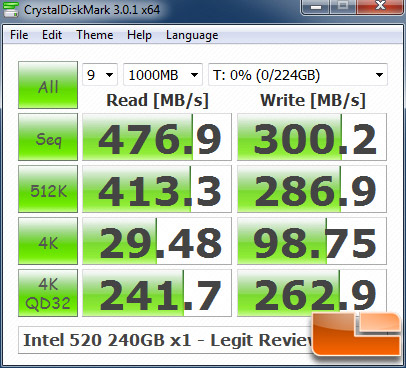
Here is someone (randome google search) benchmark of the intel 520
cdm.jpg
 
From my understanding (I use a x25-m g2) the current gen intel 520's are essentially double the performance. I do intend on purchasing the intel 520 240GB as soon as I have the finances. Do I expect to feel double the performance? I guess not... I would expect to see double performance when transferring large files, but in general windows and program performance I am not expecting it to be two fold better. If it is.. well damn that's exciting.

Here is my x25-m g2 crystal disk benchmark
Here is someone (randome google search) benchmark of the intel 520

I bet those 4k read/write speeds would be a lot closer if the 520 was 84% full like your SSD and wasn't in complete empty state.
 
YES!

But not with old drives you are using.

I could not tell the difference between my G2 and Crucial M4, and some older-gen drives... and raid0 Intel 510s, Intel 330s, were SLOWER on what you FEEL but faster on transfer. NOT a good judge for how you want to do your setup.

The new Toshiba, Samsung 830, Samsung 840 Pro, Plextor Pro, and some others are literally 2-3x as fast on transfer, which IMHO is NOT as noticeable for most of us since we aren't likely doing video work, or transferring large files often.

HOWEVER, the seek/access time of these NEW drives are in some cases 2x+ as fast too, now that is INSANE when you think about it.

Spinner most are used to 12-17ms access time.
G2 SSD .xxx
New GEn SSD .0xx


It is FOR SURE noticeable.

Now, will I know if YOU can notice it ?
NOPE, I have no clue.

I sure can though :)

I just stuck a 840 PRO in my MBPro replacing an Intel 510 that was in there for a short period, so far it's feeling more like my new MBAir (with Toshiba SSD) which is more responsive, and "faster feeling".
 
yep depends on how it is used, and for what purpose.

The difference in speed bewteen them can be large, but unless you are using them directly in the way they need to, you shouldn`t notice a much if any difference, maybe a bit faster on bootup, maybe better at keeping itself fast etc, all good things, not major things I do not think, but I only use an Agility 3 and its plenty fast for me :)
 
yep depends on how it is used, and for what purpose.

YES

Often times, what seems to be a storage bottleneck is not. So in those situations, you're not going to see a difference. For example, during boot, only a portion of boot is storage work, CPU / Memory and bus are all involved. Increasing your storage performance will only affect the times when storage access is actually being done, obviously. I've got a sound card that adds 3 seconds by itself to my boot time - that has nothing to do with storage.

Opening applications for the first time during a session, you'll use your storage, but then you're looking at 1 second for a slow SSD and .8 seconds for a fast SSD as the other .8seconds is CPU work, as an example.

Those are two situations, where, in light usage the diff between a slow SSD and fast SSD may not be noticed. It also depends on the user - some folks just aren't as "in-tune" with their stuff as others.

Heavier workloads? Yeah, there's huge benefits to be seen from slow SSDs vs. fast SSDs vs. RAID0 etc. Installing 100+ patches from Windows Update on a new build is something i can immeditely tell a difference between storage setups. Loading game levels etc.
Thing is most people expect an SSD to magically make every single part of their box faster. It will only affect that which has to do with disk I/O. It will also show you where your other bottlenecks are. Overclocking a 2600K from stock to 4.8GHz does wonders for those things that aren't storage related, which then will show further storage bottlenecks. And on and on....

Bring Haswell and bring 16G SATA Express... We're prettty much maxed on this gen of hardware for now IMO.
 
You're not going to "feel" or perceive any kind of difference between them with normal usage. I'd grab whichever is cheaper after factoring in warranty length (3 vs 5 years), and I'd personally forget about OCZ due to their not so great CS/RMA history. Oh and I'd at least add the Plextor M5 Pro Xtreme to the list of considered SSDs.

I'll second this, could add the M5S too... I went from an 80GB X25-M to a 128GB 830 and I didn't notice much of a difference except when sequential writes came into play, as that was always the X25's Achilles heel (writing large files to my older/smaller X25-V is slower than writing to my USB 3 3.0 thumbdrive :p ).

I upgraded for the jump in capacity more than anything, should've probably waited for 256GB drives to come down in price but I got my first 830 over a year ago now and the second one (bought a month ago) was cheap enough ($70) that I don't really regret it. :D

You should also try to keep more empty spare area on the drive at all times as it helps a lot in keeping performance consistent (aim for 25%).
 
My wife had a Crucial M4 and her opinion was that her computer (a fast Athlon whatever) was as fast as with the 2TB WD green drive it replaced.

I just upgraded my wife's computer to a I3-3220 (low level I3), 16GB memory, and a 1TB WD black drive. She saw no performance difference. (I could not use the M4 as I could not shrink the OS partition enough to fit.)

Then I made 2 changes to an I7-3770 (high enough level for office work), and SanDisk 32GB ReadyCache. She noticed the difference.

I would suggest that to increase performance one needs to imporve both the CPU and the drive.
 
My wife had a Crucial M4 and her opinion was that her computer (a fast Athlon whatever) was as fast as with the 2TB WD green drive it replaced.

I just upgraded my wife's computer to a I3-3220 (low level I3), 16GB memory, and a 1TB WD black drive. She saw no performance difference. (I could not use the M4 as I could not shrink the OS partition enough to fit.)

Then I made 2 changes to an I7-3770 (high enough level for office work), and SanDisk 32GB ReadyCache. She noticed the difference.

I would suggest that to increase performance one needs to imporve both the CPU and the drive.

A lot of laptops get bottlenecked by the manufacturer with the bios, though it can also be related to specific chipsets. That being said, replacing the Samsung 1TB HDD that came with my laptop with an SSD made this thing fly. I'm happy Samsung doesn't integrate bios bottlenecks with their laptops like some other companies do.
 
I would suggest that to increase performance one needs to imporve both the CPU and the drive.

The rest of my system is pretty tight. I need a bigger SSD for sure but it could wait many months if the performance side of the equation isn't there yet. Don't want to buy just for space if I there won't be bump in performance to go along with it.

Thanks for all the replies so far. Keep them coming :)
 
Yeah I had two gen one OCZ Vertex drives in raid0, moving to a single samsung 830 on a sata 3 port and there was definitely an improvement.
 
The original Vertex were even slower than an X25-M tho, by a good margin. I think a lot of very light users could really not be susceptible to the improvements a SSD generates purely because of their usage patterns. If someone spends 90% of their time in a browser and Word and they have enough memory that they never close those apps then storage isn't really the bottleneck.
 
An update to my original post, now post upgrade. Some subjective input on how the system feels.

Decided to go with a Vertex 4 256GB that's running firmware 1.5. Upgrading from two stand alone X25m G2 80GB drives.
* Bootup process seems slightly different. The Windows 7 logo stays on longer now BUT the autostarted apps seem to be further along once the desktop is view-able. Weird.
* LibreOffice loads about the same or maybe slightly slower.
* Mass Effect 3 and BlackOps game load times after a restart didn't seem to change much.
* Installed a couple 20-50MB apps with no discernible difference.
* Uninstalling programs goes a little faster. 10 seconds before and maybe 5 seconds now.

Overall I'd say the difference is negligible for everyday gaming and web usage. Storage related tasks are faster but the difference is the time I would have taken a sip of coffee or checked email on my phone and only for tasks I don't do on a regular basis. From an enthusiast perspective I"m glad my system is quicker but the difference is rarely noticeable. After selling my two Intel drives the upgrade only cost $110 out of pocket and I gained 80GB of faster storage.
Before:
X25_m_asssd.jpg


After:
as-ssd-bench%20OCZ-VERTEX4%2012.26.2012%208-58-11%20PM.png
 
You're not going to "feel" or perceive any kind of difference between them with normal usage. I'd grab whichever is cheaper after factoring in warranty length (3 vs 5 years), and I'd personally forget about OCZ due to their not so great CS/RMA history. Oh and I'd at least add the Plextor M5 Pro Xtreme to the list of considered SSDs.

I disagree, but I also don't think many people notice the small differences (much like many people have no freaking clue how big their car is). I saw a nice improvement in response time going from RAID 0 ForceGT's to a single Samsung 830, and more recently I swapped out the 830 for an 840 and noticed a distinct slowing of program loads, especially on first bootup. Load up a Nova 2 drive and tell me you can't feel the difference :p
 
Went from gen 1 raid0 to crucial 128gb M4 and could notice a difference not big though.
I also notice a difference using windows 8 vs windows 7 where I am just plain happy with the speed and access of windows 8 as tis just a perfect OS.

There be in practical use, little to no difference and most who notice any difference have placebo efffect in use, due to if you buy something surely there is a difference? so you want to feel it and then you created the response ;)

I dont expect a 256gb ssd to be any difference for me in normal use.
benchmarks aside ssd gets you into subtle variance after a point.
 
The original Vertex were even slower than an X25-M tho, by a good margin. I think a lot of very light users could really not be susceptible to the improvements a SSD generates purely because of their usage patterns. If someone spends 90% of their time in a browser and Word and they have enough memory that they never close those apps then storage isn't really the bottleneck.

I dunno, i've had 100% of my customers notice the speed increase from upgrading to an SSD regardless of usage pattern. SSDs are just that much faster than hard drives.
 
I dunno, i've had 100% of my customers notice the speed increase from upgrading to an SSD regardless of usage pattern. SSDs are just that much faster than hard drives.

I agree with this.

Even my parents notice the SSD when browsing... images/resources cached load INSTANTLY vs HD they actually "load" and you can tell, and this is on at-least a 10mbit/10mbit WAN connection too.


How can going from 17MS access (probably avg. system spinner access for a 6mo+ old win7 install not on a Raptor, Black, Etc, even then 12-14ms) and go to an SSD and you are down to .1 or maybe .05 that's INSANELY different. Unless people are used to SLOW SLOW computers then in my (and previous poser) experience is that even people just doing email, and web notice a HUGE improvement. Don't even take into account laptop users increased battery life, etc.
 
windows 8 as tis just a perfect OS.
Every once in a while, one comes upon phrases on the Internet that seemingly can't exist.

Others include:

"Jenna-Louise Coleman is perfectly dreadful as the new Companion."

"Citizen Kane should be colorized."

"Donald Trump is tasteful."
 
and lets not forget "I can fap to the fat bitch on Mike & Molly, aint lyin bro"
 
Overall I'd say the difference is negligible for everyday gaming and web usage. Storage related tasks are faster but the difference is the time I would have taken a sip of coffee or checked email on my phone and only for tasks I don't do on a regular basis. From an enthusiast perspective I"m glad my system is quicker but the difference is rarely noticeable. After selling my two Intel drives the upgrade only cost $110 out of pocket and I gained 80GB of faster storage.

That's about what I'd expect and it mirror my own experience. Going from old spindle HD to SSD was the largest benefit. The follow-on upgrade from the X-25M/X-25E to Crucial M4 was exactly like your experience with some specific tasks having a noticeable improvement but with the overall performance staying roughly the same.
 
I've tried various SSD's and between 1st gen models and current gen. models I personally "feel" the difference. However, between different brands of current gen. SSD's I'm having a hard time telling apart the real-world performance.
 
I changed from a Vertex 2 to a Samsung 830 and in some cases I don't notice a difference, but in others I most certainly do. The Vertex 2 just had far worse garbage handling leaving me at times with rather severely reduced performance (from around 180 MB/s writes to around 30). I've written a similar amount of data to my 830 (about 10 TB total) and it has taken it in much better stride. I don't have any of the hiccups I had before when writing things to the drive and loads from the drive are a fair bit faster.
 
You're not going to "feel" or perceive any kind of difference between them with normal usage. I'd grab whichever is cheaper after factoring in warranty length (3 vs 5 years), and I'd personally forget about OCZ due to their not so great CS/RMA history. Oh and I'd at least add the Plextor M5 Pro Xtreme to the list of considered SSDs.

This is EACTLY what I would have posted, minus the Plexor comment and that's only because I don't know much about that exact product.
 
Back
Top