ASUS Maximus Formula @ [H]

weird i flashed to 0907 and now if i OC at all, the intel raid controller screen doesn't show up properly 0.0

nvm it's just not as happy with high pci-e settings
 
Ok I'm jumping in the realm of stupid questions but...

MB temps are running in the 30-35 range depending on load. Any opinions on that? I've been trying to re-arrange my air flow to help reduce it but not much joy yet.

Also any recommendations for Reliable temp info on CPU? I am Running a Q9650 and between the variou things I have some very different numbers.

10x400FSB

Idle
CoreTemp: 33
Asus Probe: 22

Load
CoreTemp: 73
Asus Probe: 62

I am not running at these levels currently because I am worried about which is right.

Rule of thumb is to not trust the MB maker software, but the difference is pretty wide between them.

Any thought?

Cheers

Croaker
 
Ok I'm jumping in the realm of stupid questions but...

MB temps are running in the 30-35 range depending on load. Any opinions on that? I've been trying to re-arrange my air flow to help reduce it but not much joy yet.

Also any recommendations for Reliable temp info on CPU? I am Running a Q9650 and between the variou things I have some very different numbers.

10x400FSB

Idle
CoreTemp: 33
Asus Probe: 22

Load
CoreTemp: 73
Asus Probe: 62

I am not running at these levels currently because I am worried about which is right.

Rule of thumb is to not trust the MB maker software, but the difference is pretty wide between them.

Any thought?

Cheers

Croaker


I'm using coretempbeta 0.95.4 for CPU temps on all 4 cores. when minimized it just lists 4 numbers representing each core in the task tray. On my Q6600 core#0 and core #1 run a little hotter than the other 2. let me know what you see
 
I upgraded to the Maximus Formula - SE from my P5N-E SLI yesterday *the review made up my mind for me, Thanks [H]!. I have to say aside from the minor glitch with the software it came with this is a very solid board. Probably the best board I've ever used. Then again I've never had a motherboard like this with so many features and capabilities. I love the thing.

There is just one little problem, which ofcourse is my fault. The black PCI-E x1 slot is not usable because my radiator is in the way. Can I use the other PCI-E x1 slots for my sound card or is the black one specifically for audio?
 
I upgraded to the Maximus Formula - SE from my P5N-E SLI yesterday *the review made up my mind for me, Thanks [H]!. I have to say aside from the minor glitch with the software it came with this is a very solid board. Probably the best board I've ever used. Then again I've never had a motherboard like this with so many features and capabilities. I love the thing.

There is just one little problem, which ofcourse is my fault. The black PCI-E x1 slot is not usable because my radiator is in the way. Can I use the other PCI-E x1 slots for my sound card or is the black one specifically for audio?

The black one is for the audio riser only. onboard audio is passable, but I put in my ol' trusty SB Audigy2ZS in bottom slot to give vid card room to breathe
 
The black one is for the audio riser only. onboard audio is passable, but I put in my ol' trusty SB Audigy2ZS in bottom slot to give vid card room to breathe

sorry I need to clarify. by 'my soundcard' I meant the soundcard that comes with the mobo. I don't have any other sound cards available. thanks
 
sorry I need to clarify. by 'my soundcard' I meant the soundcard that comes with the mobo. I don't have any other sound cards available. thanks

Well if your radiator is in the way it's time to buy a soundcard, cause the black slot is only one for the riser card. From what I have seen in a coupla reviews of this mobo the onboard sound is decent, prob the best of onboard sound out there, but nothing beats a dedicated solution. Saw an Audigy (not 2ZS or 4) for $29 out there on the web the other day, but there's plenty of others avail. I just like the SB's for game support and decent audio-out to my home theater for media playback...
 
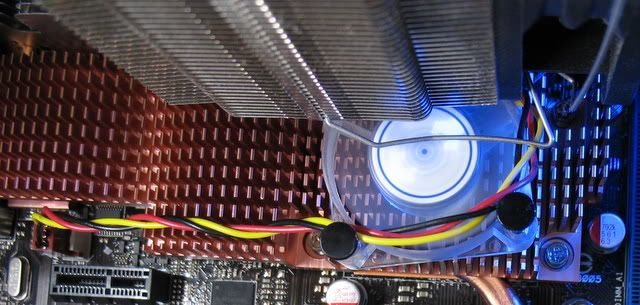
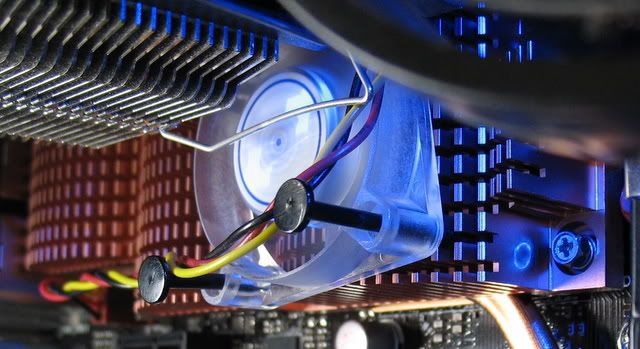
How bout some load temp comparisons, eh? Room temp is a chilly 23! :p Putting a quiet 5CFM 40mm on the NB dropped temps 7C.

maximus3400.jpg
 
Update: after checking the Crucial website I saw these Ballistix now listed as compatable with this mobo **important** with voltage of 2.2v . I was relying on what CPU-z reported during my fits of frustration (JEDEC = 1.8v , EPP = 2.0v) and never ventured over 2.05v for fear of frying the RAM. All seems to be stable so far, adobe, Word ,etc. all running fine. Will try some heavy-duty gaming later tonite. After stopping by my local PC shop and relaying my experience with a fellow tech, he said he was suprised it booted at all. Everybody who's having memory prob's should try the memory manuf's websites first, maybe save yourselves exchange/RMA hassles. Now for some more SupCom tests...

Yep my mushkin is the same way, 2.25 and the purr like kittens, under to volts and its blue screen city.
 
How bout some load temp comparisons, eh? Room temp is a chilly 23! :p Putting a quiet 5CFM 40mm on the NB dropped temps 7C.
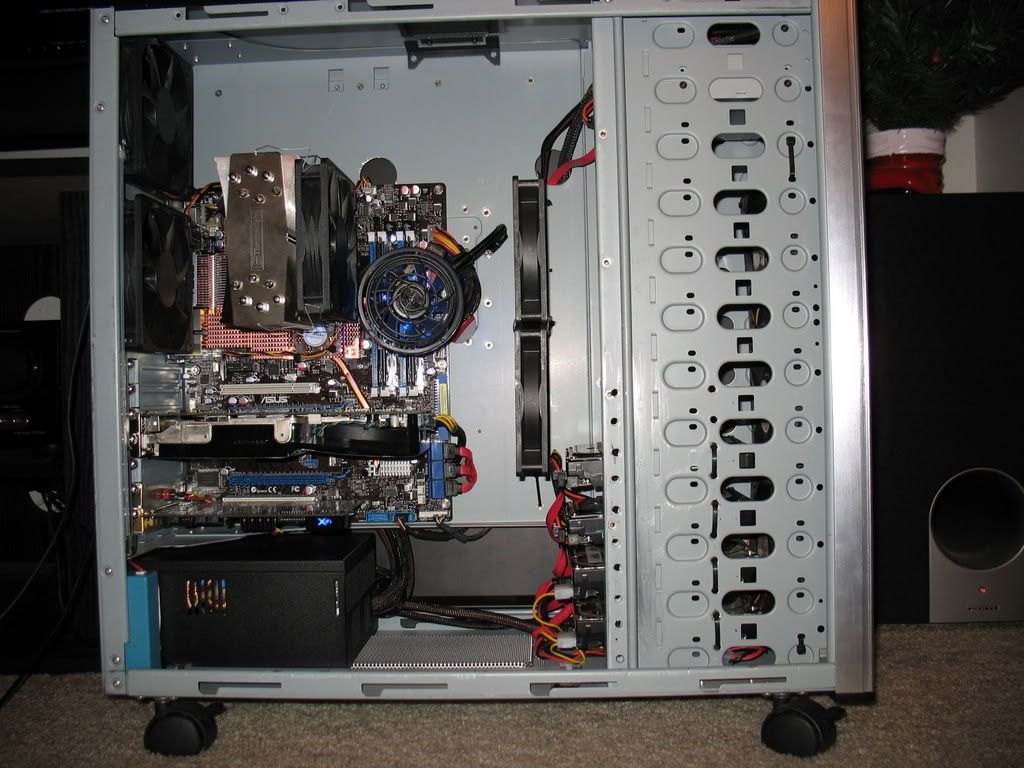
Dude my NB ios 50 c and my sb is 48 c. My video card is right over the sb, perhaps i should drop it down to the other slot?
 
Mine's in the same spot over the SB. It's all about that little fan on the NB, it's done way more than I thought possible for such a little guy. I might get one for the SB too. :D

IMG_2262.jpg
 
Had it set to 1.37v as I was reading in another thread that didn't want NB to get too hot? temp was only 43.5 tho, so I might try going higher after seeing Renegade's post. Couldn't get the system to stay up stable no matter what at stock CPU speed so traded in Ballistix for 2x1GB Kingston Hyper X PC8500. They're also rated for 2.2v and the system booted right away @ 1066 5-5-5-15 2T and stop errored but not before I got a CPU-Z reading which said 5-6-6-15 (EPP#1 - 533), so I rebooted with that and stop errored a while later after running some minor things, still only at stock CPU for this Q6600. Ran and passed memtest 3.4. So, not wanting to run asynchronous to remove that from a possible issue, I decided to try 667 mode with FSB set to 333. The Ballistix would not run this at all but these Kingston took off at the EPP#3 timings of 3-3-3-10 2T. All install/patching issues have vanished (I had to do an XP re-install so I have ALOT of stuff left to re-do) and successfully ran CPU stability test for over 75 min before I exited it, with CPU temps not going over 51. now typing this after 15 hours of up time with no system reboots, no recovered from critical error messages, etc. :p

Update: had some instability after several hours of uptime. Was 1 hour in to a SupCom skirmish when it crashed to desktop. went back into BIOS and hard set several voltages. Can't trust auto: Ai OC = manual, 9 x 333, DDR2 = 667, 3-3-3-10 2T, Static Read = enabled, Trans Booster = disabled, CPU = 1.35v (1.328 real), CPU PLL = 1.60v (1.68 real), NB = 1.37v (fluctuates 1.376 - 1.392, problem?), DRAM = 2.20v (2.256 real), FSB Term = auto (1.328 real), SB = 1.05v (1.056 real), Loadline Calibration = enabled, DDR Chans and Controller all = DDR2 REF, SB 1.5 = 1.50v (1.52 real). Ran 4.5 hour SupCom session just fine, and now will run 4 instances of Folding@Home as well ( 2 would always stop before ). Temps with 4 F@H at 90% are: CPUs = 58/55/49/51, NB = 44, SB = 43. Seems pretty solid here and am somewhat satisfied if can remain @ 3.0 GHz stable but wish mem freq was higher. I have this rig in a Centurion case underneath my desk and the heat coming up is noticably less than the AMD X2 OCed rig it replaced, Zalman CNPS 9700 is just a little quieter too. So far so good ...[/QUOTE]

Progress report: 3.2 GHz

Extreme Tweaker
Ai Overclock Tuner : Manual
OC From CPU Level Up : AUTO
CPU Ratio Control : Manual
- Ratio CMOS Setting :8
FSB Frequency : 400
FSB Strap to North Bridge : 400
PCI-E Frequency: 100
DRAM Frequency: DDR2- 800
DRAM Command Rate : 2T
DRAM Timing Control: Manual
CAS# Latency : 5
RAS# to CAS# Delay : 5
RAS# Precharge : 5
RAS# ActivateTime : 15
RAS# to RAS# Delay : auto
Row Refresh Cycle Time : auto
Write Recovery Time : auto
Read to Precharge Time : auto

Read to Write Delay (S/D) : auto
Write to Read Delay (S) : auto
Write to Read Delay (D) : auto
Read to Read Delay (S) : auto
Read to Read Delay (D) : auto
Write to Write Delay (S) : auto
Write to Write Delay (D) : auto
DRAM Static Read Control: enabled
Ai Clock Twister : auto
Transaction Booster : disabled

CPU Voltage : 1.35 (1.336 real)
CPU PLL Voltage : 1.66 (1.744 real) - juiced up for 3 GHz+ [link from Renegades post]
North Bridge Voltage : 1.39 (1.392 steady now - weird fluctuation stopped)
DRAM Voltage : 2.20 (2.26 real)
FSB Termination Voltage : auto (1.44 real)
South Bridge Voltage : 1.075 (1.072 real)
Loadline Calibration : enabled
CPU GTL Reference : .63x
North Bridge GTL Reference : .67x
DDR2 Channel A REF Voltage : REF
DDR2 Channel B REF Voltage : REF
DDR2 Controller REF Voltage : REF (1.14 real)
SB 1.5V Voltage : 1.50 (1.52 real)

NB LED Selection : NB Volt
SB LED Selection : SB Volt
CPU LED Selection : CPU VOlt
Voltiminder LED : enabled

CPU Spread Spectrum : Disabled
PCIE Spread Spectrum : Disabled

Advanced CPU Configuration
CPU Ratio Control : Manual
- Ratio CMOS Setting : 8
C1E Suppport : Disabled
CPU TM Function : enabled
Vanderpool Technology : Disabled
Execute Disable Bit : enabled
Max CPUID Value Limit : Disabled


USB Configuration
USB Functions: Enabled
Legacy USB Support : enabled

Temps are NB=47, SB=39, CPU's 58/54/48/48 with 4 F@H at 90%. I did move the RAM to A2/B2 slots to allow more breathing room as the one closest to the NB heatsink seemed quite warm. Been stable for quite awhile here now. Large Ai skirmish game of SupCom in progress left loaded into memory while I went to movies and came back and continued without a hitch. It was a long session with 1000 units cap on large map with RAM usage approaching my humble 2GB - no errors! Looking good so far
 
Mine's in the same spot over the SB. It's all about that little fan on the NB, it's done way more than I thought possible for such a little guy. I might get one for the SB too. :D
What are you using to hold the NB fan in place? May I be so bold as to ask for a closeup?

Thanks,
Ramrod
 
I just ordered an Asus Maximus Formula a couple of days ago, and im wondering if a Zalman CNPS 9700 is going to be able to fit on this board without problems. I've read of a few people having problems with their heatsinks hitting the NB/SB coolers.
 
I just ordered an Asus Maximus Formula a couple of days ago, and im wondering if a Zalman CNPS 9700 is going to be able to fit on this board without problems. I've read of a few people having problems with their heatsinks hitting the NB/SB coolers.
I've got the SE version and the 9700 fits fine. I'm not sure if the normal board uses larger coolers.


Sideline: Anyone using the AI Suite and found it quit working with the 907 BIOS, the new 10317 version of AI does work.
ftp://ftp.asus.com.tw/pub/ASUS/misc/utils/

Pack a lunch though. Asus seems to use dialup hosts for their ftp's.
 
AI Suite, PC Probe II, and ASUSupdate are all a joke. Don't even bother installing them and especially don't install the EPU driver.
 
What are you using to hold the NB fan in place?

I'm using the plastic push pins that normally hold the 120mm fan on a Coolermaster Stacker's 4 in 1 HDD bay. The NB's barely warm, almost cool w/ 1.35v and that little 40mm 5CFMer on there. Here's a couple shots...

IMG_2270.jpg

IMG_2271.jpg


...AI Suite...Asus seems to use dialup...
I tried to use AI Suite, but it shows nothing in the GUI. When I originally installed it, UAC was still turned on. Even tho I allowed it, the install froze @ 7%. After disabling UAC and installing again, it passed and the ! in Dev Mgr (ACPI/EPU?) went away, but AI Suite just doesn't load. Same deal with PC Probe. I just kinda gave up and starting using Everest. :( :p
 
I just ordered an Asus Maximus Formula a couple of days ago, and im wondering if a Zalman CNPS 9700 is going to be able to fit on this board without problems. I've read of a few people having problems with their heatsinks hitting the NB/SB coolers.

I've got the Zalman 9700 on mine (non SE), fits fine. Got it to blow air over the heatsinks/heatpipes but I'm still considering a small fan for NB cause mine is at 47C. Read in another thread that Asus doesn't use the best thermal solution for these 'sinks so might try prying them off and applying some Arctic Silver or some of the stuff that came with the Zalman.
 
Using OCCT with Everest to get the summary graphs, you can see voltages swing all over the place. Just don't install any of the ASUS software at all. Things work much smoother if you don't.
 
Ok this is odd, after burn in and leting her sit for 12 hours, north and south bridges are at 40 c . Thermal compound settling in?
 
K so I installed a Q6600 and 8GB of DDR2 800 4-4-4-12 gskill mem, so far so good, running @ 850 mem / 425 fsb / 3.85 @ default volts

the problem is when I Set the voltages to auto, i get the nuclear reactor melting down sound from AI Suite and it shows alot of my voltages in the red? (NB, FSB T, SB, CPU PLL, DDR2 REF) etc? what gives why is it overvolting so much :|?
 
Just don't install any of the ASUS software at all. Things work much smoother if you don't.
Too late. :D

I'm looking through the XS forum thread now, not much love for this phase changing, power saving driver...ack. It can't be disabled in bios, right? I'm looking through devmgr right now...
 
K so I installed a Q6600 and 8GB of DDR2 800 4-4-4-12 gskill mem, so far so good, running @ 850 mem / 425 fsb / 3.85 @ default volts

the problem is when I Set the voltages to auto, i get the nuclear reactor melting down sound from AI Suite and it shows alot of my voltages in the red? (NB, FSB T, SB, CPU PLL, DDR2 REF) etc? what gives why is it overvolting so much :|?


It just seems to be the nature of the board, you really have to dial this baby in. Fun, but time consuming lol
 
Too late. :D

I'm looking through the XS forum thread now, not much love for this phase changing, power saving driver...ack. It can't be disabled in bios, right? I'm looking through devmgr right now...
what is it about the EPU driver that is so harmful?? I never installed it, but was just about to....
 
Well since I can not seem to acquire the SE version of the Maximus Formula version, and I currently watercool, and I would like to obtain reasonable overclocks and dont want a toasty nb hindering my overclock.

So I am contemplating with either purchasing a vanilla Formula and taking the stock heatsinks off and buying a universal swiftech MCW30 heatsink for the nb. There is no gurantee regardless of how careful I am and I still will be spending money on the waterblock.

So I am leaning towards just pulling the trigger on a Maximus Extreme. This choice will be more expensive in the long run and will take a little longer to acquire all the parts for my next build. DDR3 is rather expensive, so it will be my last component that I will purchase.

The following parts are what I will be purchasing for my next build:

1. Asus Maximus Extreme
2. Intel Core 2 Quad 6600
3. Sapphire Radeon HD 3870 512 MB Video Card or EVGA GeForce 8800GTS
4. PC Power 750W Silencer Power Supply
5. CellShock DDR31800 Memory or other DDR3 Memory

Will be watercooling with my components from my current setup.

If I purchase 2 3870 I will probably opt for a dual loop system. Loop 1 with the cpu and nb will be running through my current watercooling setup. Loop 2 will consist of the two video cards, another Laing DDC Pump, and a Thermochill PA120 rad.
 
what is it about the EPU driver that is so harmful?? I never installed it, but was just about to....
Check the XS thread(s), there's talk about switching between 4 to 8 phase and overall screwing w/ voltage regulation to save the environment. I didn't see an option to disable in the BIOS tho.

...a toasty nb hindering my overclock.
This might interest you. FWIW, the NB on air's only loading out @ 40C w/ 1.35V here in 23C room temp w/ a 40mm 5CFM fan.
 
I am unable to get my CORSAIR Dominator 2GB (2 x 1GB) 1066 (PC2 8500) to run stable on the maximus formula. I have tried auto settings and manual settings at 5-5-15 and 2.2V. It is completely stable with 2 sticks of Corsair 5400c4pt, but i get random reboots and memory errors with the 8500. Anyone know what other settings to change?
 
I am unable to get my CORSAIR Dominator 2GB (2 x 1GB) 1066 (PC2 8500) to run stable on the maximus formula. I have tried auto settings and manual settings at 5-5-15 and 2.2V. It is completely stable with 2 sticks of Corsair 5400c4pt, but i get random reboots and memory errors with the 8500. Anyone know what other settings to change?

NB voltage. You may need to bump the NB volts to help drive those sticks. The X38 mem controller likes it's volts.
 
K so I installed a Q6600 and 8GB of DDR2 800 4-4-4-12 gskill mem, so far so good, running @ 850 mem / 425 fsb / 3.85 @ default volts

the problem is when I Set the voltages to auto, i get the nuclear reactor melting down sound from AI Suite and it shows alot of my voltages in the red? (NB, FSB T, SB, CPU PLL, DDR2 REF) etc? what gives why is it overvolting so much :|?


Mine did that, but I know it is not a peculiarity of the Maximus as other boards have displayed the same readouts using Probe.

Was it something like this :-

PC Probe II V1.04.19B is red flagging voltages as follows:
1.2VHT= 4.08v
NB Core=4.08v
SB Core= 4.08v
DDR2 TERM=4.08v
Memory= 4.08v
CPU VTT= 4.08v

It's got to be a reporting glitch in Probe. I'm running stock everything atm, even BIOS 0401 :p

If I try to update it I just know it will go tits :eek:
 
Does someone here have used the CPU Level Up feature in the bios ?

I want to buy a Q6600 and put it at the QX6850 setting in the cpu level up menu.

But I wonder if my XMS2 667Mhz ddr2 memory is enough to do that ?

Or will I have to buy greater speed memory ?

Thanks for your help !
 
http://www.tomshardware.com/2007/10/31/x38_comparison_part_1/page19.html

The Asus Maximus Formula's miniscule performance advantage could make it the choice for anyone who doesn't plan to overclock, even though it's already slightly overclocked at default speed. On the other hand, Gigabyte's clear overclocking stability advantage could make it the choice for system tuners. Which would we chose? It depends on which member of the Tom's Guide team you ask!
make sence?

can someone explain to me please why exactly should I choose ASUS Maximus Formula over other cheaper P35 boards like P5K-E,DS3R,IP35?
I finally realized that DDR3 is not a smart choice now even if $$ was not a problem
now I'm seaking to find if X38 worth it
btw...i'm aiming for Q9450 (with the low 8 multi & around 450FSB limit)
 
Does someone here have used the CPU Level Up feature in the bios ?

I want to buy a Q6600 and put it at the QX6850 setting in the cpu level up menu.

But I wonder if my XMS2 667Mhz ddr2 memory is enough to do that ?

Or will I have to buy greater speed memory ?

Thanks for your help !

I have used the CPU level up feature and it worked really well. I have not however used it with quad core CPUs or memory that runs below 800MHz.
 
2 days ago i bought a Maximus Formula, and as i was reading the manual i noticed that it didn't have the schematics to connect the frontal audio and mic, in my case, my gaming headphones.

My case is a Aerocool Baydream and it has the following connectors:

Mic Data
Mic VCC
GRD
2 x Ear Left
2 x Ear Right

The audio i basically figured out by myself, but the mic.. i can't seem to find the right combination. I find it incredible how ASUS could make a manual and not give instructions on how to connect things.

I have looked for info on the board and the card itself... no luck.

So, what is the right combination? and what BIOS settings should i put, HD or AC97? I'm not sure which my case supports..but i'm guessing it is AC97.

Getting desperate here, would appreciate any help. Thanks in advance.
 
I have used the CPU level up feature and it worked really well. I have not however used it with quad core CPUs or memory that runs below 800MHz.

I have the feeling that I'll end up buying 800Mhz memory if I want to use the CPU Level Up feature. :(
 
I have the feeling that I'll end up buying 800Mhz memory if I want to use the CPU Level Up feature. :(

As cheap as it is right now I wouldn't worry about that. Why would you want to use 667MHz memory anyway?
 
Yes I know it's not that expensive but wished I could have used my brand new Corsair XMS2.

Oh well I think I'll buy those funky Crucial with leds all over them lol :p
 
I was wondering if anyone has tried the 2 x 2GB OCZ Reaper DDR2 800 modules on this board, and also if someone has tried throwing 8 GB of the the Reaper on this board as well?

Thanks
 
Back
Top