• Some users have recently had their accounts hijacked. It seems that the now defunct EVGA forums might have compromised your password there and seems many are using the same PW here. We would suggest you UPDATE YOUR PASSWORD and TURN ON 2FA for your account here to further secure it. None of the compromised accounts had 2FA turned on.
    Once you have enabled 2FA, your account will be updated soon to show a badge, letting other members know that you use 2FA to protect your account. This should be beneficial for everyone that uses FSFT.

AMD's Morphological Anti-Aliasing

I read in that neogaf forum linked above that people are able to get true screen shots using windowed mode in some games + windows snipping tool.

AMD must be able to set this up so that it could made usable by game devs so they could do MorphAA as second last step before they overlay HUDs/Text boxes. The global blur is kind of annoying.
 
Last edited:
Yeah, don't think I'll be replacing my AA with this. It's interesting to be sure, but it's way too blurry from the screenshots I've seen.

One thing though, does this method actually use any of the video card's memory at all?
 
I don't buy it =p till I either see it, or see it a real screen shot of the game running it.

Get your DSLR out! :p
 
Yeah, don't think I'll be replacing my AA with this. It's interesting to be sure, but it's way too blurry from the screenshots I've seen.

What game are you testing with? This method is supposed to be similar to SSAA. SSAA has caused heavy blurring in the past with some games like CoD4, MW2 and Wolfenstein (the newest one). Those games are all based on id engines.

SSAA on its own with the default LOD settings will usually cause a slight texture quality decrease that can be rectified by changing the LOD bias, but it isn't anywhere near the strange blurring effect in those games.
 
Yeah, don't think I'll be replacing my AA with this. It's interesting to be sure, but it's way too blurry from the screenshots I've seen.

There's a little blur, but it's not horrible blur like Quincunx and CFAA (remember broken AA on the 2900 XT?) From the shots I have seen this is barely noticeable and does an excellent job or removing jaggies.

One thing though, does this method actually use any of the video card's memory at all?

No clue. It obviously needs a shader program running, but there's no indication of just how much working memory it requires. I would guess it needs a destination buffer (same size as framebuffer), and a little working ram.
 
mlaa -in c:\mlaa -out c:\mlaa\mlaa

the PNG were then processed and the processed images were stored in c:\mlaa\mlaa with a MLAA_ added to the name (MLAA_ME2.PNG). It seems to process any screenshot and apply MLAA to them, so anyone can check MLAA effect on existing screenshots. :)

Do you need a AMD card to run this. I tried this and I got nothing in my ouput directory.
 
Wonder if they'll officially support it on the 5 series since people have already got it working?

ed: Just noticed on rage3d catalystmaker apparently has said it won't be supported for a couple of months on 5 series. =/
 
NVM the issues are being discussed at large on other venues.

"when it works it is great, and when it doesn't well :-( :-P".

That sums up my post.
 
Last edited:
Do you need a AMD card to run this. I tried this and I got nothing in my ouput directory.

I don't know. According to Brents post in this thread, AMD said:

which uses the same driver code found in Catalyst 10.10a to enable you to construct image quality comparison images.

Normally, I would interpete this as if the application have the same code, but it might be interpeted as if it uses the same driver code as in 10.10a, meaning you need to have 10.10a installed for it to work.

I don't buy it =p till I either see it, or see it a real screen shot of the game running it.

Get your DSLR out! :p

The image I posted was from ME2 and I took the screenshots from the table in the very beginning before you pick up the first clip. :)

NVM the issues are being discussed at large on other venues.

"when it works it is great, and when it doesn't well :-( :-P".

That sums up my post.

My thoughts exactly. :) Not all games work with it, from what I've read (all games I've tested so far works with it), not all games gives you this with little to no performance hit, but some do and some look extremely good with it.

Haven't tested it in mixture with other AA methods as MSAA, ADAA or edge detect, but I will. :D
 
looks pretty damn good actually for what it is. waiting on the 6900 series now
 
Do you need a AMD card to run this. I tried this and I got nothing in my ouput directory.

The program doesn't like spaces in directory names, even with quotes. Funny enough though, every time I run it, the output files are PNGs with nothing but a purple stripe at the top.
 
The program doesn't like spaces in directory names, even with quotes. Funny enough though, every time I run it, the output files are PNGs with nothing but a purple stripe at the top.

No spaces:

D:\MorphAA>mlaa -in d:\morphaa\pingin -out d:\morphaa\pingout
Test MLAA
Copyright (c) 2007-2010 Advanced Micro Devices, Inc.

Nothing happens.
 
Could you do traditional AA and then perform the Morphological for post processing?


Yes, but the benefit would be very small. It would only really help on parts of the scene that traditional MSAA doesn't work on, such as transparent textures.
 
It messes with fonts a bit. You can see the starcraft 2 menu font errors at HWC. But thats only at low resolutions where the fonts dont have enough pixels.
 
Last edited:
I see the diff. in the power lines, but also, both photos show quit nice how it blurs the texture.

.

PCGH describes it more like this:

We have installed two entries comparisons, the quality of MLAAs at least in the state show. Clear: the post-filter is applied to the whole image and draws it soft. Even informally indicated Fraps counter is drawn around, edges, even sharp contrasts are smoothed considerably. Aliasing effects, such as a broken power line by the MLAA inherently not smooth: MLAA interpolated only existing image information, but adds no new addition - in contrast to SSAA or MSAA.

I agree. I would describe it more as a softening of the picture then bluring, due to the pixel blend effect. :)
Edges become less sharp, but it removes aliasing much better in those pictures then 4XAA. Gothic 4 seems to have little to no performance impact going from no AA to MLAA (if to judge by Fraps counter on the images) and that game doesn't have ingame AA.

Edit: You have a 5870, so you should really try and see it for yourself! :)
 
Got a hold of the tool and my source didn't mind I spread it, but neither of us have instructions in how to use it. Could you enlighten us?

http://www.load.to/caNlEWPtoi/mlaa.zip

On CMD, there are only options to select input/output directory.

Edit:
I figured it out.
Stored mlaa.exe in C:\mlaa
made a dir c:\mlaa\MLAA
I took screenshots with Fraps in PNG format
Put the screenshots in c:\mlaa
Entered via command line (cmd.exe) from within c:\MLAA:

mlaa -in c:\mlaa -out c:\mlaa\mlaa

the PNG were then processed and the processed images were stored in c:\mlaa\mlaa with a MLAA_ added to the name (MLAA_ME2.PNG). It seems to process any screenshot and apply MLAA to them, so anyone can check MLAA effect on existing screenshots. :)

Here are the instructions we were provided, looks like you figured it out:

To run the filtering application from the command line just type:

mlaa.exe –in <directory of .PNG files to process> -out <directory to output the processed files>
 
No spaces:

D:\MorphAA>mlaa -in d:\morphaa\pingin -out d:\morphaa\pingout
Test MLAA
Copyright (c) 2007-2010 Advanced Micro Devices, Inc.

Nothing happens.

Then you either don't have any PNGs in that folder, don't have a 5x00/6x00 series card, or aren't running 10.10a.
 
Last edited:
I'm very excited for this - Honestly, at 1080p @ 40" the hit from 4-8xaa in most games is too much to stand... And the effects of 2xaa are hardly noticeable... this filter may make for a great experience from the couch :)

I just hope we eventually get a slider to choose the degree to which this filter is applied. in combination with other AA modes at a lower filtering level - might make some gorgeous graphics.
 
I've been really vocal about this everywhere, but people should be cautious too.

It has the potential to be great, it is great already in a few titles. That means it's a big thumbs up - it's probably done more in 3 days than PhysX has in 3 years.

Just try to keep expectations reasonable because you will end up disappointed if you don't. I'm looking at it *purely* as a bonus when it works better, and no loss when it is worse or fails. :)
 
I hope there will eventually be an option to determine the area of pixels to calculate over, so you can control the blur effect to your own preference.
 
it seems pretty perfect in its ability to only blur edges, but it does it on 2d or 3d alike.

it even smooths the fraps frame counter. seems really, really fast for the quality it provides though
 
It's also providing some level of AA in titles did not previously support any traditional AA mode. I can confirm that Halo, Grand Theft Auto IV, Dead Space, and the Gothic 4 Demo all work with MLAA.

This also works nicely as an alternative or addition to MSAA in titles that usually only get partial coverage. Anything based on Unreal Engine 3 (some edges not effected by MSAA), and anything based on the CryEngine (plants and trees are not effected by MSAA) can now benefit. That includes titles like Bioshock 1+2, Mass Effect 1+2, Unreal Tournament 3, Batman Arkham Asylum, Crysis 1+2, etc.
 
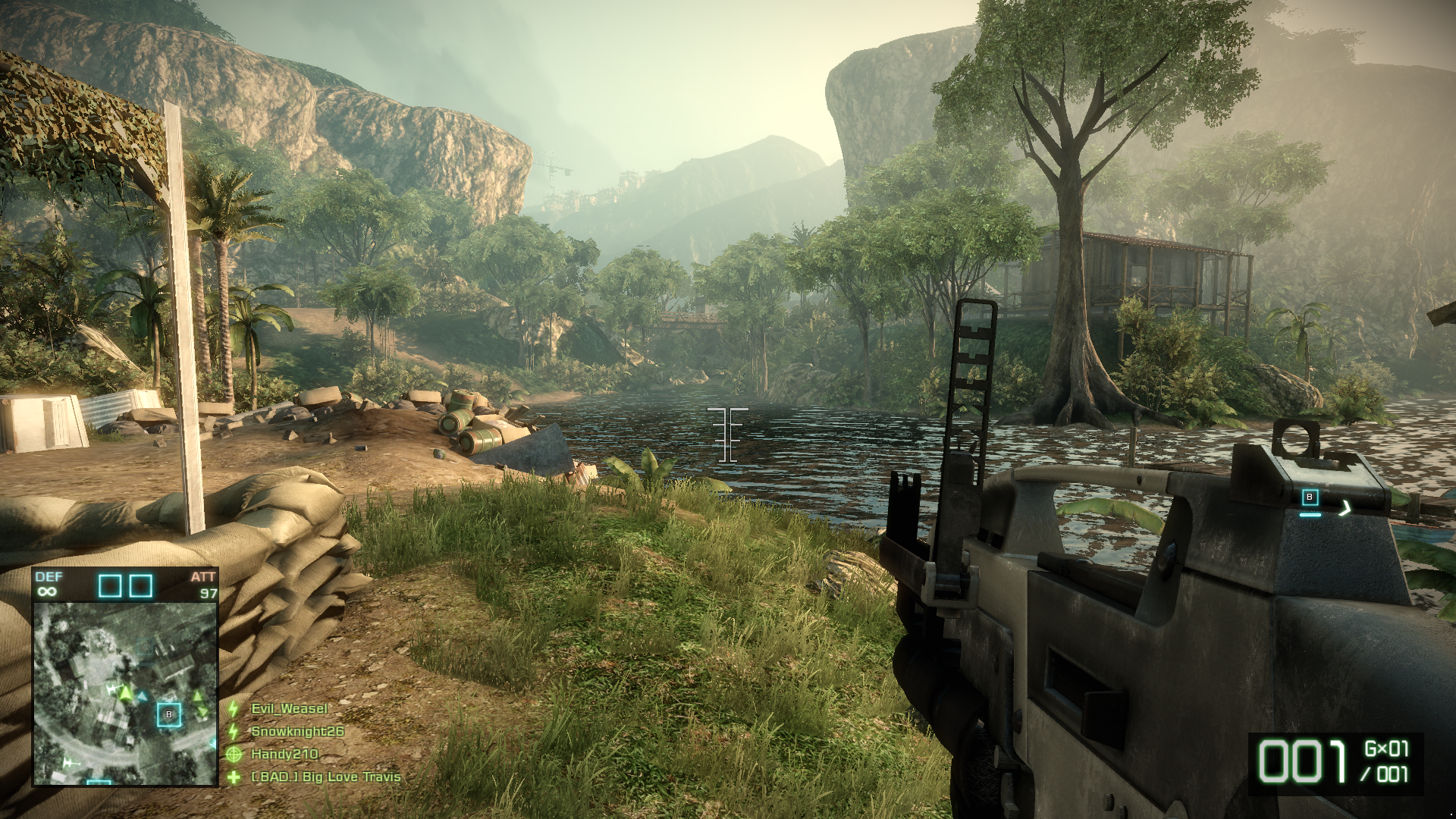
BC2 with no AA:

MLAA:


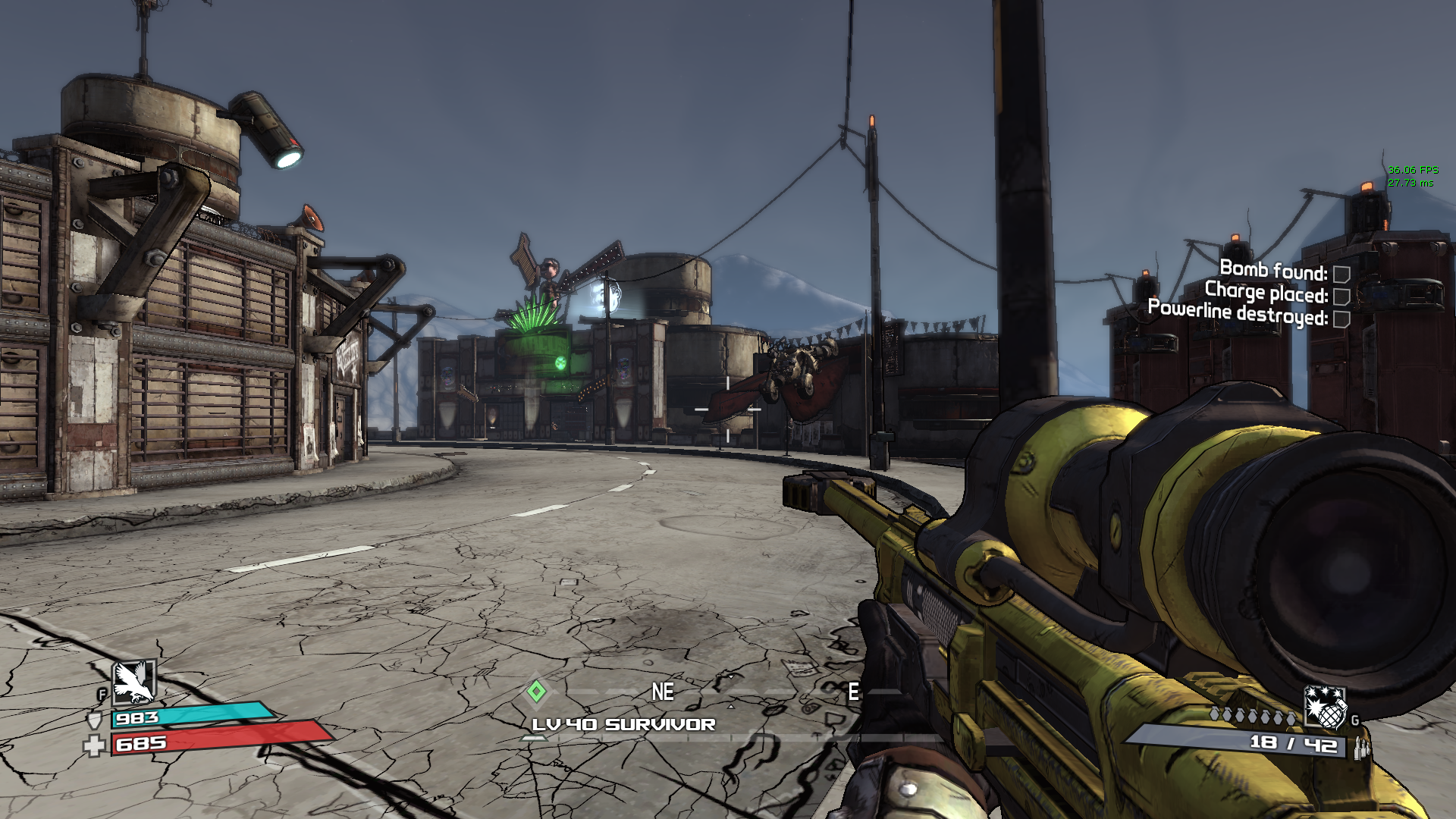
Borderlands with no AA:

MLAA:


MW2 with no AA:

MLAA:


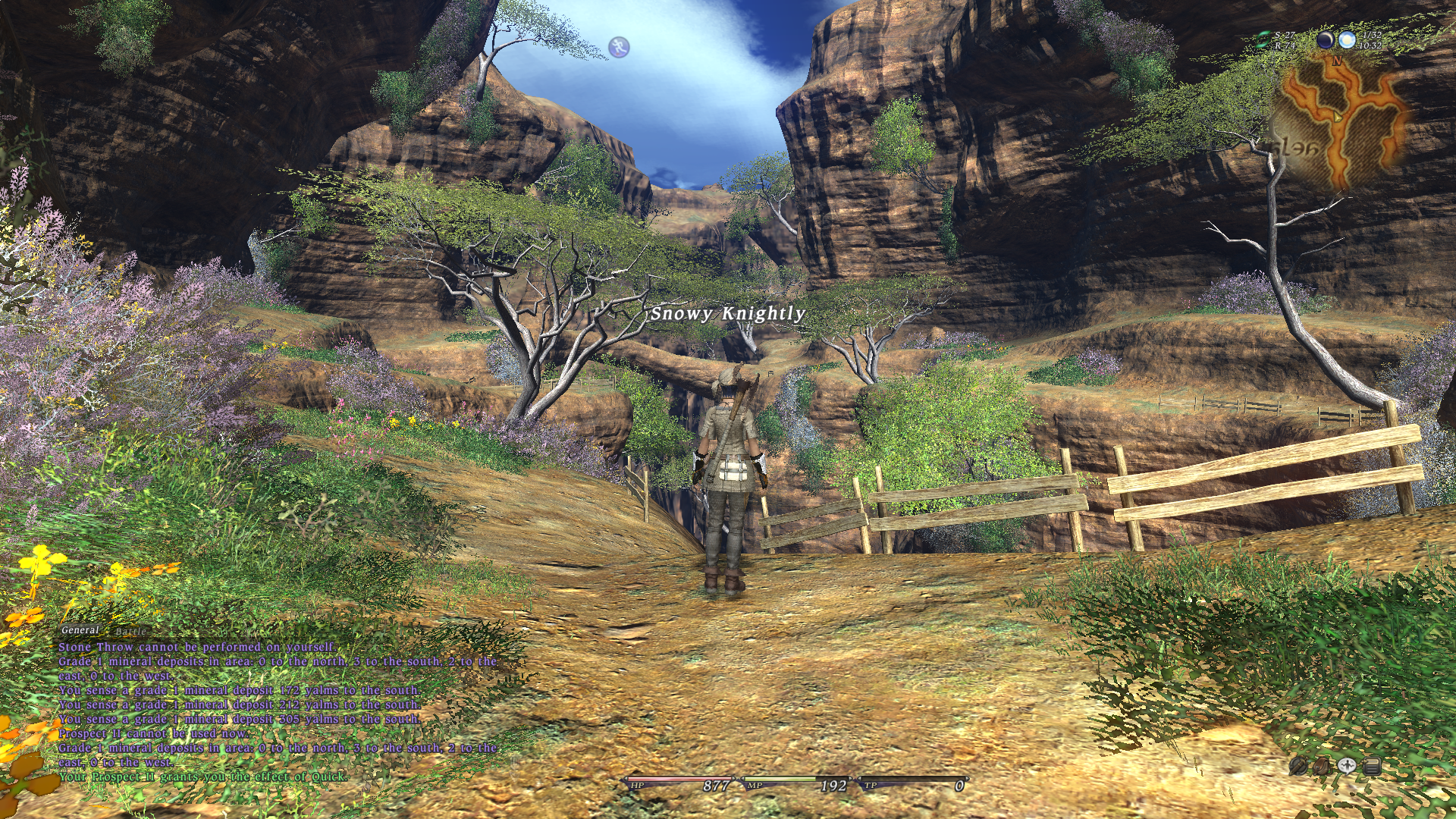
FFXIV with no AA:

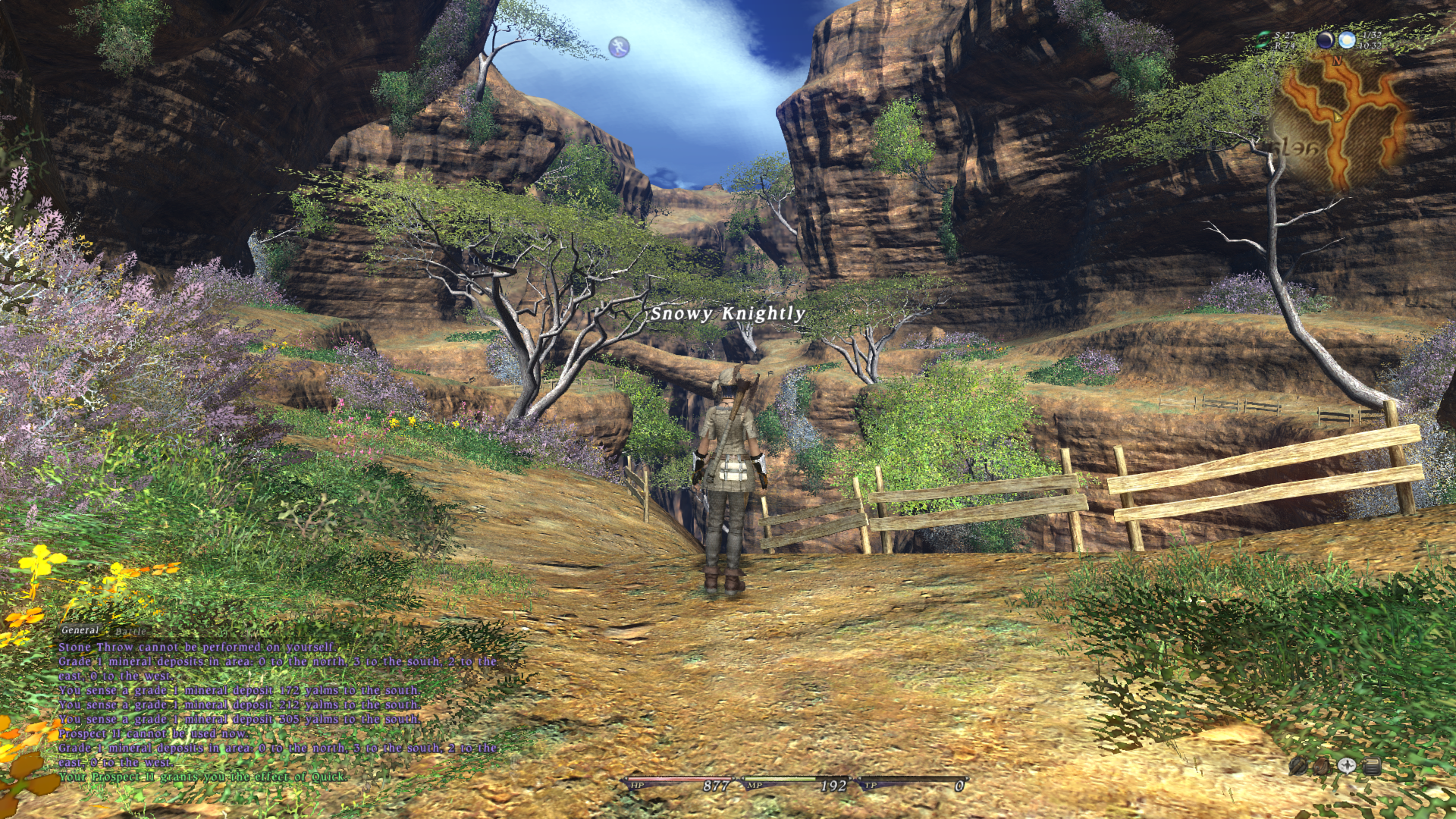
MLAA:
 
Last edited:
MLAA looks great in those screenshots. Even makes the water and tree leaves look more natural. I can't wait to read [H] 's article on MorphAA.
 
Here are the instructions we were provided, looks like you figured it out:

Thanks Brent. :)

Yeah, I got a bit impatient (enthusiasts and new toys you know) and needed to brush up on my dos. :p

Did anyone try this in Eyefinity yet and compare the performance hit vs. regular AA? Bandwidth requirements are not that big deal with MLAA, if to believe the specs (and its Directcompute based), so it might be a good solution to add AA for some titles in Eyefinity.
 
Thanks for making and posting the screens Snowknight26, very interesting and promising tech from AMD.

For games using cartoon shading (such as Borderlands) MLAA is absolutely brilliant! Looks beautiful.

The same goes for games with overly sharpened textures and alpha maps, such as the "Snowy Knightly" screen shot (what game is this?). Absolutely stunning how MLAA turns this into a visually calm and soothing scene from a frantic rip-your-eyes out edge attack, without killing off too much texture detail.

Bad Company 2 looks good, but a bit too much definition is lost due to the original texture work IMO. Everything becomes a little too soft for my liking. Still MLAA handles object borders really well.

The water in the first screen shot is greatly improved, and since a lot of the texture work is crappy to begin with it really doesn't destroy anything in terms of definition. Look at the deck and base of the railing. Horrific work. The same goes for the Mass Effect 2 shot earlier in this thread. Pretty rough and crappy texture work, is only improved by MLAA, since nothing is lost with a little softening/blending.

I would love to see someone upload some screen shots from the STALKER series. This game has overly sharpened textures in many places and would greatly benefit from MLAA, the way I understand this processing.
 
games with deferred rendering in DX9 mode that cannot support normal AA like the Diesel engine based games (Lead & Gold, Bionic Commando, Terminator Salvation, Wanted: Weapons of Fate) and other games like GTA 4, Mafia 2 can benefit from MLAA which might be the only way to have AA in those games (if forcing it from CCC or NV CP didn’t work).

and for other games it would be a way to have some kind of an alternative AA without losing performance but users with “better” video cards won’t care about it and would rather to use the real AA.

now if more games with deferred rendering in DX9 mode keep coming in the future then I hope Nvidia would come up with a similar solution because my die hard AMD fanboy steam friend who told me what I just wrote is KILLING ME with this.

Edit: stolen from here

 
Last edited:
^^

The SC II screen shot is jaw dropping. Obviously MLAA tears a hole in HUD graphics quality and that is one serious drawback for games that rely on HUDs. I play this game myself and will still gladly sacrifice a nice looking HUD for such a smooth and beautiful 3D scene. Pure eye candy.

So basically the "dream version" of MLAA (and yes SSAA looks way better IMO) would be one implemented with programming enabled to discern "overlays", HUD etc and then omit them entirely at rendertime. Surely this needs to be accommodated for by the game devs.

This might by possible by creating specially "tagged" alpha masks that are recognized by the MLAA code. I am not a programmer, so I do not know if this is possible, but surely an implementation like this would mean a performance hit because of more "look ups". On the other hand, there would be less area to render for the GPU pr. frame, meaning a performance improvement.

Does anyone have an idea whether this is possible or not? Maybe we have a few 3D programmers among us?
 
MLAA works on the image as a whole, and is done after everything has been rendered. Before the image is to be sent from the framebuffer to the screen, the driver uses a compute shader to apply it.

The only thing that Devs could do for the HUD is to take MLAA into account when designing it, but it would then look bad when MLAA was off which is going to be the vast majority of the time.
 
Anyone think the hacked drivers for 5 series cards would work for the mobility 5870? Toying with the notion of trying this on my laptop.
 
MLAA works on the image as a whole, and is done after everything has been rendered. Before the image is to be sent from the framebuffer to the screen, the driver uses a compute shader to apply it.

The only thing that Devs could do for the HUD is to take MLAA into account when designing it, but it would then look bad when MLAA was off which is going to be the vast majority of the time.

A: Yes, but that compute shader, that delivers the MLAA (this is how I understand what you wrote) could still be designed to take into account that certain areas should not have MLAA applied right?

B: Not sure I see this limitation necessarily. Could you elaborate on the mechanics of this?
 
MLAA is done to the screen as a whole. It cannot, by the way of it's current implantation, apply itself selectively. It is strictly a post-processing feature that's done after everything on the screen has been rendered. The only way that could change is AMD develops a new way of doing this that happens earlier in the graphics pipeline.

The HUD would have to be much thicker and bolder in order to not show such degradation from MLAA. Since developers use fonts and sizes that tend to stand out just enough and not detract, this would change. As far as it being worse as a whole, I shouldn't have said that. It would end up with some people liking the HUD being at the forefront while others would want it to blend in better.

The flippest is that this kind of AA can be implemented into the game itself. Then they would be able to do thing that AMD's version can't, such as selectively applying itself. This form of AA is very new, so it will still be some time if they feel the need to add this. I believe most will just be happy to let AMD do the work for them. The negative side-effects doesn't mean much to them since MLAA is only available for a small part of the market.
 
Last edited:
MLAA is done to the screen as a whole. It cannot, by the way of it's current implantation, apply itself selectively. It is strictly a post-processing feature that's done after everything on the screen has been rendered. The only way that could change is AMD develops a new way of doing this that happens earlier in the graphics pipeline.

Right. AMD should get started working on a version that handles it differently to allow what I suggested. It could be great.
 
with the current incredibly low toll on the gfx, I dont mind hud text being affected. A little less performance for allowing recognition of letters and numbers or such, would be welcome
 
Back
Top