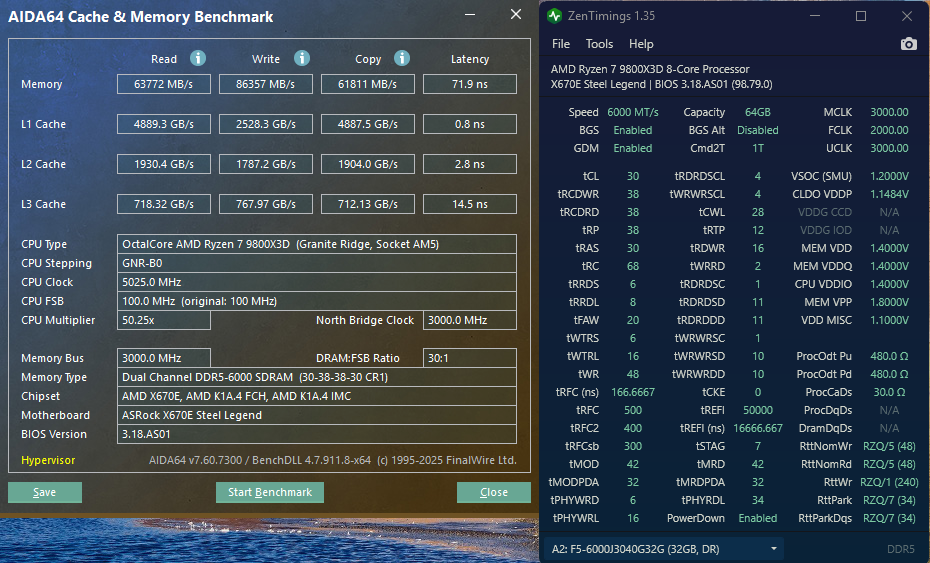
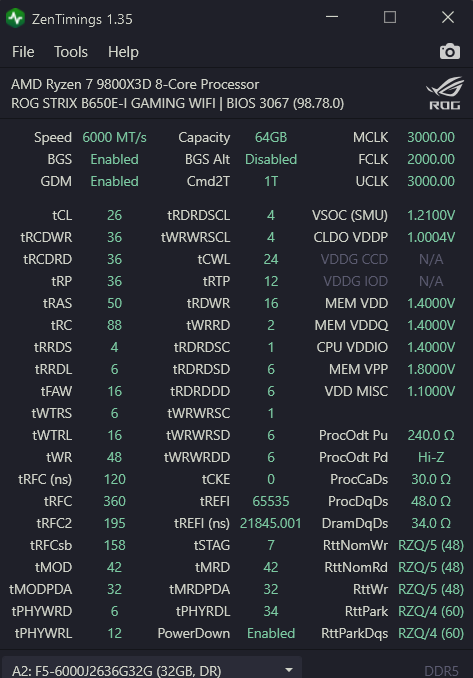
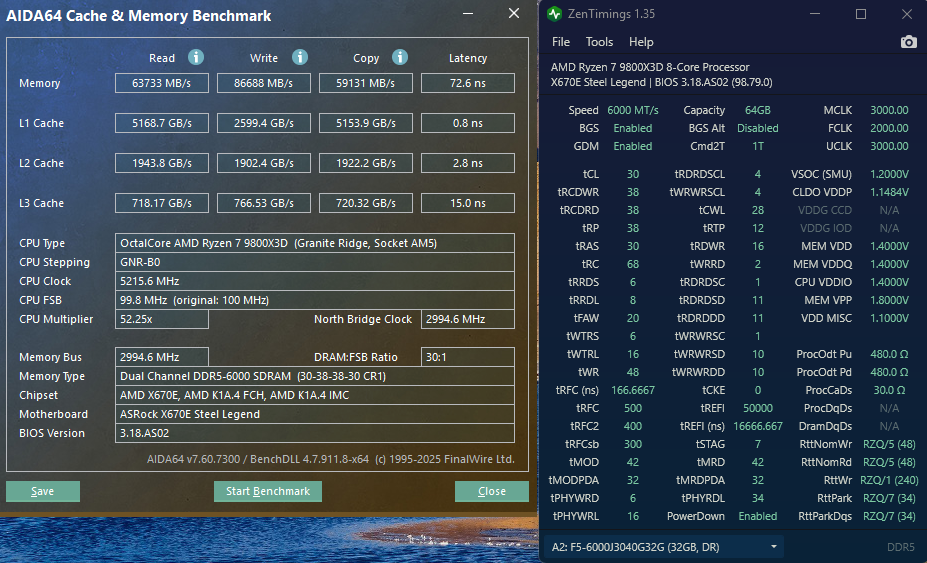
9800x3d ram tweaking

Is there a stability problem at CL30? Since that kit is rated for it?
No - I am not sure what happened with the 41 and the other stuff you found. I’ll drop it from CL32 to 30.

I usually EXPO it and then dial it in with Buildzoid’s timings
 
OK here we go
mem3.jpg
 
new BIOS, disabled SVM...

now I know why my mem settings were strange LigTasm - new beta BIOS says it fixed an issue with it reading the values heh.

mem.png

mem4.jpg
 
Last edited:
Is memory latency bugged in AIDA64 on Windows 11? I just ran a test on the trial version seems higher than it should be for my timings.

1740692629376.png
1740692666338.png

1740685165180.png

DPC latency seems alright for having SMT enabled.

I'd expect the memory latency to be closer to 57ns, not 67ns. I did do a sanity check and ran my memory at EXPO and it was 77ns with the EXPO profile.
 
Last edited by a moderator:

Attachments

  • 9800X3D 5.4GHz 6000 C30 Tuned Nitro 1 2 1.png
    9800X3D 5.4GHz 6000 C30 Tuned Nitro 1 2 1.png
    151.3 KB · Views: 0
  • Manual 5425 6000C30 Tuned Nitro Mode 1 2 1.png
    Manual 5425 6000C30 Tuned Nitro Mode 1 2 1.png
    988.1 KB · Views: 0
Is memory latency bugged in AIDA64 on Windows 11? I just ran a test on the trial version seems higher than it should be for my timings.

DPC latency seems alright for having SMT enabled.

I'd expect the memory latency to be closer to 57ns, not 67ns. I did do a sanity check and ran my memory at EXPO and it was 77ns with the EXPO profile.

I've only ever seen latency in the 50ns range on AM5 with 8000+ extremely tuned kits, like 8200CL34 with 1.6V
 
I did some more tuning got it under 65ns, stability testing right now. I'm going to try to get it to 60ns this weekend.
 
I did some more turning got it under 65ns, stability testing right now. I'm going to try to get it to 60ns this weekend.

I would suspect most people running those numbers are not running vanilla installs of Windows 11, which is what I was talking about. I do reasonable tuning, but I've already got a 60 hour work week I don't need another trying to squeak 3ns out of my memory.
 
I spent a lot of time over the last few days tuning to try to achieve 65ns stable which is challenging on a dualrank kit, here's some findings incase anyone is interested and has a similar setup...

On the 9800X3D tRRDS/tRRDL below 8 is pointless unless your tFAW is 16 which requires tRRDS 4 & tRRDL 6, tested the difference between tFAW16/20/24 the differences are minimal, there is a latency benefit to 16, harder to see the difference between 20 & 24 because the latency is within margin of error. 8 is recommended by JEDEC as the minimum on both.

tPHYRDL is important to have the same on each stick, you can correct it if it is out of sync by adjusting ARdPtrInitVal, I lowered it by 1 to sync tPHYRDL, at higher frequencies you might need to raise it by 1

This is a given, but an oversight I had since I haven't tuned memory in over a year, on DR kits tWRWRSD/tWRWRDD and tRDRDSD/tRDRDDD is very important to run as low as possible going from 8 down to 6 is about 2ns latency improvement, unfortunately I could not do 5 or 4. I think sub 65ns is impossible at 6000 Mt/s with a DR kit. I was able to do it at 6400 MT/s & 2133 FCLK, where I achieved 63ns, guessing SR would be below 60.

tRCD+tRTP for tRAS is fine on Hynix A-die

tRFC sees no benefit sub 120ns IMO, I think 130-150ns is the sweet spot at 6000MT/s

The best I can do stable at 6000 MT/s is:

1740880115135.png
1740880129550.png


You can achieve 65ns at 6000 Mt/s with DR but need the best of everything, my 9800X3D's IMC isn't that great.

at 2200 FCLK I can get ~65ns, but I have to use 1.27 VSOC for stability, which I really rather not do
1740881092022.png
1740881565251.png


@ 6400/2133fclk you can trim off about 3ns, but personally I don't see a reason to when you can achieve the maximum read/write just by increasing the fclk, there are some benefits to having mclk at 3200, I just rather keep my VDD at 1.4 since I have a SFF build

Sub 60ns definitely is not possible on dual rank kit, it would be easy to achieve on a single rank kit though.

So I was wrong, thinking it was a Windows 11 bug in my original post, I wasn't thinking.
 
getting closer... I'm about to prove my original post right, my 2nd post wrong
2000 FCLK
1740939941539.png
1740939964677.png


DPC latency improving as well.

SMT ON:
1740940127516.png


SMT OFF:
1740952207509.png


2200FCLK
1740940991024.png
1740941006064.png
 
Last edited by a moderator:
getting closer... I'm about to prove my original post right, my 2nd post wrong
2000 FCLK

DPC latency improving as well.


2200FCLK

Nice work. What is the practical gain? When I adjust things these days I have a custom run in Cyberpunk 2077 that is 100% CPU bound at 1440p Ultra with a 4090, meaning no CPU I have ever tried it with can get above ~90% GPU usage. I run that 3x and log it, average it, and add it to my spreadsheet to see if the changes were worth it.
 
Nice work. What is the practical gain? When I adjust things these days I have a custom run in Cyberpunk 2077 that is 100% CPU bound at 1440p Ultra with a 4090, meaning no CPU I have ever tried it with can get above ~90% GPU usage. I run that 3x and log it, average it, and add it to my spreadsheet to see if the changes were worth it.
Well I haven't done any benchmarking in games yet. But I did play Metro Exodus Enhanced for a bit, my 4090 hit 600W multiple times, it actually ran hotter than it ever has, my GPU core hit 86C -- fans ramped up to 100%, so I shut off the game and limited my GPU to 100% PT, didn't want to melt it. I don't recall my GPU going above 80C before even when nearing 600W, it's usually around 70c. So I think it removed a bit of a CPU bottleneck and I've played Metro Exodus Enhanced a lot on my 4090, this hasn't occurred in the past and I just cleaned my PC last weekend.

I should do a test of XMP vs these timings in something like Hitman 3 which gets CPU limited quite often. I won't have time to do it today, I have to leave for a few hours. But maybe tomorrow.
 
Well I haven't done any benchmarking in games yet. But I did play Metro Exodus Enhanced for a bit, my 4090 hit 600W multiple times, it actually ran hotter than it ever has, my GPU core hit 86C -- fans ramped up to 100%, so I shut off the game and limited my GPU to 100% PT, didn't want to melt it. I don't recall my GPU going above 80C before even when nearing 600W, it's usually around 70c. So I think it removed a bit of a CPU bottleneck and I've played Metro Exodus Enhanced a lot on my 4090, this hasn't occurred in the past and I just cleaned my PC last weekend.

I should do a test of XMP vs these timings in something like Hitman 3 which gets CPU limited quite often. I won't have time to do it today, I have to leave for a few hours. But maybe tomorrow.

Cool. This is the information I like to see, because it makes me much more willing to spend time tuning than someone shaving .00047 seconds off of a y-cruncher run or some shi.
 
Care to explain how you managed to drop your memory latency by 5-6ns by enabling power down mode and loosening your timings?
I needed to loosen them because I didn't realize I had a BIOS setting enabled that may have put my initial timing's stability into question. I will be tightening them from here this week. The setting was Core Tunings For Gaming, never noticed it before, but it increased latency a bit just by having it on Auto, I changed it to Legacy and the latency improved around 3ns. Also enabling Power Down reduced latency another 2ns which surprised me.
 
OK - installed the ASRock dead 9800X3D BIOS fix - any advice for easy tweaking? It's a G.Skill kit - https://www.gskill.com/product/165/393/1665020366/F5-6000J3040G32GX2-TZ5N.

Right now just using Buildzoid's easy timings.
for tFAW
tFAW=20
tRRDS=4
tRRDL=8

if that isn't stable try:
tFAW=24
tRRDS=6
tRRDL=8

tFAW should always be 4x tRRDS, to prevent excess power draw

tRAS=tRP+tRTP+2 (don't ask it just seems to work great)
tRC=tRAS+tRP+2 (don't ask it just seems to work great)

tDRDSD=8
tDRDDD=8
tWRWRSD=8
tWRWRDD=8
(How I handle these timings is... first I save my bios settings, then I lower them until no-post, then raise them back to their minimum that posts it is usually stable after that. Also it is worth checking L3 cache latency, if L3 cache latency goes up after lowering these they are too tight)
I have the same kit as you , it is my old kit, 8 was fine on my kit, you might be able to push these lower.

tPHYRDL= make sure they are the same on both sticks, if not then adjust ARdPtrInitVal read the description in the BIOS it has to do with PHY RAM training timings.

tREFI= make it a multiple of 255, e.g., 51000

---

tRFC is more complicated here is how I tackled it:

Record defaults for tRFC, tRFC2, tRFCsb (defaults=auto)

on my system it was (with auto):
tRFC=884
tRFC2=480
tRFCsb=390

Lowering tRFC:
- Figure out what tRFC you want to run at, I chose 340 (Hynix A-die can do ~330 on good kits, Hynix M-die can do ~380 on good kits at 6000MT/s) // on a 9800X3D you can get this very low because the RAM will never be able to utilize it's full bandwidth due to 1 CCD
tRFC: 340 ÷884=0.3847
tRFC2: 195 =0.3847x480
tRFCsb: 158 = 0.3847x390

I would try tRFC=400 or 420 as a starting point

Also while tuning disable Core Tuning Configurations for Gaming (not sure what it is called on ASRock), set this to Legacy otherwise you will get incorrect latency readings, you can turn it back on after you finish, default is Level 2 when enabled.
 
Last edited by a moderator:
for tFAW
tFAW=20
tRRDS=4
tRRDL=8

if that isn't stable try:
tFAW=24
tRRDS=6
tRRDL=8

tFAW should always be 4x tRRDS, to prevent excess power draw

tRAS=tRP+tRTP+2 (don't ask it just seems to work great)
tRC=tRAS+tRP+2 (don't ask it just seems to work great)

tDRDSD=8
tDRDDD=8
tWRWRSD=8
tWRWRDD=8
(How I handle these timings is... first I save my bios settings, then I lower them until no-post, then raise them back to their minimum that posts it is usually stable after that. Also it is worth checking L3 cache latency, if L3 cache latency goes up after lowering these they are too tight)
I have the same kit as you , it is my old kit, 8 was fine on my kit, you might be able to push these lower.

tPHYRDL= make sure they are the same on both sticks, if not then adjust ARdPtrInitVal read the description in the BIOS it has to do with PHY RAM training timings.

tREFI= make it a multiple of 255, e.g., 51000

---

tRFC is more complicated here is how I tackled it:

Record defaults for tRFC, tRFC2, tRFCsb (defaults=auto)

on my system it was (with auto):
tRFC=884
tRFC2=480
tRFCsb=390

Lowering tRFC:
- Figure out what tRFC you want to run at, I chose 340 (Hynix A-die can do ~330 on good kits, Hynix M-die can do ~380 on good kits at 6000MT/s) // on a 9800X3D you can get this very low because the RAM will never be able to utilize it's full bandwidth due to 1 CCD
tRFC: 340 ÷884=0.3847
tRFC2: 195 =0.3847x480
tRFCsb: 158 = 0.3847x390

I would try tRFC=400 or 420 as a starting point

Also while tuning disable Core Tuning Configurations for Gaming (not sure what it is called on ASRock), set this to Legacy otherwise you will get incorrect latency readings, you can turn it back on after you finish, default is Level 2 when enabled.
Wow - thank you so much for taking the time to type this out. I really appreciate it. I have some tweaking to do!!! :)
 
Nice work. What is the practical gain? When I adjust things these days I have a custom run in Cyberpunk 2077 that is 100% CPU bound at 1440p Ultra with a 4090, meaning no CPU I have ever tried it with can get above ~90% GPU usage. I run that 3x and log it, average it, and add it to my spreadsheet to see if the changes were worth it.

I've started working on a spreadsheet here are some of the results. For the comparison I chose to do EXPO vs Tuned timings, then enable "Core Tuning Configurations For Gaming" with the tuned timings to if there is additional benefit. So far I would say my game experience with the Tuned timings by itself is the smoothest of the 3, enabling Core Tuning Configurations For Gaming sometimes offers more performance at the cost of lower 0.1% lows.

For the "Tuned" Timings I used the timings that were in my previous post with 2000 FLCK. For the EXPO timings I kept all my BIOS settings the same except changed my timings from Manual to EXPO. For the game settings I decided to continue using the normal settings I run the games at but change DLSS to Performance mode at 4K.

1741277396925.png


I'm considering doing more games, but this is very time consuming, maybe over the weekend.
 
Last edited by a moderator:
I'm considering doing more games, but this is very time consuming, maybe over the weekend.

Nice work man, I do my own little spreadsheets lol. Been working on the U5-265K recently (I actually find this thing quite impressive compared to the negative hype). One thing I did noticed when I did all my 9800X3D benches is it runs several % better without the 3D V-Cache driver installed.

For example, CP2077 (ignore 14900KF, I didn't do a fresh install and it didn't run right under the 13700K Windows image):

Screenshot 2025-03-02 161400.png
 
Last edited:
I'm done, just going to run y-cruncher and call it a day. Any further tuning will be insignificant. I might try to see the minimum VSOC I can run 2200 FCLK as my next step, but I'm pretty happy with where I'm at right now.


1741121527390.png

1741122022547.png
 
This is what I ran with 24/7 rock stability, on a 7800X3D. Asrock B650-E ITX board (so, that's only 2 RAM slots). T-Create 7200 XMP kit (A-Die). Based on a couple of Buildzoid videos and some personal experimentation. I don't have Aida numbers. and this build has been sold, so I can't get numbers anymore.


This was for DDR 6200
Note: I entered 29 for the tCL and then found out Zen 4 doesn't support 29. So it falls back to 30. Which you can see immediately left.

Timings
981431_20240215_213452.jpg

981432_20240215_213502.jpg


Other relevant settings

981430_20240215_213257.jpg
981429_20240215_213239.jpg

Eventually, just for fun, I went back and dropped to DDR5 6000. and then lowered tCL to 28. all other settings stayed the same.
1068788_1731314847831.jpeg
 
1742078601068.png


I just picked up a kit of GSkill Flare X5 96GB. Got it running at EXPO settings for the moment, but I think that's the worst latency result I've ever received. Anyone want to help me out with some timings to get this latency to a reasonable level without compromising stability? I'd be grateful.

This is the kit I'm running: https://www.newegg.com/g-skill-96gb-ddr5-6000/p/N82E16820374682
 
Last edited:
Played around with some settings on my own, mostly auto settings in BIOS, plus I updated the BIOS to a new version that just came out a couple days ago. The previous BIOS for the X670E Tomahawk was from Dec 10, 2024.

I went in to one of the obscure memory settings in the OC settings of the BIOS and manually changed the setting to "Tighter". Options were Loose, Balanced, Tighter, and Tightest. It manually set tREFI to 65535. I got cold feet and put it at 50000 (pulled that number out of my ass). Seems to be working fine so far, and my latency dropped like a rock.

What's next?

1742095498132.png
 
Played around with some settings on my own, mostly auto settings in BIOS, plus I updated the BIOS to a new version that just came out a couple days ago. The previous BIOS for the X670E Tomahawk was from Dec 10, 2024.

I went in to one of the obscure memory settings in the OC settings of the BIOS and manually changed the setting to "Tighter". Options were Loose, Balanced, Tighter, and Tightest. It manually set tREFI to 65535. I got cold feet and put it at 50000 (pulled that number out of my ass). Seems to be working fine so far, and my latency dropped like a rock.

What's next?

View attachment 717193
You can check the timings buildzoid gave to Hardware Unboxed, in this video. Some of the timings are lower than yours.

*should be timestamped*

View: https://youtu.be/MOatIQuQo3s?si=mJbrCecEqxcBK7EL&t=74


My own settings from my post above, started with that as the base. Then I watched a couple of Buildzoid's own videos, where he pushes the timings more. And I also played around myself. And that's how I got the timings I posted above.

However, with a 96GB kit, you may not be able to get certain timings as low. Also, memory controller variance and general RAM kit variance.
 
Last edited:
Buildzoid's easy timings - https://www.patreon.com/posts/low-effort-rank-77403831

Once you're happy (where you're at seems a lot better!) just make sure to do some stability testing.

https://www.karhusoftware.com/ramtest/#introduction
https://www.overclock.net/threads/memory-testing-with-testmem5-tm5-with-custom-configs.1751608/

Definitely others just a couple quick options. I'm no expert I just read up and try to hack through. :)

Thanks guys. I need to see if I can figure out what's going to work.
 
Astral Abyss the Buildzoid EZ timings are for single rank kits. I have the same kit 96GB Dual Rank kit as you, I'll give you a good starting point on secondary and tertiary timings.

tRRDS 6
tRRDL 8
tFAW 24
tWTRS 6
tWTRL 16
tRDRDSCL 6
tWRWRSCL 6
tRTP 12
tRDWR 16
tWRRD 2
tRDRDSC 1
tRDRDSD 9
tRDRDDD 9
tWRWRSC 1
tWRWRSD 9
tWRWRDD 9

From there you would see the most gains by fine tuning tRFC, and if possible raising tREFI to 65535. You can also try running tRDRDSCL/tWRWRSCL at 4.
 
Astral Abyss the Buildzoid EZ timings are for single rank kits. I have the same kit 96GB Dual Rank kit as you, I'll give you a good starting point on secondary and tertiary timings.

tRRDS 6
tRRDL 8
tFAW 24
tWTRS 6
tWTRL 16
tRDRDSCL 6
tWRWRSCL 6
tRTP 12
tRDWR 16
tWRRD 2
tRDRDSC 1
tRDRDSD 9
tRDRDDD 9
tWRWRSC 1
tWRWRSD 9
tWRWRDD 9

From there you would see the most gains by fine tuning tRFC, and if possible raising tREFI to 65535. You can also try running tRDRDSCL/tWRWRSCL at 4.

Right on. I'll give this a shot tonight when I get home from work.

Did Buildzoid ever do any dual rank timing videos?
 
I wish Buildzoid would update his zen timings video with current chipset agesa for the x670 and x870 platforms. For 6000 MT/s, the old video has FCLK at 2033 for best performance. 2200 FCLK or even 2100 will garner better numbers nowadays. I just built a new system. Actually just upgraded from a 7700x to 9800x3d and added the new Gskill DDR-5 CL-26-36-36-96 TridentZ Royal stuff. My latency numbers have fallen off a cliff and Im having trouble figuring it out. Aida64 cache and mem test went from having latency give or take around 56-58ns. Now with the new parts I'm getting 68-70ns. The only thing that had changed for me was that I updated the uefi on the Asus x670e crosshair hero from a couple year old bios. I hadn't changed for so long because I always heard that the newer bios only helped to newer 9 series parts and hurt the 7 series. Now that I have the 9 series in the board, I had to update but now my numbers have gone to hell. Anyone else here having the same type of issues. Any advise would be much appreciated. After the owner of this site had left a number of years ago, I stopped coming around. I didn't realize it was going to hang on. I am very happy that it has. I have been a [H] follower for over 20 years. Great Place!!!
 
Astral Abyss the Buildzoid EZ timings are for single rank kits. I have the same kit 96GB Dual Rank kit as you, I'll give you a good starting point on secondary and tertiary timings.

tRRDS 6
tRRDL 8
tFAW 24
tWTRS 6
tWTRL 16
tRDRDSCL 6
tWRWRSCL 6
tRTP 12
tRDWR 16
tWRRD 2
tRDRDSC 1
tRDRDSD 9
tRDRDDD 9
tWRWRSC 1
tWRWRSD 9
tWRWRDD 9

From there you would see the most gains by fine tuning tRFC, and if possible raising tREFI to 65535. You can also try running tRDRDSCL/tWRWRSCL at 4.


1742524799287.png


Ok, so slight improvement, but I'm down. I had a couple timings that the BIOS settings had already lowered further than your starting points, so I left them. Increased tREFI to 65535. Anything else you can think of, or should I be happy to be in the upper 60s with a dual rank kit? Instruct me, master!

Sorry for the slow response. I've been interviewing people all week and it is freaking draining. The life of a manager...
 

Attachments

  • 1742524488490.png
    1742524488490.png
    240.9 KB · Views: 0
View attachment 718256

Ok, so slight improvement, but I'm down. I had a couple timings that the BIOS settings had already lowered further than your starting points, so I left them. Increased tREFI to 65535. Anything else you can think of, or should I be happy to be in the upper 60s with a dual rank kit? Instruct me, master!

Sorry for the slow response. I've been interviewing people all week and it is freaking draining. The life of a manager...
Since you're using tRRDS 4, tRRDL 8, use tFAW 20. tWR 48 if for some reason this is unstable raise it to 54, but I doubt there will be issues at 48 since it is already loose compared to what these kits run on Intel systems, 48 is the limit of AMD. You need to tune tRFC, start at 420 as a good starting point (at 6000 MT/s), if you can go lower even better, the optimal range for tRFC (ns) is ~120ns-150ns, with your kit should should easily be able to achieve 150ns, probably closer to 140ns, possibly in the 130-120ns range, so tuning tRFC should be a priority, deceptXS wrote a short guide which includes tuning tRFC in post #63.
 
Last edited:
Since you're using tRRDS 4, tRRDL 8, use tFAW 20. tWR 48 if for some reason this is unstable raise it to 54, but I doubt there will be issues at 48 since it is already loose compared to what these kits run on Intel systems, 48 is the limit of AMD. You need to tune tRFC, start at 420 as a good starting point (at 6000 MT/s), if you can go lower even better, the optimal range for tRFC (ns) is ~120ns-150ns, with your kit should should easily be able to achieve 150ns, probably closer to 140ns, possibly in the 130-120ns range, so tuning tRFC should be a priority, deceptXS wrote a short guide which includes tuning tRFC in post #63.
Hmmm, failed to boot at those settings. Going to try tWR 54 next.
 
Hmmm, failed to boot at those settings. Going to try tWR 54 next.
I'm curious, was tWR the setting that caused the no post? I've never heard of a Hynix kit that can't do 48, it could be the IMC struggles at 48. But did 54 work out for you?
 
Back
Top