• Some users have recently had their accounts hijacked. It seems that the now defunct EVGA forums might have compromised your password there and seems many are using the same PW here. We would suggest you UPDATE YOUR PASSWORD and TURN ON 2FA for your account here to further secure it. None of the compromised accounts had 2FA turned on.
    Once you have enabled 2FA, your account will be updated soon to show a badge, letting other members know that you use 2FA to protect your account. This should be beneficial for everyone that uses FSFT.

9800x3d ram tweaking

Moparzrule

Limp Gawd
2FA
Joined
Nov 21, 2024
Messages
148
Hey guys, trying to tweak my ram settings for best performance. I picked a set of G.Skill Trident 7600 CL36 ram, currently running them at 6400 CL28. I have FCLK at 2200, but I think my bottleneck at this point is the north bridge clockspeed. For the life of me I cannot find any setting in my bios to change it, but I only have a B650E board, specifically the Asus B650E-F gaming Wifi. I spent about 30 minutes just going through every setting and couldn't find a north bridge multiplier, so I'm wondering if perhaps B650 boards didn't even have the option to overclock it.

Anyway, when I run 6800 CL30 speed it clocks the NB to 1700mhz, but performance was about the same. Am I stuck here or do I have other options?
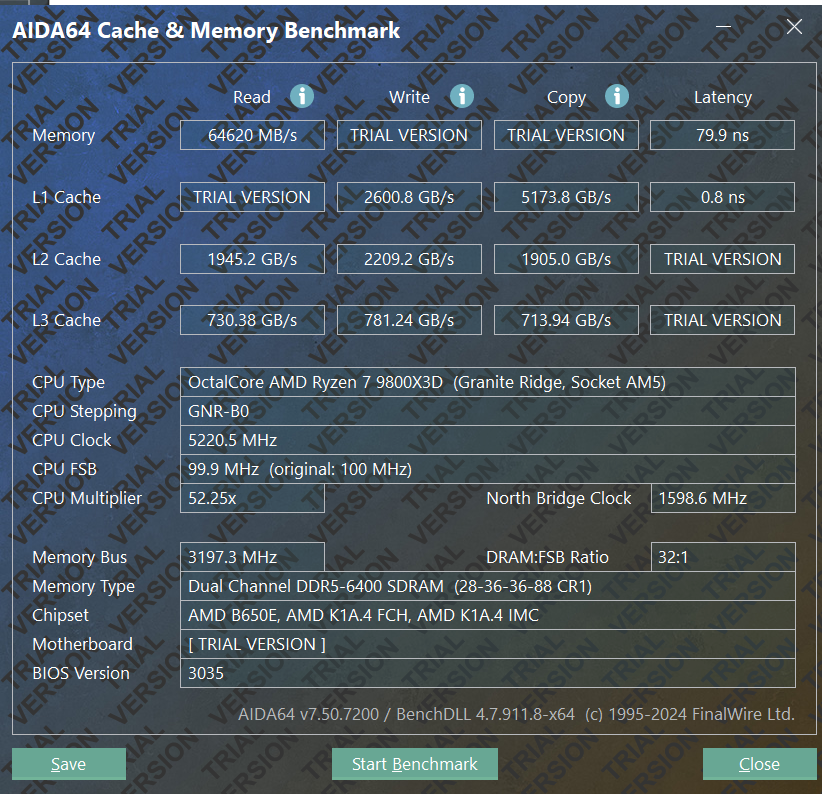
1737726844800.png
 
Last edited:
I'm curious about this too. Will try to dig up the link, but I remember seeing that DDR5-6000 with low timing produced the best net performance.

I'm currently running my sticks at their DDR5-6400 profile, but I'm tempted to try 6000 with tighter timings.
 
I'm curious about this too. Will try to dig up the link, but I remember seeing that DDR5-6000 with low timing produced the best net performance.

I'm currently running my sticks at their DDR5-6400 profile, but I'm tempted to try 6000 with tighter timings.
Well, most people run 6000 CL 28 or 30, but I'm running 6400 CL28. Maybe I can run 6000 CL 26, might try that, but the problem is I think if I lower to 6000 my north bridge speed will go even lower to 1500 and I may have worse results. Worth a try though I guess. I actually first ram 6800 CL32 and had virtually the same numbers as 6400 CL28, which actually doesn't make a whole lot of sense.

What are you running your FCLK at? I had mine at 2200 but I saw many people say to run 2067mhz, so I might experiment with that a little too.
 
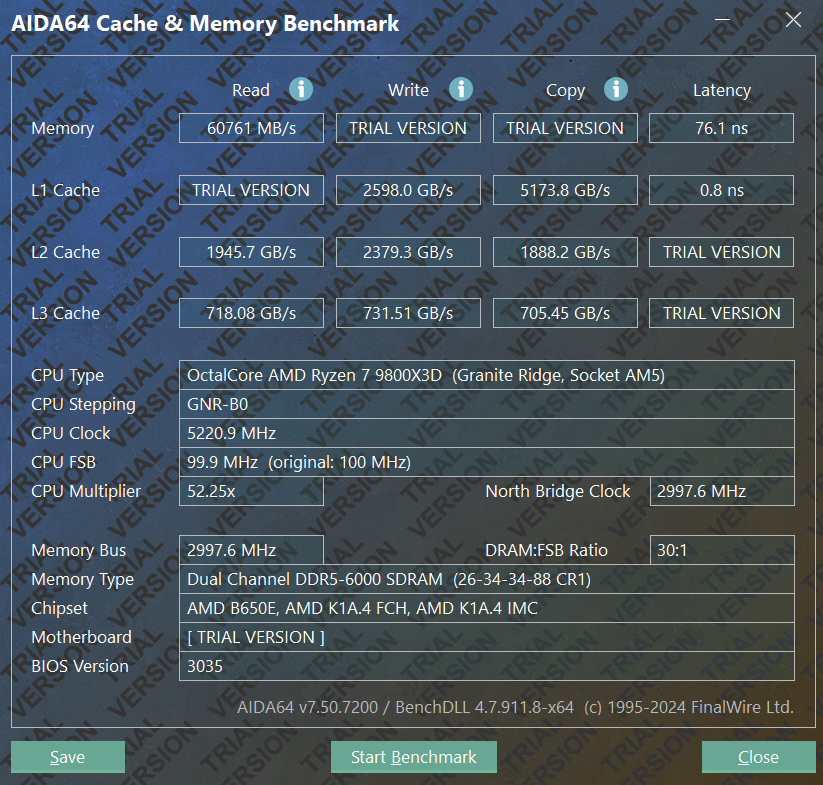
So I dropped it to 6000 CL 26 and I actually lost a significant amount of read speed. Funny enough, when I did this, the north bridge speed is at 3000mhz now. The only thing that really improved was latency.

1737751522553.png


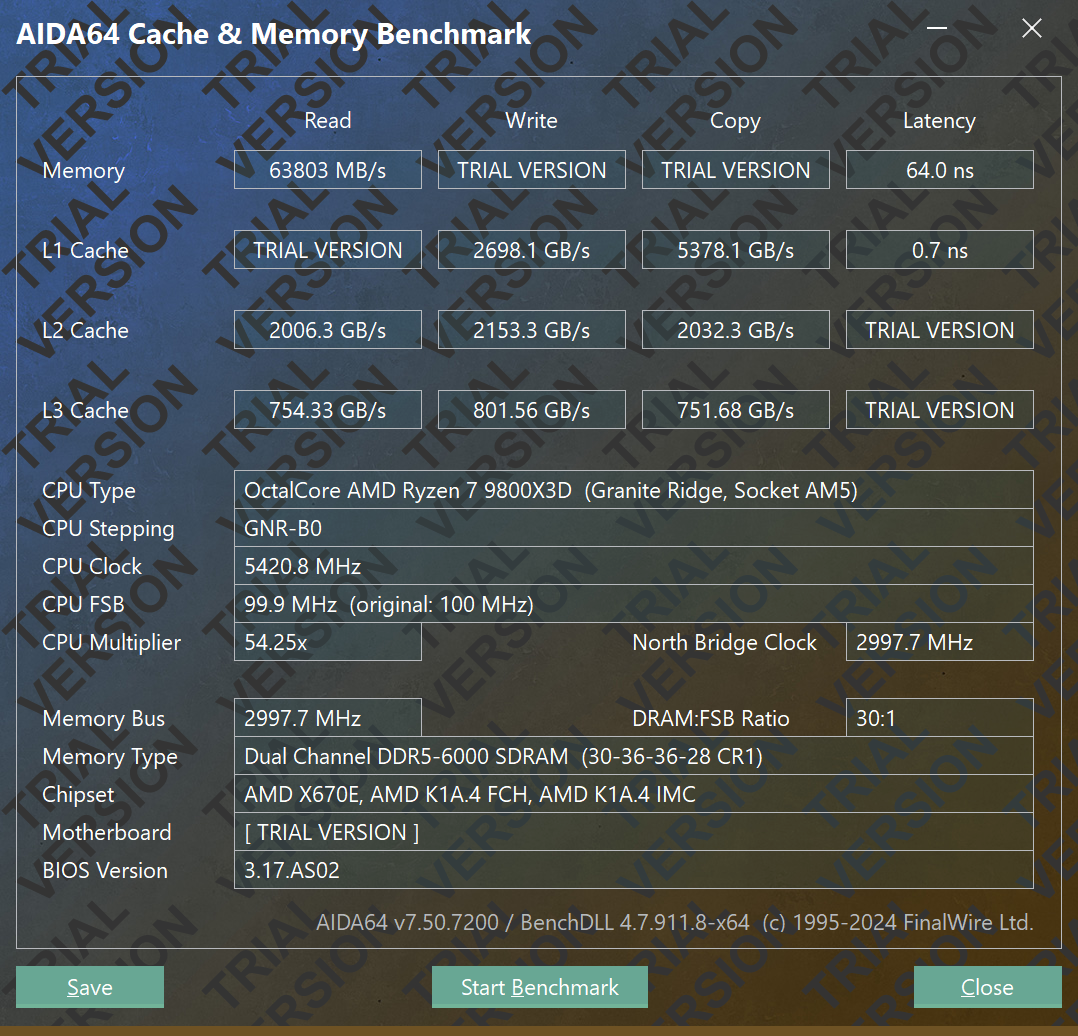
Edit: actually, I didn't realize that changing FCLK to 2067 would hurt performance that much. I changed back to 2200 and performance is nearly as good as when it was at 6400mhz for read speed. But, L3 cache read/write is decently slower. It seems 6400mhz is better for me, although this one had the best latency by far-

1737751883678.png
 
Last edited:
Do you
So I dropped it to 6000 CL 26 and I actually lost a significant amount of read speed. Funny enough, when I did this, the north bridge speed is at 3000mhz now. The only thing that really improved was latency.

View attachment 706165


Edit: actually, I didn't realize that changing FCLK to 2067 would hurt performance that much. I changed back to 2200 and performance is nearly as good as when it was at 6400mhz for read speed. But, L3 cache read/write is decently slower. It seems 6400mhz is better for me, although this one had the best latency by far-

View attachment 706166
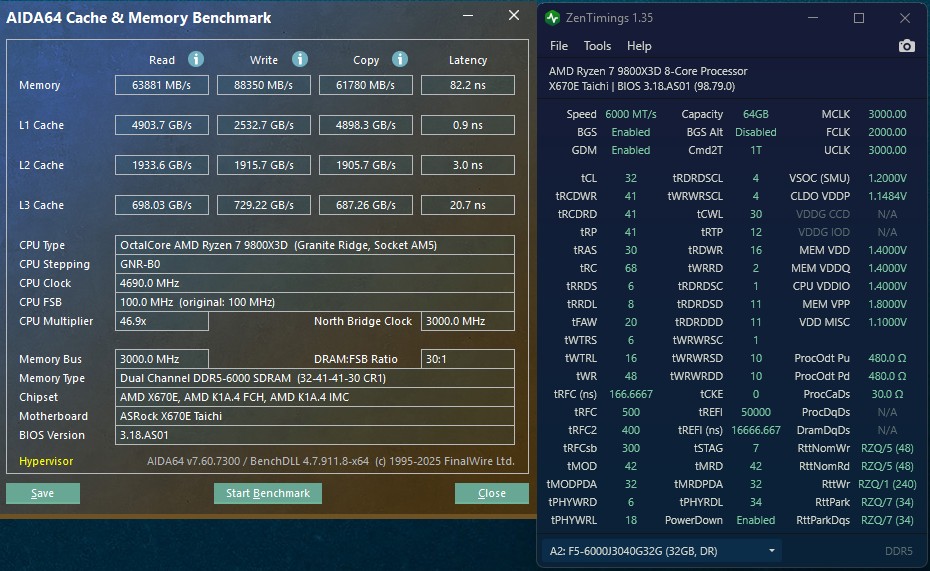
Got a lot of stuff running in the background? I'd think you'd get better results than my 6000 C30, but it looks like it's not the case. Hynix M-Die kit.
 

Attachments

  • Manual 5425 6000C30 Tuned Nitro Mode 1 2 1.png
    Manual 5425 6000C30 Tuned Nitro Mode 1 2 1.png
    988.1 KB · Views: 0
  • 9800X3D 5.4GHz 6000 C30 Tuned Nitro 1 2 1.png
    9800X3D 5.4GHz 6000 C30 Tuned Nitro 1 2 1.png
    151.3 KB · Views: 0
  • Like
Reactions: Epos7
like this
Do you

Got a lot of stuff running in the background? I'd think you'd get better results than my 6000 C30, but it looks like it's not the case. Hynix M-Die kit.
Nothing running in the background.

My memory read speed is higher, but you crush my latency and cache speeds.

Also, I noticed your TRAS was only 28???? How in the world is that possible?
 
Nothing running in the background.

My memory read speed is higher, but you crush my latency and cache speeds.

Also, I noticed your TRAS was only 28???? How in the world is that possible?
Buildzoid's every Hynix A (and M) die kit can do these settings video that I used. I am absolutely not an expert, and leaned on this video hard.
 
Do you

Got a lot of stuff running in the background? I'd think you'd get better results than my 6000 C30, but it looks like it's not the case. Hynix M-Die kit.

So I replicated the main timings and got much worse results! But I downloaded Zen Timings to compare and a bunch of these other ones that I have no idea what they are or what they do are different than yours.

1737753424874.png


But then I changed FCLK to 2200 and performance really increased quite a bit-

1737754708704.png
 
Last edited:
6400CL28 with 2200FCLK?? Yeah thats about as stable as joe biden trying to get up some stairs. Karhu would kill that before it hit 2%, going down to 6000 is much easier to manage. You need a LOT of voltage to do those original numbers you posted, most people doing that are either unstable but won't admit it for e-peen or they have water cooled ram heatsinks.

Also, AIDA64 memory bandwidth test really doesn't work well on AMD nor does it particularly mean anything. You're not going to get anything noticeable outside of lowering latency, this is the big goal to go for.
 
Last edited:
BIOS 3035 also is an older one, lacking the latency fix that was put in. The latest Beta 3201 (which looks like it needs the latest AMD chipset driver 7.01.08.129 which aren't released on the AMD website yet, but Asus should have it somewhere) should have it, if you trust Asus to not void your warranty like they'd tried last year. It is an option that has to be turned on.

It wasn't a huge decrease... on my slightly tuned setup, I saw about a 3ns decrease in latency in that Aida test and a slight bandwidth drop as well.
 
6400CL28 with 2200FCLK?? Yeah thats about as stable as joe biden trying to get up some stairs. Karhu would kill that before it hit 2%, going down to 6000 is much easier to manage. You need a LOT of voltage to do those original numbers you posted, most people doing that are either unstable but won't admit it for e-peen or they have water cooled ram heatsinks.

Also, AIDA64 memory bandwidth test really doesn't work well on AMD nor does it particularly mean anything. You're not going to get anything noticeable outside of lowering latency, this is the big goal to go for.
Passed stress tests with no problem with no errors. I can actually run 6800 CL30 with 2200 FCLK on these sticks and CPU, did I just got a good memory controller? 1.45v on the ram and 1.30v SOC, nothing crazy, full stable.
 
BIOS 3035 also is an older one, lacking the latency fix that was put in. The latest Beta 3201 (which looks like it needs the latest AMD chipset driver 7.01.08.129 which aren't released on the AMD website yet, but Asus should have it somewhere) should have it, if you trust Asus to not void your warranty like they'd tried last year. It is an option that has to be turned on.

It wasn't a huge decrease... on my slightly tuned setup, I saw about a 3ns decrease in latency in that Aida test and a slight bandwidth drop as well.

On the latest bios it didn't even post with the 9800x3d, but would post fine with 7k chips. 🤷‍♂️

That was 3057 though, maybe I should try 3067 now.
 
Passed stress tests with no problem with no errors. I can actually run 6800 CL30 with 2200 FCLK on these sticks and CPU, did I just got a good memory controller? 1.45v on the ram and 1.30v SOC, nothing crazy, full stable.

Maybe you got lucky with the most shiny of golden samples ever to exist, or something funky is going on because your latency does not match the speeds your putting up. Still would like to see a 10,000% karhu.
 
I installed the 3067 Bios, didn't seem to make any difference. Also, CL28 didn't seem to make any difference either over CL30.

1737766346261.png
 
I installed the 3067 Bios, didn't seem to make any difference. Also, CL28 didn't seem to make any difference either over CL30.

View attachment 706213
It's an option that has to be turned on, which I don't think that BIOS version has (it's too old). Different vendors call it different things. Asrock calls it Memory Enhancement.

Also, did you see my earlier response with the Buildzoid video link that I used to tweak my RAM? It is, however, only for Hynix A and M die kits.
 
It's an option that has to be turned on, which I don't think that BIOS version has (it's too old). Different vendors call it different things. Asrock calls it Memory Enhancement.

Also, did you see my earlier response with the Buildzoid video link that I used to tweak my RAM? It is, however, only for Hynix A and M die kits.
The 3067 was just released in December, its too old? Its the newest non-beta bios.

I dont know how to check what chips my ram has, but i would assume they are pretty decent being able to run 6800 CL30.
 
The 3067 was just released in December, its too old? Its the newest non-beta bios.

I dont know how to check what chips my ram has, but i would assume they are pretty decent being able to run 6800 CL30.
I found out what mine were via my motherboard's memory QVL. Not all vendors actually spell it out like mine did, and if your kit is not on the QVL you can't use that option.

And yes, it's likely is too old to have that memory enhancement option - AGESA 1.2.0.2b was 3 BIOS versions older than the one that has the memory enhancement for my board, which is AGESA 1.2.0.3a. But being different vendors, I don't know for certain.
 
Well, most people run 6000 CL 28 or 30, but I'm running 6400 CL28. Maybe I can run 6000 CL 26, might try that, but the problem is I think if I lower to 6000 my north bridge speed will go even lower to 1500 and I may have worse results. Worth a try though I guess. I actually first ram 6800 CL32 and had virtually the same numbers as 6400 CL28, which actually doesn't make a whole lot of sense.

What are you running your FCLK at? I had mine at 2200 but I saw many people say to run 2067mhz, so I might experiment with that a little too.
I have it at 2000. Just got this build up last week so I haven't had much chance to experiment yet. Was pretty happy to get 6400 out of the gate just by loading one of the profiles, especially since I have a 96GB kit. I'll try pushing things a bit over the next couple weeks. Temps are great so far so I think I might have a little room.
 
Well, I spoke too soon. Started getting BSODs at the 6400 XMP profile, so I went down to 6000 with the Buildzoid settings. Seemed good for a while then BSOD again. I've bumped voltage from 1.35 to 1.375 as a next step.

Seems like I have dual rank Hynix M-die. Buildzoid only covers single rank in his video, so maybe it won't work too well for my sticks. He mentions leaving some settings at auto for single rank (TrdrdSd, Trdrddd, TwrwrSd, TwrwrDd) and I'm not quite sure what to set those to for dual rank sticks.
 
Well, I spoke too soon. Started getting BSODs at the 6400 XMP profile, so I went down to 6000 with the Buildzoid settings. Seemed good for a while then BSOD again. I've bumped voltage from 1.35 to 1.375 as a next step.

Seems like I have dual rank Hynix M-die. Buildzoid only covers single rank in his video, so maybe it won't work too well for my sticks. He mentions leaving some settings at auto for single rank (TrdrdSd, Trdrddd, TwrwrSd, TwrwrDd) and I'm not quite sure what to set those to for dual rank sticks.
What timings are you running at 6000?
 
No luck with 1.375V. Stopped POSTing and I had to clear CMOS.

Buildzoid timings may just not work with dual rank sticks. Might try bumping to 1.4 just to see. Alternatively, maybe I should try bumping SOC voltage, just no higher than 1.3.
 
Last edited:
No luck with 1.375V. Stopped POSTing and I had to clear CMOS.

Buildzoid timings may just not work with dual rank sticks. Might try bumping to 1.4 just to see. Alternatively, maybe I should try bumping SOC voltage, just no higher than 1.3.
Mine are dual rank and work fine. Not all sticks are the same, though - same for the motherboard RAM traces and same for the CPU's IMC.
 
Mine are dual rank and work fine. Not all sticks are the same, though - same for the motherboard RAM traces and same for the CPU's IMC.
What did you use for TrdrdSd, Trdrddd, TwrwrSd, TwrwrDd? Auto? Those are the ones Buildzoid says to set to auto for single rank, but he doesn't go into what the settings should be for dual rank.
 
Last edited:
Post 5 in this thread. Got every setting from that Buildzoid video that I'd shared, and the only one not from that video were the Nitro settings which were from a different Buildzoid video.

https://hardforum.com/threads/9800x3d-ram-tweaking.2039354/post-1046042735
Sweet, thanks. Might try those out after work. Did he mention what settings to use for dual rank sticks in another video, or did you find those through trial and error? Or you have them set to auto and ZenTimings is reporting what that results in?
 
Sweet, thanks. Might try those out after work. Did he mention what settings to use for dual rank sticks in another video, or did you find those through trial and error? Or you have them set to auto and ZenTimings is reporting what that results in?
I plugged in what he rambled on about and they worked (TestMem5, Aida64, Prime 95, gaming, etc). That's the extent of it. As I've said - I'm not big into RAM tweaking precisely because it takes too much time.
 
I plugged in what he rambled on about and they worked (TestMem5, Aida64, Prime 95, gaming, etc). That's the extent of it. As I've said - I'm not big into RAM tweaking precisely because it takes too much time.
Gotcha. In the video you linked, he said to use auto for TrdrdSd, Trdrddd, TwrwrSd, TwrwrDd with single rank sticks, but didn't mention what to do for dual rank sticks. You must have plugged in auto because that's the only thing he mentions for those settings. I'm not big into RAM tweaking either, so I just do what you did and try to copy what works for other people.

These were my notes from the video:

Disable fast boot
DDR5-6000
FCLK 2033
CPU Core Voltage Auto
CPU SOC Voltage Manual
VDDSOC Voltage Override 1.25
CPU VDDIO/MC Voltage 1.35
VDDP Voltage Auto
Primary timings: use whatever kit comes with (Tcl Trcd Trp) (32-39-39)
Tras 28
Trc 68
Twr 48
Refresh Interval 50000 (could go 65000 if good mem cooling)
Trfc1 500 (M die could go lower, esp Trfc2 & Trfcsb)
Trfc2 400 (M die could go lower, esp Trfc2 & Trfcsb)
Trfcsb 300(M die could go lower, esp Trfc2 & Trfcsb)
Trtp 12 (M die could go lower)
TrrdL 8
TrrdS 4
Tfaw 20 (limitation of mem controller)
TwtrL 16
TwtrS 6
TrdrdScl 4
TrdrdSc 1
TrdrdSd auto for single-rank (Sd same dimm )
Trdrddd auto for single-rank (Dd diff dimm )
TwrwrScl 4
TwrwrSc 1
TwrwrSd auto for single-rank (Sd same dimm )
TwrwrDd auto for single-rank (Dd diff dimm )
Twrrd 2
Trdwr 16
Additional Timings
IBUF_LPWR_MODE auto
UCLK DIV1 MODE UCLK=MEMCLK
Power Down Enable Disabled


I might have a bigger issue though, as I'm still seeing instability at the settings my motherboard falls back to, which look to be 5600 with really slow timings. Maybe I got some bad sticks.
 
Gotcha. In the video you linked, he said to use auto for TrdrdSd, Trdrddd, TwrwrSd, TwrwrDd with single rank sticks, but didn't mention what to do for dual rank sticks. You must have plugged in auto because that's the only thing he mentions for those settings. I'm not big into RAM tweaking either, so I just do what you did and try to copy what works for other people.

These were my notes from the video:

Disable fast boot
DDR5-6000
FCLK 2033
CPU Core Voltage Auto
CPU SOC Voltage Manual
VDDSOC Voltage Override 1.25
CPU VDDIO/MC Voltage 1.35
VDDP Voltage Auto
Primary timings: use whatever kit comes with (Tcl Trcd Trp) (32-39-39)
Tras 28
Trc 68
Twr 48
Refresh Interval 50000 (could go 65000 if good mem cooling)
Trfc1 500 (M die could go lower, esp Trfc2 & Trfcsb)
Trfc2 400 (M die could go lower, esp Trfc2 & Trfcsb)
Trfcsb 300(M die could go lower, esp Trfc2 & Trfcsb)
Trtp 12 (M die could go lower)
TrrdL 8
TrrdS 4
Tfaw 20 (limitation of mem controller)
TwtrL 16
TwtrS 6
TrdrdScl 4
TrdrdSc 1
TrdrdSd auto for single-rank (Sd same dimm )
Trdrddd auto for single-rank (Dd diff dimm )
TwrwrScl 4
TwrwrSc 1
TwrwrSd auto for single-rank (Sd same dimm )
TwrwrDd auto for single-rank (Dd diff dimm )
Twrrd 2
Trdwr 16
Additional Timings
IBUF_LPWR_MODE auto
UCLK DIV1 MODE UCLK=MEMCLK
Power Down Enable Disabled


I might have a bigger issue though, as I'm still seeing instability at the settings my motherboard falls back to, which look to be 5600 with really slow timings. Maybe I got some bad sticks.
2033 was a bug corrected in later AGESA versions (he mentions that in other videos). Use 2000.

Maybe it was a different video, but I only set what he said to set / what should work - and every single last RAM setting in my Asrock motherboard was filled out. So, dig around some more and you may find a different video about Hynix A/M die settings. My RAM voltages are a bit increased as that's how I was able to get C30 stable on my C32 kit (defaults were 1.35, and 1.38 was stable) - I was previously running the same subtimings at C32 and default voltages without issue.

He does have a patreon if you're struggling (no, I don't sub).

More than that? I can't help you other than to say that motherboard RAM traces, the CPU's IMC, the RAM sticks themselves, and the BIOS version can all play a role in whether or not things will work well. I really didn't take the time to learn what he was rambling on about for what settings do what - just too much information, and it's not important to me if it works.
 
Last edited:
  • Like
Reactions: Epos7
like this
Well, I'm not calling it yet, but I may have found the issue. I removed one stick of RAM and still had consistent crashes, so I swapped it for the other stick (same slot). So far things are nice and stable. I'll give it a few more days to see if I'm just getting lucky, but so far it's looking like a G.Skill RMA might be in my future. Most of my crashes have happened while doing dev work or just idling overnight.
 
7 straight hours of dev work and still no crashes.

edit - day 2, still stable

edit - day 3, still rock solid

edit - day 4, still rock solid, starting RMA process
 
Last edited:
Gotcha. In the video you linked, he said to use auto for TrdrdSd, Trdrddd, TwrwrSd, TwrwrDd with single rank sticks, but didn't mention what to do for dual rank sticks. You must have plugged in auto because that's the only thing he mentions for those settings. I'm not big into RAM tweaking either, so I just do what you did and try to copy what works for other people.

These were my notes from the video:

Disable fast boot
DDR5-6000
FCLK 2033
CPU Core Voltage Auto
CPU SOC Voltage Manual
VDDSOC Voltage Override 1.25
CPU VDDIO/MC Voltage 1.35
VDDP Voltage Auto
Primary timings: use whatever kit comes with (Tcl Trcd Trp) (32-39-39)
Tras 28
Trc 68
Twr 48
Refresh Interval 50000 (could go 65000 if good mem cooling)
Trfc1 500 (M die could go lower, esp Trfc2 & Trfcsb)
Trfc2 400 (M die could go lower, esp Trfc2 & Trfcsb)
Trfcsb 300(M die could go lower, esp Trfc2 & Trfcsb)
Trtp 12 (M die could go lower)
TrrdL 8
TrrdS 4
Tfaw 20 (limitation of mem controller)
TwtrL 16
TwtrS 6
TrdrdScl 4
TrdrdSc 1
TrdrdSd auto for single-rank (Sd same dimm )
Trdrddd auto for single-rank (Dd diff dimm )
TwrwrScl 4
TwrwrSc 1
TwrwrSd auto for single-rank (Sd same dimm )
TwrwrDd auto for single-rank (Dd diff dimm )
Twrrd 2
Trdwr 16
Additional Timings
IBUF_LPWR_MODE auto
UCLK DIV1 MODE UCLK=MEMCLK
Power Down Enable Disabled


I might have a bigger issue though, as I'm still seeing instability at the settings my motherboard falls back to, which look to be 5600 with really slow timings. Maybe I got some bad sticks.
He also posted it here. :)
https://www.patreon.com/posts/low-effort-rank-77403831

Worked well for me - not as fast but 64GB cheap RAM and I'm happy.

mem.jpg
 
  • Like
Reactions: Epos7
like this
You can probably drop your latency some by dropping that down to 32-38-38-38-30 and fixing your tRAS violation. 30+41 does not equal 68. 82ns is 5600CL40 territory.
Thanks! I will get back in there! Appreciate it.
 
Thanks! I will get back in there! Appreciate it.

tRAS isn't super important on AM5 anyways, but getting that latency down will definitely help it feel more snappy. I haven't had time to fiddle with my 64GB kit on the 9800X3D yet, waiting for the weekend lol
 
tRAS isn't super important on AM5 anyways, but getting that latency down will definitely help it feel more snappy. I haven't had time to fiddle with my 64GB kit on the 9800X3D yet, waiting for the weekend lol
There we go! Nice. Thank you! I'm a memory OC noob but this buildzoid stuff has helped along with kind [H] folks like yourself :)

mem2.jpg
 
There we go! Nice. Thank you! I'm a memory OC noob but this buildzoid stuff has helped along with kind [H] folks like yourself :)

View attachment 712472

Nice, is that a G-skill kit? I can't be arsed to type the part number into google. I wish I could highlight the text in the image like my phone does.
 
Back
Top