• Some users have recently had their accounts hijacked. It seems that the now defunct EVGA forums might have compromised your password there and seems many are using the same PW here. We would suggest you UPDATE YOUR PASSWORD and TURN ON 2FA for your account here to further secure it. None of the compromised accounts had 2FA turned on.
    Once you have enabled 2FA, your account will be updated soon to show a badge, letting other members know that you use 2FA to protect your account. This should be beneficial for everyone that uses FSFT.

8GB DIMMS for Sandy Bridge

tgrimley

Limp Gawd
Joined
May 1, 2006
Messages
311
Has anyone run 32GB on Sandy Bridge? Running an overclocked i7 920 with 24GB ram @ 1600. Need at least that so 4GB DIMMS won't cut it--only gets me to 16GB.

Also, I've heard that "you don't need 1600" for SB but haven't seen any reason why. My application is RAM speed sensitive. Tested 1333 and 1600 on the i7 920 and it makes a big difference. Might be less so on SB.

So, does anyone have a suggestion for 4x 8GB dimms for a SB setup? No motherboard selected yet.
 
I don't think 8GB desktop (unregistered, non-ecc) modules exist yet (at least I haven't seen any for sale) and afaict desktop CPUs/boards won't work with server (registered ECC) modules. So while the boards nominally support 32GB I don't think it can be achieved with current modules.

There will be LGA1155 xeons and server boards which will support server modules but again I don't think they are on the market yet.
 
I'm pretty sure you're right. I just visited crucial and Kingston's pages looking and the only 8gb DIMMs they have are ECC.
 
can't you use ECC ram in a non ECC mobo? Or is 8GB still "not mature" enough to require ECC to compensate for abnormally high error rates??
 
ECC doesn't really have anything to do with it. Ranks are really the key. You can already buy 16gb DIMMs for 1366, 1567, C32, and G34 motherboards. 8gb DIMMs should be available for your desktop later this year.
 
Wrong. It definitely supports 8gb DIMMs. Even X58 boards do.

well then this PDF I downloaded from Intel site showing the thermal designs, Ram configs some nice pics of the Sandy Bridge design theoretical bandwidth oh 4gb dimm max must be wrong then. Oh well 1mb wasted downloading it what does intel know of their own chips.
So go ahead use that 8gb dimms.

Yes x58 is E platform.
2600k is the old I7 8xx replacement with its limitations.
 
Last edited:
don't be silly, and show us proof of that PDF. Unless if you are talking about registered or FB-DIMMs, lol.
 
On page 11 of the official datasheet, it states that with 4gbit memory chips, you can achieve a memory capacity of 32gb using 4 DIMMs. A dual ranked DIMM with an x8 configuration and 4gbit chips result in 8gb sticks of RAM. It's pretty clear: http://download.intel.com/design/processor/datashts/324641.pdf

page 12 of the datasheet volume 1 it states
1gb, 2gb and 4gb DDR3 dram technologies supported.
Using 4gb device technologies, the largest memory capacity possible is 32gb, assuming Dual Channel mode with four X8 dual ranked unbuffered DIMM memory configuration.

So read again X8 means 4x8=32gb
Not X8 means 8gb

Page 11 I mean
 
Last edited:
page 12 of the datasheet volume 1 it states
1gb, 2gb and 4gb DDR3 dram technologies supported.
Using 4gb device technologies, the largest memory capacity possible is 32gb, assuming Dual Channel mode with four X8 dual ranked unbuffered DIMM memory configuration.

So read again X8 means 4x8=32gb
Not X8 means 8gb
No, you obviously don't know much about RAM. 4gbit is the individual chip density. 4gbit != 4gb (Intel uses the proper SI notation of Gb and not GB if you didn't notice). x8 refers to the memory chip configuration per rank. Like I said, a dual ranked x8 DIMM using 4gbit density results in an 8gb stick of RAM. 4 sticks of that and you have your 32gb of RAM.
 
Has anyone run 32GB on Sandy Bridge? Running an overclocked i7 920 with 24GB ram @ 1600. Need at least that so 4GB DIMMS won't cut it--only gets me to 16GB.

Also, I've heard that "you don't need 1600" for SB but haven't seen any reason why. My application is RAM speed sensitive. Tested 1333 and 1600 on the i7 920 and it makes a big difference. Might be less so on SB.

So, does anyone have a suggestion for 4x 8GB dimms for a SB setup? No motherboard selected yet.
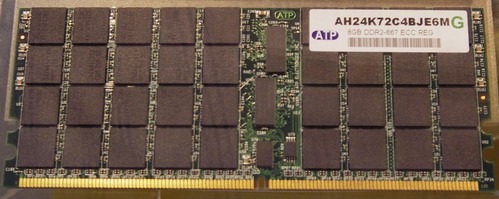
now you know why they don't advise the 2600k for video editing in THE Adobe forums nor at the pmbb5 benchmark site. Its got a limitations. I feel sorry for those poor souls who got suggested 2600k only to find out it ain't cutting it
 
page 12 of the datasheet volume 1 it states
1gb, 2gb and 4gb DDR3 dram technologies supported.
Using 4gb device technologies, the largest memory capacity possible is 32gb, assuming Dual Channel mode with four X8 dual ranked unbuffered DIMM memory configuration.

So read again X8 means 4x8=32gb
Not X8 means 8gb

Page 11 I mean

Blue Fox is correct. If you check page 19, they list in Table 2-1 Supported UDIMM Module Configurations:

Raw Card Version A
Dimm Capacity: 8GB
DRAM Device Technology: 4Gb
DRAM Organization: 512 M X 8
 
Blue Fox is correct. If you check page 19, they list in Table 2-1 Supported UDIMM Module Configurations:

Raw Card Version A
Dimm Capacity: 8GB
DRAM Device Technology: 4Gb
DRAM Organization: 512 M X 8

oh my lord lol
512x8 is a 4gb stick lol that's the banks.
He is not correct again X8 means multiply not amount of the dimms
 
Blue Fox is correct. If you check page 19, they list in Table 2-1 Supported UDIMM Module Configurations:

Raw Card Version A
Dimm Capacity: 8GB
DRAM Device Technology: 4Gb
DRAM Organization: 512 M X 8

oh my lord lol
512x8 is a 4gb stick lol that's the banks.
He is not correct again X8 means multiply not amount of the dimms


Since you didn't bother to actually read the table, I'll post the full row:

Raw Card Version A
Dimm Capacity: 8GB
DRAM Device Technology: 4Gb
DRAM Organization: 512 M X 8
# of DRAM Devices: 16
# of Physical Device Ranks: 2
# of Row/Col Address Bits: 16/10
# of Banks Inside DRA: 8
Page Size: 8 K

It's a 8GB Dimm, with each rank organized as 512M x 8, with 16 total chips, in two ranks.

DRAM Organization != Dimm organization

If you still don't believe what the Intel document that you cited is saying, then I can only guess you're trolling.


GB is Gigabyte and Gb is gigabit, right? Guess someone made a mistake in reading :p
It's annoying how those capitalizations matter :p
 
Except everything high capacity is dual ranked (or quad), so 512mbit x8 nets you a 8gb stick when you have two ranks. It's a very simple concept, but you still don't seem to get it...
 
Except everything high capacity is dual ranked (or quad), so 512mbit x8 nets you a 8gb stick when you have two ranks. It's a very simple concept, but you still don't seem to get it...

It was my fault for not spoon feeding the full table in my post. I had assumed that they would go and read the actual source instead of taking my post at face value...
 
It was my fault for not spoon feeding the full table in my post. I had assumed that they would go and read the actual source instead of taking my post at face value...
That wasn't really aimed at you. I explained it earlier, but they're too dense to get it. That's asking a lot anyway. :p
 
That wasn't really aimed at you. I explained it earlier, but they're too dense to get it. That's asking a lot anyway. :p

....or not dense enough, single ranked memory only gets you so far [/zing]
 
Last edited:
As an Amazon Associate, HardForum may earn from qualifying purchases.
No, you obviously don't know much about RAM. 4gbit is the individual chip density. 4gbit != 4gb (Intel uses the proper SI notation of Gb and not GB if you didn't notice). x8 refers to the memory chip configuration per rank. Like I said, a dual ranked x8 DIMM using 4gbit density results in an 8gb stick of RAM. 4 sticks of that and you have your 32gb of RAM.

my sincere apologies. My b's were messed up . Notice the bit when I zoomed
 
As an Amazon Associate, HardForum may earn from qualifying purchases.
The 16gb stick is quad ranked actually. All 16gbit sticks currently are. You won't find quad ranked stuff outside of servers however as the memory controllers in desktop motherboards and processors can't handle that many. It's the same reason why registers are used in systems with many DIMMs (as it lessens the load on the memory controller). I did mention 16gb sticks earlier actually. 32gb sticks are on their way as 1567 boards support them.
 
As an Amazon Associate, HardForum may earn from qualifying purchases.
ah, I guess just only use the pic and not the actual specs for the heck of it :p I'll edit it out :)
 
Since you didn't bother to actually read the table, I'll post the full row:

Raw Card Version A
Dimm Capacity: 8GB
DRAM Device Technology: 4Gb
DRAM Organization: 512 M X 8
# of DRAM Devices: 16
# of Physical Device Ranks: 2
# of Row/Col Address Bits: 16/10
# of Banks Inside DRA: 8
Page Size: 8 K

It's a 8GB Dimm, with each rank organized as 512M x 8, with 16 total chips, in two ranks.

DRAM Organization != Dimm organization

If you still don't believe what the Intel document that you cited is saying, then I can only guess you're trolling.


It's annoying how those capitalizations matter :p

I did read it had to get out of f**** bed to go zoom the thing lol
 
you can actually say fucking on the forum.... it's not a kiddyplayground anymore :p just don't say it out of context :rolleyes:, or as an insult to another member.
 
ah, I guess just only use the pic and not the actual specs for the heck of it :p I'll edit it out :)
If you're curious, this is what a quad ranked DIMM looks like. Back in the DDR1 days, manufacturers used to stack chips on top of each other so they were two high per side too (using TSOP instead of BGA of course).

ed2571562398096aea5883d22a980e31.jpg
 
If you're curious, this is what a quad ranked DIMM looks like. Back in the DDR1 days, manufacturers used to stack chips on top of each other so they were two high per side too (using TSOP instead of BGA of course).

ed2571562398096aea5883d22a980e31.jpg

woah :eek:, I have never seen one of those before. Thank you, Blue Fox :)
 
you can actually say fucking on the forum.... it's not a kiddyplayground anymore :p just don't say it out of context :rolleyes:, or as an insult to another member.

ah thanks lol nah I don't do insults that's a sign of defeat normally.
 
If you're curious, this is what a quad ranked DIMM looks like. Back in the DDR1 days, manufacturers used to stack chips on top of each other so they were two high per side too (using TSOP instead of BGA of course).

ed2571562398096aea5883d22a980e31.jpg

have you seen the heatsinks on the Bluegene super computer? Its a 17 core Sandy Bridge outfit. The heatsinks are the size of a desktop almost
 
woah :eek:, I have never seen one of those before. Thank you, Blue Fox :)
Bet you haven't seen this either. It's the other kind I mentioned and I used to own some.
http://stfcc.org/bluefox/DSC00575.JPG

Doesn't really look odd from the front though:
http://stfcc.org/bluefox/misc/forsale/DSC00669.JPG
have you seen the heatsinks on the Bluegene super computer? Its a 17 core Sandy Bridge outfit. The heatsinks are the size of a desktop almost
Actually, neither the Blue Gene/L or /P has heatsinks on the RAM. It's CPU only on each compute card.
 
Back
Top