OCNG5: OC firmware for Supermicro AMD G34 platforms

6300 are newer with same or lower TDP I think. Then technology for transistors is lower size on newer ones 6300's, but even is with lower techology, current ones, at least in AMD side, have now TDP even up to 400W.
I barely thing that old, or even actual air coolers, will face that. Of course except servers air coolers which run on 16 000 rmps or above... .
It looks we are still doomed on workstation's CPU's to have either very big either insane noizy air coolears. Then liquid coolears need much more imprevements.

Just installed the 6380ES chips in my H8QGi-F tonight. Haven't really played with them much. Just set OCNG to the same settings for memory that i had with the 6328s. Temps stabilize at around 43C with psmax -1 set, with Cinebench R20. The 6328s would top out at around 27C. Ram bandwidth with RightMark Multi thread ram benchmark is down to 32 GB/s from 37 GB/s with the 6328s, but i've not upped the ref clock yet.

Power states for 6380ES:

Main processor is Family 15h (Bulldozer/Interlagos/Valencia) Processor
Family: 0xf Model: 0x2 Stepping: 0x0
Extended Family: 0x15 Extended Model: 0x2
Package Type: 0x3 BrandId: 0x0
Machine has 4 nodes
Processor has 8 cores
Processor has 7 p-states
Processor has 2 boost states

Power States table:
-- Node: 0 Core 0
core 0 pstate 0 (pb0) - En:1 VID:19 FID:18 DID:0.00 Freq:3400 VCore:1.3125
core 0 pstate 1 (pb1) - En:1 VID:32 FID:12 DID:0.00 Freq:2800 VCore:1.1500
core 0 pstate 2 (p0) - En:1 VID:42 FID:9 DID:0.00 Freq:2500 VCore:1.0250
core 0 pstate 3 (p1) - En:0 VID:42 FID:9 DID:0.00 Freq:2500 VCore:1.0250
core 0 pstate 4 (p2) - En:0 VID:42 FID:9 DID:0.00 Freq:2500 VCore:1.0250
core 0 pstate 5 (p3) - En:0 VID:42 FID:9 DID:0.00 Freq:2500 VCore:1.0250
core 0 pstate 6 (p4) - En:1 VID:51 FID:12 DID:1.00 Freq:1400 VCore:0.9125

Power states for 6328

Main processor is Family 15h (Bulldozer/Interlagos/Valencia) Processor
Family: 0xf Model: 0x2 Stepping: 0x0
Extended Family: 0x15 Extended Model: 0x2
Package Type: 0x3 BrandId: 0x0
Machine has 4 nodes
Processor has 4 cores
Processor has 7 p-states
Processor has 2 boost states

Power States table:
-- Node: 0 Core 0
core 0 pstate 0 (pb0) - En:1 VID:19 FID:22 DID:0.00 Freq:3800 VCore:1.3125
core 0 pstate 1 (pb1) - En:1 VID:27 FID:19 DID:0.00 Freq:3500 VCore:1.2125
core 0 pstate 2 (p0) - En:1 VID:35 FID:16 DID:0.00 Freq:3200 VCore:1.1125
core 0 pstate 3 (p1) - En:1 VID:38 FID:12 DID:0.00 Freq:2800 VCore:1.0750
core 0 pstate 4 (p2) - En:1 VID:43 FID:7 DID:0.00 Freq:2300 VCore:1.0125
core 0 pstate 5 (p3) - En:1 VID:46 FID:3 DID:0.00 Freq:1900 VCore:0.9750
core 0 pstate 6 (p4) - En:1 VID:51 FID:12 DID:1.00 Freq:1400 VCore:0.9125
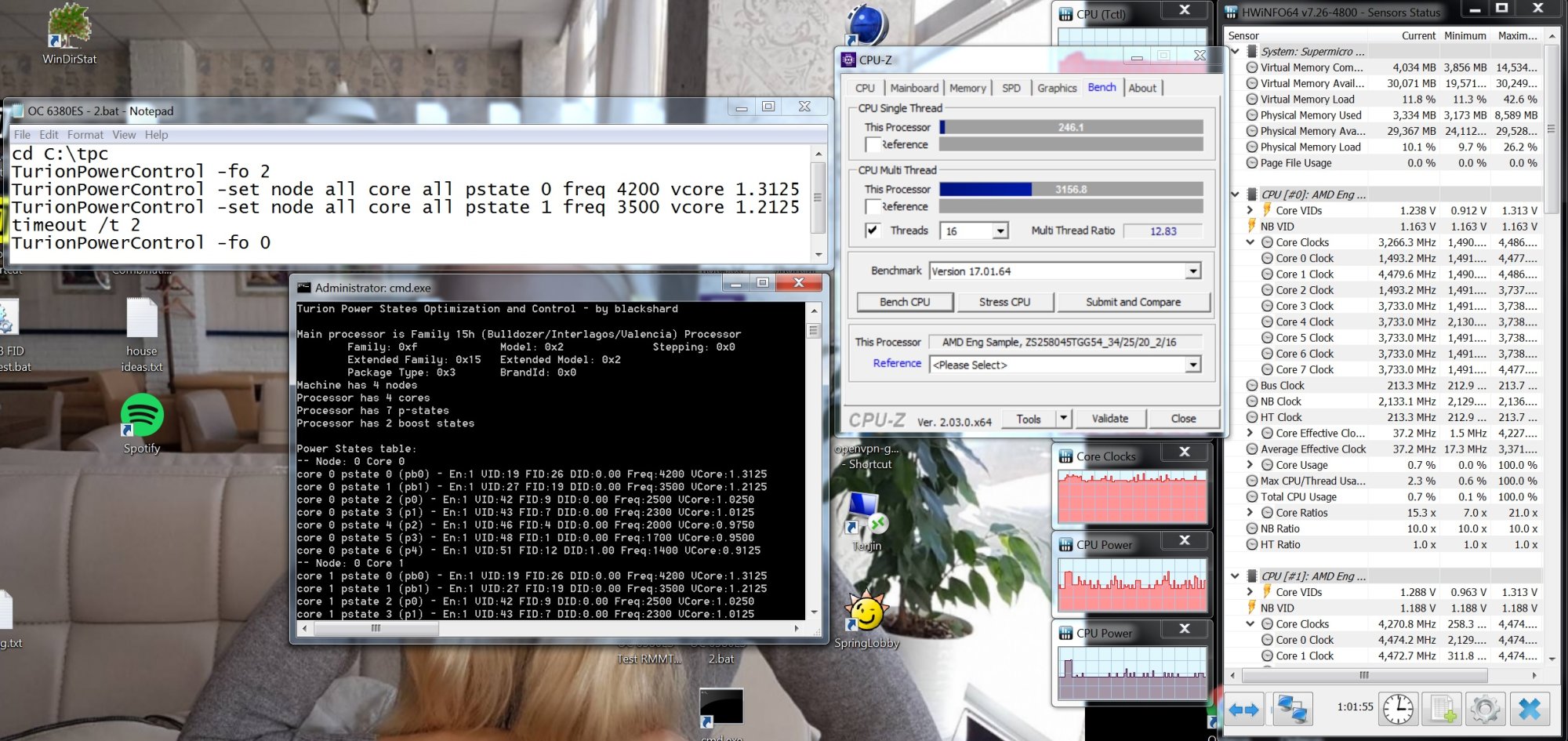
 
i thought i would add some initial impressions.

Initial attempts at overclocking with all 16 cores were not so promising. But that was compounded by the fact that i was switching to the wrong pstate prior to setting the processor voltages. This screwed up the windows timer causing all manner of strange issues, such as the driver blinking the screen on and off, various benchmarks measuring strangely, and my chrome browser all of a sudden going hyperactive. i tried various things to cure this before figuring out that it was my script and not a BIOS setting. Temps were also getting into the 50s as well. So what i did was artificially reduce the # of cores active by setting the "COMPUTE UNIT" in the "CPU Downcore Mode" BIOS setting. This effectively disables CMT, and uses a single core out of a cluster instead of both, halving the cores presented to the OS. This reduced the temps back down.

The nice thing about disabling CMT is that the shared decoder is no longer a possible slowdown factor. i was able to get 8 cores running an all core turbo of 3.5 GHz (pb1), and 4.0 GHz (pb0) with CPB on and PowerNow on. i didn't have to adjust the voltage up from the stock settings. i haven't put too much time into discovering the limits of each core for pb0, however core 0 runs at 4.5 GHz no problem as far as i can tell.

The interesting thing is that when running like this, it is very similar to the 6328s that i previously had in there, but actually faster for some reason. Some benchmarks are 20% faster when running the processors at the same speed. Not sure if this is a result of disabling CMT, or if there are larger caches or what.

One thing is for sure though. i don't think that these 63xx ES chips are anywhere as robust as the 61xx ES chips that i previously had. i do not know why it is, but i cannot even run a single iteration of IntelBurnTest at the stock settings, whereas the 61xx could run those for hours.

These things also seem to be on the ragged edge temps wise. A very fine balancing act between heat and voltage and frequency. Add just a little bit of voltage and the temps really climb. i have no measured power draw at the wall, but it seems these are very power hungry beasts.

I have gotten them running better than the 6328s though now as verified by playing some replays back of a few games. Once i know what the upper frequency limits of the cores are, i'm going to scale them back down and up the ref clock to get a boost on the CPU-NB/Northbridge/L3.
 
Perhaps i should not be amazed by this, but to properly overclock this, i am having to *reduce* voltages. refclock of 210 would not work when running rightmark multi thread benchmark saturating all memory cores. The memory was not the problem, but i noticed when i reduced the CPU-NB voltage adjustment to +0.0 (in turionpowercontrol) that stability improved. Thinking it was the temps, i then reduced the voltage on p-state pb1 - it is the all core turbo that runs when RMMT is working the memory controllers over. This reduced the temps. It seems that once temps hit 33.8C it would give up the ghost. Things stabilized again when i reduced voltage from 1.1500v to 1.0750v which reduced temps by about 1.5C. i wonder how much extra voltage the factory added for the stock p-states over what was necessary.

Anyone else run into this? i'm new to OC for these Bulldozer/Piledriver cores.

Does anyone know whether it is possible to reprogram the TDP value that is used by the APM? Mine is just under 114.xxxx. Since this is an ES processor i wonder if there is a way to set it up to 140w like the 6386SE processors.
 
Last edited:
i thought i would post some preliminary results. Using OCNG the processors seem to have hit a limit at current settings at ref clock 213. Beyond that is not stable at current settings (and i don't want to up voltage to CPU-NB due to increasing heat). RMMT really stresses out the CPUs more in terms of power than say CPU-Z stress or Cinebench. Package power is hitting 71 when running 8 threads hammering the mem controller with 128 bit SSE2 reads. Upping the ref clock seems to have also given me a jump in fps in one of the RTS games i usually play. Perhaps 8% or so.

i turned off HPC Mode in the BIOS and that helped with temps and increased stability.

This is where i am at for stability now with a 213 ref clock: Ends up being Pb0 - 3.621 GHz (single core turbo), and Pb1 - 2.982 GHz (all core turbo).
cd C:\tpc
TurionPowerControl -fo 2
TurionPowerControl -set node all core all pstate 0 freq 3400 vcore 1.2125
TurionPowerControl -set node all core all pstate 1 freq 2800 vcore 1.0500
timeout /t 2
TurionPowerControl -fo 0

i have a more aggressive file that also seems to work just fine (which is my goal - going to be starting with the above and working towards it to prove stability). That one is on the screen capture.
Ends up being Pb0 - 4.473 GHz (single core turbo), and Pb1 - 3.727 GHz (all core turbo). Cinebench 11.5 and R15 both run just fine. i include the CPU-Z benchmark.
This weekend i'll be experimenting using the Kill-a-Watt to see the power draw. i previously ran my Opteron 61xx for about 7 years at 1.2v, so ideally i would like to keep the all core turbo voltages at around that level.

i kind of like running these with the BIOS Downcore mode set to "Compute Unit", as it runs these almost like an FX-8350, but with a larger heat sink area for the same amount of cores.

1.jpg
 
Last edited:
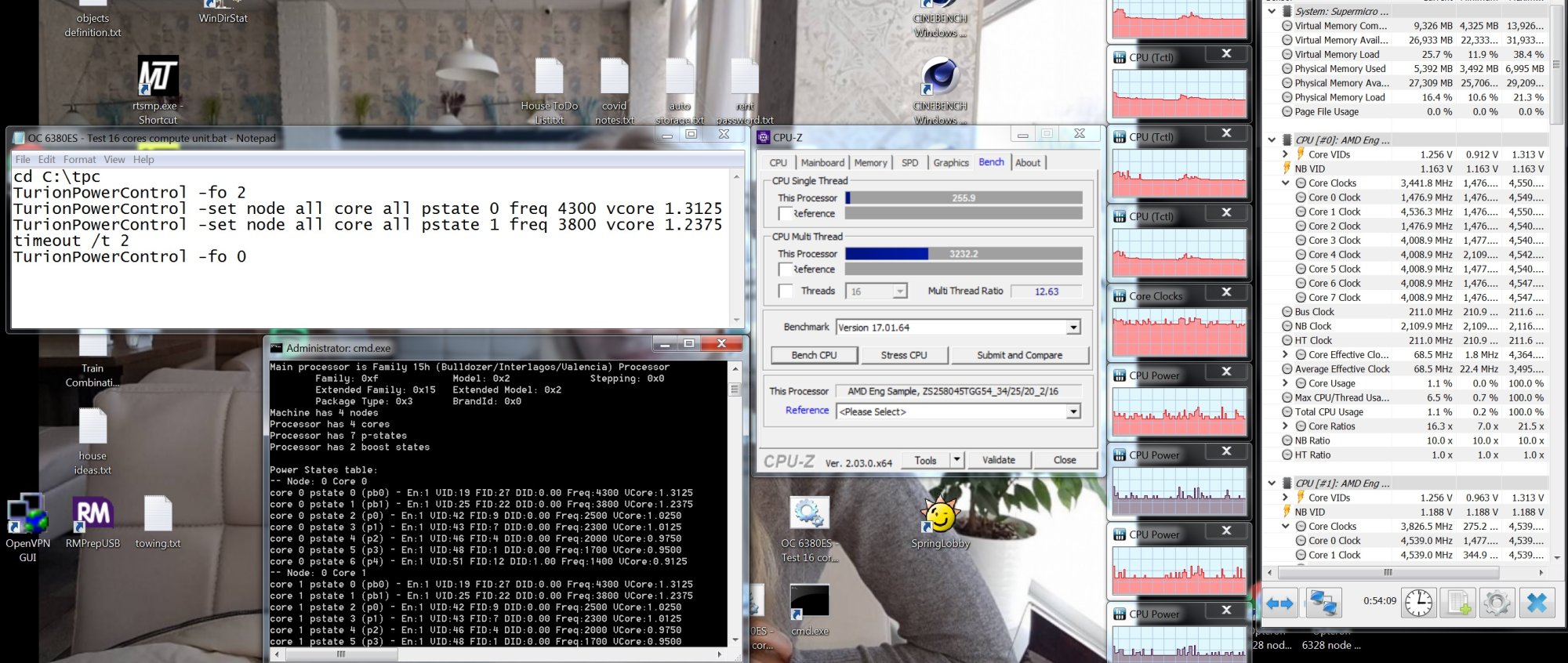
Update: With the processors still set at "Compute Unit" downcore mode i spent some time focusing on the voltage curve and pstate 1 (pb1) since that is where the CPUs spend most of their time.
3.9 GHz required 1.2125 volts
4.01 GHz required 1.2375 volts
i stopped at 4.0 GHz since i don't want to go much beyond 1.2 volts for daily use

i then focused on pstate 0 (pb0) - single core turbo
4.536 GHz requires 1.3125 volts - all of the cores can work at this frequency just fine.
i stopped here.

Settings are Powernow enabled, CPB enabled, HPC mode disabled. ref clock of 211 (i backed off from 213 for a margin of stability)

2.jpg
 
[EDIT] i found out after a bunch of further stability testing, that the lowered speed HT setting just kept the stability from manifesting itself (ie it hid the instability for longer during my Prime95 runs). The problem actually was the Node Interleaving setting in the BIOS. For some reason setting Node interleaving to "disabled" caused the processors to reset under heavy load. Enabling the Node Interleaving setting (back to "Auto" in the BIOS) made the system completely stable. Not sure why node interleaving disabled does not function properly.

i thought i would post about a very strange instability i ran across with these 63xx processors (both the 6328 i previously had in the machine and the 6380ES that are currently in the machine). i did not experience this with the 61xx ES!

My overclocks up to 4.5 GHz (single core turbo) seem just fine on the 6380ES. i could run Prime95 just fine with the small FFT option. This pretty much keeps the benchmark running within the CPUs themselves without much traffic out to ram. No initial problems doing that.
However, i noticed that if i ran any sort of benchmark that saturated the ram. Rightmark is one, and Prime95 with the Blend mode is another, the machine would almost immediately black screen (and sometimes reboot). So what i did was run Prime95/Blend on progressively more cores. i could run 4 threads just fine on cores 0-3, or 4-7, etc. Essentially so long as i kept the computations confined to one of the cpu dies in the MCM package i was fine. if i tried to overlap the cores that is when i would run into issues. This pointed to a communication issue between the cpu dies in the MCM.

Just on that hunch, i downgraded the Hyper Transport speed in the BIOS to HT1. Viola, the instability went away.

Interestingly enough, the ram benchmarks do not see to be much slower if at all. i am going to have to do some comparisons.

But why does this issue manifest with these 63xx processors?

Has anyone done any Hyper transport tuning?

Here is what TurionPowercontrol is currently listing as the HT status:
TurionPowerControl 0.44-rc2 (tpc-0.44-rc2-r144)
Turion Power States Optimization and Control - by blackshard

Hypertransport Status:
Node 0 Link 0 Sublink 0 not connected
Node 0 Link 1 Sublink 0 Bits=16 Coh=0 SpeedReg=7 (1200MHz)
Node 0 Link 2 Sublink 0 Bits=16 Coh=1 SpeedReg=7 (1200MHz)
Node 0 Link 3 Sublink 0 Bits=8 Coh=1 SpeedReg=7 (1200MHz)
Node 0 Link 3 Sublink 1 not connected

Node 1 Link 0 Sublink 0 Bits=8 Coh=1 SpeedReg=7 (1200MHz)
Node 1 Link 0 Sublink 1 not connected
Node 1 Link 1 Sublink 0 Bits=16 Coh=1 SpeedReg=7 (1200MHz)
Node 1 Link 2 Sublink 0 not connected
Node 1 Link 3 Sublink 0 not connected

Node 2 Link 0 Sublink 0 Bits=8 Coh=1 SpeedReg=7 (1200MHz)
Node 2 Link 1 Sublink 0 Bits=16 Coh=0 SpeedReg=7 (1200MHz)
Node 2 Link 2 Sublink 0 Bits=16 Coh=1 SpeedReg=7 (1200MHz)
Node 2 Link 3 Sublink 0 not connected

Node 3 Link 0 Sublink 0 Bits=8 Coh=1 SpeedReg=7 (1200MHz)
Node 3 Link 0 Sublink 1 not connected
Node 3 Link 1 Sublink 0 Bits=16 Coh=1 SpeedReg=7 (1200MHz)
Node 3 Link 2 Sublink 0 not connected
Node 3 Link 3 Sublink 0 not connected


Done.


PS: i wanted to add that the option in OCGN to set the Northbridge multiplier does not seem to work with this 6380ES processor at least. i set it to 9x, but it had no effect.
 
Last edited:
I found windows tools and bios files about a year ago when I was planning to relive the 4p supermicro days. I haven't used the files yet, but they are available here: https://filebin.net/4daknn302jixk1zj. The link expires in 6 days.
Thank you very much! I found bios 5.3 on Internet Archive, just not the tools.

I have DG6 board already with OCNG 5.3 bios, 2x Opteron 6328. I might replace it with 2x Opteron 6380 to get 32 cores instead of 16 cores despite lower base CPU frequency.

Even without overclock, it outperforms my i7-4930K (6 cores, 12 threads, hyper-threading) - I might investigate some thermal issue with i7.

When browsing 200 tabs in Chrome or Edge, i7 is laggy while Opteron nails it. Both have same DDR3 32GB and SSD. PerplexityAI says that Opteron architecture, server build and higher core count might be better for browsing using many tabs and server architecture might offer more stable turbo boost.

6328 has base speed 3.20GHz and with un-tweaked OCNG 5.3 it runs stable at 3.5 GHz.

(both computers are running Windows 11 x64 Pro)
 
Hi I've got a Supermicro H8SCM-F C32 platform with AMD Opteron 4386 3.8Ghz 32gb 1600 currently 2x modules. Would you be able to line me up with a modded bios with overclocking & explain how you adjusted the TDP in the first place by adding it to the BIOS firmware? Thanks

What's the command for TPC (Turion Power Control) for TDP control?
 
Just installed the 6380ES chips in my H8QGi-F tonight. Haven't really played with them much. Just set OCNG to the same settings for memory that i had with the 6328s. Temps stabilize at around 43C with psmax -1 set, with Cinebench R20. The 6328s would top out at around 27C. Ram bandwidth with RightMark Multi thread ram benchmark is down to 32 GB/s from 37 GB/s with the 6328s, but i've not upped the ref clock yet.

Power states for 6380ES:

Main processor is Family 15h (Bulldozer/Interlagos/Valencia) Processor
Family: 0xf Model: 0x2 Stepping: 0x0
Extended Family: 0x15 Extended Model: 0x2
Package Type: 0x3 BrandId: 0x0
Machine has 4 nodes
Processor has 8 cores
Processor has 7 p-states
Processor has 2 boost states

Power States table:
-- Node: 0 Core 0
core 0 pstate 0 (pb0) - En:1 VID:19 FID:18 DID:0.00 Freq:3400 VCore:1.3125
core 0 pstate 1 (pb1) - En:1 VID:32 FID:12 DID:0.00 Freq:2800 VCore:1.1500
core 0 pstate 2 (p0) - En:1 VID:42 FID:9 DID:0.00 Freq:2500 VCore:1.0250
core 0 pstate 3 (p1) - En:0 VID:42 FID:9 DID:0.00 Freq:2500 VCore:1.0250
core 0 pstate 4 (p2) - En:0 VID:42 FID:9 DID:0.00 Freq:2500 VCore:1.0250
core 0 pstate 5 (p3) - En:0 VID:42 FID:9 DID:0.00 Freq:2500 VCore:1.0250
core 0 pstate 6 (p4) - En:1 VID:51 FID:12 DID:1.00 Freq:1400 VCore:0.9125

Power states for 6328

Main processor is Family 15h (Bulldozer/Interlagos/Valencia) Processor
Family: 0xf Model: 0x2 Stepping: 0x0
Extended Family: 0x15 Extended Model: 0x2
Package Type: 0x3 BrandId: 0x0
Machine has 4 nodes
Processor has 4 cores
Processor has 7 p-states
Processor has 2 boost states

Power States table:
-- Node: 0 Core 0
core 0 pstate 0 (pb0) - En:1 VID:19 FID:22 DID:0.00 Freq:3800 VCore:1.3125
core 0 pstate 1 (pb1) - En:1 VID:27 FID:19 DID:0.00 Freq:3500 VCore:1.2125
core 0 pstate 2 (p0) - En:1 VID:35 FID:16 DID:0.00 Freq:3200 VCore:1.1125
core 0 pstate 3 (p1) - En:1 VID:38 FID:12 DID:0.00 Freq:2800 VCore:1.0750
core 0 pstate 4 (p2) - En:1 VID:43 FID:7 DID:0.00 Freq:2300 VCore:1.0125
core 0 pstate 5 (p3) - En:1 VID:46 FID:3 DID:0.00 Freq:1900 VCore:0.9750
core 0 pstate 6 (p4) - En:1 VID:51 FID:12 DID:1.00 Freq:1400 VCore:0.9125

Hi,
Just to ask, as it looks convenient on this thread, in case you are still runing this motherboard. Do your H8QGi is running in quad channel RAM ? . If so, what modules brand and are you using ?.
Supermicro Suport team do not longer help we this. After years been stopped, I started it again and I found it do not run in quad channel RAM as expected, but dual. Becuase of this, memory speed is half as expected. I run Samsung 32GB ECC PCL 10600, 32 modules, LDIMM's ( load reduced) , so full banks on motherboard. I also tried with 16 modules on blue slots only, and same result. Supermicro website no longer have memory matrix available, and it looks they do not want to reenable it, nor at request. I built the matrix based what was specified on Supermicro website for full populated bank on the board, as long as the best performance plan, as they specified. I remember that was possible only with LDIMM's, not registered type, and to match maximum of 32 slots available with 32 GB modules for a total of 1024 GB. I remember also with registered modules, you have to had to use 64GB modules in 16 slots, but that was not recommended as best performance matrix.
I have standard motherboard BIOS type, last one as it from Supermicro. No changes. I am looking further to check both sides, with other motherboard and others memory modules.

https://www.supermicro.com/products...EkZzAkdDE3ODk0ODU3NDQkajYwJGwwJGg5NDA2NjA5NTE.

See Detailed Memory Support Matrix...

Thank you.
 
Hi,
Just to ask, as it looks convenient on this thread, in case you are still runing this motherboard. Do your H8QGi is running in quad channel RAM ? . If so, what modules brand and are you using ?.
Supermicro Suport team do not longer help we this. After years been stopped, I started it again and I found it do not run in quad channel RAM as expected, but dual. Becuase of this, memory speed is half as expected. I run Samsung 32GB ECC PCL 10600, 32 modules, LDIMM's ( load reduced) , so full banks on motherboard. I also tried with 16 modules on blue slots only, and same result. Supermicro website no longer have memory matrix available, and it looks they do not want to reenable it, nor at request. I built the matrix based what was specified on Supermicro website for full populated bank on the board, as long as the best performance plan, as they specified. I remember that was possible only with LDIMM's, not registered type, and to match maximum of 32 slots available with 32 GB modules for a total of 1024 GB. I remember also with registered modules, you have to had to use 64GB modules in 16 slots, but that was not recommended as best performance matrix.
I have standard motherboard BIOS type, last one as it from Supermicro. No changes. I am looking further to check both sides, with other motherboard and others memory modules.

https://www.supermicro.com/products...EkZzAkdDE3ODk0ODU3NDQkajYwJGwwJGg5NDA2NjA5NTE.

See Detailed Memory Support Matrix...

Thank you.

How do I tell whether I have dual- or quad- channel on my H8QGI+-F?
 
I'm pretty sure it shows on boot up... Doing it from inside the OS is really OS dependant.
I'll have a look out for that then.

But there are 4 NUMA memory banks, all of which can be dual or quad or even single.
 
How do I tell whether I have dual- or quad- channel on my H8QGI+-F?
Hi,
You can use CPUz tool to see information about RAM memory matrix. There are others tools too on the market. See an example down below for a random computer of mine.
The problem I see is that on dual, and not quad, you got half the speed on RAM than expected one. Now I have RAID0 matrix nvme storage to run faster than the RAM, at about 6 GB/s, while my expectations were the RAM will be faster... .
For example in may case, I run it on 1333 MHz ( about 1,3 GB/s ), in dual speed is about 2,7 GB/s. On quad is expected to run on double of that, mean about 6 GB/s. That may have a huge impact in performance, while this is a feature of the motherboard that definatelly all of us as owners want to use it. That will basicall made such DDR3 motherboard run almost to compare in DDR4-DDR5 performance. Regular desktop motherboars, most of it, used to run dual channel as standard.

DRAM speed references. I think those are theoretical value.

1789958503868.png


For example latest Supermicro, for such type of quad CPU, do not even have anymore quad channel RAM feature in place. Or maybe is not mentioned. Did not have a chance to use any of it untill now.

https://www.supermicro.com/en/produ...EkZzEkdDE3ODk5NDAxOTAkajYwJGwwJGg1NzY5MjIzMDA.

and latest

https://www.supermicro.com/fr-fr/pr...EkZzEkdDE3ODk5NDAxOTAkajYwJGwwJGg1NzY5MjIzMDA.


I also seen that when I will for three channel, it goes dual too. So my motherboard is not runnig three and quad from some reasons.

1789957411568.png


BTW. as this is overclocking thread. Do any of you seen real improvement with OC in place, like even the RAM and storage real speed, out of some CPU possbile feeling of been faster ? .


Thank you.
 
Hi,
You can use CPUz tool to see information about RAM memory matrix. There are others tools too on the market. See an example down below for a random computer of mine.
The problem I see is that on dual, and not quad, you got half the speed on RAM than expected one. Now I have RAID0 matrix nvme storage to run faster than the RAM, at about 6 GB/s, while my expectations were the RAM will be faster... .
For example in may case, I run it on 1333 MHz ( about 1,3 GB/s ), in dual speed is about 2,7 GB/s. On quad is expected to run on double of that, mean about 6 GB/s. That may have a huge impact in performance, while this is a feature of the motherboard that definatelly all of us as owners want to use it. That will basicall made such DDR3 motherboard run almost to compare in DDR4-DDR5 performance. Regular desktop motherboars, most of it, used to run dual channel as standard.

DRAM speed references. I think those are theoretical value.

View attachment 827017

For example latest Supermicro, for such type of quad CPU, do not even have anymore quad channel RAM feature in place. Or maybe is not mentioned. Did not have a chance to use any of it untill now.

https://www.supermicro.com/en/produ...EkZzEkdDE3ODk5NDAxOTAkajYwJGwwJGg1NzY5MjIzMDA.

and latest

https://www.supermicro.com/fr-fr/pr...EkZzEkdDE3ODk5NDAxOTAkajYwJGwwJGg1NzY5MjIzMDA.


I also seen that when I will for three channel, it goes dual too. So my motherboard is not runnig three and quad from some reasons.

View attachment 827014


BTW. as this is overclocking thread. Do any of you seen real improvement with OC in place, like even the RAM and storage real speed, out of some CPU possbile feeling of been faster ? .


Thank you.
I overclocked my g34 rig quite a bit. It helped a lot in DC applications.
 
Hi,

It should be a way to find out for other operating systems too. However I found out, at least for Windows and others small workstations, that information about RAM frequency is not shawn properly, yet in what was top motherboard back then. Yet based tests, with Supermicro quad CPU motherboard, it looks real indeed, and yet problematic in my case as it do not run in quad channel.
I have a thread with a guy from Supermicro suport, but he is answering without consistenty, if I see an answer, but I am interested to know if it may be a software/BIOS problem, or just hardware. Back then, I decided to buy Samsung modules, for HP server, as it look for me better quality, with complete cover radiators and such. But I suppose if I have had choosen Supermicro brand, it would have had full compatibility.

Nice to hear you got better performance. I am retained to update the BIOS as I want a working and stable platform. Then Supermicro suport is over for this board. They barely respond, and when they do, it is almost nothing. I am also still working at a custom efficient cooling solution, while OC will involve even more demand for heat dissipation. I got even some Noctua's for TR4 socket, adapt it, and it goes quite good in full load, with CPU's max. temp. at 45C. Yet, becuase radiators are big, it cover RAM modules to much, and so it do not cool good enough, even with fans on it. I could measure RAM module reaching +80C while using it fully, like in a RAM disk and so, and then OS is working very slow and eventually stuck. No warning for motherboard at all, over beeping signal feature, like for CPU and chipset. I can't find other culprit so for such behave, and got convinced of that over multiple evaluations. When intense operations of copy files, it looks northbrige is under heavy load and overheat too. It looks this Supermicro bord have overheat protection sensors only for CPU and northbrige/southbrige(verified that too in my side based different cooling solutions), but not for RAM modules at all. To check RAM modules temp. I used an infrared temperature meter. Quite suprised to see +80C on the radiator surface of RAM modules, burning the finger... .
I am not looking for quiet proof solution, but yet not to use so speedy fans. Yet I spent untill now more on cooling solutions that the system itself, and I am looking to work more ... . I start to think that initial solution of Supermicro with tunnel like ventilation should be the best, and eventually low profile radiators for CPU, been replace with low profile liquid coolers for improvement of cooling. Still looking ... .

Thank you.
 
Hi,
Found a screenshot from a previous used motherboard as H8QGi-F. I use now a H8QGi+-F. One previous used used same RAM modules, and that was running quad channel mode, based speed of a RAM disk.
Yet I have now previous mo. defective and I can't recheck it, but it looks now obvious that I have a problem with setup on actual mo. and RAM modules are not the curprit. I will have to check our further on.
From some reasons I did not run a full check of functionality on this mo. from beginning.

btw. What cooling solution are you using on the ones with OC ?.

Thank you.
 

Attachments

  • ramdisk_speed_result.jpg
    ramdisk_speed_result.jpg
    90 KB · Views: 0
Hi,
Found a screenshot from a previous used motherboard as H8QGi-F. I use now a H8QGi+-F. One previous used used same RAM modules, and that was running quad channel mode, based speed of a RAM disk.
Yet I have now previous mo. defective and I can't recheck it, but it looks now obvious that I have a problem with setup on actual mo. and RAM modules are not the curprit. I will have to check our further on.
From some reasons I did not run a full check of functionality on this mo. from beginning.

btw. What cooling solution are you using on the ones with OC ?.

Thank you.
In case others have this concern too, I found out that in applications, like Monero mining, performance will increase while adding RAM modules from single to quad matrix. So somehow RAMdrive software may render in different ways, and also CPUz and other softwares like HWinfo, to somehow now showing correctly the channel level of RAM working with, while populating RAM banks for quad channel actually works in quad channel, but specific softwares do not show it correctly, and for example CPUz show it as dual.

Back to OC, it looks that links to download OC firmware are not working. Any alternatives ?.

Thank you,
 
I overclocked my g34 rig quite a bit. It helped a lot in DC applications.
How do you cool the motherboard components, like arround CPUs components ?. Did you added radiators for every single piece ?.
Or you run original server case cooling method ?.
I expect that for 4,5 Ghz CPU clock, components to run much hotter, and I plan to use motherboard in a workstation case.
Thank you.
 
How do you cool the motherboard components, like arround CPUs components ?. Did you added radiators for every single piece ?.
Or you run original server case cooling method ?.
I expect that for 4,5 Ghz CPU clock, components to run much hotter, and I plan to use motherboard in a workstation case.
Thank you.
I ran server fans across the boards. I also ran the boards out of cases, just sitting right on a bench.
 
I ran server fans across the boards. I also ran the boards out of cases, just sitting right on a bench.
Thanks for info. I used that too, as fans across the board, but I am not satisfied, as air flow get a lot of spread, while I found out, as mentioned in previous posts too, that performance of RAM dramatically decrease at heavly operations, in particular while using RAMdrive's, till even a point when it freeze the OS system and no longer work. Also as mentioned previous, I've done this check on RAM temperature several time and it looks that indeed problem appear while RAM modules get very hot ( up to 80 C under measure with an IR meter) , and in particular for RAM banks in between, because airflow is obstructed by huge CPU radiators ( I used an adapted to G34 a SP5 TR4 Noctua's; 45 C maximum in full load, with fans with Noctua's Low Noise adapters). I used the system as in room workstation, not as a server in a DC.
While checking a solution with liquid cooling, that's just with superior efficiency, and leave a lot of space and airflow for memory banks, but I am looking for a very long lasting and stable solution, and I am retained to involve liquids for cooling, under potential catastrofic failure of the liquid flow, where liquid may fall on the board and damage it. Looking further... .

Still didn't found any alternative for download the OC BIOS. If anyone have any, please let us know. Thanks.
 
Thanks for info. I used that too, as fans across the board, but I am not satisfied, as air flow get a lot of spread, while I found out, as mentioned in previous posts too, that performance of RAM dramatically decrease at heavly operations, in particular while using RAMdrive's, till even a point when it freeze the OS system and no longer work. Also as mentioned previous, I've done this check on RAM temperature several time and it looks that indeed problem appear while RAM modules get very hot ( up to 80 C under measure with an IR meter) , and in particular for RAM banks in between, because airflow is obstructed by huge CPU radiators ( I used an adapted to G34 a SP5 TR4 Noctua's; 45 C maximum in full load, with fans with Noctua's Low Noise adapters). I used the system as in room workstation, not as a server in a DC.
While checking a solution with liquid cooling, that's just with superior efficiency, and leave a lot of space and airflow for memory banks, but I am looking for a very long lasting and stable solution, and I am retained to involve liquids for cooling, under potential catastrofic failure of the liquid flow, where liquid may fall on the board and damage it. Looking further... .

Still didn't found any alternative for download the OC BIOS. If anyone have any, please let us know. Thanks.
You need the OCNG bios? I definitely have one around but I'm not sure if it works for your board specifically. Worked on my supermicro model but I think the model was different from you.

Is your board a 2P or 4P?
 
You need the OCNG bios? I definitely have one around but I'm not sure if it works for your board specifically. Worked on my supermicro model but I think the model was different from you.

Is your board a 2P or 4P?
I am intrested for H8QGi-F.
I am also interested for H8DGU-F, which is a 2p, but it looks author of OC mod did not released a version for that too. This based initial post on this thread.
THank you.
 
Back
Top