Steam Beta finally enables Proton on Linux fully, making Linux gaming simpler

MrGuvernment

Fully [H]
2FA
Joined
Aug 3, 2004
Messages
24,373
I've been using Linux as my main OS for about 3 years now, between Mint / Manjaro / Debian vanilla, and for me most games I play work fine,, but anything to make it better!

https://www.gamingonlinux.com/2025/...n-on-linux-fully-making-linux-gaming-simpler/

Steam Beta finally enables Proton on Linux fully, making Linux gaming simpler​

By Liam Dawe - 17 Jun 2025 at 11:09 pm UTC
13 comments
Last updated: 17 Jun 2025 at 11:14 pm UTC
At some point recently, Valve updated the Steam Beta Client with a change to the way Proton is enabled making Linux gaming easier. Quick note for newbies: Proton is a compatibility layer to run Windows games on Linux systems available on Steam.
For some context here: originally, Proton had an option to enable / disable it globally. That was removed with the Game Recording update last year. That made sense, because people kept somehow turning it entirely off and now it's required by Steam.
Currently, there's still an option in the stable Steam Client that you need to manually check to enable Steam Play (Proton) for "all other titles". This is something of a leftover from when Proton was initially revealed, and only worked for a specific set of games on Valve's whitelist. It now covers what Valve set by default for Steam Deck and SteamOS verification.
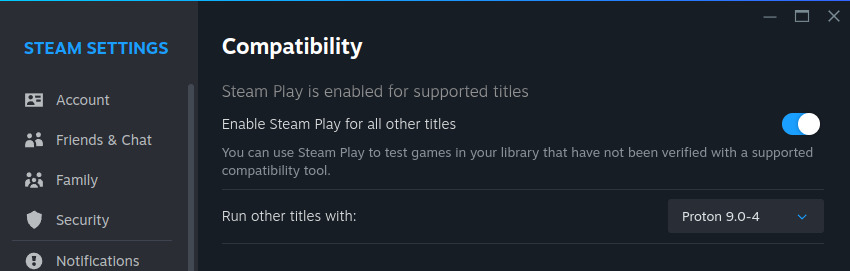
1856373141750201114gol1.jpg

What's changed is that at some point in the recent Steam Beta releases, is that "for all other titles" option is gone. I've scrolled back through changelogs and not seen it mentioned. So now, Proton is just enabled properly in full by default in the Steam Beta like shown in the below shot.
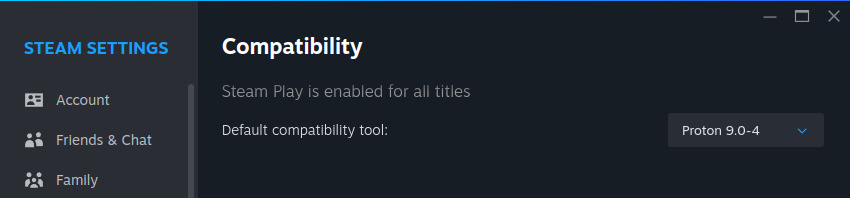
13190839541750201245gol1.jpg

This is a good (and needed) change that I'm happy to see. There's often confusion when people try to run Windows games on Linux and end up with no install button because Proton isn't turned on for all titles. The below will soon be a thing of the past:

8165610001750201664gol1.jpg

To be clear, this is not setting Proton on every game by default, it does not override Native Linux games. It's just making Proton available by default.
It's just one more little nuisance niggle removed, to get people playing games on Linux even faster
 
Proton is awesome for Linux gaming. One of those rare times when you congratulate a company for investing in something that betters a community.
 
Don't know it took Valve this long to enable this by default.
Once you've set it and forgotten it you don't think much about it anymore.
Cool that the default is on now.
Now if only they would disable a few older games that have 8 year old linux ports that suck.... and default to the windows versions. Have seen a few people in other Linux support things asking why is X old game running like ass. The answer being, because your running the native Linux version go in and force it to proton so it downloads the windows version.
 
I really would love to switch but I just don't have the interest to get everything working. Gave it a go with Mint the other week and got the basics up and running but try to get some basic Wine stuff working and my brain just stopped being interested. The wine install was for some tax software, not gaming, which winehq says should have worked but didn't.
 
Doesn't change much for existing Linux users. I always had option to allow Proton for all titles enabled.
 
Ok, this is the final step before I can convince myself to play with Linux.

I know, I know, there's 19 bajillion "how-to" guides on switching to Linux, but I am overwhelmed by the number of options.
I'm hoping people can point me to a reasonably good "Linux for Old DOS Dad's Without a Lot of Freetime to Engage in Hand-to-Hand Combat with a computer anymore" guide.

Going to pickup a small NUC or similar to play with before I switch the gaming PC, but I think it's time to finally start figuring this out. And because I've always wanted to play with a NUC but never been able to justify it! ;)

So, I'm asking for the Hard Linux Guru's for a recommendation of a good place to start.

Please'n'Thank'You
 
I'm hoping people can point me to a reasonably good "Linux for Old DOS Dad's Without a Lot of Freetime to Engage in Hand-to-Hand Combat with a computer anymore" guide.
Mint.

If you want a more performant distro with a little bit of a higher learning curve, go for CachyOS, Garuda, Nobara, etc.
 
Been on Cachy OS for a couple weeks now and it couldn't be easier to game on Linux than running Cachy. I'm certainly not a Linux guru in any way shape or form but Cachy makes it soooo easy to get to gaming and forget about it. The only learning curve is related to navigating the OS itself which is pretty much common sense. I haven't booted windows since installing Cachy so there's that as well and gaming performance is better than ever using Proton. I'm gonna completely forget about win 11 as an "upgrade?".
 
Just a checkbox that is now enabled by default in the Steam settings.
Ya its just on by default now instead of having to switch it once the first time you boot up steam. Not a major change.
For anyone new that does switch just a FYI though. If you start by testing out older games. If those games have Linux native versions, that is what Steam will install still. Depending on the game you may want to go into the specific games settings and force it to use Proton which will get steam to download the windows version instead. Most older games with a Linux port run better via proton.
 
Ok, this is the final step before I can convince myself to play with Linux.

I know, I know, there's 19 bajillion "how-to" guides on switching to Linux, but I am overwhelmed by the number of options.
I'm hoping people can point me to a reasonably good "Linux for Old DOS Dad's Without a Lot of Freetime to Engage in Hand-to-Hand Combat with a computer anymore" guide.

Going to pickup a small NUC or similar to play with before I switch the gaming PC, but I think it's time to finally start figuring this out. And because I've always wanted to play with a NUC but never been able to justify it! ;)

So, I'm asking for the Hard Linux Guru's for a recommendation of a good place to start.

Please'n'Thank'You
My first suggesting is to not try to install SteamOS. So many YouTubers are doing this and fail because so far SteamOS is not made for anything else but Steam Deck. Depending on your knowledge and willingness to learn, here are my suggestions.
  1. Linux Mint. It's easy and based on Ubuntu which means lots of support can be found. Cinnamon runs on X11 which means less headache's and it's still a pretty UI. Mint likes to focus on safe and reliable.
  2. CachyOS. It's Arch Linux but made easier to use and focus's on optimization. The only reason this isn't at the top is because the default KDE Plasma running Wayland can be a pain in the ass. That and it defaults to SystemD which is more difficult to use over Grub, especially if you plan to dual boot. You can change these options before and after installation, but if you're new to Linux then this might be overwhelming. They do provide a lot of installations that take care of things for you, including gaming.
  3. Bazzite Linux. Haven't used this myself but I've heard good things about it. It's based on Fedora so it's not an entirely new Distro, which will make things easier to deal with. If your interest is mostly gaming then this will make your life easier as they seem to put a lot of emphasis on gaming.
I would just add https://nobaraproject.org/ to the list. This and Bazzite almost feel like cousins. They are both based on Fedora. Bazzite is a lot like SteamOS in that its image based and atomic. This means you update the entire system at once, and the system files are not really free to be messed with. The advantage is it would be very hard to mess anything up, and if somehow you did you can roll back... support wise everyone is on the same base. The disadvantage to that of course is desktop wise it could be a little more limiting if you are the power user type that wants to tinker, and do things other then game. Nobara is a more traditional distro also based on fedora but it is not atomic. It is essentially fedora tuned for gaming by. Glorious Eggroll (Tom Crider) is the guy behind Nobara he is a Red Hat employee (Fedora is their testing/desktop distro) he is a wine maintainer and long time Linux gaming tinkerer. I run Cachy myself, though having tested Nobara a little it is a very solid choice as well. Great gaming distro that is also more or less standard Fedora for non gaming purposes.
 
If I can do Linux Mint there isn't a person on this forum that cant handle it.
Same here. Linux gaming has advanced so quickly in the last few years it's amazingly simple compared to when I first tried it 15 years ago. Back then I struggled to get GPU drivers installed and functional.
 
If I can do Linux Mint there isn't a person on this forum that cant handle it.
If I have to open the command line even ONCE. even to paste text, I'm going back to Windows.

If the answer to a SINGLE QUESTION starts with "sudo", back to Windows 11 and all the filthy disgusting spyware it comes with.
 
If I have to open the command line even ONCE. even to paste text, I'm going back to Windows.

If the answer to a SINGLE QUESTION starts with "sudo", back to Windows 11 and all the filthy disgusting spyware it comes with.
If you want to sabotage yourself before you even start, that's on you. Just don't come whining about anything afterwards.

sudo is a good security measure, something Windows completely lacks. Spending five seconds to copy/paste something into a command line is a hell of a lot easier and faster than spending 20 minutes trying to tell someone how to navigate a bunch of menus to hopefully get something done in Windows.

We get it. You hate anything but Windows and will look to find any way to complain about Linux. Admitting you have a problem is the first step in resolving the problem.
 
The funny thing is: For quite some time now, if you download a Windows native title via Steam under Linux, you don't actually have to check the compatibility tick box - Leave it unticked and Steam chooses what it deems to be the most appropriate Proton variant as provided by Valve themselves irregardless of whether the box is ticked and a Proton variant selected or not.

If I have to open the command line even ONCE. even to paste text, I'm going back to Windows.

If the answer to a SINGLE QUESTION starts with "sudo", back to Windows 11 and all the filthy disgusting spyware it comes with.

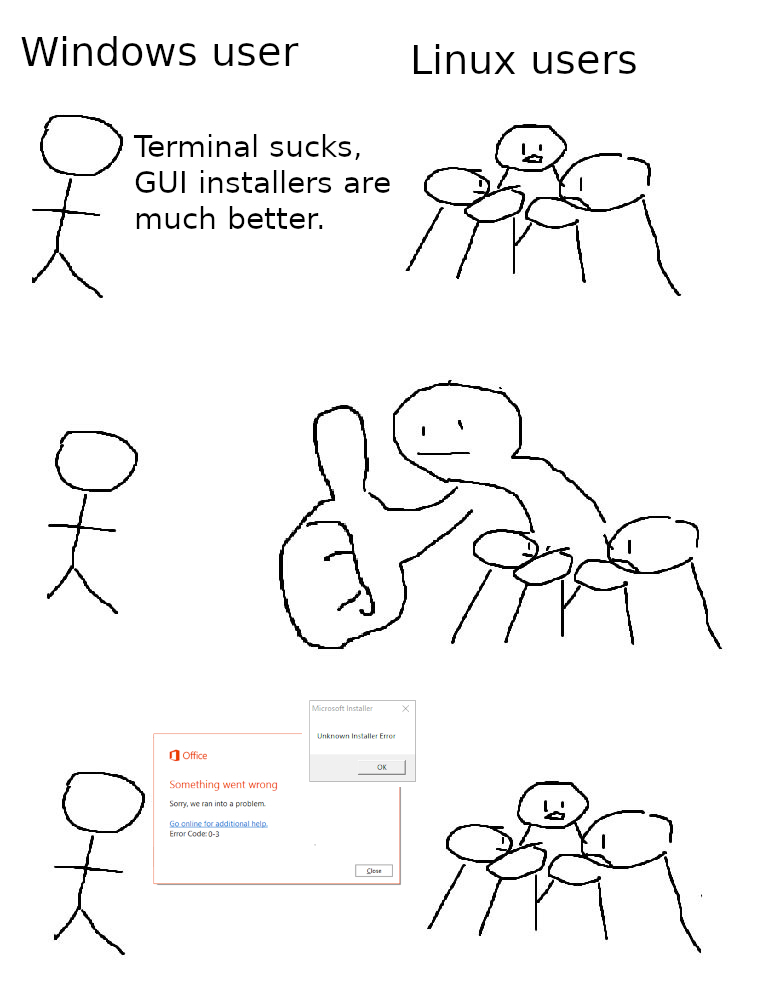
Terminal sucks.jpg
 
Last edited:
My first suggesting is to not try to install SteamOS. So many YouTubers are doing this and fail because so far SteamOS is not made for anything else but Steam Deck. Depending on your knowledge and willingness to learn, here are my suggestions.
  1. Linux Mint. It's easy and based on Ubuntu which means lots of support can be found. Cinnamon runs on X11 which means less headache's and it's still a pretty UI. Mint likes to focus on safe and reliable.
  2. CachyOS. It's Arch Linux but made easier to use and focus's on optimization. The only reason this isn't at the top is because the default KDE Plasma running Wayland can be a pain in the ass. That and it defaults to SystemD which is more difficult to use over Grub, especially if you plan to dual boot. You can change these options before and after installation, but if you're new to Linux then this might be overwhelming. They do provide a lot of installations that take care of things for you, including gaming.
  3. Bazzite Linux. Haven't used this myself but I've heard good things about it. It's based on Fedora so it's not an entirely new Distro, which will make things easier to deal with. If your interest is mostly gaming then this will make your life easier as they seem to put a lot of emphasis on gaming.

I highly vote for Bazzite if you are a gamer and new Linux user. Ubuntu based Mint is good but its update cycle is too slow, Fedora stays closer to the edge without being a full blown "public beta" like Arch based distros that update almost daily. I have dabbled with Bazzite for few months now and I like it a lot, I would do a full switch if I wasn't dependant on HDMI 2.1 on my rig, which unfortunately HDMI Forum is preventing on being added to open source drivers and I am not going back to Nvidia any time soon. This really irks me ATM...
 
If I have to open the command line even ONCE. even to paste text, I'm going back to Windows.

If the answer to a SINGLE QUESTION starts with "sudo", back to Windows 11 and all the filthy disgusting spyware it comes with.

Anything you want to do in Linux there is probably a GUI way to do too, except for some very indepth ones which a normal user probably never wants to do. But the use of the terminal has been so ingrained into the hardcore Linux users that they default to that without thinking of alternatives or what a new user might find comfortable. Combine with the myriads of guides around the internet that are probably half outdated and due for updating.

So far I have had to use Terminal only once because I wanted to dual boot with Windows. A one command that rebuilds the boot list of installed operating systems. If I were not to dual boot, I would not have had to do that either.
 
Last edited:
I highly vote for Bazzite if you are a gamer and new Linux user. Ubuntu based Mint is good but its update cycle is too slow, Fedora stays closer to the edge without being a full blown "public beta" like Arch based distros that update almost daily. I have dabbled with Bazzite for few months now and I like it a lot, I would do a full switch if I wasn't dependant on HDMI 2.1 on my rig, which unfortunately HDMI Forum is preventing on being added to open source drivers and I am not going back to Nvidia any time soon. This really irks me ATM...

I'm not sold on immutable distro's just yet. I run both a KDE Neon 6.3.4 system as well as a CachyOS system running Plasma 6.3.4, and both are great distro's. If I was to recommend a beginner distro, it would have to be CachyOS. Yes, it's Arch - But to borrow a line from ye olde Ubuntu "It's Arch for human beings". Even Nvidia users don't need to lift a finger installing the OS, as the latest drivers are installed out the box.

I can't recommend Mint, packages are too old and most variants are still running the LTS stable (6.8) kernel.

I am not a hardcore Linux afficiando but as far as I am concerned, there is nothing wrong with being immutable. In Bazzites case it just means some of the system files are read only, you cannot mess with them, pretty much how a Windows works, otherwise you are free to do with it as you please.

I think of it as just a stepping stone between Windows and Linux. Some may want the ultimate freedom Arch gives but others may not see the point in it if they just want a stable OS that can game and that sees frequent driver updates and decide to stay on Bazzite instead.
 
I am not a hardcore Linux afficiando but as far as I am concerned, there is nothing wrong with being immutable. In Bazzites case it just means some of the system files are read only, you cannot mess with them, pretty much how a Windows works, otherwise you are free to do with it as you please.

The problem is: Software installation options are very limited when it comes to immutable distro's, especially compared to an Arch based distro. Yeah, immutable distro's are harder to break - But honestly, I haven't broken a distro since I started with Mint many, many years ago; and if you run your root FS as btrfs you can easily revert to an earlier snapshot should things go south (which I believe is the case with Bazzite by default).

I guess, at the end of the day if your distro is as limited as Windows, you may as well just run Windows. However, even Windows allows for the modification of system files - You can delete system32 if you're silly enough as UAC isn't a very effective privilege escalation utility.
 
I guess, at the end of the day if your distro is as limited as Windows, you may as well just run Windows. However, even Windows allows for the modification of system files - You can delete system32 if you're silly enough as UAC isn't a very effective privilege escalation utility.

True, but if the goal is to get away comfortably from Microsofts BS then that goal is certainly achieved with Bazzite. You can comfortably learn the ins and outs of the new OS with rather small chance of messing things up before jumping in to the deep end of the pool.
 
Last edited:
True, but if the goal is to get away comfortably from Microsofts BS then that goes is certainly achieved with Bazzite. You can comfortably learn the ins and outs of the new OS with rather small chance of messing things up before jumping in to the deep end of the pool.

Granted, very true. However, the biggest hurdle I see regarding newcomers to Linux is package management and the use of package managers - And Bazzite isolates the user from the use of package managers. If you're going to use Linux, you really need to know the basics regarding package managers.

Because once you learn how to use a package manager to it's full extent under Linux, the idea of installing random .msi installers and .exe's becomes somewhat backwards. Even Windows has a form of package manager these days under Powershell called winget.
 
I would just come in here and remind people that the greatest strength of Linux is that it's GPL Free Software, and that means that anyone is able to view and modify and fork the code, unlike proprietary software, which will inevitably begin to spy on you and try to generate money off you. If a distribution isn't mentioning GPL whatsoever, it's probably because they don't care about that aspect of it, which to me, indicates a countdown towards abandonment and failure, or until it tries to spy on me and get money from me somehow.
 
  • Like
Reactions: emphy
like this
I highly vote for Bazzite if you are a gamer and new Linux user. Ubuntu based Mint is good but its update cycle is too slow, Fedora stays closer to the edge without being a full blown "public beta" like Arch based distros that update almost daily. I have dabbled with Bazzite for few months now and I like it a lot, I would do a full switch if I wasn't dependant on HDMI 2.1 on my rig, which unfortunately HDMI Forum is preventing on being added to open source drivers and I am not going back to Nvidia any time soon. This really irks me ATM...

Curious what is too slow to release on mint?

I get updates to packages sometimes daily..

Currently running 6.14.0-27 kernel...
 
If I have to open the command line even ONCE. even to paste text, I'm going back to Windows.

If the answer to a SINGLE QUESTION starts with "sudo", back to Windows 11 and all the filthy disgusting spyware it comes with.

Wait until you find out Windows has (somewhat janky) sudo support now. And a package manager.

Like this is one space where Linux is just comically more elegant once you wrap your head around it, and Windows is finally catching up.
 
If I have to open the command line even ONCE. even to paste text, I'm going back to Windows.

If the answer to a SINGLE QUESTION starts with "sudo", back to Windows 11 and all the filthy disgusting spyware it comes with.

You must not give into fear itself.
 
If I have to open the command line even ONCE. even to paste text, I'm going back to Windows.

If the answer to a SINGLE QUESTION starts with "sudo", back to Windows 11 and all the filthy disgusting spyware it comes with.
You won't. Linux hasn't needed a commend line for nearly 10 years. The only time you need to use terminal is when you're doing stuff that isn't expected from the user. Even on Windows I open the command prompt from time to time. On CachyOS when I'm searching for software I just open up Octopi. Click the Alien face button to search the AUR. CachyOS even has a menu to handle most things for you.
 
Curious what is too slow to release on mint?

I get updates to packages sometimes daily..

Currently running 6.14.0-27 kernel...

The release cycle of Ubuntu is every six months or so. If I understood correctly you are always lagging behind on stuff like latest Mesa drivers (if you use AMD GPU that is). Or am I off the mark here?
 
Curious what is too slow to release on mint?

I get updates to packages sometimes daily..

Currently running 6.14.0-27 kernel...
Ubuntu is specifically the problem as it likes to keep things older and safer. When I was on Mint I would eventually run into problems when installing software that isn't in the repository, because software outside the repository is usually compiled with newer dependencies. I specifically had this problem with Pronterface which comes with printrun, for 3D printing as the one in Ubuntu's repository was broken for years. I would try to compile it myself with no luck, and precompiled ones that needed newer dependencies. Last I checked they removed printrun entirely. On CachyOS which is Arch BTW, I just install it off the AUR and it works perfectly. You could install newer dependencies through a PPA and hope it doesn't break the entire system, which has happened to me. Usually because the installation process would just remove everything that used that dependency. If you ask the Linux Mint forum for help, they would just tell you not to use that software.

This is why things like Snap and Flatpak exist to fix these problems, because of dependency problems. Since I've been on CachyOS I've never needed to look at Flatpak. Software from Flatpak and Snap come with dependencies needed which take up more space.
 
How are drivers for niche things on Linux? EG my laptop is a dual gpu hybrid (AMD APU and Nvida dedicated that swap to save power) which Windows already has trouble handling well, would there be any hope of linux doing it right? Either way this is a good step, if we could get to a world where Windows is just the cubicle OS and Bill Gates can only afford three gold plated yachts filled with orphans he tests bioweapons on, it would be a good step.
 
If I have to open the command line even ONCE. even to paste text, I'm going back to Windows.

If the answer to a SINGLE QUESTION starts with "sudo", back to Windows 11 and all the filthy disgusting spyware it comes with.
You won't. Linux hasn't needed a commend line for nearly 10 years. The only time you need to use terminal is when you're doing stuff that isn't expected from the user. Even on Windows I open the command prompt from time to time. On CachyOS when I'm searching for software I just open up Octopi. Click the Alien face button to search the AUR. CachyOS even has a menu to handle package installs, kernels, and tweaks.
 
If I have to open the command line even ONCE. even to paste text, I'm going back to Windows.

If the answer to a SINGLE QUESTION starts with "sudo", back to Windows 11 and all the filthy disgusting spyware it comes with.
So when microsoft responds to support issues with... powershell commands your suggesting people uninstall windows? Go to what mac... where they also use a terminal?

Believe or not the terminal is the best way to do 90% of things. Its faster.

If your coming to linux with the thought I never want to ever have anyone suggest I use a terminal. Sorry your going to have a terrible experience. Don't bother. ;)

Duke isn't wrong you don't have to use one to just do basic things, install software remove software and so on. Considering you are a fellow [H].... your going to end up wanting to do something that will be best done via the terminal.

I am going to assume you have a good idea how to use Regedit and probably older things like msconfig and so on... I don't know I don't have to remember all that stuff anymore. How is any of that that mess better then using a terminal to set DE settings, or set a startup launch script or adjust IO scheduler parameters or any number of other power user things you may want to do on your computer?
 
How are drivers for niche things on Linux? EG my laptop is a dual gpu hybrid (AMD APU and Nvida dedicated that swap to save power) which Windows already has trouble handling well, would there be any hope of linux doing it right? Either way this is a good step, if we could get to a world where Windows is just the cubicle OS and Bill Gates can only afford three gold plated yachts filled with orphans he tests bioweapons on, it would be a good step.

Download your distro of choice make the ISO bootable with Rufus and boot it as a live CD/USB not an install and try it. You can run it as an image first and see how it works before committing to the install.
 
How are drivers for niche things on Linux? EG my laptop is a dual gpu hybrid (AMD APU and Nvida dedicated that swap to save power) which Windows already has trouble handling well, would there be any hope of linux doing it right? Either way this is a good step, if we could get to a world where Windows is just the cubicle OS and Bill Gates can only afford three gold plated yachts filled with orphans he tests bioweapons on, it would be a good step.
I have an Asus Zephry laptop, AMD with iGPU and NVIDIA 3600, works perfectly fine as far as I could tell when i would game on it...
 
Back
Top