• Some users have recently had their accounts hijacked. It seems that the now defunct EVGA forums might have compromised your password there and seems many are using the same PW here. We would suggest you UPDATE YOUR PASSWORD and TURN ON 2FA for your account here to further secure it. None of the compromised accounts had 2FA turned on.
    Once you have enabled 2FA, your account will be updated soon to show a badge, letting other members know that you use 2FA to protect your account. This should be beneficial for everyone that uses FSFT.

Nvidia driver issues.

I thought about flashing another firmware to the RTX 3060, but when I looked up what versions were available on TechPowerUp, I realized the firmware on the card was newer. Since the problem goes away using his monitor, I figured I'd just ignore the problem.
I bet that old TV has some form of early adaptive sync on it. The Driver with their "gsync comparability" option probably tells the firmware on the card (nvidia has their own little risc processor running firmware with its own memory) hey this montior supports adaptive sync set 45-75hz or whatever the case is. The issue is the TV and most early freesync monitors are a little wonky on their min hz (even their high hz for that matter). I suspect (could be way off) that the windows driver is setting the on board GPU firmware monitor out settings to the EXACT expected HZ like 45.0 to 75.0. Anyone that has had one of those early freesync jobs knows you want to set 1FPS over the min and 1FPS under the max on a frame limiter to avoid oddness. When I used Radeon Chill on a 45-75hz freesync monitor I would always set 46-74. If I set 45-75 I would notice odd studders/tears occasionally.

That is my though on what is going on anyway. Seems to be some sort of issue with monitors that don't quite meet the spec reported to the software. Their software should probably build in 1-2hz buffer for non Gsyn chipped monitors. Might be all they need to do.
 
The performance thing is just what i've heard from people on reddit, I'm sure there's some truth to it I would imagine most 7900 xtx users are on windows 11 and it does seem like in a lot of instances linux drivers tend to out perform windows. As for the stability of the 5700 series I don't know the answer to that. I can't personally switch to linux due to my job but at some point I'd like to make the switch, but it's currently out of my hands.
I still have a 5700 XT. I bought it just after they fixed the launch black screen issues. Never had any issues running it under Windows 10. Not one ever. [honestly it feels like AMD always was about 2-3 months behind on their drivers... their launch day drivers were questionable but it was always solved shortly after. Perhaps the 9070 launch being delayed a few months is more what AMD should have always done]
Have always run it on Linux. Last year I deleted my windows gaming partition. It was just annoying switching, and Linux gaming is now on par at min, and better in some cases. The few where I loss a couple % I can live with.
Obviously can't do any RT stuff. Some new games now requiring it which does suck. Everything I have/do run though runs quite well. Mostly set FPS caps still cause I don't really need more then 100 or so FPS, and prefer to have my card running at 50-70% fans then 100%. Was just playing some No Mans Sky Ultra settings 1440p HDR FSR Quality Frame capped at 90... a few dips to low 70s, not counting load screens. Generally a very playable experience. If I uncapped it I would probably average 110fps or so but the fan would be at 100% no doubt. Can't complain on a 6 year old GPU.

On Linux anyway. The 5700 XT might be the most stable GPU you can use. Not the fastest by any means, but super rock solid. You can tell a lot of MESA / AMDGPU kernel driver developers own or have owned 5700 XTs. I think its safe to say a lot of those types of people have 5700 Xts running in their kids/wives/parents machines still. lol
 
Last edited:
I've been blindly updated my nVidia drivers across multiple video cards for ... well ... I can't recall.
Honestly, same. First time I've ever done anything like this (rollback) but honestly, I'm just so very glad I can play this game again without 10 minutes of struggle just to get it to start up without my system rebooting.
 
It has been 6 driver releases. Not just one. It is happening on the 3000/4000 (I can confirm) and the 5000 series. Sure not everyone is having the issues, but quite a bit are having these issues.

That Ironwall Nvidia mindshare is slowly going away. Nvidia needs to get off its ass and fix this shit.
Bad patch as in rough spot, not the literal software term :rolleyes:.
 
Bad patch as in rough spot, not the literal software term :rolleyes:.
The worst patch I’ve ever had with Nvidia drivers was with Windows Vista and the 8800GTX. This was almost a year of frequent crashes and what not. Otherwise besides the clunky interface, smooth sailing.

Mileage varies, had no issues with the 5700 Lisa Sue, no black screens but AIB cards seemed to have them. 6000 series started good and for about a 4 month period, my 6900 XT on installing drivers would hard crash and refuse to boot unless the CMOS was cleared. Yeah that bad. Had to DDU drivers, install (usually did not crash), reset cmos and restart. Then the drivers were flawless. Submitted detailed reports to AMD, included using their forums, someone from the driver team contacted me and in two weeks an optional driver popped that resolved the issue.

7900XTX has been flawless driver wise. With the 5800X3D, the most stable system I’ve ever had. Rock solid. Seems to carry over with the 9070XT, so far.

With new 9800X3D system, no graphics card yet, hope to get some 5090 action at some point.

Anyways to early on if the drivers will be a major long term issue with Nvidia and the 50 series are my thoughts. There are applicable good drivers present for most folks, just wait on using newer ones.
 
I'm not too sure if these issues are just limited to Windows? But I'm running an RTX 4070 Super here using the proprietary 570.124.04 drivers under KDE Neon 6.3.4 and my system is rock stable.
 
I'm not too sure if these issues are just limited to Windows? But I'm running an RTX 4070 Super here using the proprietary 570.124.04 drivers under KDE Neon 6.3.4 and my system is rock stable.
You got me thinking, I haven't had a single problem with my 5080 FE and all the recent drivers, and that made me think that I clean installed windows 11 after first boot to confirm everything was in working order first. Has anyone here experienced these issues with a clean install system?
 
I'd blame WoW first given my experiences with the game over the years. There was that one update that borked everyone back in like 2017. For some reason my fx 8350 handled the performance bug better than far better cpus and gpus. Might have be core/thread count, either way everyone had their fps drop 30-50% in raids with 10-25 people.
Since WoW Classic brought me back, the games performance is up and down. Late TBC Classic the game started to perform really badly. As a Linux user I blame Linux, but other people were having the same problems. I found a way to disable a cache feature that was introduced into the game for Apple users, but was wrecking havoc for Windows users. Throughout WOTLK it was an up and down experience. In SoD it was often a bug introduced by developers. For a game that's over 2 decades old, it's very demanding for newer PCs.
I still have a 5700 XT. I bought it just after they fixed the launch black screen issues. Never had any issues running it under Windows 10. Not one ever. [honestly it feels like AMD always was about 2-3 months behind on their drivers... their launch day drivers were questionable but it was always solved shortly after. Perhaps the 9070 launch being delayed a few months is more what AMD should have always done]
Have always run it on Linux. Last year I deleted my windows gaming partition. It was just annoying switching, and Linux gaming is now on par at min, and better in some cases. The few where I loss a couple % I can live with.
Obviously can't do any RT stuff. Some new games now requiring it which does suck. Everything I have/do run though runs quite well. Mostly set FPS caps still cause I don't really need more then 100 or so FPS, and prefer to have my card running at 50-70% fans then 100%. Was just playing some No Mans Sky Ultra settings 1440p HDR FSR Quality Frame capped at 90... a few dips to low 70s, not counting load screens. Generally a very playable experience. If I uncapped it I would probably average 110fps or so but the fan would be at 100% no doubt. Can't complain on a 6 year old GPU.

On Linux anyway. The 5700 XT might be the most stable GPU you can use. Not the fastest by any means, but super rock solid. You can tell a lot of MESA / AMDGPU kernel driver developers own or have owned 5700 XTs. I think its safe to say a lot of those types of people have 5700 Xts running in their kids/wives/parents machines still. lol
My computing experience has never been more stable on Linux. My Vega 56 was stable on Windows 10 just before I switched over, but before that it wasn't uncommon for me to have to reboot once a week because it was either getting slow or getting unstable. I remember having to sleep and wake my PC just to fix missing sound when I'd wake it, and eventually I'd have to reboot to fix it entirely. AMD's Vega cards weren't known to be stable either. I've been using Radeon cards for a long time and other than that time period, it's been a stable experience. My RX 480 was rock solid stable and that was on Windows 10.
 
Bad patch as in rough spot, not the literal software term :rolleyes:.
"one" means singular, (your words).
Having 6 bad driver releases in a row disqualifies you from using the words "one patch".

In my opinion, this is also beyond "rough spot" territory...
We are at 4 months.

In all the GPUs I've had:
-7950GTX
-8400m GS
-8800m GTX
-GTX 850m
-GTX 980m
-GTX1050m

-X1400
-HD 6570
-HD 6950
-R9 280x
-R9 290x
-RX 480
-RX 580
-RX 5700

I've had by far the most issues with Nvidia drivers. Maybe because they were mostly laptops, but I've used more ati/amd cards.
But this is my own personal experience, and at this point i'm done even considering a laptop with an Nvidia sticker. Maybe it's the games I play, but others play the same games seemingly fine on nvidia hardware.

The most prevalent issue i've had is screen tearing, Every driver update would cause massive screen tearing (I like to keep vsync disabled for input lag), and I would have to roll back to a version that doesn't have it. So i would just stop updating drivers lol.
Never had that issue with AMD hardware on non gsync/freesync monitors.
 
"one" means singular, (your words).
Having 6 bad driver releases in a row disqualifies you from using the words "one patch".

In my opinion, this is also beyond "rough spot" territory...
We are at 4 months.

In all the GPUs I've had:
-7950GTX
-8400m GS
-8800m GTX
-GTX 850m
-GTX 980m
-GTX1050m

-X1400
-HD 6570
-HD 6950
-R9 280x
-R9 290x
-RX 480
-RX 580
-RX 5700

I've had by far the most issues with Nvidia drivers. Maybe because they were mostly laptops, but I've used more ati/amd cards.
But this is my own personal experience, and at this point i'm done even considering a laptop with an Nvidia sticker. Maybe it's the games I play, but others play the same games seemingly fine on nvidia hardware.

The most prevalent issue i've had is screen tearing, Every driver update would cause massive screen tearing (I like to keep vsync disabled for input lag), and I would have to roll back to a version that doesn't have it. So i would just stop updating drivers lol.
Never had that issue with AMD hardware on non gsync/freesync monitors.
That’s a feature so you would enjoy and brag about gsync to everyone how it makes gaming perfect. Making Nvidia the world solvers in better gaming. Also the endless blur methods incorporated by Nvidia. I had similar issues with Nvidia hardware and non variable refresh rate monitors. Funny how some never notice these type of things.
 
I keep having a game crash on my 3080 Ti I can't figure out. I'm starting to wonder if newer drivers are the culprit.
So...I started trying to play some other games on my computer ranging from some a few years old, to indie games, etc. etc. I keep having crashing problems. At this point I've done everything short of rolling back to pre-January drivers, so I think that's my next step.

At first I thought it was just the single game, but once I started trying to play some other games and they started crashing too, made me think otherwise. Will report back on if that solves the issue.

Edit: Rolled back to 566.36 from 12/5/24 last night via DDU to remove current and then installed this one. Will see how it goes.
 
Last edited:
Has anyone had the problem of "deep sleep" issues? Not sure what was meant by a comment I read on videocardz that some have had with newer cards. Curious because I've had my 2060S system wake itself up a lot in the past few months.
 
Has anyone had the problem of "deep sleep" issues? Not sure what was meant by a comment I read on videocardz that some have had with newer cards. Curious because I've had my 2060S system wake itself up a lot in the past few months.
I was having a bunch of weird issues with one of my systems using a 3080 TI. It turns out it was all being caused by Discord Overlays, the machine wasn't going to sleep when it was supposed to, and when it was asleep, it was waking up seemingly randomly.
I don't use Overlays in games, and it never occurred for me to check for it until one day I was troubleshooting some weird screen flickering and game crashes. Popped into Discord, found that the Overlay was turned back on as well as a bunch of notifications I could swear I had disabled, turned them all back off again, and boom, no more problems.

I could write quite the rant here about all the stuff Discord has been doing lately as they move to take themselves public, but yeah... Most of the weird issues I have been troubleshooting in the past few months have all pointed back to Discord in some form or another.
So I would say check Discord Notification and Overlay settings, because turning those off removed the sleep state problems I was having on that machine.
 
Last edited:
I was having a bunch of weird issues with one of my systems using a 3080 Super. It turns out it was all being caused by Discord Overlays, the machine wasn't going to sleep when it was supposed to, and when it was asleep, it was waking up seemingly randomly.
I don't use Overlays in games, and it never occurred for me to check for it until one day I was troubleshooting some weird screen flickering and game crashes. Popped into Discord, found that the Overlay was turned back on as well as a bunch of notifications I could swear I had disabled, turned them all back off again, and boom, no more problems.

I could write quite the rant here about all the stuff Discord has been doing lately as they move to take themselves public, but yeah... Most of the weird issues I have been troubleshooting in the past few months have all pointed back to Discord in some form or another.
So I would say check Discord Notification and Overlay settings, because turning those off removed the sleep state problems I was having on that machine.
Interesting, thanks.

Sadly Discord was off and not running during most of my crashes. Verified not just minimized in taskbar and still running like it likes to do. For the most part I keep Discord completely off while gaming unless I am in voice chat. So can't really point to it for my crashes at this stage.

That said, I also observed it turning overlays back on, and I promptly shut that back off and then doublechecked my other settings to quit the program etc.
 
Driver update. Definitely something going on but don't think it's the driver as rollback did not solve crash to desktop.

Then remembered my old desktop support days back in XP and thought hey why didn't I check the event viewer? nvlddmkm error...so gotta figure out what that's about.
 
Driver update. Definitely something going on but don't think it's the driver as rollback did not solve crash to desktop.

Then remembered my old desktop support days back in XP and thought hey why didn't I check the event viewer? nvlddmkm error...so gotta figure out what that's about.
ddu?
 
Yes. I am getting nvlddmkm errors with mostly ID 153, some ID 13. Trying some Windows repairs first and then will go from there. Some Google searches say maybe bad RAM or Graphics card is going out. I've been running this 3080 Ti bone stock for a while now.
1744948108096.png


1744948078566.png


EDIT: Seems to have been my RAM. Swapped kits and errors and crashes haven't reoccurred since. So yeah...display driver error, but ultimately a hardware fault. I went back to newest drivers.
 
Last edited:
  • Like
Reactions: kac77
like this
Not sure if this is related to the driver issues, but a week ago or so I woke up, turned on the computer, did my morning business, came back to a blue screen, that's odd. Reset, another blue screen after windows booted up, it happened again and again to the point when I started to get cold sweats mentally trying to figure out what could have happened. Eventually I booted to safe mode, managed to "repair" the problem (whatever TF Windows does). And things seemed fine again, whew.

Then I noticed when I left my computer on for any length of time (2+ hours) it started to slow down a bit, never happened before the BSOD issues. Opening up a browser was laggy, sometimes even taskmanager lagged or even froze up on me. Again cold sweats mentally trying to diagnose what was going on, and potential (hopefully easy) things to start checking. My mind was thinking is CPU getting too hot do I need to repaste it, did one stick of my memory fail, so I opened up some sensors and cpu temperature is perfectly fine, in fact the highest it spiked to was about 64C but for the most part was in the low 40s, gpu temp was fine, memory seems to be reading all 32GB, although I did notice that nearly half of it was used. Rebooting gave me a fast running system again... until after a few hours same thing, so it had to be software related.

When I managed to get a taskmanager open I looked at what programs could be using that much memory, and sure Firefox used a bunch, closed that, memory usage dropped but sluggishness did not, cpu usage wasn't high, ram usage was higher than normal but still plenty of physical ram available, so I scrolled down to see what was open... Windows Host Process (rundll32) ok sure, scroll more of them, scroll scroll scroll.. more and more of them, hundreds maybe a thousand instances of it, "0%" cpu usage and about 1MB of ram use but the cold sweats came back. Malware? Virus? Did Windows automatically start their AI program and it was chewing through clock cycles?

Reboot again so I would stop screaming bloody murder at my computer to hurry up, and did a quick search and found a windows forum post on it, of course the first person who replied was absolutely useless in his "knowledge" (reply), but other people mentioned issues with Geforce experience/Nvidia control panel. Which again was odd, because things worked perfectly fine before, so I uninstalled the control panel, and the problem was fixed. No slugginess regardless of how long I leave my computer on. Then I see this post here about driver issues, and I'm wondering if this was in any way related. I haven't reinstalled Nvidia control panel yet, I'm kind of enjoying the return to lag free computing and am a bit scared to put it back.
 
sfsuphysics On the 576.02 I've had two slowdowns, once on browser Edge and once on Deezer app (music streaming service) that made the system laggy for a moment. The issues are various on the drivers with support for the RTX 5000 series, for some unbearable since stability of the system is compromised, but for me the latest driver causes only oddities here and there, though I haven't tested thoroughly and certainly wish for improvement in any case, since normal behavior should be achieved. Other issues might be video/game artifacts, hitches in games, incorrect visual appearance, sensors reporting wrong results and whatever else. I wouldn't rule out the build version of Windows' as a factor since one patch improved my experience significantly (try installing the latest stable one on W11 2H24).

The feedback threads offer often valuable info:
https://www.nvidia.com/en-us/geforc...rce-grd-57602-feedback-thread-released-41625/
 
I'm still running 572.16. I've had a couple issues with Starfield using certain settings but otherwise I've not had any issues with these drivers in any games. I've not had any black screen stuff or other problems either. I've been concerned about upgrading to newer drivers for fear they'll fuck shit up if I do.
 
I updated my 4090 to 576.02 and now every time I boot the PC the screen remains black after it hits Windows. The only solution is to unplug the DP cable and put it in a different port, then it works until the next boot up. I just got done rolling back to 566.36 a little while ago.
 
Apparently new issues.

View: https://www.youtube.com/watch?v=KrCEPX47vtw

This one seems like it might effect some of the 1% 5090 water cool types. The Temp sensor with the new drivers apparently isn't reporting things properly. So if your using fancy third party coolers or something you might have some big issues.

Jay whatever you think of him... I mean it is funny seeing him melt down. I assume his personal rig is using a third party water cooled 90 class card. This one seems to have rather pissed him off on a personal level. lmao
 
Last edited:
Apparently new issues.

View: https://www.youtube.com/watch?v=KrCEPX47vtw

This one seems like it might effect some of the 1% 5090 water cool types. The Temp sensor with the new drivers apparently isn't reporting things properly. So if your using fancy third party coolers or something you might have some big issues.

Jay whatever you think of him... I mean it is funny seeing him melt down. I assume his personal rig is using a third party water cooled 90 class card. This one seems to have rather pissed him off on a personal level. lmao

Wow he seems especially pissed in this one. :ROFLMAO:

He's not wrong on some points though...its odd to see Nvidia release bad driver after bad driver for 4 months straight.

As for water-cooling...I use Aquacomputer sensors so I base all my fan curves on coolant temperatures and keeping it under 35C.
 
  • Like
Reactions: ChadD
like this
NVIDIA has released a few bad drivers over the years occasionally not fixing minor issues for months on end. However, they've never been this consistent about releasing shit driver after shit driver. It's amateur hour over on the driver team on top of everything else that's gone with with the 50 series launch.
 
NVIDIA has released a few bad drivers over the years occasionally not fixing minor issues for months on end. However, they've never been this consistent about releasing shit driver after shit driver. It's amateur hour over on the driver team on top of everything else that's gone with with the 50 series launch.
I’ve had to play war thunder on my Mac lately because it’s been crash city on my 4080 for a good 2-3 months.
 
I’ve had to play war thunder on my Mac lately because it’s been crash city on my 4080 for a good 2-3 months.
Why not roll back to the known good 566 series drivers in the meantime?

NVIDIA has released a few bad drivers over the years occasionally not fixing minor issues for months on end. However, they've never been this consistent about releasing shit driver after shit driver. It's amateur hour over on the driver team on top of everything else that's gone with with the 50 series launch.
Yeah, this is highly unusual for nvidia. It's more like AMD's "normal" typically.
 
Yeah, this is highly unusual for nvidia. It's more like AMD's "normal" typically.
Not sure AMD has ever had this level of suck. AMDs issues are typically within the first couple months of a launch with only the new cards effected then its smooth sailing. I can't say I remember a AMD launch that caused issues with older gen hardware.
Not sure what the Nvidia driver team is up to. Or if blackwell is just that much of an issue hardware wise. I know their software folks are top notch so it makes one wonder how much blackwell crap they are trying to patch up that is causing so many issues for all gens.
 
ChadD I think appraising the quality of the driver between the brands is largely personal, since it doesn't help anything if the thing you personally wish to accomplish on your PC doesn't work well or at all with one or more of the brands. I don't see a serious effort from too many discussing the drivers of evaluating the weight of the issues, while at the same time we should remember what I just stated; how we feel about the issues depends mostly on the usecase and the person.

For example, if a single game doesn't work, is that bad? Of course it is if you wish to play it and all your friends do too. Is the issue preventing gameplay altogether or can tinkering avoid it or alleviate it? How long did it take the manufacturer to fix it (if they ever did)? Perhaps there are multiple games affected by a bug(s). Was your planned holiday period totally ruined by this, since the games you really wished to play were inoperative? Such might happen.

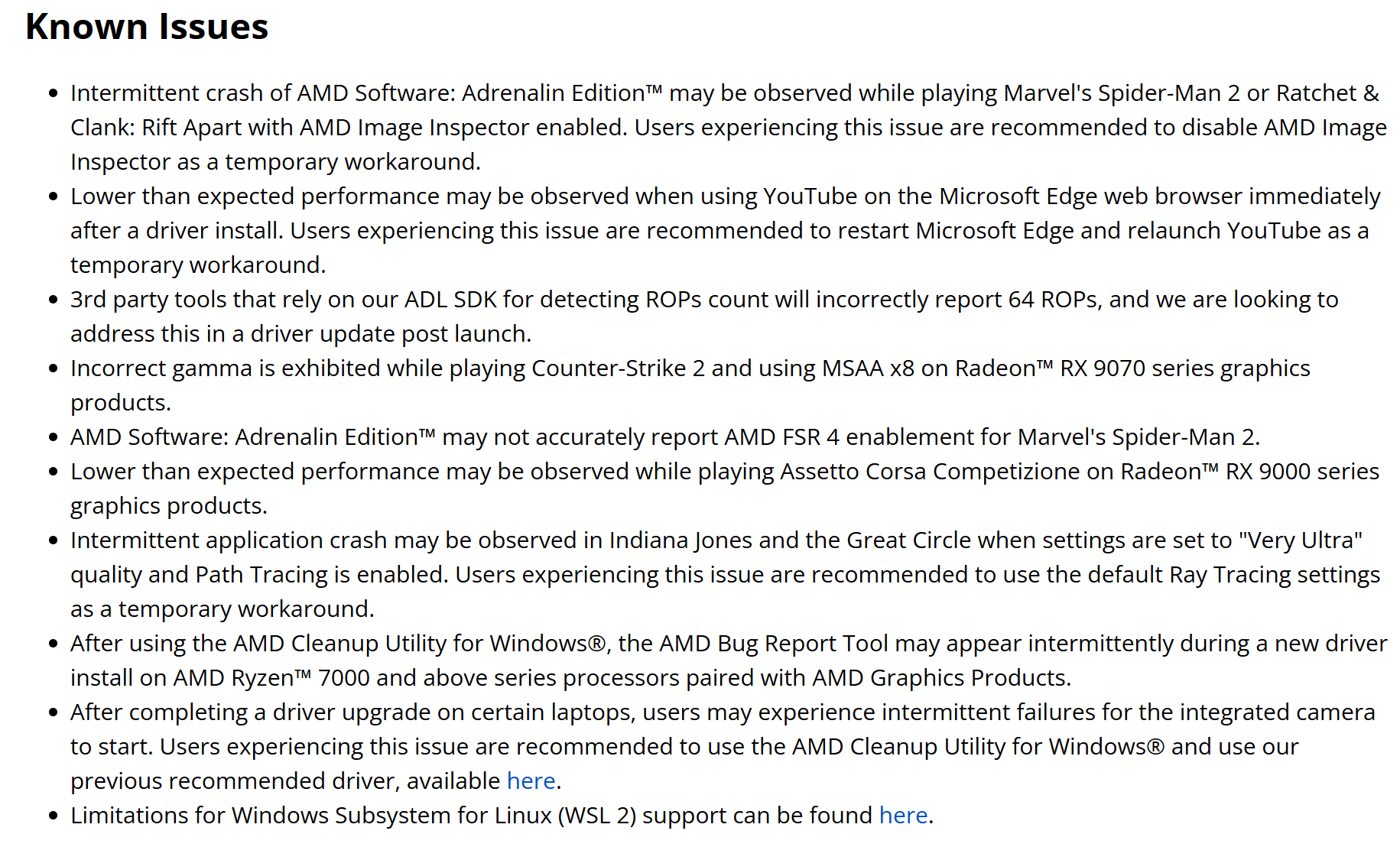
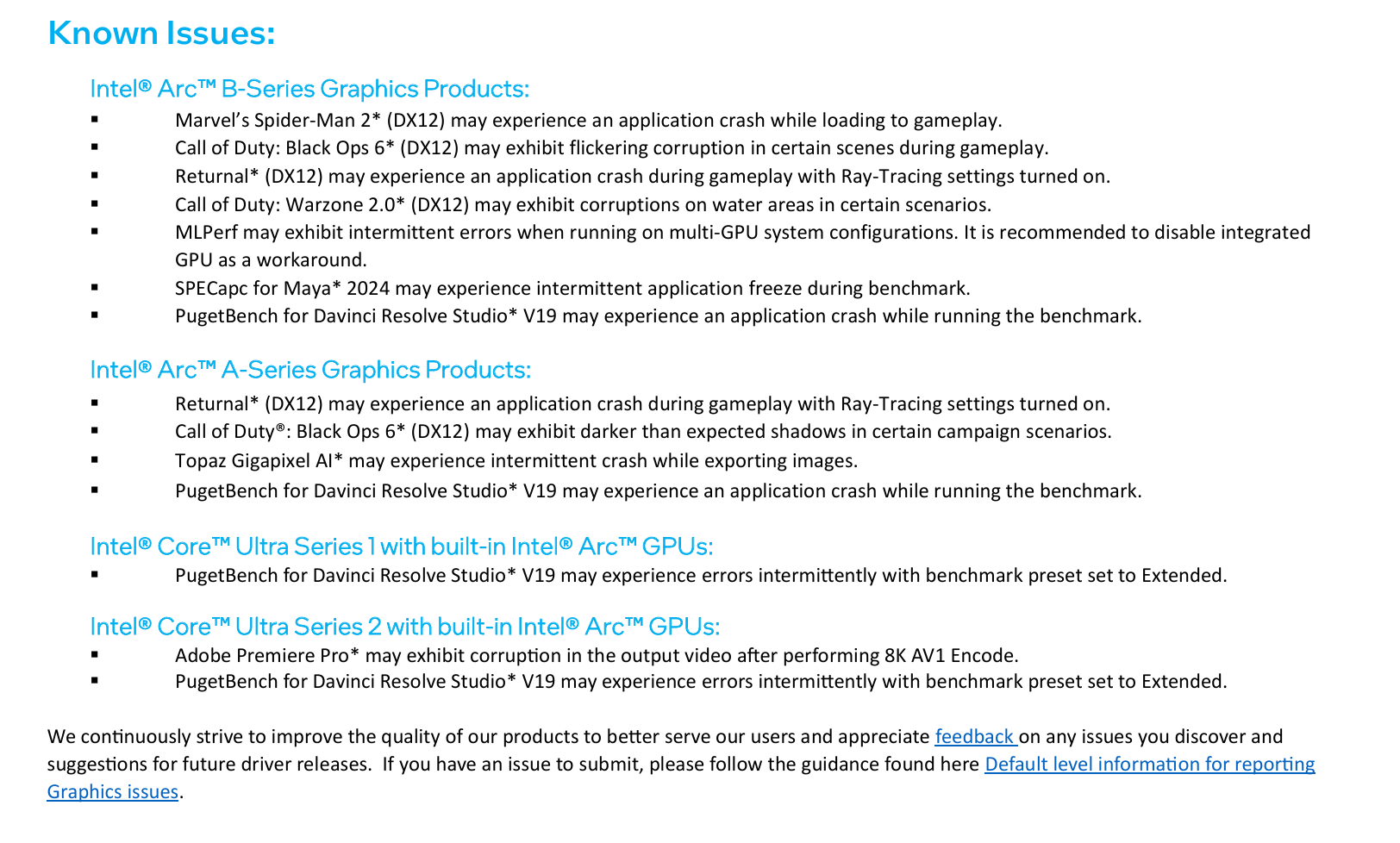
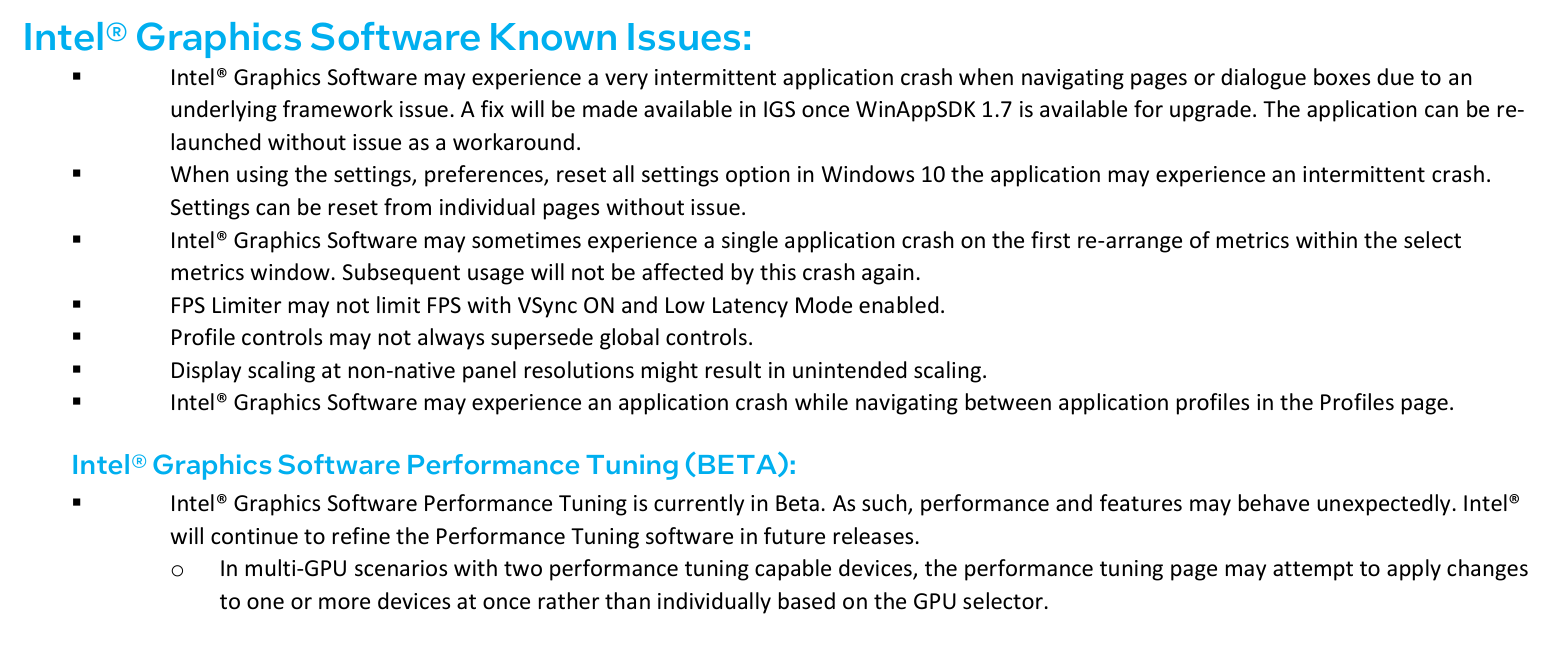
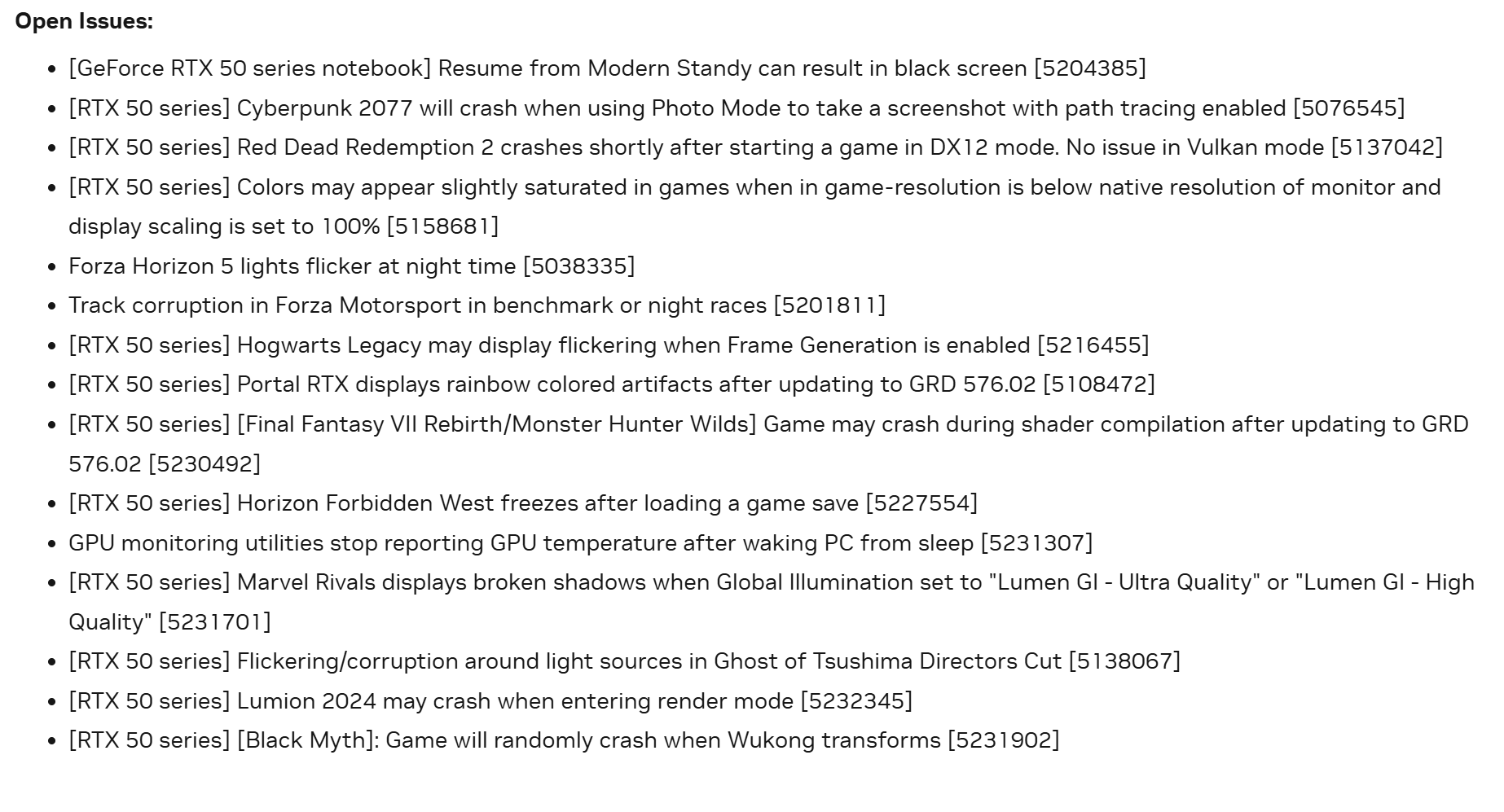
What comes to Nvidia with the black screen issues (while I have read about black screen issues from RX 9070 series owners too, though I don't know if it's due to the drivers exactly), such occasions usually irritate a large portion of people, especially if work or progress is lost because of it - I personally cannot understate the significance of such. Let's not pretend though that there are no notable issues on the AMD side too, judging simply from the known issues section of the latest driver (in the attached screenshots are these sections of every three GPU brand of the latest recommended driver release). No matter how serious the issues may be, I truly appreciate if they are mentioned, even if it would seemingly hurt the brand, because wondering if an issue is due to the driver without shared knowledge for the user can lead to worthless troubleshooting steps - even the customer support might be clueless and offer these steps for the customer.

I admit that in this current comparison Radeon's issues seem rather insignificant compared to the other two brands, but questions arise browsing the various forums where people complain about issues: Is AMD honest and can you trust them? We know that no brand lists all the known issues and this is partly due to not having time to test if the issue is on the reporter's or internal tester's end or actually in the driver. You make the decision ultimately, while the majority, for whatever reason, no matter if it makes sense to you personally or not, picks Geforce. What's left for you to decide is who you blame for this decision if anything - I think what's most important is that the customer is satisfied with his purchase regardless of his scope of knowledge on the PC part scene.

EDIT. grammar
 

Attachments

  • AMD Radeon driver 25.3.1 known issues.png
    AMD Radeon driver 25.3.1 known issues.png
    287.6 KB · Views: 0
  • Intel Arc driver 32.0.101.6734 known issues (part1).png
    Intel Arc driver 32.0.101.6734 known issues (part1).png
    277.2 KB · Views: 0
  • Intel Arc driver 32.0.101.6734 known issues (part2).png
    Intel Arc driver 32.0.101.6734 known issues (part2).png
    185.2 KB · Views: 0
  • Nvidia Geforce 576.02 known issues.png
    Nvidia Geforce 576.02 known issues.png
    279.5 KB · Views: 0
Last edited:
Not sure AMD has ever had this level of suck. AMDs issues are typically within the first couple months of a launch with only the new cards effected then its smooth sailing. I can't say I remember a AMD launch that caused issues with older gen hardware.
Not sure what the Nvidia driver team is up to. Or if blackwell is just that much of an issue hardware wise. I know their software folks are top notch so it makes one wonder how much blackwell crap they are trying to patch up that is causing so many issues for all gens.
I've had issues with AMD hardware that ultimately never got fixed or were fixed way too late to matter. On that front, NVIDIA hasn't been that bad at this point. That said, I've had nearly perfect experiences from both camps. Even with this 50 series bullshit, I haven't had any problems on the driver front. Though I'm still running the original driver I was running when I got the card. Until I have a need or they get their shit sorted I'm staying put with the version I've got.
 
I've had issues with AMD hardware that ultimately never got fixed or were fixed way too late to matter. On that front, NVIDIA hasn't been that bad at this point. That said, I've had nearly perfect experiences from both camps. Even with this 50 series bullshit, I haven't had any problems on the driver front. Though I'm still running the original driver I was running when I got the card. Until I have a need or they get their shit sorted I'm staying put with the version I've got.
If I had to assign a severity rating to how much of a PITA a driver issue was and kept a running chart and tally for AMD and Nvidia I’m pretty sure they would tip in favour of Nvidia, but it wouldn’t be an overwhelming victory.

When Nvidia fucks up they do so royally, AMD just gets lots of little annoying things that linger around significantly longer.
 
A couple months of issues is nothing. Remember that NVIDIA had DPC latency issues that went unfixed for years. It still occasionally crops up again, but it's usually fixed quickly now.
 
FYI I Had to fix this by reverting back to the previous 566.6 driver AND plugging in my primary monitor the the bottom most Display port, closest to the motherboard/PCIe slot and my secondary monitors to the other displayport plugs.

This stopped the crashes in PoE2 and D4.
image.png
 
Back
Top