Silverstone SST-FT03-Mini (Mini-Itx)

Finally, I lost against my MSI GTX560ti Hawk graphics card and replaced it by a EVGA GTX 660 Superclocked. The direct heat exhaust works much better. Noise under Idle and average graphics load conditions are fine, but I'm not completely happy with its noise level under load.

Have you tried fiddling with the fan speed curve in Precision X? Perhaps you can adjust a bit to find the sweet spot between temp and noise.
 
Not yet, just played a bit with the MSI Afterburner. But I'll try if Precision X works better...
 
What is the best build for this case so it can stay cool, quiet and play some games (not necessarily on ultra high settings, medium is good enough)?
 
What is the best build for this case so it can stay cool, quiet and play some games (not necessarily on ultra high settings, medium is good enough)?

If silence is your priority, then there are three pitfalls to avoid:
- SFX power supply: better buy the BeQuiet 350W, but if you must have a Silverstone 450W then the bronze version of the ST45SF is quieter at idle than the gold ST45SF-G. Modular cables of the latter also interfere with 3.5" drive cage.
- The AP141 included with the case is not PWM and is loud and can rattle when run at stock 12V. Make sure you get a motherboard which is able to dial down the volts of the chassis fan header. Specifically the P8Z77-I Deluxe has two PWM headers and can't control the AP141.
- Maybe most important. When buying any graphics card hotter than 120W TDP, i.e. GTX660 and up, you must get a "reference" type where the shroud/enclosure of the graphics card is entirely closed and the fan (usually radial) blows along the heatsink and out at the expansion slots. The reason for this is the FT03-mini has a solid panel in front of the graphics card and so the usual double fans which blow down on the PCB will just suck their own hot air back around. This is mentioned briefly in the manual, but should be written in big letters on the box and on every online shop product page.

How about:
Gigabyte Z77N-WIFI mITX (how do i know if it can control the fan?)
Intel Core i5 3470
PNY GeForce GTX 660 Ti 980MHZ 2GB 6.0GHZ GDDR5
with the BeQuiet 350W? would that be enough or will I have to give up little of performance, for example downgrade to i3?
Can I replace the AP141 with another, quiet fan?
 
Those components are fine, well under 350W. You can save a little money with H77 version of that motherboard instead, since you aren't overclocking. I'm pretty sure the Gigabyte boards have PWM on the CPU fan, and volts on the chassis fan, so it should be okay. If it ends up being too noisy after all: others in this thread have recommended the Rosewill Hyperborea (Akasa Apache) as a good PWM fan.
 
How about:
Gigabyte Z77N-WIFI mITX (how do i know if it can control the fan?)
Intel Core i5 3470
PNY GeForce GTX 660 Ti 980MHZ 2GB 6.0GHZ GDDR5
with the BeQuiet 350W? would that be enough or will I have to give up little of performance, for example downgrade to i3?
Can I replace the AP141 with another, quiet fan?

The Z77N can control 2 x PWM fans to some extent (i'm using it). You can also use gigabytes windows software to set up custom fan speed curves (shame this is not possible in bios, so no chance to do this in OSX as far as I can see).
You can google for the manual for this mobo to see more about the settings.

UPDATE: it's here

I'm running:
- Z77N mobo
- Geforce GTX 660 (evga blower style)
- Fanless ATX PSU
- Thermalright TY-147 PWM fan
- Antec kuhler 620 AIO

At present i'm OK with the noise level but not thrilled.
Unloaded I would hope it could be a bit quieter - fans can be heard from 2 meters and definitely not silent. I suspect the GFX card (esp given the bios-locked 30% minimum fan speed), but need to do some quantitative testing - it could be the AIO pump.

Under high GFX load (e.g. Far cry 3 or unigine valley benchmark) the GTX fan is pretty loud. My gfx card reports temps up to 82-82C (but not higher). GPU and case temps are not that high, and I think that this is preventing the case fan from spinning up fast enough... (its max 1300rpm but never goes above ~900rpm).
This is what I'm going to try and change. I need the case fan to be min speed unloaded, but when load is applied I want the case fan to ramp up before the GFX card fan, as the GFX fan is more noisy (blower vs 140mm quiet fan).

I'm investigating the possibility of a BIOS hack for the GTX to allow less than 30% fan speed... not sure if I'll do it, but looking.

I also wonder if there is a way to guide/force a portion of the cool air from the case fan to the GFX blower hole? I think that silverstone should sell a replacement front panel with a grille for air inflow for GFX cards...
 
Last edited:
Under high GFX load (e.g. Far cry 3 or unigine valley benchmark) the GTX fan is pretty loud. My gfx card reports temps up to 82-82C (but not higher). GPU and case temps are not that high, and I think that this is preventing the case fan from spinning up fast enough... (its max 1300rpm but never goes above ~900rpm).
This is what I'm going to try and change. I need the case fan to be min speed unloaded, but when load is applied I want the case fan to ramp up before the GFX card fan, as the GFX fan is more noisy (blower vs 140mm quiet fan).

Changing the PWM curve might be doing the trick here - still experimenting to get the ideal setting for my build.
Its a bit annoying that the Z77N bios does not provide more comprehensive custom PWM settings like some mobos do.

I'm investigating the possibility of a BIOS hack for the GTX to allow less than 30% fan speed... not sure if I'll do it, but looking.

This definitely looks like a possibility.
There is a kepler bios modification tool that can allow <30% min fan.
This should allow quieter operation @ idle and when doing basic 2D stuff (browsing etc), and ramp up to more noise when pushing 3D.
Useful link for this here
 
Hi everyone, I'm currently planning a new water cooled SFF build using this case. I really like this case and want to make it as cool, quiet and as powerful as possible.

Anyway, I was set on either a ref 670GTX or 680GTX since I know those are the highest performance cards that can fit in the FT03 Mini and that due to the limited space, the "blower" type should focus on pushing the hot air out the exhaust.

However, this particular card caught my eye = EVGA GeForce 670GTX FTW Signature 2.
Links: http://www.fudzilla.com/testing/rev.../29757-evga-gtx-670-ftw-sig2-reviewed?start=2

Test results show that it runs a bit quieter and cooler then reference cards. But it has a dual fan instead of one and looks longer than a 670 reference.

So my questions are:
1) Does anybody have experience with these cards in their FT03 Mini?
2) If it DOES fit, will the dual fan still act as a true "blower exhaust" or would it just pull all the hot air directly into the card without really forcing the hot air out the rear like the "blower" does?
3) or would my best bet be to stick with a reference 670/680 GTX and call it a day?

Thanks guys!
-Chris

if you look at some pictures of the card, the shroud is actually very open on the back half of the sides, and the rear of the card. this card will probably exhaust about half the heat out the case and half back into it. i would go for a full blower over this thing, sorry.
 
1) Does anybody have experience with these cards in their FT03 Mini?
2) If it DOES fit, will the dual fan still act as a true "blower exhaust" or would it just pull all the hot air directly into the card without really forcing the hot air out the rear like the "blower" does?
3) or would my best bet be to stick with a reference 670/680 GTX and call it a day?

As Eukest says, the shroud is open on that card, so you'll be lucky if it runs under 90C in this case. It's not about whether the fan is a "blower" but about whether the shroud is closed. Any opening means it will suck hot air back in.

It's the most unfortunate issue with the FT03-mini, basically limiting user to a choice of only half a dozen high end cards.

So yeah, 3: reference :)
 
However, this particular card caught my eye = EVGA GeForce 670GTX FTW Signature 2.
Links: http://www.fudzilla.com/testing/rev.../29757-evga-gtx-670-ftw-sig2-reviewed?start=2

Test results show that it runs a bit quieter and cooler then reference cards. But it has a dual fan instead of one and looks longer than a 670 reference.

So my questions are:
1) Does anybody have experience with these cards in their FT03 Mini?
2) If it DOES fit, will the dual fan still act as a true "blower exhaust" or would it just pull all the hot air directly into the card without really forcing the hot air out the rear like the "blower" does?
3) or would my best bet be to stick with a reference 670/680 GTX and call it a day?

As the other guys already wrote, the EVGA Signature card will not be cooled efficiently in this case. You'll need a card with a so called direct heat exhaust (DHE) - a centrifugal fan blows all the heat through the slot brackets of the graphics card. Most of the EVGA superclocked cards use such a cooling system but you're not limited to this vendor. This cooling concept is louder than custom design but their heat concept don't work in the FT03-mini case, I can tell you a tale...
 
So regarding the "chirping" ST450SF, Silverstone support confirmed that I have the most up to date version of the PSU which is supposed to be fixed, but it's not. They can switch out my PSU for me, but I gotta pay to send it back and they don't do advanced exchange. Advise greatly appreciated...

Regarding the USB 3.0 ports not working or only working as USB 2.0, they're sending me a new wire harness and didn't acknowledge this as a problem.

Has anyone else noticed that the case's USB 3.0 does not connect to USB 3.0 devices and even if it does, it only works at USB 2.0 speeds? Hopefully it is just the wire harness and I'm an isolated case.

Lastly, I too am curious how they fit a Titan in this case. I would have loved just an extra 6mm of space.
 
Last edited:
What is the best build for this case so it can stay cool, quiet and play some games (not necessarily on ultra high settings, medium is good enough)?

You're better off buying the FT02, See my build here: http://hardforum.com/showthread.php?t=1740852

The big problem with the FT03 is that the PSU is directly underneath the CPU. Remember that your PSU isn't 100% efficient. If it's 80% efficient and outputting 400W current, it's also outputting 100W in heat. Heat rises, so the CPU cooler doesn't get cool air. In the FT02 the PSU is at the side the CPU cooler, so the CPU cooler doesn't get any hot air from it.

Nice build but it's kinda in a different class than the FT03-MINI. If you're looking for a totally dead silent build, you're better off going with a larger case/build, but if you want a great looking ITX and silent build, there really aren't too many options (this is a good one).

Even though I have 4 fans in my case, at idle, my 3.5" HDD is still the loudest component by a significant margin (when it's spinning). Several others here are running liquid and just a single large, slow fan which most definitely is quieter than my build.

You probably won't get an absolutely dead silent build from this case (at least a pump/fan), but you probably won't be able to distinguish it from dead silent if you do it right. Check out SalemSwift's build on this thread: http://imgur.com/a/JC8mK

Basically use some closed loop liquid cooler with a quiet pump, a fanless ATX PSU, and something like the Rosewill Hyperborea 140mm case fan on the Asus P8Z77-I motherboard and you'll probably have as silent of a build as possible in this case. Video card is another issue, it'll probably need a fan unless you use some external water pump or get really crafty. As many say here, make sure it's a reference card with the centrifugal fan and TOTALLY closed shroud. They're still pretty silent at idle; especially with this cases heavy metal side panel.

Of course you can always undervolt/underclock your CPU such that you only need a tiny heatsink, use on-board video, a fanless ATX PSU, and no case fan. Unfortunately then you'd just have a slow POS and you might as well get a thin client or some all in one thing...
 
Last edited:
The big problem with the FT03 is that the PSU is directly underneath the CPU. Remember that your PSU isn't 100% efficient. If it's 80% efficient and outputting 400W current, it's also outputting 100W in heat. Heat rises, so the CPU cooler doesn't get cool air. In the FT02 the PSU is at the side the CPU cooler, so the CPU cooler doesn't get any hot air from it.

As Eatkebab pointed out, this thread is about the FT03-mini which has the PSU at the top and directly exhausting out of the case.

But since you mention the larger FT03 model. You'll be interested to know that its PSU is in a separate compartment, and exhausts directly out of the case, at the back, and none of the heat passes into the motherboard area.

Also 20% of 400W is not 100W :)
 
Hi all,

I've been though this thread and would like some clarification.

I am planning to put together a system with this case, the asrock z77 Mobo, intel 3750k, optical drive, 16gb corsair ram, evga gtx 660 and 2.5" ssd.

So just to confirm, the st45sf is the psu I want and not the gold model?

Also will the antec kuhler 620 fit and if so given i have an optical drive will I need to modify its cage? And in this configuration which fans would I be able to fit? The stock 140mm plus the kuhler fan?

Thankyou
Paul
 
If you're not sleeving wires then the bronze ST45SF is probably better yes, and quieter at idle.

You won't need to mod anything if you just use the 140mm fan with the Kuhler 620 radiator. If you want to also use the Kuhler fan in push-pull then it gets tricky as the optical bracket is folded immediately after the rad. You could bend it, or dremel it, but my own experience with H60 is that push-pull doesn't help more than a few degrees, the 140mm should be plenty.
 
Thankyou for that.

Just googling for images and it seems the h60 would be a mod free cooler in terms of its back plate with this motherboard.

In regards to modify the optical mount is it just removing the two tabs that stick down towards the bottom of the case or is there more to it?
Thankyou
Paul
 
As Eatkebab pointed out, this thread is about the FT03-mini which has the PSU at the top and directly exhausting out of the case.

:eek: Yep, mea culpa. The Mini definitely has it in a decent position.

But since you mention the larger FT03 model. You'll be interested to know that its PSU is in a separate compartment, and exhausts directly out of the case, at the back, and none of the heat passes into the motherboard area.

The area still gets hot, and some of the heat radiates upwards.

Also 20% of 400W is not 100W :)

But to get an output of 400W you need to input 500W, and 20% of that is 100W.
 
Just googling for images and it seems the h60 would be a mod free cooler in terms of its back plate with this motherboard.
Some people have reported that the H60's pipes are quite inflexible, making it more difficult to fit int he confined space in this case.
 
Some people have reported that the H60's pipes are quite inflexible, making it more difficult to fit int he confined space in this case.

Hopefully the piping on the 2013 model makes a bit of a difference in that regard.. will let you know when I pull the trigger how it works.
Paul
 
Hopefully the piping on the 2013 model makes a bit of a difference in that regard.. will let you know when I pull the trigger how it works.
Paul

It looks like the antec 620 piping, so I you should be good to go.
 
So I asked Maingear how they fit the Titan in this case. Here is their vague response:

"This case is custom for us + other modifications which allow us to ship with the Titan inside. Additionally, we&#8217;ve qualified it with a certified gold power supply. It&#8217;s a monstrous little system, that&#8217;s for sure! We hope to earn your business and thank you for taking an interest in MAINGEAR!"

I have a hard time believing that Silverstone produces a modified chassis for them, so I'm inclined to think they just cut a hole out the bottom and don't use the case fan cover...
 
Hopefully the piping on the 2013 model makes a bit of a difference in that regard.. will let you know when I pull the trigger how it works.
Paul
The tubes are very thick and not flexible, but still fits well if you don't have the drive cages in
 
Anyone know if the h80i will fit using only the stock 140mm fan?

If yes will I be able to fit a fan ontop of the radiator and still keep the optical with little modification? Or would it require major modification to a point that its not worth keeping the optical?

Only want to keep an optical drive because the slots been cut into the case..

Paul
 
Its been done before. Funnily enough I was reading this article when I saw your post:
http://www.overclock.net/t/1313019/build-log-powerhouse-in-a-hat

So I asked Maingear to clarify a bit and specifically if they just cut a hole...

"Allow me to shed some light on how we integrate our systems. All of our Silverstone-based chassis are modified at the factory to one point or the other. Some modifications we do ourselves. The SHIFT would be an example of the mods being done at the factory, hence the unique look. Some of the more subtle modifications that we can do in house we may choose to do ourselves and then incorporate into a “point revision” sometime during our next buying cycle. Currently, we modify the chassis in house to allow for the Titan to fit. At some point, that modification will be rolled into our production-spec list.

I hope that helps."

Yeah, they just cut a hole and leave the fan filter off.

wow, that's a very roundabout way to not answer the question. :rolleyes:
 
Anyone know if the h80i will fit using only the stock 140mm fan?

If yes will I be able to fit a fan ontop of the radiator and still keep the optical with little modification? Or would it require major modification to a point that its not worth keeping the optical?

The optical tray has two folds which prevent installation of any radiator wider than 28mm. One fold is where the upper 2.5" cage is screwed onto, the other fold is more decorative but also brings a little structural strength to the tray.

You need to remove the 2.5" cage and fold the metal flat. Luckily the metal is thin and can be folded by hand. Using several blocks of wood covered in felt, maybe even cork, you could do this with no other tools.

Thankyou,

I ordered the case, psu, cooler, optical drive and a few bits today so I should be able to see what you're talking about by the weekend.

Paul
 
Anyone know of a suitable ati 7870 card with the correct style of cooler? I am struggling to find one in AUS.

Otherwise its a evga gtx 660 (or ti if I can convince myself).

Thankyou
Paul
 
Anyone know of a suitable ati 7870 card with the correct style of cooler? I am struggling to find one in AUS.

Otherwise its a evga gtx 660 (or ti if I can convince myself).

Thankyou
Paul

Dood! I've been searching my arse off for the past three months!!!!!! There is NOTHING!!! Back during Xmas time there was two $280 deals for the GTX 670. I didn't get one because I wasn't getting my 27" 1440p for 3 months and thought it would get cheaper. I was DEAAAD wrong!! Now I get my monitor on Friday and am stuck with on board video...

The Tahiti core 7870's are the best all around deal currently but there are two problems with the ones available. They're either too long (by 6mm) or/and the cooler is rubbish for this case.

The ONLY 7870 option that qualifies is this one: http://www.rakuten.com/prod/diamond...b-gddr5-sdram-pci/230096342.html?listingId=-1 (5 year warranty)
I bought it for $230 from TigerDirect then canceled my order because I wanted to wait a week for the Tahiti. Again, BAD decision!

I'm not willing to spend more than $300 on a video card so unless a 670 deal pops up, I too will be looking for a 660Ti. If you're running 1080p, a 660 should serve you quite well. At 1440p, the 660Ti is really the turning point.

I'm so sad I made poor decisions :(
 
Last edited:
Thanks guys for the advice from my earlier post (#889) regarding video card type.

I started to order a few of my parts for my SFF build. Here's my parts list so far:

-FT03 Mini (Black)
-Silverstone ST45SF 80 Plus Bronze
-Asus P8Z77-I Deluxe/WD
-Intel i7 3770K
-EVGA 680 SC+ w/Backplate (Rec'd yesterday via UPS, but kinda wish I got the Signature for $10-$15 more, but for some reason I thought it was a 10.5" card, instead of 10". Oh well.)
-Corsair Low Profile 16GB CML16GX3M2A1600C9 9-9-9-24 1.5V
-Samsung 840 Pro 256GB SSD
-Silverstone Slot-load Slim DVD (SOD02B)
-Corsair H60 (Updated version)
-Dell U2410 24" IPS 1920x1200

Still debating if I should switch out the AP141 140mm with a PWM fan. If so, it'll be hard to choose. Read a few good suggestions in previous posts.

Very excited for this one! This will be my first Intel build since the Pentium 4 days. LOL!!
Can't wait to see how this will perform compared to my current 2010 build (Phenom II 1090T X6 BE + XFX Radeon 5770).

Anyway, just sharing :)

Let me know what you guys think.

Cheers!
 
So I have the P8Z77-I and I just undervolted my CPU a bit too much and now can't get anything to show on screen at all. The screen does however know it's getting a signal, just no post. Using on-board video currently. Tried using the clear CMOS button with no luck. Also tried to flash the BIOS, still no luck.

I know this isn't really the right place, but help would be greatly appreciated. I can't seem to get the motherboard to just reset all it's UEFI settings...

The manual speaks of something called "CPU parameter recall" but it doesn't say how to do it. Some info on the ASUS site says it's automatic, but that seems to be a lie (at least in this case).

Update:
Never mind, got it. I cleared the RTC and somehow that worked. Maybe it was leaving it unplugged for a while?


Update 2:
Just so I don't sound like a complete fool, allow me to explain myself. I have a 3570K that is particularly 'leaky.' It requires 1.315v to reach 4.4ghz. This is extravagantly crappy so before doing anything drastic, I'm trying to voltage condition the thing down to a lower voltage. Involves stock clocks and dropping the voltage slowly and running it at the lower volts for a week or so. It's been said to work for some.
 
Last edited:
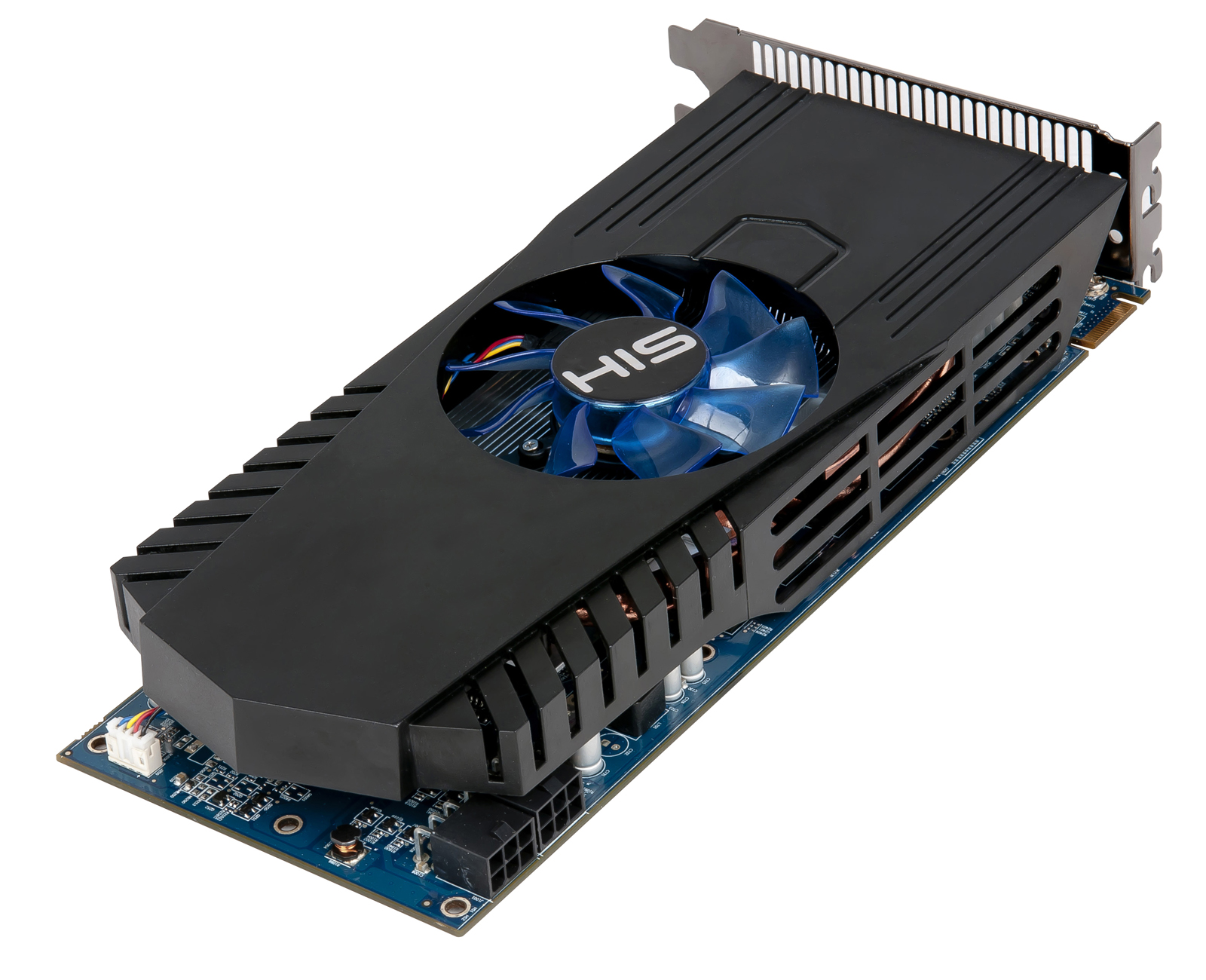
Whats everyones thoughts on how this GPU would cool in this case?
Paul

http://www.hisdigital.com/un/product2-699.shtml

0164_02_1600.jpg


or any of the sapphire 7850's? look to be more "closed" http://www.sapphiretech.com/presentation/product/?cid=1&gid=3&sgid=1160&pid=1672&psn=&lid=1&leg=0
 
Last edited:
Back
Top