ULPS has whipped my a$$. Help!!!

cageymaru

Fully [H]
2FA
Joined
Apr 10, 2003
Messages
23,536
I have the Sapphire 7950 OC with the Trixx OC'ing software. I have Google'd, prayed, threw my Kindle, pinched an old lady and I still can't get ULPS to disable. The card gets stuck in low power mode and I have to turn my graphics down in games to make them work. If I restart my PC, I can use higher settings in all games until I leave it on the desktop for an extended period of time. Then to play a game I have to lower the options to make games run.

Many times I launch a game and it just hangs after a minute. If I restart my PC and immediately launch the same game it works for 12 hours or more without a hitch. If I go say make a sandwich and leave the desktop up, I have to lower my graphics before I can play again. Or the game will just crash after approximately one minute.

Trixx keeps spamming me to disable ULPS. I have edited the registry and that didn't help. I tried installing 12.2 and that didn't work. I tried installing AMD OverDrive and that didn't work. I installed the 12.2's and then the driver linked in the review and it didn't work. I have run Driver Sweeper and then 12.2's and that didn't work.

Is there a sure fire way to fix this? The temps on the card haven't exceeded 50c so I assume that heat isn't an issue. It is 80f here atm. I'm just exasperated messing with this ULPS or whatever is causing this. Sorry if my writing is frantic.
 
Going to reinstall Win 7 64 next week as my new HD is on the way from Amazon. Rather not do that today as I will have to do it again next week.
 
I have the same issues with the non-OC Sapphire 7950 and so do many people.

I have had to disable sleep and monitor turning off in power settings.
Then I ran the registry edit to disable ULPS and also did the shortcut truck with afterburner.

Let's hope AMD fixes this shit with the certified drivers.
 
Same happened with my non-OC 7970 when I had it... I decided to try a 7950 Gigabyte OC since the cooler would address my noise complaints (which it has, and I now have sold both of my GTX 570's), and... same thing, plus other issues from before. I'm done with this series, I'll be waiting on whatever nV's response is. It's got a 30-day return availability from Amazon, so... as soon as more info on Kepler comes or the return period's closing, back it goes. This is especially annoying since I use my gaming PC to double as a WMC7 recorder/server with my Ceton InfiniTV 4. I wanted to get two cards for SLI/CF but no way am I pumping in $500/card for this silliness.
 
Last edited:
I have the Sapphire 7950 OC with the Trixx OC'ing software. I have Google'd, prayed, threw my Kindle, pinched an old lady and I still can't get ULPS to disable. The card gets stuck in low power mode and I have to turn my graphics down in games to make them work. If I restart my PC, I can use higher settings in all games until I leave it on the desktop for an extended period of time. Then to play a game I have to lower the options to make games run.

Many times I launch a game and it just hangs after a minute. If I restart my PC and immediately launch the same game it works for 12 hours or more without a hitch. If I go say make a sandwich and leave the desktop up, I have to lower my graphics before I can play again. Or the game will just crash after approximately one minute.

Trixx keeps spamming me to disable ULPS. I have edited the registry and that didn't help. I tried installing 12.2 and that didn't work. I tried installing AMD OverDrive and that didn't work. I installed the 12.2's and then the driver linked in the review and it didn't work. I have run Driver Sweeper and then 12.2's and that didn't work.

Is there a sure fire way to fix this? The temps on the card haven't exceeded 50c so I assume that heat isn't an issue. It is 80f here atm. I'm just exasperated messing with this ULPS or whatever is causing this. Sorry if my writing is frantic.

Please go read the GURU3D forums in the AMD section. This problem has been discussed ad nauseum and the answer has been repeatedly posted. You need a DLL file for low level overclocking, which AMD removed in the latest drivers.. without this DLL, neither Afterburner nor Trixx can overclock, and Ati Tray Tools won't even start. Get the link off guru3d and install it in the syswow64 folder. Did you bother to search?
 
Well I don't feel so bad then. I like to try everything before I ask for help and I tried lots of things! Hopefully new drivers will sort it out. Going to try the sleep thing next.

Thx!
 
Please go read the GURU3D forums in the AMD section. This problem has been discussed ad nauseum and the answer has been repeatedly posted. You need a DLL file for low level overclocking, which AMD removed in the latest drivers.. without this DLL, neither Afterburner nor Trixx can overclock, and Ati Tray Tools won't even start. Get the link off guru3d and install it in the syswow64 folder. Did you bother to search?

Yes I searched. I read and I read. I tried many things including editing my registry. I got exasperated and said Fuck it... Let me ask [H] guys.

Sorry if you already knew the answer in advance. I just went back AMD for the first time in years 3 days ago. I'll look up the .dll.

Thx.
 
Same happened with my non-OC 7970 when I had it... I decided to try a 7950 Gigabyte OC since the cooler would address my noise complaints (which it has, and I now have sold both of my GTX 570's), and... same thing, plus other issues from before. I'm done with this series, I'll be waiting on whatever nV's response is. It's got a 30-day return availability from Amazon, so... as soon as more info on Kepler comes or the return period's closing, back it goes. This is especially annoying since I use my gaming PC to double as a WMC7 recorder/server with my Ceton InfiniTV 4. I wanted to get two cards for SLI/CF but no way am I pumping in $500/card for this silliness.

Dang that sucks. I was considering giving the 7900s another try as well but think I will just sit tight. I'm still having nightmares about driver issues when I had two 7970s, so when the thought comes into my mind about purchasing two OC'ed 7970 versions, threads like this puts me back in check, but thats just from my experience.
 
I have the same card and HAD the same problem with 12.2s and Trixx spamming me with "you must disable ULPS". The fix was to install the older RC11 drivers from AMD's site. I didn't want to but was at my wits end. I also tried the registry hack, no luck.
 
edge929. You can use latest drivers but put the file I linked above in the syswow64 folder.
 
Same happened with my non-OC 7970 when I had it... I decided to try a 7950 Gigabyte OC since the cooler would address my noise complaints (which it has, and I now have sold both of my GTX 570's), and... same thing, plus other issues from before. I'm done with this series, I'll be waiting on whatever nV's response is. It's got a 30-day return availability from Amazon, so... as soon as more info on Kepler comes or the return period's closing, back it goes. This is especially annoying since I use my gaming PC to double as a WMC7 recorder/server with my Ceton InfiniTV 4. I wanted to get two cards for SLI/CF but no way am I pumping in $500/card for this silliness.

You are the typical example of pebcak and not knowing how to search for a solution.

Please go read the GURU3D forums in the AMD section. This problem has been discussed ad nauseum and the answer has been repeatedly posted. You need a DLL file for low level overclocking, which AMD removed in the latest drivers.. without this DLL, neither Afterburner nor Trixx can overclock, and Ati Tray Tools won't even start. Get the link off guru3d and install it in the syswow64 folder. Did you bother to search?

One of the very few people who are actually helpful instead of taking every chance someone mentions AMD to post a useless ranting post.
 
You are the typical example of pebcak and not knowing how to search for a solution.

Thanks, but I did find so called solutions and none worked. My time is valuable enough to not spend 20 hours solving this for a halfbaked fix that may not even work in a month.
 
Thanks, but I did find so called solutions and none worked. My time is valuable enough to not spend 20 hours solving this for a halfbaked fix that may not even work in a month.

You have spent just as much time (if not more ) whining about it. We get it, you failed at installing the video card. Move on. I doubt you'll stop though.
 
Going to reinstall Win 7 64 next week as my new HD is on the way from Amazon. Rather not do that today as I will have to do it again next week.

Just an FYI.. no need to reinstall Win7 to transfer to new hard drive..


use windows 7's backup and system image and you can transfer your win7 install easily.. it'd be like you never left it :)
 
Just an FYI.. no need to reinstall Win7 to transfer to new hard drive..


use windows 7's backup and system image and you can transfer your win7 install easily.. it'd be like you never left it :)

I was under the impression at the time that maybe something was conflicting with the drivers. I'm not trying to OC my video card at this point. I just want it to run at stock settings. It won't even do that.
 
So I need this .dll file to make the video card run at stock speeds? I'm not trying to OC right now. My card is being forced to run at 1/2 normal speed by something. Trying to cure the hung molasses mode first before I think about Trixx again. :)

Haven't read the Guru 3D forums yet as a storm hit and bunch of my family is running through the house atm. Will after the noise calms down.
 
Going to let the computer idle for a bit to see if it's going to down clock and get hung. So far it doesn't seem to down clock at all. Which is fine by me even though my computer runs 24 / 7. Trixx seems to have stopped that annoying error but not ready to try OC'ing yet.

Thx guys. Fingers crossed.
 
You have spent just as much time (if not more ) whining about it. We get it, you failed at installing the video card. Move on. I doubt you'll stop though.

Nah, I haven't, son. I've posted little about it, all of 2 minutes of typing total roughly. No one failed at installing anything, the drivers are broken. Can you guarantee that a future update won't just break it again even if that fix does work (and requiring an untrusted 3rd-party file to even work is bonkers)? Obviously, no, you can't. This issue is occurring for me at both stock and overclocked speeds.... AMD needs to get their crap in order. Heaven help you from what I hear if you want multi-card, which I do, since a single chip isn't enough to drive things at 2560 smoothly with any AA (or even smoothly in some cases period). I for one won't be paying more to alpha-test their hardware again this generation.
 
I've been using Sapphire TRIXX with the latest drivers as well, and whatever I did I couldn't get this problem to go away. So I uninstalled TRIXX and went to the latest Afterburner beta (which has a fix for this issue), and haven't had a problem since. I'll switch back to TRIXX once the issue is resolved (since I don't like running afterburner since its always in beta and expires every month).
 
I've been using Sapphire TRIXX with the latest drivers as well, and whatever I did I couldn't get this problem to go away. So I uninstalled TRIXX and went to the latest Afterburner beta (which has a fix for this issue), and haven't had a problem since. I'll switch back to TRIXX once the issue is resolved (since I don't like running afterburner since its always in beta and expires every month).

Latest Afterburner didn't fix it for me. I could OC just fine with Afterburner, but every time I exited a game I had to restart my computer to play another game as my video card would down clock permanently. Uninstalling Afterburner didn't do anything. Editing the .cfg didn't do anything but break the ability to save profiles in Afterburner.

I edited the registry to disable ULPS but that didn't do anything tangible. Driver sweeper, installing drivers in a certain order, etc didn't work. Adding the .dll file and cutting off my monitor's ability to turn off seemed to work.

Which brings up the question of what the hell was AMD thinking? I went through the Bulldozer not playing Steam games for 3 months at the end of last year. That ended up being a cross manufacturer broken bios issue. Now here's the same thing rearing it's ugly head again.

At least the AMD community around the web cares enough to be helpful in helping you solve AMD's shortcomings. But seriously they need to hire some driver writers. Great hardware without software to back it is just underutilized hardware.

Some may say I'm whining, but I'm just being truthful. When you spend $480 on a video card it should at least do basic things properly. Coming out of the low power state is a basic function that should work regardless of whether or not I get 20 fps in BF3 or 60 fps.

New hardware shouldn't be expected to be bug free, but having to study various websites then go through the hell I went through for 3 days trying to solve it doesn't build confidence in their products. Hopefully this bug will be squashed in a new driver as there isn't a way in hell this one can ever be WQHL.

I wouldn't expect a regular consumer to figure out how to fix this problem in a timely matter. And I doubt that AMD thinks they would take the time to find the solution either. And the sales to reguler Joe Schmoo's are what keep AMD running.
 
Wow looks scary lol.
I have a 7970 coming next week. All I'm gonna do is Max clocks in overdrive. Can I use afterburer for fan profile and use latest drivers with this dll?
 
Rattle, you can use the latest drivers and still use afterburner and utilize the fan control you just wont be able to adjust clocks without the DLL file.
 
What do you mean even if its within? You mean overclock within CCC and use AB for fan profile?
 
Yeah basically within ccc limits not having to unlock unofficial overclocking in the afterburner cfg and then just using afterburner for fan curve profile.
If my card does 1100/1500 stock volts I'll be fine with that.
 
Yep, I don't expect new hardware to be flawless with its drivers, but it should be fully functional even if not 100% polished.
 
Yep, I don't expect new hardware to be flawless with its drivers, but it should be fully functional even if not 100% polished.

agreed.

I have a sapphire 7950 OC doing something similar. the highest i can get it to be stable at is 850 mhz. anything higher and stuff starts to freeze or artifact. Which is ridiculous because it comes clocked at 900 mhz from the factory.
 
Follow the directions in the thread and hopefully you can get your's working too. Mine will down clock still, but now it comes out of that state and ramps back up to normal operating speeds when I launch a game. If you can't get it to work properly after that chime back in and hopefully someone can help you.

:)
 
Yeah, my concern is... what happens next time ATI makes a new driver? Will it still work then? And... where did that file come from? Is it even an official one or just something someone cobbled together that could be who-knows-what?
 
cobbled? :p

so cobbling and overclocking aside whats the best driver for BF3 for everyone, single card.
 
I'll just copy and paste from my driver comparison
Drivers Used
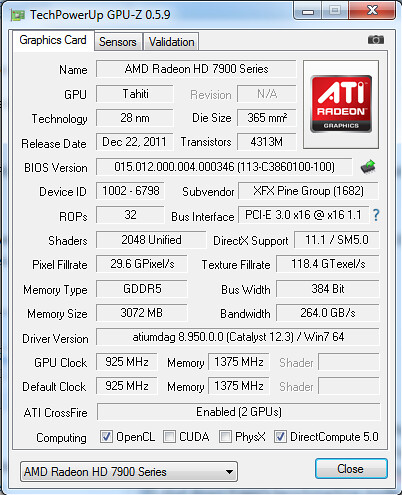
8.921.2 RC11 with 12.1 Cap 3


12.2 Pre-Certified Driver(Actually reported as 12.3) with 12.1 Cap 3
The 12.2 drivers had the atipdlxx.dll from RC11 copied to to "C:\Windows\SysWOW64", and atipdl64.dll from RC11 copied to "C:\Windows\System32" while in safe mode after the initial installation. These files are present in the RC11 driver extraction location which is normally "C:\AMD\AMD_Radeon_HD7900_Win7_64\Packages\Drivers\Display\W76A_INF\B132075\" where they will have the extension .dl_ so that they have to be renamed either before copying or after they are copied to the correct folder. If this was not done then there were clock irregularities, difficulties with some programs, and other odd behavior.

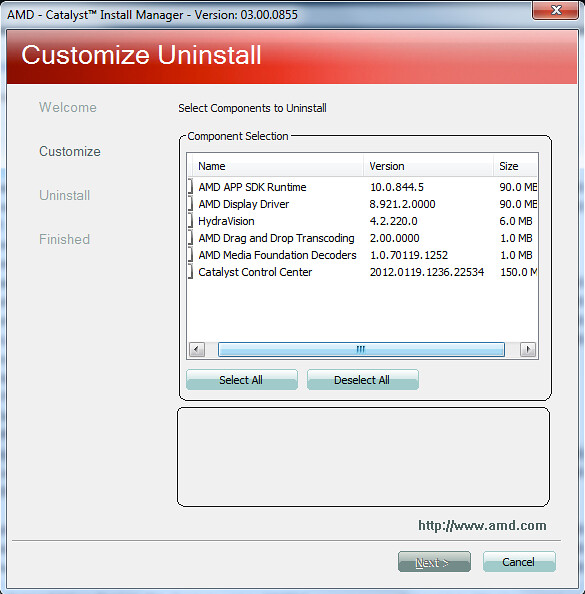
Both drivers were installed with the following process. Any previous Catalysts were fully removed via the Catalyst uninstall manager. The system was booted into safe mode where it had a driver cleaning with Driver Sweeper 3.2 from Phyxion.net(this is the latest version vs the one from Guru3d). The system was rebooted and then the driver was installed on a "clean" installation.

Edit: I'll be nice and just post the DLL's from RC11 for you as well
atipdlxx.dll
atipdl64.dll
 
Last edited:
I'll just copy and paste from my driver comparison
Drivers Used
8.921.2 RC11 with 12.1 Cap 3


12.2 Pre-Certified Driver(Actually reported as 12.3) with 12.1 Cap 3
The 12.2 drivers had the atipdlxx.dll from RC11 copied to to "C:\Windows\SysWOW64", and atipdl64.dll from RC11 copied to "C:\Windows\System32" while in safe mode after the initial installation. These files are present in the RC11 driver extraction location which is normally "C:\AMD\AMD_Radeon_HD7900_Win7_64\Packages\Drivers\Display\W76A_INF\B132075\" where they will have the extension .dl_ so that they have to be renamed either before copying or after they are copied to the correct folder. If this was not done then there were clock irregularities, difficulties with some programs, and other odd behavior.

Both drivers were installed with the following process. Any previous Catalysts were fully removed via the Catalyst uninstall manager. The system was booted into safe mode where it had a driver cleaning with Driver Sweeper 3.2 from Phyxion.net(this is the latest version vs the one from Guru3d). The system was rebooted and then the driver was installed on a "clean" installation.

Edit: I'll be nice and just post the DLL's from RC11 for you as well
atipdlxx.dll
atipdl64.dll

So for this are you saying to install the rc11 first and then the 12.2, and then move the files into their respective places?
 
no, use the DLL's from RC11 as they are the last driver before 12.2(12.3?) that are suited for the Radeon 79xx series. Or just do an upgrade install. I don't do Catalyst upgrade installs because they have caused me problems in the past.
 
/ think I'll just go rc11 when my card gets here tomorrow lol
Hopefully this shit gets fixed and I get a good clocker.
 
LOL I came in this thread thinking that UPS whipped your A$$ Was thinking they threw it at your house or something.

:D
 
ULPS has been the thorn on my side since I got my 5970. If I try disabling through registry it wont go off and if I use the exe out there it causes games to crash.
Ive tried everything and cant get my oc to function correctly. I can find a max oc @ 850/1200 1.3v but as soon as I restart I lockup after reboot.
Im thinking of going back to nvidia on next vga upgrade. Ill just get an EVGA my last card was an EVGA 8800 and it lasted for so long and oced quite well with precision tuner with no issues.
 
Back
Top