Vertex 2 RAID 0 Vs Intel G1 Raid0?

Who is this "all" you are talking about? Many people here have either looked up some benchmarks themselves, read past threads discussing this, or are capable of doing some simple searches to find it. I suggest you try that.

Also, I guarantee you that the chip you linked to will NOT compress most data people write to their hard drives by 50% at 270 MB/s.

I don't think you read what I posted.

I'm an electrical engineer. I design this stuff. Compressing streaming data at 270MB/s in under 1Watt is a trivial problem with modern processes. I provided a much harder problem (compressing streaming 1080p HDTV) and showed that the harder problem could be accomplished with 1Watt. Therefore, the less complex problem can also be accomplished in under 1 Watt. Seriously, it's trivial.


Also, I think I've finally tracked down the benchmarks you're alluding to:
http://www.bit-tech.net/hardware/storage/2010/09/03/ocz-revodrive-review-120gb/3

And the SandForce controller is still faster than the X25-M using 'incompressible data'. Or am I missing something?
 
I don't think you read what I posted.

I'm an electrical engineer. I design this stuff. Compressing streaming data at 270MB/s in under 1Watt is a trivial problem with modern processes. I provided a much harder problem (compressing streaming 1080p HDTV) and showed that the harder problem could be accomplished with 1Watt. Therefore, the less complex problem can also be accomplished in under 1 Watt. Seriously, it's trivial.


Also, I think I've finally tracked down the benchmarks you're alluding to:
http://www.bit-tech.net/hardware/storage/2010/09/03/ocz-revodrive-review-120gb/3

And the SandForce controller is still faster than the X25-M using 'incompressible data'. Or am I missing something?

Actually, I read what you wrote. You seem to have missed what I wrote, however: 50% compression ratio, lossless, for most user data. Lossless compression of most user data at a 50% compression ratio is a much harder problem than lossy compression of raw video -- raw video actually compresses rather easily since there is a lot of repetitive data in a well-defined format, and it does not have to be lossless. You are comparing apples and oranges. It is surprising that an electrical engineer does not know that.

Also, if it were so trivial to do 50% compression ratio lossless decoding, then there would be a lot of HDDs with such a chip built in. Why aren't there?

But all of this is beside the point. There are numerous real-world copy and write tests on Sandforce SSDs that you can view on the web. It is just a matter of copying files that people have on their drives. Very few of them achieve anywhere near to the specified write speed of 270 MB/s. Most of them are around 130 - 150 MB/s for a fresh drive, and below 100 MB/s for a heavily used drive. That indicates that the average compression that is being achieves is quite low. Which is not surprising, since if you look at filesystems with compression, or tape backup with compression, they almost never achieve a 50% compression ratio.

And yes, you are missing something. The Sandforce SSDs have difficulty with both reading and writing of incompressible data. There are lots of reports of this on the web. Some of the problems are that they slow down to a sequential write speed of about 80 MB/s after being filled and heavily used. Also, the read speed drops anomalously in some heavy usage cases. These problems have been discussed in this forum before.
 
Actually, I read what you wrote. You seem to have missed what I wrote, however: 50% compression ratio, lossless, for most user data. Lossless compression of most user data at a 50% compression ratio is a much harder problem than lossy compression of raw video -- raw video actually compresses rather easily since there is a lot of repetitive data in a well-defined format, and it does not have to be lossless. You are comparing apples and oranges. It is surprising that an electrical engineer does not know that.

Also, if it were so trivial to do 50% compression ratio lossless decoding, then there would be a lot of HDDs with such a chip built in. Why aren't there?

But all of this is beside the point. There are numerous real-world copy and write tests on Sandforce SSDs that you can view on the web. It is just a matter of copying files that people have on their drives. Very few of them achieve anywhere near to the specified write speed of 270 MB/s. Most of them are around 130 - 150 MB/s for a fresh drive, and below 100 MB/s for a heavily used drive. That indicates that the average compression that is being achieves is quite low. Which is not surprising, since if you look at filesystems with compression, or tape backup with compression, they almost never achieve a 50% compression ratio.

And yes, you are missing something. The Sandforce SSDs have difficulty with both reading and writing of incompressible data. There are lots of reports of this on the web. Some of the problems are that they slow down to a sequential write speed of about 80 MB/s after being filled and heavily used. Also, the read speed drops anomalously in some heavy usage cases. These problems have been discussed in this forum before.

Seriously? Don't put words in my mouth. My posts were in response to your original argument here:
Keep in mind that the Sandforce SSDs consume only a few Watts of power max. Compare that to typical desktop CPUs, which consume 70-130W. Even laptop CPUs are typically around 15-30W. Also, the Sandforce SSDs have a specified write speed of 270 MB/s. How sophisticated a compression algorithm could it possibly be running that only consumes 1-2 Watts and yet has a throughput of 270 MB/s ? The answer is that is cannot be very sophisticated. My guess is that it is doing compression of running strings of identical bytes, and little more.
You argued that a chip consuming 1 Watt could not do any sophisticated compression. The chip I linked to did full H264 HDTV compression in a 1 Watt envelope. Now let's get past this argument and get back to SSD performance.


Let's not get hung up on theoretical specs here, or random theories, or anecdotal reports. Here's a bit-tech review showing how the drives behave with compressible vs. incompressible data, after being filled with data:
http://www.bit-tech.net/hardware/storage/2010/06/25/sandforce-ssd-test/9

Yep, there's a difference, but does it really matter? From the real-world benchmarks it doesn't look like it does anywhere other than copying media files around. If you're copying media files around all day, you're probably not interested in a high $/GB SSD anyway.:
http://www.anandtech.com/show/2899/11

Anand shows that used vs. new Sandforce is negligible:
http://www.anandtech.com/show/2899/8

Make no mistake, I still bought the X25-M because I was more confident in its reliability, and that's what's important to me. But I do not believe the Sandforce controllers are as problematic as you make them out to be from your anecdotal reports.
 
Last edited:
You argued that a chip consuming 1 Watt could not do any sophisticated compression. The chip I linked to did full H264 HDTV compression in a 1 Watt envelope. Now let's get past this argument and get back to SSD performance.

Seriously? Is it that difficult to understand what I was talking about? I was talking about lossless compression of general data, and whether it was realistic for it to be done at 270MB/s with 1W of power, and achieve anywhere near 50% compression for most data. Lossy compression of raw video is not even close to the situation I was discussing.

The Sandforce drives claim 270 MB/s write speeds, but in typical usage, they achieve about half that, and after heavy usage, as low as 80MB/s. And it is erratic -- you cannot easily predict what speed you will see. More important, the read speeds of the Sandforce drives are typically around 200 MB/s for real data, as compared to Intel and Crucial which typically have read speeds of 250 MB/s or higher.

Also, the Sandforce performance is not even consistent for highly compressible data -- they can experience "read fatigue" where the read speed (for a file of zeros) drops from 270 MB/s to about 220 MB/s when nothing is done but the file is read over and over. Erratic performance like that makes me nervous. If compression/decompression is such a trivially easy problem, I would not expect to see such erratic behavior.
 
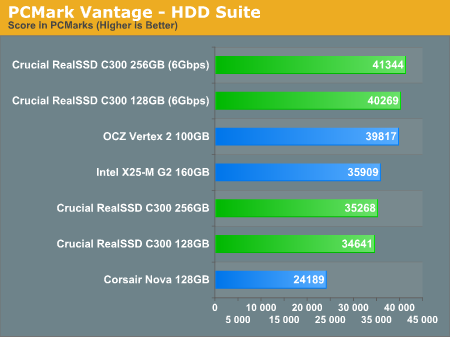
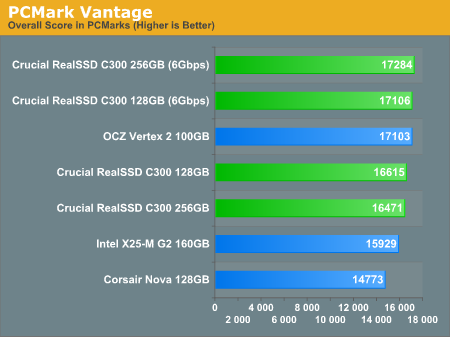
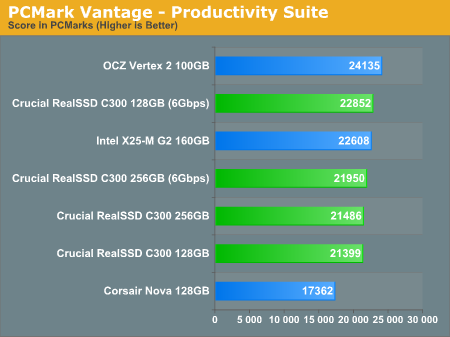
I will admit that there are people in this thread which know more from me about SSD tech, but there is one single fact which prove that SF disks are great for general use. And what is that? its PC mark vantage results, care to explain this?

Taken from Anadtech review.

Next up is PCMark Vantage, another system-wide performance suite. For those of you who aren’t familiar with PCMark Vantage, it ends up being the most real-world-like hard drive test I can come up with.

Any performance impacts here would most likely be reflected in the real world.

Now don't say that Anand is wrong as well please, and this drives sux, because i don't care if they use some fucked up way to get bigger performance, all i care is real world performance and this is the results.

And no, i won't use my SSD to copy movies,mp3s or images. I got Storage HDD drives for that.


23536.png


23542.png


23543.png


And of top of that one more qoute,

The C300’s performance is simply not as resilient as what SandForce has to offer. For the majority of users this isn’t a problem. Typical desktop workloads shouldn’t get the drive into this state. Add in the efficiency of Crucial’s TRIM implementation and you should never see such a drop. However if your workload is atypical or particularly write intensive, the C300 may not be a good fit.

Good enough for me to know what is better pick.
 
... If compression/decompression is such a trivially easy problem, I would not expect to see such erratic behavior.

Compression will always be erratic if your dataset is unknown. This isn't news to anyone. Compression ratio depends on the contents of the dataset. This is why I posted compressible and uncompressible datasets. Also, my original post was to refute your claim that you cannot perform decent compression on 270MB/s at 1W, which was not true.

Like I said, let's not get hung up on theoretical read speeds. I posted actual benchmarks of compressible and incompressible data, and benchmarks again where the drive was heavily used. I also posted 'typical use' benchmarks showing the Sandforce controllers performing very well.

If you're going for arbitrary sequential read/write benchmark speeds of uncompressible data with great consistency, then you're 100% correct and you should avoid the Sandforce SSDs. Actually, you should probably avoid all SSDs and just get a RAID array of standard HDDs. Predictable, consistent performance.

The bottom line is that it doesn't really matter for most users. If the drive makes my desktop/laptop faster in real-world scenarios and makes everything snappier, that's what matters. You can spend all day finding edge cases where an SSD slows down for arbitrary operations, but it doesn't matter as long as the net effect is an improvement.
 
Last edited:
Compression will always be erratic if your dataset is unknown. This isn't news to anyone. Compression ratio depends on the contents of the dataset. This is why I posted compressible and uncompressible datasets. Also, my original post was to refute your claim that you cannot perform decent compression on 270MB/s at 1W, which was not true.

The dataset I was referring to was zeros, as I wrote in my last post when I mentioned read fatigue.

And you are attempting to refute a claim I never made (unless you take my words completely out of context). Any decent engineer knows that you may be able to solve a highly specialized problem but not have any chance at all to solve the general problem of which the specialized problem is a subset. Compressing raw video to 50% (or whatever) in a lossy manner is a specific, relatively easy problem compared to 50% lossless compression of general data.

And if SSD performance does not matter as you claim, then why doesn't Sandforce claim realistic performance numbers? Sandforce SSDs spec 270MB/s for read and write, when typical performance is 200 MB/s sequential read, and 80-140 MB/s sequential write. The answer is that performance numbers do matter to many SSD buyers (even if it probably should not matter so much to them). If you read this forum much recently, you would see a great number of posts from people planning to buy a Sandforce SSD because of the 270 MB/s claimed write speed, as compared to the slower write speeds from other SSDs.
 
Last edited:
its PC mark vantage results, care to explain this?

Sure, I'll explain it if you tell me exactly what kind of data PCMV is reading and writing. Without knowing that, it is difficult to interpret the results. In contrast, if you take a bunch of files from your drive (and tell me what kind of files) and copy them, then you can specify a speed in MB/s and the results are easy to interpret. The Sandforce SSDs perform much worse than their spec in such copy tests, and similarly or worse to Crucial C300 SSDs. On the one hand, we have an easy to interpret copy test, on the other hand we have the black box of PCMV test. I think the burden of proof is on PCMV to show that it is actually measuring what some claim that it is.

I've read everything SSD related on Anand's site, usually the day it is posted. Anand's SSD testing methodology has not kept up with the times. He makes assumptions about PCMV and his own storage benchmark without backing up his assumptions. And his method for testing resiliency of SSDs is terrible, as I have explained in this forum before. In fact, Anand did not even know about the problem with write speed with heavily used Sandforce SSDs until I told him about it on his forum. Currently he is working on improved methodology for testing that sort of thing. Let's hope he comes up with a better methodology.
 
I can see that your well informed about SSD tech but still that doesn't cover the fact that PC mark vantage really is real world scenario in terms of general pc use.

Also, its really obvious that i won't use SSD for copying files man. maybe in some rare situation. Its just an OS disk which is used mostly for compressable data operations now that might be different if u got laptop as main pc.

The point is i really don't mind if SF based SSD's use some unfair way to get better performance as long as the disk work great in average joe home pc.

Thanks for clearing some things for me.
 
PC mark vantage really is real world scenario in terms of general pc use.

How do you know that? How do you know that it does not make some simplifying assumptions, like for example only having a few small building blocks of data that it writes to disk repeatedly? Have you actually looked at the data that it is writing? Such an assumption is reasonable for almost all storage devices, except for those that can compress data when it comes in such simple, repetitve patterns. The applicability of PCMV depends on how well what it writes matches what you actually write.

A good way to test real data is to take a bunch of files on your disk that you have actually written, and see how fast they can be copied. It does not matter if you do not normally copy those files. The point is that you have written them, and when you copy them, they get written. So it is a reasonable test. It could be improved upon if you know that the files were written either sequentially, or in small chunks. In that case, you can try to match those patterns, but that takes a little more work.
 
Well i'm guessing that they made PCMV quite similar to real world usage. Because when you think about it its not very hard to simulate that knowing what kind of tests they used.
 
I can see that your well informed about SSD tech but still that doesn't cover the fact that PC mark vantage really is real world scenario in terms of general pc use.
How 'bout this, I've had 2x50GB Vertex2s and 2 80GB Intel G2s in RAID0 in the same machine at the same time...Is that enough for a comparision?

I used those two drive configurations about a week just to make it fair but the SF drives we're a clear second to the Intels.

It didn't take a week to notice the SF drives didn't compete with the Intels but I thought I was missing something considering the great reviews they had.

You can point to every statistic in the world but I can only go by my personal, real world experience.
 
Well i'm guessing that they made PCMV quite similar to real world usage. Because when you think about it its not very hard to simulate that knowing what kind of tests they used.

But there is no need to guess about benchmarks. Just run some copy benchmarks with actual files. Then you know exactly what is being written. And for Sandforce drives, the sequential write speeds are typically in the 80 - 140 MB/s range, depending on the size of the drive and how heavily used it has been.

And for benchmarks like PCMV and Anand's storage bench, it is true that it would not be difficult to code something that records real world usage and then plays it back exactly. But I have never seen any proof that is what actually happens. The reason I am skeptical is that, with the exception of Sandforce SSDs, it would not make any difference to such programs if they substituted a string of zeros (in the right size, with the right cluster pattern and queue depth) instead of recording the actual data written. And there is a good reason for them to do that -- if they recorded every byte exactly, the "recording" file could be hundreds of MBs or even GBs in size, depending on what you recorded and for how long. If anyone has used one of these programs, I would be interested in knowing how large the "recording" file is for a typical heavy usage pattern (say, an hour of multitasking with a lot of disk access), and also how much the file can be compressed with something like ZIP or RAR.
 
The dataset I was referring to was zeros, as I wrote in my last post when I mentioned read fatigue.
And it still doesn't matter. Real world benchmarks (posted above) show that it doesn't matter.

And you are attempting to refute a claim I never made (unless you take my words completely out of context). Any decent engineer knows that you may be able to solve a highly specialized problem but not have any chance at all to solve the general problem of which the specialized problem is a subset. Compressing raw video to 50% (or whatever) in a lossy manner is a specific, relatively easy problem compared to 50% lossless compression of general data.
What are you talking about? I already quoted your original text, which clearly said that 1 Watt wasn't even to perform anything sophisticated, then I showed that 1 Watt was plenty of power to do sophisticated compression. Nothing more.

Let's drop the '50% compression' red herring already. You will NEVER achieve 50% compression of a general dataset, as I mentioned above several times already, so I'm not sure why you keep returning to this.

I also provided benchmarks showing performance on uncompressible data so we could completely ignore the compression angle. Let's quit beating this dead horse.

And if SSD performance does not matter as you claim, then why doesn't Sandforce claim realistic performance numbers? Sandforce SSDs spec 270MB/s for read and write, when typical performance is 200 MB/s sequential read, and 80-140 MB/s sequential write. The answer is that performance numbers do matter to many SSD buyers (even if it probably should not matter so much to them). If you read this forum much recently, you would see a great number of posts from people planning to buy a Sandforce SSD because of the 270 MB/s claimed write speed, as compared to the slower write speeds from other SSDs.

Now you're just off in the weeds. I never claimed SSD performance doesn't matter. I pointed out that sustained, consistent transfer speeds are not the defining characteristic of SSD performance in real-world scenarios. Sure, there are discrepancies between peak transfer numbers and real-world transfer numbers, and it's worth pointing that out. But PCMark Vantage and other real-world test suites still show improved numbers.

So like I said before, unless you're just going to be copying files back and forth, don't worry too much about sustained transfer rates.
 
Last edited:
But there is no need to guess about benchmarks. Just run some copy benchmarks with actual files. Then you know exactly what is being written. And for Sandforce drives, the sequential write speeds are typically in the 80 - 140 MB/s range, depending on the size of the drive and how heavily used it has been.

And for benchmarks like PCMV and Anand's storage bench, it is true that it would not be difficult to code something that records real world usage and then plays it back exactly. But I have never seen any proof that is what actually happens. The reason I am skeptical is that, with the exception of Sandforce SSDs, it would not make any difference to such programs if they substituted a string of zeros (in the right size, with the right cluster pattern and queue depth) instead of recording the actual data written. And there is a good reason for them to do that -- if they recorded every byte exactly, the "recording" file could be hundreds of MBs or even GBs in size, depending on what you recorded and for how long. If anyone has used one of these programs, I would be interested in knowing how large the "recording" file is for a typical heavy usage pattern (say, an hour of multitasking with a lot of disk access), and also how much the file can be compressed with something like ZIP or RAR.

Copy benchmarks don't tell you the whole SSD performance story. The biggest advantage comes from lower latency and higher IOPs throughput. When you copy one file and look at the number, you're only performing a single stream of operations. When you're opening programs and seeking through files, you're throwing a whole slew of random operations at the SSD that mechanical HDDs have a hard time coping with.

And I think you're missing the point on PCMark Vantage. The sustained transfer rate probably doesn't have as much of an impact as you would think there, or in any typical desktop work load.
 
For anyone who still might be hung up on sustained transfer rates, consider this:

The 10,000RPM Velociraptor HDDs have sustained transfer rates nearly identical to 7,200RPM disk drives these days. If you do file copy or sequential read/write benchmarks, you'd probably think they weren't worth the price premium.

However, due to their lower latency and higher IOP throughput, they make your machine far more responsive. This shows up in PCMark Vantage and other real-world benchmarks:

http://www.storagereview.com/western_digital_velociraptor_review

The same goes for SSDs. The faster sequential transfer rates are great, but the real benefit comes from the low latencies and higher throughputs. The MacBook Air SSD has abysmal throughputs compared to even modern mechanical desktop HDDs, but it still feels substantially faster in day-to-day operations than those same HDDs.

So don't look to sustained transfer rates as the defining measurement of SSD performance.
 
And it still doesn't matter. Real world benchmarks (posted above) show that it doesn't matter.

You can pretend the specifications do not matter, but the reality is that specifications do matter. You can pretend that buggy implementations of compression do not matter. The reality is that they do matter. And how do you know that the PCMV benchmarks are "real world"? Do you know exactly what data they write and how?

What are you talking about? I already quoted your original text, which clearly said that 1 Watt wasn't even to perform anything sophisticated, then I showed that 1 Watt was plenty of power to do sophisticated compression. Nothing more.

Okay, obviously I will have to explain "out of context" since evidently engineers are no longer required to have language skills. Context refers to the words and meaning that go with a statement, and out of context means taking the statement without the surrounding words that lend it meaning. Everyone reading my statement in this thread understood the context -- we were talking about lossless 50% compressibility of general data. You are the only one who insists on taking it out of context and making irrelevant claims about compressing raw video. The point is that the underlying flash write speed for Sandforce SSDs appears to be about 130 - 140 MB/s. To achieve their specification of 270 MB/s write, then they have to compress all data to 50% (i.e., cut down the data by a factor of 2).

Let's drop the '50% compression' red herring already. You will NEVER achieve 50% compression of a general dataset, as I mentioned above several times already, so I'm not sure why you keep returning to this.

Let's not. But I am glad to see you finally admit that you were wrong and that it is impossible to make a chip that does lossless 50% compression of general data at all, let alone at 1W power consumption.
 
Last edited:
When you copy one file and look at the number, you're only performing a single stream of operations.

No one was talking about copying a single file. Most file-copy tests have a lot of different sized files, and/or a group of small files and a group of large files. You might want to try reading about these things before making such silly statements.

And I think you're missing the point on PCMark Vantage. The sustained transfer rate probably doesn't have as much of an impact as you would think there, or in any typical desktop work load.

I never said anything about sustained transfer rate and PCMV. And if you know exactly what PCMV is writing and how, please tell us.
 
:p You are a funny man, john4200. I'm not evening going to touch your latest round of bizarre ad hominem attacks, and I'm really starting to regret wasting everyone's time with this dragging this thread on this far already.

As for PCMark Vantage, I don't think you understand how it works. PCMark Vantage runs real-world applications through a series of scripts that mimic real-world usage scenarios and measures how quickly the system handles it.

Here's a handy 54-page whitepaper on how they developed the tests: http://www.futuremark.com/pressroom/companypdfs/PCMark_Vantage_Whitepaper_v1.0_(PDF)
That should answer all of your questions and help put your doubts aside. If you still don't like PCMark, Anand has his own storage benchmark that records real-world usage and plays it back (without substituting real data with useless 0s :p) here: http://www.anandtech.com/show/3756/2010-value-ssd-100-roundup-kingston-and-ocz-take-on-intel/4
(Note that Anand's test relies more heavily on sequential transfer rates than PCMark, according to him. Thus, any issues with sequential transfer rates should show up here. They don't.)

psyside provided some PCMark results for the drives in question above:

psyside said:

And here are Anand's real-world storage benchmark results with a SF-1200 drive and an Intel drive (from a test more heavily biased toward real-world transfer rates):
CoQpk.png
 
Last edited:
The Intels will not be able to clean themselves while in RAID (though there was a rumor the latest Intel Matrix Driver might allow TRIM in RAID finally).

The Sandforce based drives should be able to clean themselves in RAID as they have OS-dependent garbage collection.

Haha, how many times have we heard this rumor? :D
 
That should answer all of your questions and help put your doubts aside.

No, that does not answer the question I have now asked you three times. What exactly does it write to disk?

If you still don't like PCMark, Anand has his own storage benchmark that records real-world usage and plays it back (without substituting real data with useless 0s

How do you know? I already mentioned that in this thread. It would make sense for it to substitute something else for GBs of real data, since the program was not designed for testing something like Sandforce SSDs. The author may have just recorded the pattern of reads and writes, but substituted something else for the actual data.

It is odd that you think I am not familiar with the benchmark results posted on Anand's site. Did you just find them yourself? The problem is not the results, but the methodology.

We know what AS-SSD and CDM are writing when they test, we know exactly what the reported results (IOPS and MB/s) mean, and we can look at plenty of results of AS-SSD and CDM for Sandforce drives. We also know what is being written for various file copy tests on Sandforce drives. None of these tests have the Sandforce drives performing anywhere close to the 270 MB/s specified write speed. Instead, we see 70 - 140 MB/s write speeds. Even the Sandforce read speed specs are wrong, since the measured results with AS-SSD and CDM are around 200 MB/s, not 270 MB/s.

The bottom line is that Sandforce specs are inflated.
 
Last edited:
No, that does not answer the question I have now asked you three times. What exactly does it write to disk?
:rolleyes: Read it again, please. PCMark Vantage does not write to the disk. It runs other programs, doing REAL work that involves the disk and other subsystems. You can't substitute the files with all 0s because then the programs would have nothing to work on. Likewise, when you 'save' in these programs you're writing out real data, not 0s.

The bottom line is that Sandforce specs are inflated.
Sandforce specs quote peak read speeds, which are indeed accurate for compressible data.

The bottom line is that it doesn't matter because real-world performance is still good in real benchmarks. If you want to benchmark-race using only uncompressible data transfer specs on the Internet, avoid Sandforce, otherwise, don't worry about it. :p
 
Last edited:
Ok John i will ask you just one thing, and no i dont ask this to argue cause i'm new to ssd tech and you know more about it no doubt.

So that being said, name me all of the uncompressable types of data (you can think of) which we find in everyday use? as far as i know this is the short list, mp3, Divx, jpg. Or even add every type you can think of, thanks!

The Thing is i got 6 pc connected in network and as far as i know the Vertex2 and all SF based disk are very good regarding installation programs and the time requited for that kind of operations. I'm asking this because its really pain to install many programs on 6 different machines.
 
Last edited:
PCMark Vantage does not write to the disk.

Are you sure you are an engineer? Of course PCMV writes to disk. The fact that it is calling other programs is irrelevant. If PCMV did not arrange for the other programs to write to disk, then it would be completely useless as a storage benchmark.

The fact is that you do not know exactly what it writes to disk, so you are playing games with words. I have a better idea than you what PCMV writes, since I have looked at the 700+ MB .dat file that PCMV comes with, but it is impossible to tell from that exactly what it is writing to disk in each test. For all I can tell, the .dat file could contain some video and audio files, but many of the other tests may not use realistic data.

Sandforce specs quote peak read speeds, which are indeed accurate for compressible data.

No, wrong again. The Sandforce specs are only accurate for benchmarks like ATTO that write a string of zeros or other useless data. File copy tests of data that can be compressed by something like ZIP or RAR, show that Sandforce SSDs do NOT reach anything close to Sandforce's specifications.

The bottom line is that Sandforce specifications are inflated and inaccurate.
 
Last edited:
name me all of the uncompressable types of data (you can think of) which we find in everyday use?

It is not so simple as classifying data into two categories, such as compressible and incompressible. Depending on the program used and the data itself, some data may be able to be compressed to 10% of its original size, other data to 50%, other to 90%, and other data not at all.

So, two important variables in determining compression ratio are the compression technique used, and the data itself. One of the best lossless compression programs for general data is 7zip. As an example, I just ran 7zr on a tar file of a documents folder I have, on a system with a 4/8 core 3.2 GHz Core i7 CPU (130W), and it compressed the file to 62% of its original size (186MB/301MB), but it took 62 seconds, which is 4.9 MB/s throughput.

For a Sandforce SSD to achieve the 270 MB/s write speed that they claim, it would have to compress the data even more (to 50%), and do it 55 times faster than my powerful CPU could manage. Not likely. In fact, the Sandforce SSD probably could not manage to compress the data to even 90% of its size. So the data that is compressible to 7zip is likely incompressible to the Sandforce SSD.

The list of data that can be written to a Sandforce SSD at 270 MB/s is very short. A file of zeros, definitely. A text file with the word "unrealistic" repeated a million times, maybe. Most other files, no.

The Thing is i got 6 pc connected in network and as far as i know the Vertex2 and all SF based disk are very good regarding installation programs and the time requited for that kind of operations. I'm asking this because its really pain to install many programs on 6 different machines.

You may be taking the wrong message away from this discussion. Compared to Sandforce's quoted specifications, the Sandforce SSDs underperform. Compared to other SSDs like the Crucial C300 and the Intel X25-M, the Sandforce SSDs do worse in some areas and better in others. Compared to an HDD, the Sandforce SSDs are a big improvement in most areas (one area to be wary of though is if you have an application that demands a high sequential write speed -- Sandforce SSDs can drop to 80 MB/s sequential write after heavy use). However, you should NOT conclude that Sandforce SSDs cannot be used productively in many situations.

The bottom line is that Sandforce's specifications are inflated, and should not be used for comparison or deciding whether a Sandforce SSD will meet your needs.
 
Last edited:
Are you sure you are an engineer?
:p Your personal attacks are getting ridiculous.


Of course PCMV writes to disk. The fact that it is calling other programs is irrelevant. If PCMV did not arrange for the other programs to write to disk, then it would be completely useless as a storage benchmark.

The fact is that you do not know exactly what it writes to disk, so you are playing games with words. I have a better idea than you what PCMV writes, since I have looked at the 700+ MB .dat file that PCMV comes with, but it is impossible to tell from that exactly what it is writing to disk in each test. For all I can tell, the .dat file could contain some video and audio files, but many of the other tests may not use realistic data.

No john, you still don't get it. We don't need to know exactly what the PCMV sub-programs write to disk as long as it approximately mirrors what I would be doing on my desktop. You just admitted that it contains some real data, so why are you going out on a limb and writing off the entire benchmark because you think there might be a slim chance that it has strings of zeros hidden somewhere? Which programs in the test suite will operate on strings of zeros and still provide meaningful results?

Let's stop this "It might possibly have zeros somewhere so we must throw the entire benchmark out" red herring.


No, wrong again. The Sandforce specs are only accurate for benchmarks like ATTO that write a string of zeros or other useless data. File copy tests of data that can be compressed by something like ZIP or RAR, show that Sandforce SSDs do NOT reach anything close to Sandforce's specifications.

You're missing the point. Did you know that your car's horsepower specs are only accurate at a single RPM and is less everywhere else? Did you know that your PSU's power rating is only accurate when the power rails are loaded in a particular way and the temperature is low enough?

The transfer values quoted are peak values. The new reality with SSDs is that all specs are peak values. Get over it. It doesn't matter unless you're benchmark-racing on the internet.
 
It is not so simple as classifying data into two categories, such as compressible and incompressible. Depending on the program used and the data itself, some data may be able to be compressed to 10% of its original size, other data to 50%, other to 90%, and other data not at all.

So, two important variables in determining compression ratio are the compression technique used, and the data itself. One of the best lossless compression programs for general data is 7zip. As an example, I just ran 7zr on a tar file of a documents folder I have, on a system with a 4/8 core 3.2 GHz Core i7 CPU (130W), and it compressed the file to 62% of its original size (186MB/301MB), but it took 62 seconds, which is 4.9 MB/s throughput.

For a Sandforce SSD to achieve the 270 MB/s write speed that they claim, it would have to compress the data even more (to 50%), and do it 55 times faster than my powerful CPU could manage. Not likely. In fact, the Sandforce SSD probably could not manage to compress the data to even 90% of its size. So the data that is compressible to 7zip is likely incompressible to the Sandforce SSD.

John, we just covered this a few posts ago. The compression speed of your general-purpose CPU has nothing to do with the compression speed of dedicated silicon that is optimized to efficiently compress data. You can't take the performance of 7zip and draw conclusions that Sandforce couldn't compress anything to 90% of its size. That's quite a leap. :rolleyes:

I'm not saying the Sandforce compression is amazing, I'm just saying that it's irrelevant and the Sandforce-based drives still perform very well for real-world usage, as you've already admitted to.
 
We don't need to know exactly what the PCMV sub-programs write to disk as long as it approximately mirrors what I would be doing on my desktop.

I'm glad to see you are no longer making the absurd claim that PCMV does not write data to disk. But you still have no clue about what exactly PCMV writes to disk, so your claim that it approximately mirrors what people write do disk is not to be believed.

Which programs in the test suite will operate on strings of zeros and still provide meaningful results?

It is hard to believe some of the ignorant questions I am seeing. All of the programs that work with user generated data, And I hope you understand that "stream of zeros" is shorthand for any short, simple, repetitive pattern that is unrealistic but easy to compress.

Let's stop this "It might possibly have zeros somewhere so we must throw the entire benchmark out" red herring.

Let's not. But feel free to stop calling anything that disproves your absurd claims as "red herring".


The new reality with SSDs is that all specs are peak values. Get over it. It doesn't matter unless you're benchmark-racing on the internet.

Wrong again, as usual. Other SSDs report specs for sequential read and write that are accurate for typical use. Intel's specs are particularly reliable. Only a fool thinks that specifications do not matter.
 
The compression speed of your general-purpose CPU has nothing to do with the compression speed of dedicated silicon that is optimized to efficiently compress data.

You failed to back up this ridiculous claim before. Care to try again? What "dedicated silicon" is Sandforce using that can obtain compression better than 7zip, 55 times faster, with less than 1% the power draw of a desktop CPU? I'll even make it easier for you. Name a chip that is even in the ballpark of being able to do that. Specialized chips for compression of raw video do not count, since we both know that raw video is easy to compress. We are talking about lossless compression of general data with a ratio of about 50%.
 
Time to settle this argument:

Looks like Anand already did it for us. In this article (from April) he compiles the latest version of IOMeter which specifically produces random, uncompressible data for SSD testing and compares the SandForce drives with and without compressible data.

http://www.anandtech.com/show/3667/oczs-agility-2-reviewed-the-first-sf1200-with-mp-firmware/6

The results? Not much of an impact. Most results are within 74.4% or better of the 'compressible' data. The only exception is the '2MB Sequential Write" test which falls to 57.4% of the compressible speed. Interestingly, though, Anand remarks that "Only the X25-M is slower", so the OP still has nothing to worry about. :p

Interestingly enough, now that IOMeter uses uncompressible data, benchmarks that use IOMeter will actually show [very] slightly worse performance than what an end-user can expect to see when using real-world, compressible data, as real-world data sets will fall somewhere between the 'compressible' and 'uncompressible' numbers.

Conclusion: The compression isn't that big of a deal, unless you're copying files around all day. :p
 
Last edited:
You failed to back up this ridiculous claim before. Care to try again? What "dedicated silicon" is Sandforce using that can obtain compression better than 7zip, 55 times faster, with less than 1% the power draw of a desktop CPU? I'll even make it easier for you. Name a chip that is even in the ballpark of being able to do that. Specialized chips for compression of raw video do not count, since we both know that raw video is easy to compress. We are talking about lossless compression of general data with a ratio of about 50%.

:rolleyes: The "dedicated silicon" is the Sandforce controller chip, which they designed themselves with a dedicated streaming compression block. Dedicated silicon. That's the definition. You don't find a "chip" that will do that, because everyone just integrates that into their own silicon. We've been over this probably 3 times now.

I'm not claiming it can do wonderful compression, in fact, just the opposite. It's doing basic streaming compression. The compression is such a small part of the performance of the drive that it doesn't matter. That's why I provided those 'compressed data' benchmarks pages ago and showed that it doesn't matter. Unless, of course, you're specifications-racing, which it sounds like you are.

Only a fool thinks that specifications do not matter.
I never said they don't matter, I just said they're peak numbers. Which they are.
What I did claim, however, is that as far as we're concerned, only the real-world performance matters. Only a fool would rely entirely on specifications. :p

Check the numbers I posted above if you don't believe me.
 
Last edited:
The "dedicated silicon" is the Sandforce controller chip, which they designed themselves with a dedicated streaming compression block.

Which cannot do anything close to the compression job that you claim. Why not drop your ludicrous claims and admit that you were wrong?

And I read the Anand article, that you apparently just discovered, the day it was posted. It does not prove that Sandforce's specifications are accurate. Quite the opposite. Sandforce specs a 270 MB/s sequential write speed. Nowhere in the article is a measurement with realistic data that confirms anything close to inflated 270 MB/s speed that Sandforce claims. If you want to have a productive discussion, it would help if you actually read and understood some articles about SSDs.

You do realize that 144 MB/s is less than 270 MB/s? I think engineers are supposed to know that sort of thing.
 
Only a fool would rely entirely on specifications.

You obviously do not read many of the SSD threads on this storage forum. While I am flattered that you are returning just to debate with me, you might want to try reading some of the other questions and threads here about comparing SSDs.
 
Which cannot do anything close to the compression job that you claim. Why not drop your ludicrous claims and admit that you were wrong?

And I read the Anand article, that you apparently just discovered, the day it was posted. It does not prove that Sandforce's specifications are accurate. Quite the opposite. Sandforce specs a 270 MB/s sequential write speed. Nowhere in the article is a measurement with realistic data that confirms anything close to inflated 270 MB/s speed that Sandforce claims. If you want to have a productive discussion, it would help if you actually read and understood some articles about SSDs.

You do realize that 144 MB/s is less than 270 MB/s? I think engineers are supposed to know that sort of thing.

If you keep moving the goalposts, you're bound to win the argument. :D The fact that you keep attacking my skills as an engineer is particularly cute. :p

You're exactly right, you won't get real-world transfer rates matching the 270MB/s number. I haven't argued otherwise. I haven't argued that you can compress data to 50%. In fact, I clearly stated that it's mathematically impossible above. Are you even reading these posts? I'm arguing that it doesn't matter, because the real-world performance is still plenty fast, unless you're copying uncompressible files around all day. I think I've repeated this 5 times now. The chip doesn't need to match 7zip's performance to make the drive perform well. Do you really think it has to? Do you really think that if it can't, the drive won't work well in standard desktop usage patterns?

Can we just move on now?
 
Last edited:
You're exactly right, you won't get real-world transfer rates matching the 270MB/s number.

Yes, you finally get it!

The bottom line, as I have repeated multiple times, is that Sandforce's specifications are inflated and inaccurate. Typical sequential speeds are 200 MB/s read and 80 - 150 MB/s write, which are obviously much less than Sandforce's claimed 270 MB/s.
 
Yes, you finally get it!

The bottom line, as I have repeated multiple times, is that Sandforce's specifications are inflated and inaccurate. Typical sequential speeds are 200 MB/s read and 80 - 150 MB/s write, which are obviously much less than Sandforce's claimed 270 MB/s.

:D Hahaha, you're kidding, right? My claim all along has been this:

Even if the sequential read speeds are less than the 'spec', it doesn't matter because the real-world performance is still good.

My problem was with your bizarre leaps of logic regarding the performance of Sandforce's silicon, or the merit of PCMV based on assumptions about it writings strings of 0s. I haven't frequented the [H]ard|Forum for 6-7+ years now, so I didn't realize that the Data Storage Systems visitors were as oblivious to the difference between real-world benchmarks and manufacturer's specifications as you claim. It definitely wasn't the case when I signed up 10 years ago. After all, we all know what the OCP stands for, and it's a hardware review and benchmark site.
 
Last edited:
So the slower performance using compressed data will appear as issue mostly when someone copy files? or maybe even extracting some rar files correct or i'm wrong?

That being said, copying is the last thing i will do with my SSD which i did not order yet, actually now the CrucialC300 is back again in game, if i find som pattern that will lower my real world performcnse during using the Vertex 2.
 
So the slower performance using compressed data will appear as issue mostly when someone copy files? or maybe even extracting some rar files correct or i'm wrong?

No, you will rarely see sequential performance numbers close to what Sandforce specifies on real world tasks. The performance may or may not be adequate to your needs, but it will not be what Sandforce claims. And you cannot use Sandforce's inflated specs to conclude that their SSDs will be faster than a Crucial C300 or Intel X25-M.
 
Well i'm mostly interested in 4K read and mostly write performance, then sequential as i stated before. and even in AS-SSD benchmarks 100% uncompresable data the Vertex 2 60 GB is faster then the C300 64Gb, and we both know that 100% uncompressable data is rare to use in real world scenarios. The real numbers are somewhere in the middle so the C300 still lag behind regarding my needs. If i could afford atm the 128GB version then i would choose C300, because im from EU and here the 128GB C300 cost 230 euros...
 
Back
Top