• Some users have recently had their accounts hijacked. It seems that the now defunct EVGA forums might have compromised your password there and seems many are using the same PW here. We would suggest you UPDATE YOUR PASSWORD and TURN ON 2FA for your account here to further secure it. None of the compromised accounts had 2FA turned on.
    Once you have enabled 2FA, your account will be updated soon to show a badge, letting other members know that you use 2FA to protect your account. This should be beneficial for everyone that uses FSFT.

x1800xt pe

Yes, it should be perfectly fine. I'm ordering basically a new PC (building myself) and getting a X1800XT. Goint to flash the bios to a PE probably as soon as I get it. =)
 
Guys, please let us know how it goes.

I'm afraid of doing this...... (chicken :p )
 
I never said I was brave enough to do it lol. I was just thinking about it.
 
I did it on mine with a zalman vf700 cooling it. It idles at 44 in texas with a bad ambient and loads maybe mid 70s. I oced it to 721/891 after the flash and it ran great. The flash maybe raises the heat 2-3 degrees celsius. I have friends who have flashed with stock cooling and dont set the fan to run 100percent all the time but they do hit 90c on loads sometimes. Get a mid range after market cooler and stop being scared =p.
 
capnstabn said:
I did it on mine with a zalman vf700 cooling it. It idles at 44 in texas with a bad ambient and loads maybe mid 70s. I oced it to 721/891 after the flash and it ran great. The flash maybe raises the heat 2-3 degrees celsius. I have friends who have flashed with stock cooling and dont set the fan to run 100percent all the time but they do hit 90c on loads sometimes. Get a mid range after market cooler and stop being scared =p.

But you have an x1900xt, right?
 
And what max core/memory clocks it is able to get from X1800 XT by Ati Tool voltmodding?
 
Is this applicable to all X1800 XT's, and not just sapphire branded cards?

I've got a BBA X1800 XT, and I was just curious to see if it's worth trying. ( Traded out the stock HSF for an Accelero 2 )
 
Gh()st said:
Is this applicable to all X1800 XT's, and not just sapphire branded cards?

I've got a BBA X1800 XT, and I was just curious to see if it's worth trying. ( Traded out the stock HSF for an Accelero 2 )

Built by ATI cards are usually Sapphire cards ;) Or less that has changed in the past year or so...
 
I don't see why they would release a BIOS that kills your card. Shappire works very closly with ATi, and I'm pretty sure updating your BIOS doesn't viod your warrenty either which means you can return your card if something should happen.
 
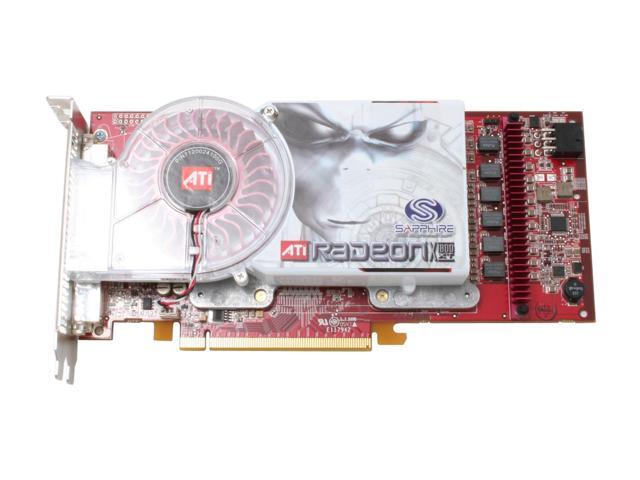
While following through some of the links, I noticed that they're saying you need to have a 6-phase card, and not a 5-phase card.

PE Cards
 
Yes, go to the link I previously provided. Go 3 posts down. There's 2 links to what a PCB10/5-phase, and a PCB20/6-phase look like. Basically it's 5-6 little "black boxes" on the right of the card, running top to bottom.

On the PCB10/5-phase card you can see the empty spot for a 6th box. ( at the bottom )
 
Ahh, thanks a lot Ghost, I really appreciate your input. :)

I just went to check on newegg.com to see if the card I want to get does indeed have the 6 chips on it.

14-102-697-03.JPG


I guess it looks like the retail sapphire does offer the 6-phase cards, at least in this picture it does. Chances are pretty high I would get an identical card. Which will allow me to use the PE bios. Nice.
 
No problemo. ;)

Now I've just got to go home, and see which one I have. Mine's a BBA I bought from CompUSSR for $299 about a month ago.

/crosses fingers and toes :D

**UPDATE**

w00t! 6 it is. I'll flash, and post the results. My default was 600/700, and using ATI tool I've got it running at a modest 635/730. Never tried to overclock it too much.
 
Guys, please keep us updated about flashing your x1800xt to x1800xt pe....

I am dying.
 
Once I get my card I'll be sure to let you know. :)

This should increase the performance of the card greatly.
 
Just got my sapphire 1800xt 512mb this week from newegg.. checked it and it does have the 6 phase board... this was the 299 model if anyone else is interested in picking one up from newegg.
 
Well, both links provide only the BIOS flash program...don't see the actual BIOS flash file in either zip.

Am I missing something?

*update*

nm,

I'm guessing the ./103 file is the update?
 
What max core/memory clocks it is able to get from X1800 XT by Ati Tool voltmodding?
 
Well, it definitely works. Default used to be 600/700, but now it boots to this:

newbios.jpg


Haven't tried to OC it to see how much further it will go. I ran ATITool's max core 1 time, and it puked at 752 core, so I'm thinking there some room still left to go. I'll play with it for awhile, and post results.

:cool:
 
Like some have already stated, there is no point to voltmod a X1800XT because you can increase the voltage already with ATi tool.

I wonder if there are any benchmarks between the X1800XT and the X1800XT-PE. Would be interesting to see what performance increase there would be.

Also for those of you who updated to the PE. Are your temperatures still around the same or have they jumped?
 
I'm interested in what max core/memory clocks I can reach with changing volts by Ati Tools?
 
Gh()st said:
Well, it definitely works. Default used to be 600/700, but now it boots to this:

http://i45.photobucket.com/albums/f98/spdr8cer/newbios.jpg

Haven't tried to OC it to see how much further it will go. I ran ATITool's max core 1 time, and it puked at 752 core, so I'm thinking there some room still left to go. I'll play with it for awhile, and post results.

:cool:

When I try max core in ati tool my system reboots lol.
 
nobi125 said:
When I try max core in ati tool my system reboots lol.

yah, mine hard locks, and the screen goes blank. I have to reset to recover. When it boots back, ATI tool reports a crash dump, and that the last stable core speed was 750.
 
Gh()st said:
yah, mine hard locks, and the screen goes blank. I have to reset to recover. When it boots back, ATI tool reports a crash dump, and that the last stable core speed was 750.

Yeah but it does the same thing when I try to set speeds with ATI Tool. :(
 
come on! more updates! dang so flashing to PE gives a/nearly 100 clock increase in both core/memory

yummy
 
Gh()st said:
Well, it definitely works. Default used to be 600/700, but now it boots to this:

newbios.jpg


Haven't tried to OC it to see how much further it will go. I ran ATITool's max core 1 time, and it puked at 752 core, so I'm thinking there some room still left to go. I'll play with it for awhile, and post results.

:cool:

Pretty stable after the flash? (w/ no additional OC)
Also how did the bios flash effect your temperatures?
 
Gh()st said:
Well, it definitely works. Default used to be 600/700, but now it boots to this:

newbios.jpg


Haven't tried to OC it to see how much further it will go. I ran ATITool's max core 1 time, and it puked at 752 core, so I'm thinking there some room still left to go. I'll play with it for awhile, and post results.

:cool:
I flashed my bios with the pe bios and the clocks are the same.
Shows the new bios rev., but no new clock speeds. :confused:
 
Back
Top