WHS OS drive replacement thoughts.

MaxBurn

[H]ard|Gawd
2FA
Joined
Nov 14, 2004
Messages
1,134
Seems my OS drive in my home server is thinking about failing, several times that drive has been marked as degraded in the past couple months. Home server smart says nothing wrong though.

I was going to swap it with a 1TB Samsung that I have here but then I realized that the motherboard has a ICH9R, so now I am thinking I should just go ahead and do a RAID 1 for the OS drive and never have the problem again.

When I switch the motherboard to RAID how should I mark the non OS disks so WHS still picks them up?

Really hoping I can do a reinstall and have it pick up the drive pool. I have been backing up the server for a couple days now and have nearly everything off of it. Only stuff left is non duplicated items for movies I have here that I can easily rerip, just be a waste of time. Does a reinstall really wipe out the non duplicated folders when it rebuilds the pool?

Newegg has some Samsung F4 320GB drives I was thinking about using for boot, thoughts? Those are single platter jobs right? Either that or two 1TB F3. Existing drive is something 5400rpm Samsung but would like to get two more or less matched drives for RAID.

Was previously using a WHS nlite image with the AHCI drivers on it, will redo the image so I get AHCI and RAID drivers on it.
 
You can not re-use a drive pool for a fresh install of WHS. This is because the OS drive houses all the file pointers for the file system. If you re-install WHS then all the pointers are gone. As far as I know there is no automated way to do this.

What I would do (and have done myself), and you'll need a spare drive to do it:

1) Disconnect all existing drives from system.
2) Connect new OS drive plus spare blank drive.
3) Install WHS (make sure your OS drive is higher up on the bus chain so the OS installs there)
4) Reconnect first pool drive, do NOT make it part of the pool- if you do it will wipe the drive.
5) Copy the data from the old pool drive to the new pool.
6) When copy is done, add old pool drive to new pool. This will wipe the old drive.
7) Rinse, repeat with remaining pool drives.
 
You can not re-use a drive pool for a fresh install of WHS.

Sure you can.

You have to both get the option presented to do an OS reinstall and select reinstall. Apparently it doesn't always work. Install specifically states you will lose data that wasn't duplicated and it is key that you have drivers loaded so it can see all the disks.
 
Sure you can.

You have to both get the option presented to do an OS reinstall and select reinstall. Apparently it doesn't always work. Install specifically states you will lose data that wasn't duplicated and it is key that you have drivers loaded so it can see all the disks.

You say "sure" as if its guaranteed then immediately qualify your statement by saying that it doesn't always work.,

Good luck.
 
You say "sure" as if its guaranteed then immediately qualify your statement by saying that it doesn't always work.,

It doesn't always work but I don't count on anything to always work.....especially anything WHS. :)

That's why I have a completely separate backup of my important WHS data.

Sometimes you aren't offered a reinstall or it will only appear once and if you don't select it immediately you aren't offered again.

If you don't get a reinstall option with your regular install disk, try the X-Files version with all the drivers slipstreamed on the install disk.
 
I had my WHS OS get corrupted. Took out the OS drive, attached it to another box and deleted all partitions. Put the drive back in the WHS and attached both data drives and booted off the install CD. The WHS go straight to Console Recovery, installs OS and sees all the files on the data drives. I didn't have all that many data files so rebuilding all the pointers took 15-20 minutes. No data loss...none. This is exactly how WHS is designed to work.
 
It doesn't always work but I don't count on anything to always work.....especially anything WHS. :)

That's why I have a completely separate backup of my important WHS data.

Sometimes you aren't offered a reinstall or it will only appear once and if you don't select it immediately you aren't offered again.

If you don't get a reinstall option with your regular install disk, try the X-Files version with all the drivers slipstreamed on the install disk.

Which is why I'd just as soon not bother trying at all- too much if a chance of it being a waste of time. ;)
 
NO, it is a huge time saver when it works, the opposite from a waste of time. No need to do a restore on all data.

Myself I realized I am one disk short of a complete backup so now waiting on newegg again.
 
Which is why I'd just as soon not bother trying at all- too much if a chance of it being a waste of time.

For sure.

It takes all that time to boot the install CD and see if you get the reinstall option. :D
 
Well it didn't work but I figure it was my fault for hosing the nlite slipstream portion and getting a default installation of of server 2003 on the server. But I found the new process and slipstreamed the two RAID drivers and the AHCI driver (just in case) and got it all working again. Now have the OS as a mirror on the ICH9R and all eight 2TB drives spread across the SASLP-MV8 with two or three on the ICH9R too.

About 150 updates to go, on like the 6th reboot. Man there are a lot of patches for this.
 
I've read this with some laughter. After years, the lead moderator of wegotserved recently said that WHS is unstable, and varies from one installation to another in stability.
A bold statement.
 
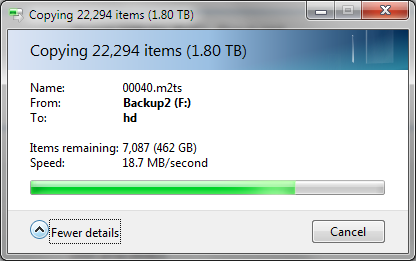
OK like about day three of data restore here and only on the second 2TB backup disk. Transfer started out at 78MB/s as reported by windows explorer file copy, this morning it is still going and down to 19.5MB/s. HDD light on the server is on solid and process demegrator has over 1.7TB of I/O other activity. I forgot how shitty demegrator makes things, on the old machine I had it disabled during the usual hours I use the box which was required for bluray playback.

I am seriously considering going back to the nlite neutered version of home server and setting up a simple SOFT RAID5 and a file share in it. Can anyone think of a reason why I shouldn't?

About the only reason I went with this again is because I have it and it is nice to have easy workstation backup/restore, but I will find another way to do that.
 
Last edited:
Yeah, I need to do something else, this is intolerable.

Major thoughts on my mind are will microsoft soft RAID5 be any better or do I just go straight for a PERC6i?

If I do go PERC6i will it care about my motherboard only doing PCIEx4 and the card being PCIEx8?

crappywriteperf.png
 
Probably too late, and a bit risky, but a frequent problem with WHS is the system drive giving a false positive of failure. You may want to browse the forums to see if there is a fix.
 
Probably too late, and a bit risky, but a frequent problem with WHS is the system drive giving a false positive of failure. You may want to browse the forums to see if there is a fix.

Yeah, I sort of agree with that. All the times it listed them as having problems only once was the OS drive not listed. Home server SMART never had one failure listed, which basically means the software somewhere was having a problem. Possibly my fault for starting/stopping the demegrator service.

Looking at all this I have basically come around to the decision WHS doesn't meet my needs anymore.
 
Transfer started out at 78MB/s as reported by windows explorer file copy, this morning it is still going and down to 19.5MB/s.
There could be many reasons for that including your components.

I don't know exactly what you're trying to transfer/copy to what, but an Atom processor doesn't exactly mean 'fast' to me.

For all I know the WHS OS has nothing to do with your problem.

I'm not trying to be mean but WHS may not be the problem.
 
I've read this with some laughter. After years, the lead moderator of wegotserved recently said that WHS is unstable, and varies from one installation to another in stability.
A bold statement.

To be honest, even though I've never personally had major issues with my WHS, I feel the same way. Everywhere I look I see problems in either Drive Extender performance, file management, or recovering from failed hardware. I'm starting to lose faith in the platform, especially since an improved DE was stripped from Vail.

-Cool-
 
Back
Top